
 简体中文
简体中文 English
KNOWLEDGE ARTICLE
What Is Permissions-Policy?
Browser feature permissions policy
Restricts browser capabilities such as cameras and location for a page and its embeds.
At a glance
The response header enables or disables capabilities by origin, reducing unnecessary access available to third-party iframes.
Setting boundaries for browser capabilities
Permissions-Policy lets a site constrain features such as camera, microphone, geolocation, fullscreen and clipboard use in pages and embedded iframes. Origin allowlists in response headers work with iframe allow attributes to limit third-party components to necessary capabilities.
Policy permission is not user consent. Sensitive features may still prompt the user even when policy allows them; a policy denial can block the request earlier. Supported feature names evolve, and browsers generally ignore unknown directives.
Intersecting top-level and iframe permissions
- The top-level response establishes limits for the document tree. Embedded documents cannot override capabilities that their parent has forbidden.
- An iframe allow attribute can further restrict or delegate within that boundary, using self, explicit origins and other supported values.
- Browser permission, operating-system permission, secure-context requirements and feature policy must all be satisfied before the capability is available.
- Payment, conferencing and map components need explicit capability inventories. Broad authorization for every iframe increases the potential impact of a compromised component.
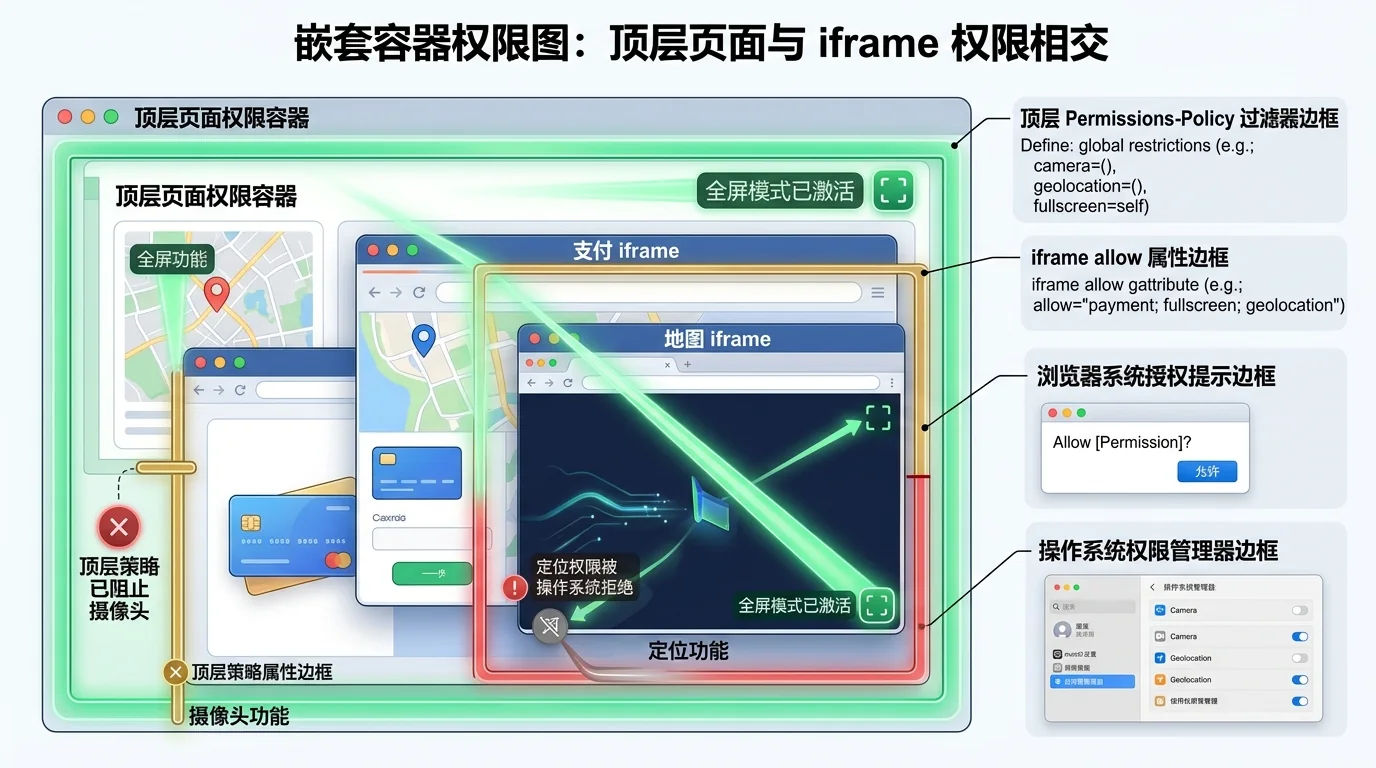
Deriving minimal policy from real features
Ordinary content pages often need no camera, microphone or location access and can disable them. Conferencing or upload workflows should allow only the necessary pages and trusted origins. Derive policy from actual requirements instead of copying long lists of obsolete or unsupported directives.
Test real workflows and console reports in supported browsers. Provider-origin changes, iframe restructuring and renamed browser directives can break capabilities. Monitoring should cover the entire flow before and after user consent.
Practical use and interpretation
A retrieved policy identifies explicitly disabled, self-only or origin-allowlisted features. A missing header means no additional restriction was declared there; defaults and consent remain. It does not mean the page automatically has every permission.
Broad delegation suggests third-party content may request more capabilities. Actual risk depends on embeds, user consent and business data. Keep conclusions narrow without inspection of the document tree.
Points to consider
A missing header does not grant sensitive permissions. User consent, browser defaults and iframe attributes still apply.
Frequently asked questions
Can Permissions-Policy bypass user consent?
No. It governs eligibility to request a feature. Camera, microphone and location still have browser and operating-system permission checks.
Does absence enable every capability automatically?
No. Default rules, secure contexts and user permissions still constrain access.
Can iframe allow override its parent's policy?
It cannot exceed a parent's prohibition. Delegation and further restrictions operate within the parent policy.