
 简体中文
简体中文 English
KNOWLEDGE ARTICLE
What Is MIME Types?
Content-Type, media type
Tells clients the response format and how to interpret it.
At a glance
Content-Type declares media such as HTML, JSON, images and fonts. Incorrect types can break display or interact with content sniffing to create security risks.
How media types guide response handling
A MIME type has a type/subtype form. Content-Type declares formats such as text/html, application/json, image/webp and font/woff2. Browsers use it to choose rendering, execution, downloading or a specific parser. Text responses can also declare an encoding with charset.
An extension is only part of a URL path. HTTP clients rely mainly on response headers and context. Labeling an upload as HTML or JavaScript can turn data into executable content; incorrect CSS, module-script or font types can cause loading failures.
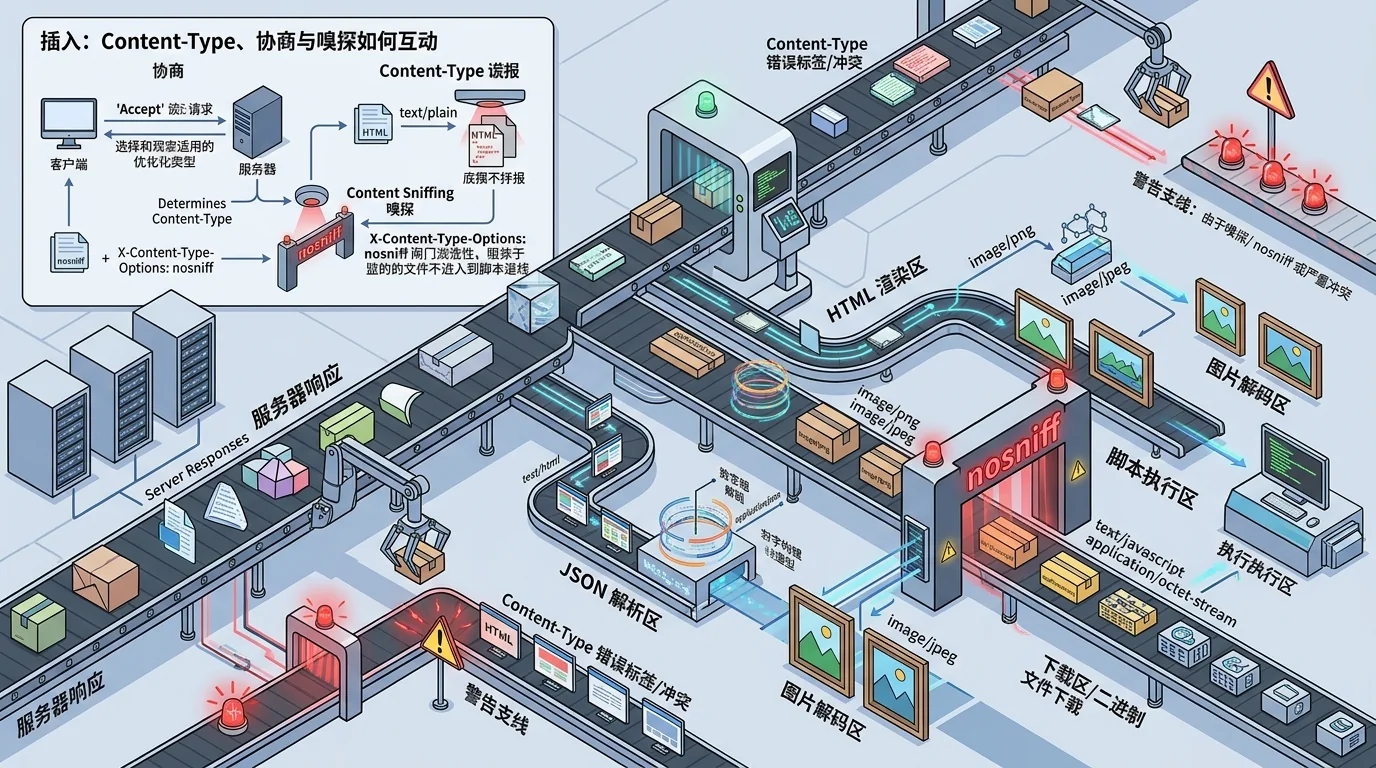
Negotiation, Content-Type and sniffing
- Clients can advertise supported formats through Accept. Servers may vary representations and use Vary to tell caches which request headers affect the response.
- Content-Type describes the response; Content-Disposition suggests inline presentation or download. Neither replaces safe processing of the content itself.
- Browsers have historically sniffed data to infer its type. X-Content-Type-Options: nosniff enforces stricter reliance on declared types in important contexts.
- JSON APIs need suitable media types and encoding. An error page returning text/html on a script URL should not be mistaken by frontend code for the expected resource.
Uploads and static-asset configuration
Upload systems should not trust client filenames or supplied Content-Type alone. Validate content, allowed formats, storage and download responses. A separate origin, non-executable responses and suitable Content-Disposition reduce the chance that user files become same-origin HTML or script.
Check deployed CSS, JavaScript, WebAssembly, fonts and images for correct types alongside nosniff and cross-origin rules. Incorrect origin metadata can spread through CDN caches, so purge affected objects after correcting it.
Practical use and interpretation
The response's Content-Type is directly observable and can be compared with its URL, body and intended use. A mismatch is not automatically a vulnerability, but executable contexts combined with user-controlled data can increase risk.
Without response headers, the media type is unknown. Extensions alone are unreliable. A confirmed mismatch supports a more specific explanation of possible loading, download or security effects.
Points to consider
Check the actual response and X-Content-Type-Options, not just the filename extension.
Frequently asked questions
Does Content-Type matter more than a file extension?
HTTP browsers primarily use Content-Type and context. Extensions are clues for routing and human identification.
What does application/octet-stream mean?
It represents generic binary data, commonly handled as a download. Other evidence is needed to identify the exact format.
Why can a wrongly labeled resource sometimes display?
A browser may sniff or parse it leniently. Behavior varies and may weaken intended security boundaries.