Website profiles · Technology insights · Alternatives

bikesharingworldmap.com

Your description

No paid content found
Visit website
Profile views 8 Outbound visits 0 Normal
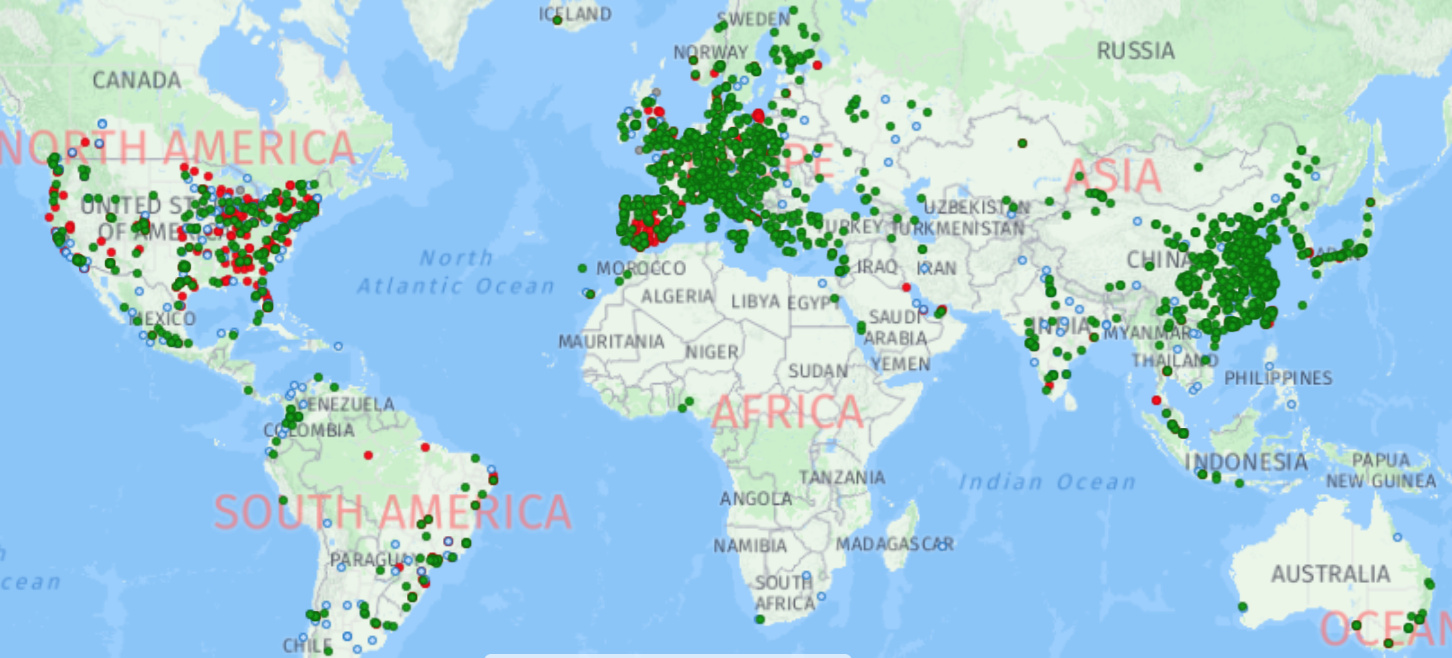
The Meddin Bike-sharing World Map Full homepage screenshot

At a glance

Category
Travel
Language
English
Paid-content signal
No paid content foundObserved
Registered
2020
Hosting
Akamai Connected CloudInferred
HTTPS certificate trusted
PassedObserved
Last updated

Website review

This review may include AI-generated content and is not individually verified. Domain, certificate and other facts come from the observed data on this page.

What is The Meddin Bike-sharing World Map?

The Meddin Bike-sharing World Map is a global directory and map of bike-share services — systems offering short-term bicycle or e-bike rentals from a network of unattended stations or hubs. It is a reference tool rather than a rental service: you use it to find which cities have bike-share, what the system is called, who operates it, and what platform or equipment it uses.

What you can do with it

  • Search for a city to see whether it has a bike-share system and what that system looks like.
  • Browse entries covering operator, equipment type (including pedelecs and cargo bikes), platform, and status.
  • Check status details such as seasonal hibernation (start and end months), closures, or whether a service was replaced by another.
  • Read attached news items about plans, launches, changes in fleet numbers, and closures.
  • Submit a missing service or report an error or update, optionally leaving an email for a reply.

Who it suits

  • Travellers checking whether bike-share is available at a destination before relying on it.
  • Researchers, journalists and students who need a broad international picture of bike-share rather than a single-city view.
  • Planners and operators comparing how systems in other cities are structured and operated.

How it compares with alternatives

Source Strength Trade-off
Meddin Bike-sharing World Map The Meddin Bike-sharing World Map Wide global coverage of systems, with operator, platform and status detail Crowd-updated, so individual entries can lag reality; not a booking tool
A city's own bike-share site Authoritative on pricing, station locations and live availability Only covers that one city
Open data portals such as CityBik.es Live station and bike availability feeds for many systems Focused on real-time data, not on system history or operator background

Practical next step

If you are planning a trip, use the map to confirm a system exists, then open that operator's official site for current pricing, station map and app. If you are researching, treat each entry as a starting point and verify operator and status against a recent news source, since systems launch, rebrand and close frequently.

How can I find bike-sharing services in a specific city?

Use The Meddin Bike-sharing World Map to look up whether a city has a short-term bike or e-bike rental network with unattended pickup and drop-off points. Its main tool is a searchable world map: type a city name into the search field, then read the entry for operator, platform, equipment type, and service status.

What the map helps you check

  • Whether a service exists in that city at all, rather than just a single rental shop.
  • Whether it is station-based (docked hubs) or uses another model, since the map focuses on networks of unattended locations.
  • Whether the service is active, planned, hibernating for winter, changed, closed, or replaced by another operator.
  • Which operator runs it and what equipment is used, including pedelecs and cargo bikes.
  • Recent news items about launches, number changes, and closures.

A practical lookup routine

  1. Search the city name and confirm you are looking at the right metro area, not a same-named town.
  2. Check the status and any hibernate start/end months, which matter in cities that pause service in winter.
  3. Note the operator and platform, then compare that with what you actually see on the street.
  4. If the entry looks stale or a service is missing, use the update or missing-service form. Including an email address is optional but useful if you want a reply.

Deciding what to do next

For a trip, treat the map as a first filter, not a booking tool. Once you have a candidate operator, check that operator's own site or app for current station locations, pricing, and account requirements. If you are comparing cities for a move or a study, the status and hibernate fields are often more revealing than a simple yes/no listing, because a seasonal or recently replaced service changes how usable the network really is.

How do I report a missing bike-sharing service or an error in the map?

Use the map's own submission forms: one for a missing service, one for updates or errors. Both live on the main map page at The Meddin Bike-sharing World Map.

Reporting a missing service

Open the "Tell us about a missing service" form and describe a short-term bicycle or e-bike rental available at a network of unattended locations. Useful details to include:

  • City, and the suburb or local area if relevant
  • Service name and operator
  • Type: bikes, pedelecs or cargo bikes, in stations or hubs
  • Equipment and platform where known
  • Website
  • Typical hibernation start and end months, if the service pauses seasonally
  • Whether it replaced another service, and what replaced it if it closed

Reporting an error or update

Use the "Tell us about any updates to this service or errors in the information shown about it" form. It covers the same fields plus news items, each with a date, a short summary, a source URL and optional photos. Categories include plans, launch, change, numbers, closure and photos.

Practical notes

  • Add your email address if you want a reply; submissions are read either way.
  • One service per submission keeps records clean.
  • For closures, name the replacement service if there is one, so the map does not show two entries for the same fleet.
  • If you are unsure whether a service qualifies, ask yourself whether a visitor could rent a bike without staff present. If yes, it belongs on the map.

Whose observation is this?

The page itself provides the forms and field list; the guidance above on what to include and how to phrase it is practical advice, not a product feature. A reader in, say, a mid-sized city where a new dockless e-bike operator launched last month can use the missing-service form, list the operator, the launch month and the app or website, and let the editors verify the rest.

Next step: gather the operator's website and launch date before you start, then submit the missing-service form; use the updates form only for services already shown.

What information does the map provide about each bike-sharing system, such as platform, operator, or equipment?

The map is a global index of bike-share services, where “bike-share” means short-term bicycle or e-bike rentals from a network of unattended stations or hubs. Each city or system entry can carry several practical fields rather than just a pin on a map.

H3 Fields you can expect per system

  • Status — whether the service is active, planned, changed, closed, or replaced.
  • Platform — the technology or system platform used to run the service.
  • Power — likely the power source or drive type, such as human-powered, pedelec, or other.
  • Data — data availability or related notes for the system.
  • Operator — the company or organisation running the service.
  • Equipment — the type of bikes, including pedelecs and cargo bikes, in stations or hubs.
  • Website — the service’s own site, when recorded.
  • BSM ID — the map’s internal identifier for that system.
  • Replaced by — a successor service if one took over.
  • Typical hibernate start and end months — seasonal suspension periods.
  • News and updates — dated items for plans, launches, number changes, closures, and photos, with a story summary and source URL.
  • Suburb — a location qualifier for larger metropolitan entries.

H3 What this is good for If you are comparing cities for a trip, moving somewhere new, or researching how a service evolved, these fields let you check more than existence: who runs it, what kind of bikes are available, whether it is seasonal, and whether it has been replaced or closed. The news entries add a timeline, so you can see changes rather than a single snapshot.

H3 Limits to keep in mind The map is an information index, not a booking or live availability tool. It does not promise fares, station-level real-time counts, or current operating hours. Coverage depends on submissions and updates, so a missing service may simply not have been reported yet. For a specific city, treat the map entry as a starting point, then confirm current details with the operator’s own site.

A useful next step: search for your city, note the operator and equipment fields, then check the operator’s official site for current pricing and station maps. If the entry looks outdated, the page includes a way to report missing services or errors.

What does the 2024 report on the Meddin Bike-sharing World Map cover?

The 2024 report is a global status update on bike-share systems tracked by the Meddin Bike-sharing World Map, not a single-city study. Based on the map's own data fields, the report draws on entries covering systems with short-term bicycle and e-bike rentals at networks of unattended stations or hubs, including pedelecs and cargo bikes. It is the kind of reference used to see where bike-share exists, how systems are classified, and how they change year to year.

What it likely covers

  • System counts and distribution: how many bike-share services are operating worldwide and where they are located.
  • Platform and equipment: the technology platform and the type of bikes or e-bikes in use.
  • Operator and status: who runs each system and whether it is active, planned, replaced or closed.
  • Seasonality: typical hibernate start and end months for systems that pause in winter.
  • Changes over time: launches, closures, number changes and replacements, compared with the 2021 and 2022 reports.

H3: Who it is for Planners, researchers, journalists and operators use it to compare cities and spot trends. A transport planner considering a new system, for example, can check which nearby cities already run one, what platform they use, and whether any have closed.

H3: Practical next step Use the map's city search to check a specific location, then read the 2024 report for the global picture and the 2021 and 2022 reports for trend context. If a service is missing or wrong, the site provides forms to report a missing service or submit updates and errors; the map is maintained with community submissions, so accuracy depends on those corrections. The map is sponsored by Lyft Urban Solutions, which is worth noting when reading operator-related content.

How can I stay updated on news about bike-sharing launches, closures, or changes?

Use the Meddin Bike-sharing World Map as a structured starting point, then supplement it with local sources for real-time changes. The map is designed around tracking services, updates, and errors, and it includes fields for launches, changes, closures, and news submissions.

Practical ways to stay current

  • Check the map regularly. It lists bikeshare services and accepts corrections or missing-service reports. The update form includes categories like Plans, Launch, Change, Numbers, Closure, and Photos.
  • Submit or watch error reports. The site says it reads all submissions and asks for an email address if you want a reply. This is useful if you notice a service has closed or changed operator.
  • Follow the news section. The map includes a News Articles area with fields for date, story summary, source URL, and news type. That makes it a place to look for announcements, not just a static map.
  • Use the status and platform fields. For each service, the map tracks status, platform, power type, operator, equipment, and whether a service was replaced. Those fields help you distinguish a temporary hibernation from a permanent closure.

A concrete reader scenario

Suppose you are planning a trip to a city and want to know whether its bikeshare system is still running. Start with the map entry for that city and check the status, operator, and any recent news. If the entry looks outdated, use the site's update form to ask about it or report what you know. Then confirm locally, because the map depends on submissions and may lag behind a sudden closure or rebranding.

Decision criterion

If you need a global overview and historical context, the Meddin map is a strong reference. If you need minute-by-minute operational alerts, treat it as one layer among several and verify with the operator or local transit authority.

For broader context, you can also compare with Wikipedia or check a city's official transport site when you know its domain.

Related questions

More questions →
How to Find Bike-Sharing Services in a Specific City on The Meddin Bike-sharing World Map

The Meddin Bike-sharing World Map lets you look up a city directly through its search box, then open that city's entry to see the service's operator, platform, equipment, status, and power data. It covers short-term bicycle rentals available at a network of unattended locations — so docked and hub-based systems, including pedelecs and cargo bikes — rather than every form of bike rental. If you want to know whether a city has a qualifying service and who runs it, this is the fastest route.

Step 1: Search for the city

On the map page, find the search field labeled "Search for a city" and enter the city name. The map is the primary interface, so the search narrows the world view down to the location you typed. If the city does not appear, that usually means no qualifying service is recorded there — not that the map is broken.

Step 2: Open the service entry

Select the city or its map marker to bring up the service record. The map is built around individual service entries, and each one is tied to a specific city or area.

Step 3: Read the service details

Once a service is open, the record can include:

Field What it tells you
Operator The company or organization running the service
Platform The technology or system the service uses
Equipment The type of bikes — the map's own category covers bikes including pedelecs and cargo bikes, in stations/hubs
Status Whether the service is active or otherwise
Power Power-related data for the service
Website The service's own site, when listed
BSM ID The map's internal identifier for that service

Not every field is populated for every city, so treat a blank field as "not recorded" rather than "does not exist."

Step 4: Check the 2024 report for context

The map links to a 2024 report, alongside 2021 and 2022 editions. Use these when you want city or system counts and trend context rather than a single city's record — for example, to see how a service's numbers have changed across years.

What counts as a listed service

The map's scope is deliberately narrow: short-term bicycle/e-bike rentals available at a network of unattended locations. That means station- or hub-based systems. A staffed rental shop, a one-off tour operator, or a peer-to-peer rental marketplace generally falls outside this definition, so don't expect to find it here.

If a city is missing or wrong

The site provides two submission paths:

  • "Tell us about a missing service" — for a qualifying service that isn't on the map.
  • "Tell us about any updates to this service or errors in the information shown about it" — for corrections to an existing entry.

Both forms ask for your name, email address, and comments. The site states it reads all submissions but only replies if you include an email address, so add one if you want a response. The missing-service form also asks for details such as type, operator, equipment, and website.

There is also an "Add News" option for submitting news items, with fields for type (Plans, Launch, Change, Numbers, Closure, Photos), date, story summary, source URL, and text.

Common snags

  • City not found: confirm you're searching the city name as the map records it; a missing result most likely means no qualifying service is listed.
  • Thin entry: some services have only partial data. Cross-check the linked website when one is provided.
  • Editor access: the page shows an "Editor login," which is for map editors, not general visitors — you don't need it to search or read entries.
How to Report a Missing Bike-Sharing Service or an Error on The Meddin Bike-sharing World Map

The Meddin Bike-sharing World Map accepts two kinds of public submissions: a missing service and an update or error. Use the "Tell us about a missing service" form when a bikeshare system is absent from the map entirely, and the "Tell us about updates and errors" form when a service is already listed but its details are wrong, outdated, or incomplete. Both forms are open to anyone, and the site states that all submissions are read — but you only get a reply if you include your email address.

Before you submit: check what the map actually covers

The map tracks bikeshare services defined as short-term bicycle rentals available at a network of unattended locations. That definition matters, because it decides whether your submission belongs on the map at all.

A service generally fits if it is:

  • Short-term rental (not a conventional bike shop or long-term lease)
  • Available at a network of locations, not a single staffed counter
  • Unattended at the point of pickup or return

The site also notes that the map covers bikes including pedelecs and cargo bikes, in stations or hubs. So e-bike and cargo-bike systems can qualify. If what you found is a single rental shop, a guided tour operator, or a staffed rental desk, it likely falls outside the map's scope.

How to report a missing service

Use this route when you search for a city and the service simply isn't there.

  1. Open the map and use the "Search for a city" field to confirm the service is genuinely absent — not just listed under a different name or operator.
  2. Find and open the "Tell us about a missing service" form.
  3. Fill in the details the form asks for. Based on the form fields, expect to provide:
    • Your name
    • Email address (required if you want a reply)
    • Comments, including the suburb or location
    • Type: bikes including pedelecs and cargo bikes, in stations/hubs
    • Typical hibernate start month and hibernate end month (for seasonal systems)
    • Platform
    • Operator
    • Equipment
    • Website
    • BSM ID (if one has been assigned)
  4. Submit the form.

Expected result: your submission enters the review queue. The site says it reads all submissions, so a missing service can be added in a later update — but there is no stated turnaround time, so don't expect an immediate change on the map.

What makes a missing-service report easy to act on

  • The service name as it appears locally, plus any English name
  • The city and, where relevant, the suburb
  • The operator, if you know it
  • A working website or app link
  • Whether it's pedal bikes, e-bikes (pedelecs), cargo bikes, or a mix
  • Whether it's docked, dockless, or hub-based

How to report an update or an error

Use this route when the service is already on the map but something about it is wrong.

  1. Locate the service on the map.
  2. Open the "Tell us about any updates to this service or errors in the information shown about it" form.
  3. Describe the specific problem — for example, a changed operator, a closed system, a corrected launch date, or a wrong platform.
  4. Include your email address if you want a reply.
  5. Submit.

The site's own wording is that it reads all submissions but asks you to include your email address if you would like a reply. That's the key condition: without an email, your correction may still be applied, but you won't hear back.

Common error types worth reporting

Problem What to include
Service has closed Closure date and, if known, what replaced it
Operator changed Old and new operator names
Wrong platform Correct platform name
Wrong equipment Bike type: pedelec, cargo, standard
Seasonal dates wrong Correct hibernate start and end months
Service was replaced The "Replaced by" service name

The form fields include Replaced by, which is specifically there for systems that were superseded by another service — useful when a city rebrands or swaps operators.

Adding news, launches, and closures

Beyond the two report forms, the site also accepts news articles. The news submission includes fields for:

  • Type: Plans, Launch, Change, Numbers, Closure, Photos
  • Date in yyyy-mm-dd format
  • Story summary text
  • Source URL

This is the right place for a launch announcement, a fleet-size update, or a closure notice that you want recorded with a source link, rather than a correction to an existing listing.

Practical tips and common snags

  • Search first. A service may already be listed under a different city spelling or operator name, which turns a "missing service" report into an "update" report.
  • One service per submission. If you're reporting several missing systems, submit them separately so each can be verified on its own.
  • Always add a source. A website, news article, or official announcement makes a submission far easier to confirm.
  • Email is optional but consequential. The site reads everything; it only replies when you leave an address.
  • No stated response time. The map is a volunteer-style reference, so plan for updates to appear in a later revision rather than instantly.
  • Match the map's definition. If the service isn't short-term, networked, and unattended, it probably won't be added no matter how complete your submission is.

Quick decision guide

  • Service not on the map at all → "Tell us about a missing service"
  • Service on the map but wrong → "Tell us about updates and errors"
  • Launch, closure, or fleet news with a source → News Articles form
  • Want a reply → include your email address in any of the above
What Status, Platform, Power, and Hibernate Mean on The Meddin Bike-sharing World Map

The Meddin Bike-sharing World Map records each bike-share service with a set of structured fields, and four of them carry most of the operational meaning: Status tells you whether the service is currently running, Platform names the technology provider behind the system, Power relates to how the fleet is powered (including e-bike support), and Hibernate shows the months a service typically suspends operations for the season. These fields appear on individual service entries and in the submission form used to add or correct a service, so understanding them helps you read the map accurately and report changes correctly.

Status

Status describes the current operating state of a service. In practice it distinguishes a service that is running from one that is not — for example, a system that has closed, been suspended, or been replaced.

Because the map tracks services over time, Status is the field to check first when a city looks unfamiliar or a system you remember no longer appears active. If a service has been replaced, the entry also carries a Replaced by field, which points to the successor system.

Platform

Platform refers to the technology provider — the company or system that supplies the bikes, docks, app, or backend for the service. Two cities can look similar on the map but run on entirely different platforms, which affects how you register, unlock a bike, and pay.

When you submit an update, Platform is one of the fields you can correct, so it is worth checking the operator's own materials before reporting a change.

Power

Power relates to how the service's vehicles are powered. The map's service type explicitly covers "bikes including pedelecs and cargo bikes," so Power is the field that separates a purely pedal-powered fleet from one that includes e-bikes (pedelecs). If you are looking for electric assistance in a city, Power is the field to inspect rather than assuming from the city name alone.

Hibernate

Hibernate captures seasonality. Each service entry can record a Typical Hibernate Start Month and Typical Hibernate End Month — the months when the system is normally taken out of service and when it typically returns.

This matters in cities with harsh winters or monsoon seasons, where a system may be fully operational for part of the year and dormant for the rest. A service showing a hibernate window is not necessarily closed; it may simply be out of season.

The fields together

Field What it tells you Why it matters
Status Whether the service is currently operating Avoids mistaking a closed or suspended system for an active one
Platform The technology provider Determines the app, unlock method, and payment route
Power How the fleet is powered (including pedelecs) Tells you whether e-bikes are part of the service
Hibernate Typical start and end months of seasonal suspension Explains why a service may be absent for part of the year

Related fields worth knowing

The same entry structure includes several companion fields that clarify the four above:

  • Replaced by — the system that took over when a service ended.
  • Operator — the company running the service day to day, which may differ from the Platform provider.
  • Equipment — the hardware in use.
  • Website — the service's own site, useful for confirming current details.
  • BSM ID — the map's internal identifier for the service.

Using these fields when you report an update

The map accepts submissions for missing services and for corrections to existing entries. The submission form asks for the same categories described above, including Type, Typical Hibernate Start Month, Typical Hibernate End Month, Platform, Replaced by, Operator, Equipment, Website, and BSM ID, plus a comments field.

If you are reporting a change, filling in Platform, Power-related type details, and the hibernate months accurately is what makes the entry useful to other readers — a vague note that "something changed" cannot be placed on the map. The site states that all submissions are read, and asks for an email address if you want a reply.

What Types of Bike-Sharing Services Are Included on The Meddin Bike-sharing World Map?

The Meddin Bike-sharing World Map covers short-term bicycle rentals that are available at a network of unattended locations. In practice, that means the map is built around services a rider can pick up and drop off without staff on site — the defining feature of bike-sharing as the project uses the term. It is not a directory of every place you can rent a bike.

The core inclusion rule

The site states the scope directly: it maps "the world's bikeshare services (short-term bicycle rentals available at a network of unattended locations)." Two conditions have to hold at the same time:

  • Short-term rental — the service is built for temporary use, not long-term leasing or ownership.
  • Unattended network — bikes are distributed across multiple locations that operate without staff, so a rider can access them on their own.

A staffed rental shop that hands you a bike during opening hours does not meet the second condition, even if the rental itself is short-term.

Vehicle types that count

The submission form lists the vehicle categories the map tracks:

Category Included?
Bikes Yes
Pedelecs (e-bikes) Yes
Cargo bikes Yes

So the map is not limited to classic pedal bicycles. Electric-assist bikes and cargo bikes are treated as valid bike-sharing vehicles when they are offered through the same short-term, unattended network model.

Station-based and hub-based services

The form describes qualifying services as those "in stations/hubs." This means the map accommodates both docked systems, where bikes are locked into physical stations, and hub-based systems, where pick-up and drop-off are concentrated at designated points rather than anywhere on the street.

What the map does not cover

The unattended-location requirement is the main filter. Services that depend on staffed counters, guided rentals, or tourist rental desks fall outside the scope, because they are not part of an unattended network. The map is also specifically about shared fleets rather than peer-to-peer or individual bike rental listings.

Why the distinction matters

If you are checking whether a city's service belongs on the map, the test is straightforward: can a rider rent short-term and complete the transaction at an unattended location within a network? If yes, it fits — whether the fleet is pedal bikes, pedelecs, or cargo bikes, and whether it uses stations or hubs. If access requires staff or falls outside a shared network, it does not.

What Is The Meddin Bike-sharing World Map?

The Meddin Bike-sharing World Map is a global reference map of bike-share services, defined on the site as short-term bicycle rentals available at a network of unattended locations. You can search for a city to find services, view details such as status, platform, power, and data, and submit corrections or missing services. It is sponsored by Lyft Urban Solutions.

What the map covers

The site focuses on systems that match a specific definition: short-term bicycle or e-bike rentals offered across a network of unattended locations. That means staffed rental shops generally fall outside its scope, while station-based and hub-based services fit.

The submission form lists the types of vehicles included: bikes, including pedelecs (pedal-assist e-bikes) and cargo bikes, in stations or hubs.

What you can do on the site

  • Search for a city using the search field to locate a service on the map.
  • View service details, including status, platform, power, and data fields.
  • Report a missing service if a system is not shown.
  • Report updates or errors in the information displayed for an existing service.
  • Add news items tied to a service, with a type, date, summary, and source URL.

Reporting a missing service

The "Tell us about a missing service" form asks for:

  • Your name and email address
  • Comments
  • Suburb
  • Type (bikes including pedelecs and cargo bikes, in stations/hubs)
  • Typical hibernate start month and end month
  • Platform
  • Replaced by
  • Operator
  • Equipment
  • Website
  • BSM ID

The site notes that all submissions are read, but you should include your email address if you want a reply.

Reporting updates and errors

The update form covers the same service fields, plus a news section where you can add an item with:

  • News type (Plans, Launch, Change, Numbers, Closure, Photos)
  • Date in yyyy-mm-dd format
  • Story summary text
  • Source URL

This is the route to use if a service's status, operator, platform, or equipment has changed, or if something on the map is wrong.

Reports and sponsorship

The site references a 2024 report, along with 2021 and 2022 reports, which suggests it publishes periodic summaries of the data it tracks. It is sponsored by Lyft Urban Solutions, and there is an editor login for maintaining the map.

When this site is useful

Use it when you want a worldwide view of which cities have bike-share systems, or when you need to check details about a specific service and the site's data is more current than other sources. It is also the place to go if you spot a system that is missing or a record that needs correcting, since submissions go directly to the map's editors.

Website Overview

Identifiable technologies and additional version or configuration signals make the service easier to fingerprint, which may help targeted scanners narrow their checks. An established domain and managed infrastructure suggest continuity of operations and may support dependable delivery, although neither guarantees service quality.

Domain and Registration

Registered in 2020, this domain has about 6 years of history. That suggests continuity, although ownership and purpose may have changed. Transfer-protection status is present, helping reduce the risk of unauthorized domain transfers. The registrar is Squarespace Domains II LLC, a widely used domain service provider. The domain uses the common .com extension, which is not an independent safety signal.

DNS and Email

Nameservers are provided by Google Cloud DNS, indicating managed DNS hosting. DNSSEC is enabled, allowing validating resolvers to authenticate signed DNS data. No CNAME was found; the observed records resolve directly to addresses. No MX record was found. A conventional explicit inbound-mail route is not configured. The lowest observed DNS TTL is 21600 seconds.

TLS and Certificates

The public key uses EC with 256 bits. The server supplied a complete certificate chain. No organization name is present in the certificate; the available fields are consistent with domain validation. The certificate was issued by Let's Encrypt, commonly associated with automated certificate services. The certificate's total validity is about 89 days, consistent with a short renewal cycle.

HTTP and Browser Security

The Server header exposes the software version: Apache/2.4.58 (Ubuntu). This makes version-targeted checks easier, but is not proof of an exploitable vulnerability. The checked browser-security headers were not detected, leaving fewer explicit browser-side safeguards. No X-Powered-By header was found, reducing one common source of backend fingerprinting information. No obvious internal addresses or debug information were found in the headers. Cookie security attributes are unknown.

Technology Stack Analysis

The public page identifies Google Analytics, Apache 2.4.58, with exact versions exposed for 1 technologies. These details can narrow vulnerability checks, although exposure alone is not a vulnerability.

Search and Social Sharing

No homepage meta description was detected, leaving snippet selection more dependent on page text. No homepage canonical URL was detected. If duplicate URLs exist, consolidation may be less explicit. The title has 33 characters, within a common display range. The observed directives allow indexing and link following. No Generator meta tag is publicly exposed.

Hosting and Email

DNSGoogle Cloud DNS
HostingAkamai Connected Cloud
EmailUnknown
Approximate IP geolocation (inferred; a CDN or proxy may differ from the origin server) United Kingdom flagLondon, England, United Kingdom Inferred 109.74.205.203

Registration details

RDAP / WHOIS

RegistrarSquarespace Domains II LLC
Registered2020-07-13
Expires2027-07-13
Domain statusclient delete prohibited、client transfer prohibited
Nameserversns-cloud-e1.googledomains.com、ns-cloud-e2.googledomains.com、ns-cloud-e3.googledomains.com、ns-cloud-e4.googledomains.com
DNSSECsigned

DNS records

DNS

TypeNameValueTTLPriority
Abikesharingworldmap.com109.74.205.20321600—
NSbikesharingworldmap.comns-cloud-e1.googledomains.com21600—
NSbikesharingworldmap.comns-cloud-e2.googledomains.com21600—
NSbikesharingworldmap.comns-cloud-e3.googledomains.com21600—
NSbikesharingworldmap.comns-cloud-e4.googledomains.com21600—
TXTbikesharingworldmap.comv=spf1 a mx include:spfc40.carrierzone.com include:verticalresponse.com ~all21600—
DSbikesharingworldmap.com13225 8 2 1a1af3e155ad1a532d06ac4a49a11063e4673f27336f95de06ef2eff3760a29586400—

TLS and certificates

TLS / SSL

AssessmentNormal configuration
Supported protocolsTLSv1.2、TLSv1.3
Negotiated protocolTLSv1.3
Certificate subjectbikesharemap.com
IssuerLet's Encrypt
Valid until2026-11-01T14:44 · Remaining when checked: 30 days
Verification detailsCertificate trust: Passed · Hostname match: Passed

HTTP response headers

HTTP

HeaderValue
content-typetext/html; charset=UTF-8
cache-controlno-store, no-cache, must-revalidate
serverApache/2.4.58 (Ubuntu)
set-cookieRedacted

Identified technologies

Google AnalyticsApache 2.4.58

Pages, Search and Sharing

User reviews (0)

  • No reviews yet.