Website profiles · Technology insights · Alternatives

austlit.edu.au

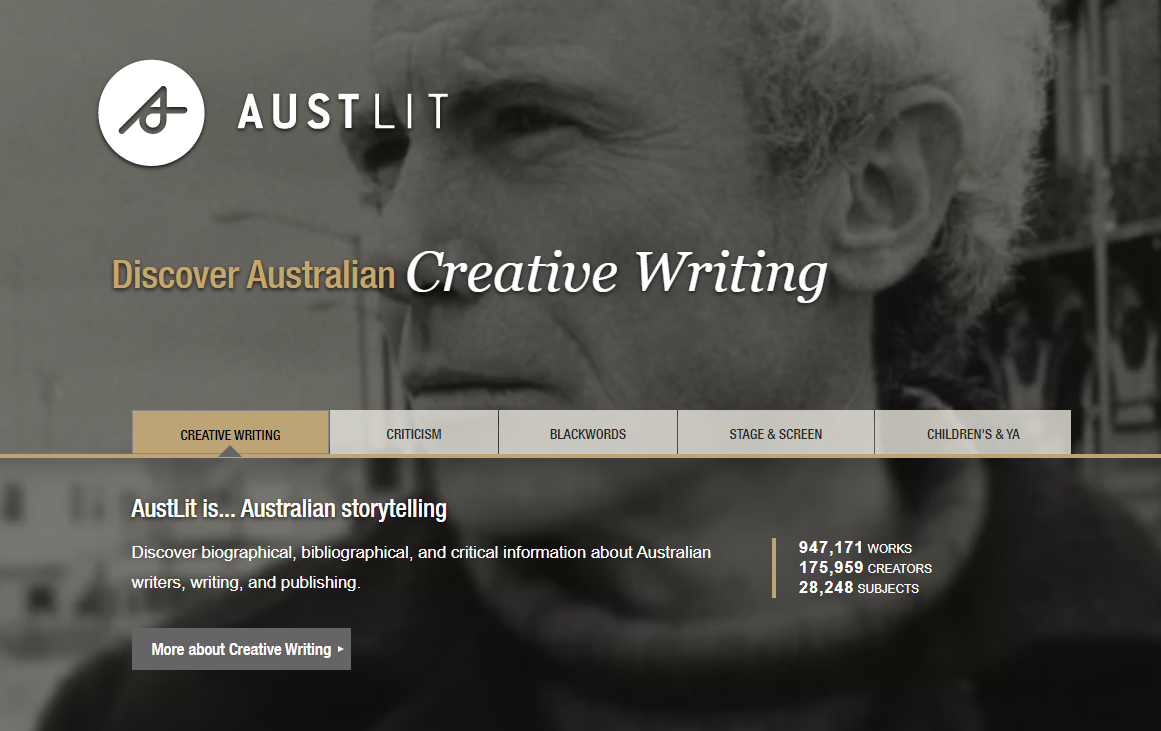
Discover biographical, bibliographical, and critical information about Australian writers, writing, and publishing.

No paid content found
Visit website
Profile views 0 Outbound visits 0 Normal
AustLit Full homepage screenshot

At a glance

Category
Books & Reading
Language
English
Paid-content signal
No paid content foundObserved
Registered
Unknown
Hosting
austlit.edu.auInferred
HTTPS certificate trusted
PassedObserved
Last updated

Website review

This review may include AI-generated content and is not individually verified. Domain, certificate and other facts come from the observed data on this page.

What is AustLit?

AustLit is a research database devoted to Australian stories and the people who make them. It brings together biographical, bibliographical and critical information on Australian writers, writing and publishing — the kind of record you consult when you need to know who wrote what, when it appeared, and how it has been discussed.

Its scope is broad rather than limited to literary fiction. The site organises material into distinct areas, each with its own focus and audience:

  • Creative Writing — scholarship on teaching, research and current debates in Australian literary and narrative culture; useful for students and educators.
  • Criticism — critical and scholarly material around Australian writing, print and narrative cultures.
  • BlackWords — the lives and works of Aboriginal and Torres Strait Islander writers and storytellers; a starting point for Indigenous literary research.
  • Stage & Screen — the history of Australian performance works across theatre, film, television and radio.
  • Children's & YA — Australian writing for younger readers, alongside teaching resources.

Who it suits

Researchers, librarians, teachers and students working on Australian literature will get the most from it, because the value lies in the depth of records and the connections between works, creators and subjects rather than in reading full texts. The site notes that it has operated as a digital humanities project since 2001, which helps explain the scale of its catalogue.

A practical next step

If you are chasing a specific author or title, begin with the search box and then narrow by the relevant area — for example, BlackWords for Indigenous writers or Stage & Screen for performance works. If you are building a reading list or a teaching unit, browse the subject records to find related works you might otherwise miss. Access to some material may depend on a subscription or a library card login, so check what your institution provides before assuming everything is open. For broader context on Australian literature, the Australian Government and the National Library of Australia are useful companion sources.

How can I search AustLit to find information about a specific Australian author or work?

Use the Search AustLit box on the AustLit home page for a quick author or title lookup, then switch to Advanced search when you need to combine criteria such as genre, form, date range or subject. For a known author, search the name first and open the person record: it links biographical details to their works and related criticism. For a known work, search the title and use the work record to move between editions, creators, subjects and reviews. If you are not sure of the exact title or spelling, start broad and narrow by adding terms.

Practical search paths

  • A specific author: search the name, then check the creator record for variant names, works, biographical notes and criticism.
  • A specific work: search the title; if several matches appear, filter by author, year or form.
  • A theme or genre: use Advanced search with subject terms, or browse the curated areas: Creative Writing, Criticism, BlackWords, Stage & Screen, and Children's & YA.
  • Aboriginal and Torres Strait Islander writers: go straight to BlackWords, which is AustLit's dedicated pathway for those lives and works.
  • Teaching and research: the Education and Research sections sit alongside the main search and are the better entry points for teaching resources and current scholarly debates.

A useful next step is to search one author you already know well and inspect how their record connects works, subjects and criticism. That shows you what a good result looks like before you search for an unfamiliar name. If you are working from a library, note that AustLit offers library-card login and subscription access; check your institution's access before relying on full records. For broader Australian literary context, the National Library of Australia's Trove at Trove can complement AustLit's bibliographic and biographical focus.

What does BlackWords cover, and how do I find Aboriginal and Torres Strait Islander writers and storytellers in AustLit?

BlackWords is AustLit's dedicated dataset on the lives and works of Aboriginal and Torres Strait Islander writers and storytellers. According to the site's own summary, it covers roughly 29,360 works by about 8,109 authors, and it sits alongside AustLit's other collections (Creative Writing, Criticism, Stage & Screen, Children's & YA) rather than being a separate site.

What it covers

  • People and works: author records with biographical and bibliographical detail, linked to their works.
  • Storytelling beyond the book: because BlackWords sits inside AustLit, it connects to writing across forms—fiction, poetry, drama, film, television and radio—plus writing for children and young adults.
  • Research context: criticism, teaching and research material on Indigenous literary and narrative cultures, which is where AustLit's "scholarship" material becomes useful.

How to find writers and storytellers

  1. Go to the AustLit homepage and use the search box, or open Advanced search for fielded queries (e.g. author name, title, subject).
  2. Filter or browse to the BlackWords collection to restrict results to Indigenous writers and storytellers rather than the full database.
  3. Open an author record to see their works, and follow subject links to related writers and themes.
  4. If you're off campus, use the "Log in with your library card" option shown on the site—many Australian libraries provide access this way.

A practical example

A teacher preparing a unit on Indigenous poetry could search BlackWords for poets, open each author record to check their works and any linked criticism, then cross-check the Children's & YA collection for younger-reader titles. A researcher tracing a playwright's radio and stage work would do better starting from Stage & Screen with a BlackWords filter, since that collection is organised around performance history.

Trade-off to weigh

AustLit is a curated scholarly database, not a general bookshop or reading app: expect rich metadata and critical context but not full texts or retail listings. Some content sits behind subscriber access, so check library access before planning around it. For broader context on Australian literature, AustLit itself is the reference point; the National Library of Australia's Trove at Trove is a useful complement for digitised newspapers and archives when tracing older or historical Indigenous writing.

Can I access AustLit through my library card, and what do I need to log in?

Yes. AustLit supports library-card login: its login panel includes a "Log in with your library card" option alongside a standard username/password form. You do not need to create a separate AustLit account if your library participates.

What to have ready

  • Your library card number (and any PIN or password your library issues for online access).
  • Your library's name or login route, since the card-login option typically asks you to identify your library before authenticating.

Practical scenario

A public-library member researching Australian children's authors can use the card login to reach subscriber content, while the public pages for the main collections remain browsable without signing in.

If it does not work

Confirm with your library that it is an AustLit subscriber and that your card is active for database access; a card that works for borrowing may not automatically be enabled for third-party resources. As a complement for general readers, the National Library of Australia's National Library of Australia and the AustLit public collection pages are useful starting points before troubleshooting access.

What kinds of teaching and research resources does AustLit offer for Australian literature and creative writing?

AustLit is a research database and discovery service rather than a course platform. Its teaching and research value comes from curated records, subject pathways and specialised datasets that support Australian literature, creative writing, Indigenous writing and performance studies.

What it offers

  • Biographical and bibliographical records: information on Australian writers, works and publishing, useful for author studies, genre surveys and building reading lists.
  • Criticism and scholarship: material on current debates, teaching approaches and research patterns in Australian literary, print and narrative cultures.
  • BlackWords: a dedicated body of records on Aboriginal and Torres Strait Islander writers and storytellers, suited to Indigenous literary studies and inclusive curriculum design.
  • Stage and Screen: records tracing Australian theatre, film, television and radio writing, useful for adaptation and performance studies.
  • Children's and Young Adult writing: works plus a collection of teaching resources, practical for school and teacher-education settings.
  • Curated projects and datasets: themed information trails and research projects hosted on the platform, which can seed assignments or literature reviews.

How different users benefit

User Typical use
Undergraduate or postgraduate researcher Locating works, authors and criticism for essays and theses
Teacher or lecturer Building reading lists and finding YA or Indigenous teaching material
Writer Mapping genres, publishers and predecessors in a field
Librarian Verifying bibliographic details and guiding readers

Practical next step

Start with a themed pathway rather than a broad search. A teacher preparing a unit on Aboriginal storytelling, for example, would go to BlackWords first, then cross-check individual authors in the main catalogue. Researchers should treat AustLit as an index to sources, not a full-text archive, and confirm access through a library card login where required. For broader Australian literary context, Australian War Memorial collections and National Library of Australia catalogues can complement author and publishing research.

How do I find Australian plays, films, television, and radio works in AustLit's Stage & Screen collection?

Use the Stage & Screen section of AustLit, then narrow your search by form (play, film, television or radio) and by the people or works involved. It is built for discovering Australian performance history rather than for streaming or buying scripts: AustLit describes itself as covering theatre, film, television and radio, with records for works and creators.

A practical route

  1. Open the Stage & Screen area from the homepage's subject links.
  2. Search a title, writer, director, performer or production company. Use the advanced search if you have several details, such as a playwright plus a year.
  3. Filter or browse by form and by the "works" or "creators" records. A work record tells you what the production was; a creator record connects a person to related works.
  4. Follow the subject links from a record to find adjacent material—adaptations, other works by the same writer, or related criticism.

Who this suits

  • Students and teachers tracing an Australian play's production history or a screen adaptation.
  • Researchers mapping careers across stage, film, television and radio.
  • Programmers and festival staff checking a writer's or company's body of work.
  • Curious viewers and theatregoers who want context before or after seeing a production.

What to expect

Stage & Screen is a discovery and research collection, not a viewing service. Records are strongest for identifying works, dates, creators and relationships; full texts or recordings are not the default. For deep research, check whether a record points to criticism or other AustLit datasets, and use the site's research and education areas for context.

For comparison, the National Library of Australia's Trove Trove is useful for digitised newspapers, programmes and reviews, while the Australian Film, Television and Radio School's library catalogue AFTRS suits production-oriented screen material. Use AustLit first for the structured performance record, then these for documents and archival detail.

Related questions

More questions →
What Is AustLit and How Can You Use It to Research Australian Writers and Stories?

AustLit is a digital research database for Australian literature, publishing, and storytelling, covering more than 1 million works and over 200,000 creators. You can use it to find biographical, bibliographical, and critical information about Australian writers, works, and subjects—including dedicated collections for Aboriginal and Torres Strait Islander writing, stage and screen, and children's and YA literature. It is best suited to students, teachers, researchers, and readers who need structured, citable information rather than general web search results. Some features require a subscription or a library card login, so check access before relying on it for a project.

What AustLit Covers

AustLit describes itself as "Australian storytelling" and as a record of Australian literary, print, and narrative cultures. Its homepage presents five main collections, each with its own scope and scale:

Collection What it covers Works Creators
Creative Writing Australian storytelling and creative writing 1,074,633 210,442 creators
Criticism Current debates, teaching, and research patterns in Australian literary, print, and narrative cultures 162,227 28,730 authors
BlackWords Lives and works of Aboriginal and Torres Strait Islander writers and storytellers 29,360 8,109 authors
Stage & Screen History of Australian performance works in theatre, film, television, and radio 24,770 16,475 creators
Children's & YA Australian writing for younger readers, plus teaching resources 71,151 32,395 authors and illustrators

The site also notes 30,444 subjects across the database. These collections are the main way to narrow a search: if your topic is Indigenous writing, start in BlackWords; if it is drama or film, start in Stage & Screen.

How to Search AustLit

AustLit offers a basic search box ("Search AustLit") and an advanced search option. The record structure supports finding:

  • Works — individual titles, with bibliographic details
  • Creators/agents — writers, illustrators, and other contributors, with biographical information
  • Subjects — thematic or topical entry points

A practical workflow:

  1. Start with a basic search for the author or title you have in mind.
  2. If results are too broad, switch to advanced search and combine fields (for example, creator name plus collection or subject).
  3. Open a creator record to see biographical and bibliographical information, then follow links to associated works.
  4. Use subject records to discover related works and authors you may not have known about.

The site also provides a "Full text" option and an "Education" section, which suggests some records connect to teaching material—useful if you are building a course reading list.

Access: What Is Public and What Is Restricted

AustLit's homepage includes "Log in," "Support Us," and "Subscribe" signals, and the login form offers "LOG IN WITH YOUR LIBRARY CARD." This means:

  • Some content and features are available to subscribers or to users whose library provides access.
  • Institutional or library-card login is the standard route for full access.
  • The site does not state that access is free or that no login is required, so plan for authentication if you need subscriber-level features.

Before starting a research task, confirm whether your school, university, or public library provides AustLit access. If not, you can still use the public-facing collection pages and search to identify works and creators, then locate the material through your library catalogue.

When AustLit Is the Right Tool

Use AustLit when you need:

  • Biographical and bibliographical facts about an Australian writer, verified against a structured database rather than scattered web pages.
  • Collection-based research—for example, a survey of Aboriginal and Torres Strait Islander authors (BlackWords) or Australian children's literature (Children's & YA).
  • Teaching preparation, drawing on the education resources and criticism collection.
  • Discovery of lesser-known works and creators through subject browsing.

It is less useful as a full-text reading platform: the database is primarily a discovery and reference resource, and full-text availability varies by record.

As a point of context, AustLit marked its 25th anniversary in 2026, having launched as a web-accessible database in September 2001 and described by the site as Australia's longest-running digital humanities project. That longevity is a reasonable signal of stability if you are citing it in academic work—though you should still check each record's currency and cite the specific entry you used.

What Is Grant Writing and How Do You Write a Grant Proposal?

Grant writing is the process of researching funding opportunities and producing a structured proposal that persuades a funder to pay for a specific project. It applies to public and private sector organizations seeking grants, and the work runs from opportunity research through drafting, submission, and post-award reporting. It differs from general writing or fundraising: the proposal must match a funder's published priorities and guidelines, and it competes against other applicants on evidence, fit, and budget credibility.

What Grant Writing Is (and What It Isn't)

Grant writing is proposal development for a defined funder and program. It is not:

  • General writing. Persuasion matters, but the structure, sections, and review criteria are set by the funder, not the writer.
  • Fundraising. Fundraising usually builds ongoing relationships with many donors; grant writing responds to a specific solicitation with a specific deadline and scope.
  • A one-time document. A competitive proposal depends on research before writing and reporting after an award.

Grants Office describes itself as a full-service provider of grant resources for public and private sector organizations, with support tailored to the needs of a grant application. That framing is useful: the writing is one part of a larger intelligence and preparation process.

The Standard Sections of a Grant Proposal

Most proposals, especially federal ones, follow a similar skeleton. Names vary by funder, but the underlying questions do not.

Section Question it answers What reviewers look for
Need statement Why is this project necessary? Local data, documented gaps, connection to the funder's priorities
Goals and objectives What will change, and by how much? Specific, measurable outcomes tied to the need
Methods / activities How will you do it? A realistic plan, timeline, staffing, and evidence the approach works
Evaluation How will you know it worked? Metrics, data collection, and who is responsible
Budget and justification What will it cost, and why? Every cost tied to an activity, math that adds up
Organizational capacity Can you deliver? Relevant experience, staff, partnerships, past results

A proposal that answers these questions consistently — the need matches the goals, the goals match the methods, the methods match the budget — reads as credible. A proposal where the sections contradict each other is one of the most common reasons reviewers lose confidence.

How to Align a Proposal With a Funder's Priorities

Alignment is the difference between a fundable project and a good project that gets rejected.

  1. Read the notice of funding opportunity (NOFO) or guidelines in full. Note eligibility, required sections, page limits, formatting, and review criteria.
  2. Extract the funder's language. If the program prioritizes a specific population, outcome, or region, use the same terms and show how your project serves that priority.
  3. Map your project to the review criteria. If the funder scores "need" at 20 points, your need statement should be strong enough to earn them.
  4. Check eligibility before writing. An ineligible applicant cannot be rescued by good prose.
  5. Confirm the deadline and submission system. Late or misformatted submissions are often rejected without review.

Step-by-Step: From Research to Reporting

1. Research opportunities. Identify programs whose priorities and eligibility match your organization and project. Track deadlines, required documents, and contacts.

2. Decide whether to apply. Weigh fit, effort, competition, and whether the project can succeed at the funding level offered. Not every opportunity is worth a proposal.

3. Plan the project. Define the need, goals, objectives, activities, staffing, timeline, and evaluation before drafting. A logic model or outline keeps the sections consistent.

4. Draft the narrative. Write the need, goals, methods, and evaluation in plain language. Use data your organization can document, and avoid claims you cannot support.

5. Build the budget. Cost out each activity, include required categories (personnel, fringe, travel, supplies, indirect costs, as applicable), and write a justification that explains every line.

6. Gather attachments and approvals. Collect letters of support, resumes, financial documents, and any required signatures or institutional approvals.

7. Review against the criteria. Have someone who did not write the proposal check it against the funder's scoring rubric, page limits, and formatting rules.

8. Submit early. Enter the submission system before the deadline, confirm receipt, and keep a copy of everything submitted.

9. Report and follow up. If funded, meet reporting requirements and document outcomes. If not, request reviewer feedback where the funder offers it and use it in the next application.

Common Mistakes That Get Proposals Rejected

  • Ignoring the guidelines. Wrong format, missing sections, or over-length proposals can be disqualified before review.
  • A weak or generic need statement. Reviewers want documented local need, not general statements about a problem.
  • Goals that aren't measurable. "Improve outcomes" is not an objective; "increase X by Y% among Z participants by [date]" is.
  • A budget that doesn't match the narrative. Costs that appear in the budget but not the activities — or the reverse — raise doubts.
  • Overpromising. A plan that is too large for the budget, timeline, or staff is a red flag.
  • No evaluation plan. Funders want to know how results will be measured and reported.
  • Missing the deadline. Submit with time to spare; technical problems near a deadline are common.

Where Training and Resources Fit

Grant writing is a learnable process, and training typically covers opportunity research, proposal structure, budgeting, and compliance. Grants Office positions itself as a full-service provider of grant resources for public and private sector organizations, with support tailored to each application — useful when an organization needs help matching a project to the right program or strengthening a proposal before submission. Whether you build the skills in-house or use outside support, the core requirement is the same: a project that fits a funder's priorities, described in the sections and format that funder requires.

Own-Free-Website.com Free Website: What You Get and When to Upgrade

Own-Free-Website.com lets you build and publish a website at no cost, with no coding required. Based on the site's own description, a free account includes up to 1 GB of web space, a short ".page.tl" domain ending, professional design templates, and built-in tools like a guestbook, hit counter, and survey function. The site states you can create a website in about 2 minutes. A paid "Premium" upgrade exists for users who outgrow the free tier, though the site does not publish what each premium package costs or exactly which features it unlocks beyond additional space.

What the free plan includes

According to the site's homepage, the free offering covers:

  • 1 GB of web space for your pictures and content
  • A short ".page.tl" domain ending — your site lives on a subdomain rather than a custom domain you own
  • No coding skills needed — the site says only a few minutes are required and that using it is "a piece of cake"
  • Professional design templates created by a designer, with a choice between "professional or frisky" styles
  • Google optimization built in from the start, which the site claims helps search engine ranking
  • Web 2.0 compatibility — connections to Facebook, Twitter, and blogs
  • Responsive display across laptops and smartphones
  • Extra features such as a guestbook, hit counter, and survey function

The site also mentions a GDPR module and SEO among its features, and states that registration is free of charge.

What the free plan does not include

The homepage does not spell out every free-tier limitation, but a few constraints follow from what it does say:

  • Domain: You get a ".page.tl" subdomain, not a custom domain. If you want your own domain name, that is not part of the free offer as described.
  • Space: 1 GB is the stated ceiling. The site explicitly says that if you run out of space, you can extend your site with a premium pack.
  • Ads or branding: The source material does not state whether free sites carry ads or a platform badge. Treat this as unconfirmed rather than assuming either way.

What the Premium upgrade is for

The site links to a "Premium Upgrades" page and mentions "premium" and "upgrade" as paid options, but the homepage itself does not list prices or a feature-by-feature comparison. What it does confirm is one concrete reason to upgrade: running out of the 1 GB of free space. Beyond that, the specific benefits of each premium package are not documented in the material available here, so check the Premium Packages page directly before deciding.

Who the free plan suits

The free tier fits situations where a simple, no-cost web presence is enough:

  • A personal homepage or hobby page
  • A small project or interest showcase
  • A first website where you want to test whether you'll keep it up
  • Anyone who wants to publish quickly without learning to code

It is less suited to a business that needs its own domain name, a large media library, or guaranteed ad-free hosting — those are the cases where the premium upgrade becomes worth investigating.

How to get started

  1. Register for a free account on the site.
  2. Choose a design template from the available professional or "frisky" options.
  3. Add your content using the built-in editor — no programming knowledge required.
  4. Publish to your ".page.tl" address.

The site claims this takes about 2 minutes, though the real time depends on how much content you add.

When to consider upgrading

Use the free plan first. Upgrade when you hit a concrete limit rather than preemptively:

  • You've used up the 1 GB of space and need more.
  • You need features or capacity that only the premium packages provide (verify these on the Premium Packages page, since they aren't detailed on the homepage).
  • Your project has outgrown a subdomain and needs a more professional address.

Because pricing and the full premium feature list are not published in the source material, the practical step is to start free, confirm what you actually need, then compare that against the Premium Packages page before paying.

Where Can You Find Reliable Biographies of William Hogarth?

The most direct starting point is william-hogarth.de, a research site dedicated to William Hogarth (1697–1764) that organizes biographies, books, essays, and image galleries in one place. It suits anyone who needs scholarly sources on Hogarth's life and work rather than a single popular biography: the site is built as a gateway to source literature, not as a standalone life story. If you want one authoritative narrative, you will still need to follow its links to books and essays.

What the site actually offers

The site's own contents list is the clearest guide to what you can expect:

  • Hogarth Biographies — a dedicated section pointing to biographical accounts
  • Books on Hogarth — monographs and catalogues
  • Online Essays — shorter scholarly pieces
  • Image Galleries — visual material for his paintings and engravings
  • Special Search Tools — aids for locating sources

The framing is explicit: "Carry out your investigation of Hogarth's life, his paintings and his engravings here." That makes it a research hub rather than a biography in itself.

The bibliography as a finding tool

The site highlights a forthcoming annotated, international two-volume Hogarth Bibliography by German art historian Bernd Krysmanski (publisher: Georg Olms, Hildesheim, Zurich, New York; ISBN 3-487-10971-9). Its stated purpose is to address a real gap: while many books, exhibition catalogues, articles, and essays have been written on Hogarth over three centuries, "attempts at a bibliography have been rare and indeed imperfect."

For biography hunting, this matters because a good bibliography tells you which biographical accounts exist and how they relate to each other. The site also notes that Ronald Paulson has written more than sixty publications on Hogarth — a signal that a single name can dominate the biographical literature, and that you should look for other voices alongside it.

Reading the site's examples as a map of scholarly debate

The homepage lists specific claims and attributions that show how varied Hogarth scholarship is:

Scholar Contribution noted
Ronald Paulson 60+ publications on Hogarth
Mary Klinger Lindberg A dozen papers on Hogarth and the London theatre
Peter Wagner Reading Iconotexts (1995), a poststructuralist view
Dennis Todd & Ronald Paulson Reading Cunicularii as a parody of the Adoration of the Magi
Werner Busch Das sentimentalische Bild (1993) on Beer Street and Gin Lane
Michael J. H. Liversidge A booklet on Hogarth's Bristol Altar-Piece
Bernd Krysmanski Hogarth's Hidden Parts (2010)
Christian Ludwig von Hagedorn An early (1762) study of Analysis of Beauty

These are not neutral facts to memorize — they are leads. If you are writing about Hogarth's theatre connections, Lindberg is your entry point; if you need reception history, Hagedorn's 1762 study is a primary-era source.

How to use it for a biography project

  1. Start with the Biographies section to see which life accounts the site endorses.
  2. Cross-check against the bibliography (or its forthcoming volumes) to confirm editions, dates, and whether a source is primary or secondary.
  3. Use the essays and exhibition reviews to fill gaps a biography may skip — reception, specific works, contested interpretations.
  4. Consult the image galleries when a biography references a painting or print you need to see.
  5. Note the debates (e.g., the Cunicularii parody reading) so your account reflects that Hogarth interpretation is contested, not settled.

Limits to keep in mind

The site is a curated research aid maintained around one scholar's bibliography project, so its coverage reflects that editorial viewpoint. It does not present a full biography on its own, and the bibliography is described as forthcoming — check availability before relying on it. For a complete picture, pair it with library catalogues and the individual books and essays it points to.

If your goal is a quick life summary, a standard published biography will serve you faster. If your goal is to find and evaluate biographical sources on Hogarth, this site is a well-organized place to begin.

Website Overview

Identifiable technologies and additional version or configuration signals make the service easier to fingerprint, which may help targeted scanners narrow their checks. Several search or sharing settings need attention. Together they may make snippets, preview images or preferred URLs less consistent across platforms.

Domain and Registration

Transfer-protection status is present, helping reduce the risk of unauthorized domain transfers. The domain uses the common .au extension, which is not an independent safety signal.

DNS and Email

Nameservers are provided by uq.edu.au, indicating managed DNS hosting. MX records point to the iphmx.com email service. SPF and DMARC are configured. DKIM status is unknown. TXT records include verification markers for Apple, Microsoft. Such markers may also remain after a service stops being used. DNSSEC signatures were not detected, so this additional DNS authenticity protection is not confirmed.

TLS and Certificates

The certificate includes the organization field The University of Queensland. The certificate issuer is DigiCert Inc, a commercial certificate authority. The certificate uses an RSA 2048-bit public key, offering broad client compatibility. The server supplied a complete certificate chain. The certificate is valid for about 198 days in total, with 135 days remaining.

HTTP and Browser Security

The Server header exposes the software version: nginx/1.20.1. This makes version-targeted checks easier, but is not proof of an exploitable vulnerability. The checked browser-security headers were not detected, leaving fewer explicit browser-side safeguards. CORS permits any origin to read this response. This is common for public resources; sensitive responses need narrower handling. No X-Powered-By header was found, reducing one common source of backend fingerprinting information. No obvious internal addresses or debug information were found in the headers.

Technology Stack Analysis

The public page identifies nginx 1.20.1, with exact versions exposed for 1 technologies. These details can narrow vulnerability checks, although exposure alone is not a vulnerability.

Search and Social Sharing

No homepage canonical URL was detected. If duplicate URLs exist, consolidation may be less explicit. Open Graph is partially configured; og:type is missing. Twitter Card metadata is configured. The title has 36 characters, within a common display range. A meta description is present, with 115 characters.

Hosting and Email

DNSuq.edu.au
Hostingaustlit.edu.au
Emailiphmx.com
Approximate IP geolocation (inferred; a CDN or proxy may differ from the origin server) Australia flagBrisbane, Queensland, Australia Inferred 130.102.185.32

Registration details

RDAP / WHOIS

RegistrarEducation Services Australia Limited
RegisteredUnknown
ExpiresUnknown
Domain statusserver renew prohibited
Nameserversns1.dc.uq.edu.au、ns2.dc.uq.edu.au、ns3.dc.uq.edu.au、ns4.dc.uq.edu.au
DNSSECunsigned

DNS records

DNS

TypeNameValueTTLPriority
Aaustlit.edu.au130.102.185.321134—
MXaustlit.edu.aumx1.hc86-32.ap.iphmx.com360010
MXaustlit.edu.aumx2.hc86-32.ap.iphmx.com360010
NSaustlit.edu.auns1.dc.uq.edu.au86400—
NSaustlit.edu.auns2.dc.uq.edu.au86400—
NSaustlit.edu.auns3.dc.uq.edu.au86400—
NSaustlit.edu.auns4.dc.uq.edu.au86400—
TXTaustlit.edu.auMS=ms650453743600—
TXTaustlit.edu.auMailertable to exchange.uq.edu.au3600—
TXTaustlit.edu.au_1lvt7ccf21kw5fcq90dgnai6dsg9zrj3600—
TXTaustlit.edu.auapple-domain-verification=L5oGJ3Q4jpohqbi43600—
TXTaustlit.edu.auv=spf1 include:_spf.uq.edu.au ~all3600—
CNAMEwww.austlit.edu.auaustlit.edu.au3600—
DMARC_dmarc.austlit.edu.auv=DMARC1;p=none;sp=none;rua=mailto:[email protected],mailto:[email protected];ruf=mailto:[email protected],mailto:[email protected];rf=afrf;ri=864003600—

TLS and certificates

TLS / SSL

AssessmentNormal configuration
Supported protocolsTLSv1.2、TLSv1.3
Negotiated protocolTLSv1.3
Certificate subjectaustlit.edu.au
IssuerDigiCert Inc
Valid until2027-03-03T23:59 · Remaining when checked: 135 days
Verification detailsCertificate trust: Passed · Hostname match: Passed

HTTP response headers

HTTP

HeaderValue
content-typetext/html; charset=utf-8
servernginx/1.20.1
access-control-allow-origin*
set-cookieRedacted

Identified technologies

nginx 1.20.1

Pages, Search and Sharing

Meta descriptionDiscover biographical, bibliographical, and critical information about Australian writers, writing, and publishing.
Canonical URLNot detected
LanguageEnglish (default)
Twitter Cardsummary_large_image
All bots 0 allowed · 0 disallowed

User reviews (0)

  • No reviews yet.