Website profiles · Technology insights · Alternatives

pict.chat

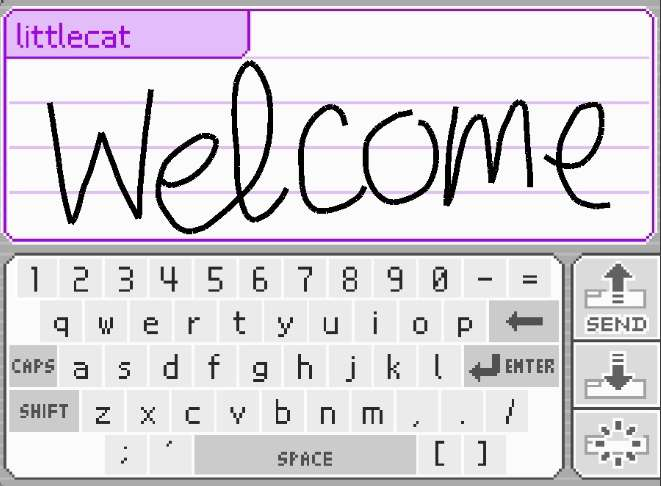
PictoChat web app with a server written in Java! Source: https://github.com/ayunami2000/ayunpictojava

No paid content found
Visit website
Profile views 9 Outbound visits 1 Normal
PictoChat Online, by ayunami2000 Full homepage screenshot

At a glance

Category
Development
Language
English
Paid-content signal
No paid content foundObserved
Registered
2023
Hosting
HostPapaInferred
HTTPS certificate trusted
PassedObserved
Last updated

Website review

This review may include AI-generated content and is not individually verified. Domain, certificate and other facts come from the observed data on this page.

What is PictoChat Online?

PictoChat Online is a browser-based recreation of the local drawing-and-chat app that shipped with the Nintendo DS. You open the page, pick a username and color, and draw on a shared canvas with other people in the same room. It is built for quick, low-stakes doodling rather than text-heavy conversation: the pen is the point.

What you actually get

  • A shared canvas per room. Everyone in a room sees the same drawing surface and can add strokes to it.
  • Username and color selection. You choose how you appear before joining, which matters when several people are drawing at once.
  • Tripcodes. The page mentions sharing tripcodes, so regulars can keep a consistent identity without creating an account.
  • No Discord account required. You can join without linking a chat platform first.
  • Display and input options. Integer scaling, volume, pressure support, and dark mode are listed as settings, so the experience adapts to your screen and whether you are using a stylus.

Who it suits

The obvious audience is people who remember passing a DS around and want that feeling on a desktop or tablet. It also works for casual group sketching, a shared whiteboard for a small call, or a lightweight way to doodle with friends who are not on the same chat service.

The trade-off is that a canvas-first chat is clumsy for anything long-form. If you need threaded discussion, file sharing, or persistent rooms with history, a dedicated chat app will serve you better. PictoChat Online is best treated as a toy and a sketching space, not a messaging replacement.

A practical next step

Decide what you want before you share the link. For a five-minute doodle duel with one friend, just send the URL and agree on a room. For a recurring group, set a habit around tripcodes so people recognize each other, and keep sessions short so the canvas does not become an unreadable pile of strokes. If you want the broader context of DS-era PictoChat, the Nintendo site covers the original hardware, while the GitHub project page for the Java server shows how this version is put together.

How do I connect to a PictoChat Online room?

Open PictoChat Online in a browser, enter a username, and use the chat interface that appears. PictoChat Online is a web recreation of the Nintendo DS local chat app, with a Java server behind it; the page shows a username field, a color selector, a note that no Discord account is required, and a place to share tripcodes.

What the page gives you

  • Username and color are the visible setup fields. Pick a name and a color before you start drawing or typing.
  • Tripcodes are how you can identify yourself or reconnect; the page mentions sharing them.
  • Other settings include integer scaling, volume, pressure support, and dark mode.

There is no visible room list or "join room" button in the supplied page evidence, so the practical path is: load the site, set your username and color, then look for the room or chat area that opens. If the page asks for a room name or code, enter one that you and the other person agreed on; if it drops you straight into a chat canvas, that is the room.

A concrete scenario

You want to draw with a friend on a DS-style canvas. Both of you open the site, set different usernames, and share the tripcode or room identifier shown after connecting. If one of you cannot see the other, the likely causes are a different room, a stale tripcode, or a browser that needs a refresh.

Trade-offs to expect

A browser chat canvas is easy to join and needs no install, but it will not have the DS's local wireless range or its exact stylus feel. Pressure support and integer scaling are optional settings; turning them on may change how your drawing responds, so test with a small stroke before relying on them. Dark mode is cosmetic and does not affect connectivity.

Next step

If the room does not appear automatically, refresh the page, re-enter the same username, and check whether a tripcode or room field is present. For a different take on the same idea, GitHub hosts the source linked from the page, which is useful if you want to run your own server rather than join someone else's room.

Does PictoChat Online work on mobile phones?

Yes. PictoChat Online runs in a browser, so a phone with a modern browser can open it and join a chat room. The page's own settings point to that: it asks for a Username, offers a Color choice, and includes Dark Mode, Volume and Pressure Support controls. Pressure Support matters most on phones and tablets, because a finger or stylus press has varying pressure while a mouse click does not.

What actually works on a phone

  • Drawing and writing: the canvas is the main interaction, so a touchscreen is a natural fit. A stylus gives finer control than a fingertip.
  • Room access: the page notes "no discord account required," and it invites you to "share your tripcodes" — so you can pass a room code to friends and let them join from their own phones.
  • Display: Integer Scaling keeps the pixel art crisp; on a small screen, expect the drawing area to feel cramped in portrait, so landscape is usually more comfortable.
  • Sound: Volume is adjustable, which helps when you are on a phone in public.

Practical trade-offs

Situation Phone Desktop or laptop
Quick doodle or short message Convenient, always with you Slower to start
Detailed pixel drawing Harder — small canvas, finger occlusion Easier — mouse and larger canvas
Typing longer messages On-screen keyboard covers the canvas Physical keyboard is faster
Sharing a room code Easy — copy and send from the same device Requires switching apps

Next step

Open the site on your phone, set a Username and Color, and try drawing one short message before inviting anyone. If the canvas feels too small, rotate to landscape; if precision still suffers, a cheap stylus makes more difference than a bigger screen. For a group session, send the tripcode first and let everyone confirm they can see the canvas before you start drawing. If you want a second browser-based option to compare, Aggie.io is a well-known collaborative drawing canvas, though it targets a different, more illustration-focused use case than PictoChat's chat-room format.

How does PictoChat Online compare to the original Nintendo DS PictoChat?

PictoChat Online recreates the DS's local doodle-and-chat concept as a browser app, but it is a fan project, not a Nintendo product, and its main trade-off is reach versus fidelity: it works between people on different networks, while the original worked only between consoles in the same room.

What carries over

  • The core loop is the same: pick a name and color, draw on a shared canvas, and send short messages to everyone in the room.
  • Small touches from the DS era return, such as tripcodes and a pressure-support option for stylus-like drawing.
  • Settings like integer scaling and dark mode echo the original's pixel-art look, with modern display conveniences added.

Where they diverge

Aspect Original DS PictoChat PictoChat Online
Hardware Two or more DS consoles with local wireless Any device with a web browser
Range Same room, roughly 30 metres Anyone online, anywhere
Rooms Fixed set of four chat rooms Server-hosted rooms
Identity Chosen name only Name, color, optional tripcode
Accounts None None required; no Discord account needed

Practical differences

In a classroom or on a train, the original's short range was a feature: you could only chat with people physically present. Online, that constraint disappears, which makes it easier to coordinate with friends in other cities but harder to keep a conversation private from strangers in a public room. The lack of required accounts lowers the barrier to entry, but it also means there is no persistent identity beyond the tripcode you set.

Who it suits

  • Nostalgia seekers who want the DS interface without carrying a console.
  • Groups of friends who want a quick shared canvas across different devices.
  • Anyone curious about the original's design, since the settings mirror its quirks.

If you want the authentic local-only experience, a DS and a copy of the original software remain the only way to get it. For everything else, open PictoChat Online, by ayunami2000, share the room with the people you want to draw with, and set a tripcode if you want to be recognisable across sessions.

Can I use a drawing tablet or stylus with PictoChat Online?

Yes. PictoChat Online accepts pressure-sensitive stylus input, so a drawing tablet or a pen-equipped device can be used for sketching in the chat. The page lists a Pressure Support setting alongside Integer Scaling, Volume, and Dark Mode, which tells you the app is built to read pen pressure rather than treat every stroke as a uniform line.

What this means in practice

  • Drawing tablets (e.g. Wacom, Huion, XP-Pen): The tablet reports pressure to the browser, and the app's pressure support uses it. Thicker strokes when you press harder, thinner when you ease off — much closer to the DS stylus feel than a mouse.
  • Pen displays and 2-in-1 laptops: Same behavior, and you draw directly on the screen, which suits quick doodles and handwriting.
  • Phones and tablets with an active stylus (e.g. Apple Pencil, S Pen): These report pressure in the browser too, so they generally work. Finger input still works but gives no pressure variation.
  • Mouse or trackpad: Usable, but every line is the same width. Fine for simple messages, frustrating for anything expressive.

If pressure isn't registering

Check the Pressure Support toggle first — if it's off, strokes will look flat regardless of your hardware. Then confirm the browser actually receives pen events: test your stylus on a generic canvas or drawing site. Some browsers and OS combinations only pass pressure for the primary pen button, and Bluetooth-connected styli can behave differently from those paired by cable or dongle.

A concrete scenario

Someone joining a PictoChat-style room to sketch a quick character or write a handwritten note will get the most out of a small pen tablet: it's cheap, works on any desktop browser, and gives pressure variation without needing a touchscreen. If you already own an iPad or a Galaxy Tab with a stylus, that's the more natural fit — you draw where you see the result.

For a general introduction to the app and how rooms work, see PictoChat Online, by ayunami2000. The source code is on GitHub at GitHub if you want to check how pen input is handled.

Is PictoChat Online free and does it require a Discord account?

Yes. PictoChat Online, by ayunami2000 is free to use, and you do not need a Discord account to join. The page's own settings panel includes the line "no discord account required," so the account-free access is a stated feature rather than an assumption.

What you actually get

The site recreates the Nintendo DS PictoChat experience in a browser, backed by a Java server. Before entering, you pick a Username and a Color, and you can share tripcodes so specific people can find you. The Other Settings area adds Integer Scaling, Volume, Pressure Support and Dark Mode.

Question Answer
Cost Free
Discord account Not required
What you need instead A username, plus an optional tripcode to share
Extras Color choice, dark mode, volume, pressure support, integer scaling

Who it suits

It is a good fit if you want the novelty of DS-style chat rooms without creating an account, or if you want to draw rather than type. Pressure Support matters if you have a stylus or a pressure-sensitive tablet and want line thickness to respond to how hard you press; on a mouse or trackpad it will do little. Integer Scaling is worth turning on if the canvas looks blurry or unevenly pixelated on a high-resolution screen, since it keeps the drawn pixels crisp instead of smoothing them.

A practical first step

Open the site, set a username and color, and leave the tripcode blank for a casual public room. If you want a specific friend to find you rather than a stranger, set a tripcode and send it to them privately — that is the intended use of the feature. Keep in mind that a browser-based chat room is a public space by default, so avoid sharing personal details in the drawing area or the name field.

Related questions

More questions →
What technology powers PictoChat Online and where can I find its source code?

PictoChat Online is a browser-based web app whose server is written in Java, and its source code is published on GitHub at ayunami2000/ayunpictojava. If you want to inspect, self-host, or contribute to the project, that repository is the starting point; the live site itself runs the app in your browser, so you don't install anything to use it.

The two halves of the stack

The project splits into a client and a server:

Layer What it is Where it lives
Client Web app that runs in the browser Served by the site you open
Server Written in Java ayunami2000/ayunpictojava on GitHub

The site's own description states this directly: "PictoChat web app with a server written in Java! Source: https://github.com/ayunami2000/ayunpictojava". So the browser handles the drawing/chat interface, while a Java process handles the server side.

Finding and using the source

  1. Go to GitHub and open the repository ayunami2000/ayunpictojava.
  2. Read the repository's own README and build files for the exact Java version, dependencies, and run instructions — those details live in the repo, not on the website.
  3. To self-host, clone the repository and follow its build/run steps; to contribute, fork it and open a pull request against the original.

Because the server is Java, expect a JDK and the project's build tooling to be prerequisites for running it yourself. The repository is the authoritative place to confirm versions and commands.

What the app exposes in the browser

The site's interface shows a small set of client-side options, which tells you what the web app handles locally versus on the server:

  • Username and Color — your identity and drawing color in a session.
  • Tripcodes — shareable identifiers; the page notes "no discord account required" and "share your tripcodes!"
  • Other Settings — Integer Scaling, Volume, Pressure Support, and Dark Mode.

Pressure Support and Integer Scaling are client-side rendering/input concerns, while usernames, colors, and tripcodes are session identity handled with the server.

Why the open-source nature matters

  • Self-hosting: you can run your own instance rather than relying on the public site.
  • Auditing: you can read exactly how sessions, tripcodes, and messages are handled.
  • Contributing: bug fixes and features go through the GitHub repository.

If your goal is simply to chat, open the site and use it. If your goal is to understand or extend it, the Java server in ayunami2000/ayunpictojava is where the real work happens.

What Are Tripcodes in PictoChat Online and How Do I Share Them?

Tripcodes in PictoChat Online are short codes that identify you across sessions, so people can recognize you even if you change your username or reconnect later. The site's own settings panel lists "share your tripcodes!" as a feature, and it also notes that no Discord account is required — so a tripcode is the lightweight identity option rather than a login. If you just want to draw and chat casually, you don't need one; if you want a stable identity in a room, you do.

Username vs. tripcode: what's the difference

Username Tripcode
Purpose Label shown in the room Persistent identifier tied to you
Persistence Typically per session or per entry Intended to stay the same across sessions
Sharing Others see it, but anyone can reuse it You share it so others can verify it's you
Account needed No No

The key point: a username is a display name anyone could copy, while a tripcode is meant to be the thing you hand out so others can tell it's actually you. Treat the username as cosmetic and the tripcode as your identity.

How tripcodes work in PictoChat Online

PictoChat Online is a web app with a Java server (source: github.com/ayunami2000/ayunpictojava). The settings area exposes a Username field, a Color choice, and a note to "share your tripcodes!" — alongside options like Integer Scaling, Volume, Pressure Support, and Dark Mode.

Because the site presents tripcodes as something you share rather than something you register, the practical model is:

  • You set or generate a tripcode.
  • The server associates that code with your presence.
  • Anyone you give the code to can recognize you when it appears again.

The page evidence does not spell out the exact generation algorithm or whether the code is derived from a passphrase, so don't assume a specific formula. What is supported is that tripcodes exist as a shareable identifier and that no Discord account is required to use the app.

How to set and share a tripcode

  1. Open the settings panel. On pict.chat, the settings area is where Username, Color, and the tripcode note appear.
  2. Enter a username and color if you want a display label and a drawing color.
  3. Set or note your tripcode. Use the tripcode field or option the settings panel provides. If the app generates one for you, copy it exactly.
  4. Share it deliberately. Give the tripcode only to people you want to recognize you. Since it functions as an identifier, sharing it widely is like handing out a name tag anyone can wear.
  5. Reuse it next session. When you return, enter the same tripcode so others see the same identity.

Expected result: others in the room can match your tripcode to you across visits, even if your username changes.

Common snags

  • Assuming a tripcode is a password. It's an identifier you share, not a secret login. Don't treat it as account security.
  • Confusing it with the username. Changing your username won't necessarily change your tripcode, and vice versa.
  • Expecting account recovery. The site notes no Discord account is required, and the page evidence doesn't describe account recovery — so keep your tripcode somewhere safe if it matters to you.
  • Sharing too broadly. If anyone can use your tripcode, it stops proving it's you.

Quick answer

Use a tripcode when you want a recognizable identity in PictoChat Online without creating an account. Set it in the settings panel, keep it consistent across sessions, and share it only with people who need to verify it's you. If you're just doodling for a few minutes, skip it — the username and color are enough.

What Is PictoChat Online by ayunami2000?

PictoChat Online is a browser-based recreation of Nintendo's PictoChat, the local wireless drawing-and-messaging app that shipped with the Nintendo DS. You open it in a web browser, pick a username and color, and draw or type messages into shared chat rooms instead of being limited to the DS's short-range wireless range. It is an open-source project: the page credits a Java server backend, with source at github.com/ayunami2000/ayunpictojava.

What you actually get

The app reproduces the core PictoChat experience — a canvas you draw on, a message feed, and other people in the same room — but moves it to the web. According to the site, it runs with a server written in Java, so the client is just a web page and the rooms are hosted rather than peer-to-peer.

The visible settings on the page point to what the tool supports:

Setting What it suggests
Username You identify yourself without creating an account
Color Your name/message color in the room
Tripcodes You can share a tripcode, a classic anonymous-board style identifier
Discord account not required No third-party login is needed to join
Integer Scaling Pixel-art canvas scaling for a crisp, non-blurry look
Volume Audio level control
Pressure Support Stylus/pen pressure input for drawing
Dark Mode Light/dark interface toggle

How it compares to the original DS app

  • Range: The DS version worked only between consoles in local wireless range. PictoChat Online works over the internet through a server.
  • Hardware: The original needed a DS or 3DS. This needs only a browser.
  • Input: The DS used a stylus on a resistive touchscreen. Here you draw with a mouse, trackpad, or pen — and the "Pressure Support" option means a pressure-sensitive stylus can vary line thickness.
  • Identity: The DS had no accounts at all. This keeps that spirit (no Discord account required) while adding optional tripcodes for people who want a consistent handle.

Who it's for

It fits two main uses. First, nostalgia: if you want the look and feel of DS PictoChat without digging out old hardware, this is a direct recreation. Second, casual shared doodling: it's a lightweight way to draw with other people in a room, closer to a shared whiteboard than a full chat app.

If you need persistent message history, file sharing, or moderation tools, this isn't built for that — it's a drawing chat, not a collaboration suite.

Things to know before you start

  • No account needed. The page states no Discord account is required, so you can join by choosing a username.
  • Tripcodes are optional and shareable. If you want a recognizable identity across sessions, set and share a tripcode.
  • Pressure support depends on your hardware. It only helps if you're drawing with a pen that reports pressure; a mouse won't use it.
  • It's a community open-source project. The source is public on GitHub, so behavior and availability depend on whoever runs the server, not on Nintendo.

To try it, open pict.chat, enter a username, pick a color, adjust scaling and volume if you like, and start drawing in a room.

How to Use PictoChat Online and What Settings Are Available

PictoChat Online (pict.chat) is a browser-based recreation of the Nintendo DS PictoChat app, backed by a Java server. You can use it without a Discord account: pick a username, choose a color, and start drawing in a shared chat room. The settings panel adds integer scaling, volume, pressure support, and dark mode, and you can share a tripcode so others can recognize you or so you can reconnect.

Getting started

  1. Open pict.chat in your browser.
  2. Enter a Username. This is the name other people in the room will see.
  3. Pick a Color for your messages and drawings.
  4. Join the chat and start writing or drawing on the canvas.

No Discord account is required to join, so you can go straight from the page to a session.

Settings you can change

The settings area exposes the following options:

Setting What it controls
Integer Scaling Scales the canvas in whole-number steps, which keeps pixels crisp instead of blurry
Volume Controls the loudness of audio in the app
Pressure Support Enables pressure-sensitive input, so supported styluses can vary stroke weight
Dark Mode Switches the interface to a darker color scheme

If your drawings look soft or stretched, try Integer Scaling first — it's the setting aimed at keeping the pixel art look intact.

Tripcodes

The app lets you share your tripcodes. A tripcode is a short identifier tied to your session, useful for two things:

  • Identifying yourself to other people in the chat, so they know a message is yours.
  • Reconnecting as the same recognizable user rather than showing up as a stranger.

If you plan to come back to the same room, save or share your tripcode before you leave.

Common snags

  • Blurry canvas: turn on Integer Scaling.
  • No pressure variation when drawing: check that Pressure Support is enabled and that your input device actually reports pressure.
  • Can't hear anything: raise Volume, and check your browser or system audio isn't muted.
  • Too bright at night: enable Dark Mode.

Quick answers

  • Do I need an account? No Discord account is required.
  • What do I set up first? Username and color, then join.
  • What are the main settings? Integer Scaling, Volume, Pressure Support, and Dark Mode.
  • What is a tripcode for? Sharing it lets others identify you and lets you reconnect.

Website Overview

Limited stack disclosure and few obvious backend markers suggest a more restrained public footprint. That reduces easy fingerprinting clues but is not proof of overall security.

Domain and Registration

Transfer-protection status is present, helping reduce the risk of unauthorized domain transfers. The domain has about 3 years of registration history; its current configuration provides more context than age alone. The registrar is NameCheap, Inc., a widely used domain service provider. The domain uses the common .chat extension, which is not an independent safety signal.

DNS and Email

Nameservers are provided by Cloudflare, indicating managed DNS hosting. No CNAME was found; the observed records resolve directly to addresses. No MX record was found. A conventional explicit inbound-mail route is not configured. TXT records include verification markers for Google. Such markers may also remain after a service stops being used. DNSSEC signatures were not detected, so this additional DNS authenticity protection is not confirmed.

TLS and Certificates

The public key uses EC with 256 bits. The server supplied a complete certificate chain. No organization name is present in the certificate; the available fields are consistent with domain validation. The certificate was issued by Let's Encrypt, commonly associated with automated certificate services. The certificate's total validity is about 89 days, consistent with a short renewal cycle.

HTTP and Browser Security

The checked browser-security headers were not detected, leaving fewer explicit browser-side safeguards. No X-Powered-By header was found, reducing one common source of backend fingerprinting information. The via response header indicates a CDN or caching proxy in the delivery path. No obvious internal addresses or debug information were found in the headers. No CORS permission header was found, so browsers normally restrict cross-origin script access.

Technology Stack Analysis

No obvious technology stack is exposed. This may reflect restrained information disclosure, although the underlying technologies remain unknown.

Search and Social Sharing

No homepage canonical URL was detected. If duplicate URLs exist, consolidation may be less explicit. Twitter Card metadata is configured. The title has 33 characters, within a common display range. A meta description is present, with 101 characters. The observed directives allow indexing and link following.

Hosting and Email

DNSCloudflare
HostingHostPapa
EmailUnknown
Approximate IP geolocation (inferred; a CDN or proxy may differ from the origin server) United States flagAshburn, Virginia, United States Inferred 23.94.117.222

Registration details

RDAP / WHOIS

RegistrarNameCheap, Inc.
Registered2023-05-19
Expires2027-05-19
Domain statusclient transfer prohibited
Nameserversaida.ns.cloudflare.com、rocky.ns.cloudflare.com
DNSSECunsigned

DNS records

DNS

TypeNameValueTTLPriority
Apict.chat23.94.117.222300—
NSpict.chataida.ns.cloudflare.com86400—
NSpict.chatrocky.ns.cloudflare.com86400—
TXTpict.chatgoogle-site-verification=ps19b_giTd-Mj2Xe1jQGTuv3MrdU5gwuJMb52F-Y9wA300—

TLS and certificates

TLS / SSL

AssessmentNormal configuration
Supported protocolsTLSv1.2、TLSv1.3
Negotiated protocolTLSv1.3
Certificate subjectpict.chat
IssuerLet's Encrypt
Valid until2026-12-13T09:21 · Remaining when checked: 67 days
Verification detailsCertificate trust: Passed · Hostname match: Passed

HTTP response headers

HTTP

HeaderValue
content-typetext/html; charset=utf-8
cache-controlprivate, max-age=60

Identified technologies

Technology stack: Unknown

Pages, Search and Sharing

Meta descriptionPictoChat web app with a server written in Java! Source: https://github.com/ayunami2000/ayunpictojava
Canonical URLNot detected
LanguageEnglish (default)
Twitter Cardsummary_large_image

No robots.txt found

No sitemaps found

User reviews (0)

  • No reviews yet.