Website profiles · Technology insights · Alternatives

ai-flow.net

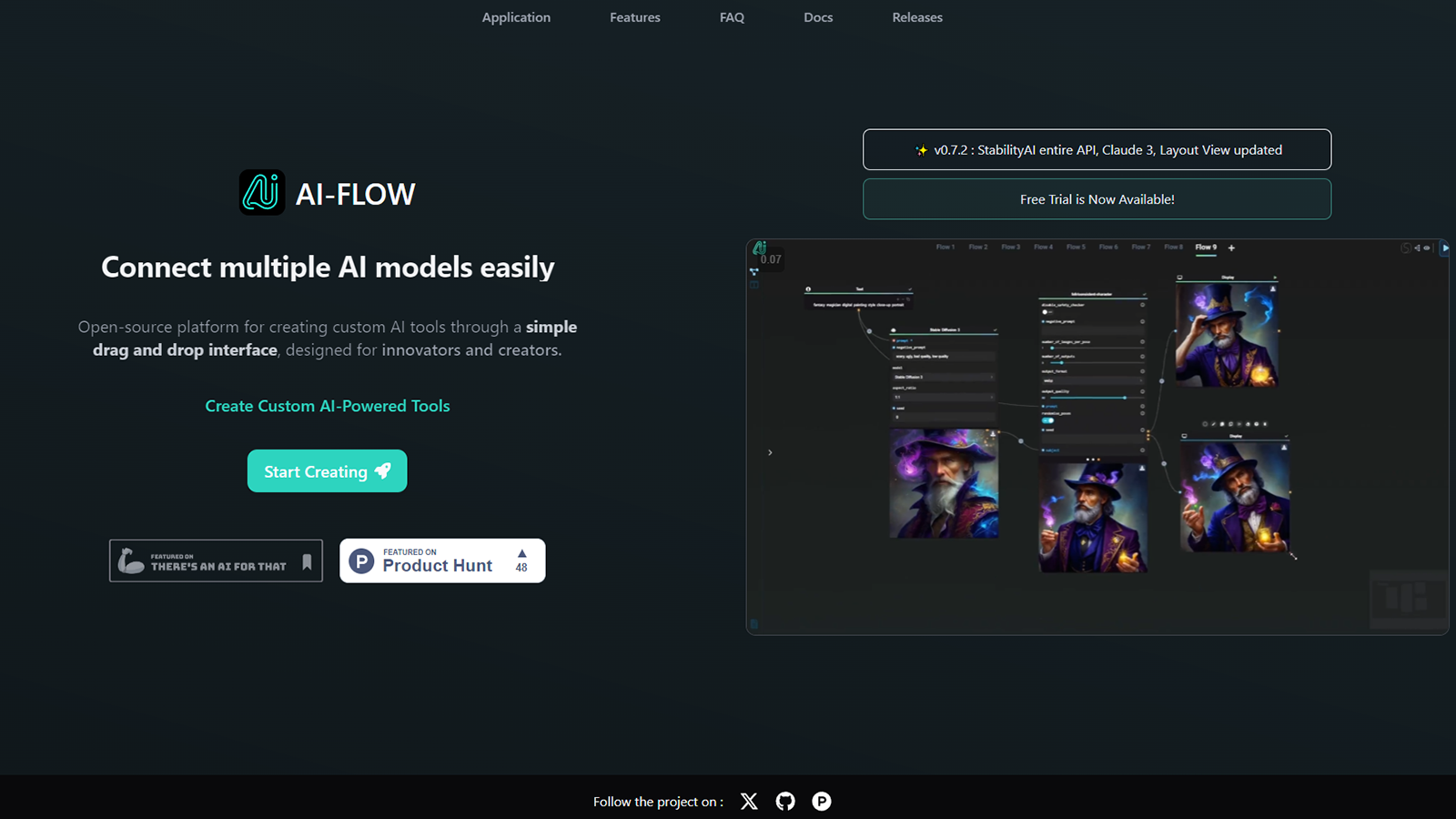
Connect multiple AI models easily. Open source, user-friendly UI application to create workflows with different AI models.

No paid content found
Visit website
Profile views 7 Outbound visits 0 Normal
AI-Flow Full homepage screenshot

At a glance

Category
Artificial Intelligence
Language
English
Paid-content signal
No paid content foundObserved
Registered
2023
Hosting
Amazon CloudFrontInferred
HTTPS certificate trusted
PassedObserved
Last updated

Website review

This review may include AI-generated content and is not individually verified. Domain, certificate and other facts come from the observed data on this page.

What is AI-Flow?

AI-Flow is an open-source, browser-based application for building visual workflows that chain multiple AI models together. Instead of jumping between separate tools for text, images, video, and speech, you connect model nodes on a canvas and pass outputs from one step into the next.

What it actually does

  • Combines models from several providers — the page names OpenAI, Google, Anthropic, and Replicate — inside a single flow.
  • Supports a wide range of model types: text and chat models, image generation, image editing, video generation, music, and speech.
  • Lets you bring your own API keys, and the page states there is no subscription and a free tier when you use your own keys.
  • Presents a node-and-connection interface, so a pipeline is something you assemble rather than code from scratch.

Who it suits

If you are… AI-Flow is useful because… Main trade-off
A content creator running repeatable pipelines You can chain a prompt model into an image or video model and reuse the flow You still manage provider accounts and keys
A developer prototyping multi-model ideas Open source means you can inspect and adapt it You handle setup and your own API costs
A team standardising a creative process Flows make steps explicit and shareable Complex flows need naming and organisation
A casual one-off user The visual builder is approachable Bringing your own keys adds friction

A concrete example

A short fashion-video pipeline: a text model writes a shot description, an image model produces a keyframe, and a video model animates it. The page's own sample prompt — a woman in tortoiseshell sunglasses turning her head under warm studio light — illustrates exactly this kind of chained brief.

Next step

Decide based on how many providers you already pay for. If you hold keys for two or more of OpenAI, Google, Anthropic, or Replicate, the value is in wiring them together; if you only use one, a single-provider tool may be simpler. Start by rebuilding one task you already do manually as a three-node flow, then expand. Compare with Replicate if model hosting is your main concern.

Do I need my own API keys to use AI-Flow, or can I run it without any subscriptions?

You can run AI-Flow without a subscription, but not entirely without credentials. The site describes a free tier that works with your own API keys, and it explicitly says "No subscription." So the usual setup is: install the open-source app, plug in keys you already have, and pay each model provider directly for what you use. There is no separate AI-Flow subscription standing between you and those models.

The page also hints at a second path with the line "Use your own API keys — or don't." That suggests some models or flows may be usable without bringing your own keys, likely through built-in or hosted access. Treat that as a convenience option rather than the default, and check what it covers before relying on it.

What each route means in practice

Route What you provide Trade-off
Your own API keys Keys from OpenAI, Anthropic, Google, Replicate, etc. Full model choice and direct provider pricing, but you manage keys, quotas and billing
Without your own keys Nothing at signup Less setup, but likely narrower model access or usage limits

Because AI-Flow chains models from several providers in one workflow, the key-based route is the one that matches its main pitch: combine OpenAI, Google, Anthropic and Replicate models in a single automation. If you already pay one of those providers, that cost carries over; AI-Flow itself doesn't add a subscription on top.

A concrete scenario

Say you want a pipeline that writes a script with an Anthropic model, generates an image with a Google model, and turns it into video with a Replicate model. With your own keys, you add three credentials once and the workflow runs end to end, billed by each provider. Without keys, you'd depend on whatever the no-key option supports, which may not span all three.

Next step

Start with the free tier using a key from a provider you already use, build one small two-model flow, and confirm the output and cost before expanding. If you have no keys at all, test the no-key path first to see whether its model selection covers your use case.

For background on the individual providers and their own pricing, see OpenAI, Anthropic, Replicate and Google AI.

How do I connect models like GPT, Claude, and Gemini into a single automated workflow?

AI-Flow is built for exactly this: it presents a visual canvas where you drop in nodes for different providers and wire their outputs into each other. Its page states you can "chain AI models from OpenAI, Replicate, Anthropic and more," and that models from OpenAI, Google, Anthropic and Replicate can sit inside the same workflow for end-to-end automations. It is described as an open-source, user-friendly UI application, and the site notes you can use your own API keys with no subscription.

The general pattern

  1. Get an API key from each provider you want to use (OpenAI, Anthropic, Google, and Replicate are the ones named on the page).
  2. Add a node per model and paste the matching key into that node's settings.
  3. Connect nodes so one model's text output becomes the next model's prompt — for example, a Gemini node that drafts, feeding a Claude node that critiques, feeding a GPT image node that renders.
  4. Map inputs and outputs explicitly. Most failures in multi-model flows come from a node receiving a field it does not expect, not from the models themselves.
  5. Run the flow once with a trivial input before adding branches, then add parallel paths only after the linear chain is stable.

A concrete scenario

A small content team wants one brief turned into a finished campaign asset. Gemini expands a one-line brief into a script, Claude tightens the copy and enforces tone, and an image or video model generates the visual from that copy. The page's own example prompt is a fashion-film description — "subtle fashion film, woman wearing tortoiseshell sunglasses... slow motion, luxury campaign feel" — which is the kind of text a prior model node would produce and a later video node would consume.

Choosing between this and alternatives

Option Best when Trade-off
AI-Flow You want a visual, self-hosted-feeling canvas and to pay providers directly with your own keys You manage keys, quotas and provider outages yourself
Direct provider SDKs You need full control over retries, logging and deployment You build the orchestration layer yourself
Hosted no-code builders You want the vendor to handle keys and hosting Less control, and usually a subscription

If you already have keys and want to avoid a subscription, AI-Flow's own-key model is the deciding factor. If you would rather not manage credentials at all, a hosted builder is the better fit. Related tools worth comparing: n8n for heavier automation with code steps, and Replicate if most of your models are hosted there.

Can I use AI-Flow to generate videos and images, such as turning a text prompt into a fashion film?

Yes. AI-Flow is built for exactly that kind of multi-step pipeline: you connect several AI models in one visual workflow, so a text prompt can pass through image generation, then image-to-video, then upscaling or editing without you moving files between tools by hand.

The fashion-film example on the site illustrates the idea: a written shot description ("subtle fashion film, tortoiseshell sunglasses, warm studio light, slow motion") is the kind of prompt you'd feed into a video model, with image models used upstream if you want a consistent subject or look. The page also shows image-to-video, first-to-last-frame, motion control and resolution-increase nodes, which are the building blocks for that sequence.

H3 What a realistic workflow looks like

  1. Text to image — generate a still of the model, outfit and lighting you described.
  2. Image to video — animate that still with a video model, optionally setting a first and last frame for controlled motion.
  3. Motion or reference control — keep camera movement or subject motion consistent across shots.
  4. Upscale / edit — raise resolution or retouch specific frames before export.

H3 Who this suits, and the trade-offs

You are… AI-Flow fits if… Watch out for…
A solo creator You want one place to chain models instead of juggling tabs Multi-step chains take trial and error to tune
A small content team You need repeatable pipelines for recurring formats Each model has its own limits on clip length and style control
A developer You prefer an open-source, bring-your-own-key setup You manage your own keys and provider costs

H3 Next step

Start with a single two-node chain — one image model into one video model — using a short prompt like the fashion-film example. Once the motion behaves, add a reference or upscale step. If you'd rather compare model behaviour before committing, check the documentation of the underlying providers such as OpenAI, Anthropic, Replicate and Google to see which video and image capabilities each one exposes.

Is AI-Flow open source, and can I self-host it for private content pipelines?

Yes — AI-Flow is presented as an open-source, user-friendly UI application for chaining AI models into workflows, and open source is the basis on which self-hosting for private pipelines becomes possible. The page's own framing is "Connect any AI model. Build any workflow," with models from OpenAI, Google, Anthropic and Replicate combined in a single flow.

What the product itself tells you

  • Workflows chain multiple models end to end, so a pipeline can move from text to image to video without leaving the tool.
  • You can use your own API keys, and the page states "No subscription · Free tier with your own API keys" — meaning model usage is billed by whichever provider you connect, not necessarily by AI-Flow.
  • The interface is described as a visual, connect-the-nodes style builder ("Select. Connect. Integrate."), which matters for self-hosting because it implies a front-end plus a workflow engine rather than a command-line-only tool.

What self-hosting actually gets you — and what it doesn't

Running the app on your own machine or server keeps the orchestration layer under your control: your workflow definitions, prompt history, and any files passed between nodes stay on your infrastructure. That is the real privacy win.

It does not make the models private. When a node calls OpenAI, Anthropic, Google or Replicate, your prompts and media still travel to that provider under their terms and your API key. For genuinely sensitive content, a private pipeline means either choosing providers with suitable data policies or routing those steps to locally hosted models.

A concrete scenario

A small studio producing product videos could self-host AI-Flow, keep client briefs and draft assets on an internal server, and use hosted models for generation steps where the client has approved them. The page's own example prompt — a fashion film with tortoiseshell sunglasses and warm studio light — shows the kind of multi-step media pipeline this suits.

Decision criteria

If you need… Self-hosted AI-Flow fits Hosted alternatives fit better
Control over workflow data and history Yes Less so
Zero infrastructure work No Yes
Strict data residency for prompts Only with local models Rarely
Fast experimentation across many models Yes, if you're comfortable with setup Yes

Next step: check the repository's licence and deployment instructions before committing, since "open source" covers a wide range of terms, and confirm whether your target providers permit the data you intend to send.

How does AI-Flow compare to using each AI model's native interface for chaining multiple steps?

AI-Flow's core value is the chain itself: it puts models from OpenAI, Google, Anthropic and Replicate inside one workflow so a step's output feeds the next step automatically. Native interfaces are built around a single model, so multi-step work means manual copy-paste between tabs and reformatting prompts each time.

H3 Where the difference actually shows up

  • Handoffs. In AI-Flow you wire a text model into an image or video model and the output passes along without you touching it. Natively, you export or copy the result, switch services, and paste it in — every run, by hand.
  • Mixed-vendor pipelines. The page describes combining OpenAI, Google, Anthropic and Replicate models in the same flow, plus a long model list spanning image, video, speech and music generation. No single native interface can do this, because each vendor only exposes its own models.
  • Repeatability. A saved flow reruns the same sequence with new inputs. Native tools have no concept of your cross-vendor sequence, so you rebuild the steps mentally each time.
  • Control and cost. AI-Flow is open source and works with your own API keys, with no subscription mentioned. Going native means separate accounts, separate billing and separate rate limits — but also the vendor's newest features the moment they ship.

H3 Trade-offs to weigh

Consideration AI-Flow Native interfaces
Multi-step chaining Automated inside one flow Manual copy-paste between tools
Cross-vendor models Yes, in a single workflow One vendor per interface
Setup effort Build and maintain the flow None beyond an account
Feature freshness Lags until the model is added Immediate
Billing Your own API keys, no subscription mentioned Per-vendor accounts

H3 A concrete scenario

Say you write a product description with Claude, generate a lifestyle image from it, then animate a short clip. Natively that is three services, three logins, and two manual transfers per item — fine for one asset, painful for fifty. In AI-Flow you build the chain once and rerun it per product, which is where the time saving compounds.

H3 How to decide

Choose native interfaces when you use one model heavily, need its latest capabilities, or run only occasional one-off tasks. Choose AI-Flow when your work is genuinely multi-step and multi-vendor, and you are willing to spend setup time to remove repeated manual steps. If you already hold API keys for several providers, the switching cost is low enough to test with one real pipeline before committing.

A useful first step: pick your most repetitive two-model sequence, rebuild just that in AI-Flow, and compare the time per run against your current manual version. For background on the individual models, see OpenAI, Anthropic, Replicate and Google DeepMind.

Related questions

More questions →
What Are Open-Source UI Element Libraries and How Do They Differ From UI Frameworks?

An open-source UI element library is a collection of individual, ready-made interface pieces—buttons, cards, inputs, toggles, loaders—that you copy into your own project and adapt. A UI framework, by contrast, is a structured system of components, conventions, and often a theming layer that governs how your whole interface is built. The practical difference: an element library gives you a snippet; a framework gives you a way of working. If you need a polished button in ten minutes, reach for the element library. If you're building a 40-screen product with a team, you probably want the framework.

What "open-source UI element library" actually means

The term gets used loosely, so it helps to separate the parts:

  • Open-source: the code is publicly available, and the license tells you what you may do with it—copy, modify, redistribute, or use commercially.
  • UI element: a single, self-contained piece of interface, usually small enough to read in one sitting. A button with hover states, a pricing card, a search field.
  • Library: a browsable, searchable collection of those elements, typically contributed by many different people.

On a site like Uiverse, elements are shared by a community and written in plain CSS or Tailwind. You find one you like, copy the markup and styles, paste them into your project, and adjust colors, spacing, and text to fit. There's no package to install and no build step required—which is exactly the appeal, and also the source of most of the confusion.

Element library vs. UI framework: the core differences

Dimension Open-source UI element library UI framework / design system
Unit of reuse A single snippet you copy A component you import or call
Installation None; paste into your code Package install, config, sometimes a provider
Consistency Depends on you; each element may look different Enforced by shared tokens and APIs
Theming Manual edits per element Central theme/config file
Updates You own the copy; no upstream updates Version bumps bring fixes and changes
Accessibility Varies per contributor; must be checked Usually tested and documented
Best for Prototypes, landing pages, small sites, one-off needs Multi-page apps, teams, long-lived products
Learning curve Low—read the CSS Higher—learn the API and conventions

The table isn't a verdict. It's a map of trade-offs. Element libraries win on speed and freedom; frameworks win on consistency and maintenance.

Licensing and attribution: what to check before you paste

This is where people get into trouble, and it's worth slowing down for.

  1. Find the license. Every element or collection should state one. Common open-source licenses include MIT, Apache-2.0, and BSD. Some projects use copyleft licenses like GPL, which can impose obligations if you redistribute your code.
  2. Understand what the license permits. MIT and Apache-2.0 are permissive: you can typically use the code in commercial and closed-source projects. Copyleft licenses may require you to release derivative source under the same terms.
  3. Check attribution requirements. Permissive licenses usually require you to keep the copyright notice and license text somewhere in your project. That's a real obligation, not a formality.
  4. Look for per-element terms. On community sites, the site's overall terms and the individual contributor's stated wishes may differ. If a contributor asks for credit, honor it.
  5. When in doubt, ask or avoid. If a snippet has no license at all, you don't have clear permission to reuse it. Treat "no license" as "not open source," even if the code is publicly visible.

This article is general information, not legal advice. For commercial products with real exposure, have someone qualified review the licenses you're relying on.

How to use a community element in your project: a practical workflow

Here's a repeatable process that avoids most of the usual mess.

1. Start from a real need, not a browsing session

Decide what you need first—"a compact primary button with a loading state"—then search. Browsing aimlessly produces a pile of pretty snippets that don't fit together.

2. Copy the smallest version that works

Take the markup and the styles. Strip anything you don't need: demo wrappers, extra animations, decorative layers. Less code means fewer surprises.

3. Convert it to your conventions

If your project uses design tokens or CSS variables, replace hard-coded values:

/* Before: hard-coded */
.button { background: #4f46e5; border-radius: 8px; }

/* After: token-based */
.button { background: var(--color-primary); border-radius: var(--radius-md); }

This one step is what keeps a copied element from looking like a foreign object in your UI.

4. Check accessibility before you ship

Community elements vary widely here. Verify at minimum:

  • Keyboard focus is visible and the element is reachable by Tab.
  • Color contrast meets WCAG AA (4.5:1 for normal text).
  • Interactive elements use semantic HTML (<button>, not a clickable <div>).
  • Form inputs have associated labels.
  • Motion respects prefers-reduced-motion.

5. Test in context

Paste it into a real page with real content. Long labels, small screens, and dark mode break more copied elements than anything else.

6. Note where it came from

Keep a short comment or an internal credits file: source, license, date. Future you—and your legal reviewer—will be grateful.

Where element libraries genuinely shine

  • Prototypes and demos: you need something clickable today, not a design system.
  • Landing pages and marketing sites: a handful of distinctive elements, each custom.
  • Filling gaps: your framework lacks one specific component, and you don't want to build it from scratch.
  • Learning: reading well-made CSS is one of the fastest ways to improve.
  • Small projects: a personal site doesn't need a theming architecture.

Where they fall short

  • Consistency at scale: ten elements from ten contributors rarely look like one product.
  • Maintenance: you own every copy. When your design changes, you edit each one.
  • Accessibility debt: you inherit whatever the contributor did or didn't do.
  • No upstream fixes: a bug fixed in the original won't reach your copy.
  • Integration friction: different naming conventions, different units, different assumptions about resets.

When to choose which

Choose an element library when the scope is small, the timeline is short, or you need a few distinctive pieces rather than a whole system.

Choose a framework or design system when multiple people build multiple screens over months, when consistency is a product requirement, or when accessibility and theming need to be guaranteed rather than checked.

A hybrid works well for many teams: adopt a framework for the structural components—forms, navigation, layout—and borrow individual elements for the places where you want personality. Just route every borrowed element through the same token and accessibility checks, so it lands as part of your system rather than beside it.

The short version: open-source UI element libraries are a fast, flexible way to get good-looking interface pieces into a project. They are not a substitute for a design system, and the license and accessibility details are the part worth reading carefully.

When should you use AI-Flow instead of calling AI models directly?

Use AI-Flow when your task needs more than one model in sequence or in combination, and you expect to run that same combination repeatedly. If you only ever call a single model with a single prompt, or you already have a working script that does exactly what you need, calling the model directly is simpler. AI-Flow's value is orchestration, not model capability — it does not make any individual model smarter, it makes multi-model pipelines reusable and visible.

What AI-Flow actually is

AI-Flow is an open-source, user-friendly UI application for creating workflows with different AI models. Its own description frames it as a way to "connect multiple AI models easily," and the page headline is "Connect any AI model. Build any workflow."

The core idea is chaining: the site describes chaining AI models from OpenAI, Replicate, Anthropic and more to automate content creation pipelines, and combining models from OpenAI, Google, Anthropic and Replicate inside the same workflow to create end-to-end automations.

So the unit of work is a flow — a connected set of model steps — not a single prompt.

The decision: AI-Flow vs. direct model calls

Dimension Calling a model directly Using AI-Flow
Best fit One model, one prompt, occasional use Multiple models chained into a repeatable pipeline
Cross-vendor mixing You wire each API yourself Models from OpenAI, Google, Anthropic, Replicate in one flow
Reuse Re-run your own code or re-paste prompts Save and re-run the same workflow
Interface Code or a single vendor's playground Visual UI for selecting and connecting steps
Control over accounts You manage keys per vendor You can use your own API keys
Setup cost Low for one call Higher up front, lower per repeat

The trade-off is straightforward: AI-Flow adds a layer of setup and abstraction. That layer pays off only when the pipeline is something you run again and again, or when the value comes from combining models rather than from any one of them.

When AI-Flow is the better choice

  • You need cross-vendor chaining. For example, generate an image with one provider, describe or edit it with another, then produce video or audio with a third — all in one connected flow.
  • You run the same pipeline repeatedly. Content creation pipelines are the stated use case; if you regenerate the same kind of output regularly, a saved workflow beats re-assembling prompts each time.
  • You want to see and adjust the structure. A visual flow makes the order of steps and the handoffs between models explicit, which is harder to inspect in a long script.
  • You want to bring your own accounts. The site states you can use your own API keys — or not — which gives you a say in which vendor accounts and quotas sit behind each step.

When direct calls are the better choice

  • Single model, single prompt. If one call to one model produces what you need, a workflow tool adds steps without adding output quality.
  • You already have a working script. If your existing code does the job and you don't need to change the model mix, there's no reason to rebuild it visually.
  • You need tight, custom control. Highly specific retry logic, caching, or non-AI processing steps may be easier to express in code than in a UI.
  • You want minimal moving parts. Fewer layers means fewer places for a step to fail or for configuration to drift.

What to check before committing

The site lists a large and changing set of models — including GPT, Claude, Gemini, Flux, Seedance, Kling, Veo, Nano Banana, and others across image, video, music, and speech categories. Model availability in a tool like this shifts over time, so confirm the specific models you need are present before you build around them.

On cost and access, the page signals "No subscription · Free tier with your own API keys." Treat that as a statement about AI-Flow's own access model, not as a guarantee about the underlying providers: when you supply your own keys, the usage terms, quotas, and billing of each model vendor still apply to you. If you don't supply keys, check what the free tier actually covers rather than assuming it's unlimited.

Because AI-Flow is open source, you also have the option to inspect or self-host it. That matters if data flow and where your prompts go are part of your decision — but the deployment details and any data-handling policies are things you should verify yourself rather than infer.

A quick test

Before adopting it, describe your intended pipeline as a chain: model A produces X, model B consumes X and produces Y, model C consumes Y. If that chain has two or more steps and you'd run it more than a handful of times, AI-Flow is likely worth the setup. If the chain collapses to a single step, call the model directly.

What Is AI-Flow and What Can You Do With It?

AI-Flow is an open-source, user-friendly UI application for connecting multiple AI models into a single workflow. You use it when you want to chain models from different providers — OpenAI, Google, Anthropic, Replicate — into one end-to-end automation instead of writing glue code yourself. The site describes it as "Connect any AI model. Build any workflow," and notes you can use your own API keys, with no subscription and a free tier when you bring your own keys.

The core idea: one flow, many models

Most AI tools lock you into one provider. AI-Flow's premise is the opposite: a workflow can mix models from several vendors, each doing the step it's best at. The page states you can "combine AI models from OpenAI, Google, Anthropic and Replicate inside the same workflow to create end-to-end automations."

That matters when a task naturally splits into stages — for example, generate an image with one model, edit it with another, then animate it with a third. Instead of moving files between separate apps, the steps live in one connected graph.

What you can build

The site frames the main use case as automating content creation pipelines. The model list on the page shows the range of steps available, including:

  • Text and chat models — GPT, Claude, Gemini, Grok
  • Image generation and editing — GPT Image, Nano Banana, Seedream, Flux, Grok Imagine
  • Video — Seedance, Kling, Veo, Wan, LTX
  • Audio — Music, Speech (HD and Turbo variants)
  • 3D — an image-to-3D step

Because these sit in the same flow, a pipeline can move from a text prompt to an image to a video clip without leaving the tool. The page's own example prompt — a fashion-film shot description paired with image and video models — illustrates this kind of multi-stage content job.

Who it's for

AI-Flow fits you if:

  • You want visual, node-style building rather than scripting API calls by hand.
  • Your work spans more than one model provider and you're tired of stitching them together manually.
  • You want to automate a repeatable content pipeline — not just run one-off prompts.
  • You're comfortable supplying your own API keys for the providers you use.

It's less suited if you only ever use a single model, or if you need a fully hosted service where you never touch API keys.

How access and pricing work

The page is explicit on two points:

  • No subscription.
  • Free tier with your own API keys.

It also says "Use your own API keys — or don't," implying there's a path that doesn't require your own keys, but the page doesn't detail what that path includes or what it costs. Treat the "no subscription / free tier" line as applying to the bring-your-own-key route; anything beyond that isn't specified in the available material.

Getting started

  1. Open the app at ai-flow.net and start creating from the landing page.
  2. Add a model node — pick from the available providers (OpenAI, Google, Anthropic, Replicate, and others listed).
  3. Connect nodes so the output of one feeds the input of the next.
  4. Supply API keys for the providers you're using, if you're on the bring-your-own-key route.
  5. Run the flow and check each stage's output before chaining further.

The exact menu locations and setup screens aren't described in the source material, so expect to explore the UI directly rather than follow a fixed click path.

The bottom line

AI-Flow is worth trying if your goal is to connect several AI models into one automated content workflow through a visual interface, and you're willing to manage your own API keys. If you need a single-provider tool or a fully managed service with published pricing, the information available doesn't confirm it meets that need.

How Do You Build a Workflow in AI-Flow?

AI-Flow is an open-source, user-friendly UI application for chaining AI models into automated workflows. You build a workflow by selecting models as nodes, connecting them in a sequence, and integrating them into an end-to-end pipeline — without writing model-calling code from scratch. The site frames the process in three steps: Select. Connect. Integrate. It suits anyone who wants to automate a content-creation pipeline (for example, image generation feeding into video generation) using models from multiple providers in one flow.

The core idea: models as connected nodes

Instead of calling each AI model separately, AI-Flow treats each model as a node in a visual workflow. You pick the models you need, wire them together so the output of one becomes the input of the next, and run the whole chain as a single automation.

The site describes this as combining models "inside the same workflow to create end-to-end automations." A typical content pipeline might run from a text prompt, through an image model, into a video model — all connected in one flow.

Which models you can connect

AI-Flow's page states you can chain models from OpenAI, Google, Anthropic, and Replicate. The listed models span several categories:

Category Examples listed on the page
Text / chat GPT, Claude, Gemini, Gemini Omni Flash
Image generation GPT Image 2, Nano Banana 2, Seedream 5 pro, Flux 2 Max
Image editing Grok Imagine Image Edit, Flux Kontext Dev Lora
Video Seedance 2.0, Kling V2.6, Veo 3.1, Wan 2.6 I2v
Audio Music 1.5, Speech 2.6 HD, Speech 2.6 Turbo
3D Image to 3D Fast

The page also shows a multi-model example prompt (a fashion-film style video description) paired with several model names, illustrating how one creative brief can route through multiple models.

How to build a workflow

  1. Select — choose the models you want as nodes. The page lists models across text, image, video, audio, and 3D categories.
  2. Connect — link the nodes so each model's output feeds the next step. This is what turns separate models into a pipeline.
  3. Integrate — run the connected chain as one automation, from initial input to final output.

The exact node types and connection rules are shown inside the application; the site does not publish a full step-by-step node reference, so the in-app interface is where you confirm available connectors and wiring options.

Access and cost signals

The page states "No subscription · Free tier with your own API keys." It also says you can "Use your own API keys — or don't," implying there is a path that does not require supplying your own keys. The site does not publish specific pricing tiers or payment details, so treat the free-tier and no-subscription statements as the page's own framing rather than a full pricing breakdown.

What to check before you start

  • Provider keys: if you use your own API keys, confirm which providers you already have access to (OpenAI, Google, Anthropic, Replicate are named).
  • Model availability: the model list on the page is long and changes over time — verify the specific model you need is currently offered in-app.
  • Pipeline shape: decide your input and desired output first (e.g., prompt → image → video), then select the models that fill each stage.

Because AI-Flow is open source with a UI, the practical starting point is to open the app, select your models, and connect them into the pipeline your task requires.

Does AI-Flow Require Your Own API Keys or a Subscription?

AI-Flow does not require a subscription. Its own page states "No subscription · Free tier with your own API keys," and a section heading reads "Use your own API keys — or don't." So there are two paths: bring your own keys and use the free tier, or use the platform without supplying keys. The page does not publish prices or paid-plan details, so treat any cost beyond that as something to confirm on the site.

What "Use your own API keys — or don't" means

AI-Flow is an open-source, user-friendly UI application for creating workflows with different AI models. The "or don't" phrasing signals that supplying your own keys is optional, not mandatory. The page does not explain how the no-key path works, who pays for those model calls, or what limits apply, so that detail needs to be checked against the current site.

If you bring your own keys

  • You connect models from providers such as OpenAI, Google, Anthropic, and Replicate inside one workflow.
  • The page frames this as the free-tier route: no subscription, your keys.
  • Model usage is typically billed by the provider whose key you use, since that provider is the one running the model. AI-Flow's page does not state that it bills you for those calls.

If you don't bring keys

  • The page implies an alternative exists but gives no mechanics, pricing, or quota.
  • Do not assume it is free or unlimited — the page does not say either way.

Which models can sit in one workflow

The page lists a long, mixed catalog of image, video, audio, and language models, including:

Provider (as listed) Example models
OpenAI GPT, GPT Image 2, GPT Image 1.5
Google Gemini, Gemini Omni Flash, Nano Banana 2, Veo 3.1
Anthropic Claude, Claude Sonnet 4.6
Replicate Flux 2 Max, Flux 2 Pro, Seedream 4.5
Others Seedance 2, Kling V2.6, MiniMax H3, Grok Imagine, Wan 2.6

The page also mentions "10 models available" in one place while listing far more names elsewhere, so the exact count is inconsistent on the page itself. Treat the list as indicative, not a fixed number.

How to decide

  • You already have API keys → the free tier with your own keys is the documented route, and you pay providers directly for usage.
  • You don't want to manage keys → the page says you can proceed without them, but you must verify the current terms, limits, and any cost on the site before relying on it.
  • You need a firm budget → the page publishes no prices, so no cost figure can be confirmed from it.

What the page does not answer

  • Specific prices or paid tiers.
  • Whether the no-key path is free, metered, or capped.
  • Which provider bills you in the no-key case.

For any of these, check AI-Flow's current site directly, since the page evidence here does not cover them.

Website Overview

Several search or sharing settings need attention. Together they may make snippets, preview images or preferred URLs less consistent across platforms. An active inbound-mail setup with incomplete authentication may leave the domain more open to impersonation. Provider hosting alone does not close that gap.

Domain and Registration

The domain has about 3 years of registration history; its current configuration provides more context than age alone. The domain uses the common .net extension, which is not an independent safety signal.

DNS and Email

The observed email authentication setup is incomplete: DMARC is missing. The lowest TTL is 60 seconds, supporting rapid record changes at the cost of more frequent lookups. Nameservers are provided by Amazon Route 53, indicating managed DNS hosting. MX records point to the ovh.net email service. No CNAME was found; the observed records resolve directly to addresses.

TLS and Certificates

The certificate uses an RSA 2048-bit public key, offering broad client compatibility. The server supplied a complete certificate chain. No organization name is present in the certificate; the available fields are consistent with domain validation. The certificate was issued within the Amazon cloud or CDN ecosystem. The certificate is valid for about 197 days in total, with 100 days remaining.

HTTP and Browser Security

The checked browser-security headers were not detected, leaving fewer explicit browser-side safeguards. No X-Powered-By header was found, reducing one common source of backend fingerprinting information. The x-cache, via response header indicates a CDN or caching proxy in the delivery path. No obvious internal addresses or debug information were found in the headers. The Server header contains the custom value AmazonS3.

Technology Stack Analysis

The public page identifies Next.js, Google Analytics, Amazon CloudFront without precise versions, leaving fewer clues for version-specific scanning.

Search and Social Sharing

No homepage canonical URL was detected. If duplicate URLs exist, consolidation may be less explicit. Open Graph is partially configured; og:type is missing. Twitter Card metadata is configured. JSON-LD includes Organization data, helping describe the organization as an entity. The title has 44 characters, within a common display range.

Hosting and Email

DNSAmazon Route 53
HostingAmazon CloudFront
Emailovh.net
Approximate IP geolocation (inferred; a CDN or proxy may differ from the origin server) United States flagUnited States Inferred 3.170.19.49

Registration details

RDAP / WHOIS

RegistrarAmazon Registrar, Inc.
Registered2023-09-13
Expires2027-09-13
Domain statusactive
Nameserversns-1489.awsdns-58.org、ns-1949.awsdns-51.co.uk、ns-455.awsdns-56.com、ns-558.awsdns-05.net
DNSSECunsigned

DNS records

DNS

TypeNameValueTTLPriority
Aai-flow.net3.170.19.4960—
Aai-flow.net3.170.19.8060—
Aai-flow.net3.170.19.8360—
Aai-flow.net3.170.19.8860—
MXai-flow.netpro3.mail.ovh.net3001
NSai-flow.netns-1489.awsdns-58.org172800—
NSai-flow.netns-1949.awsdns-51.co.uk172800—
NSai-flow.netns-455.awsdns-56.com172800—
NSai-flow.netns-558.awsdns-05.net172800—
TXTai-flow.netgoogle-site-verification=ds4WbkFW2b4FUstzqzKaxS_dtknMNBwUJACKd_9jDZk300—
TXTai-flow.netv=spf1 include:mx.ovh.com ~all300—

TLS and certificates

TLS / SSL

AssessmentNormal configuration
Supported protocolsTLSv1.2、TLSv1.3
Negotiated protocolTLSv1.3
Certificate subject*.ai-flow.net
IssuerAmazon
Valid until2027-01-12T23:59 · Remaining when checked: 100 days
Verification detailsCertificate trust: Passed · Hostname match: Passed

HTTP response headers

HTTP

HeaderValue
content-typetext/html
serverAmazonS3

Identified technologies

Next.jsGoogle AnalyticsAmazon CloudFront

Pages, Search and Sharing

Meta descriptionConnect multiple AI models easily. Open source, user-friendly UI application to create workflows with different AI models.
Canonical URLNot detected
LanguageEnglish (default)
Twitter Cardsummary_large_image
All bots 1 allowed · 0 disallowed
  • Allow/

Recent Updates

  • Website images
  • Screenshots
  • Network details
  • Website Technologies
  • Pages and Search Information
  • TLS and certificates
  • DNS Information
  • Domain Registration

User reviews (0)

  • No reviews yet.