
 简体中文
简体中文 English
Website review
This review may include AI-generated content and is not individually verified. Domain, certificate and other facts come from the observed data on this page.
What is miku.gg?
miku.gg is a browser-based hub for visual novel–style chatbots: you interact with AI characters in a chat format, with a visual-novel presentation rather than a plain text box. The site's own description is "Interact with visual novel chatbots!" and it runs as a JavaScript web app, so it loads as an interactive application rather than a set of static pages. See Bot Database | miku.gg.
What you can expect to do there
- Chat with AI-driven characters, typically by picking a bot and starting a conversation.
- Browse or search a catalog of bots, since the site is framed as a "bot database."
- Get a visual-novel feel — character art and dialogue-style presentation — instead of a bare chat window.
Who it suits
- People who enjoy character-driven roleplay or visual novels and want something lighter than installing a full game.
- Users who want quick, no-setup access in a browser.
- Anyone curious about AI character chat who prefers a themed, visual interface over a generic assistant.
Trade-offs to weigh
- It's a hosted web app, so you need JavaScript enabled and a stable connection; the page itself notes JavaScript is required.
- As a chat/roleplay service, quality depends on individual bots and models, which can vary widely.
- Content and moderation policies for AI character chat differ from general-purpose assistants, so check what's allowed before diving in.
A practical next step: open the site, browse the bot list, and try one short conversation to see whether the character style and response quality match what you want before investing time. If you mainly need task help rather than roleplay, a general AI assistant will likely serve you better.
How do I start chatting with a visual novel chatbot on miku.gg?
Open Bot Database | miku.gg in a browser with JavaScript enabled, then pick a character and start the chat from that character's page. The site is a JavaScript app, so if scripts are blocked you'll only see a blank page or a "enable JavaScript" message rather than any bot list.
A practical first session:
- Load the site and wait for the character or bot list to render.
- Choose a bot whose source series or character you already know, so the dialogue style is familiar.
- Open its chat view and send a short opening line — a greeting or a simple in-character prompt works better than a long paragraph.
- Continue in short turns and steer with concrete details (a scene, a mood, a topic) if the replies drift.
If nothing loads, check that JavaScript isn't disabled by an extension, that you're not in a restricted reader mode, and that the page isn't blocked by a network filter. Trying a different browser or a private window is the fastest way to tell whether the problem is your setup or the site.
For judging which bot to keep: prefer ones whose greeting and sample lines match the tone you want, since that tone usually carries into the conversation. Bots built around a specific visual novel character tend to stay closer to that character, while generic bots are more flexible but less consistent.
What visual novel characters or series are available as chatbots on miku.gg?
The page itself does not list its catalog in the text it serves to crawlers — it only tells you JavaScript is required to run the app — so the specific characters and series available can't be confirmed from the page content alone. What can be said is that the site presents itself as a bot database for interacting with visual novel chatbots, meaning the roster is browsable inside the app rather than in static text.
How to find out what's actually there
Open the site in a normal browser with JavaScript enabled and look for a browse, search or tag view. Character bots on sites like this are typically grouped by series and by individual heroine or route, so filtering by title is usually faster than scrolling.
If the catalog is thin or you want a second source, these are worth checking directly:
- VNDB — the largest visual novel database; useful for confirming which characters and series exist before you search for a bot.
- Character.AI — a general character-chat platform where visual novel characters are also commonly recreated.
What to expect from visual novel chatbots generally
These bots are fan-made impersonations, not official voice or script material from the original game. Quality varies sharply: a bot built on a detailed character profile will hold a persona and reference plot events, while a thin one drifts into generic assistant behaviour within a few messages. Expect spoilers if you chat about a game you haven't finished, and expect the bot to invent details the source game never established.
A practical test: ask the bot something only that character would know — a specific relationship, a scene, a verbal tic — and see whether the answer stays in character or collapses into vague agreement. That tells you more about the bot than any description on a listing page.
Is miku.gg free to use, or does it require payment?
The site doesn't publish any pricing information, and its page content doesn't load without JavaScript, so there's no visible sign of a paywall, subscription, or checkout flow. Treat it as likely free to try, but unconfirmed until you check the live interface yourself.
How to confirm in a minute
- Open the site with JavaScript enabled and look for a login or "sign up" prompt.
- If you can start a chat without entering payment details, the core experience is free at that point.
- Watch for limits that appear only after a few messages — daily caps, queue waits, or locked characters are the usual ways free chatbot sites gate usage.
- If a paid tier exists, it's normally shown next to the free option on the same page, so an absence of any pricing link is weak evidence of a fully free service.
What "free" tends to mean for visual novel chatbots
- Free with limits: unlimited browsing, capped messages or slower responses.
- Free with accounts: an email or social login required, still no payment.
- Free trial: a short allowance, then payment.
For a casual reader who just wants to try a few character conversations, even a limited free tier is usually enough to judge whether the writing and character quality suit you. If you plan to use it regularly or for long sessions, confirm the limits before relying on it.
As a comparison point, other interactive-story and chatbot platforms publish their pricing openly, for example Character.AI, so you can see how a free tier is typically structured elsewhere.
Can I create and upload my own visual novel chatbot to the Bot Database?
Yes — the Bot Database at Bot Database | miku.gg is built around user-contributed visual novel chatbots, so creating and uploading your own bot is the intended way to participate. The site's own description frames it as a place to "interact with visual novel chatbots," which implies a catalog of bots rather than a single official character.
What that means in practice depends on what the site supports at upload time. Because the page loads as a JavaScript app, the actual creation form, character fields and submission rules only appear once you open it in a browser — so treat the steps below as the general shape of a contribution flow, not a guarantee of this site's exact feature set.
Typical things you would prepare
- Character identity — name, series or original setting, and a short description that helps other users find the bot.
- Personality and speech style — how the character talks, what they know, and how they respond to off-topic prompts.
- A greeting or opening scene — the first message users see when they start a chat.
- Example dialogue — sample exchanges that anchor tone, especially useful if the character has a distinctive voice.
- Any visual assets — a portrait or avatar, if the site displays one.
A realistic first attempt
Pick one character you know well and write ten to fifteen lines of dialogue in their voice before touching the upload form. Then create the bot, paste those lines in as examples, and chat with it yourself for five minutes. If it drifts out of character, the fix is almost always in the examples or the personality description, not in the platform.
Decision criteria
- If the site offers a public gallery, expect your bot to be visible to strangers and possibly rated or reviewed — write the description for people who have never heard of the character.
- If the site requires an account before submission, decide whether you want your bot tied to a persistent profile.
- If there is no moderation or review step, quality control is entirely on you.
Your next step: open Bot Database | miku.gg in a JavaScript-enabled browser and look for a "create," "submit" or "add bot" entry point; that will confirm the exact fields and whether an account is needed.
What do I need to run miku.gg, and why does it require JavaScript?
You need a modern, JavaScript-enabled browser to use miku.gg. The page itself is a client-side web app, so the HTML you receive is essentially an empty shell that loads the interface and chatbot data only after scripts run. With JavaScript disabled, you see the fallback message asking you to enable it.
What that means in practice
- Any current desktop or mobile browser works: Chrome, Firefox, Safari, Edge.
- No account is described on the page, so you can likely start interacting without signing up, though that may change once the app loads.
- A stable connection matters because the visual novel chatbots and their assets are fetched dynamically.
- Older browsers or strict script blockers (NoScript, some privacy extensions) will break the app entirely.
H3. Why JavaScript is mandatory The site is built as a single-page application. Navigation, chat logic, and visual novel rendering all happen in the browser rather than on the server. Without scripting, there is no rendered content to fall back on. This is a common trade-off: a smoother, app-like experience at the cost of requiring scripting and a heavier initial load.
H3. If it still does not load Try disabling script blockers for the site, clearing the cache, or switching browsers. If you are on a locked-down network or corporate machine, that is often the real blocker. For a quick comparison, the same client-side pattern appears on many interactive fiction platforms, such as itch.io, where browser-based visual novels also need scripting enabled.
 Cloudflare
 Amazon CloudFront
 Google Workspace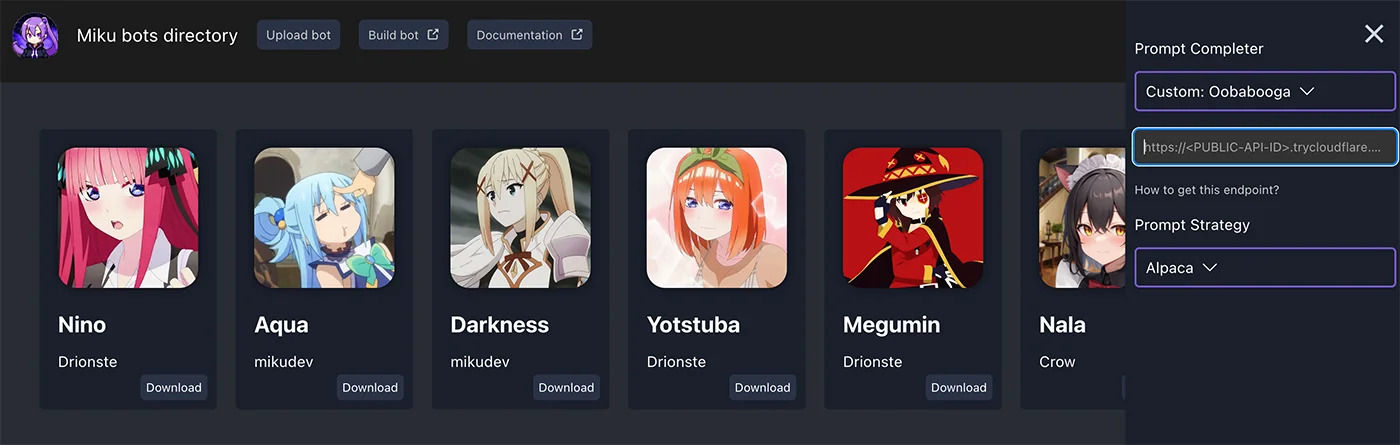
User reviews (0)