Website profiles · Technology insights · Alternatives

creative-woodturner.com

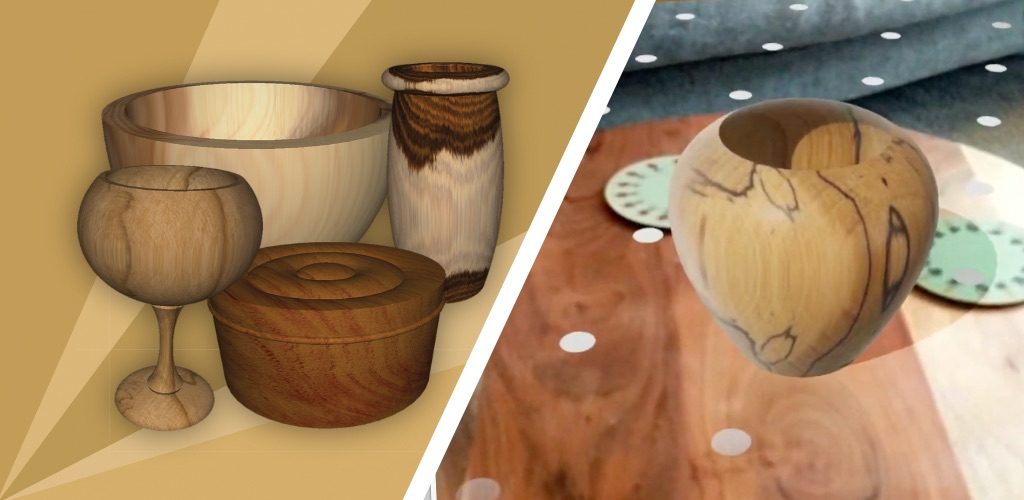
Design your woodturnings on your phone or tablet and see them come to life in stunning 3D realism. Over 140 wood images, a unique catenary curve tool, dimensions and printable plans.

No paid content found
Visit website
Profile views 1 Outbound visits 0 Normal
Creative Woodturner Full homepage screenshot

At a glance

Category
Hobbies & Collecting
Language
English
Paid-content signal
No paid content foundObserved
Registered
2003
Hosting
FastlyInferred
HTTPS certificate trusted
PassedObserved
Last updated

Website review

This review may include AI-generated content and is not individually verified. Domain, certificate and other facts come from the observed data on this page.

What is Creative Woodturner?

Creative Woodturner is a mobile design app for woodturners, available for iOS and Android. You sketch a turning on your phone or tablet and the app renders it in 3D, so you can judge the shape before committing to a block of wood. It includes over 140 wood images for realistic surface previews, a catenary curve tool for drawing natural-looking curves, dimension entry, and printable plans.

Who it suits

  • Hobby turners who want to try a form—a bowl profile, a vase, a spindle—without wasting stock on a shape that doesn't work.
  • Turners without a desktop CAD setup, since the whole workflow lives on a phone or tablet.
  • Anyone who likes working from printed plans at the lathe rather than a screen.

Where the value lies

The 3D preview and wood textures are the practical core: they let you compare proportions and grain appearance quickly. The catenary tool is the distinctive feature—catenary curves are a natural way to get flowing, stable-looking profiles, and drawing them by hand is fiddly. Printable plans bridge the gap between screen design and workshop execution.

Trade-offs to weigh

A mobile app is convenient but constrains precision compared with desktop CAD, and screen size limits how much detail you can see at once. If your work involves complex segmented or multi-axis pieces, check whether the app's dimension and curve tools cover that before relying on it.

Next step: if you already turn simple forms and want faster iteration, install the app and redraw a piece you've made before—comparing the 3D preview to the finished object is the quickest way to judge whether the rendering matches your eye. For broader turning guidance alongside design work, American Association of Woodturners publishes technique resources worth pairing with the app.

Can Creative Woodturner replace sketching a woodturning design on paper?

Yes, for most design work: Creative Woodturner is built to let you design woodturnings on a phone or tablet and view them in 3D, so it can replace paper sketching for the shape-development stage. It is not a full substitute for every paper habit, though.

Where it replaces paper well

  • Developing profiles and curves. The 3D view shows the form as you shape it, which paper cannot do. The catenary curve tool is useful for vessel and bowl profiles where a natural hanging-curve shape is wanted.
  • Judging proportions. Rotating a 3D model makes it easier to spot a form that looks fine in flat side view but clumsy in the round.
  • Recording dimensions. Dimensions and printable plans mean the design can move from idea to workshop without redrawing it on paper.
  • Visualising timber. With over 140 wood images, you can test how a form reads in different woods before committing to a blank — a decision paper sketches usually leave until the lathe.

Where paper still has a role

  • Rough, fast ideation. A pencil is quicker for throwaway thumbnail sketches in the first few minutes.
  • Full-size templates. Printable plans cover many needs, but some turners still prefer a full-scale paper template at the lathe for checking a curve by eye.
  • Working without a device. Paper does not need charging, and dust and shavings are less of a concern.

A practical approach: sketch loosely on paper to generate ideas, then model the promising ones in the app to check the form in 3D and settle dimensions before printing a plan. If you want to compare with other design routes, American Association of Woodturners is a useful general reference for turning practice.

How does the catenary curve tool help when designing a bowl or hollow form?

The catenary curve tool helps you shape the profile of a bowl or hollow form as a smooth, natural-looking curve rather than a series of guessed points. On Creative Woodturner Creative Woodturner, it is presented as a distinctive feature for drawing turning profiles, so you can define a flowing wall or rim curve and then check it in 3D before cutting wood.

What it does for a bowl or hollow form

  • Gives a continuous profile: A catenary is the curve a hanging chain forms. Applied to a turning, it produces an even, graceful sweep from rim to base or across a hollow form's shoulder, avoiding flat spots and kinks.
  • Speeds up the design stage: Instead of plotting many points by hand, you adjust the curve and see the result. This suits turners who have a shape in mind but find it tedious to translate into exact coordinates.
  • Supports proportion decisions: You can compare a deeper, more closed bowl against a shallower, more open one before committing to a blank. The curve makes the difference in wall flow easy to judge.
  • Pairs with 3D preview and plans: The site describes 3D realism, wood images and printable plans, so a curve you like can be reviewed visually and carried to the lathe as a reference.

Who benefits most

Designer Practical use
Beginner Uses the curve as a guide to avoid lumpy or unbalanced profiles.
Experienced turner Tests variations quickly, especially on hollow forms where the shoulder curve matters.
Turners working from plans Refines a profile digitally, then prints it for the workshop.

A useful next step: sketch your intended bowl profile on paper first, then recreate it with the catenary tool and compare the 3D view against your sketch. If the curve feels too tight at the rim or too straight near the base, adjust before choosing a blank. The tool is a design aid, not a guarantee of a good cut, so treat the curve as a starting point and confirm wall thickness and safe hollowing depth with your own turning practice.

Can I print plans from the app to take to the lathe?

Yes. Creative Woodturner is described as producing printable plans alongside its 3D views and dimensions, so you can work out a design on your phone or tablet and then carry a paper copy to the lathe rather than propping up the device near shavings and dust.

How that fits a real workflow

A turner sketching a bowl or hollow form at the kitchen table can adjust proportions in 3D, check the dimensions, then print the plan before heading to the workshop. The printed sheet keeps the key numbers in front of you while both hands are busy, and it survives the occasional touch of dusty fingers better than a screen.

Decide based on where you design versus where you turn:

Situation Printed plan helps because
Workshop is separate from where you design No need to carry or protect a device
You turn with wet finish, glue or shavings around Paper can be replaced cheaply
You want to annotate as you go Margins invite pencilled notes

A practical next step

Before committing a design, test one print and check that the dimensions are legible at arm's length from the lathe and that the plan shows the profiles you actually need to check with calipers. If the printout is too small or lacks a dimension you rely on, that is the detail to verify in the app before you start a blank.

For broader turning reference alongside the app, the Craft Supplies USA catalogue and the Wood Magazine project pages show how other turners lay out plans and dimensioned drawings.

Is Creative Woodturner suitable for beginners or only experienced turners?

Creative Woodturner is designed to be approachable for beginners while still offering depth for experienced turners. Its core appeal is visual: you design a turning on a phone or tablet and see it rendered in realistic 3D, so someone new to the craft can understand proportions and shape before ever touching a lathe. The presence of dimensions and printable plans also supports less experienced users who want a concrete reference at the bench.

Where it helps beginners

  • Seeing the shape before cutting: 3D realism reduces guesswork about how a profile will look in the round.
  • Printable plans and dimensions: useful for planning stock sizes and step-by-step work.
  • Wood image library (140+): lets a novice experiment with how different woods might read in a finished piece.
  • The catenary curve tool: a distinctive feature that helps produce natural-looking curves, which beginners often find hard to judge freehand.

Where experience matters

The software is a design aid, not a teaching course. It won't replace learning tool technique, sharpening, or safe lathe practice. Experienced turners will get the most from the curve tool and realistic previews for prototyping complex forms, while beginners should treat it as a planning companion alongside hands-on instruction.

A practical next step: if you're starting out, design one simple bowl or spindle, print the plan, and turn it—then compare the result with the 3D preview to calibrate your eye. For structured technique learning, pair the app with a recognised turning resource such as American Association of Woodturners.

Does the app run on both iOS and Android, and can I use it on a tablet?

Yes. Creative Woodturner is listed as a woodturning design app for both iOS and Android, so the same toolset is intended to work on either phone platform. The description also refers to designing on a "phone or tablet," which indicates tablet use is part of the intended experience rather than an afterthought — useful for woodturners who want a larger canvas for 3D previews and dimension work.

What that means in practice

  • Cross-platform: You can choose your device based on what you already own rather than being locked to one ecosystem. A turner with an Android phone and an iPad, or vice versa, should check the store listing for the specific device before relying on it.
  • Tablet fit: The app's core features — 3D realism previews, over 140 wood images, the catenary curve tool, dimensions and printable plans — benefit from screen space. A tablet makes the 3D view and dimension entry more comfortable; a phone suits quick sketching and reference checks at the lathe.
  • Trade-off: Larger screens help visual design work but are less handy in a dusty workshop. Many turners design on a tablet and print plans to take to the lathe, which matches the app's printable-plans feature.

Next step

Before buying, open the official App Store or Google Play listing for the app on your actual tablet model and confirm the current compatibility and minimum OS version shown there. If you mainly want to design away from the workshop, a tablet is the stronger choice; if you want reference checks while turning, your phone is likely enough.

Related questions

More questions →
Does Aldersgate United Methodist Church Have a Mobile App?

As of the information available on the church's website, Aldersgate United Methodist Church in Wichita, Kansas does not advertise a dedicated mobile app. The site presents itself as the primary online hub for the congregation, with its mission of "Making Disciples of Jesus Christ for the Transformation of the World" front and center. If a mobile app exists, it is not prominently featured on the homepage. The most reliable way to confirm is to contact the church office directly or check the website for any new announcements.

That said, "no app advertised" is not the same as "no app at all." Churches sometimes launch apps quietly, link them only in weekly bulletins, or roll them out through a congregation-wide email. This article explains what a church mobile app usually includes, how to verify whether Aldersgate has one, and how to stay connected in the meantime.

What a Church Mobile App Typically Offers

Most church apps are built around a handful of core functions. If Aldersgate launches or already operates one, you can reasonably expect some combination of the following:

  • Sermons and worship — audio or video of past services, sometimes with notes or discussion questions.
  • Events calendar — worship times, Bible studies, youth group meetings, outreach days, and seasonal services.
  • Giving — online donations via credit card, debit card, or bank transfer, often with recurring gift options.
  • Prayer requests — a form or feed where members can submit and pray for needs.
  • Groups and ministries — sign-ups, rosters, and communication for small groups, choirs, or volunteer teams.
  • Push notifications — reminders for services, weather cancellations, or special announcements.
  • Connection cards — a digital way for first-time visitors to share contact information.

Not every app includes all of these. Some churches use a general-purpose platform that bundles them together; others rely on separate tools for giving and communication.

How to Check Whether Aldersgate Has an App

Because app availability changes and the website may not always reflect the latest tools, verify through more than one channel:

  1. Search the website. Look for a menu item labeled "App," "Mobile," "Connect," or "Media." Check the footer, too, since app links are sometimes placed there.
  2. Search your phone's app store. Try terms like "Aldersgate United Methodist," "Aldersgate Wichita," or "Aldersgate Church." Be careful to match the correct city and denomination, since other churches share the Aldersgate name.
  3. Call or email the church office. This is the fastest way to get a definitive answer. Ask specifically: "Do we have a mobile app, and if so, what is it called and where do I download it?"
  4. Ask an usher or greeter on Sunday. They often know about new tools before they appear online.
  5. Check the weekly bulletin or newsletter. App launches are frequently announced there first.

If you find an app, confirm it is officially affiliated with the church before entering any personal or payment information.

If There Is No App: Other Ways to Stay Connected

A dedicated app is convenient, but it is not the only way to remain plugged into church life. These alternatives cover most of what an app would do:

Need Alternative
Worship times and location Church website homepage
Sermons Website media page, podcast, or social media
Events Website calendar, bulletin, or email newsletter
Giving Online giving link on the website, or giving during service
Prayer requests Email, phone call, or prayer chain
Announcements Email newsletter, social media, or Sunday bulletin

For a first-time visitor, the simplest starting point is the website's contact page: send a message introducing yourself and ask how the church prefers to communicate. For a long-time member, the church office can add you to the email list or connect you with the right ministry leader.

A Practical Checklist for Getting Connected

Use this sequence whether or not an app exists:

  1. Visit the church website and note the worship times and address.
  2. Find the "Contact" or "About" page and save the office phone number and email.
  3. Sign up for the email newsletter if a sign-up form is available.
  4. Follow the church on any social media accounts linked from the site.
  5. Ask the office directly about a mobile app, online giving, and prayer request channels.
  6. If an app is confirmed, download it, create an account, and enable notifications for the updates you want.

A Note on Accuracy

App availability, features, and download links can change at any time, and a website may lag behind those changes. Nothing in this article should be treated as a guarantee that Aldersgate United Methodist Church does or does not currently offer an app. Treat the church office as the authoritative source, and confirm details before relying on any tool for giving or personal information.

If you are a member or visitor hoping for an app, it is also reasonable to ask the church whether one is planned. Congregations often gauge interest before investing in a new platform, and a simple question can move the conversation forward.

Can Creative Woodturner Produce Dimensions and Printable Plans?

Yes. Creative Woodturner is built to carry a design from the screen into the workshop: you can add dimensions to a design and generate printable plans, and those plans work alongside the 3D preview rather than replacing it. This suits turners who want to sketch a form on a phone or tablet and then take measured drawings to the lathe. The details below reflect what the app's own description states; specifics such as paper sizes, export formats, or whether plans can be shared as files are not covered there, so check inside the app if those matter to you.

What the app says it does

Creative Woodturner is woodturning design software for iOS and Android. Its stated features include:

  • Designing woodturnings on a phone or tablet
  • Viewing the design in 3D realism
  • A library of over 140 wood images
  • A catenary curve tool
  • Dimensions for designs
  • Printable plans

The dimension and print features are listed as core capabilities, not add-ons, which suggests they are part of the normal design workflow.

How dimensions and plans fit the workflow

The intended sequence is straightforward:

  1. Shape the form. Draw the profile of your turning using the design tools, including the catenary curve tool for natural hanging-curve shapes.
  2. Apply a wood image. Choose from the wood library so the 3D preview shows grain and colour.
  3. Add dimensions. Mark the measurements that matter for your project — diameters, heights, and similar references.
  4. Generate printable plans. Produce a plan document you can print and keep at the bench.
  5. Verify against the 3D preview. Use the realistic view to sanity-check proportions before committing stock.

The 3D preview and the printed plan serve different purposes: the preview helps you judge shape and appearance, while the plan gives you numbers to measure and cut against. Using both together is the point of the pairing.

What to check before relying on it

Because the source material does not specify every detail, confirm these points in the app itself before you build a workflow around it:

  • Units and precision. Whether you can work in metric, imperial, or both, and how fine the dimension increments are.
  • Plan layout. What a printed plan actually contains — profile drawing, dimension callouts, wood image, or a combination.
  • Printing and sharing. Whether plans print directly from the device, and whether they can be saved or sent as files.
  • Device fit. Plans are most useful on a tablet where the drawing is legible; on a phone, check that printed output remains readable.

Who this is for

This combination is most useful if you design away from the shop — on a commute, at a desk, or while planning a project — and want a measured reference when you return to the lathe. If you only ever turn by eye and feel, the dimension and print features will matter less; the 3D preview and wood library would be the main draw. If you routinely work from drawings, the printable plans are the feature to test first.

How Creative Woodturner's 3D Preview and Wood Image Library Work

Creative Woodturner renders your woodturning designs as 3D models on your phone or tablet, and lets you apply any of its 140+ wood images to those models. The point is to judge shape and appearance before you commit wood to the lathe: you see the form in three dimensions and get a sense of how a species' grain and colour sit on that form. This applies to anyone designing on iOS or Android who wants a visual check before turning; it is a design aid, not a substitute for your own judgement about the wood you actually have on hand.

What the 3D preview shows you

The preview is a rendered 3D view of the piece you are designing, not a flat profile drawing. That matters for turned work because a profile only tells part of the story — a curve that looks right in silhouette can read differently once it has volume and you can rotate around it.

In practice the preview supports decisions like:

  • Checking the flow of a curve around the whole form rather than along one edge.
  • Comparing proportions — how a narrow stem reads against a wide bowl, for example — before you cut.
  • Spotting shapes that will look awkward in the round, which is hard to judge from a 2D outline.

The preview sits inside the mobile design workflow: you design on the device, view the result in 3D, and adjust. The site also mentions dimensions and printable plans, so the 3D view is one part of a process that ends with measurements you can take to the lathe.

How the wood image library works

The library holds over 140 wood images. You apply one to your design so the 3D model is shown with that wood's appearance rather than a neutral surface.

The useful distinction is between form and appearance:

Question What answers it
Is the shape right? The 3D preview of the form
Will this wood suit this piece? Applying a wood image from the library

Switching wood images on the same design lets you see how a lighter or darker wood, or a strongly figured one, changes the read of a piece — useful when you are deciding what to turn a design in, or whether a shape needs simplifying for a busy grain.

A concrete example

Say you are designing a goblet with a long, thin stem and a flared bowl. In profile the stem may look elegant. In the 3D preview you rotate the model and notice the flare makes the bowl look top-heavy against the slim stem. You widen the stem slightly and re-check. Then you apply a strongly figured wood image and see that the figure competes with the curve you worked to get right — so you either simplify the profile or choose a plainer wood. All of that happens on the device before any wood is mounted.

Limits worth knowing

  • The preview shows appearance, not structural behaviour. It will not tell you whether a thin stem is sound in a given blank, or how a specific board's grain will actually run. Those remain your calls at the lathe.
  • The wood images are representations of species appearance, not a guarantee that the piece of wood in your shop will match.
  • The site describes the software as being for iOS and Android; check your own device and OS version against the app store listing before relying on it.

Where it fits in a workflow

Use the 3D preview and wood library as the decision stage: settle the shape and the wood choice on screen, then use the dimensions and printable plans to carry that decision into the workshop. The value is in catching proportion and appearance problems while they are still free to fix.

Which devices does Creative Woodturner support?

Creative Woodturner is available for iOS and Android, and it is designed to be used on phones and tablets. The site does not indicate a desktop version, so the practical answer is: use it on a supported iPhone, iPad, or Android phone/tablet rather than expecting a Windows or macOS application.

Supported platforms at a glance

Device type Supported? What the site indicates
iPhone Yes iOS app
iPad Yes iOS app, suited to tablet use
Android phone Yes Android app
Android tablet Yes Android app, suited to tablet use
Desktop/laptop (Windows, macOS) Not indicated No desktop version is mentioned

What this means in practice

The software is built around designing woodturnings on a phone or tablet and viewing them in 3D. That makes a tablet the more comfortable option for detailed design work, while a phone works for quick sketching and review. If your workflow depends on a desktop computer, the site gives no indication that one is supported, so plan around a mobile device.

Checking before you commit

  • Confirm your device runs a current version of iOS or Android.
  • If you intend to use it mainly for design rather than quick viewing, consider a tablet for the larger screen.
  • The site does not state a desktop option, so do not assume you can move the same work to a laptop.

Common sticking points

The main mismatch is expecting a desktop tool. Creative Woodturner is presented as a mobile app for iOS and Android; there is no indication of a browser-based or desktop edition. If you need to design on a computer, this is not the product for that use case.

What is Creative Woodturner?

Creative Woodturner is a woodturning design app for iOS and Android that lets you plan turnings on a phone or tablet and preview them in 3D. It suits woodturners who want to work out proportions, curves, and dimensions digitally before committing wood to the lathe. The app's own description highlights over 140 wood images, a catenary curve tool, dimensioning, and printable plans.

What the app does

The core workflow is design-first: you build a turning on screen, apply a wood appearance, and check the result in a 3D view before you turn anything. According to the site, the main capabilities are:

  • 3D preview — see the design "come to life in stunning 3D realism" on your device.
  • Wood library — over 140 wood images to apply to your designs.
  • Catenary curve tool — a distinctive shaping aid for laying out curves; the site calls it "unique."
  • Dimensions — size your design with measurements rather than eyeballing it.
  • Printable plans — output plans you can take to the shop.

Who it is for

It is aimed at woodturners who want to plan designs digitally rather than sketch on paper or improvise at the lathe. The phone/tablet format means the design step can happen away from the workshop, with the printable plan carrying the result to the bench.

Good fit

  • You already turn and want to test shapes and proportions before cutting.
  • You want a visual sense of how a wood species will look on a finished form.
  • You like having measured, printable references at the lathe.

Less relevant if

  • You do not turn wood or plan to.
  • You prefer paper sketches and do not want a design step on a device.

Platform and availability

The app is described as available for both iOS and Android, so it is not tied to a single mobile platform. The source material does not state pricing, subscription terms, or account requirements; check the App Store or Google Play listing for current cost and device requirements before installing.

Practical example

Suppose you want to turn a bowl with a sweeping outer curve but are unsure how deep the profile should sit. You could lay out the profile in the app, use the catenary curve tool to shape the outer wall, apply a wood image close to your blank, and check the 3D view. Adjust dimensions until the proportions look right, then print the plan and use it as a reference while turning. The value is in catching a shape you dislike on screen rather than in a half-turned blank.

Bottom line

Creative Woodturner is a mobile design tool for woodturners, built around 3D preview, a large wood-image library, curve and dimension tools, and printable plans. If you turn wood and want to plan shapes digitally on a phone or tablet, it is worth checking the store listing for current pricing and compatibility; if you do not turn, it offers little.

Website Overview

An established domain and managed infrastructure suggest continuity of operations and may support dependable delivery, although neither guarantees service quality. Several search or sharing settings need attention. Together they may make snippets, preview images or preferred URLs less consistent across platforms.

Domain and Registration

Registered in 2003, this domain has about 23 years of history. That suggests continuity, although ownership and purpose may have changed. Transfer-protection status is present, helping reduce the risk of unauthorized domain transfers. The domain uses the common .com extension, which is not an independent safety signal.

DNS and Email

MX records exist, but SPF, DKIM and DMARC were not detected. Protection against domain impersonation may be incomplete. The lowest TTL is 60 seconds, supporting rapid record changes at the cost of more frequent lookups. Nameservers are provided by uk2.net, indicating managed DNS hosting. MX records point to the Google Workspace email service. No CNAME was found; the observed records resolve directly to addresses.

TLS and Certificates

The certificate uses an RSA 2048-bit public key, offering broad client compatibility. The server supplied a complete certificate chain. No organization name is present in the certificate; the available fields are consistent with domain validation. The certificate was issued by Let's Encrypt, commonly associated with automated certificate services. The certificate's total validity is about 89 days, consistent with a short renewal cycle.

HTTP and Browser Security

The checked browser-security headers were not detected, leaving fewer explicit browser-side safeguards. CORS permits any origin to read this response. This is common for public resources; sensitive responses need narrower handling. No X-Powered-By header was found, reducing one common source of backend fingerprinting information. The x-cache, x-served-by, via response header indicates a CDN or caching proxy in the delivery path. No obvious internal addresses or debug information were found in the headers.

Technology Stack Analysis

The public page identifies Fastly without precise versions, leaving fewer clues for version-specific scanning.

Search and Social Sharing

The title has 69 characters and may be truncated in search results. The meta description has 182 characters and may be shortened in search results. No homepage canonical URL was detected. If duplicate URLs exist, consolidation may be less explicit. Twitter Card metadata is configured. The observed directives allow indexing and link following.

Hosting and Email

DNSuk2.net
HostingFastly
EmailGoogle Workspace
Approximate IP geolocation (inferred; a CDN or proxy may differ from the origin server) United States flagUnited States Inferred 185.199.108.153

Registration details

RDAP / WHOIS

RegistrareNom, LLC
Registered2003-01-23
Expires2027-01-23
Domain statusclient transfer prohibited
Nameserversdns1.uk2.net、dns2.uk2.net、dns3.uk2.net
DNSSECunsigned

DNS records

DNS

TypeNameValueTTLPriority
Acreative-woodturner.com185.199.108.15386400—
Acreative-woodturner.com185.199.109.15386400—
Acreative-woodturner.com185.199.110.15386400—
Acreative-woodturner.com185.199.111.15386400—
MXcreative-woodturner.comASPMX.L.GOOGLE.com601
MXcreative-woodturner.comALT1.ASPMX.L.GOOGLE.com605
MXcreative-woodturner.comALT2.ASPMX.L.GOOGLE.com605
MXcreative-woodturner.comALT3.ASPMX.L.GOOGLE.com6010
MXcreative-woodturner.comALT4.ASPMX.L.GOOGLE.com6010
NScreative-woodturner.comdns1.uk2.net86400—
NScreative-woodturner.comdns2.uk2.net86400—
NScreative-woodturner.comdns3.uk2.net86400—

TLS and certificates

TLS / SSL

AssessmentNormal configuration
Supported protocolsTLSv1.2、TLSv1.3
Negotiated protocolTLSv1.3
Certificate subjectcreative-woodturner.com
IssuerLet's Encrypt
Valid until2026-12-26T19:46 · Remaining when checked: 58 days
Verification detailsCertificate trust: Passed · Hostname match: Passed

HTTP response headers

HTTP

HeaderValue
content-typetext/html; charset=utf-8
cache-controlmax-age=600
serverGitHub.com
access-control-allow-origin*

Identified technologies

Fastly

Pages, Search and Sharing

Meta descriptionDesign your woodturnings on your phone or tablet and see them come to life in stunning 3D realism. Over 140 wood images, a unique catenary curve tool, dimensions and printable plans.
Canonical URLNot detected
LanguageEnglish (default)
Twitter Cardsummary_large_image
All bots 1 allowed · 0 disallowed
  • Allow/

No sitemaps found

User reviews (0)

  • No reviews yet.