
 简体中文
简体中文 English
Website review
This review may include AI-generated content and is not individually verified. Domain, certificate and other facts come from the observed data on this page.
What is Femur by Luke Phillips?
Femur is the personal studio site of Luke Phillips, a design engineer and musician who builds expressive, accessible music tools across software, hardware and the web. The site's own framing is “making musical things that anyone can play” — the through-line is instruments and learning products where space, colour, movement and shape do the work that knobs, sliders, menus and numbers usually do.
What you'll find there
| Project | Type | What it is |
|---|---|---|
| Funputs | Audio plugins | A suite of MIDI instruments built around visual, gestural control — Comet (an expressive XY pad), Orbit (tunes you to any scale) and Cluster (generates chords). Works with a mouse, or a phone/tablet paired for wireless multi-touch. |
| ROLI | Software engineering & R&D | Work across piano learning, interactive notation, audio, hardware integration and conversational AI, including AI Music Coach and Airwave; computer vision gives real-time finger-position guidance and gesture-based sound shaping. |
| BlokDust | Browser instrument | An open-source, browser-based environment where you join blocks to build synths, process your voice, remix samples and create self-playing systems. |
| Omni | Web instrument | A tactile way to play and learn scales from cultures around the world, with a pitch constellation, harp, effects, harmonies and loop recording. |
| Theremin | Web instrument | A multi-touch Web Audio synthesiser for shaping waveforms, delay, feedback and “scuzz” in the browser. |
Who it's for
Two audiences get the most from it. First, musicians and tinkerers who want to try instruments immediately — several are playable in the browser with no install, which makes them easy to test before committing attention. Second, people hiring or collaborating in music tech: the project list doubles as a portfolio showing frontend and UX engineering, creative coding, audio, MIDI and real-time interaction, plus long-form product work at ROLI.
A practical next step: if you're evaluating the design approach, open BlokDust or Omni first — they show the philosophy fastest, since the interaction model is the product. If you're assessing the engineering depth, read the Funputs and ROLI entries, where the harder problems (multi-touch, computer vision, hardware integration) sit. For context on the wider music-tooling landscape, see ROLI and GitHub, where the open-source work is hosted.
How can I try or play the music tools like Funputs, BlokDust, Omni, and Theremin?
Funputs, BlokDust, Omni and Theremin are all playable directly from Luke Phillips' site at Femur, where each project has its own "Visit" or "Play" link. BlokDust, Omni and Theremin are browser instruments, so you can open them in a modern desktop browser and start making sound without installing anything. Funputs is a suite of MIDI instruments rather than a single web toy, and the site notes you can use your mouse or pair a phone or tablet for wireless multi-touch control.
What to expect from each
- Funputs — A set of MIDI instruments built around space, colour, movement and shape instead of the usual knobs and menus. Comet is an expressive XY pad, Orbit tunes you to any scale, and Cluster generates chords. Best if you want a more tactile, visual way to play and shape notes.
- BlokDust — An open-source, browser-based environment where you join blocks to build synths, process your voice, remix samples and create self-playing systems. Best if you enjoy patching and building rather than just performing.
- Omni — A web instrument for playing and learning scales from different cultures, with a pitch constellation, harp, effects, harmonies and loop recording. Best if you want to explore tuning and scale systems.
- Theremin — A multi-touch Web Audio synthesiser for shaping waveforms, delay, feedback and scuzz in the browser. Best for quick, hands-on sound design and experimentation.
A practical way to start
Open Theremin or Omni first if you want something immediate and playful, since both are single-page browser instruments with no setup. Move to BlokDust when you want to build a patch or process audio, and try Funputs when you want a more expressive, performance-oriented MIDI setup. If you are on a laptop, a mouse works, but a touchscreen or paired phone or tablet makes the multi-touch instruments feel much more natural.
What accessibility features make these instruments playable by anyone?
The site frames accessibility around input flexibility and visual-first control rather than around a formal list of assistive features. Luke Phillips describes the goal as “expressive, accessible music tools” and “making musical things that anyone can play,” and several projects show what that means in practice.
What the page actually shows
- Mouse, touch and multi-touch as equal inputs. Funputs is described as playable with a mouse, or by pairing a phone or tablet for wireless multi-touch control. That matters for anyone who finds a mouse or keyboard awkward, and it lets a phone or tablet become the instrument surface.
- Sound controlled by space, colour, movement and shape. Funputs replaces knobs, sliders, menus, numbers and text with visual elements — Comet is an XY pad, Orbit tunes to any scale, Cluster generates chords. Less reading and less fine numeric adjustment lowers the barrier for beginners, younger players and anyone who struggles with dense software interfaces.
- Scales handled for the player. Orbit tuning to any scale, Cluster generating chords, and Omni’s approach to scales from many cultures mean a player can produce something musical without knowing music theory first.
- Browser-based instruments. BlokDust, Omni and Theremin run in the browser, so trying them does not require installing or configuring music software — useful on shared, borrowed or locked-down devices.
- Learning support through vision and gesture. At ROLI, Phillips worked on piano learning, interactive notation and AI Music Coach, including computer vision giving real-time guidance on finger positions, and gesture-based expressive sound shaping.
Where the limits are
These are input and cognitive-accessibility choices. The page does not claim screen-reader support, keyboard-only operation, switch access, captions or hearing-related accommodations, and visual interfaces built on colour and movement can create their own barriers for blind or low-vision users. Treat “anyone can play” as a design ambition demonstrated by flexible inputs, not as a verified conformance claim.
Practical next step
If you are choosing a tool for a specific player, test the input path first: open Femur in a browser, try Funputs with a mouse, then pair a phone or tablet and repeat. If the touch surface works where the mouse does not, that is usually the deciding factor; if the player needs screen-reader or keyboard-only operation, ask before relying on it.
How does Funputs replace traditional knobs and sliders with space, colour, and shape?
Funputs is built on the premise that most music software relies on knobs, sliders, menus, numbers and text, and that a lot of that can instead be handled with space, colour, movement and shape. Per the site's own description, Funputs is a suite of MIDI instruments, and three named components show how the substitution works in practice: Comet is an expressive XY pad, Orbit tunes you to any scale, and Cluster generates chords. Control is by mouse, or by pairing a phone or tablet for wireless multi-touch control.
What each piece replaces
- Comet (XY pad): a two-dimensional surface replaces separate knobs for two parameters at once. Instead of reading a number and turning a dial, you place a point in space — position carries the value, and movement carries the change over time.
- Orbit (scale tuning): choosing a scale becomes a spatial or visual selection rather than picking from a list of note names. The constraint is built into the interface, so you are steered toward in-scale notes instead of needing to know the theory first.
- Cluster (chord generation): chords are produced as shapes or groupings rather than assembled note-by-note through menus. This lowers the entry bar for someone who wants harmonic movement without keyboard voicing knowledge.
Why that matters for different players
A beginner benefits most from Orbit and Cluster: the interface removes wrong notes and menu navigation, so a first session produces something musical quickly. An experienced player may find the XY pad the more interesting part, because continuous two-axis gesture is genuinely different from a knob — it suits sweeps, filter-style moves and expressive phrasing that a single rotary control cannot capture. The trade-off is precision: knobs and numeric fields are easy to set to an exact value and to reproduce, while spatial and gestural controls are better at feel and worse at exact recall. If your work needs repeatable, documented parameter values, expect to keep some conventional controls alongside these.
The wireless multi-touch option is the practical detail worth noting. Pairing a phone or tablet turns the touchscreen into a control surface, which means the "space" in the interface is not just a metaphor on screen — you can physically place fingers on it. For a reader deciding whether to try Funputs, the useful test is whether your current friction comes from hunting through menus and numbers, or from needing exact, recallable settings. The first case fits this approach; the second is where it will feel limiting.
To see the instruments and how they are played, start at Femur — Luke Phillips.
What is Luke Phillips's role and experience at ROLI with AI Music Coach and Airwave?
Luke Phillips describes himself as a design engineer and musician who worked at ROLI from 2019 to 2026, spanning software engineering and R&D. His account of that period covers piano learning, interactive notation, audio, hardware integration and conversational AI — with AI Music Coach and Airwave named as specific projects in that AI work.
Two threads stand out in how he describes the role:
- Computer vision for learners. He says he integrated computer vision into ROLI's platforms to give real-time feedback on finger positions for people learning piano. This is the learning-assistant side of the work: watching a player's hands and telling them something useful about what they just did.
- Gesture for expression. The same integration let musicians shape sound through gesture rather than only through keys or sliders, which is the performance side of the same technology.
AI Music Coach and Airwave sit at the intersection of those two ideas — a coach implies guidance and feedback over time, while gesture-driven sound shaping implies continuous, expressive control. His broader portfolio points the same direction: browser instruments such as BlokDust and Omni, plus the Funputs MIDI instrument suite, all aim at making musical ideas immediately playable rather than buried in menus.
For a concrete read on fit: if you are hiring for a music-learning product, the relevant evidence is the finger-position feedback work, because it shows he has handled the messy real-time perception problem that most educational tools avoid. If you are hiring for an expressive instrument or a creative tool, the gesture work and the instrument portfolio are the closer match. The distinction matters, because a coach is judged on whether learners improve, while an instrument is judged on how it feels in the hand.
A useful next step is to look at the ROLI project write-ups alongside his own instruments and ask which of the two problems — measuring a learner or extending a performer — your product actually needs solved first.
How can I contact Luke Phillips or contribute to open-source projects like BlokDust?
Contact Luke Phillips through the contact link on Femur, his personal site. That is the direct route for project inquiries, collaboration or questions about his work. For BlokDust specifically, the site describes it as open-source and links to a GitHub presence, so the repository is the practical place to start: check its README, open issues and contribution guidelines before submitting changes.
Contributing to BlokDust
- Start small. Fix a bug, improve documentation or add a preset before proposing a large feature.
- Use issues first. Describe the problem or idea and wait for a maintainer's response, so effort isn't wasted on a direction the project won't take.
- Match the existing style. Browser audio projects have particular constraints around performance and latency; follow the patterns already in the codebase.
- Test in a real browser. BlokDust runs on Web Audio, so verify changes with actual audio output, not just unit tests.
If your interest is broader than BlokDust, the same GitHub profile likely covers his other browser instruments, such as Omni and Theremin, both listed on the site. A concise message stating what you want to change and why tends to get a faster reply than a general offer to help.
 Fastly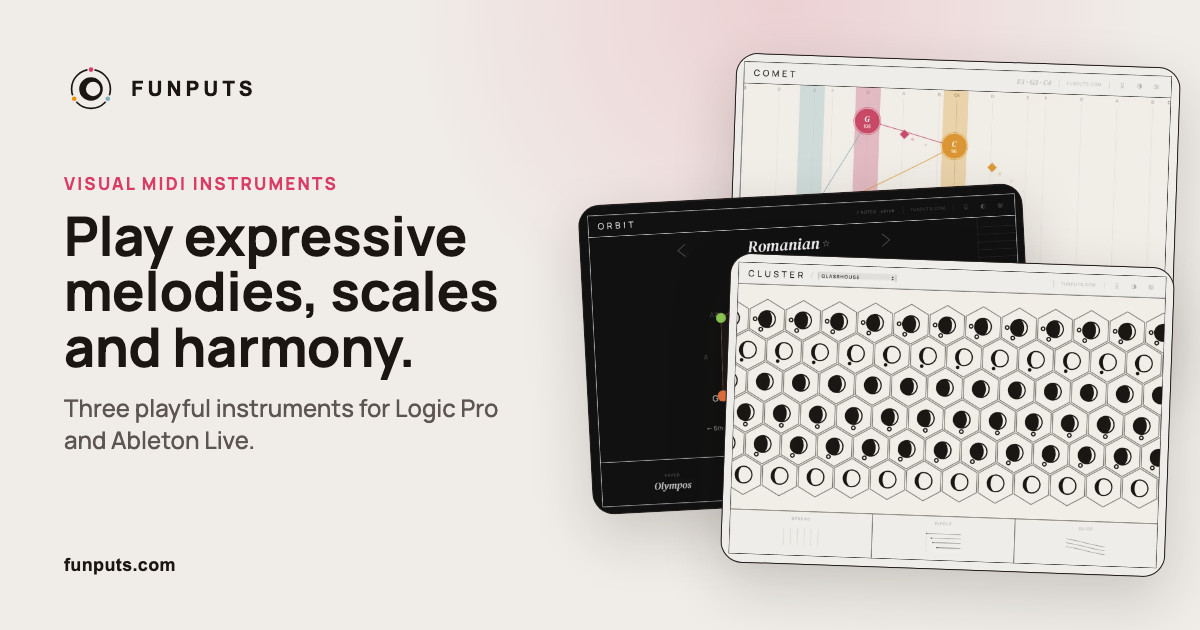
User reviews (0)