
 简体中文
简体中文 English
Website review
This review may include AI-generated content and is not individually verified. Domain, certificate and other facts come from the observed data on this page.
What is FixFirst?
FixFirst is a free web tool that reads a blood test report and returns a short, ranked action plan instead of a full data dump. You upload a lab PDF, or even a photo of the page, and it highlights the three markers most likely to affect your health, explains why they matter, and suggests what to do next. Its stated goal is speed and focus: results in about 45 seconds, no account required.
What it does
- Ranks flagged markers by clinical urgency rather than listing all of them equally.
- Personalises the ranking by age, sex and lifestyle, according to the site.
- Adds context for each priority, such as an elevated LDL, a low vitamin D or a borderline ferritin, with a suggested plan.
- Anchors its guidance in clinical guidelines and notes physician review.
- Offers supporting material: marker guides, test-by-symptom pages, panel explanations and browser-based calculators for things like eGFR and LDL.
The framing is aimed at a specific frustration: being told your labs are "fine" while you still feel unwell. FixFirst argues that a normal range is a population average, not a personal target, and that the useful question is which few numbers to act on first.
Who it suits, and what to watch
It fits people who have a report in hand and feel overwhelmed by 15 flagged values across 20 pages, or who want a plain-language second read before a follow-up appointment. It is less suited to anyone who wants a diagnosis, a full interpretation of every marker, or advice on medication.
The trade-off is inherent to the design. Prioritising three markers makes the output readable, but it deliberately hides the rest. Several early users quoted on the site praise exactly that narrowing, including one who submitted a report in Bulgarian. Treat the ranking as a prompt for a conversation with your clinician, not a substitute for one, and check that the values it extracted match your original report.
A practical next step: open the sample report first to see the output format, then use it on your own PDF and bring the top three items to your next appointment as questions. If you want a broader reference alongside it, MedlinePlus explains individual lab tests in plain language, and Testing.com covers what specific markers measure.
How does FixFirst decide which blood test markers to prioritize?
FixFirst ranks markers by how much they are likely to affect your health and how urgently they may need attention, then shows only the top three. According to the site, it weighs your values against optimal ranges rather than only standard "normal" cutoffs, and personalizes the ranking by age, sex and lifestyle. The goal is to turn a 20-page report with many flagged values into a short, ordered action plan.
What the ranking appears to reflect
- Clinical urgency: Values that are far outside range or linked to time-sensitive risks rank higher.
- Room for improvement: A marker sitting at the edge of normal may rank above one that is technically abnormal but stable.
- Personal context: Age, sex and lifestyle change what counts as a priority.
- Interaction between markers: The site highlights combined results, such as high TSH with low ferritin, where one finding changes how another should be read.
A practical example
The sample report on the site shows LDL cholesterol, vitamin D and ferritin as the top three, even though 15 markers were flagged. That illustrates the core trade-off: you get a clear starting point, but you still need a clinician to review the full report and confirm the plan.
How to use it
Upload your report, read the three priorities and the reasoning behind each, then bring that short list to your doctor. Ask whether the ranking fits your symptoms and history, and whether any lower-ranked flag still needs attention. For general background, the site's own guides and the NHS NHS or MedlinePlus MedlinePlus can help you understand a marker before your appointment.
Can I upload a photo of my lab report or does it need to be a PDF?
Yes. FixFirst accepts a phone photo of the lab report as well as a PDF, according to the site's own description: "Drop in any lab PDF — even a phone photo of the page."
What that means in practice
- Photo upload: Useful when you only have a printed report from the clinic and no digital file. Shoot the page straight-on, in good light, with all four edges visible.
- PDF upload: The safer choice if your lab emailed you results, because text-based PDFs avoid glare, shadows and skew.
- Multi-page reports: A 20-page lab file with 15 flagged markers is the scenario FixFirst explicitly addresses, so expect to supply the full document rather than one cropped panel.
How to get a clean result
- Flatten the page and avoid shadows from your hand or phone.
- Capture the whole table, including units and reference ranges — those matter for interpretation.
- Check the extracted numbers against the original before trusting the output. Early user Kaloyan reported uploading a report in Bulgarian and then double-checking the values himself; he found them correct, but that verification step is worth copying regardless of language.
- If a photo comes out blurry or partly cut off, retake it rather than uploading a second, conflicting copy.
Decision criterion
Use a photo when convenience matters and the page is legible; use a PDF when you have one, when the report runs to many pages, or when the numbers must be exact. FixFirst positions itself as a prioritisation tool rather than a diagnosis — it ranks your top three markers and gives a plan, so treat the upload as the start of a conversation with a clinician, not a replacement for one.
How is FixFirst different from asking ChatGPT to interpret my blood test?
FixFirst is built around a single editorial decision: instead of explaining every flagged number on your report, it ranks the top three markers most likely to matter for your health and gives you a plan for each. Asking ChatGPT for a blood test interpretation usually gets you a broad walkthrough of the whole panel — useful, but you have to work out yourself which of the 15 flags deserves attention first. FixFirst's own framing is "your blood test has 40 numbers. Fix the right 3," and its sample output shows exactly that: LDL cholesterol, vitamin D and ferritin surfaced with a short action note, while the remaining flags are left in the background.
The practical differences come down to how each tool handles scope and consistency.
| FixFirst | A general chatbot | |
|---|---|---|
| Output shape | Ranked top 3 priorities, each with an action plan | Free-form explanation of whatever you ask |
| Coverage | All markers considered, few surfaced | Whatever the model decides to discuss |
| Personalisation | Age, sex and lifestyle inputs shape the ranking | Depends entirely on what you type in |
| Consistency | Same report tends to produce the same priorities | Answers vary between sessions and phrasings |
| Depth | Deliberately shallow per marker, focused on next steps | Can go deep on any single marker on request |
| Oversight | Medically reviewed, guideline-anchored content | No clinical review of your specific output |
Where a chatbot still wins
A chatbot is better when you want to interrogate one result in depth — say, understanding why ferritin can look low while hemoglobin is normal, or what a borderline TSH means in the context of thyroid medication you already take. It is also more flexible if your question is unusual, spans multiple conditions, or involves a specialist's instructions that a fixed ranking system has no way to know about.
Where FixFirst's approach helps
The ranking model suits a specific and common situation: you have a multi-page report, several out-of-range values, a short appointment, and no clear sense of what to raise first. Reducing that to three items with reasons attached is a triage function, not a diagnosis. The site also notes that it is free and requires no account, which lowers the friction of trying it on a report you already have.
A sensible way to use both
Upload the report to FixFirst to get a shortlist, then take that shortlist to a chatbot or, better, to your clinician for the deeper questions. Treat the top three as a conversation agenda rather than a treatment plan. If a marker FixFirst ranks low is one you are worried about, ask about it anyway — a ranking is a starting point, not a boundary.
For context on how these markers are normally interpreted, MedlinePlus and Lab Tests Online explain reference ranges and what individual tests measure, and American Thyroid Association covers thyroid-specific guidance if TSH appears in your top three.
What should I do if my labs are "normal" but I still feel tired or foggy?
Start by treating "normal" as a range, not a verdict. Lab reference ranges are built from population averages, so a result can sit inside the range and still be far from optimal for you — and several markers that commonly drive fatigue and brain fog are not always included in a standard panel. FixFirst is designed around exactly this gap: it ranks the markers most likely to be worth acting on rather than listing every flag equally.
A practical sequence
- Get the actual numbers, not just the summary. Ask for or download the full report with values and units, including any markers that were run but not discussed.
- Check what wasn't tested. Fatigue and fogginess are frequently linked to thyroid function, iron status (ferritin, not just hemoglobin), vitamin D, vitamin B12, and blood sugar markers like HbA1c. If your panel was a basic CBC and metabolic screen, the relevant tests may simply be missing.
- Look at where you sit within each range. A result at the edge of a range tells a different story than one in the middle — especially for ferritin, TSH, and vitamin D.
- Bring context to the interpretation. Age, sex, menstrual status, diet, sleep, training load, and medications all shift what a given number means for you.
Where FixFirst fits
You upload a lab PDF or a phone photo of the page, and it returns a ranked top-three priority list with an explanation and an action plan, personalised by age, sex, and lifestyle. It is free and requires no account. The sample output on the site shows the intended format: elevated LDL cholesterol, critically low vitamin D, and borderline ferritin surfaced as the three items to address, with the remaining flags deprioritised.
That ranking is the useful part. A 20-page report with 15 flagged values creates decision paralysis; a short ordered list gives you a starting point for a conversation with a clinician. The site's guides cover marker-by-marker optimal ranges, symptom-based test selection, and interacting markers such as high TSH combined with low ferritin.
What it is not
It is not a diagnosis, and it does not replace a clinician — particularly if your fatigue is new, worsening, or accompanied by weight change, shortness of breath, palpitations, or mood changes. Use the output as a structured question list for your next appointment: which of these three matters most, what additional testing is warranted, and what would we change first.
If you want to compare approaches, FixFirst is built for prioritisation rather than exhaustive explanation, which is a different job from a general-purpose chatbot. For background on what specific markers mean, MedlinePlus and American Thyroid Association are reasonable reference points.
Next step: pull your last two lab reports, note the date of each, and check whether ferritin, TSH, vitamin D, B12, and HbA1c appear at all. Missing markers are often the fastest route to an answer.
Is FixFirst really free and do I need to create an account?
Yes. FixFirst's own page describes the blood test analyzer as free with no subscription, and the upload flow is built around no account — you drop in a lab PDF or a phone photo of the page and get results in about 45 seconds. The site's description says the same thing: "No account."
What "free, no account" actually means in practice
- No signup wall described. The analyze flow starts from an upload, not a login screen, so you can test it with one report before deciding whether it's useful to you.
- Free refers to the analyzer, not to medical care. It ranks your markers and explains them; it doesn't replace a clinician, and any follow-up testing, supplements or prescriptions still cost what they normally cost.
- No account also means no persistent record you control. If you want to compare this year's report with last year's inside the tool, expect to re-upload rather than log in to a history.
- Uploading a lab PDF is still sharing health data with a third party. "No account" lowers friction; it doesn't change the privacy question. If your report carries an ID number, name or insurance details, consider redacting those before uploading.
A concrete way to judge it
Take one older report where you already know the outcome — say a flagged ferritin or TSH that your doctor later acted on. Upload that. If the tool's top three priorities match what your clinician actually treated, you've learned something real about its judgment. If it ranks something your doctor considered irrelevant above something they treated, that tells you how much weight to give it next time.
For a second opinion on whether a value is genuinely out of range, the reference material at MedlinePlus is a reasonable neutral check, and American Thyroid Association covers thyroid-specific interpretation if that's your flagged marker.
 GoDaddy
 Vercel
 Amazon SES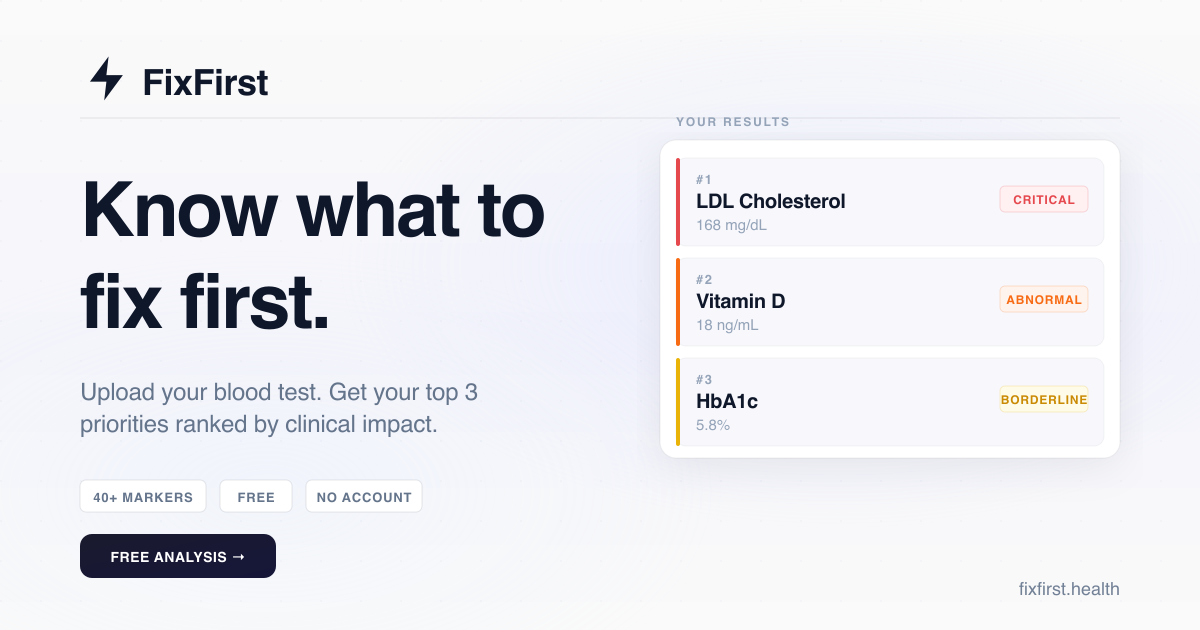

User reviews (0)