
 简体中文
简体中文 English
Website review
This review may include AI-generated content and is not individually verified. Domain, certificate and other facts come from the observed data on this page.
What is Flic?
Flic is a family of wireless smart buttons, a dimmer and the hubs that connect them to phones, smart-home systems and business software. You press, twist or double-press a physical control instead of opening an app, and the action triggers whatever you have linked to it.
What the product line covers
- Flic Button: a single button you can assign to lights, music, scenes or other connected actions.
- Flic Twist: a rotary dimmer-style control for adjusting smart-home settings such as light brightness.
- Flic Duo: a dual-button remote for two separate actions from one device.
- Flic Hub and Hub LR: hubs that connect buttons to a wider smart-home setup.
- Flic Gateway: described as an IoT gateway for connecting Flic controls to other systems.
- Flic Mic and Flic Cue: listed as coming soon; Flic Cue is presented as an AI voice button, with early access and a planned Kickstarter launch in November.
The site also lists accessories for upgrading existing buttons, plus developer tools including SDKs, an MQTT option, a MIDI controller and keyboard/mouse emulators.
Who it is for
For a home user, the appeal is removing small frictions: a button by the door for a lighting scene, a Twist on the wall for dimming, or a bedside button that turns everything off. The trade-off is that each button does one or two jobs, so a large setup needs several devices and a hub.
For organisations, Flic markets the same hardware for specific jobs: patient call and nurse panic buttons in healthcare, lone-worker and campus alarms in personal safety, service-call and panic buttons in hospitality, and buttons for offices, schools, retail, logistics and defence. These uses depend on integration with existing systems, which is where the SDKs and device-management tools matter.
A practical next step
Decide first whether you need a simple home control or an integrated alert system. For home use, list the two or three actions you repeat most and check that Flic supports the services you already use. For business use, confirm the integration with your current platform and how devices will be managed before planning a rollout.
For comparison with other smart-home control ecosystems, see Home Assistant and SmartThings.
How do Flic smart buttons work with my existing smart home devices?
Flic buttons work as physical triggers that send a signal to a hub or phone, which then runs whatever action you've assigned—turning on lights, starting music, or firing off a routine in your smart home platform. The button itself doesn't speak to your bulbs or plugs directly; it's the hub or app that translates a press into commands your existing devices already understand.
How the connection typically runs
- Button to hub or phone: The button pairs over Bluetooth to a Flic Hub (or directly to a phone app). The hub keeps the connection alive so the button works without your phone nearby.
- Hub to your ecosystem: The hub passes the press to integrations such as smart home platforms, music services, or custom setups. The page lists a broad integrations section and developer tools (SDK, MQTT, OSC, MIDI), which is where the "control anything" claim comes from.
- Press types as separate commands: Single press, double press, and long press can each be mapped to a different action, so one button can cover several jobs—say, one press for the ceiling light, a long press for "all lights off."
What this means in practice
If your lights, plugs, and speakers already live in a platform Flic integrates with, you assign the button's press to that platform's devices or scenes, and the hub does the rest. The main trade-off is dependency: the button is only as capable as the integrations and hub you pair it with, and you'll spend time in the app mapping actions rather than having them appear automatically.
A concrete scenario: a bedside button where a single press toggles the lamp, a double press starts a sleep playlist, and a long press runs an "everything off" scene. That works only if each of those devices is reachable through an integration the hub supports.
Decision criterion
Before buying, list the exact devices and scenes you want to trigger and check them against Flic's integrations page. If your key devices sit in a platform that isn't supported, the button won't reach them regardless of how well the hardware performs. For a wider view of compatible ecosystems, see Home Assistant and IFTTT.
What is the difference between Flic Twist, Flic Duo, and the original Flic Button?
The three products differ mainly in how you interact with them: the original Flic Button is a single pressable button, Flic Twist adds a rotating dial to the button, and Flic Duo is a dual-button remote.
How they differ in use
- Flic Button: One button, one action (or a few actions via press patterns such as double-press or long-press). Best for the simplest jobs: turning a lamp on, triggering a scene, sending a call for help, or starting a routine. It suits anyone who wants a physical shortcut without learning a new control.
- Flic Twist: Combines a button with a twist dial, which the site frames as a way to "simplify your smart home." The dial is the point: it gives you gradual control, such as dimming lights or adjusting volume, rather than just on/off. It suits people who already have smart lighting or audio and find app sliders annoying.
- Flic Duo: A dual-button remote, so two distinct actions sit under your fingers without press patterns. Useful where you need two clear choices, such as up/down, start/stop, or two separate scenes.
| Product | Control type | Best for |
|---|---|---|
| Flic Button | Single button, press patterns | Simple triggers, alerts, one-touch scenes |
| Flic Twist | Button plus rotating dial | Dimming, volume, gradual adjustment |
| Flic Duo | Two buttons | Paired actions, clearer separation of commands |
A practical way to choose
Start from the action, not the device. If you only need "do this one thing," the Flic Button is the least fiddly. If your main frustration is adjusting a level (brightness, volume), the Twist's dial addresses that directly. If you keep confusing press patterns or need two commands side by side, the Duo removes that ambiguity.
One thing to check before buying: all three depend on a hub or gateway for many smart-home integrations, so confirm your setup matches what each product requires. The site's product pages at Flic list the hubs and integrations, and its business sections show alert-style uses (panic buttons, service calls) where the plain Button is typically the fit.
Can Flic buttons be used as a panic or emergency alert system for elderly care or lone workers?
Yes. Flic positions its buttons for exactly these uses: the site names a "Personal Alarm for Elderly," "Panic Button for Schools & Campuses," "Wearable Panic Button for Staff," and "Lone Worker Panic Button," and describes sending location updates and alerts without reaching for a phone.
How it works in practice
A button is pressed, and the hub or gateway passes the event to whatever system you have chosen—an app, a messaging service, a nurse-call platform, or a business tool via the open SDK. The button is only the trigger; the alerting, escalation and logging live in the receiving system.
What to plan for
- Coverage: Bluetooth buttons need a hub or gateway in range and a working network path to the recipient. Check dead zones in bathrooms, stairwells and outdoor areas.
- Escalation: Decide who is notified, after how long, and what happens if no one responds. A press that reaches a phone nobody checks is not an alarm.
- Wearability: For lone workers and elderly users, a clip, lanyard or wrist mount matters more than the button itself; confirm the accessory fits daily use.
- False presses and testing: Build a routine for accidental presses and scheduled tests so staff or family trust the system.
- Business deployment: The Device Manager and cloud tools are aimed at fleets of buttons across sites, which suits care homes, hotels and campuses more than a single household.
Choosing between use cases
| Setting | Priority | Practical implication |
|---|---|---|
| Elderly care at home | Simple, familiar trigger; family or carer response | Few buttons, clear escalation to a named contact |
| Care facility | Many devices, staff routing, records | Central management and integration with existing call systems |
| Lone workers | Discreet wearable, location context | Mounting options and location data in the alert |
If you need certified medical alarms with built-in cellular fallback, compare dedicated personal emergency response systems; Flic is strongest where you want a flexible trigger wired into your own workflows. A sensible next step is to sketch your alert path—button, hub, recipient, backup—and test it in the weakest-signal room before committing.
Do I need the Flic Hub to use Flic buttons, or can they connect directly to my phone?
You can use Flic buttons directly with your phone over Bluetooth; a hub is optional and becomes useful when you want the button to work without your phone nearby.
What each setup gives you
- Phone-only (Bluetooth): The button pairs with the Flic app on your phone and triggers actions while the phone is in range. This suits one person controlling their own devices—music, phone shortcuts, or simple smart-home actions—without buying extra hardware. The trade-off is dependence on the phone: if it's out of range, off, or the app isn't running, the button can't act.
- With a Flic Hub: The hub stays at home and connects the buttons to your network, so triggers can run when no phone is present. That matters for a shared button (a bedside light switch, a kitchen timer, a guest-facing control) or for anyone who doesn't want to carry a phone around. The site lists the Hub, Hub LR, and Gateway as separate products, so check which one matches the wireless standard and integrations you need.
- Business and alert use: The site's healthcare, lone-worker, and hospitality pages describe check-ins, panic alerts, and service calls, which imply always-on infrastructure rather than a single paired phone. For those scenarios, plan on a hub.
| Your situation | Practical choice |
|---|---|
| One user, phone usually nearby | Button plus phone app |
| Button should work for others or when you're phone-free | Add a hub |
| Multiple buttons across a home or site | Hub, sized to the number of buttons |
| Alert or check-in workflows | Hub-based setup |
Next step
List the actions you want the button to perform and ask, for each, "will my phone be in reach and awake?" If the answer is no for any of them, include a hub in your setup. The product pages at Flic distinguish the Hub, Hub LR, and Gateway, which is the place to confirm compatibility with your phone and smart-home platform before buying.
How can developers integrate Flic buttons into custom apps or business systems?
Developers integrate Flic buttons by pairing the physical buttons over Bluetooth with a Flic Hub (or Hub LR) or Gateway, then having their own app or backend receive button events through Flic's developer tools rather than rebuilding the radio layer. In practice, the button press is the trigger and your software decides what happens next.
The integration paths Flic describes
- Mobile SDK — build iOS/Android apps that listen for single, double and long presses and map them to app actions. Best for field apps, lone-worker tools or patient-call apps where the phone is the receiver.
- Flic Hub Studio / Developer Portal — write logic that runs on the hub itself, so button events can call HTTP endpoints, MQTT topics or local devices without a phone in the loop.
- Flic MQTT — publish button events into an existing message bus, which suits building systems, dashboards and industrial or logistics setups.
- Keyboard and mouse emulators, MIDI and OSC — expose a button as a standard input, so legacy desktop software, media tools or show-control systems can respond without custom code.
- Device Manager and Cloud Buttons — fleet-level provisioning and management for deployments across many sites.
Choosing between them
| Your situation | Sensible starting point | Trade-off |
|---|---|---|
| One app, a handful of users | Mobile SDK | Simplest, but the phone must be nearby and running |
| Fixed installation, no phone | Hub Studio with HTTP/MQTT | More setup, but events fire reliably on-site |
| Existing enterprise system | MQTT or HTTP webhook into your backend | Needs broker or endpoint work, fits your current stack |
| Old desktop or AV software | Keyboard/MIDI/OSC emulation | No code, but limited to what the host app accepts as input |
For a concrete case: a facilities team wanting a desk-side service-call button would run logic on the hub that posts to their ticketing API, while a nurse-call app on tablets would use the mobile SDK. Business pages also list healthcare, lone-worker safety, hospitality and logistics scenarios, which indicates the intended deployment style — many buttons, managed centrally, feeding an existing system.
Next step: decide whether a phone, a hub or your server should be the listener, then start with the SDK or Hub Studio accordingly; the Developer Portal is the entry point for keys, docs and examples.
 Amazon Route 53
 Google Workspace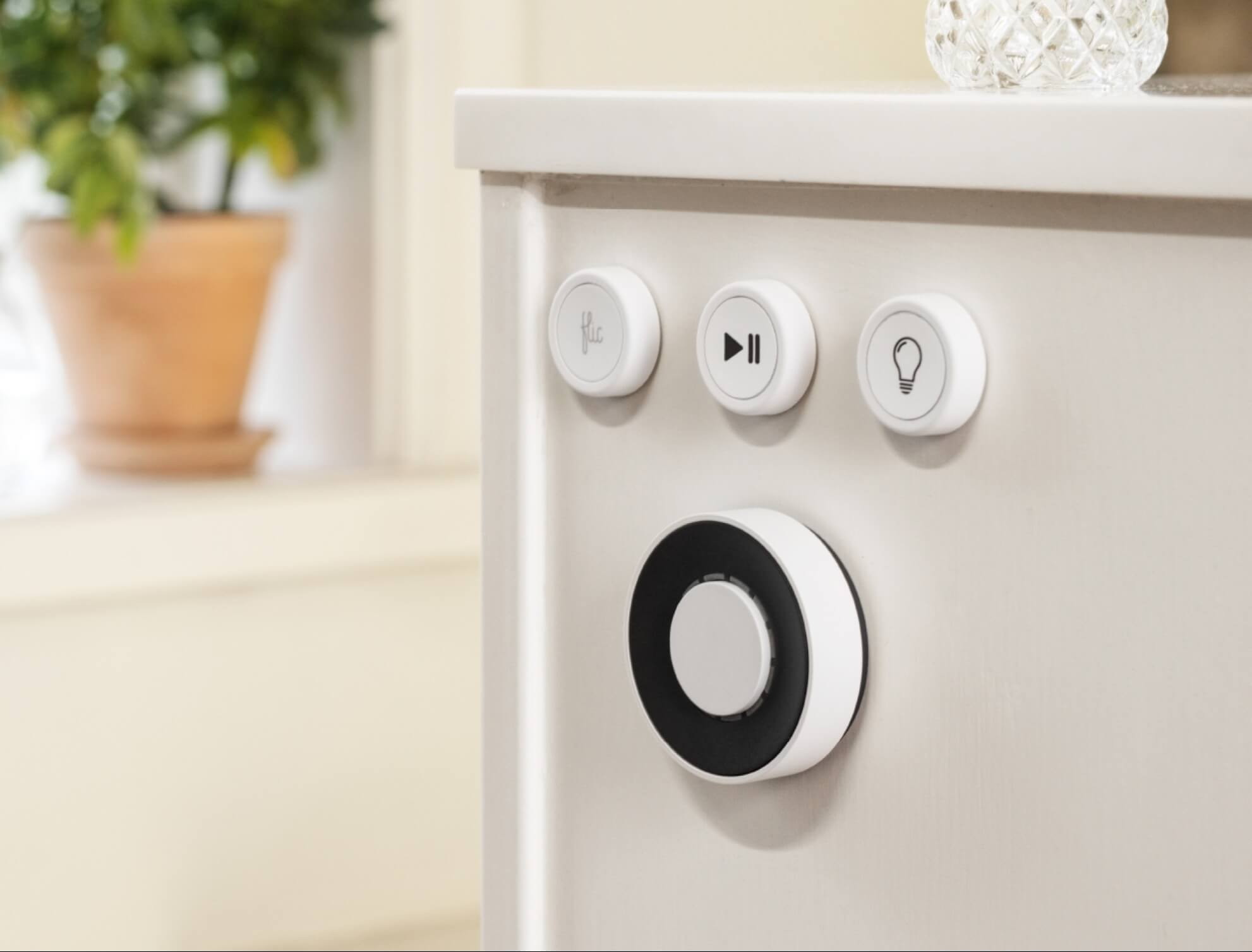
User reviews (0)