
 简体中文
简体中文 English
Website review
This review may include AI-generated content and is not individually verified. Domain, certificate and other facts come from the observed data on this page.
What is #fretflip?
#fretflip is a browser-based guitar fretboard tool for viewing, editing and sharing fretboard charts. You pick a scale or chord, see it mapped onto a fretboard diagram, then change notes, tuning or key as needed. It is aimed at both learners and teachers: the page groups its material under "Learn guitar" and "Teach guitar," and it includes presets, short lessons and documentation rather than being only a chord lookup.
What you can actually do with it
- Explore scales and modes: minor pentatonic, major pentatonic, the seven modes, melodic minor, whole-tone and others.
- Work with chords and voicings: common chords, power chords, 7th chords, shell voicings and extended chords.
- See notes in context: presets cover note names, scale degrees and harmonizing scales, plus the CAGED system.
- Change tuning: standard, Drop D, open tunings, DADGAD, all fourths, 7-string and 8-string variants, plus bass and ukulele.
- Build and share charts: create a fretboard diagram and share it, which is where the teaching use case becomes practical.
Who it suits
A teacher can build a diagram for a specific lesson — say, a minor pentatonic shape in one position — and share it instead of drawing on a whiteboard. A self-taught player can use the interactive diagram to connect shapes they already know, such as linking pentatonic positions or finding all the notes in a key. A complete beginner may find the range of scales and tunings overwhelming at first; the "Where do I start?" and quick-start documentation are the sensible entry points.
A practical next step
If you are learning a solo, open the interactive fretboard, choose the key and scale, then switch between note names and scale degrees. Seeing degrees rather than letters makes it easier to understand why a phrase works and to move it to another key. For a broader reference on guitar theory, JustinGuitar is a well-known free lesson site, and musictheory.net covers the underlying theory without instrument-specific diagrams.
How can I use #fretflip to learn guitar scales and chords?
#fretflip is a browser-based fretboard chart tool: you pick a scale or chord, see it laid out on a fretboard diagram, and can edit, save and share what you build. Its main learning value is visual — it shows note names and scale degrees across the neck rather than making you decode tab.
A practical way to use it
- Start with a preset you recognise, such as Minor Pentatonic or Major Pentatonic, and set the key. The diagram fills in the positions for you.
- Switch the labelling between note names and scale degrees. Note names tell you what you are playing; degrees (1, ♭3, 5, ♭7) tell you why it sounds minor or major, which transfers to other keys.
- Move the same scale to a different tonic and watch which shapes stay put. That is the quickest route to seeing the fretboard as patterns rather than memorised boxes.
- For chords, work through the chord presets — common chords, power chords, 7th chords, shell voicings, extended chords — and compare how adding one note changes the diagram.
- Use the built-in material on harmonising scales, scale degrees and the CAGED system when you want the theory behind the shapes.
Where it fits
| Goal | How #fretflip helps | What it does not do |
|---|---|---|
| Seeing scale shapes in any key | Instant diagrams with adjustable tonic and tuning | No audio feedback or timing practice |
| Understanding chord construction | Chord and arpeggio presets plus degree labelling | Not a songbook or chord-melody arranger |
| Teaching or sharing | Create a chart and share it with a student | Not a full lesson curriculum on its own |
The tuning list is unusually broad — standard, drop tunings, open tunings, DADGAD, all fourths, 7- and 8-string, plus bass and ukulele — so it is useful if you play something other than standard-tuned six-string.
Who it suits
Self-taught players who can already read basic tab but want to connect shapes to theory; teachers who want a clean diagram to send a student; and players in alternate tunings who struggle to find charts elsewhere. It is less useful if you want play-along backing tracks or a structured graded course.
Next step
Pick one key and one scale, learn it in note-name view, then switch to degree view and say the degrees out loud as you play them. Repeat in two other keys before adding a new scale. If you want a second reference for the theory side, Music Theory covers intervals and chord construction in plain language.
Can I create custom fretboard charts for teaching guitar?
Yes. #fretflip is built around creating and sharing guitar fretboard charts, and its page explicitly frames itself for both learning and teaching: you can view and edit scales and chords, then share the result.
What a teacher can actually make
The site provides preset material you can adapt rather than draw from scratch. From the page evidence, the preset list includes:
- Scales: minor pentatonic, major pentatonic, the 7 modes, all guitar scales, 3NPS and CAGED shapes
- Chords: common chords, power chords, 7th chords, shell voicings, extended chords
- Concept lessons: notes explained, scale degrees, harmonizing scales, the CAGED system
- Soloing and fretboard navigation: major and minor triad arpeggios, modes and pitch, modal chord progressions, find all notes, connect the pentatonics, 4NPS scale patterns
You can also choose tuning (standard, Drop D, open tunings, DADGAD, 7- and 8-string, bass, ukulele) and key/tonic, so a chart can match the exact instrument and key a student is working in.
Practical teaching uses
A realistic workflow: open the interactive fretboard, pick a preset such as minor pentatonic, set the key to the one your student is practising, then edit the notes you want emphasised. Use the chart for a single lesson point rather than everything at once — for example, one position of the pentatonic scale, or the notes of a triad arpeggio across the neck.
For a student who keeps losing their place in CAGED shapes, a custom chart showing only the shape you assigned is more useful than a full scale diagram. For a theory lesson on harmonizing scales, the relevant preset gives you a starting point you can trim to the chords in the progression being studied.
Trade-offs to weigh
The tool's strength is quick, editable, shareable fretboard diagrams. It is not a full notation program, and it will not replace a method book or a structured curriculum — you still decide the sequence, the amount of material per lesson and how it connects to playing. Whether sharing is convenient for your students depends on how they access the site, so test the share step with one student before building a term's worth of charts.
Next step
Start with one lesson: choose the key and tuning, load the closest preset, delete everything the student does not need this week, and share that single chart. If it lands well, expand preset by preset. For broader reference alongside it, Music Theory covers general theory lessons, and JustinGuitar offers structured beginner courses.
How do I share my fretboard diagrams with others?
#fretflip is built around sharing fretboard charts, not just viewing them. The site describes itself as a tool to "easily create and share guitar fretboard charts," so sharing is a core function rather than an afterthought.
H3 How sharing works in practice
The typical workflow is: open or build a diagram on the interactive fretboard, then send the result to someone else. Because the tool runs in a browser, the person you share with can open the same diagram without installing guitar software — useful if you are sending a scale to a student, a chord voicing to a bandmate, or a modal pattern to a jam partner.
H3 What you can share
The presets and templates listed on the site give you ready-made starting points, so you do not have to build from scratch:
- Scales: Minor Pentatonic, Major Pentatonic, the 7 Modes, 3NPS and CAGED shapes
- Chords: Power Chords, 7th Chords, Shell Voicings, Extended Chords
- Learning material: Notes Explained, Scale Degrees, Harmonizing Scales, The CAGED System
- Practice ideas: Start Soloing, Find all Notes, Connect the Pentatonics, 4NPS scale patterns
If you want to share something specific to your student, edit a preset first — for example, change the key or tuning — then share that edited version rather than the generic preset.
H3 A decision criterion for choosing your approach
Ask what the other person needs to do with the diagram:
| Goal | Better approach |
|---|---|
| They just need to see it | Share the diagram as-is |
| They need to practise it in another key | Share the preset and tell them which key/tuning to switch to |
| They need to teach from it | Point them to the related docs pages so they understand the underlying theory |
H3 Next step
Start with the Quick Start Guide on #fretflip, then create one diagram you actually need — say, a Minor Pentatonic in a key you are working on — and share it with the person you want to play it with. If you also want a second reference for scale and chord shapes, Justin Guitar covers similar ground in lesson form.
What guitar tunings does #fretflip support?
#fretflip's tuning list is unusually broad, covering standard guitar, common alternates, extended-range instruments, bass, and ukulele.
Guitar tunings
- Standard Guitar
- E♭ Standard (and B Standard, A Standard)
- Drop D
- Open G, Open D, Open E
- DADGAD
- All Fourths
- C G C F A D and D G C F A D
- GBE (Cigar Box)
Extended-range
- 7-String Standard, 7-String A Standard, 7-String B♭ Standard
- 8-String Standard, 8-String F Standard
Bass
- 4-string Standard, Drop D, and 5-String
- 6-string variants in B E A D G C and B E A D G C F
- B♭ Bass Standard and F♯-based variants
Ukulele
- Standard, D, A, and B♭ Ukulele
How to choose: match the tuning to the instrument in your hands, then check that the fretboard diagram shows your open strings before you build a scale or chord chart. If you play a 7-string in drop tuning, pick the closest preset and adjust the individual strings rather than starting from scratch.
For a next step, open the interactive fretboard and try the Minor Pentatonic preset in Standard, then switch to Drop D to see how the same shape shifts across the strings.
Does #fretflip offer resources for advanced players like modes and arpeggios?
Yes. #fretflip is built around fretboard diagrams rather than songs or video lessons, and its preset library goes well past beginner chords: The 7 Modes, 3NPS and CAGED shapes, arpeggio templates (major and minor triads), "Modal chord progressions," "Connect the pentatonics," and 4NPS scale patterns. It also lists 7- and 8-string tunings and several bass and ukulele tunings, so the same tool works for extended-range players.
What advanced players can actually do
- Modes: Seven named mode presets, plus a scale-degree view (1, ♭3, 5…) that shows intervals rather than note names — useful when you want to see how Dorian differs from Aeolian on the same root.
- Arpeggios: Triad arpeggio templates are a starting point; you can edit any diagram to build seventh or extended shapes.
- Position systems: 3NPS and CAGED presets for mapping scales across the neck instead of one box.
- Chord vocabulary: Shell voicings, 7th chords and extended chords, which matter more in jazz, fusion and session work than open chords.
- Harmony: Harmonizing scales and modal progressions connect the shapes to actual playing contexts.
- Tunings: Standard, Drop D, DADGAD, open tunings, all fourths, 7/8-string and bass.
The honest trade-off
This is a diagramming and exploration tool, not a curriculum. Advanced players get the most from it by using it as a custom chart maker: pick a preset, edit it, and share the link with a student, bandmate or teacher. If you want structured advanced courses with graded exercises, tab playback and backing tracks, a lesson platform will serve you better — for example Justin Guitar for free structured courses or TrueFire for advanced styles. If you mainly want accurate, printable, editable fretboard maps, #fretflip is the more direct fit.
A concrete next step
Open the interactive fretboard, choose a mode preset such as Dorian, switch the labels to scale degrees, then move the same shape to a different root. If the interval pattern stays clear across roots, the tool is doing its job for you; if you find yourself wanting a lesson plan instead, look at a course-based site.
 Amazon Route 53
 Google Workspace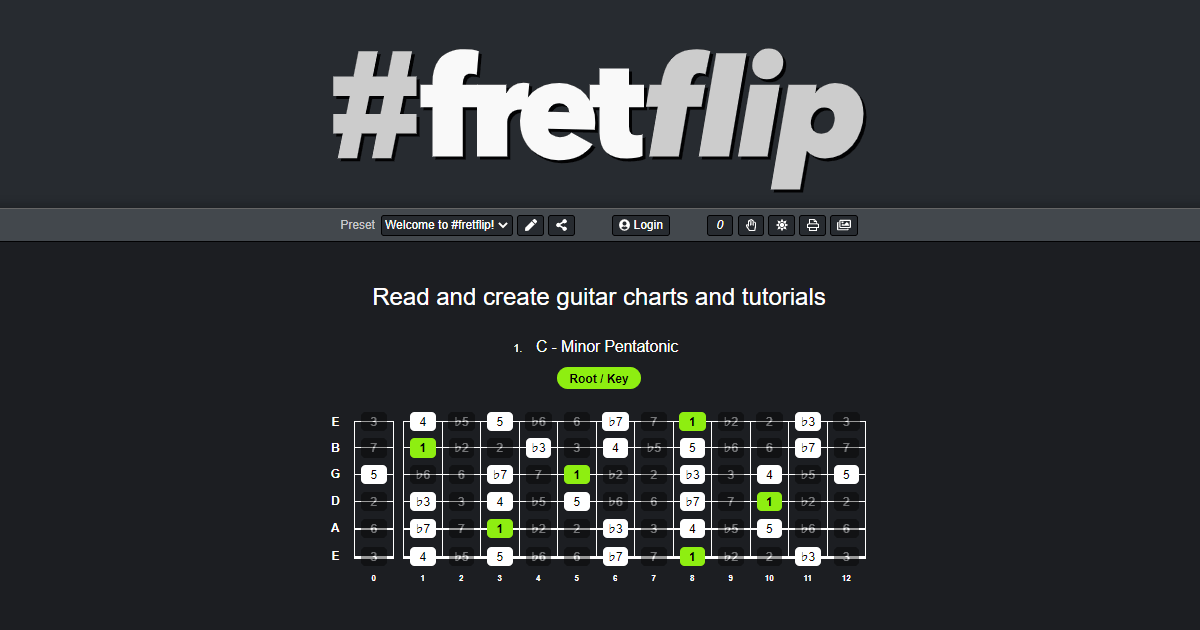
User reviews (0)