Website profiles · Technology insights · Alternatives

labiblog.com

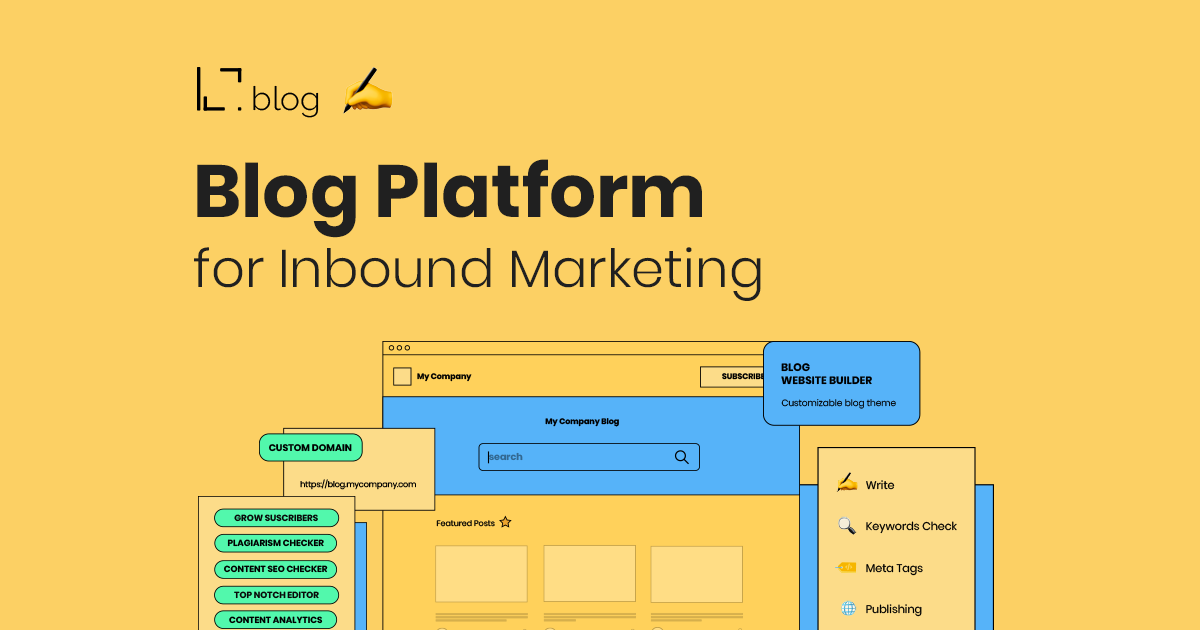
Produce Engaging Content & Attract Sales-Ready Prospects with LabiBlog! Blog Website Builder! Easy Setup! Custom Domain! Beautiful & User Friendly Design!

Paid content
Visit website
Profile views 6 Outbound visits 0 Normal
LabiBlog Full homepage screenshot

At a glance

Category
Design & Creativity
Language
English
Paid-content signal
Paid contentObserved
Registered
2020
Hosting
Hetzner Online GmbHInferred
HTTPS certificate trusted
PassedObserved
Last updated

Website review

This review may include AI-generated content and is not individually verified. Domain, certificate and other facts come from the observed data on this page.

What is LabiBlog?

LabiBlog is a hosted blog platform aimed at companies that want their blog to do marketing work—attracting search traffic and turning readers into sales-ready leads. It is part of the LabiOffice product family, sitting alongside tools for helpdesk, CRM, knowledge base, project management, live chat, website building and cold email. The pitch is a ready-made company blog rather than a general-purpose publishing tool: you register, customize the design to match your brand, connect it to your own domain, and start publishing.

What it includes

Based on the product page, the core feature set covers the practical side of running a business blog:

  • Blog website builder with an out-of-the-box setup and a visual editor
  • Full personalization of styles, plus banners and call-to-action forms
  • Custom domain so the blog lives on your own site address
  • Subscribers and members to build an audience
  • Content analytics for published posts
  • Plagiarism checker, SEO checker, keyword analysis and readability testing
  • Guest posting and search engine optimization features

The page also cites social proof: 1,000+ companies, 2K+ blog websites built, 15K+ articles posted, 11M+ views, and an overall rating of 4.9. Those are the vendor's own figures, so treat them as marketing claims rather than independently verified numbers.

Who it suits

The stated target is startups, tech, SaaS and ecommerce companies that want to be found in search engines and drive leads from content. If your team has no developer and no appetite for maintaining a WordPress install, a hosted option like this removes setup and hosting chores. If you already run a content operation with custom templates, complex integrations or a large archive, a dedicated CMS may give you more control.

A practical next step

Before committing, test the workflow you actually care about: publish one real post, connect your domain, and check whether the SEO and readability tools give advice you would follow. Also confirm how the blog relates to your main website—whether it sits on a subdomain or subdirectory matters for search performance, and the page does not spell that out. LabiBlog offers a free trial and lists pricing at LabiBlog Pricing, which is the fastest way to check whether the plan limits fit your publishing cadence.

How does LabiBlog help with inbound marketing and lead generation?

LabiBlog is positioned as a company blog builder tied to inbound marketing: you publish content on your own domain, grow a subscriber base, and use content analytics and SEO checks to attract search traffic that can convert into leads.

What it does for inbound marketing

  • Blog website builder: an out-of-the-box setup so a business can launch a blog without coding, with hosting and a custom domain plus SSL.
  • Brand-matched design: theme customization, banners and CTA forms let the blog look like your brand and place conversion prompts inside posts.
  • Content quality tools: a plagiarism checker, content SEO checker, keyword analysis and readability test help keep posts original, readable and search-friendly.
  • Audience building: subscribers and members turn readers into an owned audience you can reach again.
  • Content analytics: see how published content performs so you can double down on topics that bring traffic.
  • Guest posting: an additional channel to widen reach and earn links.

Where lead generation actually comes from

The lead-generation mechanism is indirect but practical: search-optimized posts pull in organic visitors, CTA forms and banners capture interest, and subscribers/members keep those people in your orbit. LabiBlog's own page claims organic traffic increases of up to 1000% and cites 2K+ blog websites, 15K+ articles and 11M+ views across its users — those are vendor figures, not independent benchmarks, so treat them as marketing claims rather than forecasts.

Who it suits and the trade-offs

It fits startups, SaaS, tech and ecommerce teams that want a blog on their own domain without building one. The trade-off is that LabiBlog supplies the publishing and optimization layer; the strategy, writing consistency and offer quality still determine results. If you already run a full CMS with strong SEO plugins, the added value is smaller. If you want a fast, guided company blog with built-in checks and subscriber capture, it is a reasonable starting point.

Next step

Pick one buyer question your product answers, write a post around it, run it through the SEO and readability checks, add a CTA form, and measure traffic and signups after 30 days. That single loop tells you more than any feature list. For broader context on inbound methodology, see HubSpot.

What are the key features of LabiBlog's blog website builder?

LabiBlog's blog website builder is aimed at companies that want a company blog they can launch quickly and connect to their own domain, rather than a general-purpose personal blogging tool. Its feature set clusters into four areas: setup and hosting, branding, publishing, and audience growth.

Setup and hosting

  • Blog website builder described as an out-of-the-box solution, so you are not assembling themes and plugins from scratch.
  • Custom domain so the blog sits on your own web address.
  • 10-minute setup, with hosting handled on LabiKnow, according to the page.
  • Custom domain plus SSL listed among the stated advantages.

Design and branding

  • Full personalization with styles adjustable to match your brand.
  • Theme customization, including banners and call-to-action forms, which is what turns a blog post into a lead-capture page.

Writing and content quality

  • An online editor the page calls "top notch" and easy to use.
  • Plagiarism checker to catch duplicate or copied text before publishing.
  • Content SEO checker to confirm a post is search-friendly.
  • Keyword analysis and a readability test for tuning drafts.

Audience and measurement

  • Subscribers and members, so you can build a list rather than only publishing.
  • Content analytics on what you publish.
  • Guest posting support, useful if you want outside contributors.
  • Search engine optimization features and guest posting are listed as ways to increase organic traffic.

How to choose

If your priority is a fast, hosted, brand-matched blog tied to a company domain with built-in SEO and plagiarism checks, this combination covers the basics without extra tools. If you need deep editorial workflows, granular user roles, or full control over hosting and templates, compare it against a general CMS before committing. A practical first step is to register for the free trial, publish two or three real posts, and check whether the SEO checker, readability test and analytics give you enough feedback to improve them.

LabiBlog is part of a wider suite that includes LabiDesk, LabiKnow and LabiMail, so it may fit best if you already use those tools for support, knowledge base or outreach.

Can I use my own custom domain with LabiBlog?

Yes. A custom domain is one of LabiBlog's listed features, so you can host your blog on your own address rather than a subdomain or a platform-branded URL. The page also lists SSL alongside the domain setup, which means the blog can be served over HTTPS without you arranging a certificate separately.

What this looks like in practice

If your main site is yourcompany.com, a custom-domain blog typically lives at yourcompany.com/blog or blog.yourcompany.com. The practical difference:

Setup Effect
Subfolder on your main domain Shares your domain's authority and keeps all traffic in one property
Subdomain Cleaner separation, but search engines may treat it as a distinct site
Platform-hosted address Easiest to start, but you build equity on someone else's domain

For inbound marketing, the subfolder is usually the stronger choice because ranking signals and backlinks accumulate on the domain you actually own. Whichever you pick, confirm the exact DNS records and whether LabiBlog handles the subfolder routing or only subdomains, since that affects your existing site configuration.

Who benefits most

Small teams without a developer get the most from this. LabiBlog's stated setup time is around ten minutes, and the bundle covers hosting, theme customization, banners and CTA forms, subscriber management, and content checks for SEO, readability, plagiarism and keywords. That combination suits a startup or SaaS company that wants a company blog running quickly and pointed at its own brand.

Before you commit

  • Check whether your domain registrar allows the DNS changes LabiBlog requires, and whether you need access to your main site's configuration for a subfolder.
  • Decide on the URL structure first; changing it later means redirects and lost momentum.
  • Confirm how the free trial handles domain connection, since that is often the point where a platform's limits appear.

A sensible next step is to register for the trial, connect a test subdomain such as blog-test.yourcompany.com, and publish one post to verify the SSL certificate and canonical URLs resolve correctly before moving your live blog.

How does LabiBlog compare to other blog platforms for business blogging?

LabiBlog is a business blogging platform built around inbound marketing rather than general-purpose publishing. Its pitch is a company blog that is quick to launch and tied to lead generation: setup in minutes, hosting on LabiKnow, a custom domain with SSL, brand-level theme customization, banners and CTA forms, subscriber and member management, and content tools such as a plagiarism checker, SEO checker, keyword analysis and readability testing. It also sits inside a wider suite (helpdesk, CRM, knowledge base, project management, live chat, website builder, cold email), so the strongest fit is a company that wants its blog connected to sales and support workflows rather than a standalone writing space.

Where it tends to win

  • Speed and focus. The promise is a working company blog in about 10 minutes, with hosting and SSL handled. That suits small marketing teams without developer time.
  • Conversion-oriented features. CTA forms, banners and subscriber/member tools treat the blog as a lead channel, not just a publication.
  • Content quality checks in one place. Plagiarism, SEO, keywords and readability checks reduce the number of separate tools a writer needs.
  • Suite integration. Teams already using LabiDesk, LabiKnow or LabiFlow get a shorter path from blog reader to sales conversation.

Where other platforms may fit better

  • WordPress remains the default when you need maximum control, thousands of plugins, or a developer who wants to shape every template and data structure.
  • HubSpot is the natural comparison for inbound marketing because blog, CRM, email and analytics are deeply unified — at the cost of higher complexity and commitment to one ecosystem.
  • Ghost appeals to publishers and membership businesses that prioritize clean writing, newsletters and paid subscriptions over sales-pipeline features.
  • Wix and Squarespace suit very small businesses that want a website and blog in one visual builder without maintaining separate systems.
  • Medium can work for reach and audience discovery, but it does not give you a branded, owned lead channel in the same way.

A practical way to decide

Ask one question first: is the blog mainly a lead engine or mainly a publication? If leads, judge platforms on CTA forms, CRM connection, subscriber capture and SEO tooling — LabiBlog is designed around exactly that. If publishing, judge them on editor feel, newsletter and membership options, and design freedom.

Then run a two-week test: publish three posts, place one CTA form, and see whether you can capture and follow up with a subscriber without leaving the platform. If that flow feels natural, the tool fits; if you spend the time fighting templates or exporting contacts, a more open platform such as WordPress or a fuller marketing suite such as HubSpot will cost less in the long run.

What is the pricing and free trial offer for LabiBlog?

LabiBlog advertises a free trial and a dedicated pricing page, but the supplied page evidence does not include specific plan prices or trial terms. The site's own navigation points to LabiBlog Pricing and a "Free trial" entry, so that is where current figures and conditions should be confirmed.

What the page does and doesn't say

  • Free trial: Listed as an available entry point, alongside "Pricing" and "Log In."
  • Pricing: A pricing link exists, but no amounts, tiers, billing periods or limits appear in the evidence provided.
  • Trial length, card requirement, and feature limits: Not stated.

How to evaluate the offer

Treat the free trial as a way to test the parts of the platform that matter for an inbound marketing blog: custom domain setup, the editor, SEO and plagiarism checks, subscriber tools, and analytics. A practical test is to publish two or three real posts during the trial and check whether the SEO checker, readability test and keyword analysis produce advice you would actually follow.

If pricing is usage-based or tiered by features such as custom domain, members or analytics, compare the tier that includes your must-haves rather than the entry price. The cheapest plan is only good value if it covers the workflow you need.

Related questions

More questions →
How Do You Choose a Blog Website Builder for a Company Blog?

Choose a blog website builder by matching it to how much control you need over hosting, design, and SEO — not by feature count. If you want a company blog live fast on your own domain with SEO and subscriber tools built in, an all-in-one hosted blog builder like LabiBlog is the shortest path: it advertises 10-minute setup, custom domain + SSL hosting, a built-in editor, plagiarism and SEO checkers, and subscriber/member tools. If you need deep customization or already run a site on another stack, a general website builder or a CMS plugin setup may fit better — at the cost of more setup and maintenance work.

Start with the must-have feature list

Before comparing tools, write down what a business blog actually needs. Most company blogs fail on missing plumbing, not missing design.

Requirement Why it matters What to check
Custom domain + SSL Credibility and search visibility; blog lives at yourbrand.com/blog Is domain connection and SSL included or an add-on?
Hosting Removes server maintenance from your team Is hosting bundled, and is it on a knowledge base/CMS backend?
Editor Determines how fast non-technical staff can publish Online editor, formatting, media handling
SEO tools Organic traffic is the main reason to blog SEO checker, keyword analysis, readability test
Plagiarism checker Protects against duplicate content penalties Built in or external tool?
Analytics Tells you which posts attract leads Content-level analytics, not just site-wide
Subscribers & members Turns readers into a pipeline Email capture, member accounts
Branding control Blog should look like your company, not a template Theme customization, banners, CTA forms

LabiBlog lists all of these as out-of-the-box features, which is the main argument for a dedicated blog builder over assembling separate tools.

Compare the three build approaches

1. All-in-one hosted blog builder (e.g., LabiBlog)

  • Setup effort: Lowest. Register, customize, connect domain, publish. LabiBlog claims 10-minute setup.
  • Technical lift: Minimal — no server, no plugin maintenance.
  • Best for: Startups, SaaS, ecommerce, and service companies that want to publish fast and rank in search engines.
  • Trade-off: You work within the platform's theming and feature set.

2. General website builder

  • Setup effort: Medium. You build the blog as one section of a broader site.
  • Technical lift: Low, but you configure blog structure yourself.
  • Best for: Companies whose blog is secondary to a landing-page or brochure site.
  • Trade-off: Blog-specific SEO and subscriber features are often thinner.

3. CMS + plugin stack (self-managed)

  • Setup effort: Highest. Hosting, SSL, theme, and multiple plugins.
  • Technical lift: Ongoing — updates, security, plugin conflicts.
  • Best for: Teams with developer capacity and unusual requirements.
  • Trade-off: Maximum control, maximum maintenance.

Check setup time and technical lift in practice

For a hosted builder, the workflow is typically:

  1. Register an account and start a trial.
  2. Customize the theme, banners, and CTA forms to match your brand.
  3. Connect your domain so the blog sits on your own URL (SSL handled by the platform).
  4. Publish your first posts and confirm they render correctly on mobile.
  5. Verify the SEO checker and analytics are tracking before you scale content.

Expected result: a live, indexed blog on your domain without touching a server. The common snag is domain DNS propagation — plan for a few hours before the blog resolves publicly.

Evaluate the content-growth features

A blog builder earns its place through what it does after publishing:

  • SEO checker — flags missing meta data, weak headings, and keyword gaps.
  • Keyword analysis — ties posts to terms your buyers search.
  • Readability test — keeps posts skimmable.
  • Plagiarism checker — avoids duplicate-content risk, especially with guest posts.
  • Guest posting support — lets you scale content beyond your own team.
  • Content analytics — shows which articles attract sales-ready leads.

LabiBlog frames these as inbound marketing features, with the stated goal of increasing organic traffic and attracting leads. Treat the "up to 1000% traffic increase" claim as a marketing figure, not a guarantee — your results depend on content quality and consistency.

Confirm pricing and trial limits before committing

LabiBlog's site references a free trial, a Pricing page, and Log In, but the provided material does not state prices, trial length, or payment methods. Before you commit:

  • Open the pricing page and confirm the plan that includes custom domain, SSL, and SEO tools.
  • Check what the free trial covers and what happens to your content and domain if you don't subscribe.
  • Ask whether you can export posts — this is your migration path if you outgrow the tool.

Decide with a simple rule

  • Speed + SEO + no dev team → hosted blog builder like LabiBlog.
  • Blog is part of a larger custom site → general website builder.
  • Unusual requirements + developer capacity → CMS + plugins.

Whichever you pick, verify the four non-negotiables first: custom domain, SSL, SEO tooling, and content export. Everything else is preference.

What Does an IDX Website Actually Do for a Real Estate Agent?

An IDX website pulls live listings from your local MLS and displays them on your own domain, so visitors can search homes without leaving your site. That single capability changes what a website does for your business: instead of a static brochure that describes who you are, it becomes a working search tool that captures leads at the moment they're actively looking. A built-in CRM then takes those inquiries and turns them into an ongoing contact record rather than a message buried in your inbox.

The Core Difference: Brochure Site vs. IDX Site

A generic agent website typically has a homepage, an "About Me" page, a few testimonials, and a contact form. Visitors read, maybe click "Contact," and leave. There's little reason to return.

An IDX-enabled site adds a searchable listing database. Visitors filter by price, bedrooms, neighborhood, or property type, save favorites, and come back to check for new matches. The practical difference shows up in behavior:

Brochure site IDX-enabled site
Primary visitor action Reading about you Searching homes
Reason to return Rare New listings, saved searches
Lead trigger "I want to talk to an agent" "I want info on this specific home"
Typical inquiry General, low urgency Property-specific, higher intent
Follow-up context Almost none Which listings they viewed and saved

Neither type is useless. But if your goal is capturing buyers who are in the market right now, the search experience is what keeps them on your domain instead of sending them to a national portal where you're one of many agents competing for the same click.

What "IDX" Actually Means in Plain Terms

IDX stands for Internet Data Exchange. It's a reciprocal arrangement among MLS participants: brokers agree to let their listings appear on each other's websites in exchange for the same courtesy. Your MLS governs the rules — what data can display, how often it refreshes, how listings must be attributed, and which fields can be shown.

For you as an agent, the practical takeaway is:

  • The feed comes from your MLS, not from the website provider. The provider builds the display; the MLS supplies the data.
  • Coverage depends on your MLS. If you belong to one MLS, you typically get that MLS's listings. If you belong to several, you may need multiple feeds.
  • Rules vary by region. Some MLSs require specific disclaimers, refresh intervals, or restrictions on certain fields.

This is why "does it have IDX?" is the wrong first question. The better question is "does it support my MLS, and what does the display look like?"

How the CRM Connects the Dots

A listing search without follow-up is just a nicer brochure. The CRM is what closes the loop.

Here's the flow in a well-integrated setup:

  1. A visitor searches listings and clicks "Request a showing" or "Ask a question" on a specific property.
  2. The inquiry lands in the CRM with the property address attached, not just a name and email.
  3. The agent sees what the lead was looking at, which makes the first reply specific instead of generic.
  4. The lead enters a follow-up sequence — new listings matching their criteria, price-change alerts, or a simple check-in.
  5. Over time, the contact record accumulates: saved searches, past inquiries, showing history.

The alternative — leads arriving as raw emails — means you're reconstructing context from memory and hoping you remember to follow up. Most agents don't, not because they're careless, but because there's no system prompting them.

What to Expect During Setup

Setup is usually more about approvals than technical work. A realistic sequence:

1. Choose a domain

Use your name or brand (for example, yourname.com). Many providers include a free domain with a paid plan; confirm whether it renews free or at standard rate after year one.

2. Select a template and connect your branding

Logo, colors, headshot, service areas, and a short bio. This is the part you control fully.

3. Submit your MLS IDX approval

This is the step that catches people off guard. Your MLS must approve you as a participant authorized to display IDX data. You'll typically need your license number and MLS credentials. Approval can take anywhere from a day to a couple of weeks depending on the MLS.

4. Verify the feed and listing display

Once approved, confirm that listings actually appear, that search filters work, and that required disclaimers show. Check a handful of known addresses to make sure the data is current.

5. Set up lead capture and CRM routing

Decide where inquiries go, who gets notified, and what the first automated response says. Test it yourself with a fake inquiry before going live.

6. Publish and review on mobile

Most real estate searches happen on phones. Check the search flow on your own device before announcing the site.

Limitations Worth Knowing Before You Commit

IDX is powerful but not unlimited. Ask a provider these questions directly:

  • Which MLSs do you support? Get a specific answer for your MLS, not a general "we support many."
  • How often does the feed refresh? Some MLSs mandate near-real-time; others allow delays.
  • Can I display sold and pending data? Rules differ, and sold data is often restricted.
  • What happens if I switch brokers or MLSs? Can the feed be transferred or re-approved?
  • Is the CRM included or an add-on? Some providers bundle it; others charge separately.
  • What are the limits on contacts or emails? A CRM that caps out at 500 contacts may not fit a growing database.
  • Who owns the lead data if I leave? Export rights matter more than most agents realize until it's too late.

Pricing structures in this category commonly start in the range of a few tens of dollars per month for a basic plan, with higher tiers adding features like advanced CRM, additional MLS feeds, or expanded marketing tools. Confirm current pricing and what each tier includes directly with the provider, since plan contents change.

A Reasonable Way to Decide

Ask yourself three questions:

  1. Do buyers in my market search online before contacting an agent? In most markets, yes — which means a searchable site meets them where they already are.
  2. Do I have a follow-up system I actually use? If not, the CRM half of an IDX site is arguably more valuable than the listings half.
  3. Is my MLS supported? Without this, nothing else matters.

If the answer to all three is yes, an IDX site with integrated CRM is a reasonable infrastructure investment. If your MLS isn't supported, or you won't use the follow-up tools, a simpler site plus a standalone CRM may serve you better.

The honest framing: an IDX website doesn't generate leads by itself, and no provider can promise rankings or sales. What it does is give interested visitors a reason to stay on your domain and give you a structured way to follow up when they raise their hand. Whether that translates into business depends on how consistently you work the leads it captures.

How Do You Choose a Blog Platform for a Company Blog?

Start by deciding what the blog is supposed to produce. If the goal is organic search traffic and sales-ready leads, an all-in-one blog platform with hosting, a custom domain, SEO tooling, and subscriber management removes the most setup work. If the goal is simply to publish posts and you already run your own infrastructure, self-hosted blog software gives you more control at the cost of maintenance. LabiBlog is positioned for the first case: its page describes an out-of-the-box blog website builder for startups, tech, SaaS, and ecommerce companies that want to attract traffic from search engines and convert it into leads.

Match the platform to your blog's job

The same feature list can be essential or irrelevant depending on the job you're hiring the blog to do.

Your primary goal What matters most What you can deprioritize
Rank in search and capture leads SEO checker, keyword analysis, custom domain, analytics Deep theme code access
Publish expertise and company stories Fast editor, readability test, scheduling Lead capture forms
Build an audience you own Subscribers and members, email capture Guest posting workflow
Support a product launch Banners and CTA forms, landing page builder Long-form editorial tooling

Write your goal down before comparing tools. A platform that scores well on every feature but doesn't match your goal still costs you setup time you won't recover.

Compare self-hosted software vs. an all-in-one platform

This is the decision that shapes everything downstream: who hosts the blog, who secures it, and how long launch takes.

  • Self-hosted blog software: you arrange hosting, install and update the software, configure SSL, and manage performance. You get maximum control over themes and data. Expect days to weeks before the first post, plus ongoing maintenance.
  • All-in-one blog platform: hosting, SSL, and the editor come bundled. LabiBlog lists "10 Minutes Setup," "Custom Domain + SSL," and "Hosting on LabiKnow" as core advantages, which points to launch measured in minutes rather than weeks.

If your team has no one to own server maintenance, the all-in-one route usually wins on time-to-first-post. If you need custom server-side logic or full data ownership, self-hosting is the more honest fit.

Check the features that decide whether the blog earns its keep

Work through this list against any candidate platform, including LabiBlog:

  1. Custom domain and SSL — the blog should live on your domain, not a subdomain of the vendor, so search authority and brand accrue to you. LabiBlog lists both.
  2. Editor quality — you'll spend most of your time here. LabiBlog describes a "top notch editor" for online writing; test it with a real post before committing.
  3. Subscribers and members — a blog that can't capture emails can't feed a sales pipeline. LabiBlog includes subscriber and member management.
  4. Content analytics — you need to see which posts attract views and leads. LabiBlog lists content analytics.
  5. SEO and quality checks — LabiBlog bundles a content SEO checker, keyword analysis, readability test, and plagiarism checker. These replace several separate tools.
  6. Lead capture — banners and CTA forms let a post convert a reader without leaving the page.

If a platform is missing items 1, 3, or 6, it will struggle to support an inbound marketing goal regardless of how good the editor is.

Weigh the content marketing extras

LabiBlog's page claims organic traffic increases "by up to 1000%" and lists guest posting alongside SEO features. Treat vendor traffic claims as directional, not guaranteed — the number depends on your niche, publishing cadence, and existing domain authority. What you can verify is whether the tooling exists: SEO checker, keyword analysis, readability test, plagiarism checker, and guest posting support are all listed, and each one removes a manual step from a content workflow.

The social proof on the page — "1000+ happy companies," "2K+ built converting blog websites," "15K+ posted engaging blog articles," "11M+ gained views," and an overall rating of 4.9 — is vendor-reported. Use it to judge whether the product is established, not as an independent benchmark.

Confirm pricing, trial, and migration before you commit

LabiBlog's site links to a pricing page and shows "Free trial" and "Log In" options, and the page states that 85 companies started a free trial last month. The specific plan prices, trial length, and any limits are not stated in the available material, so check the pricing page directly rather than assuming a free tier.

Before committing, answer three questions:

  • What does the trial include? Confirm whether the custom domain and SSL are available during the trial or only on paid plans.
  • What happens to your content if you leave? Ask whether you can export posts and subscriber lists.
  • What's the long-term cost? Add subscription cost to the time your team spends on content, and compare that against the cost of maintaining self-hosted software.

A practical decision path

  1. State your blog's primary goal in one sentence.
  2. Decide self-hosted vs. all-in-one based on who maintains your infrastructure.
  3. Score candidates on custom domain, editor, subscribers, analytics, SEO checks, and lead capture.
  4. Start a trial and publish one real post end to end — including a CTA and a subscriber form.
  5. Check the pricing page for plan limits, then confirm export options before you commit.

If your goal is inbound leads and you want to publish within days rather than weeks, LabiBlog's combination of custom domain, SEO tooling, and subscriber management is worth testing against your own shortlist. If you need full control over hosting and code, a self-hosted option will serve you better — just budget the maintenance time honestly.

How Do You Choose a Blog Platform for a Business Blog?

Choose a business blog platform by matching it to one primary goal first — lead generation, organic search traffic, or brand authority — then checking whether it covers custom domain, SEO tooling, subscriber management, and content analytics without extra plugins. A platform like LabiBlog is built for companies that want an out-of-the-box blog with hosting, SSL, and a custom domain included, rather than assembling and maintaining a WordPress stack. If you need deep customization or already run a large content operation, a self-hosted setup may still fit better.

Start With the Job the Blog Has to Do

A business blog is not a personal blog. The platform decision changes depending on which outcome you are optimizing for:

  • Lead generation — you need CTA forms, banners, subscriber capture, and a way to connect readers to sales.
  • Organic traffic — you need SEO checking, keyword analysis, readability tests, and clean post structure.
  • Brand authority — you need theme control, custom domain, and a design that matches your existing site.
  • Content operations at scale — you need multiple authors, guest posting, and plagiarism checks.

Write down your top one or two. A platform that is excellent at lead capture but weak at SEO will frustrate you if traffic is the actual goal.

Compare Self-Hosted vs. All-in-One Platforms

This is the biggest fork in the decision. The trade-off is control versus maintenance.

Dimension Self-hosted (e.g. WordPress) All-in-one platform (e.g. LabiBlog)
Setup time Days to weeks, plus plugin configuration LabiBlog advertises a 10-minute setup
Hosting You buy and manage it Included
SSL You configure it Included
Custom domain You point DNS yourself Supported as a built-in feature
SEO tooling Via plugins Built-in content SEO checker and keyword analysis
Plagiarism check Third-party tool Built-in
Maintenance Updates, security, backups on you Handled by the platform
Customization ceiling Very high Bounded by the platform's themes and options

If your team has no one to own updates and security, the maintenance burden of self-hosting is a real ongoing cost, not a one-time setup fee. If you need unusual functionality or full code control, that same burden buys you flexibility an all-in-one platform will not give you.

Check the Features That Actually Matter for a Company Blog

Run any candidate platform against this list. LabiBlog's stated feature set covers most of it:

  • Custom domain — the blog lives on your domain, not a subdomain of the platform.
  • Theme and brand customization — styles, banners, and CTA forms you can match to your brand.
  • Editor quality — an online editor that does not fight you on formatting and images.
  • SEO checker — flags content that is not search-friendly before you publish.
  • Keyword analysis and readability test — supports the writing process, not just the publishing step.
  • Plagiarism checker — avoids duplicate content problems.
  • Subscribers and members — builds an audience you own rather than renting from a social platform.
  • Content analytics — shows which posts perform.
  • Guest posting — useful if you plan to accept outside contributors.

If a platform is missing subscriber management or analytics, you will end up bolting on separate tools, which defeats the point of an integrated platform.

Evaluate Onboarding Speed and Operating Effort

LabiBlog describes the flow as: register, customize your blog portal, add it to your domain, and start publishing. That is the right shape for a small marketing team that wants to publish this week rather than next quarter.

Test this yourself before committing. The practical check is:

  1. Register for the trial.
  2. Connect a real domain (or a test subdomain).
  3. Publish one real post with an image, a heading structure, and a CTA.
  4. Run the SEO checker on it and see whether the feedback is actionable.
  5. Confirm the post is indexed and renders correctly on mobile.

If any of those five steps requires a support ticket or a workaround, factor that into your decision — it will repeat every week.

Confirm Pricing, Trial, and Expansion Path

LabiBlog lists a Pricing page, a Log In option, and a Free trial, and states that 85 companies started a free trial in the last month. The site does not publish specific price points in the material available here, so check the Pricing page directly for current plans and what each tier includes.

Two things to verify before you commit long-term:

  • What the trial includes — whether the custom domain and SEO tools are available during the trial or only on paid plans.
  • What you can grow into — LabiBlog sits inside a wider product family (helpdesk, CRM, knowledge base, project management, live chat, website builder, cold email). If you expect to connect your blog to sales or support workflows later, confirm those integrations exist rather than assuming they do.

A Reasonable Decision Rule

  • Pick an all-in-one platform if you want a company blog live in days, with hosting, SSL, custom domain, SEO checks, and subscriber management handled for you, and you do not need deep code-level customization.
  • Pick a self-hosted setup if you need unusual functionality, already have technical ownership, or want full control over the stack.
  • In either case, do not decide from the feature list alone. Publish one real post end-to-end on a trial, check the SEO output, and confirm the domain and analytics work before you commit.
What Is Blog Publishing and How Do You Publish a Blog?

Blog publishing is the process of writing, formatting, and making posts publicly available on the web. You can do it through a hosted platform that manages the technical side for you, or through self-hosted open-source software such as WordPress, which you install and run on your own hosting. The right choice depends on how much control you want over domain, design, and data versus how much setup and maintenance you are willing to handle.

What "publishing" actually involves

Publishing is more than hitting a button. A complete publish cycle includes:

  • Drafting the content in an editor.
  • Formatting it with headings, links, images, and categories or tags.
  • Assigning a title, slug (URL), and author.
  • Choosing visibility — public, private, or password-protected.
  • Setting a date — publish now or schedule for later.
  • Making it live so the post is reachable at its URL.

Once live, the post usually appears on the blog index, in archives, in category pages, and in the site's feed. That distribution is part of publishing too, not an afterthought.

Hosted platform vs. self-hosted software

These are the two broad approaches, and they differ on the same set of dimensions:

Dimension Hosted platform Self-hosted (e.g., WordPress)
Setup effort Sign up and start writing Need hosting, install, and configuration
Technical maintenance Handled for you You manage updates, backups, security
Domain control Often a subdomain; custom domains may be limited or paid Full control over your domain
Design flexibility Constrained to provided themes/options Themes and plugins extend almost anything
Data ownership Stored on the provider's system Stored on your own hosting
Cost model Usually tiered plans Hosting and domain costs; software itself is open source

WordPress.org describes its software as open source that you can use to "easily create a beautiful website, blog, or app." That description points to the self-hosted model: the software is free and open, but you supply the hosting environment. The trade-off is control versus convenience — pick hosted if you want to publish today with minimal setup, and self-hosted if you want ownership of domain, design, and data and are willing to maintain it.

Core steps to publish a first post

The exact menus differ by platform, but the sequence is consistent:

  1. Get a place to publish. On a hosted platform, create an account. For self-hosted software, obtain hosting and a domain, then install the software.
  2. Choose a theme. This controls layout and typography. Pick something readable and mobile-friendly before writing much.
  3. Create the post. Open the editor, add a title, and write the body. Use headings to structure sections and links to cite sources.
  4. Add media and metadata. Insert images with alt text, then set categories and tags so the post is findable.
  5. Set the slug and visibility. The slug becomes part of the URL; keep it short and descriptive. Decide whether the post is public, private, or scheduled.
  6. Preview. Check how it looks on desktop and mobile before going live.
  7. Publish. Confirm, then open the live URL to verify it loads and renders correctly.

Verification: after publishing, load the post URL in a private browser window. If it appears there, it is genuinely public and not just visible to you while logged in.

Key choices that shape the result

  • Domain: a custom domain looks more permanent and is portable if you later change platforms. A provider subdomain is faster to start.
  • Hosting: affects speed, uptime, and how much traffic you can handle. Match it to expected audience size.
  • Theme: determines readability and branding. Test it with a real post, not placeholder text.
  • Scheduling: lets you write ahead and publish at a set time, useful for consistent cadence.
  • Permalinks: the URL structure for posts. Set it early, because changing it later can break existing links.

Common issues that block publishing

  • Post stays in draft. The most common cause is not completing the publish action, or a scheduled time that has not arrived yet.
  • Page not found after publishing. Usually a permalink setting that needs refreshing, or a caching layer serving an old version.
  • Images missing or broken. Often an upload or file-path problem; re-upload and reinsert.
  • Changes not visible. Caching — clear the site cache and your browser cache, then reload.
  • Cannot reach the editor. Usually a login or permission issue; confirm you are signed in with an account that can publish.

If a post will not go live, check these in order: draft status, scheduled date, permalink settings, cache, and account permissions. One of them is almost always the blocker.

Website Overview

An established domain and managed infrastructure suggest continuity of operations and may support dependable delivery, although neither guarantees service quality. Several search or sharing settings need attention. Together they may make snippets, preview images or preferred URLs less consistent across platforms.

Domain and Registration

Registered in 2020, this domain has about 6 years of history. That suggests continuity, although ownership and purpose may have changed. Transfer-protection status is present, helping reduce the risk of unauthorized domain transfers. The registrar is NameCheap, Inc., a widely used domain service provider. The domain uses the common .com extension, which is not an independent safety signal.

DNS and Email

The observed email authentication setup is incomplete: DMARC is missing. Nameservers are provided by Cloudflare, indicating managed DNS hosting. MX records point to the Zoho Mail email service. No CNAME was found; the observed records resolve directly to addresses. TXT records include verification markers for Google, Meta. Such markers may also remain after a service stops being used.

TLS and Certificates

The certificate uses an RSA 2048-bit public key, offering broad client compatibility. The server supplied a complete certificate chain. No organization name is present in the certificate; the available fields are consistent with domain validation. The certificate was issued by Let's Encrypt, commonly associated with automated certificate services. The certificate's total validity is about 89 days, consistent with a short renewal cycle.

HTTP and Browser Security

The checked browser-security headers were not detected, leaving fewer explicit browser-side safeguards. No X-Powered-By header was found, reducing one common source of backend fingerprinting information. No obvious internal addresses or debug information were found in the headers. The Server header identifies nginx without an exact version. Cookie security attributes are unknown.

Technology Stack Analysis

The public page identifies Google Analytics, nginx without precise versions, leaving fewer clues for version-specific scanning.

Search and Social Sharing

No homepage meta description was detected, leaving snippet selection more dependent on page text. No homepage canonical URL was detected. If duplicate URLs exist, consolidation may be less explicit. Twitter Card metadata is configured. The title has 46 characters, within a common display range. The observed directives allow indexing and link following.

Hosting and Email

DNSCloudflare
HostingHetzner Online GmbH
EmailZoho Mail
Approximate IP geolocation (inferred; a CDN or proxy may differ from the origin server) Germany flagFalkenstein, Saxony, Germany Inferred 159.69.124.135

Registration details

RDAP / WHOIS

RegistrarNameCheap, Inc.
Registered2020-02-11
Expires2027-02-11
Domain statusclient transfer prohibited
Nameserversizabella.ns.cloudflare.com、sterling.ns.cloudflare.com
DNSSECunsigned

DNS records

DNS

TypeNameValueTTLPriority
Alabiblog.com159.69.124.135300—
MXlabiblog.commx.zoho.eu30010
MXlabiblog.commx2.zoho.eu30020
MXlabiblog.commx3.zoho.eu30050
NSlabiblog.comizabella.ns.cloudflare.com86400—
NSlabiblog.comsterling.ns.cloudflare.com86400—
TXTlabiblog.comfacebook-domain-verification=s69ojlz9wn2ybjtuajdm07fp1ub59z300—
TXTlabiblog.comgoogle-site-verification=jddpJKNWDKfgxrZNOOSHsbc1B-zpqNN9W4aTKliPbCI300—
TXTlabiblog.comv=spf1 include:mxsmtp.sendpulse.com +a +mx ~all300—
TXTlabiblog.comv=spf1 include:zoho.eu ~all300—
TXTlabiblog.comzoho-verification=zb40807333.zmverify.zoho.eu300—

TLS and certificates

TLS / SSL

AssessmentNormal configuration
Supported protocolsTLSv1.2、TLSv1.3
Negotiated protocolTLSv1.3
Certificate subjectsaas.labioffice.com
IssuerLet's Encrypt
Valid until2026-12-19T15:56 · Remaining when checked: 73 days
Verification detailsCertificate trust: Passed · Hostname match: Passed

HTTP response headers

HTTP

HeaderValue
content-typetext/html; charset=UTF-8
cache-controlno-cache, private
servernginx
set-cookieRedacted

Identified technologies

Google Analyticsnginx

Pages, Search and Sharing

Meta descriptionNot detected
Canonical URLNot detected
LanguageEnglish (default)
Twitter Cardsummary_large_image
All bots 0 allowed · 0 disallowed

No sitemaps found

User reviews (0)

  • No reviews yet.