Website profiles · Technology insights · Alternatives

modelviewer.dev

Easily display interactive 3D models on the web and in AR

No paid content found
Visit website
Profile views 8 Outbound visits 12 Normal
<model-viewer> Full homepage screenshot

At a glance

Category
Design & Creativity
Language
English
Paid-content signal
No paid content foundObserved
Registered
2019
Hosting
FastlyInferred
HTTPS certificate trusted
PassedObserved
Last updated

Website review

This review may include AI-generated content and is not individually verified. Domain, certificate and other facts come from the observed data on this page.

What is ?

<model-viewer> is an open-source web component from Google for embedding interactive 3D models directly into a web page, with optional augmented reality (AR) viewing. It is a custom HTML element rather than a full 3D engine: you point it at a model file and it handles rendering, camera controls, lighting and AR entry for you.

What it actually does

  • Displays a 3D model in a normal web page, where visitors can rotate, zoom and inspect it.
  • Offers AR modes, so on supported phones the model can be placed into the real environment through the camera.
  • Works across current desktop and mobile browsers, including the last two major versions of evergreen browsers and Safari on macOS and iOS.
  • Includes a quick-start path, an online editor for testing models and downloading a starter site, plus documentation, examples, an API reference and addons.

Where it fits

It suits product pages, museum and archive showcases, education, configurators and portfolios — anywhere a 3D object needs to be seen without installing an app. A typical reader scenario: an online store selling furniture wants shoppers to spin a chair on the product page and, on a phone, place it in their own living room. A single custom element can cover both.

The trade-off is that WebXR-dependent AR features are not universally available. Browser support for the core element is broad, but WebXR features such as the Device API, HitTest API and DOM Overlay API vary: natively supported in some browsers, available via polyfill in others, behind a flag or unstable elsewhere, and not available at all in some. So AR quality and availability depend on the visitor's device, while plain 3D viewing is the dependable baseline.

Next step

Start with the quick-start guide and the editor to confirm your model loads and looks right, then decide whether your audience needs AR or only interactive 3D. If AR matters, check the browser-support table against your actual audience before committing. The project is licensed under Apache 2.0, so it can be used commercially; the site is at .

How do I add a 3D model to my website using ?

Use the <model-viewer> web component from : you load its JavaScript once, drop a <model-viewer> tag where the model should appear, and point its src attribute at your .glb/.gltf file. The component handles the rendering, camera controls and optional AR launch, so you don't write WebGL or Three.js code yourself.

A minimal page looks like this:

<script type="module"
  src="https://ajax.googleapis.com/ajax/libs/model-viewer/3.5.0/model-viewer.min.js"></script>

<model-viewer
  src="/models/chair.glb"
  alt="A wooden chair"
  camera-controls
  ar
  poster="/images/chair-poster.webp"
  style="width: 100%; height: 400px;">
</model-viewer>

Key attributes to start with:

  • src — path to your model file (GLB is the usual choice; it packs geometry, materials and textures together).
  • alt — text description for accessibility and screen readers.
  • camera-controls — lets visitors orbit, pan and zoom.
  • ar — adds an "view in your space" button on supported phones.
  • poster — an image shown while the model loads, so the layout isn't empty.

Practical notes for a real site

  • Give the element an explicit size via CSS. A <model-viewer> with no height collapses to nothing.
  • Keep file size down: compress textures and geometry before uploading. A multi-megabyte model is the main reason these embeds feel slow.
  • Browser support covers the last two major versions of evergreen desktop and mobile browsers plus recent Safari on macOS and iOS. AR modes that rely on WebXR need extra feature support, so treat AR as a progressive enhancement rather than a guarantee.
  • Test in the editor on before deploying, and check the documentation and examples there for advanced attributes.

Next step: start with one model and the four attributes above, confirm it loads and rotates on both a desktop browser and a phone, then add ar and a poster once the basics work.

What file formats does support for 3D models?

<model-viewer> is built around the glTF family of formats, which is the standard for real-time 3D on the web. In practice that means:

  • glTF (.gltf) — the JSON-based version, usually paired with separate .bin and texture files.
  • GLB (.glb) — the single-file binary version that packs geometry, materials and textures together. This is the format most people ship, because one file is simpler to host and load.
  • USDZ (.usdz) — used for AR on Apple devices. On iOS, Quick Look expects USDZ, so a typical setup pairs a GLB for the in-page 3D view with a USDZ for the AR handoff.

A few practical points:

  • The component does not convert formats for you. If your source file is FBX, OBJ, or something from a CAD tool, you export to glTF/GLB first (Blender, or a converter) and then point the component at the result.
  • Textures inside a GLB are usually PNG or JPEG; KTX2 is the common choice when you want smaller, GPU-friendly textures, and it needs the right setup to work.
  • USDZ is not a substitute for GLB in the browser view — it is specifically the AR path.

Next step: open the editor at `` and drop in a GLB to check that it renders and animates before you wire it into a page. If you also need AR on iPhones, export a matching USDZ from the same source and test both.

Decision criterion: if you only need an interactive viewer, ship GLB alone. Add USDZ only when iOS AR matters, and expect to maintain two exports of the same model.

How can I make my 3D model appear in augmented reality on a phone?

Use the <model-viewer> web component: it renders a glTF/GLB model in the browser and adds an AR button that hands the model to the phone's native AR viewer. The page lists Quick Start, an Editor for testing models, Documentation, Examples and API Reference, plus a browser-support note covering the last two major versions of evergreen desktop and mobile browsers and the last two Safari versions on macOS and iOS. The component is from Google and licensed under Apache 2.0.

H3 Practical path

  1. Export your model as glTF or GLB; keep textures packed or in the same folder.
  2. Put a <model-viewer> tag on the page and point src at that file.
  3. Set ar and choose ar-modes so phones can use the best available mode.
  4. Add a poster image and camera controls so non-AR visitors still see something.
  5. Test on a real phone, not just a desktop browser, because AR depends on device and browser support.

H3 What AR needs on the phone For WebXR-based AR, the page notes that the WebXR Device API, WebXR HitTest API and WebXR DOM Overlay API matter. Hit testing places a model on a real surface; DOM overlay lets page UI sit over the AR view. Support varies: natively supported, available with a polyfill, behind a flag and unstable, or not available. On iPhone, Safari's AR Quick Look is often the smoother route, while Android Chrome relies more on WebXR/Scene Viewer-style handoff.

H3 Example scenario A furniture shop wants a sofa in a customer's living room. The customer taps "View in your room," the phone opens AR, and the sofa appears at floor scale. If the phone lacks WebXR, the fallback may be a 3D preview or a native viewer rather than in-page AR. That trade-off is why you should offer both an AR button and a normal interactive 3D view.

H3 Next step Open the Editor at model-viewer to load a test model and copy a starter page. Then check the API Reference for ar, ar-modes, camera-controls and related attributes, and verify behavior on an actual iOS and Android device.

Which browsers support and its AR features?

<model-viewer> targets modern evergreen browsers, with AR support being the more restrictive part.

The component itself is supported on the last two major versions of all evergreen desktop and mobile browsers, plus the last two versions of Safari on macOS and iOS. That covers current Chrome, Edge, Firefox, and Safari, including mobile Safari, which matters because iOS is where a lot of AR traffic comes from.

AR is where support splits. WebXR-based AR (used when you set ar-modes to include webxr) depends on three separate browser features:

Feature Support picture
WebXR Device API Natively supported in some browsers, available via polyfill in others, behind a flag and unstable elsewhere, unavailable in some
WebXR HitTest API Same range of states
WebXR DOM Overlay API Same range of states

The practical consequence: you cannot assume a browser that renders the 3D model will also run WebXR AR. A browser may display the model fine while lacking one of these APIs, in which case AR fallback modes matter.

If you are building for iOS Safari, test the AR path separately from the viewer path — rendering and AR entry are different capabilities. If you are building for Android Chrome, WebXR support is generally the smoother route, but confirm hit-testing and DOM overlay behaviour on your target devices.

Next step: open the component in the browsers you actually expect your audience to use and check both the model display and the AR button, rather than relying on the version list alone. For current details, see .

Can I customize the appearance or interaction of a 3D model with ?

Yes. <model-viewer> is built for exactly that. You control how the model looks on the page, how visitors manipulate it, and how it behaves when entering augmented reality, all through HTML attributes, CSS and JavaScript rather than by editing the 3D file itself. The official documentation, examples and API reference at cover the full attribute list.

H3 Appearance

  • Camera and framing: set initial camera orbit, field of view, and minimum/maximum zoom or orbit limits so the model opens at a flattering angle.
  • Lighting and environment: apply an environment image to change reflections and mood, adjust exposure, and add a shadow for grounding.
  • Background and transparency: choose a solid color, a gradient, or a transparent canvas so the model sits on your page design.
  • Animation: play, pause, and choose among clips baked into the file, or trigger them from your own buttons.

H3 Interaction

  • Orbit and zoom: enabled by default; you can restrict rotation axes or lock the camera for a fixed hero shot.
  • Hotspots: place annotations anchored to points in 3D space that reveal text or links when tapped.
  • AR placement: on supported devices, visitors can drop the model into their room. The AR launch button, its label and its position are yours to style.
  • Events and API: listen for load, progress, camera-change and AR-status events to drive your own UI.

H3 What you cannot change this way

Attribute-level customization does not retopologize, retexture or re-rig the asset. If a model needs different materials or a new animation, that work happens in a 3D tool before export. Think of <model-viewer> as the presentation layer, not the authoring layer.

H3 A concrete scenario

A furniture retailer wants a sofa on a product page. They set a transparent background, fix the camera to a three-quarter view, add a hotspot on the cushion fabric that opens a materials panel, and enable AR so a shopper can check the sofa against their living room wall. None of that requires touching the sofa's geometry.

H3 Trade-off to weigh

Every attribute you add is another thing to test across browsers. AR features in particular depend on WebXR support, which varies: some capabilities are native, some need a polyfill, and some sit behind an unstable flag or are unavailable. Build the non-AR experience first, then layer AR on top.

H3 Next step

Open the editor on with your own file, toggle attributes live, and copy the resulting markup into your page. If you are weighing it against a full WebGL framework, compare the effort of a configurable viewer against writing your own renderer — for straightforward product display, the viewer is usually the faster path.

Related questions

More questions →
What is modelviewer.dev?

modelviewer.dev is the official website for <model-viewer>, a web component that lets you display interactive 3D models on the web and in augmented reality (AR). It is maintained by Google and licensed under the Apache License 2.0. The site is the central place to learn the component, try it out, and look up its API.

What the site offers

The homepage describes <model-viewer> as a way to "easily display interactive 3D models on the web & in AR." From there, the site is organized into several resources:

  • Quick Start and Getting Started — entry points for adding the component to a page
  • FAQ and an Introduction section — background and common questions
  • Editor — a tool to test your 3D models and download a starter website
  • Documentation and API Reference — the full attribute and property surface of the component
  • Examples — basic and advanced usage, plus Addons

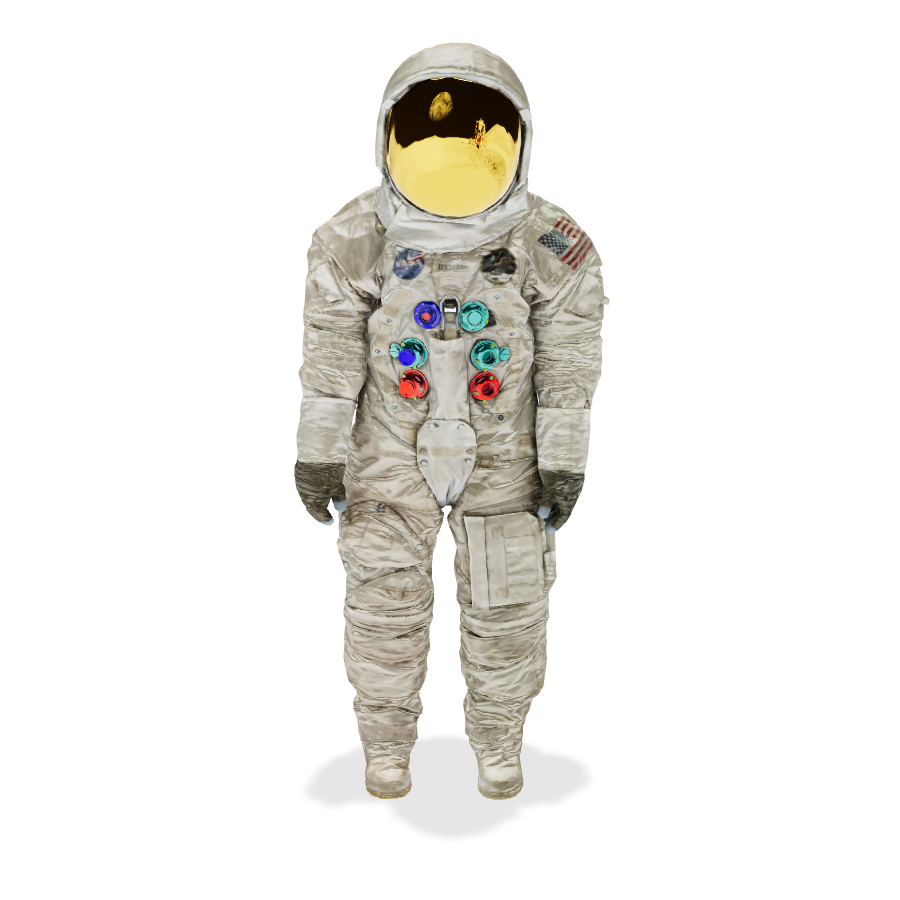
The site also includes a live demo model, the Neil Armstrong Space Suit, provided by the Smithsonian Digitization Programs Office and the National Air and Space Museum.

Who it's for

If you need to embed a 3D model in a web page — with optional AR viewing — <model-viewer> is designed to make that a matter of adding a tag and a few attributes rather than writing a custom WebGL viewer. The site's Editor is useful when you want to check how a specific model behaves before committing to an implementation, since it lets you test models and download a starter site.

Browser support

According to the site, <model-viewer> is supported on the last two major versions of all evergreen desktop and mobile browsers, plus the last two versions of Safari on macOS and iOS.

Some browser features are only required if you want to use WebXR in ar-modes:

Feature Status
WebXR Device API Natively supported
WebXR HitTest API Available with polyfill
WebXR DOM Overlay API Behind a flag, unstable

The table above reflects the site's own support notes; "behind a flag, unstable" means that feature is not something to rely on in production without checking current behavior.

Licensing

The site states: "©Copyright 2018-2025 Google Inc. Licensed under the Apache License 2.0." That license governs the project, so you can check the repository for the exact terms before shipping it in your own product.

Which browsers support and its AR features?

<model-viewer> supports the last two major versions of all evergreen desktop and mobile browsers, plus the last two versions of Safari on macOS and iOS. That covers the basic 3D display. AR is a separate question: if you use WebXR in ar-modes, the browser also needs the WebXR Device API, the WebXR HitTest API, and the WebXR DOM Overlay API — and those are not uniformly available.

Browser support at a glance

Browser Basic <model-viewer> WebXR AR features
Evergreen desktop browsers (last 2 major versions) Supported Depends on WebXR API support
Evergreen mobile browsers (last 2 major versions) Supported Depends on WebXR API support
Safari on macOS (last 2 versions) Supported Depends on WebXR API support
Safari on iOS (last 2 versions) Supported Depends on WebXR API support

"Evergreen" means browsers that update themselves automatically, such as Chrome, Edge, and Firefox. The support statement is version-based, not browser-name-based, so the practical rule is: keep the browser current and you are within the supported range.

What the WebXR requirement actually means

The three APIs listed in the documentation have different availability levels:

  • Natively supported — the browser implements the API directly.
  • Available with polyfill — the API is missing, but a polyfill can supply it.
  • Behind a flag, unstable — the API exists but is not enabled by default and may change.
  • Not available — the browser does not provide the API.

The documentation presents these as a feature matrix rather than a single yes/no answer, which is the key point: a browser can fully support <model-viewer> for 3D viewing while still failing on WebXR AR because one of the three APIs is missing or flagged.

How to check before you ship

  1. Identify which ar-modes you actually need. If you only need 3D display, the evergreen/Safari rule is your whole answer.
  2. If you need WebXR, look up each of the three APIs — Device API, HitTest API, DOM Overlay API — in your target browser's support status.
  3. Where the status is "available with polyfill," plan to load the polyfill rather than assuming native support.
  4. Where the status is "behind a flag, unstable," treat that browser as unreliable for production AR and provide a fallback path.
  5. Test on the actual last-two-versions of your target browsers, since the support statement is explicitly version-scoped.

Practical takeaways

  • For 3D-only use: the last two major versions of evergreen browsers and the last two Safari versions are enough. This is the widest and most predictable support tier.
  • For AR via WebXR: verify the three WebXR APIs per browser. Expect a mix of native support, polyfill needs, and flagged/unstable implementations.
  • For iOS Safari specifically: it is covered for <model-viewer> itself, but WebXR availability is governed by the same API matrix, so do not assume AR works just because the component renders.

The safest approach is to treat 3D display and WebXR AR as two separate compatibility checks, and to design a non-AR fallback for any browser where the WebXR APIs are missing, polyfill-only, or flagged.

How to Get Started with ``

<model-viewer> is a web component from modelviewer.dev that lets you display interactive 3D models on a web page and in AR. To get started, load the component script, add a <model-viewer> tag with a src pointing to a .glb model, and set attributes such as camera-controls or ar for the behavior you want. This works in the last two major versions of all evergreen desktop and mobile browsers, plus the last two versions of Safari on macOS and iOS.

The fastest path: Editor

The site's Editor is the quickest way to see a model render before you touch your own codebase. It lets you test your 3D models and download a starter website, so you can confirm the model loads and looks correct, then take the generated starting point into your project.

If you already have a .glb file, this avoids hand-writing boilerplate just to check whether the asset is valid.

Minimal setup on your own page

The core pattern is a script tag plus a component tag:

<script type="module"
  src="https://modelviewer.dev/dist/model-viewer.min.js"></script>

<model-viewer
  src="path/to/model.glb"
  alt="A 3D model"
  camera-controls
  ar>
</model-viewer>

What each part does:

  • The module script registers the <model-viewer> custom element. Without it, the tag is inert.
  • src points to your model file. The component expects a glTF/GLB asset.
  • alt provides a text description, which matters for accessibility and for when the model fails to load.
  • camera-controls enables user rotation, pan, and zoom.
  • ar adds the AR entry point where the browser supports it.

Expected result: the model renders in the page and responds to pointer input. If nothing appears, the usual causes are a wrong src path, a model that isn't valid glTF/GLB, or the script failing to load.

AR support and its browser requirements

AR is optional and depends on browser features beyond basic rendering. Per the site's browser support notes, these are only needed if you want to use WebXR in ar-modes:

Feature Support status
WebXR Device API Natively supported
WebXR HitTest API Available with polyfill
WebXR DOM Overlay API Behind a flag, unstable

So a page can display and rotate a model in browsers where full WebXR AR is unavailable. Treat AR as a progressive enhancement: the model view should stand on its own, with AR added where the environment supports it.

Where to go next

  • Documentation covers introduction and much more, including the concepts behind the component.
  • Examples show advanced usage you can copy and adapt.
  • API Reference lists the available attributes and methods, which is where you look when you need a specific behavior rather than a general setup.
  • Addons extend the component beyond its core features.

A practical order: get a model rendering with the minimal setup, verify it in the Editor if something looks wrong, then consult the API Reference only for the specific attribute or method you need.

Common sticking points

  • Model doesn't appear. Check the src path and confirm the file is a valid glTF/GLB. A 404 or an unsupported format both produce an empty view.
  • Controls don't respond. camera-controls must be present; it is not on by default.
  • AR button missing. AR depends on the browser features listed above, and some are polyfilled or flagged. Absence of an AR button does not mean the model failed to load.
  • Older browsers. Support targets the last two major versions of evergreen browsers and the last two Safari versions, so very old browsers are outside the supported range.
Where to Find Documentation, Examples, and Tools

The official home for <model-viewer> is modelviewer.dev, the project site for the web component that displays interactive 3D models on the web and in AR. From that one site you can reach four main resources: Documentation (introduction, FAQ, and more), Examples (advanced usage), the API Reference, and the Editor, which lets you test your 3D models and download a starter website. If you already know which of those you need, go straight to it; the sections below explain what each one is for.

What modelviewer.dev is

<model-viewer> is a component for easily displaying interactive 3D models on the web and in AR. The site at modelviewer.dev is its documentation and tooling hub rather than a product marketing page — it exists to help you get a model rendering and then to help you go further.

The four main resources

Resource What it gives you Use it when
Documentation Getting Started, Introduction, FAQ, and more You are new to the component or need a conceptual answer
Examples Advanced usage demos You have a basic model working and want to do more
API Reference The component's interface You need to know which attributes, properties, or events exist
Editor Test your 3D models and download a starter website You want to check a model or scaffold a project quickly

Documentation

Start here for the Quick Start and Getting Started material, plus the FAQ and an Introduction. This is the place to answer "how do I get a model on a page" and "why is my model behaving this way" before you dig into the API.

Examples

The Examples section covers advanced usage. Treat it as a set of working references: find the example closest to what you want, then adapt it rather than building from scratch.

API Reference

The API Reference documents the component's interface. Use it when you know what you want to change but not what it is called.

Editor

The Editor has two jobs: test your 3D models and download a starter website. It is the fastest way to confirm a model file loads and looks right, and to leave with a working starting point instead of an empty page.

Browser support and AR requirements

<model-viewer> is supported on the last two major versions of all evergreen desktop and mobile browsers, plus the last two versions of Safari (on macOS and iOS).

AR features are a separate question. These browser features are only needed if you want to use WebXR in ar-modes:

Feature Status
WebXR Device API Natively supported
WebXR HitTest API Available with polyfill
WebXR DOM Overlay API Behind a flag, unstable
(remaining listed feature) Not available

The practical reading: basic model display has broad support, but WebXR-based AR depends on features that are not uniformly available — one is polyfilled, one is unstable behind a flag, and one is not available at all. Check this table before committing to a WebXR AR experience.

A sensible order of operations

  1. Open modelviewer.dev and read the Getting Started / Quick Start material.
  2. Load your model in the Editor to confirm it renders, then download a starter website.
  3. When you need more than the basics, work from Examples (advanced usage).
  4. When you need a specific attribute, property, or event, look it up in the API Reference.
  5. Before shipping AR, verify your target browsers against the Browser Support table above.

Notes on the demo content

The site's featured model is the Neil Armstrong Space Suit, provided by the Smithsonian Digitization Programs Office and the National Air and Space Museum, with usage conditions applying. The site itself is ©Copyright 2018–2025 Google Inc., licensed under the Apache License 2.0.

Website Overview

An established domain and managed infrastructure suggest continuity of operations and may support dependable delivery, although neither guarantees service quality. Several search or sharing settings need attention. Together they may make snippets, preview images or preferred URLs less consistent across platforms.

Domain and Registration

Registered in 2019, this domain has about 7 years of history. That suggests continuity, although ownership and purpose may have changed. The registrar, MarkMonitor Inc., specializes in corporate domain and brand management, suggesting attention to domain asset protection. Transfer-protection status is present, helping reduce the risk of unauthorized domain transfers. The domain uses the common .dev extension, which is not an independent safety signal.

DNS and Email

Nameservers are provided by Google Cloud DNS, indicating managed DNS hosting. CAA records restrict which certificate authorities are authorized to issue certificates. No CNAME was found; the observed records resolve directly to addresses. No MX record was found. A conventional explicit inbound-mail route is not configured. TXT records include verification markers for Google. Such markers may also remain after a service stops being used.

TLS and Certificates

The certificate uses an RSA 2048-bit public key, offering broad client compatibility. The server supplied a complete certificate chain. No organization name is present in the certificate; the available fields are consistent with domain validation. The certificate was issued by Let's Encrypt, commonly associated with automated certificate services. The certificate's total validity is about 89 days, consistent with a short renewal cycle.

HTTP and Browser Security

The checked browser-security headers were not detected, leaving fewer explicit browser-side safeguards. CORS permits any origin to read this response. This is common for public resources; sensitive responses need narrower handling. No X-Powered-By header was found, reducing one common source of backend fingerprinting information. The x-cache, x-served-by, via response header indicates a CDN or caching proxy in the delivery path. No obvious internal addresses or debug information were found in the headers.

Technology Stack Analysis

The public page identifies Google Analytics, Fastly without precise versions, leaving fewer clues for version-specific scanning.

Search and Social Sharing

No homepage canonical URL was detected. If duplicate URLs exist, consolidation may be less explicit. Open Graph is partially configured; og:type is missing. Twitter Card metadata is configured. The title has 14 characters, within a common display range. A meta description is present, with 57 characters.

Hosting and Email

DNSGoogle Cloud DNS
HostingFastly
EmailUnknown
Approximate IP geolocation (inferred; a CDN or proxy may differ from the origin server) United States flagUnited States Inferred 185.199.108.153

Registration details

RDAP / WHOIS

RegistrarMarkMonitor Inc.
Registered2019-05-29
Expires2027-05-29
Domain statusclient delete prohibited、client transfer prohibited、client update prohibited
Nameserversns1.googledomains.com、ns2.googledomains.com、ns3.googledomains.com、ns4.googledomains.com
DNSSECunsigned

DNS records

DNS

TypeNameValueTTLPriority
Amodelviewer.dev185.199.108.1533600—
Amodelviewer.dev185.199.109.1533600—
Amodelviewer.dev185.199.110.1533600—
Amodelviewer.dev185.199.111.1533600—
NSmodelviewer.devns1.googledomains.com21600—
NSmodelviewer.devns2.googledomains.com21600—
NSmodelviewer.devns3.googledomains.com21600—
NSmodelviewer.devns4.googledomains.com21600—
TXTmodelviewer.devmodelviewer.devgoogle-site-verification=rxz6TUXWsgfs2VPNpBv-hYOoU8vXmTwEakGW94FvAzQ3600—
TXTmodelviewer.devv=spf1 -all3600—
CAAmodelviewer.dev0 issue "letsencrypt.org"3600—
DMARC_dmarc.modelviewer.devv=DMARC1; p=reject; rua=mailto:[email protected]300—

TLS and certificates

TLS / SSL

AssessmentNormal configuration
Supported protocolsTLSv1.2、TLSv1.3
Negotiated protocolTLSv1.3
Certificate subjectmodelviewer.dev
IssuerLet's Encrypt
Valid until2026-11-26T03:50 · Remaining when checked: 59 days
Verification detailsCertificate trust: Passed · Hostname match: Passed

HTTP response headers

HTTP

HeaderValue
content-typetext/html; charset=utf-8
cache-controlmax-age=600
serverGitHub.com
access-control-allow-origin*

Identified technologies

Google AnalyticsFastly

Pages, Search and Sharing

Meta descriptionEasily display interactive 3D models on the web and in AR
Canonical URLNot detected
LanguageEnglish (default)
Twitter Cardplayer

No robots.txt found

No sitemaps found

User reviews (0)

  • No reviews yet.