Website profiles · Technology insights · Alternatives

react-guitar.com

A beautiful and accessible guitar component for React.

No paid content found
Visit website
Profile views 10 Outbound visits 2 Normal
React Guitar Full homepage screenshot

At a glance

Category
Development
Language
English
Paid-content signal
No paid content foundObserved
Registered
2020
Hosting
FastlyInferred
HTTPS certificate trusted
PassedObserved
Last updated

Website review

This review may include AI-generated content and is not individually verified. Domain, certificate and other facts come from the observed data on this page.

What is React Guitar?

React Guitar is a React component that renders an interactive, playable guitar fretboard in the browser. It draws a six-string, 22-fret guitar with standard tuning (E A D G B E), lets you click or focus frets to build chord shapes, and plays the resulting notes as audio. The component is built with accessibility in mind, so it can be driven from the keyboard rather than only by mouse clicks.

React Guitar

What it does in practice

  • Shows a visual fretboard with selectable themes, including a "spanish" look described as a brown fretboard with golden details.
  • Supports alternate setups such as a dark theme, a "coco" theme, and a left-handed orientation.
  • Lets you play a string by hovering, or by focusing a string and pressing keys; arrow keys move between strings and frets, and "p" plays the focused string.
  • Handles muted strings, shown as fret -1, alongside fretted notes.
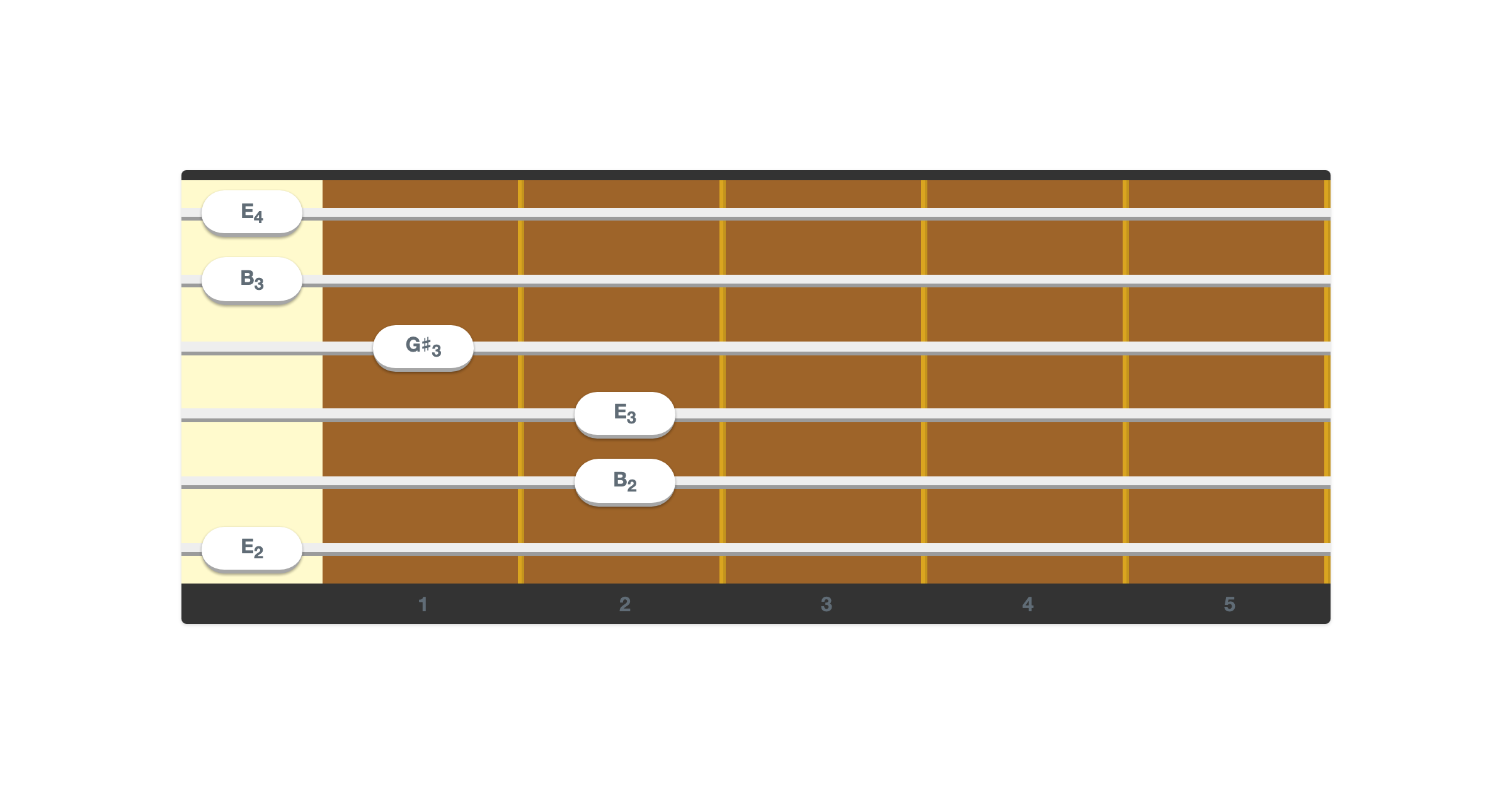
  • Displays note names per fret, such as E4 at the open first string and F4 at its first fret.
  • Can represent named chords, with Em7add11 shown as an example, and exposes a "Strum" action and a "Copy Link" action for sharing a particular fretboard state.

Who it suits

This is most useful to developers building music-related React apps: chord or scale explorers, beginner practice tools, tab or lesson interfaces, and ear-training demos. It also fits teams that need a fretboard widget which works for keyboard and screen-reader users, since arrow-key navigation and string focus are part of the design rather than an afterthought.

It is less suitable if you need a full notation editor, recording, or audio production features. The component is a fretboard and playback surface, not a digital audio workstation.

A quick way to decide

If your goal is to let someone see and hear notes on a guitar inside a React page, this is a direct fit. A practical next step is to load the component, set the tuning and theme you want, and test the keyboard path yourself: tab to a string, arrow across frets, and press "p" to confirm the interaction works for users who never touch a mouse.

How do I install and use React Guitar in a React project?

React Guitar is a React component that renders an interactive guitar fretboard. It is distributed as an npm package, so installation follows the standard React dependency workflow, and usage is a matter of importing the component and giving it the settings you want.

Install

Install it with your package manager of choice, for example npm install react-guitar (or yarn add react-guitar). Because it is a React component, your project needs a compatible React version already installed; check the package's peer dependency notes if your app is on an older or very new React release.

Basic usage

Import the component and render it in your JSX. The page evidence shows the component accepts configuration for tuning (the default is E A D G B E), theme (for example Spanish, dark, coco), frets, and left-handed orientation, plus interaction options such as "play on hover" and a chord/strum mode. A minimal pattern looks like this:

import { Guitar } from 'react-guitar';

export default function Fretboard() {
  return <Guitar strings={[0, 0, 0, 0, 0, 0]} />;
}

The strings array represents the current fretting, one value per string, where -1 means muted and 0 means open. That matches the fret data on the page: each string lists Fret -1 (Mute) through Fret 22, with note names such as E4, F4 and F♯4.

What you get

  • Six strings and 22 frets, starting from fret 0, with note labels per string and fret.
  • Keyboard navigation: focus a string, move across strings and frets with the arrow keys, and press p to play the focused string.
  • Themes and a left-handed mode, plus a hover-to-play option and a chord display (the page shows an example chord, Em7add11, and a "Copy Link" action).

Practical notes

If you are building a chord-learning tool, the strings prop is the main integration point: store the user's fretting in state and pass it down, then read it back when they save or share a voicing. If you only need a static diagram, render the component with fixed values and skip the interaction options.

For the exact prop names, defaults and any required CSS or audio setup, use the project's own documentation and examples at React Guitar; the component's audio behavior depends on how sounds are loaded, so verify that step before shipping.

How can I customize the appearance of React Guitar with themes?

React Guitar ships with a small set of built-in visual themes rather than a full styling API. The page evidence names three: spanish, dark, and coco, where spanish is described as "a typical Spanish guitar with a brown fretboard and golden details." You switch between them through the component's theme setting, so customization here means choosing a whole look, not recoloring individual parts.

What you can realistically change

  • Theme: pick spanish, dark, or coco depending on whether your page is light, dark, or warm-toned.
  • Frets: the component is documented around a 6-string, 22-fret layout starting at fret 0 (plus a mute position), so the visual scale is fixed by the fret count you configure.
  • Left-handed: a left-handed mode flips the neck, which is an orientation change rather than a color change.
  • Chord display: a chord label such as Em7add11 is shown, so the component's text output reflects the current fretting.

Deciding between themes

Theme Best fit Trade-off
spanish Music-education pages, warm or cream backgrounds Golden/brown palette can clash with cold blue-grey UI
dark Dark-mode apps, dashboards, night-time reading Less contrast against dark fretboards if your page is also dark
coco Neutral or vintage-styled sites Least "guitar-like" of the three; reads as a generic wood tone

If the built-in themes aren't enough

Because the themes are preset looks, deep customization (custom fret colors, your own wood textures, brand accents) isn't something the component exposes per the page evidence. In that case you'd wrap the component and apply CSS overrides to the rendered elements, or fork the component. Treat that as general advice about React component styling, not a documented feature of React Guitar.

A concrete next step

Build a small theme switcher: render the component three times in a row, one per theme, side by side on your actual page background, and pick the one with the best contrast for your chord labels and fret numbers. Then check the left-handed toggle in that theme, since flipping the neck can change how the layout reads.

If you want a broader reference for how similar interactive instrument components handle theming, React documents the component patterns these libraries build on.

How do I make the guitar component accessible for keyboard users?

React Guitar already ships with keyboard support built in, so the main work is making that support discoverable and not breaking it. According to the component's own page, once a string has focus you can move across strings and frets with the arrow keys and play the focused string with the P key. The component also exposes per-string, per-fret labels such as "String 1, Fret 0, E4," which is the kind of text a screen reader can announce.

H3 Practical steps

  • Give the guitar a focusable entry point. A keyboard user needs a way to land on the component before the arrow keys do anything. A visible "Play with keyboard" button or a focusable wrapper is usually the simplest route.
  • Document the keys where users will look. The arrow-key and P-key interaction is not self-evident. A short caption or help text near the instrument ("Tab to the guitar, use arrow keys to move, press P to play") removes the guesswork.
  • Keep a visible focus indicator. Because focus moves between individual strings, a clear highlight on the focused string is what tells a sighted keyboard user where they are. Don't suppress outlines.
  • Don't trap focus. If the guitar captures arrow keys, make sure Tab still moves out of the component to the rest of the page.
  • Offer a non-audio alternative. A screen reader user may not hear the plucked note. Showing the current chord name and the fretting pattern as text (the page already surfaces a chord label like Em7add11 and a "Current fretting" readout) gives equivalent information.

H3 What to verify

Test with a screen reader and no mouse: can you reach the guitar, hear which string and fret you're on, play a note, and leave again? Also test with sound muted, since the note names are doing the real work there.

For a broader accessibility baseline to check against, the WAI-ARIA Authoring Practices and the MDN accessibility guides are the standard references: MDN Web Docs and W3C.

How can I play specific chords or notes programmatically with React Guitar?

React Guitar exposes a playable 6-string, 22-fret instrument, but its own page evidence shows an interactive component driven by clicks and keyboard input rather than a documented programmatic play API. There is no public method described for "play this chord" or "play this note" in the supplied material. So the honest answer is: you can't assume a built-in imperative play function; you either use the component's interactive state or wire audio yourself.

What the component actually gives you

  • Tuning: E A D G B E, 6 strings, 22 frets, with fret 0 as the open string and fret -1 as mute.
  • A "Current fretting" value — a list of six fret positions, e.g. 0, 0, 0, 0, 0, 0 for all open strings. This is the closest thing to a programmatic chord representation.
  • Per-string, per-fret note names (e.g. string 1 fret 0 = E4, string 6 fret 3 = G2), so you can map a chord to fret positions and know the resulting pitches.
  • Interaction: arrow keys to move between strings and frets, p to play the focused string, plus hover-to-play, chord display (e.g. Em7add11), strum, and copy-link.

Practical approaches

  1. Drive the fretting state. Treat the six-element fret array as your chord input. Setting positions like [0, 2, 2, 1, 0, 0] describes an E major shape; if the component accepts a fretting prop or controlled state, that's your chord-setting mechanism. Verify against the component's actual props before relying on it.
  2. Play notes with your own audio layer. Since the page evidence doesn't confirm a play method, the reliable route is to trigger sound yourself (Web Audio API or an audio sample library) using the note names the component already exposes. You compute the pitch from string + fret, then play it.
  3. Simulate interaction for demos. For a guided tutorial, you can programmatically focus a string and dispatch the p key press, but this is fragile and depends on internal DOM behavior — use it for demos, not production.
  4. Use the chord label for display, not playback. The chord name (like Em7add11) is useful UI feedback; don't assume it also triggers a strum.

Decision guide

Goal Best fit
Show a chord diagram / fretting Fret array state
Actually hear a chord Your own audio layer keyed to note names
Guided interactive lesson Focus + keyboard simulation
Reliable playback in an app External audio, component as visual only

A concrete next step

Pick one chord — say E major, frets [0, 2, 2, 1, 0, 0] — and check the component's props or source for a fretting/onChange style prop. If it exists, you can set chords declaratively. If not, keep React Guitar as the visual fretboard and play the notes through your own audio engine using the string/fret-to-note mapping above.

If you want a fuller component library with documented playback, compare with GitHub projects or a dedicated audio library, since React Guitar's own evidence points to interactivity rather than a scripting API.

How do I handle string muting and fretting in React Guitar?

React Guitar exposes fretting as a per-string value, and muting is simply the value -1. You do not need a separate "mute" API: set a string's fret position to -1 and that string is treated as muted, while 0 means open string and positive numbers select the fret.

From the component's own page evidence, the default state is all open strings, described as "Current fretting: 0, 0, 0, 0, 0, 0," and each string's fret list explicitly includes "Fret -1 (Mute)" before the open-string entry. The page also shows a six-string, 22-fret instrument in standard tuning E A D G B E, with per-string note mappings such as String 1 fret 0 = E4 and String 6 fret 0 = E2.

Practical model

Think of the state as an array of six fret numbers, ordered from the highest-pitched string (String 1, high E) to the lowest (String 6, low E):

Intent Value for that string Example
Mute / don't sound -1 [-1, 0, 0, 0, 0, 0]
Open string 0 [0, 0, 0, 0, 0, 0]
Fretted note 1–22 [0, 1, 0, 0, 2, 3]

If you are building a chord shape, you are just writing those six numbers. An E minor shape, for instance, would be low-to-high 0, 2, 2, 0, 0, 0 — reverse it to match the component's String 1-first ordering.

Accessibility and interaction

The page describes built-in keyboard behaviour: once a string has focus, arrow keys move across strings and frets, and pressing p plays the focused string. It also lists a "Copy Link" action and a chord label such as Em7add11, which suggests the component is designed to be driven by a small amount of external state rather than requiring you to reimplement input handling.

For a concrete scenario: if you are building a chord-learning tool, keep the fretting array in your own state, pass it in, and update it when the user clicks a fret or presses a key. Muting is then a single assignment of -1 to that index — no separate toggle needed.

As a next step, decide whether your app should treat -1 as "user-muted" versus "not yet set." If you need to distinguish them, store your own parallel array of booleans; the component itself only needs the numeric fret value.

Related questions

More questions →
How do I use the React Guitar component in a React app?

React Guitar is a guitar component for React that renders a 6-string, 22-fret instrument with built-in keyboard accessibility. You can use it to display a playable guitar, set a tuning, apply a visual theme, and let users interact with strings and frets. The component ships with themes such as spanish, dark, and coco, and it supports left-handed mode, hover playback, and chord display.

What you need before starting

  • A React project (any modern React setup works).
  • A way to install packages, such as npm or yarn.
  • Basic familiarity with JSX and component props.

The source material describes React Guitar as “a beautiful and accessible guitar component for React,” so the main task is installing it, rendering it, and configuring its props.

Install and import

Install the package in your project:

npm install react-guitar

Then import the component into the file where you want to render it:

import { Guitar } from 'react-guitar';

If your project uses a different package manager, use the equivalent install command. The exact package name and export style should match what your installed version provides; the component is referred to as Guitar in the source description.

Render a basic guitar

The simplest usage is to render the component with no props:

function App() {
  return <Guitar />;
}

This produces a guitar with 6 strings and 22 frets, starting from fret 0. The default tuning shown in the source is E A D G B E, and the default fretting is 0, 0, 0, 0, 0, 0 — all open strings.

Configure tuning, theme, and orientation

React Guitar accepts props that control how the instrument looks and behaves. Based on the source material, these include:

Prop Purpose Example values
tuning Sets the notes for each string E A D G B E
theme Changes the visual style spanish, dark, coco
leftHanded Flips the guitar for left-handed players true / false
playOnHover Plays a string when the pointer hovers over it true / false
frets Controls the number of frets 22
strings Controls the number of strings 6

A configured example:

<Guitar
  tuning={['E', 'A', 'D', 'G', 'B', 'E']}
  theme="spanish"
  leftHanded={false}
  playOnHover={true}
  frets={22}
  strings={6}
/>

The spanish theme is described as “a typical Spanish guitar with a brown fretboard and golden details.” The dark and coco themes are also available as alternatives.

Handle user interaction

React Guitar is designed to be played. According to the source, the component supports:

  • Focusing a string — once a string is focused, you can navigate strings and frets using the arrow keys.
  • Playing a string — when a specific string is focused, press p to play it.
  • Play on hover — if enabled, hovering over a string plays it.
  • Chord display — the component can show a chord name such as Em7add11.
  • Strum — a strum action is available in the interface.
  • Copy Link — the interface includes a way to copy a link, likely to share the current guitar state.

If you need to react to playback in your own code, attach an event handler prop to the Guitar component. The source does not list the exact prop name for playback events, so check the component’s API or documentation for the handler signature. A typical pattern would be:

<Guitar
  onPlay={(string, fret) => {
    console.log(`Played string ${string} at fret ${fret}`);
  }}
/>

Replace onPlay with the actual event prop your version exposes.

Keyboard accessibility

The component is built with accessibility in mind. The documented keyboard interactions are:

  1. Tab or focus into the guitar to focus a string.
  2. Arrow keys move between strings and frets.
  3. p plays the currently focused string.

This means users who cannot use a mouse can still navigate and play the instrument. If you enable playOnHover, mouse users get immediate audio feedback, while keyboard users retain the arrow-key and p controls.

Common issues to check

  • No sound — the source shows a “Sound Loading...” state, so audio assets may need to load before playback works. Wait for loading to finish.
  • Wrong notes — verify your tuning array matches the intended string order. The default is E A D G B E from lowest to highest string.
  • Left-handed layout looks wrong — set leftHanded to true and confirm the theme still renders correctly.
  • Fret numbering confusion — the source lists fret -1 as “Mute” and fret 0 as the open string. Keep this in mind when mapping frets to notes.
  • Theme not applying — use one of the supported theme names (spanish, dark, coco) exactly as written.

When to use React Guitar

Use React Guitar when you need an interactive, accessible guitar UI inside a React app — for example, a chord-learning tool, a music education site, or a demo that lets users explore tunings and frets. It is a good fit if you want keyboard navigation and theme options out of the box. If you only need a static image of a guitar, a plain SVG or image may be simpler. If you need advanced audio synthesis or MIDI input, you may need to combine React Guitar with a separate audio library.

How does keyboard navigation and accessibility work in React Guitar?

React Guitar supports keyboard-only operation: once a string has focus, you move between strings and frets with the arrow keys and play the focused string by pressing p. That means the component can be played without a mouse or touch input, which is the core of its accessibility story. The rest of this page covers exactly what the keyboard controls do, what state the component exposes while you play, and where the limits of that accessibility support are.

The keyboard controls

The interaction model is a two-step focus-then-play pattern:

  1. Focus a string. You first need focus on a string element. The component is described as "a beautiful and accessible guitar component," and its documented keyboard behavior begins "once you focus on a string."
  2. Navigate with the arrow keys. With a string focused, the arrow keys move you across strings and frets. This lets you reach any of the 6 strings and 22 frets without a pointer.
  3. Play with p. When a specific string is focused, pressing p plays it.

So the minimum keyboard loop is: focus a string → arrow to the string and fret you want → press p to sound it.

What the component reports while you play

The component exposes its state as you navigate, which is what makes keyboard use practical rather than blind:

  • Current fretting — shown as a six-value list, e.g. 0, 0, 0, 0, 0, 0 for all open strings.
  • Focused string — the interface names the string you are on, e.g. "String 1."
  • Fret position and note — each fret is labeled with its number and pitch, e.g. String 1 Fret 0 = E4, Fret 1 = F4, Fret 2 = F♯4, and so on up to Fret 22 = D6.
  • Mute state — Fret -1 is labeled "(Mute)," so a muted string is a distinct, reportable state rather than an absence of information.

Because the note names are attached to fret positions (String 6 Fret 0 = E2, String 2 Fret 0 = B3, String 3 Fret 0 = G3, String 4 Fret 0 = D3, String 5 Fret 0 = A2), a keyboard user can confirm what they are about to play from the labels rather than from sound alone.

Standard tuning and range

The component's default tuning is E A D G B E, with 6 strings and 22 frets, "starting from 0." Fret -1 is the mute position. This matters for keyboard navigation because the arrow-key path spans 23 positions per string (mute plus frets 0–22), and the labels change per string — for example, String 1 Fret 12 is E5 while String 6 Fret 12 is E3.

String Open note (Fret 0) Fret 12
1 E4 E5
2 B3 B4
3 G3 G4
4 D3 D4
5 A2 A3
6 E2 E3

Other input and display options

Beyond the keyboard, the component exposes several toggles that affect how it behaves and looks:

  • Play on hover — an alternative to pressing p, useful for pointer users but not a keyboard substitute.
  • Left handed — flips the layout.
  • Themes — spanish, dark, and coco; the spanish theme is described as "a typical Spanish guitar with a brown fretboard and golden details."
  • Chord — the interface references a chord such as Em7add11, and a Strum action and Copy Link control are present.

Where the accessibility support stops

The page evidence documents keyboard navigation and playing, focus behavior, and state reporting (current fretting, focused string, fret/note labels, mute). It does not document screen-reader announcements, ARIA roles, focus-trap behavior, or a published accessibility conformance level. So the safe claim is: React Guitar is designed to be operable by keyboard, and it exposes enough state to make that operation meaningful — not that it has been verified against a specific accessibility standard.

If your requirement is "can a user play and navigate the guitar without a mouse," the documented controls answer that. If your requirement is "does this meet WCAG at a specific level," that is not established by the available material and would need to be tested directly.

What tuning, fret, and chord features does React Guitar support?

React Guitar is a React component that renders a six-string, 22-fret guitar with standard E A D G B E tuning, per-string note labels, chord name display, and a set of visual and interaction options including left-handed mode, play-on-hover, strumming, and link copying.

Tuning and fret range

The component's default tuning is E A D G B E, and the fretboard runs from fret 0 through fret 22. Each string also has a mute position, labeled Fret -1 (Mute).

The note data exposed for each string follows standard tuning, with octave numbers included:

String Open note (fret 0) Mute Highest fret shown (22)
1 E4 Fret -1 D6
2 B3 Fret -1 A5
3 G3 Fret -1 F5
4 D3 Fret -1 C5
5 A2 Fret -1 G4
6 E2 Fret -1 (listed through fret 5: A2)

Because every fret on every string carries its own note value, the component can report the exact pitch of any fretted position rather than just a fret number. For example, string 1 fret 3 resolves to G4, and string 5 fret 3 resolves to C3.

Chord display

The component shows the current fretting as a set of six values, one per string, and derives a chord name from them. In the default state all six strings are open, shown as 0, 0, 0, 0, 0, 0.

When a fretting pattern matches a known voicing, the chord name is displayed — the page evidence shows Em7add11 as an example chord label. This means the component maps fret positions to chord names rather than requiring you to type a chord symbol.

Visual and interaction options

The available options visible in the component include:

  • Theme — a theme selector, with spanish shown as the active theme and dark and coco listed as alternatives. The spanish theme is described as "a typical Spanish guitar with a brown fretboard and golden details."
  • Left handed — a toggle for left-handed orientation.
  • Play on hover — a toggle that plays a string when the pointer hovers over it.
  • Strum — triggers a strummed sound across the strings.
  • Copy Link — copies a link representing the current state.
  • Sound — audio playback, with loading states shown while samples load.

Keyboard navigation

Keyboard control is built in and tied to string focus:

  1. Focus a string.
  2. Use the arrow keys to move between strings and frets.
  3. Press 'p' to play the currently focused string.

This gives full fretboard navigation without a mouse, which is the basis for the component's accessibility claims.

What this means for use

If you need a guitar component with a fixed standard tuning, a full 22-fret range, per-note pitch data, automatic chord naming, and keyboard access, these features are all present. The trade-off is that the documented tuning is fixed at E A D G B E — the page evidence does not describe alternate tunings, so treating it as a standard-tuning component is the safe assumption unless you verify otherwise in the source.

What themes and visual options does React Guitar offer?

React Guitar ships with three built-in themes — spanish, dark, and coco — and you switch between them by setting a theme value on the component. The theme controls the visual appearance of the fretboard and hardware, while separate options control tuning, handedness, and interaction behavior. The page itself describes the default look as "a typical Spanish guitar with a brown fretboard and golden details."

The three themes

Theme What it changes When to pick it
spanish The classic look: brown fretboard with golden details Default choice when you want a warm, acoustic-style instrument
dark A darker visual treatment of the same component Interfaces with dark backgrounds, or when you want the guitar to recede into the UI
coco A distinct wood-toned variant When you want a different wood character from the spanish theme

The theme only affects presentation. It does not change the notes, the fret count, or how the component behaves.

Visual and layout options beyond the theme

Themes are one part of the component's appearance. The same configuration surface also exposes:

  • Tuning — the page shows the standard tuning E A D G B E, with each string's fret-by-fret note names listed (for example, String 1 open is E 4, String 6 open is E 2).
  • Left handed — flips the instrument for left-handed players.
  • Frets — the fretboard spans 6 strings and 22 frets, numbered starting from 0, with fret -1 representing a mute.
  • Play on hover — lets a string sound when the pointer moves over it instead of requiring a click or keypress.

These settings combine freely with any theme, so you can run a left-handed, dark-themed guitar with a custom tuning without touching the theme logic.

How the theme relates to the rest of the component

The theme is purely a styling layer over a fixed musical model. The component always exposes the same note map — String 1 runs from E 4 at fret 0 up to D 6 at fret 22, String 6 runs from E 2 at fret 0 upward — and the theme decides how that map is drawn. That separation means:

  • Changing the theme never changes which note a given string/fret combination produces.
  • Changing tuning or handedness never changes which themes are available.
  • You can preview a chord (the page shows Em7add11 as an example) and copy a shareable link without the theme affecting the result.

Choosing a theme

Pick spanish if you want the default, most guitar-like presentation described on the page. Pick dark when the component sits on a dark UI and you want it to blend rather than stand out. Pick coco when you want a visibly different wood tone from the default. If none of the three matches your design, the theme value is the single knob to change — the rest of the configuration (tuning, frets, handedness, hover behavior) stays as-is.

What is React Guitar?

React Guitar is a React component that renders an interactive six-string guitar interface in the browser. It is aimed at developers who want to embed a playable, visually styled guitar into a React app without building the fretboard, tuning, and input handling themselves. The component is described as "beautiful and accessible," and its default configuration is a 6-string, 22-fret guitar in standard tuning (E A D G B E).

What you get out of the box

The component ships with a working guitar model rather than just a static image. Based on the default page, it includes:

  • Six strings, 22 frets, with fret 0 as the open string and -1 representing a muted string.
  • Standard tuning: string 1 is high E (E4), string 2 is B (B3), string 3 is G (G3), string 4 is D (D3), string 5 is A (A2), and string 6 is low E (E2).
  • Per-fret note mapping, so each string/fret position resolves to a named pitch (for example, string 1 fret 3 is G4, string 6 fret 5 is A2).
  • Themes, with named options shown as spanish, dark, and coco. The spanish theme is described as "a typical Spanish guitar with a brown fretboard and golden details."
  • Display toggles for left-handed mode and "play on hover."
  • Chord display, shown with an example of Em7add11.
  • A strum control and a copy link action.

How interaction works

The accessibility model is keyboard-driven, which is the part most worth understanding before you adopt it:

  1. Focus a string — once a string has focus, you can move across strings and frets with the arrow keys.
  2. Play a note — with a specific string focused, pressing p plays it.
  3. Read the current state — the component reports the current fretting as a list of fret numbers, one per string (the default is 0, 0, 0, 0, 0, 0, i.e. all open).

So the expected result of focusing and pressing keys is both audible playback and a visible change in the fretting state. If you are integrating this, plan for keyboard focus management in your surrounding UI, since the component relies on focus to know which string is active.

When it fits and when it doesn't

Use it if Be cautious if
You want a ready-made fretboard UI in React You need a full tablature editor or notation engine
You want keyboard-accessible string/fret navigation You need audio synthesis details you can fully control
You want selectable visual themes and handedness You need documented pricing or licensing terms from the page

The page evidence does not state pricing, licensing, or installation instructions, so treat those as things to confirm from the project itself rather than assuming the component is free or that a specific install command applies.

Practical starting point

To evaluate it, load the component, then verify three things against your own requirements: that the tuning and fret range match your instrument, that the keyboard flow (focus → arrows → p) works with your app's existing focus handling, and that a theme like spanish, dark, or coco matches your design. The chord readout and strum control are the quickest way to confirm the component is producing the notes you expect.

Website Overview

An established domain and managed infrastructure suggest continuity of operations and may support dependable delivery, although neither guarantees service quality. Several search or sharing settings need attention. Together they may make snippets, preview images or preferred URLs less consistent across platforms.

Domain and Registration

Registered in 2020, this domain has about 6 years of history. That suggests continuity, although ownership and purpose may have changed. Transfer-protection status is present, helping reduce the risk of unauthorized domain transfers. The registrar is NameCheap, Inc., a widely used domain service provider. The domain uses the common .com extension, which is not an independent safety signal.

DNS and Email

The observed email authentication setup is incomplete: DMARC is missing. Nameservers are provided by Namecheap, indicating managed DNS hosting. MX records point to the registrar-servers.com email service. No CNAME was found; the observed records resolve directly to addresses. TXT records include verification markers for Google. Such markers may also remain after a service stops being used.

TLS and Certificates

The certificate uses an RSA 2048-bit public key, offering broad client compatibility. The server supplied a complete certificate chain. No organization name is present in the certificate; the available fields are consistent with domain validation. The certificate was issued by Let's Encrypt, commonly associated with automated certificate services. The certificate's total validity is about 89 days, consistent with a short renewal cycle.

HTTP and Browser Security

The checked browser-security headers were not detected, leaving fewer explicit browser-side safeguards. CORS permits any origin to read this response. This is common for public resources; sensitive responses need narrower handling. No X-Powered-By header was found, reducing one common source of backend fingerprinting information. The x-cache, x-served-by, via response header indicates a CDN or caching proxy in the delivery path. No obvious internal addresses or debug information were found in the headers.

Technology Stack Analysis

The public page identifies Next.js, Fastly without precise versions, leaving fewer clues for version-specific scanning.

Search and Social Sharing

No homepage canonical URL was detected. If duplicate URLs exist, consolidation may be less explicit. Open Graph is partially configured; og:type is missing. Twitter Card metadata is configured. The title has 12 characters, within a common display range. A meta description is present, with 54 characters.

Hosting and Email

DNSNamecheap
HostingFastly
Emailregistrar-servers.com
Approximate IP geolocation (inferred; a CDN or proxy may differ from the origin server) United States flagUnited States Inferred 185.199.108.153

Registration details

RDAP / WHOIS

RegistrarNameCheap, Inc.
Registered2020-07-21
Expires2027-07-21
Domain statusclient transfer prohibited
Nameserversdns1.registrar-servers.com、dns2.registrar-servers.com
DNSSECunsigned

DNS records

DNS

TypeNameValueTTLPriority
Areact-guitar.com185.199.108.1531800—
MXreact-guitar.comeforward1.registrar-servers.com180010
MXreact-guitar.comeforward2.registrar-servers.com180010
MXreact-guitar.comeforward3.registrar-servers.com180010
MXreact-guitar.comeforward4.registrar-servers.com180015
MXreact-guitar.comeforward5.registrar-servers.com180020
NSreact-guitar.comdns1.registrar-servers.com1800—
NSreact-guitar.comdns2.registrar-servers.com1800—
TXTreact-guitar.comgoogle-site-verification=ZCWmFFfPFQXfGccTdXgL2sVuv11PXh7AUeE05XvySHQ1799—
TXTreact-guitar.comv=spf1 include:spf.efwd.registrar-servers.com ~all1799—

TLS and certificates

TLS / SSL

AssessmentNormal configuration
Supported protocolsTLSv1.2、TLSv1.3
Negotiated protocolTLSv1.3
Certificate subjectreact-guitar.com
IssuerLet's Encrypt
Valid until2026-11-23T08:11 · Remaining when checked: 48 days
Verification detailsCertificate trust: Passed · Hostname match: Passed

HTTP response headers

HTTP

HeaderValue
content-typetext/html; charset=utf-8
cache-controlmax-age=600
serverGitHub.com
access-control-allow-origin*

Identified technologies

Next.jsFastly

Pages, Search and Sharing

Meta descriptionA beautiful and accessible guitar component for React.
Canonical URLNot detected
LanguageEnglish (default)
Twitter Cardsummary_large_image

No robots.txt found

No sitemaps found

User reviews (0)

  • No reviews yet.