Website profiles · Technology insights · Alternatives

remove-vocals.com

Remove vocals from any song & get the instrumental karaoke track using state of the art AI. FREE (2/day) & no registration.

No paid content found Multilingual
Visit website
Profile views 7 Outbound visits 2 Normal
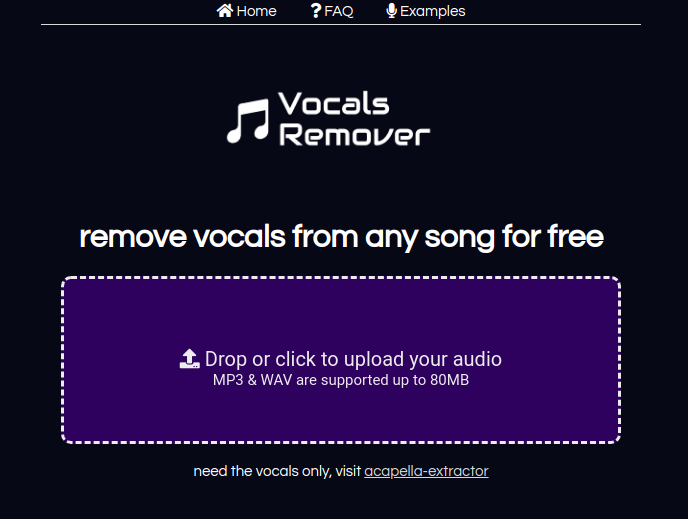
Remove Vocals Full homepage screenshot

At a glance

Category
Artificial Intelligence
Language
English
Paid-content signal
No paid content foundObserved
Registered
2019
Hosting
Hetzner Online GmbHInferred
HTTPS certificate trusted
PassedObserved
Last updated

Website review

This review may include AI-generated content and is not individually verified. Domain, certificate and other facts come from the observed data on this page.

What is Remove Vocals?

Remove Vocals is a browser-based tool for stripping the vocal track out of a song so you are left with an instrumental you can sing over. You upload an audio file, the service processes it with AI, and you download the result. No software install and no account are required.

What it actually does

It performs vocal/instrumental separation rather than true "vocal removal" by phase cancellation. The site states it is built on the open-source Spleeter library, which is a real, widely used separation model — a reasonable signal that results will be cleaner than the old channel-inversion trick, though AI separation always leaves some artifacts.

Practical limits stated on the page

  • Free use is capped at 2 songs per day.
  • Supported formats: MP3 and WAV.
  • Maximum file size: 80MB.
  • Maximum length: 10 minutes.
  • Processing happens on their server; you are redirected to a download page when it finishes.

Who it suits

  • Casual singers and party hosts who want a handful of karaoke tracks without paying or signing up.
  • Musicians practising or demoing who need a quick backing track and can tolerate minor bleed.
  • Anyone who wants the opposite — the isolated vocal — is pointed to a separate tool, Acapella Extractor.

It is a poor fit if you need many tracks in one sitting, if your source is longer than ten minutes, or if you need release-quality stems. In those cases, desktop separation software or a paid service is the better route.

A realistic scenario

You want to sing a four-minute pop song at a small gathering tonight. Upload the MP3, wait for processing, download the instrumental, and check it on headphones before you commit. Listen specifically for ghosted vocals on reverb-heavy or doubled lead lines — that is where separation most often shows its seams.

Next step

Before relying on it, run one song you know well and compare the output against the original. If the vocals sit clearly in the centre of the mix and the arrangement is not overly dense, expect a decent result; if the vocal is heavily processed or buried, expect more residue.

How do I remove vocals from a song for free?

Upload the song to a browser-based vocal remover and download the instrumental it returns. That is the whole workflow on Remove Vocals: drop or click to upload an MP3 or WAV, wait for processing, then download the instrumental from the results page. No software install and no account are needed, and the service is free for up to 2 songs per day.

What to check before you upload

  • Format and size: MP3 or WAV, up to 80MB.
  • Length: files up to 10 minutes. Longer tracks need trimming first.
  • Output: an instrumental (vocals removed). If you want the opposite — an isolated a cappella — that is a different job.
  • Account: none required, which matters if you only need one track for practice or a party.

How the result will sound

The site states it uses AI based on the open-source Spleeter library. Expect good separation on straightforward mixes — a lead vocal sitting in the centre with a conventional band behind it. Expect artefacts on dense productions, heavy reverb, layered harmonies, or anything where the vocal and an instrument share the same frequency range. You may hear a hollow or watery tone in the instrumental where the voice used to be, or a faint ghost of the vocal on sustained notes.

For karaoke at home, that is usually fine. For a live performance or a release, audition the result on headphones and on a phone speaker before committing.

A practical scenario

You are hosting a party and want a backing track for one song. Upload the MP3, download the instrumental, play it. If the chorus still leaks vocal, try a different source file — a higher-bitrate version of the same song often separates more cleanly than a low-quality rip.

When to use something else

Your need Better fit
One or two songs, no signup This browser tool
Many songs per day A paid desktop or subscription separator
Isolated vocals, not the instrumental A dedicated a cappella extractor
Studio-quality stems for mixing Dedicated stem-separation software

For higher daily limits or batch work, look at Moises or Lala; both are built around repeated stem separation rather than occasional one-off jobs.

Next step

Pick your cleanest copy of the song, keep it under 10 minutes and 80MB, and run the first track. Judge the output on the chorus, not the intro — that is where separation usually struggles most.

What file formats and size limits are supported for vocal removal?

MP3 and WAV files are the supported input formats, with a maximum file size of 80MB and a maximum track length of 10 minutes. Both limits apply together, so a small file that runs longer than 10 minutes is still rejected, and a short file over 80MB is rejected too.

Practical implications

  • Format: If your track is in another format (M4A, FLAC, AAC, OGG), convert it to MP3 or WAV first. WAV preserves more quality but takes up far more space, so a long WAV can hit the 80MB ceiling quickly.
  • Size: As a rough guide, 80MB is generous for MP3 but tight for uncompressed WAV. A 10-minute stereo WAV at CD quality is already near or past that limit, so MP3 is often the safer upload.
  • Length: Anything over 10 minutes — extended mixes, live sets, DJ edits — falls outside what the tool accepts, even if the file is small.

What to do next

Check your file before uploading: confirm the extension is .mp3 or .wav, check the duration, and check the file size in your operating system's file info panel. If a WAV is too large, export an MP3 version at a reasonable bitrate and upload that instead.

For listeners who want the opposite result — the isolated vocal rather than the instrumental — the page points to a companion tool at Acapella Extractor, which follows the same upload-based approach.

Can I use Remove Vocals to extract the acapella instead of the instrumental?

No — Remove Vocals is built to strip the vocals out and give you the instrumental, not to isolate the voice. Its own page points people who want the opposite result to a separate tool for acapella extraction.

What each output actually is

Goal What you get Typical use
Instrumental (this site's purpose) Song with vocals removed, backing music kept Karaoke, practising an instrument, backing tracks
Acapella (not this site) Isolated vocal, backing music removed Remix stems, sampling, vocal study, mashups

Practical details from the site

  • Upload MP3 or WAV, up to 80MB and 10 minutes long.
  • No registration or software; processing is free up to 2 songs per day.
  • Files are processed with an AI model based on the open-source Spleeter library.
  • After uploading you are redirected to a download page and grab the finished file there.

What to do instead

If your real target is the vocal, use the acapella-oriented tool that Remove Vocals itself recommends in place of this one. If you cannot find it, a workable fallback is to run the track through a vocal-isolation tool, or to check whether the acapella already exists: many popular songs have official and fan-made acapellas circulating, and starting from one of those usually beats extracting it yourself.

A quick way to judge any separator before committing: test it on a section with dense drums and harmonies. Clean instrumental results do not guarantee a clean vocal, and vice versa, because the two tasks are trained and tuned differently.

Does Remove Vocals require registration or software installation?

No. Remove Vocals works directly in your browser: you drop or click to upload an audio file, wait for processing, then download the instrumental from the redirect page. There is no account, signup or app to install, and the site states that the service is free up to 2 songs per day.

What you still need to know

  • File types and limits: MP3 and WAV, up to 80MB and 10 minutes per track. Longer files are rejected, so trim DJ sets, live recordings or full albums first.
  • Output: A vocal-removed instrumental intended for karaoke-style use. If you want the opposite — an isolated a cappella — the page points to a separate extractor rather than offering it here.
  • Technology: The site says it uses artificial intelligence based on the open-source Spleeter library. Expect separation quality to vary with how prominently vocals sit in the mix; dense productions with heavy reverb or doubled lead vocals are harder than simple arrangements.

A practical test

Take one song you know well, upload it, and listen for two things: whether the lead vocal disappears cleanly, and whether the bass and drums survive intact. If the result is good enough for your purpose, the no-registration workflow makes it easy to process a couple of tracks a day. If you need more than two songs daily or longer files, look at desktop separation tools instead.

For a second opinion on how different separation engines compare, Acapella Extractor is the companion service referenced on the page.

How does the AI vocal removal process work?

It works by splitting a mixed song into two stem files: one containing the instrumental, one containing the vocals. On Remove Vocals, you upload an audio file, the service processes it with an AI model, and you land on a download page for the instrumental once processing finishes.

What happens step by step

  1. Upload — drag or click to add an MP3 or WAV file.
  2. AI separation — the track is analyzed and separated into vocal and instrumental components. Remove Vocals states it uses artificial intelligence based on the open-source Spleeter library.
  3. Download — when processing completes, you download the instrumental track, which is what makes it usable as a karaoke backing.

The site also notes that if you want the opposite result — vocals only — that is handled by a separate tool, acapella-extractor.

Limits worth knowing before you start

Remove Vocals states the service is free for up to 2 songs per day, requires no registration or software, and accepts files up to 10 minutes and 80MB. Those caps exist to avoid overloading the server, so a long DJ set or a full live recording will not fit.

Where this approach helps — and where it struggles

Situation What to expect
Standard pop/rock mix, clear lead vocal centered Usually the cleanest result; the instrumental is often good enough for practice or casual karaoke
Dense mix, heavy reverb, layered harmonies Some vocal bleed or thinness in the instrumental is common with stem separation
Classical, jazz, or mostly instrumental tracks Little benefit; there may be almost nothing to remove
You need studio-grade isolation for release Treat the output as a starting point, not a finished master

A practical next step

Pick one song you know well, upload it, and listen to the instrumental on headphones — specifically to the section where the vocal was loudest. If you hear ghosting or muffled artifacts, that tells you the source mix is hard to separate, and you can decide whether the result is usable for your purpose or whether you need a different source file (a cleaner, higher-bitrate copy often helps).

If your goal is karaoke practice rather than production, the free daily allowance is usually enough to test a few tracks before committing to a paid alternative.

Related questions

More questions →
What is Remove Vocals (remove-vocals.com)?

Remove Vocals is a free browser-based tool that strips the vocal track out of a song to produce a karaoke-style instrumental. You upload an MP3 or WAV file, the site processes it with AI, and you download the instrumental — no software install and no account required. It fits quick, occasional use: the free tier allows up to 2 songs per day, and each file must be 10 minutes or shorter and no larger than 80MB.

What it does

The site takes a mixed audio file (instrumentals + vocals) and separates out the vocal layer, leaving you with the backing track. According to the site, the separation is powered by artificial intelligence and built on the open-source Spleeter library.

It also points to a companion tool, acapella-extractor, if you want the opposite result — the vocals only.

How to use it

  1. Open remove-vocals.com.
  2. Drop your audio file onto the page, or click to browse and select it. Supported formats are MP3 and WAV.
  3. Wait while the file uploads and processes. You'll be redirected to a download page.
  4. When processing finishes, click the download button to save the instrumental track.

No registration or software is needed to do any of this.

Limits and conditions to know before you start

Condition Value
Free usage Up to 2 songs per day
Max file length 10 minutes
Max file size 80MB
Supported formats MP3, WAV
Registration Not required
Software install Not required

The length and size caps exist, per the site, to avoid overloading its server. If your song is longer than 10 minutes, you'd need to trim it first.

When this tool is a good fit

  • You want a karaoke backing track from a song you already have as MP3 or WAV.
  • You only need a couple of tracks a day and don't want to sign up for anything.
  • You'd rather not install desktop audio software.

When it may not fit

  • You need to process many songs in one day — the 2/day free limit will get in the way.
  • Your track is longer than 10 minutes or larger than 80MB.
  • Your source file is in a format other than MP3 or WAV.

Related pages on the site

  • Examples — isolated instrumental samples you can check before uploading your own.
  • FAQ — answers to common questions.
  • acapella-extractor — the linked tool for extracting vocals only.

Using the service means accepting its terms of use; the site also links a Privacy Policy and a contact option.

Is Remove Vocals free, and do I need to register?

Yes. Remove Vocals (remove-vocals.com) is free to use for up to 2 songs per day, and it does not require registration or any software installation. You upload an audio file, wait for processing, and download the instrumental track. The only condition stated on the site is that by using the service you accept its terms of use.

What "free" actually covers

The site describes the service as "free up to 2 songs per day." That is a daily usage cap, not a one-time trial. If you need more than two songs in a single day, the page does not describe a paid tier, account upgrade, or payment option — so plan around the limit rather than assuming you can pay to lift it.

There is also a separate tool mentioned for the opposite task: if you need the vocals only, the site points you to acapella-extractor.

Do you need an account?

No. The page states the service "does not require any software or registration." In practice that means:

  • No sign-up, email, or login step before processing.
  • No desktop or mobile app to install — it runs in the browser.
  • You go straight from uploading a file to a download page.

The trade-off of not having an account is that there is no user dashboard or history described on the page, so keep track of your own downloads.

Limits to know before you upload

Item Limit
Free usage 2 songs per day
Supported formats MP3 and WAV
Maximum file size 80 MB
Maximum audio length 10 minutes
Registration Not required
Software install Not required

The page explains the length and size caps are there "so as not to saturate our server," so treat them as fixed rather than negotiable.

How the free process works

  1. Open remove-vocals.com and drop or click to upload your audio file (MP3 or WAV, up to 80 MB).
  2. The site processes the track and redirects you to a download page.
  3. When processing finishes, click the download button to get the instrumental.

The vocal removal is done with artificial intelligence, based on the open-source library Spleeter. You can preview what the output sounds like in the examples section before committing one of your two daily uploads.

Quick answers

Is it really free? Yes, within the 2-songs-per-day limit.

Do I have to register? No.

Do I need to install anything? No — it works through the browser.

What do I give up by not registering? There is no described account area, so no saved history or library of past conversions.

What if my song is longer than 10 minutes or larger than 80 MB? The page states those files cannot be processed, so you would need to trim or split the audio first.

How does Remove Vocals isolate instrumentals from a song?

Remove Vocals (remove-vocals.com) separates a mixed song into vocals and instrumental by running the audio through an AI model built on the open-source Spleeter library. You upload an MP3 or WAV, the site processes it on its server, and you download the resulting instrumental from a download page. It is free for up to 2 songs per day and requires no registration.

The separation mechanism

The site describes its service as using artificial intelligence and being "based on the open source library spleeter." Spleeter is a source-separation library: it takes a mixed audio file as input and predicts which parts of the signal belong to different stems (for example, vocals versus accompaniment), then writes those stems out as separate audio files.

In practice, for this tool that means:

  • Input: one mixed track containing both vocals and instruments (MP3 or WAV).
  • Processing: the AI model estimates the vocal component and subtracts/isolates it, leaving the instrumental.
  • Output: an instrumental track you can download and use as a karaoke backing.

This is a prediction task, not a perfect filter. The model works on the mixed waveform, so results depend on how prominent and how "typical" the vocals are in the mix.

What you get, and what "vocals only" means

The main output is the instrumental (karaoke) track. If you want the opposite — the isolated vocals — the site points you to a separate tool, acapella-extractor. So the two use cases are split across two services rather than offered as one combined export.

The site also hosts an Examples section where you can listen to isolated instrumentals before deciding whether the quality is good enough for your purpose. That is the most reliable way to judge output quality, since separation results vary by song.

Limits and access conditions

Condition Value
Free usage Up to 2 songs per day
Registration Not required
Supported formats MP3 and WAV
Max file size 80MB
Max audio length 10 minutes
Software install None needed (browser upload)

The length and size caps are stated as necessary to avoid saturating the server, so files beyond 10 minutes or 80MB will not be processed.

How to run a separation

  1. Open remove-vocals.com.
  2. Drop your audio file onto the upload area, or click to select it. Use MP3 or WAV, up to 80MB and 10 minutes.
  3. Wait while the file uploads and the AI processes it — you are redirected to a download page.
  4. When processing finishes, click the download button to save the instrumental.

Expected result: a downloadable instrumental version of your track. If nothing downloads, check first that the file is within the size and length limits, since those are the documented hard constraints.

Where quality can fall short

Because the separation is model-based, expect artifacts when:

  • Vocals overlap heavily with instruments in the same frequency range.
  • The mix is dense or heavily compressed.
  • The vocal is quiet relative to the backing.

The site's own Examples page is the practical reference point — compare your track type against those samples before relying on the output for a performance or release.

How do I remove vocals from a song on Remove Vocals?

Go to remove-vocals.com, drop or click to upload an MP3 or WAV file up to 80MB and 10 minutes long, then wait for processing to finish and download the instrumental from the download page. No registration or software is needed, and the service is free up to 2 songs per day.

What you need before starting

  • An audio file in MP3 or WAV format.
  • A file no longer than 10 minutes and no larger than 80MB. The site states these limits are necessary to avoid saturating its server.
  • A song that contains mixed instrumentals and vocals — that is what the extractor is built to separate.

If you only want the vocal track instead of the instrumental, the site points to a separate tool, acapella-extractor.

Step-by-step: removing vocals

  1. Open remove-vocals.com. The main heading reads "remove vocals from any song."
  2. Upload your audio. Either drag your file onto the upload area or click it to browse your computer. The page confirms MP3 and WAV are supported up to 80MB.
  3. Wait for processing. The site uses artificial intelligence based on the open source library Spleeter to separate vocals from the instrumental.
  4. Get redirected to the download page. After uploading, you are taken to a download page automatically.
  5. Download the instrumental. Once processing is finished, click the download button to save your karaoke track.

What to expect

Item Detail
Output Instrumental (vocals removed)
Input formats MP3, WAV
Max file size 80MB
Max length 10 minutes
Free usage Up to 2 songs per day
Registration Not required
Software install Not required
Underlying technology AI, based on the open source library Spleeter

Common snags

  • File rejected or won't process: check that it is MP3 or WAV, under 80MB, and under 10 minutes. Files outside these limits won't go through.
  • Hit the daily cap: the free tier covers 2 songs per day, so a third upload on the same day will have to wait.
  • You wanted the vocals, not the instrumental: this tool removes vocals. For the isolated vocal track, use the acapella-extractor the site links to.
  • Quality varies by song: separation is AI-based, so results depend on how the original mix blends vocals and instruments. The site's examples section shows isolated instrumentals you can check before uploading your own track.

By using the service you accept its terms of use.

What are the file size and length limits for Remove Vocals?

Remove Vocals (remove-vocals.com) accepts MP3 and WAV files up to 80MB and 10 minutes long. Both limits apply at the same time, so a file must satisfy each one to be processed. The site states the caps exist to avoid saturating its server.

The limits at a glance

Requirement Limit
File size 80MB maximum
Audio length 10 minutes maximum
Supported formats MP3, WAV
Free usage Up to 2 songs per day
Registration Not required

Why the limits exist

The site explains that the 10-minute and 80MB ceilings are "necessary, so as not to saturate our server." In other words, they are capacity controls rather than format restrictions — the tool itself is built on the open-source Spleeter library and is designed to handle mixed instrumental-and-vocal tracks.

What happens if your file exceeds a limit

The page does not describe a specific error message for oversized or overlong files. What it does make clear is the workflow: you upload a song, you are redirected to a download page, and once processing finishes you click the download button to get the instrumental. If your file is over either cap, it falls outside the stated supported range, so the practical step is to shorten or compress it before uploading.

How to bring a file within the limits

  • Trim the length: cut the track to 10 minutes or less in any audio editor before uploading.
  • Reduce the size: for a long WAV file, exporting to MP3 usually brings it well under 80MB. A WAV at 10 minutes can easily exceed the size cap depending on sample rate and bit depth, while the same audio as MP3 is far smaller.
  • Check both, not just one: a short file can still be too large (high-bitrate WAV), and a small file can still be too long (low-bitrate MP3). Confirm both numbers.

Other things worth knowing before you upload

  • Daily free allowance: the service is free for up to 2 songs per day. If you need more than that in a day, plan around the reset rather than expecting unlimited runs.
  • No software or account: you do not need to install anything or register to use it.
  • Vocals-only output: if you want the isolated vocal track instead of the instrumental, the page points to a separate tool, acapella-extractor.
  • Examples available: the site has an examples section where you can hear isolated instrumentals before committing your own file.

If your song is under 10 minutes and under 80MB in MP3 or WAV, it fits the supported range and you can upload it directly. If it exceeds either limit, edit it down first — the caps are hard requirements, not suggestions.

Website Overview

Identifiable technologies and additional version or configuration signals make the service easier to fingerprint, which may help targeted scanners narrow their checks. An established domain and managed infrastructure suggest continuity of operations and may support dependable delivery, although neither guarantees service quality.

Domain and Registration

Registered in 2019, this domain has about 6 years of history. That suggests continuity, although ownership and purpose may have changed. Transfer-protection status is present, helping reduce the risk of unauthorized domain transfers. The registrar is Squarespace Domains II LLC, a widely used domain service provider. The domain uses the common .com extension, which is not an independent safety signal.

DNS and Email

The observed email authentication setup is incomplete: DMARC is missing. Nameservers are provided by Google Cloud DNS, indicating managed DNS hosting. MX records point to the Mailgun email service. No CNAME was found; the observed records resolve directly to addresses. DNSSEC signatures were not detected, so this additional DNS authenticity protection is not confirmed.

TLS and Certificates

The public key uses EC with 256 bits. The server supplied a complete certificate chain. No organization name is present in the certificate; the available fields are consistent with domain validation. The certificate was issued by Let's Encrypt, commonly associated with automated certificate services. The certificate's total validity is about 89 days, consistent with a short renewal cycle.

HTTP and Browser Security

The Server header exposes the software version: nginx/1.18.0 (Ubuntu). This makes version-targeted checks easier, but is not proof of an exploitable vulnerability. The checked browser-security headers were not detected, leaving fewer explicit browser-side safeguards. No X-Powered-By header was found, reducing one common source of backend fingerprinting information. No obvious internal addresses or debug information were found in the headers. Cookie security attributes are unknown.

Technology Stack Analysis

The public page identifies Google Analytics, nginx 1.18.0, with exact versions exposed for 1 technologies. These details can narrow vulnerability checks, although exposure alone is not a vulnerability.

Search and Social Sharing

The page declares 4 language or regional alternatives using hreflang. The title has 53 characters, within a common display range. A meta description is present, with 123 characters. The observed directives allow indexing and link following. No Generator meta tag is publicly exposed.

Hosting and Email

DNSGoogle Cloud DNS
HostingHetzner Online GmbH
EmailMailgun
Approximate IP geolocation (inferred; a CDN or proxy may differ from the origin server) Finland flagHelsinki, Uusimaa, Finland Inferred 65.108.122.81

Registration details

RDAP / WHOIS

RegistrarSquarespace Domains II LLC
Registered2019-11-13
Expires2026-11-13
Domain statusclient delete prohibited、client transfer prohibited
Nameserversns-cloud-c1.googledomains.com、ns-cloud-c2.googledomains.com、ns-cloud-c3.googledomains.com、ns-cloud-c4.googledomains.com
DNSSECunsigned

DNS records

DNS

TypeNameValueTTLPriority
Awww.remove-vocals.com65.108.122.8114400—
MXremove-vocals.commxa.mailgun.org1440010
MXremove-vocals.commxb.mailgun.org1440010
NSremove-vocals.comns-cloud-c1.googledomains.com21600—
NSremove-vocals.comns-cloud-c2.googledomains.com21600—
NSremove-vocals.comns-cloud-c3.googledomains.com21600—
NSremove-vocals.comns-cloud-c4.googledomains.com21600—
TXTremove-vocals.comv=spf1 include:mailgun.org ~all14400—

TLS and certificates

TLS / SSL

AssessmentNormal configuration
Supported protocolsTLSv1.2、TLSv1.3
Negotiated protocolTLSv1.3
Certificate subjectremove-vocals.com
IssuerLet's Encrypt
Valid until2026-12-23T23:49 · Remaining when checked: 73 days
Verification detailsCertificate trust: Passed · Hostname match: Passed

HTTP response headers

HTTP

HeaderValue
content-typetext/html; charset=utf-8
servernginx/1.18.0 (Ubuntu)
set-cookieRedacted

Identified technologies

Google Analyticsnginx 1.18.0

Pages, Search and Sharing

Meta descriptionRemove vocals from any song & get the instrumental karaoke track using state of the art AI. FREE (2/day) & no registration.
Canonical URLhttps://www.remove-vocals.com/en/
LanguageEnglish (default) · Multilingual
Twitter CardNot detected
All bots 0 allowed · 6 disallowed
  • Disallow/*/result/*
  • Disallow/*/news/
  • Disallow/*/paywall/
  • Disallow/*/thankyou/
  • Disallow/*/nodonation/
  • Disallow/free_credits/*

User reviews (0)

  • No reviews yet.