
 简体中文
简体中文 English
Website review
This review may include AI-generated content and is not individually verified. Domain, certificate and other facts come from the observed data on this page.
What is Retrosizer?
Retrosizer is a free visual comparison tool for handheld gaming devices. It shows devices at true relative scale, so you can see exactly how a Miyoo Mini, Anbernic RG-35XX, Steam Deck, or Game Boy compare in size. You can drag, rotate, and arrange them freely, then share a comparison via URL.
It also simulates how classic systems appear on each screen. For example, you can check how Game Boy, GBA, SNES, Genesis, or PlayStation games look on a given device, with accurate pixel scaling. That matters if you care whether a screen is large enough for text-heavy RPGs or whether integer scaling leaves black bars.
Who it helps
- Buyers choosing between similar handhelds: compare physical size and screen area before ordering.
- Retro enthusiasts: see how original game resolutions map onto modern panels.
- Collectors: visualize old and new devices side by side without owning them all.
H3: What to keep in mind The site covers size and screen simulation, not performance benchmarks or build quality. It includes devices from Anbernic, Miyoo, PowKiddy, Retroid, Nintendo, Sony, Valve, and others, with filters for screen size, manufacturer, and performance. Use it alongside hands-on reviews for ergonomics and battery life.
A practical next step: open a comparison between the two devices you are considering, rotate them to match how you hold them, and check a text-heavy game simulation. If the smaller screen makes dialogue hard to read at a glance, that is a real trade-off the tool makes visible before you buy.
For official manufacturer details, check Anbernic or Miyoo directly.
How can I use Retrosizer to decide which retro handheld to buy?
Use Retrosizer as a visual shortlist tool, not a full buying guide. It shows handhelds at true relative scale and simulates how classic systems appear on each screen, so you can judge physical size and pixel scaling before committing.
A practical workflow
- Pick two or three realistic candidates, e.g. Miyoo Mini Plus vs Anbernic RG-35XX SP vs Retroid Pocket 4.
- Drag and rotate them side by side to feel the size difference. Pocketability is often the deciding factor, not specs.
- Run screen simulations for the systems you actually play: Game Boy, GBA, SNES, Genesis, PlayStation.
- Share the comparison URL with a friend or a forum thread if you want a second opinion.
- Use the filters (screen size, manufacturer, performance) to narrow the field, then check reviews for build quality, battery and software.
What the tool does and does not tell you
| Question | Retrosizer helps? |
|---|---|
| How big is it in my hand or pocket? | Yes, relative scale |
| How will Game Boy or SNES look on the screen? | Yes, pixel scaling simulations |
| Is the D-pad, hinge or shell any good? | No |
| Battery life, firmware, shipping, price | No |
Trade-offs to weigh
A larger screen makes 4:3 consoles like SNES and Genesis comfortable but hurts portability. A small vertical device like the Miyoo Mini is easy to carry but cramped for PlayStation-era games. A wide device such as the Retroid Pocket 5 suits GBA and PSP-style content better. The simulation shows the visual result; you still decide how much size you will tolerate.
Example scenario
If you mostly play GBA on the train, compare a Miyoo Mini Plus against an Anbernic RG-34XXSP and check the GBA simulation on both. If the image looks too small on one, move up a screen size before buying.
Next step
Build one comparison URL with your top three devices and your two most-played systems. Then read owner reports on durability and software for whichever device wins on size and screen fit. For broader background on these devices, Anbernic and Miyoo publish official product pages.
How accurate is the size comparison on Retrosizer?
Retrosizer presents devices at true relative scale, so the size comparison is accurate in the sense that a Game Boy Advance will appear smaller than a Steam Deck, and a Miyoo Mini will sit proportionally next to an Anbernic RG-35XX. The page states that devices can be dragged, rotated, and arranged freely, and that screen simulations show accurate pixel scaling for systems such as Game Boy, GBA, NES, SNES, Genesis/Mega Drive, and PlayStation. That means the tool is designed for visual proportion and on-screen appearance, not for millimetre-perfect hardware measurements.
The practical value is in judging how a device will feel in hand and how a game will look on a given screen. If you are choosing between a small vertical handheld and a wider horizontal one, the relative-scale view makes the difference obvious. If you already own a device, you can place it next to a candidate and see whether the screen is meaningfully larger or just slightly so. The screen simulations are the more distinctive part: they answer whether a Game Boy game will look cramped or comfortably sized on a particular panel.
Accuracy caveats worth knowing:
- Relative scale depends on the underlying device dimensions being correct; treat it as a strong visual guide rather than a calibration tool.
- Screen simulations show pixel scaling, but they cannot reproduce real-world factors like panel brightness, colour reproduction, or viewing angles.
- Physical details such as button placement, grip thickness, and weight are not the focus, so a device that looks similar in outline may still feel different in use.
A useful next step is to open a comparison that matches your shortlist, such as a Miyoo model versus an Anbernic device versus a Steam Deck, and rotate them to the angle you would actually hold them. If the screen simulation is the deciding factor, compare the same game system across two devices rather than comparing two devices on different systems. For broader context on a specific manufacturer, the official pages from Anbernic or Nintendo can confirm hardware details that Retrosizer does not cover.
Can I see how classic games like Game Boy or SNES will look on different handheld screens?
Yes. Retrosizer includes screen simulations for systems such as Game Boy, Game Boy Advance, NES, SNES, Genesis/Mega Drive and PlayStation, and shows them on handheld screens at relative scale. That means you can see whether a game fills the screen, sits in a bordered window, or gets stretched, before you buy a device.
What you can actually compare
- Screen size and shape: devices are shown at true relative scale, so a Miyoo Mini next to a Steam Deck makes the size gap obvious.
- Pixel scaling: the simulations show how classic systems appear on each screen, which is the part static product photos rarely reveal.
- Layout freedom: you can drag, rotate and arrange devices, then share the comparison via URL — useful when asking a forum or friend for a second opinion.
- Filtering: narrow the list by screen size, manufacturer and performance instead of scrolling through every supported device.
A practical way to use it
Pick two or three candidates you are actually considering — for example a small vertical handheld versus a wider horizontal one — and load the same Game Boy or SNES simulation on each. Ask yourself: is the image large enough to read text in RPGs, and do I mind black borders? Then share the URL with someone who owns one of the devices.
Trade-offs to weigh
| Priority | What to look for |
|---|---|
| Pocketability | Smaller screens look sharper for low-resolution systems but text-heavy games suffer |
| Comfort | Larger devices are easier to hold but less portable |
| Authenticity | Correct pixel scaling and aspect ratio matter more than raw screen size |
| Value | A cheap device with a poor screen fit can be a worse experience than a slightly pricier one |
A simulation is not a substitute for holding a device, but it removes the biggest guesswork: how a specific console's output will map onto a specific screen. If you want to check real-world ownership impressions, communities such as Reddit often discuss screen quality on specific models, and manufacturer pages like Anbernic list official device details.
How do I share my comparisons with others?
Comparisons on Retrosizer can be shared by URL. The page lists "Share comparisons via URL" as a feature, so the intended workflow is to build your layout — dragging, rotating and arranging devices — then copy the resulting link and send it to whoever needs to see it.
That matters most when the point is a size argument rather than a spec sheet. If a friend is choosing between a Miyoo Mini and an Anbernic RG-35XX and keeps picturing them as roughly the same, a shared link lets them see the two side by side at true relative scale and judge for themselves.
A practical way to use it
- Open Retrosizer and find the devices you care about.
- Arrange them the way you want the comparison read — smallest to largest, or grouped by screen size.
- Add the screen simulations that matter for the decision, such as Game Boy Advance or SNES, so the recipient sees how those systems actually fill the display.
- Copy the URL and send it. Anyone opening it should see your arrangement rather than a blank canvas.
If you are comparing for someone else, keep the layout simple: two or three devices and one simulated system are easier to interpret than a crowded canvas.
What a shared link can and cannot settle
A link is good for questions of physical size, screen proportions and how retro pixel output is scaled. It is not a review. It will not tell you whether a device's buttons feel right, how warm it runs, or whether the software is pleasant to use. Treat the shared comparison as the first filter, then look for hands-on impressions of the specific model before buying.
For a buyer deciding between similarly sized handhelds, the useful next step is to share the comparison and ask a narrower question: not "which is better" but "is this screen big enough for the systems I actually play?"
Which handheld gaming devices are supported on Retrosizer?
Retrosizer covers a broad catalog of handhelds, grouped by manufacturer. The list includes dedicated retro emulation devices, modern handheld PCs, and original hardware from major brands.
Manufacturers and notable devices
- Anbernic: RG ARC-D/S, RG Cube, RG Rotate, RG-280M/V, RG-28XX, RG-300/300X, RG-34XX/34XXSP, RG-351M/MP/P/V, RG-353M/P/V, RG-35XX/H/SP, RG-405M/V, RG-406V, RG-40XXH/V, RG-503/505/552/556, RG-NANO, Win600
- Miyoo: A30, Mini, Mini Plus, Mini V4, P60
- PowKiddy: A66, Q90, RGB10 series (including Max, Max2, RGB10S), RGB20S/SX, RGB30, RK2023, X55, v10, v90
- Retroid: Pocket 2, Pocket 3, Pocket 4, Pocket 5, Pocket Flip
- Nintendo: Game Boy family (original, Pocket, Color, Advance, Advance SP, Micro), DS/DS Lite/DSi/DSi XL, 2DS/3DS/3DS XL/new 2DS XL/new 3DS/new 3DS XL, Switch/Switch Lite/Switch OLED, Wii U
- Sony: PSP 1000/2000/3000, PSP Go, PS Vita, PS Vita 2000
- Valve: Steam Deck
- AYANEO: 2, Air, Next, geek
- AYN Technologies: Odin, Odin 2, Odin 2 Mini
- Analogue: Pocket
- Asus: ROG Ally
- Lenovo: Legion Go
- Logitech: G CLOUD
- Panic: Playdate
- TRIMUI: Smart, Smart Brick, Smart Pro, Model S
- GPD: WIN 4
- KT Pocket: KT-R1
- Evercade: EXP
- FunKey: S
- GKD: Mini Pixel
- Data Frog: SF2000
- Retroflag: GPi Case, GPi Case 2, GPi Case 2W
- PocketGo: S30
- Other classic handhelds: Atari Lynx, Lynx II; SEGA Game Gear, Game Gear Micro; NEC TurboExpress; SNK Neo Geo Pocket Color
How to use this for a buying decision If you are choosing between two devices, open Retrosizer and place them side by side. Check the physical size against your hand or pocket, then switch on a screen simulation for the systems you actually play — for example, Game Boy Advance on a widescreen handheld versus a 4:3 device. The visual difference in scaling and letterboxing is often the deciding factor, not the spec sheet.
A useful next step: start with a comparison such as Miyoo Mini vs RG-280V vs GBA vs Steam Deck, then filter by screen size or manufacturer to narrow the field to devices that fit your preferred form factor. For original hardware reference, compare a modern handheld against a Game Boy or PSP to judge whether the screen is an upgrade or a compromise for your library.
 Amazon Route 53
 Fastly
 Google Workspace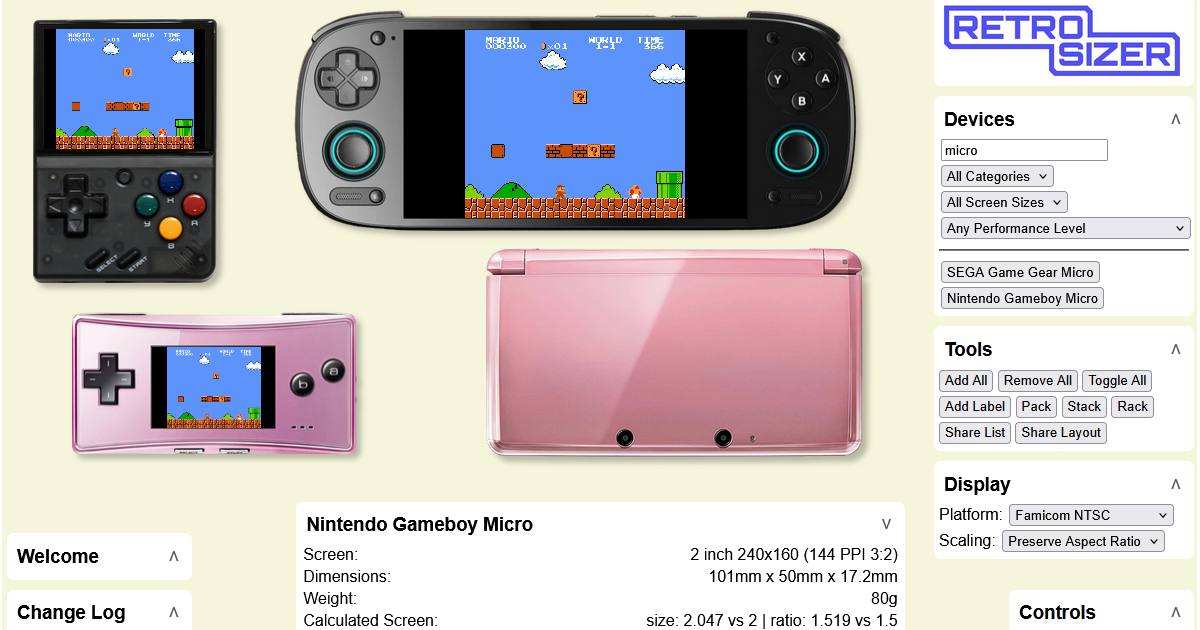

User reviews (0)