
 简体中文
简体中文 English
Website review
This review may include AI-generated content and is not individually verified. Domain, certificate and other facts come from the observed data on this page.
What is SafeSquid?
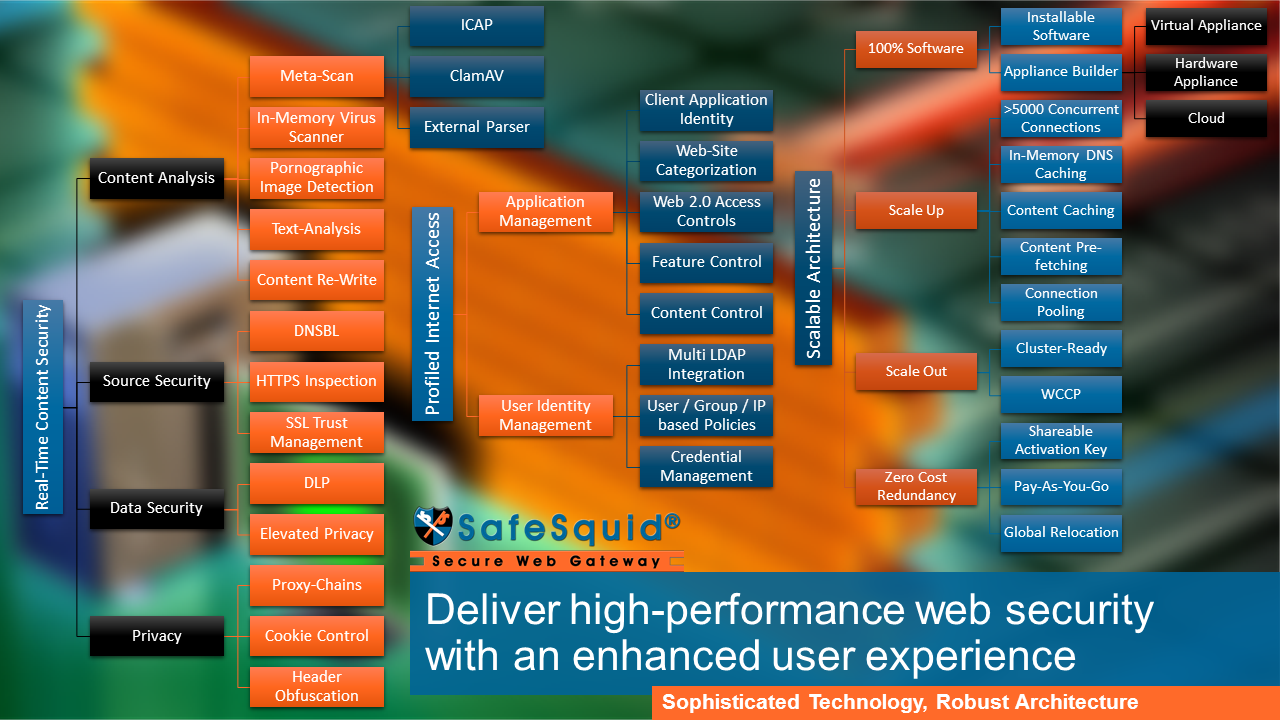
SafeSquid is an HTTP(S) proxy server built for web security rather than caching. Its stated design goal is Zero-Trust web security: regulating web traffic at the perimeter and applying access and content controls with enough granularity to enforce secure operating practices. The page frames it as a specialized replacement for the proxy core inside traditional firewalls, UTMs and secure web gateways, which are typically built around Squid.
What it does, in practical terms
- Proxies and inspects web traffic — HTTP(S) traffic passes through it, and application-layer controls such as malware defence, application identification, URL classification and user authentication run on top of that proxy service.
- Enforces access and content rules — the emphasis is on granular control, so policies can be more specific than a simple allow/block list.
- Targets named enterprise problems — data leakage, phishing, ransomware, cyber-slacking and unwanted targeted advertising.
Who it suits
Security teams that want to keep HTTPS inspection switched on without wrecking users' web experience, and organisations pursuing Zero-Trust goals that find their current perimeter appliance forces compromises. Because it is a proxy core rather than a turnkey appliance, expect to design and tune policy yourself.
The trade-off it argues
The page's central claim is architectural: Squid's legacy multi-process design limits how much structured data can be shared across processes, which weakens the "contextual intelligence" needed for consistent policy decisions. SafeSquid positions itself as avoiding that limitation. Treat this as the vendor's argument and validate it against your own traffic and policy complexity.
Next step: list the specific controls you currently disable or work around — HTTPS inspection, granular URL categories, per-user policy — and test whether SafeSquid can enforce them without degrading browsing. For background on the proxy model it contrasts with, see Squid Cache.
How does SafeSquid differ from a traditional firewall or UTM for web security?
SafeSquid is positioned as a dedicated HTTP(S) proxy at the core of web security, rather than a general-purpose firewall or UTM with web filtering bolted on. The page's central argument is architectural: traditional firewalls, UTMs and secure web gateways are built around the Squid web proxy, which was designed for caching and uses a multi-process design. SafeSquid's page says that design limits the sharing of structured data, which in turn weakens the "contextual intelligence" needed for granular, Zero-Trust-style access and content control. SafeSquid presents itself as a single-purpose proxy engineered for that role instead.
Where the difference shows up in practice
- Layer of operation. A firewall primarily governs network traffic by address and port; a UTM bundles several security functions. SafeSquid's page describes application-layer web controls—malware defence, application identification, URL classification and user authentication—all riding on the proxy service.
- Granularity of control. The page emphasizes "granular compliance of secure operating practices," meaning policies tied to users, content and applications rather than just network endpoints.
- HTTPS inspection and user experience. The page notes that users on traditional perimeter security often push to disable HTTPS inspection because of poor web experience. A proxy built for inspection aims to avoid that trade-off, though real-world performance depends on sizing and policy design.
- Scope. A UTM covers email, intrusion detection, VPN and more. SafeSquid covers web traffic specifically, so it complements rather than replaces those other functions.
A concrete scenario
A mid-sized company wants to block phishing sites, stop data leaks over web uploads, and curb cyber-slacking without breaking legitimate SaaS use. A traditional UTM may force coarse URL blocking or inspection that slows browsing. A dedicated proxy approach lets administrators write per-user, per-application policies and keep HTTPS inspection on.
How to decide
Choose a dedicated web proxy like SafeSquid when web traffic is your main risk surface and you need fine-grained, identity-aware content control. Keep a firewall or UTM for network segmentation, email and intrusion prevention. Evaluate by testing policy granularity, HTTPS inspection performance and reporting against your own traffic. For broader context on secure web gateways, see Wikipedia's Secure Web Gateway overview.
Why does SafeSquid claim Squid-based perimeter security fails against phishing and ransomware?
SafeSquid's argument is architectural: most firewalls, UTMs and secure web gateways are built around the Squid web proxy, which was designed for caching and uses a multi-process model. In that model, each process handles traffic largely on its own, so structured data about a user's activity is not shared across the system. SafeSquid calls the missing ingredient "contextual intelligence"—the ability to connect a URL request, a user identity, a download and a later outbound upload into one coherent picture.
Why that matters for phishing and ransomware
Phishing and ransomware attacks unfold across several steps rather than a single bad request. A typical chain: a user clicks a link in a mail, lands on a newly registered or compromised site, downloads a payload, and the malware later calls out to a command-and-control server or exfiltrates files.
- Per-request inspection misses the sequence. If URL classification, malware scanning and authentication run as loosely attached external scripts, each sees only its slice of traffic. A link that looks harmless on its own may become suspicious only in combination with the user's history or a subsequent outbound connection.
- HTTPS inspection gets switched off. SafeSquid's page argues that when inspection degrades the browsing experience, users pressure administrators to disable HTTPS inspection—removing visibility into exactly the encrypted traffic where modern phishing and malware delivery hide.
- Policy becomes a compromise. Without shared context, granular rules (this user, this category, this time, this data type) are hard to enforce, so organisations water down zero-trust intentions.
SafeSquid's proposed fix is to make a purpose-built HTTP(S) proxy the operative core of the perimeter, with URL classification, application identification, user authentication and malware defence riding on that single service, so access and content controls can be applied with granularity.
How to evaluate the claim for your own network
Treat this as a vendor's architectural argument, not a measured comparison. The practical question is whether your current gateway can correlate identity, content and behaviour across a session. A useful test: take a real phishing simulation and a simulated payload download, then check whether your logs let you reconstruct the full chain for one user without manual stitching across tools. If they don't, session-aware inspection is worth prioritising—whether through SafeSquid or another gateway. You can review the vendor's own description at SafeSquid and compare general proxy architecture notes from Squid Cache.
How can I stop data leaks and cyber-slacking with SafeSquid without disabling HTTPS inspection?
Keep HTTPS inspection on by enforcing policy at the proxy layer rather than switching inspection off. SafeSquid positions its HTTP(S) proxy as the operative core of a Secure Web Gateway, with Zero-Trust access and content-control features intended to regulate web traffic at the perimeter (SafeSquid). The practical goal is to filter and control what users send and receive over encrypted sessions, so you address both data leaks and cyber-slacking without degrading the browsing experience enough that users demand inspection be disabled.
A workable setup
- Inspect, then classify. Let the proxy terminate and inspect HTTPS traffic, then apply URL classification, application identification and user authentication to each request. This is the layer where both leak prevention and slacking controls live.
- Control outbound content. For data leaks, focus on what leaves: block or log uploads to unapproved file-sharing and webmail destinations, restrict posting to unsanctioned sites, and alert on large outbound transfers. Content-control rules on the proxy are the enforcement point.
- Control categories, not just sites. For cyber-slacking, block or time-limit categories such as streaming, social media and gaming during work hours, while allowing business-relevant use of the same domains where needed.
- Tie policy to identity. Apply different rules per user group, so finance gets stricter upload controls and engineering keeps access to code repositories.
- Preserve the web experience. Exclude certificate-pinned or business-critical apps from inspection where breaking them would push users to bypass the proxy; use exceptions rather than disabling inspection globally.
Trade-offs to weigh
| Approach | Leak control | Slacking control | User friction |
|---|---|---|---|
| Full HTTPS inspection with content rules | Strong | Strong | Higher; needs certificate trust and exceptions |
| Category blocking only | Weak | Moderate | Low |
| Disabling inspection | Minimal | Minimal | None, but defeats the purpose |
Decision criterion
If your main risk is sensitive data leaving via encrypted uploads, invest in outbound content rules and logging first; if the main complaint is lost productivity, start with category and time-based controls. Either way, keep inspection on and manage friction through targeted exceptions and clear communication about why the proxy inspects traffic.
A useful next step is to pilot on one department: enable inspection, log rather than block for two weeks, then convert the noisiest leak and slacking patterns into rules.
What does it take to set up SafeSquid as a Zero-Trust secure web gateway in my enterprise?
Setting up SafeSquid as a Zero-Trust secure web gateway centers on deploying its HTTP(S) proxy as the operative core of your perimeter, then layering access and content controls on top of it so that every web request is authenticated, classified, and inspected before it is allowed through. Per the product material, SafeSquid is an HTTP(S) proxy explicitly designed for Zero-Trust web security, with innovative implementations of Zero-Trust access and content control intended to enforce granular compliance with secure operating practices. The page frames the proxy as the component on which the rest of application-layer security rides—malware defense, application identification, URL classification, and user authentication—so the practical work is configuring those functions rather than treating the proxy as a simple pass-through.
What the setup involves
- Proxy as the enforcement point: Route enterprise web traffic through the SafeSquid proxy so it regulates all HTTP(S) flows at the perimeter.
- Access control: Apply Zero-Trust access rules so users and devices are authenticated and authorized per request rather than trusted by network location.
- Content control: Use URL classification, application identification, and content filtering to decide what categories, sites, and Web 2.0 applications are permitted.
- HTTPS inspection: Enable inspection so encrypted traffic is also subject to policy; the page notes that poor web experience often pushes users to demand HTTPS inspection be disabled, so plan for performance and usability.
- Threat defense: Layer malware scanning and phishing/ransomware protections onto the proxy so malicious content is blocked before reaching users.
- Data leakage prevention: Apply controls that restrict what data can leave through web channels.
A concrete scenario
A mid-sized enterprise with a flat internal network can start by placing SafeSquid at the internet egress, authenticating users against its directory, then enforcing category-based filtering and HTTPS inspection for all staff. Executives get tighter rules against targeted advertising and social applications, while engineering keeps access to needed developer sites. Logs from the proxy become the evidence base for tuning rules and auditing compliance.
Decision criteria and trade-offs
| Consideration | What to weigh |
|---|---|
| Architecture | A proxy-centric gateway concentrates control but must be sized for throughput, especially with HTTPS inspection |
| User experience | Strict inspection and filtering can slow browsing; communicate policy and tune exceptions |
| Operational effort | Granular Zero-Trust rules require ongoing maintenance and log review |
| Coverage | Proxy-based control covers web traffic; pair it with other controls for non-web channels |
As a next step, inventory your current egress path, define which user groups need which web categories, and pilot HTTPS inspection with one department before rolling out enterprise-wide. For general background on secure web gateway concepts, see Wikipedia and NIST.
Can SafeSquid replace my existing Squid-based proxy without disrupting users' web experience?
SafeSquid is designed as a specialized HTTP(S) proxy that can take over the traffic-regulation role of a Squid-based perimeter setup, but "no disruption" depends on how you stage the switch. The page presents SafeSquid as a purpose-built proxy for Zero-Trust web security, originally conceived as a proxy-chain web-filtering layer for Squid, and argues that traditional firewalls, UTMs and secure web gateways built around Squid suffer from multi-process limits that hamper contextual policy enforcement. That is the vendor's positioning; treat the performance and inspection claims as claims to validate in your own environment.
The disruption risk is less about proxy substitution and more about policy migration. Your users notice the proxy through authentication prompts, HTTPS inspection behaviour, blocked categories, and speed. Before cutting over, map these:
- Authentication: confirm how users are identified (directory integration, SSO, IP-based) and test that sign-in is invisible or familiar.
- HTTPS inspection: replicate your current inspection scope and certificate trust chain; untrusted certificates are the most common cause of "the web feels broken."
- Filtering policy: export URL categories, allow/deny lists, and application controls, then replay them in SafeSquid and compare decisions on a sample of real sites.
- Logging and reporting: verify your SIEM or reporting pipeline can consume SafeSquid's logs before you retire Squid.
- Bandwidth and latency: run a pilot group through SafeSquid and compare page-load times and proxy CPU under peak load.
A practical cutover approach
Run SafeSquid in parallel with your existing proxy for a pilot department, using explicit proxy settings or a PAC file to route only that group. Compare block decisions and user complaints for two to four weeks, then expand in waves. Keep a quick rollback path (revert the PAC file or proxy setting) until the full estate is stable.
When it may not fit
If your Squid deployment is heavily customized with bespoke scripts, or if you rely on Squid's caching for bandwidth savings, confirm SafeSquid covers those behaviours before committing. For teams wanting an independent baseline on proxy and gateway concepts, OWASP publishes guidance on web security testing that can inform your pilot checklist.
 Google Workspace
 Bengaluru, Karnataka, India

User reviews (0)