Website profiles · Technology insights · Alternatives

simone.computer

Simone Marzulli's personal website, feel free to click your favourite buttons!

No paid content found
Visit website
Profile views 14 Outbound visits 13 Normal
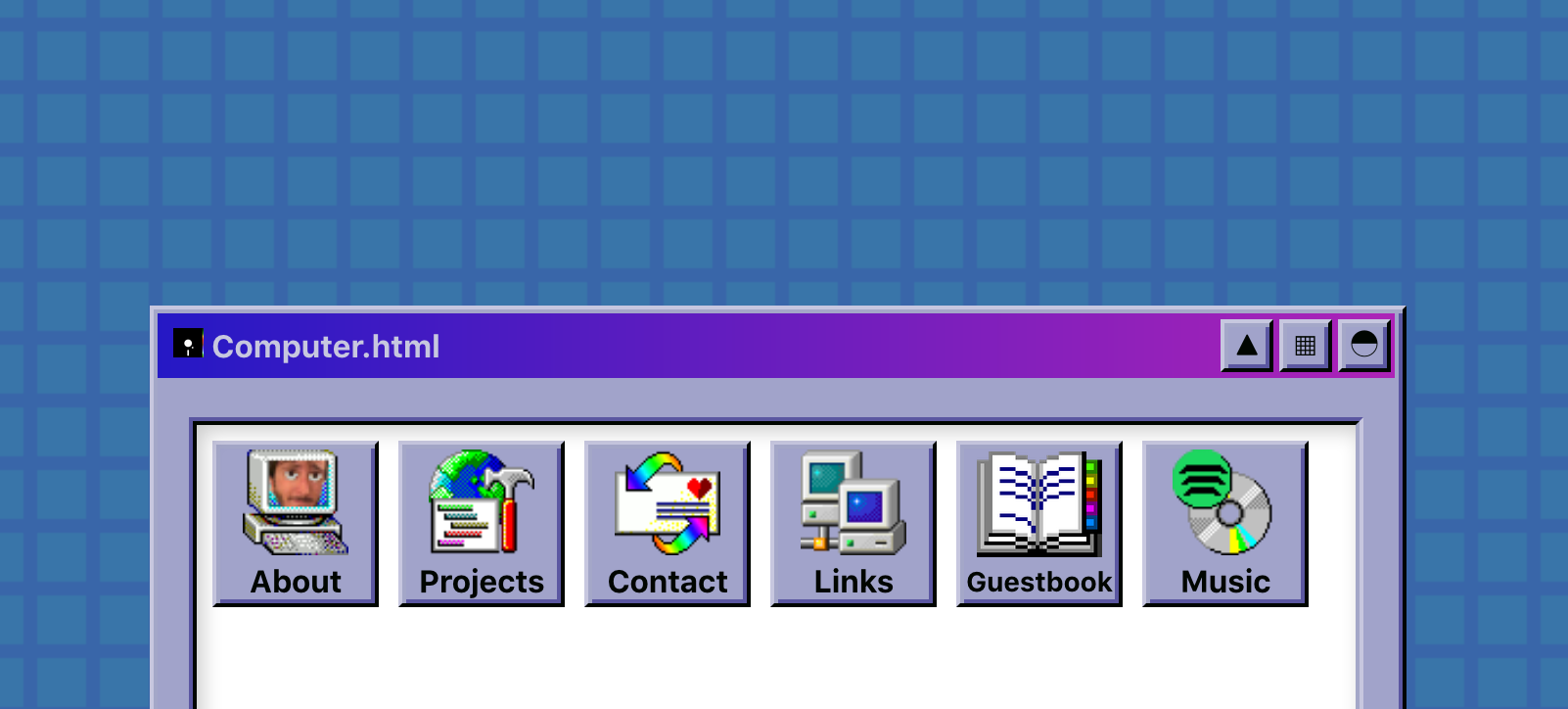
Simone's Computer Full homepage screenshot

At a glance

Category
Development
Language
English
Paid-content signal
No paid content foundObserved
Registered
2019
Hosting
FastlyInferred
HTTPS certificate trusted
PassedObserved
Last updated

Website review

This review may include AI-generated content and is not individually verified. Domain, certificate and other facts come from the observed data on this page.

What is Simone's Computer?

Simone's Computer is the personal website of Simone Marzulli, a full-stack software engineer and open-source enthusiast who describes himself as a piadina lover. It is a small, personal homepage rather than a product or service: a place to introduce himself and point visitors to his blog, email, and social profiles.

A distinctive touch is that the site has a No-JavaScript fallback. Visitors without JavaScript see a plain version with a playful note about "what a boring life you must live," which suggests the full experience is built around interactive elements — the site invites you to "click your favourite buttons."

Simone's Computer

Who it's for

  • People who want to follow Simone's writing or get in touch, via the blog and email links.
  • Developers and open-source folks curious about his work and profiles.
  • Anyone who enjoys quirky, personality-driven personal sites rather than corporate pages.

What to do next

If you want to know what he actually writes about, open the blog first; if you're evaluating him professionally, check the GitHub profile linked from the page. And if you have JavaScript enabled, reload the site to see the interactive version — the fallback text implies that's where the fun is.

How can I contact Simone Marzulli?

Contact Simone Marzulli through the links on his personal site, Simone's Computer. The page lists Email, GitHub, and Bluesky as his contact channels, alongside a Blog. Email is the most direct route for a personal message; GitHub and Bluesky are better if you want a public, topic-specific exchange.

A practical next step: open the site, pick the channel that matches your reason for writing, and use it rather than a generic contact form. For example, if you're reporting a bug or asking about open-source work, GitHub keeps the conversation with the relevant project; if you just want to say hello or ask a general question, email fits better. Note that the fallback page you may land on is the no-JavaScript version, so the links are still usable even without scripts running.

What projects has Simone Marzulli worked on?

The page itself doesn't list specific projects, so the most reliable way to see what Simone Marzulli has built is to follow the links he provides from Simone's Computer: his blog, email, GitHub and Bluesky. GitHub is the practical starting point, since open-source work usually lives there in public repositories with commit history and READMEs.

What the page does tell you

  • He describes himself as a full-stack software engineer and an open source enthusiast.
  • The site is his personal home page, and it has a No-JavaScript fallback version — the page you land on if scripts are blocked.
  • The tone is playful rather than a formal portfolio: "feel free to click your favourite buttons" and a joke about the boring life of a no-JavaScript visitor.

How to check projects yourself

  1. Open his GitHub profile from the link on the site and sort repositories by "Last updated" to see current activity, not just old pinned work.
  2. Read a few READMEs to judge whether a project is a maintained tool, a learning exercise or an abandoned experiment.
  3. Cross-check his blog for write-ups that explain why he built something — that context is usually missing from the code alone.

Why the page doesn't answer the question directly

Personal sites like this one often act as a hub rather than a portfolio: the interesting material sits behind the outbound links. That's a useful signal in itself — if you're evaluating him for a role or collaboration, the GitHub history and blog posts will tell you more about his range and working style than the landing page does.

Why does Simone's Computer have a No-JavaScript version?

Because the site is built as a playful, button-driven personal page, and its owner wants it to keep working even when scripting is blocked. The fallback text on Simone's Computer explicitly says "You're currently viewing the No-JavaScript version of the site," which tells you the main experience depends on JavaScript and this is the backup path.

What this design choice gives readers

  • Access for people who disable JavaScript. Some readers block scripts for privacy, security, or bandwidth reasons; they still get the essential content instead of a blank page.
  • A working identity and contact path. The fallback presents Simone Marzulli as a full-stack software engineer and open source enthusiast, plus links to Blog, Email, GitHub and Bluesky. That is the core "who is this and how do I reach them" information.
  • Resilience. If a script fails to load, the page degrades to a readable version rather than showing nothing.

The trade-off

A No-JavaScript version is usually plainer and less interactive than the main site. The playful "click your favourite buttons" experience lives in the scripted version; the fallback is closer to a business card. For someone who only wants to read a blog post or find a contact address, that is fine. For someone who came for the interactive toy, it is a downgrade.

A practical next step

If you are visiting from a locked-down browser and only see the fallback, you can still use the Blog, Email, GitHub or Bluesky links to reach the real content. If you want the full interactive experience, allow JavaScript for this site specifically rather than globally — that keeps the rest of your browsing protected while letting the button-driven version load.

What topics does Simone Marzulli write about on his blog?

The available page evidence doesn't list any blog post titles or topic categories. It only shows that a blog exists on Simone's Computer, alongside links to email, GitHub and Bluesky, and describes Simone Marzulli as a full-stack software engineer and open source enthusiast.

So the honest answer is: the site itself tells you he blogs, but the excerpt given here doesn't say what he blogs about. Anything more specific would be guesswork.

How to find out in a minute: open the blog from the site's own navigation and scan the post archive. Two signals are usually enough:

  • Recurring tags or categories — if the same few labels repeat, that's his core territory.
  • The mix of post types — deep technical write-ups, short links-and-comments posts, or personal notes. A full-stack engineer's blog often leans toward implementation details, tooling and open-source work, but you should confirm that against the actual archive rather than assume it.

If the blog turns out to be mostly short posts linking elsewhere, treat it as a reading list rather than a tutorial source; if posts are long and code-heavy, it's better for learning a specific technique.

Is Simone Marzulli available for freelance or full-time work?

No — nothing on Simone's Computer states that Simone Marzulli is available for freelance or full-time work. The page identifies him as a full-stack software engineer, open source enthusiast and piadina lover, and offers ways to follow or contact him (blog, email, GitHub, Bluesky), but it makes no claim about hiring status, availability or interest in new roles.

That distinction matters if you're evaluating him as a candidate or contractor. A personal site like this is best read as a portfolio and contact surface, not a CV or a services page: the absence of a "hire me" section is not evidence that he is unavailable, and the presence of contact links is not evidence that he is. Many engineers keep a personal site purely as a writing and project space while their employment situation lives elsewhere.

Practical next step: send a short, specific message through one of the listed channels. State the engagement type (freelance contract vs. full-time), the rough scope or role, and a time frame, then ask directly whether he is open to it. A concise inquiry is easy to answer even for someone who is currently employed and not looking.

Decision criteria for reading a signal either way:

  • An explicit availability statement, rate card or "services" page is a real signal of openness.
  • A current-role description or an employer listed on a profile suggests full-time commitments that would rule out most freelance work.
  • Silence on the topic is neutral; treat it as "unknown," not "no."

If you need a quick read on his technical focus before reaching out, the blog and GitHub links are the more informative destinations — the landing page itself is largely a playful interface.

Related questions

More questions →
What is Simone's Computer (simone.computer)?

simone.computer is the personal website of Simone Marzulli, a full-stack software engineer who describes himself as an open source enthusiast and a piadina lover. It is a small, playful personal hub rather than a product, company, or service: the site's own description invites visitors to "click your favourite buttons," and its content is mainly a short introduction plus links to where Simone can be found elsewhere online. If you are trying to work out whether this domain belongs to a person, a project, or a business, the answer is the first of those.

Who runs the site

The site identifies its owner directly in the page text: "Hello there, I'm Simone Marzulli and I'm a full-stack software engineer, open source enthusiast and piadina lover!" That single line is the core of the site's self-description. Three roles are stated:

  • Full-stack software engineer — his professional identity.
  • Open source enthusiast — an interest, not a claim about specific projects.
  • Piadina lover — a personal, light-hearted detail that sets the tone of the site.

The footer carries a copyright line reading "© Simone Marzulli 2026," which is consistent with the site being personally owned and maintained.

What you can find there

The site is deliberately minimal. Its main function is to point you to Simone's other channels. The links listed on the page are:

Link What it leads to
Blog His written posts
Email A way to contact him
GitHub His code and open source activity
Bluesky His social profile

Beyond those links, the page offers little in the way of articles, documentation, or downloadable material. If you arrived looking for a tool, a product, or a knowledge base, this is not that kind of site — it is a personal landing page.

The interactive, playful style

Two details define how the site presents itself:

  • Buttons as the main interaction. The site's own description says "feel free to click your favourite buttons," so the interface is built around clickable elements rather than long-form reading. This is a stylistic choice, not a functional requirement.
  • A No-JavaScript fallback. The version captured in the page evidence is explicitly labelled "Computer.html (fallback mode)" and tells the visitor: "You're currently viewing the No-JavaScript version of the site, what a boring life you must live!" The joke is part of the site's voice. Practically, it means the site is designed to remain readable even when scripts are blocked or fail to load — useful if you browse with JavaScript disabled or a script blocker active.

When this site is useful to you

  • You want to reach Simone Marzulli. Use the Email, GitHub, or Bluesky links rather than expecting a contact form on the site itself.
  • You want to read his writing. Follow the Blog link; the homepage is not where the writing lives.
  • You are checking whether the domain is a company or product. It is not — it is a personal site, and the content reflects that.
  • You are browsing without JavaScript. The fallback version is intended to work in that situation, so a stripped-down appearance is expected rather than a sign the site is broken.

One caveat: because the site is a personal page, its content can change whenever its owner chooses. Treat the links above as the current state of the page rather than a fixed directory.

Why Simone's Computer Has a No-JavaScript Version and Clickable Buttons

Simone's Computer (simone.computer) is the personal website of Simone Marzulli, described as a full-stack software engineer, open source enthusiast, and piadina lover. The clickable buttons and the No-JavaScript fallback are two sides of the same design choice: the site is built as a playful personal space rather than a commercial product, and it treats JavaScript as an enhancement rather than a requirement. If you visit with JavaScript disabled or blocked, you still get the core content — a short introduction and links to the blog, email, GitHub, and Bluesky — served through a fallback page.

What the site actually contains

The fallback page shows a simple layout with a few decorative symbols (▲ ◘ ⊗), a greeting from Simone, a one-line bio, and a set of outbound links:

  • Blog
  • Email
  • GitHub
  • Bluesky

That is the whole content surface in fallback mode. There is no product, pricing, or account system mentioned anywhere in the available material, so nothing here implies a paid tier or a login requirement.

Why a No-JavaScript version exists

The fallback exists because the site is designed to degrade gracefully. When JavaScript is unavailable, the page still renders the introduction and links instead of showing a blank screen or an error. This is a common pattern on personal and experimental sites: the author wants the interactive layer to be optional, not mandatory.

The fallback page also makes a joke of the situation, telling the visitor they are viewing the No-JavaScript version and that they "must live a boring life." That line is a signal about intent — the author is aware of the trade-off and is treating it with humor rather than as a defect.

Why the buttons are clickable

The site's own description invites visitors to "click your favourite buttons," which frames the interface as something to play with rather than something to navigate efficiently. On a personal site, clickable buttons can serve several purposes at once:

  • They act as the primary navigation to the blog, email, GitHub, and Bluesky links.
  • They give the page a tactile, toy-like feel that matches the "Simone's Computer" name.
  • They let the author experiment with interface ideas without needing a business justification.

The result is a site that behaves more like a small interactive toy than a portfolio or landing page.

What this tells you about the site

Signal What it suggests
Fallback mode with full core content Content is treated as more important than the interactive layer
Self-deprecating note about No-JavaScript The author is deliberate about the trade-off, not careless
"Click your favourite buttons" framing Playfulness is the point, not conversion
No pricing or payment signals Not a commercial product
Links limited to blog, email, GitHub, Bluesky A personal hub, not a platform

Practical takeaway

If you land on simone.computer with JavaScript enabled, expect an interactive, button-driven page. If JavaScript is blocked, you will get the fallback version with the same introduction and the same outbound links, plus a joke about the experience. Either way, the useful content is the same: who Simone Marzulli is and where to find his blog, email, GitHub, and Bluesky profiles.

How do I find Simone Marzulli's blog, GitHub, and social profiles from simone.computer?

simone.computer is Simone Marzulli's personal website, and it works as a single hub: the homepage lists his Blog, Email, GitHub, and Bluesky links. To reach any of them, open the site and use that link list — there is no separate navigation menu or multi-page structure to work through. The same links also appear in the site's No-JavaScript fallback mode, so you can still find them even if scripts are blocked or fail to load.

What the site actually is

The page describes Simone Marzulli as a full-stack software engineer, open source enthusiast, and "piadina lover." The site is a personal landing page rather than a service, app, or product — its purpose is to point visitors to his writing, code, and social presence.

The links available on the homepage

Link What it leads to
Blog His written posts
Email A way to contact him directly
GitHub His code repositories and open source work
Bluesky His social profile on Bluesky

These four are the main ways to follow or contact him.

How to get there

  1. Open simone.computer in your browser.
  2. Look at the link list on the page — Blog, Email, GitHub, and Bluesky.
  3. Click the one you want. Each opens the corresponding destination.

Expected result: you land on his blog, your mail client opens for Email, or you arrive at his GitHub or Bluesky profile.

If the page looks different

The site has a fallback mode for visitors without JavaScript. In that version you'll see a short notice about viewing the "No-JavaScript version," but the same set of links — Blog, Email, GitHub, Bluesky — is still present. So a stripped-down or unusual-looking page doesn't mean the links are missing.

Common snags

  • Expecting more pages. There's no deeper site structure to browse; the homepage is the entry point for everything.
  • Blocked scripts. If JavaScript is disabled or blocked, you'll get the fallback view, but the links remain usable.
  • Email link behavior. Clicking Email typically opens your default mail app rather than a web form, so nothing happens visibly if no mail client is configured.

The footer carries a copyright notice reading "© Simone Marzulli 2026."

Does Simone's Computer Offer Products, Tools, or Paid Services?

No. Based on the site's own content, simone.computer is a personal homepage rather than a storefront or product page. It identifies Simone Marzulli as a full-stack software engineer and open source enthusiast, and the visible content is a short introduction plus links out to a blog, email, GitHub, and Bluesky. There is no pricing information, no payment platform, and no product or service listing on the page.

What the site actually is

The page describes itself as "Simone Marzulli's personal website" and invites visitors to "click your favourite buttons." That framing matches what the page contains: a greeting, a short self-description, and a set of outbound links. It reads as a personal hub or portfolio-style landing page, not a commercial offering.

The self-description covers three things:

  • Full-stack software engineer
  • Open source enthusiast
  • Piadina lover

Only the first two relate to professional work, and neither is presented as something for sale.

What is not on the page

Thing you might expect Present on simone.computer?
Product or tool listings No
Pricing or plans No
Payment platforms or checkout No
Service descriptions or packages No
Contact for hiring or consulting Not indicated

The absence of pricing signals is meaningful here. There are no pricing keywords, no pricing links, and no payment platforms referenced in the page content. That does not prove nothing is ever sold anywhere — it means this site does not present itself as the place where that happens.

Where the actual work lives

If you are looking for software, code, or writing, the page points you outward rather than inward:

  • GitHub — the natural place to look for open source projects, given the "open source enthusiast" description
  • Blog — likely where longer-form writing or project notes would appear
  • Email — the contact route if you want to reach Simone directly
  • Bluesky — a social profile for updates

So the practical answer is: treat simone.computer as a signpost, not a shop. Any tools or projects would be found through the linked GitHub or blog, not purchased on this domain.

One detail worth knowing

The page you may land on is explicitly a fallback: it says you are "currently viewing the No-JavaScript version of the site." That version is deliberately plain — a short message and links. If the full site has more interactive elements, they would only appear with JavaScript enabled. Either way, the fallback content gives no indication of products, tools, or paid services, and nothing in the available evidence suggests the JavaScript version changes that.

How to decide

  • If you want to buy something or hire a service, this site does not offer that path — you would need to reach out via the listed email and ask.
  • If you want to see code or projects, go to the linked GitHub.
  • If you want to read writing, go to the linked blog.
  • If you just want to know what the site is, it is a personal homepage for Simone Marzulli, and that is the whole of it.

Website Overview

Identifiable technologies and additional version or configuration signals make the service easier to fingerprint, which may help targeted scanners narrow their checks. An established domain and managed infrastructure suggest continuity of operations and may support dependable delivery, although neither guarantees service quality.

Domain and Registration

Registered in 2019, this domain has about 7 years of history. That suggests continuity, although ownership and purpose may have changed. Transfer-protection status is present, helping reduce the risk of unauthorized domain transfers. The registrar is NameCheap, Inc., a widely used domain service provider. The domain uses the common .computer extension, which is not an independent safety signal.

DNS and Email

Nameservers are provided by Namecheap, indicating managed DNS hosting. MX records point to the Namecheap Private Email email service. DNSSEC is enabled, allowing validating resolvers to authenticate signed DNS data. No CNAME was found; the observed records resolve directly to addresses. SPF and DMARC are configured. DKIM status is unknown.

TLS and Certificates

The certificate uses an RSA 2048-bit public key, offering broad client compatibility. The server supplied a complete certificate chain. No organization name is present in the certificate; the available fields are consistent with domain validation. The certificate was issued by Let's Encrypt, commonly associated with automated certificate services. The certificate's total validity is about 89 days, consistent with a short renewal cycle.

HTTP and Browser Security

The checked browser-security headers were not detected, leaving fewer explicit browser-side safeguards. CORS permits any origin to read this response. This is common for public resources; sensitive responses need narrower handling. No X-Powered-By header was found, reducing one common source of backend fingerprinting information. The x-cache, x-served-by, via response header indicates a CDN or caching proxy in the delivery path. No obvious internal addresses or debug information were found in the headers.

Technology Stack Analysis

The public page identifies Microsoft FrontPage 1.1, Fastly, with exact versions exposed for 1 technologies. These details can narrow vulnerability checks, although exposure alone is not a vulnerability.

Search and Social Sharing

The Generator tag identifies Microsoft FrontPage 1.1, making the publishing system easier to fingerprint. No homepage canonical URL was detected. If duplicate URLs exist, consolidation may be less explicit. The title has 17 characters, within a common display range. A meta description is present, with 78 characters. The observed directives allow indexing and link following.

Hosting and Email

DNSNamecheap
HostingFastly
EmailNamecheap Private Email
Approximate IP geolocation (inferred; a CDN or proxy may differ from the origin server) United States flagUnited States Inferred 185.199.108.153

Registration details

RDAP / WHOIS

RegistrarNameCheap, Inc.
Registered2019-06-18
Expires2027-06-18
Domain statusclient transfer prohibited
Nameserversdns1.registrar-servers.com、dns2.registrar-servers.com
DNSSECsigned

DNS records

DNS

TypeNameValueTTLPriority
Asimone.computer185.199.108.1531799—
Asimone.computer185.199.109.1531799—
Asimone.computer185.199.110.1531799—
Asimone.computer185.199.111.1531799—
MXsimone.computermx1.privateemail.com180010
MXsimone.computermx2.privateemail.com180010
NSsimone.computerdns1.registrar-servers.com1800—
NSsimone.computerdns2.registrar-servers.com1800—
TXTsimone.computerv=spf1 include:spf.privateemail.com ~all1799—
DSsimone.computer4322 13 2 2f0d18a2ca294b3dcc7a987dc5b479135d660b0b932ef078e9f14410426d47d53600—
DMARC_dmarc.simone.computerv=DMARC1; p=quarantine;1799—

TLS and certificates

TLS / SSL

AssessmentNormal configuration
Supported protocolsTLSv1.2、TLSv1.3
Negotiated protocolTLSv1.3
Certificate subjectsimone.computer
IssuerLet's Encrypt
Valid until2026-11-26T23:23 · Remaining when checked: 57 days
Verification detailsCertificate trust: Passed · Hostname match: Passed

HTTP response headers

HTTP

HeaderValue
content-typetext/html; charset=utf-8
cache-controlmax-age=600
serverGitHub.com
access-control-allow-origin*

Identified technologies

Microsoft FrontPage 1.1Fastly

Pages, Search and Sharing

Meta descriptionSimone Marzulli's personal website, feel free to click your favourite buttons!
Canonical URLNot detected
LanguageEnglish (default)
Twitter CardNot detected

No rules found

No sitemaps found

User reviews (0)

  • No reviews yet.