Website profiles · Technology insights · Alternatives

zrok.io

Open Source Meet zrok, the World-Leading Open-Source, Zero-Trust Peer-to-Peer Tunneling and Ingress Solution Brought to you by NetFoundry and built on OpenZiti, NetFoundry’s open source Zero Trust networking platform, zrok is available as SaaS or self-hosted. It’s as easy as… zrok2 invite zrok2 enable zrok2 share Get Started Contact NetFoundry How It Works Instant, Secure ... Read more

Paid content
Visit website
Profile views 4 Outbound visits 11 Normal
zrok by NetFoundry Full homepage screenshot

At a glance

Category
Security & Privacy
Language
English
Paid-content signal
Paid contentObserved
Registered
Unknown
Hosting
Google LLCInferred
HTTPS certificate trusted
PassedObserved
Last updated

Website review

This review may include AI-generated content and is not individually verified. Domain, certificate and other facts come from the observed data on this page.

What is zrok by NetFoundry?

zrok is an open-source tunneling and ingress tool from NetFoundry for exposing applications and other resources securely, either privately to specific users or publicly. It is built on OpenZiti, NetFoundry's open-source Zero Trust networking platform, and is offered both as a hosted SaaS service (zrok.io, run by NetFoundry) and as software you can self-host. Its pitch is speed of setup: the page describes a three-step flow of zrok2 invite, zrok2 enable, and zrok2 share to get a resource shared "in minutes."

What it does beyond a typical tunnel

Most tunneling tools are essentially HTTP reverse proxies. zrok's page positions it more broadly:

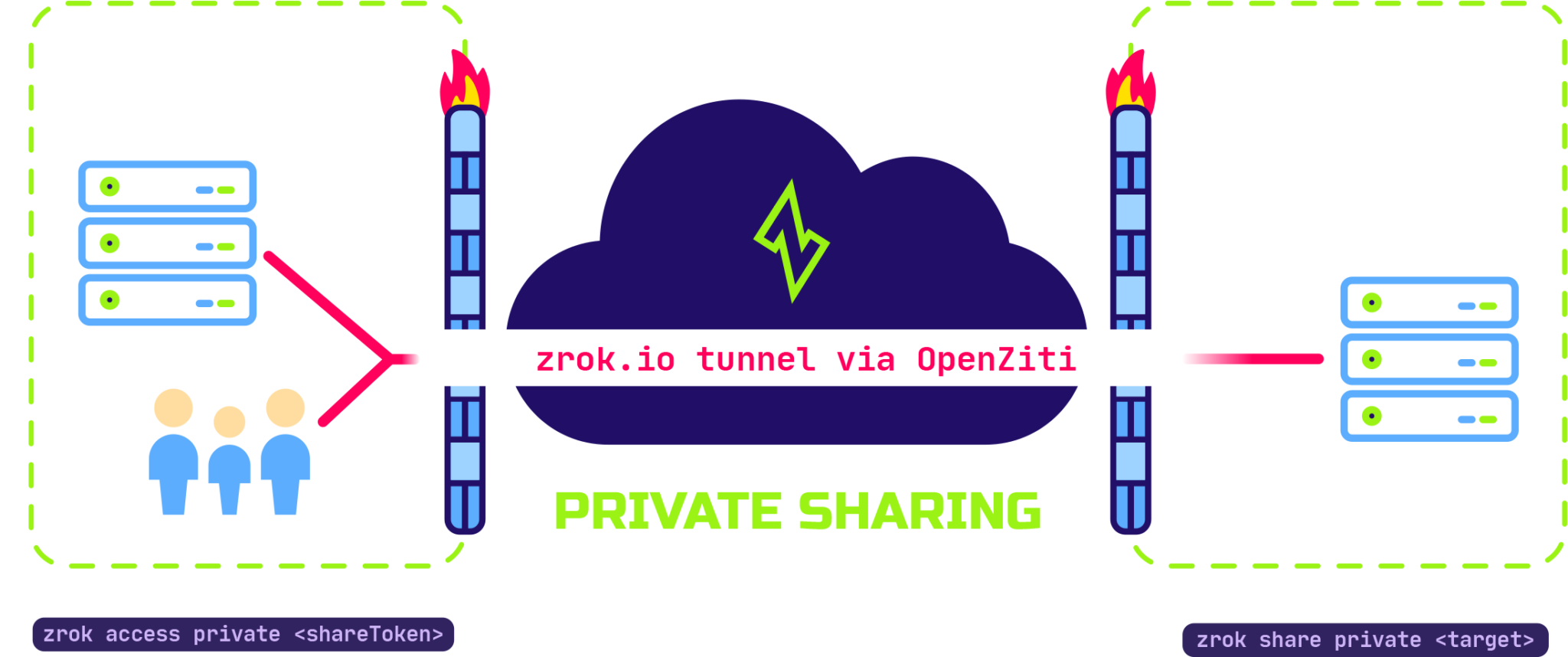
  • Private sharing: resources can be shared only with other zrok users, without exposing them on public endpoints, with traffic carried between zrok clients over the OpenZiti overlay.
  • Public ingress: applications can also be exposed publicly when that's the goal.
  • Non-HTTP resources: the page highlights sharing files and web content, and describes a framework intended to extend to other kinds of decentralized, peer-to-peer resource sharing.

Who it suits

Reader Why it fits Trade-off to weigh
Developer demoing a local app Quick share step, no infrastructure to stand up on the SaaS instance You depend on NetFoundry's hosted service
Team needing private access to internal tools Private mode avoids public exposure; Zero Trust overlay handles transport Requires onboarding other users to zrok
Operator with compliance or air-gap needs Self-hosted option; the page says a single binary plus a Ziti network is enough, scaling down to a Raspberry Pi You run and maintain the Ziti network yourself
Someone sharing files rather than web apps Built-in file/content sharing rather than proxy-only Peer-to-peer sharing is described as extensible, so check current capabilities for your use case

The main decision is hosted versus self-hosted: the hosted instance minimizes setup, while self-hosting trades that convenience for control and independence from a third party. If you want to evaluate it, start by installing the binary and running the three commands against the public instance with a throwaway local service, then repeat the exercise self-hosted if private or regulated traffic is your real target. Related open-source projects in this space include OpenZiti and localhost.run.

How does zrok differ from a traditional HTTP reverse proxy or tunneling tool?

zrok is a zero-trust, peer-to-peer sharing platform built on OpenZiti, not just a tunnel that forwards HTTP traffic through a public relay. The key difference is that private shares are not exposed to public endpoints at all: communication is transported directly between zrok clients over an overlay network. A traditional reverse proxy or tunneling tool typically terminates traffic at a public hostname, so anyone who can reach that endpoint can attempt to connect; access control is bolted on separately.

Where the difference shows up

  • Private sharing. With zrok, other zrok users reach your resource through the overlay; the page states private resources are not exposed to public endpoints. A traditional tunnel usually gives you a public URL that is reachable by anyone unless you add authentication yourself.
  • Beyond HTTP. zrok is designed to share files, web content, repositories and video, and to be extended to other decentralized resource-sharing types. Most tunneling tools are built around proxying HTTP or TCP endpoints only.
  • Deployment choice. The same codebase runs as the public zrok.io service operated by NetFoundry or as a self-hosted instance. Self-hosting is described as small enough for a Raspberry Pi with a single binary plus a Ziti network. Traditional tools vary widely here, but many are SaaS-only or require more moving parts to self-host.
  • Trust model. Zero trust is baked in via OpenZiti rather than added as a layer. A conventional reverse proxy assumes the network perimeter does part of the work.

A practical scenario

A developer wants to give two remote teammates access to a local repository and a staging web app without publishing either to the internet. With a classic tunnel, the web app gets a public URL and the repository needs a separate mechanism. With zrok, both can be shared privately to those users through the overlay, and the public-exposure question disappears.

Decision criterion

Choose zrok when private-by-default access, non-HTTP resources, or self-hosting on modest hardware matter. A traditional reverse proxy remains the simpler fit when you genuinely need a public, anonymous endpoint, or when your existing infrastructure and TLS tooling already handle access control.

To evaluate it, start with the three-step flow shown on the site (zrok2 invite, zrok2 enable, zrok2 share) on a non-critical resource, then compare the access model against your current proxy setup. The project is documented at zrok by NetFoundry, and its underlying platform at OpenZiti.

How do I set up my own self-hosted zrok instance on a Raspberry Pi or small server?

Self-hosting zrok means running your own zrok service instance backed by an OpenZiti network, rather than using NetFoundry's public zrok.io service. The page describes the single zrok binary as containing "everything you need to operate zrok environments and host your own service instances," and says a full setup can run on a Raspberry Pi: "Just add a Ziti network and you're up and running." So the practical shape of the job is: stand up OpenZiti first, then layer zrok on top.

What the setup involves

  • An OpenZiti network. zrok's zero-trust transport comes from OpenZiti, so a self-hosted instance needs a Ziti network behind it. On a Pi or small VPS this is the part that consumes the most resources and attention; plan the network (controllers, routers) before touching zrok.
  • The zrok binary and service instance. The same code base runs both zrok.io and self-hosted deployments, and the page notes it is designed to "scale down to support extremely small deployments" as well as up to very large ones. One binary covers operating the environment and hosting the service instance.
  • Client onboarding. Users join an instance with zrok2 invite, activate their shell with zrok2 enable, and share with zrok2 share. On your own instance you'll be issuing those invites yourself rather than using the public service's flow.

Choosing between a Pi and a small server

Consideration Raspberry Pi Small cloud/VPS server
Cost and power Low purchase and running cost; sits on your own network Recurring monthly fee
Network reachability Depends on your home connection and any NAT/firewall in front of it Usually a public IP and simpler inbound networking
Suitability Fine for personal or lab use; the page explicitly cites the Pi case Better if others outside your network will rely on it
Failure modes SD card wear, home power/ISP outages Provider outages, but generally more predictable uptime

The Pi is a good fit for learning the stack and sharing with a handful of people you know. If the instance will serve a team or anything semi-production, a small server with a stable address removes a class of networking problems before you start.

A sensible order of work

  1. Read the zrok documentation for the self-hosting path, since the exact Ziti configuration steps are version-specific and the page only sketches them.
  2. Build the OpenZiti network first and confirm it works on its own.
  3. Install the zrok binary, create the service instance, and issue yourself a first invite.
  4. Test both sharing modes: private sharing (resources not exposed to public endpoints, traffic carried between zrok clients) and public ingress.
  5. Only then invite other users.

As a concrete example: someone who wants to reach a home-lab dashboard and a file share from a laptop while travelling could run Ziti plus zrok on a Pi, keep the dashboard in private mode so it never touches a public endpoint, and use public sharing only for a demo site they actually want strangers to see.

For background on the underlying network, the OpenZiti project is at OpenZiti, and the zrok docs and download links are on zrok by NetFoundry.

Is zrok free to use, and what do the SaaS and self-hosted pricing options include?

zrok is open-source software, and its public SaaS instance is operated by NetFoundry on the same code base that is available for self-hosting. The site points to a dedicated pricing page, but the supplied page content does not list plan tiers or what each paid option includes, so specific SaaS pricing and self-hosted support terms can't be confirmed from this material alone. What is clear is the structural choice: you can use the hosted service or run your own instance.

What each option means in practice

Option What the page indicates Practical fit
Public SaaS instance (zrok.io) A service instance run by NetFoundry using the same code as self-hosted deployments Teams that want to start sharing quickly without operating the service themselves
Self-hosted The single zrok binary contains what you need to run your own service instance; you add an OpenZiti network Organizations with data-residency, compliance or network-control requirements, or very small deployments such as a Raspberry Pi

The page also describes private sharing between zrok users, where resources are not exposed to public endpoints, and sharing of files and web content beyond HTTP proxying. Those capabilities matter when comparing options: a self-hosted deployment gives you control over the underlying OpenZiti network, while the SaaS route trades that control for operational simplicity.

Next step

Open the pricing page at zrok by NetFoundry and check two things before deciding: whether the SaaS tier you need covers private sharing and non-HTTP resource sharing, and what support or hosting obligations come with self-hosting. If your team must keep traffic inside its own Zero Trust network, self-hosting is the more direct path; if you mainly need to expose a development service or share files quickly, start with the hosted instance and move later, since both use the same code base.

How does zrok use OpenZiti to keep shared resources private with zero trust?

zrok uses OpenZiti as its underlying zero-trust overlay network: shared resources are reached through that overlay rather than exposed on a public endpoint. In private sharing, traffic between zrok clients is carried inside the OpenZiti network, and access is granted to identified zrok users instead of to anyone who finds an address. Public sharing is a separate mode; the privacy benefit described on the page applies to private shares.

What that means in practice

  • Private shares: a resource stays off public endpoints, and only invited or authorized zrok users can reach it. This suits internal dashboards, admin tools, databases and file shares that should not face the open internet.
  • Public shares: useful for demos, webhooks or showing a site to someone outside your account, but the resource is intentionally reachable more broadly.
  • Beyond HTTP: the same model extends to files, repositories and video, not just web endpoints.
  • Deployment choice: the hosted service and self-hosted installs use the same code base, and self-hosting layers zrok on an OpenZiti network you operate.

A practical test before choosing a mode: ask whether a stranger with the URL should be able to connect. If not, use a private share and manage access through zrok identities; if yes, a public share is the simpler fit. For teams already running OpenZiti, self-hosting keeps identity and policy under your control; for quick trials, the hosted instance removes that setup work.

Can zrok share files and other non-HTTP resources peer-to-peer, and how does that work?

Yes. zrok is not limited to proxying HTTP endpoints. Its own description says it can share files and web content, and that the framework is meant to be extended to other kinds of decentralized, peer-to-peer resource sharing. The transport sits on an OpenZiti Zero Trust overlay, so traffic between zrok clients stays private rather than being exposed on a public endpoint.

How the sharing model differs

Mode What is exposed Typical use
Public share A reachable endpoint for anyone with the address Quick demos, webhooks, temporary access
Private share Nothing public; only other zrok users on the overlay Files, internal apps, repos shared with colleagues

For non-HTTP resources, the private path is the one that matters. Because the connection is between zrok clients over the overlay, a recipient does not need inbound ports opened or a public IP on your machine; they need to be a zrok user in the same sharing arrangement. That is what makes "peer-to-peer" meaningful here: the resource stays on your side and the overlay brokers the private path.

A concrete scenario

A developer on a home network wants to hand a large build artifact and a private Git repository to two teammates without uploading to a third-party host or exposing a port forward. They run the share command for the resource, invite the teammates as zrok users, and each teammate connects through their own zrok client. Nothing appears on the public internet.

Decision criteria

  • Choose zrok when you want self-hosting or a managed instance from the same codebase, and when private, identity-based access matters more than anonymous public links. The project notes it scales from a Raspberry Pi deployment up to very large instances, with a single binary containing what you need plus a Ziti network.
  • Look elsewhere if your recipients cannot install a client and you need purely anonymous public file links, or if you want a mature GUI-first file-sharing product rather than a CLI-driven tunnel.

Next step

Read the sharing documentation and try a private share of a small folder between two machines you control before involving others; that confirms the invite/enable flow works in your environment. For the underlying zero-trust layer, see OpenZiti; for the project itself, zrok by NetFoundry.

Related questions

More questions →
What Are Open-Source UI Element Libraries and How Do They Differ From UI Frameworks?

An open-source UI element library is a collection of individual, ready-made interface pieces—buttons, cards, inputs, toggles, loaders—that you copy into your own project and adapt. A UI framework, by contrast, is a structured system of components, conventions, and often a theming layer that governs how your whole interface is built. The practical difference: an element library gives you a snippet; a framework gives you a way of working. If you need a polished button in ten minutes, reach for the element library. If you're building a 40-screen product with a team, you probably want the framework.

What "open-source UI element library" actually means

The term gets used loosely, so it helps to separate the parts:

  • Open-source: the code is publicly available, and the license tells you what you may do with it—copy, modify, redistribute, or use commercially.
  • UI element: a single, self-contained piece of interface, usually small enough to read in one sitting. A button with hover states, a pricing card, a search field.
  • Library: a browsable, searchable collection of those elements, typically contributed by many different people.

On a site like Uiverse, elements are shared by a community and written in plain CSS or Tailwind. You find one you like, copy the markup and styles, paste them into your project, and adjust colors, spacing, and text to fit. There's no package to install and no build step required—which is exactly the appeal, and also the source of most of the confusion.

Element library vs. UI framework: the core differences

Dimension Open-source UI element library UI framework / design system
Unit of reuse A single snippet you copy A component you import or call
Installation None; paste into your code Package install, config, sometimes a provider
Consistency Depends on you; each element may look different Enforced by shared tokens and APIs
Theming Manual edits per element Central theme/config file
Updates You own the copy; no upstream updates Version bumps bring fixes and changes
Accessibility Varies per contributor; must be checked Usually tested and documented
Best for Prototypes, landing pages, small sites, one-off needs Multi-page apps, teams, long-lived products
Learning curve Low—read the CSS Higher—learn the API and conventions

The table isn't a verdict. It's a map of trade-offs. Element libraries win on speed and freedom; frameworks win on consistency and maintenance.

Licensing and attribution: what to check before you paste

This is where people get into trouble, and it's worth slowing down for.

  1. Find the license. Every element or collection should state one. Common open-source licenses include MIT, Apache-2.0, and BSD. Some projects use copyleft licenses like GPL, which can impose obligations if you redistribute your code.
  2. Understand what the license permits. MIT and Apache-2.0 are permissive: you can typically use the code in commercial and closed-source projects. Copyleft licenses may require you to release derivative source under the same terms.
  3. Check attribution requirements. Permissive licenses usually require you to keep the copyright notice and license text somewhere in your project. That's a real obligation, not a formality.
  4. Look for per-element terms. On community sites, the site's overall terms and the individual contributor's stated wishes may differ. If a contributor asks for credit, honor it.
  5. When in doubt, ask or avoid. If a snippet has no license at all, you don't have clear permission to reuse it. Treat "no license" as "not open source," even if the code is publicly visible.

This article is general information, not legal advice. For commercial products with real exposure, have someone qualified review the licenses you're relying on.

How to use a community element in your project: a practical workflow

Here's a repeatable process that avoids most of the usual mess.

1. Start from a real need, not a browsing session

Decide what you need first—"a compact primary button with a loading state"—then search. Browsing aimlessly produces a pile of pretty snippets that don't fit together.

2. Copy the smallest version that works

Take the markup and the styles. Strip anything you don't need: demo wrappers, extra animations, decorative layers. Less code means fewer surprises.

3. Convert it to your conventions

If your project uses design tokens or CSS variables, replace hard-coded values:

/* Before: hard-coded */
.button { background: #4f46e5; border-radius: 8px; }

/* After: token-based */
.button { background: var(--color-primary); border-radius: var(--radius-md); }

This one step is what keeps a copied element from looking like a foreign object in your UI.

4. Check accessibility before you ship

Community elements vary widely here. Verify at minimum:

  • Keyboard focus is visible and the element is reachable by Tab.
  • Color contrast meets WCAG AA (4.5:1 for normal text).
  • Interactive elements use semantic HTML (<button>, not a clickable <div>).
  • Form inputs have associated labels.
  • Motion respects prefers-reduced-motion.

5. Test in context

Paste it into a real page with real content. Long labels, small screens, and dark mode break more copied elements than anything else.

6. Note where it came from

Keep a short comment or an internal credits file: source, license, date. Future you—and your legal reviewer—will be grateful.

Where element libraries genuinely shine

  • Prototypes and demos: you need something clickable today, not a design system.
  • Landing pages and marketing sites: a handful of distinctive elements, each custom.
  • Filling gaps: your framework lacks one specific component, and you don't want to build it from scratch.
  • Learning: reading well-made CSS is one of the fastest ways to improve.
  • Small projects: a personal site doesn't need a theming architecture.

Where they fall short

  • Consistency at scale: ten elements from ten contributors rarely look like one product.
  • Maintenance: you own every copy. When your design changes, you edit each one.
  • Accessibility debt: you inherit whatever the contributor did or didn't do.
  • No upstream fixes: a bug fixed in the original won't reach your copy.
  • Integration friction: different naming conventions, different units, different assumptions about resets.

When to choose which

Choose an element library when the scope is small, the timeline is short, or you need a few distinctive pieces rather than a whole system.

Choose a framework or design system when multiple people build multiple screens over months, when consistency is a product requirement, or when accessibility and theming need to be guaranteed rather than checked.

A hybrid works well for many teams: adopt a framework for the structural components—forms, navigation, layout—and borrow individual elements for the places where you want personality. Just route every borrowed element through the same token and accessibility checks, so it lands as part of your system rather than beside it.

The short version: open-source UI element libraries are a fast, flexible way to get good-looking interface pieces into a project. They are not a substitute for a design system, and the license and accessibility details are the part worth reading carefully.

What Is SaaS? How Software-as-a-Service Works and When to Use It

SaaS (Software-as-a-Service) is a delivery model in which a vendor hosts an application and customers access it over the internet, typically paying a recurring subscription fee rather than buying a perpetual license. It fits most organizations that want faster deployment, lower upfront cost, and automatic updates — but it is a weaker fit when you need deep customization, strict data residency control, or the ability to run fully offline.

The core SaaS model

In a SaaS arrangement, three things move from the customer to the vendor:

  • Infrastructure — servers, storage, and networking are owned and operated by the provider.
  • Maintenance — patching, upgrades, and uptime are the provider's responsibility.
  • Access — users reach the software through a browser or thin client, usually with per-user or usage-based billing.

You consume the software as a service rather than owning a copy of it. That single shift is what drives most of the benefits and most of the trade-offs below.

SaaS vs. on-premise, self-hosted, IaaS, and PaaS

These models are often confused because they all involve "the cloud." The difference is how much the vendor manages.

Model Who manages the app? Who manages the infrastructure? Typical customer control
SaaS Vendor Vendor Configuration and data only
PaaS Customer (builds/deploys) Vendor App code, runtime settings
IaaS Customer Customer (on rented VMs) OS, middleware, app, data
On-premise Customer Customer (own hardware) Everything
Self-hosted Customer Customer (own or rented) Everything, but you install the vendor's software yourself

A quick way to place them: with IaaS you rent the raw building blocks; with PaaS you rent a ready workbench to build on; with SaaS you rent the finished product. On-premise and self-hosted mean you run and maintain the software on infrastructure you control.

Main benefits and trade-offs

Benefits

  • Lower upfront cost — no hardware purchase or large license fee; spend shifts to an operating expense.
  • Faster setup — provisioning is usually measured in hours or days, not procurement cycles.
  • Automatic updates — the vendor ships fixes and new features without a customer-side upgrade project.
  • Elastic scalability — capacity can often be adjusted up or down as demand changes.
  • Anywhere access — a browser and a connection are usually enough, which supports distributed teams.

Trade-offs

  • Less data control — your data lives in the vendor's environment, subject to their architecture and regions.
  • Limited customization — you generally configure within the vendor's boundaries rather than modifying the core.
  • Vendor lock-in — migrating away can be costly if data export and integration are not well supported.
  • Ongoing cost — subscriptions never "finish paying off" the way a perpetual license can.
  • Dependency on connectivity and uptime — if the service is down or unreachable, work may stop.

Typical use cases and examples

SaaS is the default choice for horizontal needs like email, CRM, project management, and HR. It is also increasingly common as vertical SaaS — software built for one industry's specific workflows and compliance requirements.

Regulated industries are a useful illustration. Trust, corporate, and fund services providers handle sensitive client data and face audit and reporting obligations, so they tend to weigh data control and compliance heavily. Quantios, for example, describes itself as an AI-native SaaS platform for global corporate, trust, and fund services providers, positioned to help them reduce risk, boost efficiency, and scale. That is the vertical-SaaS pattern: the delivery model is standard SaaS, but the feature set and compliance posture are tailored to one sector.

How to evaluate a SaaS option

Use the same criteria regardless of vendor, and get specifics rather than assurances:

  1. Security — encryption in transit and at rest, access controls, and how incidents are handled.
  2. Compliance — which standards and regulations the vendor supports, and whether they match your obligations.
  3. Integration — APIs, prebuilt connectors, and how easily it fits your existing stack.
  4. Pricing model — per user, per usage, tiered, or a mix; understand what triggers a cost increase.
  5. Data portability and exit — can you export your data in a usable format, and what happens to it at contract end?
  6. Service levels — uptime commitments, support channels, and response times.

When SaaS is the right fit — and when it isn't

Choose SaaS when you want speed, predictable operating costs, and low maintenance overhead, and your data can reasonably live in a vendor's environment.

Reconsider when you need deep customization, must keep data strictly on your own infrastructure, operate in low-connectivity settings, or face regulations that rule out third-party hosting. In those cases, self-hosted or on-premise may be the better fit — or a SaaS vendor with strong regional and compliance guarantees.

What Is zrok by NetFoundry?

zrok is an open-source, zero-trust peer-to-peer tunneling and ingress tool from NetFoundry, built on the OpenZiti networking platform. It lets you expose an application, file, or web resource to a specific person or to the public through a secure overlay network, and it is available either as the hosted zrok.io service or as a self-hosted deployment. It fits best when you want quick, secure sharing without opening inbound ports or standing up a VPN, and when you are comfortable running a command-line client.

What zrok actually does

The core job is tunneling: a resource on your machine or network becomes reachable by someone else without a public endpoint being exposed in private mode. According to the project's own description, zrok provides "private or public, instant, secure tunneling of applications from anywhere," secured by the Zero Trust overlay network that OpenZiti supplies.

Two modes matter for choosing it:

  • Private sharing — resources are shared with other zrok users and are not exposed to public endpoints; traffic moves between zrok clients over the overlay.
  • Public sharing — a resource is made reachable more broadly, which is the mode you want for a demo, webhook target, or temporary public URL.

The project also positions itself as more than an HTTP proxy. It supports sharing files and web content, and its framework is designed to be extended to other kinds of decentralized, peer-to-peer resource sharing.

How you get started

The site describes a three-step flow, and each step has a clear input and expected result:

  1. Invite — download the binary for your platform, then run zrok2 invite to create an account with the service. Expected result: your account is registered with the zrok instance you are using.
  2. Enable — run zrok2 enable to enable your shell environment for sharing. Expected result: your shell is configured to talk to the service.
  3. Share — run zrok2 share to share a resource. Expected result: a share is created and the connection details are produced for you to pass on.

The project's claim is that you can be "up and sharing with zrok in minutes." The practical prerequisites are a supported platform binary and, for the hosted service, an account created through the invite step.

SaaS or self-hosted

This is the main decision point, and the site frames it as "choose your own adventure":

Dimension zrok.io (hosted) Self-hosted
Who operates it NetFoundry runs the public service instance You run it
Code base Same code base as self-hosted Same code base as the hosted service
Scale Designed to scale up to very large service instances Designed to scale down to very small deployments
Minimum footprint Not your concern A single zrok binary plus a Ziti network; the site cites a Raspberry Pi as an example
Effort Account setup only You operate the OpenZiti network and the zrok layer

The single zrok binary is described as containing everything needed to operate zrok environments and host your own service instances — "just add a Ziti network." If you need control over where traffic terminates or you are sharing inside an organization, self-hosting is the relevant path; if you want to try the tool or share occasionally, the hosted instance removes the operational work.

Where it fits and where it doesn't

zrok is a reasonable fit when you need to:

  • Give a collaborator temporary access to a service running on your laptop or a private host.
  • Share files or static web content without uploading them to a third-party storage service.
  • Publish a short-lived public endpoint for testing a webhook or integration.

It is a weaker fit if you want a managed reverse proxy with no client software, or if your organization requires all traffic to terminate in infrastructure you already control and you are not prepared to run OpenZiti.

The open-source angle

zrok is built on OpenZiti, which the site describes as a free open-source project focused on bringing Zero Trust to any application. That matters for evaluation in two ways: the security model is inherited from a separately documented platform rather than invented for the tunneling tool, and the self-hosted path depends on you running that platform. If Zero Trust networking is a requirement in your environment, the OpenZiti foundation is the part worth reading up on before you commit.

Pricing for the hosted service is not specified in the material available here; check the pricing page on zrok.io before assuming the hosted instance is free for your use case.

Get Started with zrok: Invite, Enable, and Share

You can start sharing a resource with zrok in three commands: download the binary for your platform, run zrok2 invite to create an account with the service, run zrok2 enable to set up your shell environment, and run zrok2 share to expose the resource. This applies whether you use the public zrok.io service operated by NetFoundry or a self-hosted instance, since both run the same code base.

Before You Start

zrok is an open-source, zero-trust peer-to-peer tunneling and ingress solution built on OpenZiti. The site describes it as available as SaaS or self-hosted, and the single zrok binary contains everything needed to operate zrok environments and host your own service instances — a self-hosted setup additionally requires a Ziti network.

Two things to decide before running commands:

  • Which service instance you target. zrok.io is the public instance run by NetFoundry. A self-hosted instance is your own deployment layered on an OpenZiti network, and the site notes it can scale down to a Raspberry Pi.
  • Whether you need public or private sharing. Private sharing keeps your resources off public endpoints and transports communication only between zrok clients. Public sharing exposes an endpoint.

Step 1: Download the Binary

Download the zrok binary for your platform from the download page linked in the site navigation. The same binary serves both sharing clients and service-instance operators, so there is no separate client package to hunt for.

Step 2: Run zrok2 invite

zrok2 invite creates an account with the service. The site presents this as the first of its three getting-started steps: download the binary, then run the invite command to create your account.

Expected result: your account exists on the target service instance, and you have the credentials the next step needs.

Common snag: if you are pointing at a self-hosted instance rather than zrok.io, the invite must go to that instance, not the public one. Confirm which environment your binary is configured for before inviting.

Step 3: Run zrok2 enable

zrok2 enable enables your shell environment for sharing with the service. Run it in the shell where you intend to share.

Expected result: your shell is authenticated and ready to issue share commands.

Common snag: environment changes made by enable apply to that shell session. If sharing fails in a new terminal, re-enable in that terminal rather than assuming the account is broken.

Step 4: Run zrok2 share

zrok2 share shares resources "immediately, simply, and securely," per the site. What you share is not limited to HTTP: the site describes zrok as going beyond HTTP proxies to let users share files and web content, with a framework designed to extend to many kinds of decentralized, peer-to-peer resource sharing.

Expected result: a share is created and the resource is reachable according to the sharing mode you chose — private (between zrok users, no public endpoint) or public.

Quick Reference

Step Command What it does What to check
1 Download binary Gets the zrok client for your platform Correct platform build
2 zrok2 invite Creates an account with the service Targeting the intended instance
3 zrok2 enable Enables your shell environment Run in the shell you will share from
4 zrok2 share Shares the resource Private vs. public mode

Choosing Between Public and Self-Hosted

Both options use the same code base, so the four steps above are identical; the difference is who operates the service instance and network.

  • Choose zrok.io (public SaaS instance) if you want to be up and sharing in minutes without running infrastructure. The site frames the three-step flow as the fast path.
  • Choose self-hosted if you need to control the deployment, including very small setups — the site explicitly describes running an OpenZiti network with zrok on top on a Raspberry Pi. Budget for operating the Ziti network in addition to zrok.

For current plan details and any account requirements, check the pricing and account pages linked from the site rather than assuming terms.

How zrok's Private Sharing and Zero-Trust Tunneling Work

zrok's private sharing keeps a resource off the public internet entirely: the sharer and the person accessing it both connect through zrok clients, and traffic moves between them over the OpenZiti zero-trust overlay network rather than through a public endpoint. Public sharing is the opposite mode — the resource is reachable through a public endpoint. Both modes run on the same OpenZiti foundation, which is where the "zero trust" part comes from.

Private vs. public sharing

The distinction is about who can reach the resource and over what path, not about how the tunnel is set up.

Private sharing Public sharing
Exposure Not exposed to any public endpoints Reachable via a public endpoint
Who can connect Other zrok users Anyone who can reach the public endpoint
Traffic path Between zrok clients, over the OpenZiti overlay Through the public endpoint
Typical use Internal apps, files, repos you want to keep closed Demos, webhooks, content you intend to publish

The site is explicit that in private scenarios "your private resources are not exposed to any public endpoints, and all communication is securely and privately transported between zrok clients." That is the core promise: the resource never gets a public address.

Where zero trust comes from

zrok is built on OpenZiti, NetFoundry's open-source zero-trust networking platform. The overlay network handles identity and secure transport, so zrok doesn't have to invent its own security layer — it inherits the overlay's model. Practically, this means access is tied to identities on the network rather than to network location or an open port. The site describes the tunneling as "secured effortlessly by using a Zero Trust overlay network provided by OpenZiti."

One consequence worth knowing: the security properties are a property of the overlay, so self-hosted deployments need a Ziti network underneath. The site says the single zrok binary contains what you need to operate zrok environments, and you "just add a Ziti network."

Beyond HTTP proxies

Traditional tunneling tools mostly proxy HTTP endpoints. zrok is positioned as broader: it also shares files and web content, and the site describes a framework for peer-to-peer resource sharing that can be extended to other kinds of decentralized resources — files, repositories, video among the examples given. If your need is strictly "expose a local web server," a conventional HTTP tunnel may be simpler; if you want private, identity-based sharing of non-HTTP resources, that is where zrok's model differs.

Getting to a share in three steps

The site's own quickstart is three commands:

  1. Invite — download the binary for your platform, then run zrok2 invite to create an account with the service.
  2. Enable — run zrok2 enable to enable your shell environment for sharing.
  3. Share — run zrok2 share to share resources.

Expected result: after enable, your shell is configured for the service, and share creates the share. Note that invite creates an account with the service — for the hosted instance that means NetFoundry's public service; self-hosted setups follow a different path built around your own Ziti network.

Choosing between hosted and self-hosted

zrok.io is a public service instance operated by NetFoundry using the same code base available for self-hosting. The site says it scales up to very large service instances and down to very small ones — a Raspberry Pi running OpenZiti with zrok on top is given as an example. So the choice is roughly: use the hosted instance to start quickly, or self-host if you need to control the network and the service instance yourself. Pricing and account terms are on the site's pricing page; check there before assuming what the hosted tier includes.

Website Overview

Identifiable technologies and additional version or configuration signals make the service easier to fingerprint, which may help targeted scanners narrow their checks. An active inbound-mail setup with incomplete authentication may leave the domain more open to impersonation. Provider hosting alone does not close that gap.

Domain and Registration

Unknown

DNS and Email

The observed email authentication setup is incomplete: SPF is missing. The lowest TTL is 60 seconds, supporting rapid record changes at the cost of more frequent lookups. Nameservers are provided by Amazon Route 53, indicating managed DNS hosting. MX records point to the Google Workspace email service. No CNAME was found; the observed records resolve directly to addresses.

TLS and Certificates

The certificate uses an RSA 2048-bit public key, offering broad client compatibility. The server supplied a complete certificate chain. No organization name is present in the certificate; the available fields are consistent with domain validation. The certificate was issued by Let's Encrypt, commonly associated with automated certificate services. The certificate's total validity is about 89 days, consistent with a short renewal cycle.

HTTP and Browser Security

X-Powered-By exposes backend information: WP Engine. The checked browser-security headers were not detected, leaving fewer explicit browser-side safeguards. The x-cache response header indicates a CDN or caching proxy in the delivery path. No obvious internal addresses or debug information were found in the headers. The Server header identifies nginx without an exact version.

Technology Stack Analysis

The public page identifies Site Kit by Google 1.190.0, WordPress, nginx, with exact versions exposed for 1 technologies. These details can narrow vulnerability checks, although exposure alone is not a vulnerability.

Search and Social Sharing

No homepage meta description was detected, leaving snippet selection more dependent on page text. The Generator tag identifies Site Kit by Google 1.190.0, making the publishing system easier to fingerprint. Twitter Card metadata is configured. JSON-LD includes Organization data, helping describe the organization as an entity. The title has 25 characters, within a common display range.

Hosting and Email

DNSAmazon Route 53
HostingGoogle LLC
EmailGoogle Workspace
Approximate IP geolocation (inferred; a CDN or proxy may differ from the origin server) United States flagThe Dalles, Oregon, United States Inferred 104.199.116.47

Registration details

RDAP / WHOIS

Unknown

DNS records

DNS

TypeNameValueTTLPriority
Azrok.io104.199.116.4760—
MXzrok.ioaspmx.l.google.com6001
MXzrok.ioalt1.aspmx.l.google.com6005
MXzrok.ioalt2.aspmx.l.google.com6005
MXzrok.ioalt3.aspmx.l.google.com60010
MXzrok.ioalt4.aspmx.l.google.com60010
MXzrok.iofeedback-smtp.us-east-1.amazonses.com60010
NSzrok.ions-1495.awsdns-58.org172800—
NSzrok.ions-1913.awsdns-47.co.uk172800—
NSzrok.ions-342.awsdns-42.com172800—
NSzrok.ions-629.awsdns-14.net172800—
TXTzrok.io"v=spf1 include:_spf.google.com include:email.chargebee.com include:amazonses.com include:3452613.spf08.hubspotemail.net -all600—
TXTzrok.iogoogle-site-verification=xDEY1OP4QSxIBL8q_9whXyGRZstxiZO0jKK1_-bswHI"600—
DMARC_dmarc.zrok.iov=DMARC1;p=none;rua=mailto:[email protected];ruf=mailto:[email protected];fo=1;300—

TLS and certificates

TLS / SSL

AssessmentNormal configuration
Supported protocolsTLSv1.2、TLSv1.3
Negotiated protocolTLSv1.3
Certificate subjectzrok.io
IssuerLet's Encrypt
Valid until2027-01-07T20:26 · Remaining when checked: 73 days
Verification detailsCertificate trust: Passed · Hostname match: Passed

HTTP response headers

HTTP

HeaderValue
content-typetext/html; charset=UTF-8
cache-controlmax-age=600, must-revalidate
servernginx

Identified technologies

Site Kit by Google 1.190.0WordPressnginx

Pages, Search and Sharing

Meta descriptionNot detected
Canonical URLhttps://zrok.io/
LanguageEnglish (default)
Twitter Cardsummary_large_image
All bots 0 allowed · 0 disallowed

User reviews (0)

  • No reviews yet.