Website profiles · Technology insights · Alternatives

8bitdashboard.com

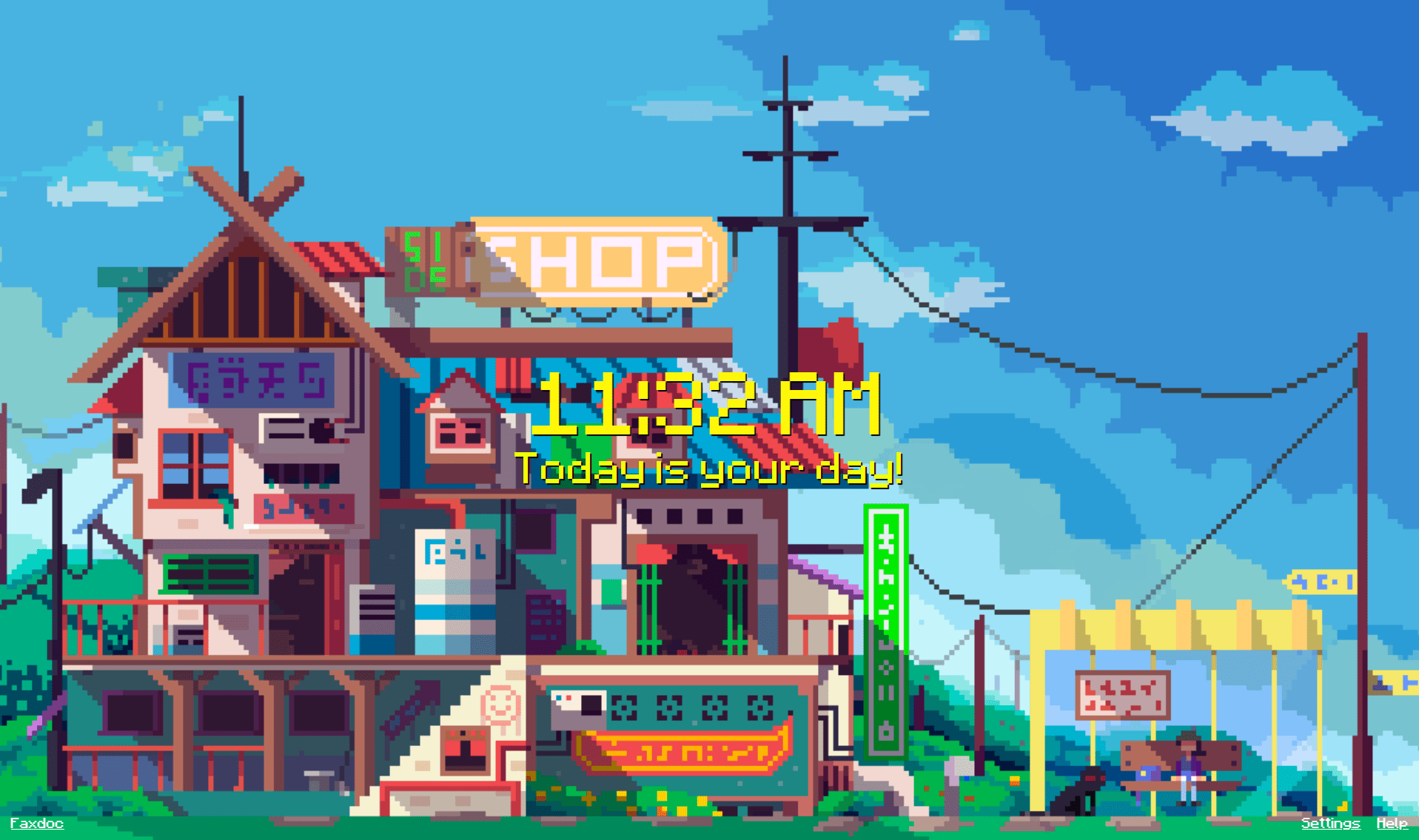
The perfect dashboard. 8-bit gifs with a clock, bookmark hotkeys, and a greeting. Ready to be your start page!

No paid content found
Visit website
Profile views 0 Outbound visits 0 Normal
8 Bit Dashboard Full homepage screenshot

At a glance

Category
Data & Analytics
Language
English
Paid-content signal
No paid content foundObserved
Registered
2020
Hosting
CloudflareInferred
HTTPS certificate trusted
PassedObserved
Last updated

Website review

This review may include AI-generated content and is not individually verified. Domain, certificate and other facts come from the observed data on this page.

What is 8 Bit Dashboard?

8 Bit Dashboard is a browser start page built around a retro 8-bit aesthetic. Rather than a full productivity suite or a data-heavy homepage, it's a lightweight landing page you set as the first thing your browser opens: pixel-art animated GIFs, a clock, a personalized greeting, and bookmark hotkeys for jumping to sites you use often.

What you actually get

  • An 8-bit visual theme with animated GIFs, aimed at people who like the pixel-art look rather than a clean minimal dashboard.
  • A clock and greeting, so the page doubles as a quick glance at the time and a friendly start to a browsing session.
  • Bookmark hotkeys, letting you launch frequently visited sites from the keyboard instead of clicking through a bookmarks bar.

Who it suits, and the trade-offs

It fits a specific taste: someone who wants a start page with personality and doesn't need widgets, feeds, or analytics. The trade-off is that a decorative start page adds little functional value beyond fast navigation; if your priority is information density (weather, tasks, inbox counts), a conventional dashboard will serve you better. If you mainly want a pleasant, fast-loading launchpad with keyboard shortcuts, this is the right shape of tool.

A concrete scenario

Say you open your browser a dozen times a day to check mail, a calendar, a code repository, and a couple of news sites. Setting 8 Bit Dashboard as your homepage gives you one screen where the clock orients you and hotkeys take you straight to those destinations, with the retro visuals as the backdrop.

Next step: open the site, set it as your browser's home or startup page, and assign hotkeys to your three or four most-visited sites. If after a week you find yourself ignoring the visuals and wanting more at-a-glance information, that's the signal to switch to a denser dashboard.

How do I set 8 Bit Dashboard as my browser start page?

Set 8 Bit Dashboard (8 Bit Dashboard) as your start page by opening your browser's settings and entering the site's address as the page that loads on startup or when you open a new tab. The exact menu names differ by browser, but the steps are similar: open Settings, find the section for "On startup" or "Startup pages," and add the dashboard's URL.

Quick steps by browser

  • Chrome / Edge: Settings → "On startup" → "Open a specific page or set of pages" → Add the 8 Bit Dashboard address.
  • Firefox: Settings → Home → "Homepage and new windows" → enter the dashboard address.
  • Safari: Settings → General → "Homepage" → enter the address.

The dashboard's own description says it is built to be a start page, with a clock, bookmark hotkeys, and a greeting, so it fits naturally in the startup slot. If you want it to appear every time you open a new tab rather than only at launch, check whether your browser lets you set a custom new-tab page; some browsers restrict this to extensions.

A practical tip

If you use bookmarks heavily, the bookmark hotkeys are the main reason to make it your first screen. Try it for a week as your startup page before committing to it as your new-tab page too, so you can judge whether the 8-bit visuals stay useful or become distracting during focused work.

Can I customize the greeting and bookmarks on 8 Bit Dashboard?

Yes. 8 Bit Dashboard is built around a small set of personal touches you can adjust: the greeting, the bookmark hotkeys, and the clock that sits alongside the 8-bit gifs. The greeting is meant to be edited so the page addresses you (or whoever uses it) rather than showing a generic line, and the bookmarks are set up as hotkeys so you can reach your usual sites with a keystroke instead of hunting through a menu.

What each customization is for

  • Greeting: Best for a personal start page you open every morning. Change it to your name or a short line you want to see first thing; it costs nothing in speed and sets the tone of the page.
  • Bookmark hotkeys: The practical part. If you routinely open the same handful of sites (mail, calendar, a docs tool, a news source), assigning hotkeys turns the dashboard into a launchpad. The trade-off is that hotkeys reward muscle memory: a long list of them is harder to remember than five or six you use daily, so keep the set small and stable.
  • Clock and gifs: These are the ambient layer. The clock gives you the time at a glance; the 8-bit gifs are decorative and mainly matter if you like the retro look as your default tab.

A concrete way to decide

Think about how many sites you actually open on autopilot each day. If it is under about six, hotkeys on a start page are a good fit and you will memorize them within a week. If you jump between dozens of tools, a bookmark hotkey page becomes clutter, and you are better off with browser bookmarks or a search-first habit, using the dashboard mainly for the greeting and clock.

As a next step, set the greeting to something short, then add only your three or four most-visited sites as hotkeys and use the page for a week before adding more. That keeps the dashboard fast to read and easy to remember.

Does 8 Bit Dashboard work offline or require an internet connection?

8 Bit Dashboard is designed as a browser start page, so its core elements — the 8-bit GIFs, clock, greeting and bookmark hotkeys — are the kind of content that can generally be loaded from a local file or cached page. The supplied page information doesn't explicitly state offline behavior, so the honest answer is: it depends on how you install it, and you should verify before relying on it without a connection.

What to check

  • If you save the page locally (for example, as a local HTML file set as your browser's homepage), the GIFs, clock and bookmarks should work without a network connection. The clock and greeting are typically generated in the browser, not fetched from a server.
  • If you load it from the hosted site, the page and its GIFs need to be fetched, so you'd need a connection at least the first time, and possibly on each visit unless your browser caches them.
  • Bookmark hotkeys are just links; they work offline as shortcuts, but the destinations they open obviously need a connection.

Practical next step

A concrete test: disconnect your device from the internet, open the dashboard, and reload it. If the GIFs and clock still render, it works offline in your setup; if the page is blank or the images are missing, it relies on the network. For a start page you want available on a plane or during an outage, saving a local copy is the safer choice.

How do I use bookmark hotkeys in 8 Bit Dashboard?

The site describes bookmark hotkeys as a feature, but it doesn't publish the exact key combinations. The reliable way to learn them is to open 8 Bit Dashboard as your start page and check the hotkey hints on the dashboard itself, or look for a settings or help area where bookmark shortcuts can be assigned.

How bookmark hotkeys usually work in practice

A start-page dashboard with bookmark hotkeys typically works like this:

  • You save your most-used links as bookmarks and the dashboard shows them as a grid or list.
  • Each bookmark gets a keyboard shortcut, often a number or a letter, so pressing it opens that site immediately.
  • The shortcuts only work while the dashboard page is focused, so you open a new tab to the dashboard and then press the key.

A concrete scenario

Suppose you check the same five sites every morning: webmail, a calendar, a news site, a project tracker and a wiki. Instead of typing addresses or hunting through a bookmarks bar, you set the dashboard as your browser's home page, press the shortcut for each site in turn, and close the tab when done. That turns a routine of typing and clicking into a few keystrokes.

What to weigh

Situation Bookmark hotkeys help Bookmark hotkeys matter less
You visit a small, fixed set of sites daily High value: fewer clicks, faster starts —
You juggle dozens of ad hoc links — Low value: more shortcuts than you can remember
You mostly work inside one app — The dashboard adds a step
You want a distraction-free start page — Animated 8-bit visuals may not suit focus work

Next step

Open the dashboard, add two or three bookmarks, and note the shortcut shown for each. If the site doesn't display shortcuts, check your browser's own bookmark keyword feature, which lets you type a short keyword plus a term in the address bar to jump to a saved search or site; that covers the same need without relying on a specific dashboard.

Is 8 Bit Dashboard free to use?

Yes—8 Bit Dashboard is free to use. The site presents itself as a ready-made start page built around 8-bit GIFs, a clock, bookmark hotkeys, and a greeting, with no pricing information, payment links, or subscription tiers mentioned on the page. That suggests it is offered as a free browser start page rather than a paid product.

A practical next step is to set it as your browser's homepage or new-tab page and try it for a few days. If you rely on quick bookmark shortcuts and want a simple, nostalgic landing page, it fits well; if you need synced bookmarks, productivity widgets, or team features, a dedicated dashboard tool may suit you better.

Related questions

More questions →
How to Set 8 Bit Dashboard as Your Browser Start Page

Open 8bitdashboard.com in your browser, then use the browser's own settings to make that address your homepage or startup page. The site itself has no account or setup step — it's a start page you point your browser at. The exact menu differs by browser, so the steps below cover Chrome, Edge, Firefox, and Safari.

What the page gives you

According to the site's own description, 8 Bit Dashboard is designed as a start page: 8-bit GIFs with a clock, bookmark hotkeys, and a greeting. That means the value shows up the moment a new tab or window opens, so the goal is to make the browser load it automatically rather than typing the URL each time.

Set it in Chrome

  1. Open https://8bitdashboard.com in a tab.
  2. Open Settings (three-dot menu → Settings).
  3. Go to On startup.
  4. Choose Open a specific page or set of pages, then Add a new page and enter https://8bitdashboard.com.
  5. Optional: under Appearance → Show home button, enable it and set the home button to the same address.

Expected result: every new Chrome window opens on the dashboard. New tabs still open your normal new-tab page unless you also change the new-tab behavior through an extension.

Set it in Edge

  1. Open Settings → Start, home, and new tabs.
  2. Under When Edge starts, select Open these pages and add https://8bitdashboard.com.
  3. To make the Home button use it, set Home button → Show home button and enter the same URL.

Expected result: launching Edge loads the dashboard first.

Set it in Firefox

  1. Open Settings → Home.
  2. In Homepage and new windows, choose Custom URLs and enter https://8bitdashboard.com.
  3. Optionally set New tabs to the same custom URL — this is the one browser where the dashboard can also replace the new-tab page without an extension.

Expected result: new windows (and new tabs, if you set it) open on the dashboard.

Set it in Safari

  1. Open Safari → Settings → General.
  2. In Homepage, enter https://8bitdashboard.com.
  3. Set New windows open with and New tabs open with to Homepage.

Expected result: new Safari windows and tabs load the dashboard.

Quick comparison

Browser Startup page setting Can replace new tab natively?
Chrome On startup → specific pages No (needs an extension)
Edge Start, home, and new tabs No (needs an extension)
Firefox Home → Custom URLs Yes
Safari General → Homepage Yes

Common snags

  • Typing the bare domain: enter the full https://8bitdashboard.com if the browser rejects the short form.
  • New tab vs. startup: these are separate settings in Chrome and Edge. If the dashboard appears on launch but not on new tabs, that's expected — change the new-tab behavior separately or accept the split.
  • Multiple startup pages: if you add the dashboard alongside other pages, they all open at launch; remove the others if you want the dashboard alone.
  • Private/incognito windows: these usually ignore startup page settings, so test in a normal window.

Once set, the dashboard loads with no further configuration — the clock, GIFs, greeting, and bookmark hotkeys are part of the page itself.

Who Is 8 Bit Dashboard Designed For?

8 Bit Dashboard is for people who want a retro, 8-bit styled browser start page that combines animated visuals with practical daily-use elements: a clock, bookmark hotkeys, and a greeting. It suits users who open a browser many times a day and want a lightweight, characterful homepage instead of a blank new tab or a cluttered default start page. If you prefer a minimal, text-only start page or need built-in productivity tools like a to-do list or calendar, this dashboard is probably not the right fit.

The Core Audience

The site describes itself as "the perfect dashboard" built from 8-bit gifs, with a clock, bookmark hotkeys, and a greeting, positioned as a start page. That description points to three overlapping groups:

  • Retro and pixel-art fans who enjoy 8-bit aesthetics and want that style in a place they see constantly — their browser's start page.
  • People who want a functional homepage with a visible clock and one-press access to frequently used bookmarks, rather than a plain new-tab screen.
  • Anyone replacing their default start page who wants something more personal and visually distinct without installing a heavy extension or app.

When It Fits Your Routine

The dashboard's value comes from repetition. It is most useful if you:

  • Open new tabs or launch your browser many times a day and glance at a clock.
  • Keep a small set of sites you visit constantly and want them one keystroke away via bookmark hotkeys.
  • Like a bit of personality — animated 8-bit gifs and a greeting — on a page you see first thing.

For example, if your morning routine is opening the browser, checking the time, and jumping straight to email, a news site, and a project tracker, a start page with a clock and hotkey-driven bookmarks matches that flow directly.

When It Is Not the Right Choice

  • You want a distraction-free, minimal start page. Animated gifs and a greeting are the opposite of a blank, quiet new tab.
  • You need built-in productivity features. The described feature set is a clock, bookmark hotkeys, and a greeting — not notes, tasks, weather, or calendars.
  • You rely on your browser's own sync and default page. Switching start pages is a per-browser setting; if you move between browsers or devices often, you would need to set it up where you want it.

How to Decide

Your priority 8 Bit Dashboard fits?
Retro 8-bit look on your homepage Yes — it is built around 8-bit gifs
Clock visible when you open the browser Yes — a clock is a core element
Fast access to a few favorite bookmarks Yes — via bookmark hotkeys
A completely plain, minimal start page No — animated visuals are central
Built-in tasks, notes, or calendar No — not part of the described features

If the first three rows describe you, it is worth setting as your start page. If the last two matter more, keep your current setup.

Next Step

If you have decided it fits, the practical follow-up is learning how to make it your browser's start page and how the bookmark hotkeys are triggered — those two steps determine whether the dashboard actually saves you time or just looks good.

What Is 8 Bit Dashboard?

8 Bit Dashboard (8bitdashboard.com) is a browser start page designed to replace your default new-tab or homepage with a retro, 8-bit themed dashboard. According to the site's own description, it combines animated 8-bit GIFs with a clock, bookmark hotkeys, and a greeting, and is positioned as "the perfect dashboard" that is "ready to be your start page." It is a personalization tool for your browser rather than a productivity suite or content platform.

What the dashboard includes

Based on the site's description, the page centers on four elements:

  • 8-bit GIFs — animated pixel-art visuals that set the retro aesthetic of the page.
  • A clock — a time display built into the dashboard.
  • Bookmark hotkeys — keyboard shortcuts for jumping to saved bookmarks, so frequently visited sites are one keypress away.
  • A greeting — a personalized welcome message shown on the page.

The combination is meant to make the first screen you see when opening a browser both functional (time, quick navigation) and visually distinctive.

Who it is for

This kind of start page suits people who:

  • Want a custom homepage instead of a browser's default new-tab page.
  • Like retro gaming or pixel-art aesthetics and want that style in their daily browsing environment.
  • Prefer keyboard-driven navigation to bookmarks over clicking through a bookmarks bar or menu.

It is not aimed at users looking for a full productivity dashboard with widgets, calendars, email, or task management — the described feature set is deliberately narrow: visuals, time, bookmarks, and a greeting.

How it fits into your browsing routine

A start page like this works by being set as your browser's homepage or new-tab page. Once configured, every new tab or browser launch opens the dashboard, giving you the clock and greeting at a glance and letting you reach bookmarked sites via hotkeys rather than searching or clicking. The value depends on how often you open new tabs and how much you rely on a small set of frequently visited bookmarks.

What to check before adopting it

The available site information describes the concept and features but does not detail setup steps, customization options, account requirements, or pricing. Before making it your start page, confirm on the site itself:

  • Whether bookmarks and hotkeys are configured within the page or pulled from your browser.
  • Whether any account or sign-in is needed to save your settings.
  • Whether the greeting and GIFs can be personalized.
  • Any terms or limits that apply to use.

If those details match how you browse, 8 Bit Dashboard is a lightweight, style-forward option for turning your browser's first screen into something more personal than a blank new tab.

What the 8 Bit Dashboard Start Page Includes

8 Bit Dashboard is a browser start page built around four elements: 8-bit animated GIFs, a clock, bookmark hotkeys, and a greeting. It suits anyone who wants a lightweight, retro-styled homepage that still gives quick access to saved links. The site describes it as "the perfect dashboard… ready to be your start page," so the intended use is as the page your browser opens on a new tab or at launch.

The Four Core Elements

8-bit animated GIFs

The visual layer is a set of pixel-art GIFs in an 8-bit style. These are decorative and animated, giving the page its retro character rather than serving a data function. If you prefer a plain or quiet start page, this is the element most likely to be a drawback.

A clock

The page displays the current time. This is a standard convenience for a start page — you see the time as soon as you open a tab, without switching context.

Bookmark hotkeys

Saved links are reachable through keyboard shortcuts rather than only by clicking. This is the feature that makes the page a "dashboard" rather than just a themed landing page: it is designed for fast navigation to the sites you use most. The site does not publish the specific key assignments, so expect to configure or learn them once you start using the page.

A greeting

A greeting message is shown on the page. The site does not specify whether it is static or time-based, so treat it as a fixed welcome element until you see it in use.

Who It Fits

If you want… 8 Bit Dashboard is…
A retro, animated start page A direct match — the 8-bit GIFs are the core of the design
Keyboard-first access to bookmarks Worth trying — hotkeys are a stated feature
A minimal, distraction-free homepage Probably not — animation and greeting add visual noise
A dashboard with data widgets (weather, stats, feeds) Not a match — the listed features are clock, GIFs, greeting, and bookmarks only

Trying It Out

Open 8bitdashboard.com in your browser and set it as your homepage or new-tab page through your browser's settings. The practical test is the bookmark hotkeys: add a few frequently used links and confirm the shortcuts work the way you expect. If the animation is distracting or the hotkey setup does not fit your habits, reverting your start page is a single settings change.

The site's own description does not mention pricing, accounts, or login requirements, so check the page itself for any such conditions before relying on it as a permanent start page.

How Bookmark Hotkeys Work on 8 Bit Dashboard

8 Bit Dashboard is a browser start page built around 8-bit gifs, a clock, a greeting, and bookmark hotkeys. The hotkeys are keyboard shortcuts that sit on the start page and take you straight to sites you have saved, so you can open a frequently visited page without scanning a list of links or typing a URL. They are most useful if you open the same handful of sites many times a day and want the start page to act as a launchpad.

What the Hotkeys Do

The site describes itself as “the perfect dashboard” with “8-bit gifs with a clock, bookmark hotkeys, and a greeting,” ready to be your start page. In that setup, the bookmark hotkeys are the navigation layer: each saved bookmark is tied to a key, and pressing that key from the dashboard opens the site.

The practical effect is that your most-used destinations become one keystroke away. Instead of moving the mouse to a bookmark bar or typing an address, you press a key and land on the site.

How the Flow Works

  1. Set the dashboard as your start page. The hotkeys only help if the dashboard is the page you see when you open a new tab or launch the browser. The site is designed to be a start page, so this is the intended setup.
  2. Save your bookmarks on the dashboard. The hotkeys are shortcuts to bookmarks saved within the dashboard, not to your browser’s own bookmark list. You choose which sites are worth a key.
  3. Press the key from the start page. With the dashboard open, a single keypress opens the matching site. This is the fast path for sites you visit constantly.
  4. Keep the set small and memorable. Hotkeys work best when each key maps to a site you can recall without thinking. A short, stable list beats a large one you have to look up.

Where Hotkeys Help Most

Situation Why hotkeys fit
Daily routine sites (email, calendar, news) Same few destinations every morning; one key each
Research or work hubs you reopen all day Avoids retyping or hunting through tabs
A start page you actually look at The dashboard is already open, so the shortcut is always in reach

Hotkeys are less useful for sites you visit rarely, because you would have to remember a key you almost never press. For occasional sites, a normal bookmark or a search is simpler.

Limits to Keep in Mind

The available site information does not describe how many hotkeys you can assign, whether keys are customizable, or whether the dashboard syncs bookmarks across browsers or devices. Treat those as things to check on the site itself before relying on it as your only bookmark system. The hotkeys are a convenience layer on the start page, not a replacement for browser bookmarks you depend on for long-term storage.

If your goal is simply to reach a few favorite sites faster each time you open a new tab, the bookmark hotkeys on 8 Bit Dashboard are the feature to set up first.

Website Overview

An established domain and managed infrastructure suggest continuity of operations and may support dependable delivery, although neither guarantees service quality.

Domain and Registration

Registered in 2020, this domain has about 6 years of history. That suggests continuity, although ownership and purpose may have changed. Transfer-protection status is present, helping reduce the risk of unauthorized domain transfers. The registrar is NameCheap, Inc., a widely used domain service provider. The domain uses the common .com extension, which is not an independent safety signal.

DNS and Email

Nameservers are provided by Cloudflare, indicating managed DNS hosting. MX records point to the simplelogin.co email service. No CNAME was found; the observed records resolve directly to addresses. SPF and DMARC are configured. DKIM status is unknown. TXT records include verification markers for Google. Such markers may also remain after a service stops being used.

TLS and Certificates

The public key uses EC with 256 bits. The server supplied a complete certificate chain. No organization name is present in the certificate; the available fields are consistent with domain validation. The certificate was issued within the Google Trust Services cloud or CDN ecosystem. The certificate's total validity is about 90 days, consistent with a short renewal cycle.

HTTP and Browser Security

The checked browser-security headers were not detected, leaving fewer explicit browser-side safeguards. No X-Powered-By header was found, reducing one common source of backend fingerprinting information. The cf-ray, x-cache response header indicates a CDN or caching proxy in the delivery path. No obvious internal addresses or debug information were found in the headers. The Server header identifies cloudflare without an exact version.

Technology Stack Analysis

The public page identifies Tailwind CSS, Cloudflare without precise versions, leaving fewer clues for version-specific scanning.

Search and Social Sharing

No homepage canonical URL was detected. If duplicate URLs exist, consolidation may be less explicit. Twitter Card metadata is configured. The title has 15 characters, within a common display range. A meta description is present, with 110 characters. The observed directives allow indexing and link following.

Hosting and Email

DNSCloudflare
HostingCloudflare
Emailsimplelogin.co
Approximate IP geolocation (inferred; a CDN or proxy may differ from the origin server) Location unknown Inferred 104.21.48.220

Registration details

RDAP / WHOIS

RegistrarNameCheap, Inc.
Registered2020-09-04
Expires2027-09-04
Domain statusclient transfer prohibited
Nameserverselliot.ns.cloudflare.com、piper.ns.cloudflare.com
DNSSECunsigned

DNS records

DNS

TypeNameValueTTLPriority
A8bitdashboard.com104.21.48.220300—
A8bitdashboard.com172.67.156.176300—
AAAA8bitdashboard.com2606:4700:3030::6815:30dc300—
AAAA8bitdashboard.com2606:4700:3036::ac43:9cb0300—
MX8bitdashboard.commx1.simplelogin.co30010
MX8bitdashboard.commx2.simplelogin.co30020
NS8bitdashboard.comelliot.ns.cloudflare.com86400—
NS8bitdashboard.compiper.ns.cloudflare.com86400—
TXT8bitdashboard.comgoogle-site-verification=oRj8NVTJkyBI2o1pzzE6B_iMtOLyVeMEEN-MofCRmzY300—
TXT8bitdashboard.comsl-verification=bghxybgidesrvaflmfdliyntxnbbtb300—
TXT8bitdashboard.comv=spf1 include:simplelogin.co -all300—
DMARC_dmarc.8bitdashboard.comv=DMARC1; p=quarantine; pct=100; adkim=s; aspf=s300—

TLS and certificates

TLS / SSL

AssessmentNormal configuration
Supported protocolsTLSv1.2、TLSv1.3
Negotiated protocolTLSv1.3
Certificate subject8bitdashboard.com
IssuerGoogle Trust Services
Valid until2026-12-02T07:08 · Remaining when checked: 42 days
Verification detailsCertificate trust: Passed · Hostname match: Passed

HTTP response headers

HTTP

HeaderValue
content-typetext/html
cache-controlmax-age=300
servercloudflare

Identified technologies

Tailwind CSSCloudflare

Pages, Search and Sharing

Meta descriptionThe perfect dashboard. 8-bit gifs with a clock, bookmark hotkeys, and a greeting. Ready to be your start page!
Canonical URLNot detected
LanguageEnglish (default)
Twitter Cardsummary_large_image

No rules found

No sitemaps found

User reviews (0)

  • No reviews yet.