
 简体中文
简体中文 English
Website review
This review may include AI-generated content and is not individually verified. Domain, certificate and other facts come from the observed data on this page.
What is Aidbase?
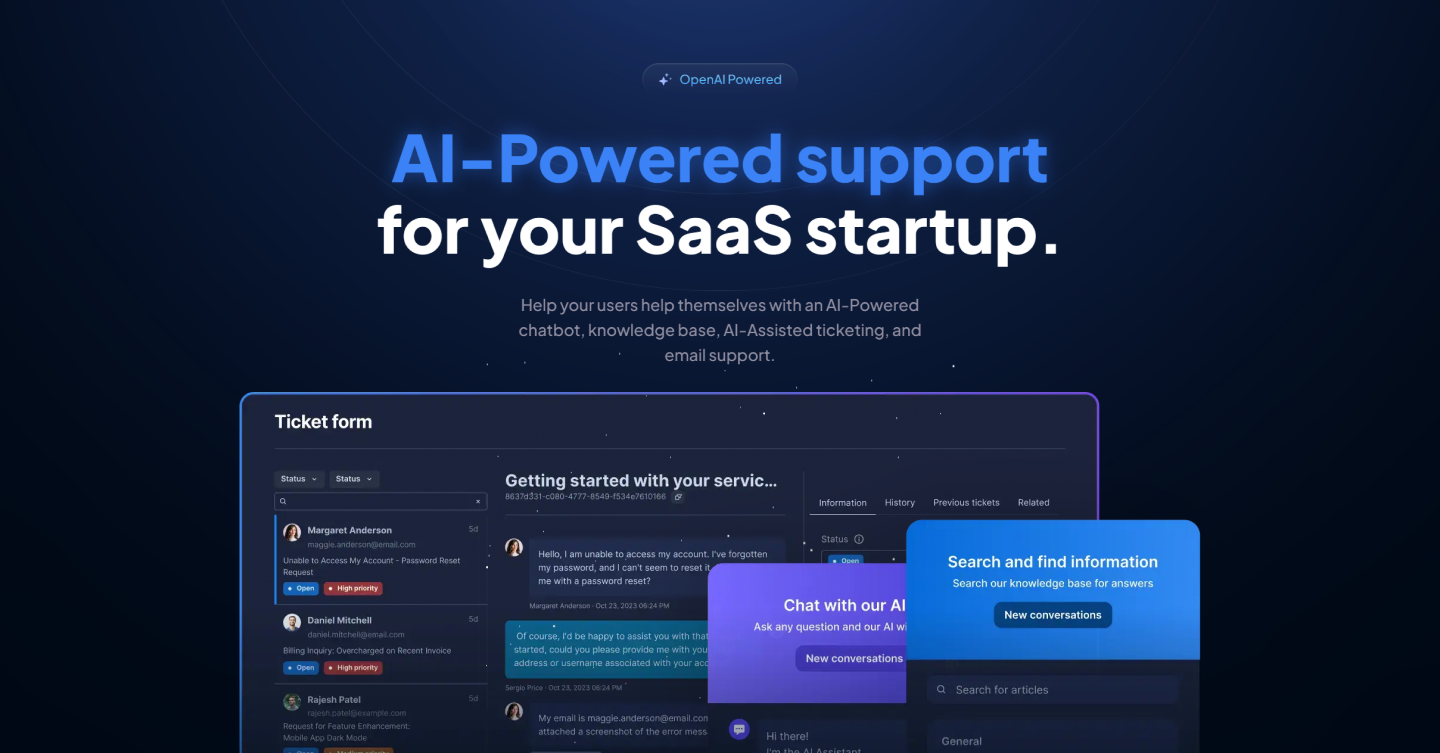
Aidbase is a self-serve customer support platform for SaaS companies, built around an AI chatbot that learns from your own content. Instead of replacing your helpdesk outright, it bundles several support channels into one system: an AI chat widget, a ticket form, a shared email inbox, and a searchable FAQ/knowledge base. The pitch is straightforward — deflect repetitive questions with a chatbot trained on your data, then let your team handle the remaining tickets faster with AI assistance.
What it actually includes
- AI chatbot — trained on your data sources (the site mentions learning from websites, PDFs, and videos), intended to answer user questions around the clock.
- Ticket form — a customizable form to collect structured information before a request reaches your team.
- Unified email inbox — incoming support emails handled in one place.
- FAQ and knowledge base — content for both end users and your support staff to search.
- Knowledge-gap detection — surfaces questions your documentation doesn't answer, so you can improve and retrain the model.
- Integrations and developer hooks — SDKs, APIs, webhooks, plus a CDN or npm package for embedding the chat widget. Listed connectors include Discord, Slack, WhatsApp, Notion, Shopify, WordPress, Webflow, and Zapier.
Who it suits
Early-stage and mid-size SaaS teams where a small support crew is drowning in repeat questions. If your users mostly ask "how do I…" questions that your docs already answer, an AI layer can absorb that volume. If your tickets are heavily account-specific, billing disputes, or bug triage, expect the chatbot to deflect less and the AI-assisted ticketing side to matter more.
Trade-offs to weigh
A chatbot is only as good as the content behind it, so budget time for writing and maintaining documentation — the knowledge-gap feature helps here, but it doesn't write the answers for you. Consolidating chat, tickets, and email into one tool is convenient, yet it also means migration effort if you already run a mature helpdesk. Reviews on the page come from named users: Kyle Prinsloo, founder of ClientManager, says Aidbase cut response time by over 70%, and Sam G., a marketing manager, notes it learned from their website, PDFs, and videos and was easy to embed.
Next step
Before committing, list your ten most common support questions and check whether your existing docs answer them cleanly. If yes, an AI chatbot is likely to pay off quickly; if not, fix the content first. You can compare options at Aidbase and see how the chatbot behaves in their demo.
How can Aidbase reduce my SaaS startup's customer support workload?
Aidbase targets the repetitive part of SaaS support: the questions users ask before, during, and after they hit a problem. Its page describes a support ecosystem where an AI chatbot, ticket form, email inbox, and knowledge base share the same underlying information, so users can self-serve first and your team only handles what remains.
Where the workload actually drops
- Deflection at the first touchpoint. The AI chatbot is trained on your own data — the page mentions connecting data sources so it learns your business and answers around the clock. For a startup with a small team, this mostly removes after-hours and "how do I…" questions.
- Better tickets when deflection fails. A custom ticket form collects structured information up front, which cuts the back-and-forth of clarifying questions before anyone can act.
- One inbox instead of many. Support email is handled from a unified inbox, so agents aren't switching between tools and losing track of threads.
- Faster handling of what's left. The AI-assisted ticketing learns from your knowledge base and previous tickets, so responses to recurring issues get drafted rather than written from scratch.
- Finding the gaps. Aidbase flags knowledge gaps so you can improve articles and retrain the model — this is the part that compounds over time.
What this looks like in practice
A two-person SaaS team might point the chatbot at their docs and website, publish a ticket form, and route support@ into the shared inbox. Routine setup and billing questions get answered instantly; anything unusual arrives as a structured ticket with context attached. The knowledge-gap report then shows which articles are missing, so the same question stops arriving next month.
Trade-offs to weigh
| Approach | Best when | Main cost |
|---|---|---|
| AI chatbot only | High volume of repeat, documented questions | Needs good source material to be accurate |
| Chatbot + knowledge base | Users will search before asking | Ongoing article maintenance |
| Full ecosystem (chat, tickets, email, AI-assisted replies) | Support is already a daily drain and you want one place to work | More setup and a migration from existing tools |
The page's customer quotes are worth reading with that in mind. Kyle Prinsloo, founder of ClientManager, says Aidbase cut response time by over 70% and that the ticketing system is the strongest part for him. Sam G., a marketing manager, notes it learned from their website, PDFs, and videos, and that internal staff started using it too. Both are vendor-published testimonials, so treat the specific numbers as their experience rather than a guaranteed outcome — the pattern they describe (fast setup, learning from existing content, internal reuse) is the realistic expectation.
Next step
Before committing, list your last 20 support conversations and mark each as answerable from existing documentation or not. If most are, start with the chatbot plus knowledge base and measure deflection for two weeks; if a large share need human judgment, prioritize the unified inbox and AI-assisted ticketing instead. Aidbase publishes pricing details at Aidbase if you want to check plan limits against that volume.
How do I integrate Aidbase's AI chatbot and ticket form into my website or app?
Aidbase provides two drop-in pieces you can place on a site or inside an app: an AI chatbot and a ticket form. According to the product page, both are added "in minutes" using a CDN script or npm packages, with a stated npm install of @aidbase/chat, and it lists JavaScript, React/Next.js, and HTML/CSS as supported paths. The page also says the chatbot learns from your connected data sources and that the platform is built to integrate with existing tools via SDKs, APIs and webhooks.
A practical integration path
- Create the chatbot and ticket form in Aidbase first. The chatbot needs a data source to be useful; the page mentions training it on your website, documents and videos, and identifying knowledge gaps to improve and retrain it.
- Choose your delivery method. CDN script for plain HTML/CSS sites, npm package for JavaScript or React/Next.js projects.
- Place the widget. Add the chatbot and ticket form to your site or app where users already look for help — a persistent launcher on marketing pages, and the ticket form on a contact or support page.
- Connect your channels. Aidbase lists Discord, WhatsApp, Slack, Notion, Messenger, Shopify, WordPress, Zapier, Webflow, OpenAI and YouTube as integrations, so you can route conversations into the tools your team already uses.
- Test with real questions. Use the "Try it yourself" flow on the page: feed it a bit of information and check whether it answers accurately before going live.
Which route fits which situation
| Situation | Sensible starting point | Trade-off |
|---|---|---|
| Static marketing site or CMS | CDN script | Fastest to ship, least control over behaviour |
| React/Next.js app | npm package (@aidbase/chat) |
More setup, better fit with your build and routing |
| Support-heavy product | Chatbot plus ticket form and email inbox | More configuration, but one unified queue for tickets and emails |
What to watch
A chatbot trained on your content will only be as good as that content. The page's own emphasis on finding knowledge gaps suggests you should plan for a review cycle rather than a one-time setup. If your users are already in Slack or Discord, route support there instead of forcing them to your website.
Next step: start with the CDN script on a single help or contact page, confirm the answers are accurate, then expand to the full site and connect your other channels. For the exact install snippets and integration steps, see Aidbase and its documentation.
How does Aidbase learn from my data, knowledge base, and past tickets to answer user questions?
Aidbase learns by connecting the sources you already use and turning them into a searchable, AI-readable knowledge layer. Based on the product page, it trains on your data so the chatbot can answer like someone who knows your business, and it also learns from your knowledge base and previous tickets to help with email and ticket replies.
H3 How the learning works in practice
- Chatbot: You connect data sources, and the AI chatbot learns from that data to give around-the-clock answers.
- Knowledge base: Your FAQ and knowledge base articles are used both by users and by support staff to find answers, and they also feed the AI.
- Past tickets and email: The AI-assisted ticket handling learns from your knowledge base and all previous tickets, so it can suggest or draft replies faster.
- Gap detection: Aidbase identifies knowledge gaps, which you can then fill and use to improve and retrain the models.
- Integrations: SDKs, APIs, and webhooks let Aidbase fit into your existing tools, and the chatbot/ticket form can be added to your site with a CDN or npm package.
H3 A concrete reader scenario Imagine you run a small SaaS. You connect your help center, upload a few PDFs, and let the chatbot read your website. A new user asks how to reset their API key. The chatbot answers from your docs. Later, three users ask about an undocumented billing edge case. Aidbase flags the gap, you write a short article, and the next time the question appears the answer is ready. Your support inbox also gets easier: when a ticket arrives, the AI can draw on similar past tickets and your articles to suggest a reply.
H3 What to check before relying on it The quality of answers depends on the quality and coverage of what you feed it. If your knowledge base is thin or your past tickets contain wrong answers, the AI can repeat those mistakes. Plan to review early replies, keep articles current, and use the gap detection to decide what to document next.
A useful next step is to pick one high-volume question your team answers repeatedly, connect the relevant source, and test the chatbot against it. If the answer is accurate, expand to more sources and past tickets. If it is not, improve the source material first.
What does Aidbase cost and which pricing plan fits a small SaaS team?
Aidbase doesn't publish a single flat rate in the material here — its pricing lives on a dedicated pricing page, so the exact tiers and numbers need to be checked there directly. What the product does make clear is that it bundles four support functions into one subscription: an AI chatbot trained on your own data, a custom ticket form, a unified email inbox, and a FAQ/knowledge base, plus gap detection and SDK/API/webhook integrations. That bundling matters for cost comparison, because a small SaaS team would otherwise pay separately for a help desk, a knowledge base tool, and a chatbot widget.
For a small team, the fit depends less on the headline price than on which of those four you'd actually use:
- Just starting out, low ticket volume: the AI chatbot plus knowledge base is usually the highest-value pair. It deflects repetitive questions before they become tickets, which is where a small team feels the pain first.
- Already drowning in email: the unified inbox and AI-assisted ticketing become the deciding features, since the AI learns from past tickets as well as your knowledge base.
- Developer-led product: SDKs, APIs, and webhooks decide whether it slots into your existing stack or becomes another silo.
One caveat on the testimonials on the page: Kyle Prinsloo of ClientManager reports a response-time reduction of over 70% and says the ticketing system is the strongest part; Sam G., a marketing manager, describes setup as easy and notes it learned from a website, PDFs, and videos. Both are vendor-published customer quotes, so treat the figures as their own reported experience rather than a benchmark. My practical read: the deflection claim is plausible for teams whose support load is mostly "how do I…" questions, but it depends heavily on how clean your existing documentation is — a chatbot trained on thin or outdated content will confidently repeat your gaps.
Next step: open the pricing page and map each tier against your monthly ticket volume and how many of the four modules you'd genuinely switch on. If you only need a chatbot and knowledge base, compare that cost against a standalone help desk before committing to the full suite.
Which tools like Slack, Discord, or Shopify can I connect to Aidbase, and how do the integrations work?
Aidbase lists connections for Discord, WhatsApp, Slack, Notion, Messenger, Shopify, WordPress, Zapier, Webflow, OpenAI, and YouTube. These are presented as ways to connect with the tool of your choice, so the practical pattern is: your existing channels and data sources feed Aidbase, and Aidbase's AI chatbot, ticket form, email inbox, and knowledge base work from that material.
How they generally work:
- Chat and messaging channels (Slack, Discord, WhatsApp, Messenger): you connect the channel so users can reach the AI chatbot where they already are, rather than only through a widget on your site.
- Knowledge and content sources (Notion, YouTube, OpenAI, WordPress): you connect data sources so the chatbot learns from your content. A review from Sam G., a marketing manager, notes it learned from their website, PDFs, and videos, and was easy to integrate into their website.
- Commerce and site builders (Shopify, Webflow, WordPress): these are typically where the chatbot and ticket form get embedded, so visitors can get answers or submit tickets without leaving the page.
- Automation (Zapier): used to pass events or data between Aidbase and other tools without custom code.
- Developer options: Aidbase also offers SDKs, APIs, and webhooks, plus CDN or npm packages (
npm install @aidbase/chat) for JavaScript, React/Next.js, and HTML/CSS.
A useful next step is to decide which channels are support surfaces (where users ask) versus knowledge sources (what the AI learns from). For example, a small SaaS team might embed the ticket form and chatbot on a Webflow site, connect Slack for internal notifications, and point the AI at Notion docs and YouTube tutorials. If you need connections beyond the listed set, the SDK, API, and webhook route is the fallback. For setup specifics and any limits, check Aidbase directly.
 Amazon Route 53
 Google Workspace
 Germany

User reviews (0)