Website profiles · Technology insights · Alternatives

bibisco.com

bibisco is a novel writing software for authors. Plan, write and organize your novel. Free version available for Windows, Mac and Linux.

No paid content found Multilingual
Visit website
Profile views 5 Outbound visits 0 Normal
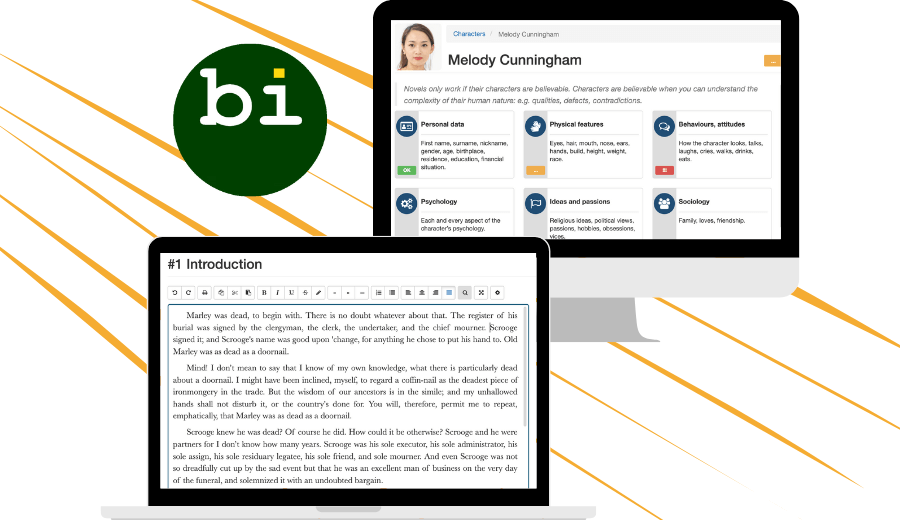
bibisco Full homepage screenshot

At a glance

Category
Books & Reading
Language
English
Paid-content signal
No paid content foundObserved
Registered
2011
Hosting
Google LLCInferred
HTTPS certificate trusted
PassedObserved
Last updated

Website review

This review may include AI-generated content and is not individually verified. Domain, certificate and other facts come from the observed data on this page.

What is bibisco?

bibisco is novel-writing software for planning, organizing and drafting a book. It is more than a plain text editor: it is built around the structure of a novel, so you can manage characters, chapters, scenes and storylines while you write. It runs on Windows, macOS, Linux, Android and iOS, and is translated into multiple languages.

What it is designed to do

bibisco focuses on keeping the whole story visible as it grows. Instead of only giving you a page to type on, it helps you see how chapters, scenes and storylines fit together, move parts around, and notice gaps, pacing problems or sections that may be in the wrong place. It also includes tools for character development, reflecting the idea that believable characters need qualities, flaws and contradictions you can track deliberately.

Who it suits

It is aimed at novelists who start with an idea and then find the story becoming complex: more characters, more scenes, more interwoven relationships. If you write short pieces or prefer a completely blank document, a simpler editor may be enough. If you tend to lose track of subplots, timelines or who knows what, a structure-first tool like bibisco is more useful.

Practical next step

Before committing to it for a full draft, test it on your current project: create your main characters, outline a few chapters and scenes, then try rearranging them. If that process feels clearer than your usual notes and word processor, it is likely a good fit. You can compare the approach with general-purpose writing setups such as Scrivener or a plain editor like Obsidian if you prefer building your own system.

How does bibisco help writers plan and organize a novel?

bibisco helps writers plan and organize a novel by treating the manuscript as a structured project rather than a single long document. Instead of only holding prose, it gives you a workspace for the moving parts of a story: chapters, scenes, characters and storylines. The goal, as the site frames it, is to keep a clear view of the whole story as it grows, so you can see how parts fit together, move them around, and understand what comes before and after a given scene. That makes it easier to spot gaps, pacing problems or material sitting in the wrong place.

What that looks like in practice

bibisco is positioned as "more than a text editor" and explicitly "designed for novelists," so its planning tools sit alongside the drafting space rather than in a separate app. The site highlights three areas:

  • Story structure: chapters, scenes and storylines are visible as connected parts, which supports outlining and reordering.
  • Character development: characters are developed with attention to qualities, defects and contradictions, on the premise that believable characters carry a novel.
  • A clear workspace: the interface is meant to keep character, scene and storyline tracking manageable as complexity increases.

It also runs on Linux, macOS, Windows, Android and iOS and is translated into 15 languages, so planning can continue across devices and in your own language. The site notes the software has been shaped by writer feedback since 2014 and mentions a free version.

A practical way to use it

A useful workflow is to plan before drafting: sketch your main characters with their contradictions, list storylines, then build the scene list for each chapter and order it. Draft inside each scene, and when the middle sags, return to the overview to check which storyline is underused or which scene is doing no work.

If your novels are short and linear, a plain text editor plus a separate notes file may be enough. bibisco earns its place when your cast and subplots multiply and you keep losing track of what happens where. For a second opinion on structure-first tools, see Scrivener; for a free, plain-text alternative, Obsidian is worth knowing.

Which platforms and languages does bibisco support?

bibisco runs on Linux, macOS and Windows for desktop writing, and also has Android and iOS apps, so you can move between a full computer and a phone or tablet. The interface is translated into 15 languages, which means you can work in your own language rather than an English-only tool.

What this means in practice

  • Desktop-first writers: Linux, macOS and Windows are all covered, so you are not forced onto one operating system to use the full planning and writing workspace.
  • Writing on the move: The Android and iOS versions suit capturing scenes, notes or edits away from your desk.
  • Non-English writers: With 15 interface languages, you can keep menus, labels and structure terms in a language you think in.

The trade-off is the usual one for cross-platform writing tools: mobile versions are best for short bursts and reference, while the deeper structural work — chapters, scenes, storylines and character development — is more comfortable on a larger screen. If you write in a less widely supported language, check that yours is among the 15 before committing.

A practical next step: open the same test project on your computer and your phone, add a scene in each, and confirm the language setting matches how you want to work. For a second opinion on platform fit, Reddit writing communities often discuss cross-platform workflows, though experiences vary by device.

How does bibisco's character development feature work?

bibisco treats character development as a structured part of planning the novel, not just a notes field you fill in once. The site describes its aim as helping you understand a character's human nature — qualities, defects and contradictions — so that the people in your story read as believable rather than merely consistent.

In practice, that means characters live in the same workspace as the rest of the project. Because bibisco is built around seeing how chapters, scenes and storylines fit together, a character profile is something you can revisit while drafting a scene and check against what that person actually does on the page. The value is in that proximity: you notice when a character's stated traits and their behaviour in a scene disagree.

Who this suits

  • Plotters and planners who want character work finished, or at least sketched, before drafting.
  • Writers juggling a large cast, where contradictions and motivations are easy to lose track of.
  • Anyone revising, since a character who changed in chapter three needs to be checked against their behaviour in chapter twenty.

Where it asks more of you

A structured character tool does not generate believable characters; it stores your thinking and makes it harder to forget. If you prefer discovering characters purely through drafting and dislike filling in fields up front, the structure can feel like homework. The honest trade-off is between the friction of planning and the risk of inconsistency later.

A practical next step

Pick one character you already know well and one you are vague about. Fill in the first and see whether the prompts surface anything you had not articulated. Then try the vague one — if the structure helps you decide what that character wants and where they contradict themselves, the feature is earning its place in your process. If you are comparing options, bibisco sits alongside tools such as Scrivener and WriterDuet, which approach planning and drafting differently.

What are the differences between bibisco's free and paid versions?

bibisco's free version is a working version of the software, not a demo: you can plan, organize and write a novel in it, on Windows, macOS and Linux. The paid editions remove limits and add conveniences, chiefly the mobile apps and syncing across devices. Because the site's own download and pricing pages are the authoritative source for what each tier currently includes and costs, check them before deciding — the split has shifted over time.

Practical differences

Area Free version Paid editions
Core writing and planning Available: chapters, scenes, characters, storylines Same tools
Platforms Desktop (Windows, macOS, Linux) Adds Android and iOS
Moving between devices Not the point of the free tier Built for writing on desktop and mobile
Limits Some features or content capped Caps lifted

The pattern is common in writing tools: the free tier gets you through a draft, and payment buys flexibility — writing on a phone during a commute, switching machines, keeping one project in sync.

Who each suits

  • Try-before-committing writers. Start free, build your character and scene structure, and see whether the method fits how you think. If you finish a draft without needing mobile access, you may never pay.
  • Writers who draft away from the desk. If you write on a laptop at home and a phone or tablet elsewhere, the paid mobile apps are the main reason to upgrade.
  • Plotters with large casts. Heavy character and storyline work is where bibisco's structure pays off; if your project is small, the free version's limits may never bite.

How to decide

Write one real chapter in the free version before paying. If the only thing pushing you toward the paid tier is device switching, upgrade; if it is a feature cap you have not actually hit, keep drafting free. For a second opinion on structure-first tools, see Scrivener and WriterDuet — different philosophies, useful for comparison.

How does bibisco help writers see the whole story and avoid pacing problems?

bibisco approaches pacing as a structural problem rather than a line-editing one. Its central idea is that you lose control of a novel when you can only see the scene in front of you, so it gives you a bird's-eye view of how chapters, scenes and storylines fit together. From that view you can move things around and see what comes before and after, which is how you spot gaps, slow stretches and material sitting in the wrong place.

What the overview actually gives you

  • Chapters, scenes and storylines in one picture. Instead of scrolling a manuscript, you see the skeleton of the book, so a subplot that vanishes for two hundred pages becomes visible.
  • Reordering as a first-class action. Pacing fixes are often sequence fixes. Moving a scene is easier when you can see its neighbours.
  • Character work as structure. bibisco treats believable characters as a planning concern — qualities, defects, contradictions — so motivation problems surface before they turn into sagging middle chapters.

A concrete way to use it

Take a draft between 40,000 and 70,000 words that reads fine scene by scene but drags in the middle. Open the overview and mark each scene with one of: advances the main plot, develops a character, raises stakes, or none of the above. Scenes in the last category are your first candidates to cut or merge. Then check the gaps: if three consecutive scenes only develop character, the plot has stalled there regardless of how good the prose is.

Trade-offs

This is planning-led software, so it rewards writers who are willing to outline and maintain a story bible. Discovery writers who resent filling in character fields may find the structure overhead outweighs the benefit, and it will not diagnose prose-level pacing — sentence rhythm, scene length within a beat — for you. It is also not a specialist tool for screenplays or non-fiction.

For comparison, Scrivener is the long-standing alternative with a binder-and-corkboard model, and The Writer's Store is a general retail and resource site rather than a planning tool. If you already outline in a separate app, adding bibisco means maintaining two sources of truth; if you don't, the overview is the reason to adopt it.

Next step: before committing, take your current draft's chapter list and rebuild it as a one-line-per-scene outline in any tool. If that exercise reveals the pacing problem immediately, the overview view is what you need; if it doesn't, the issue is likely at scene level and better solved during revision.

Related questions

More questions →
How bibisco Helps Writers Plan and Organize a Novel

bibisco is novel-writing software built specifically for planning, organizing, and drafting a novel, rather than a general-purpose text editor. It is most useful if your problem is not a lack of ideas but losing track of how characters, scenes, and storylines fit together as the manuscript grows. It runs on Linux, macOS, Windows, Android, and iOS and is translated into 15 languages, so you can work on the same project across desktop and mobile in your own language.

What bibisco actually is

The site describes it as "more than a text editor" — a workspace designed for novelists. The core promise is staying "clear, focused and in control as your story grows," because a novel is a complex structure rather than a single idea.

Two things follow from that framing:

  • It assumes you are writing long-form fiction. The tools are oriented around chapters, scenes, characters, and storylines, not around short documents.
  • It assumes your draft will get messy. The value shows up in the middle of a project, when the story has outgrown what you can hold in your head.

bibisco has been developed since 2014 through continuous feedback from writers, so the feature set reflects recurring real-world drafting problems rather than a generic productivity template.

How it helps you see the whole story

The central mechanism the site highlights is keeping a clear view of the story as a whole. When you are drafting, it is easy to fixate on the next scene and lose sight of the bigger picture. bibisco is built so you can:

  • See how chapters, scenes, and storylines fit together
  • Move things around and understand what comes before and what comes after
  • Spot gaps, pacing problems, or sections that don't belong where they are

That last point is the practical payoff. Structural problems in a novel are hard to notice scene by scene, because each scene can read fine on its own while the sequence as a whole drags or skips. A view that shows the arrangement of scenes and storylines makes those problems visible while they are still cheap to fix.

A concrete example

Say you have three storylines running: a main plot, a relationship subplot, and a mystery thread. Around the midpoint you suspect the mystery is stalling. In a plain text editor you would have to scroll and reconstruct the order of scenes from memory. In a tool organized around storylines, you can look at where the mystery scenes fall relative to the others, see that they cluster early and then vanish for a long stretch, and move or add a scene to close the gap — then check what now comes before and after it.

Character development

The site singles out character work as a differentiator: novels only work if their characters are believable, and characters become believable when you can capture the complexity of human nature — qualities, defects, and contradictions. This matters for organization as much as for craft, because inconsistent character behavior is one of the structural problems that is hardest to catch while drafting forward.

Who it fits, and who it doesn't

Your situation bibisco is a good fit if…
You are drafting a novel Yes — the toolset is built around novel-length structure
You write short pieces or essays Probably not — the chapter/scene/storyline model adds overhead you won't use
You already outline in another tool and only need a place to type Only if you want the planning and drafting in one workspace
You work across devices Yes — available on desktop and mobile platforms
You write in a language other than English Yes — 15 translations available

The site states a free version is available for Windows, Mac, and Linux. It does not publish pricing details or payment terms on the page, so check the download page directly for current editions and any paid tiers before committing.

How to evaluate it for your own process

  1. Download the free version for your desktop platform from bibisco.com.
  2. Enter a project you already have in progress rather than a blank one — the organizational features only prove themselves against real material.
  3. Set up your existing chapters and scenes, then look at the whole-story view and ask whether the gaps and pacing problems you already suspected are visible.
  4. Try moving a scene and confirm you can see what comes before and after it.
  5. Test the character tools against a character you find hard to keep consistent.

If step 3 or 4 surfaces something you hadn't noticed, the tool is doing the job it claims. If your draft is short enough that you can hold the whole structure in your head, you likely don't need it yet.

Which platforms and languages does bibisco support?

bibisco runs on Linux, macOS, Windows, Android, and iOS, and the interface is translated into 15 languages so you can write in your own language. A free version is available for Windows, Mac, and Linux. If you write on a desktop or laptop and want to test the software before committing, the free desktop version is the entry point; if you work on a phone or tablet, bibisco is available there too, though the site only states the free version for the three desktop platforms.

Platform support at a glance

Platform Supported Notes from the site
Windows Yes Free version available
macOS Yes Free version available
Linux Yes Free version available
Android Yes Listed as a supported platform
iOS Yes Listed as a supported platform

The site describes bibisco as "available on Linux, macOS, Windows, Android and iOS," so the same project can move across desktop and mobile environments rather than locking you to one device type.

Language support

bibisco is translated into 15 languages. The stated purpose is that "writers everywhere can work in their own language," so the translation covers the interface you plan, organize, and write in — not just a marketing page. The site does not list the 15 languages by name, so if your language is a deciding factor, check the language selector in the app or the docs after downloading rather than assuming from the count alone.

What this means for your setup

  • Desktop-first writers (Windows, Mac, Linux): you can start with the free version, which the site explicitly offers for these three platforms.
  • Mobile or tablet writers (Android, iOS): bibisco is available, but the free-version statement on the site is tied to Windows, Mac, and Linux — treat mobile pricing as something to confirm in the store listing.
  • Writing in a non-English language: the 15-language translation is the relevant feature; verify your specific language is included before you build your workflow around it.
  • Switching between devices: since all five platforms are supported, you can plan on desktop and draft on mobile, provided you manage your project files consistently.

How to confirm your platform and language

  1. Go to bibisco.com and use the download option for your operating system (Windows, macOS, or Linux) or your app store (Android, iOS).
  2. Install and open the app.
  3. Check the language settings for your language among the 15 translations.
  4. On desktop, confirm whether you are running the free version or a paid one before starting a long project, since the free version is only stated for Windows, Mac, and Linux.

Expected result: you end up with bibisco running in your language on a supported device, and you know which version you are using before you invest time in a full manuscript.

Common snags

  • Assuming mobile is free: the site's free-version statement names only Windows, Mac, and Linux. Check the mobile store listing for current terms.
  • Assuming your language is one of the 15: the count is given, not the list. Verify in-app.
  • Mixing devices without a file plan: support across five platforms doesn't automatically sync projects; decide how you'll move or store your work.
What Is bibisco and What Is It Used For?

bibisco is a novel writing software for authors. It is used to plan, organize, and write a novel from the first idea through to a complete draft, rather than functioning as a plain text editor. According to bibisco, a free version is available for Windows, Mac, and Linux, and the software is also available on Android and iOS, translated into 15 languages. It is a fit if you are writing long-form fiction and find that characters, scenes, and storylines become hard to track as the manuscript grows; it is not aimed at general note-taking or short-form writing.

What bibisco is designed to do

bibisco positions itself as "more than a text editor" — a tool built specifically for novelists. Its stated purpose is to help you stay clear, focused, and in control as a story grows, because a novel is a complex structure rather than a single idea.

The problem it addresses is structural, not motivational. As bibisco describes it, you start with an idea, then characters appear, scenes multiply, and relationships intertwine until it becomes harder to see how everything fits together. The software is meant to keep that complexity manageable.

Core uses

See the whole story

bibisco lets you view how chapters, scenes, and storylines fit together, move elements around, and understand what comes before and after a given point. In practice, this is for spotting gaps, pacing problems, or sections that don't belong where they are — tasks that are difficult when you only see the current scene.

Develop characters

The software treats believable characters as central to a working novel, and its character development tools are built around understanding qualities, defects, and contradictions in human nature. This is the part of planning that most affects whether readers find a character convincing.

Plan and organize before and during drafting

Because it covers planning, organizing, and writing in one workspace, bibisco is intended to be used across the whole process — from outlining to producing a complete draft — instead of switching between separate tools for notes, structure, and prose.

Who it suits, and who it doesn't

Your situation bibisco is a reasonable fit
Writing a novel-length work Yes — it is built for novelists
You lose track of scenes and storylines as the draft grows Yes — whole-story visibility is a core feature
You want character planning alongside drafting Yes — character development is a highlighted tool
You need to write on multiple platforms or in your own language Yes — Linux, macOS, Windows, Android, iOS; 15 languages
You only need a distraction-free text editor Probably not — it is explicitly positioned as more than that
You write short pieces or non-fiction notes Not the intended use

Practical notes before you commit

  • Platforms: Windows, Mac, and Linux for the free version; Android and iOS are also listed as available.
  • Language: translated into 15 languages, so you can work in your own language.
  • Maturity: bibisco states it has evolved since 2014 through continuous feedback from writers, so the toolset reflects long-running input from working authors rather than a new release.
  • Cost: the site states a free version is available. Details of any paid tiers, prices, or account requirements are not specified here — check the download and pricing pages directly before relying on a particular plan.

If your main difficulty is keeping a growing novel coherent rather than producing sentences, bibisco is built for exactly that problem. If you mainly want a minimal place to type, its structure will be more than you need.

How long has bibisco been developed and who is it for?

bibisco has been shaped by writer feedback since 2014, and it is built specifically for novelists — authors who want to plan, organize, and write a story without getting lost as it grows. If you are writing a novel (not a screenplay, not general notes) and you want a workspace that keeps characters, scenes, and storylines visible as the manuscript expands, bibisco is aimed at you. The "since 2014" detail is the site's own account of how long the software has been evolving; it does not by itself guarantee any particular release cadence or support commitment.

Who bibisco is designed for

The site frames the product around a specific problem: a novel is a complex structure, and the difficulty is not a lack of talent but losing sight of how everything fits together. That framing tells you who the intended user is.

  • Novelists working on long-form fiction. bibisco describes itself as "more than a text editor" and as software "built for novelists," so the target is book-length narrative, not short-form or non-fiction drafting.
  • Writers juggling many moving parts. Characters appear, scenes multiply, relationships intertwine. If your draft has outgrown your ability to hold it all in your head, that is the stated use case.
  • Authors who want to see the whole story. The software is meant to show how chapters, scenes, and storylines fit together, so you can move things around and understand what comes before and after.
  • Writers who want to catch structural problems early. The site says this whole-story view makes it easier to spot gaps, pacing problems, or sections that don't belong where they are.

If you only need a plain text editor, bibisco's own description suggests it is more than you need. If you need screenplay formatting or a general note-taking system, nothing in the source material positions bibisco for that.

How long it has been developed

The only development-history claim in the source is: "Since 2014, bibisco has evolved through continuous feedback from writers around the world, shaping tools designed for the real challenges of writing a novel."

What that tells you:

  • The project has a documented history stretching back to 2014, so it is not a brand-new or abandoned-looking tool.
  • Its stated development method is iterative and feedback-driven — features are described as shaped by working writers rather than designed in isolation.
  • The emphasis is on "real challenges of writing a novel," which reinforces the novelist-specific positioning.

What it does not tell you: the current version number, release frequency, roadmap, or how many people maintain it. If ongoing maintenance is your deciding factor, treat "since 2014" as a starting signal and verify current activity yourself before committing your manuscript to it.

What this means for your decision

If you are… bibisco's stated fit
Writing a novel and losing track of plot threads Directly targeted — whole-story view of chapters, scenes, storylines
Developing complex, believable characters Targeted — character development is called out as a differentiator
Wanting a tool with a long track record Supported by the "since 2014" history, though not by release details
Writing screenplays or short pieces Not positioned for this
Needing only basic text editing Explicitly "more than a text editor," so likely overkill

The practical next step is to check the platform and language coverage against your own setup, since the site says bibisco runs on Linux, macOS, Windows, Android, and iOS and is translated into 15 languages. Those are the two facts most likely to rule it in or out before you evaluate the writing tools themselves.

How bibisco Supports Character Development for Novelists

bibisco treats character development as a structural part of writing a novel, not a side activity. According to the site, the software is built on the premise that "novels only work if their characters are believable," and that believability comes from understanding "the complexity of their human nature: qualities, defects, and contradictions." If your problem is that your cast feels flat or that you lose track of who knows what as the plot grows, bibisco's character tools are aimed at exactly that. If you only need a distraction-free text editor, you likely don't need this layer.

What bibisco actually gives you for characters

The site frames bibisco as "more than a text editor" — a workspace where characters, scenes, and storylines are tracked together as the story grows. For character work specifically, the stated approach is:

  • Believability through complexity. The tool is designed to help you explore a character's qualities, defects, and contradictions rather than a flat list of traits.
  • Characters as part of the whole story. Character work isn't isolated; it connects to the wider structure so you can see how people, chapters, and storylines fit together.
  • A clear view of the whole. The site's "See the Whole Story" section describes seeing how chapters, scenes, and storylines interlock, moving things around, and understanding what comes before and after — which is how you catch gaps, pacing problems, or sections that don't belong.

Why this matters while drafting

The site describes a specific failure mode: you start with an idea, then "characters appear, scenes multiply, relationships start to intertwine," and the story becomes "bigger than a single idea." At that point it gets "harder to see how everything fits together" — not because the idea is weak, but because "a novel is a complex structure." Character development tools matter here because a character's contradictions and defects only pay off if they stay consistent across scenes you wrote months apart.

How to use it in practice

  1. Start with the character, not the scene. Before drafting a scene, work out the qualities, defects, and contradictions that drive the person in it.
  2. Draft the scene. Write normally — bibisco is still a writing environment.
  3. Check the character against the whole. Use the story-wide view to see whether this scene's behavior fits what comes before and after, and whether the character's arc is actually progressing.
  4. Fix at the structure level. If a scene doesn't belong or the pacing sags, move or cut it rather than patching the prose.

The expected result is that you catch inconsistencies and gaps while they're still cheap to fix, instead of during a full revision pass.

Where bibisco fits — and where it doesn't

Your situation bibisco's character tools
Large cast, interlocking storylines Built for this — the whole-story view is the point
Characters feel flat or inconsistent Directly targeted: qualities, defects, contradictions
You write in a non-English language Available in 15 languages
You want a plain text editor only More than you need
You need platform coverage Linux, macOS, Windows, Android, iOS

Practical notes before you commit

  • Platforms: Linux, macOS, Windows, Android, and iOS.
  • Languages: translated into 15 languages.
  • Maturity: the site states bibisco has evolved through continuous feedback from writers since 2014, so the character tools reflect long-running input from working novelists rather than a one-off feature set.
  • Pricing: the site mentions a free version for Windows, Mac, and Linux. It does not state what the free version includes versus any paid tier, so check the download page for current terms before relying on a specific feature being free.

If your core difficulty is keeping believable, contradictory people consistent across a long, complex manuscript, bibisco's character development approach is designed for that problem. If your difficulty is simply getting words on the page, a simpler editor will do.

Website Overview

Identifiable technologies and additional version or configuration signals make the service easier to fingerprint, which may help targeted scanners narrow their checks. An established domain and managed infrastructure suggest continuity of operations and may support dependable delivery, although neither guarantees service quality.

Domain and Registration

Registered in 2011, this domain has about 15 years of history. That suggests continuity, although ownership and purpose may have changed. The registrar is Tucows Domains Inc., a widely used domain service provider. The domain uses the common .com extension, which is not an independent safety signal.

DNS and Email

The lowest TTL is 30 seconds, supporting rapid record changes at the cost of more frequent lookups. Nameservers are provided by siteground.net, indicating managed DNS hosting. MX records point to the mailspamprotection.com email service. No CNAME was found; the observed records resolve directly to addresses. SPF and DMARC are configured. DKIM status is unknown.

TLS and Certificates

The certificate uses an RSA 2048-bit public key, offering broad client compatibility. The server supplied a complete certificate chain. No organization name is present in the certificate; the available fields are consistent with domain validation. The certificate was issued by Let's Encrypt, commonly associated with automated certificate services. The certificate's total validity is about 89 days, consistent with a short renewal cycle.

HTTP and Browser Security

The checked browser-security headers were not detected, leaving fewer explicit browser-side safeguards. No X-Powered-By header was found, reducing one common source of backend fingerprinting information. No obvious internal addresses or debug information were found in the headers. The Server header identifies nginx without an exact version. No explicit CDN or WAF marker was found in the response headers.

Technology Stack Analysis

The public page identifies WordPress 7.1.2, jQuery, Google Analytics, nginx, with exact versions exposed for 1 technologies. These details can narrow vulnerability checks, although exposure alone is not a vulnerability.

Search and Social Sharing

The Generator tag identifies WordPress 7.1.2, making the publishing system easier to fingerprint. Twitter Card metadata is configured. JSON-LD includes Organization data, helping describe the organization as an entity. The page declares 4 language or regional alternatives using hreflang. The title has 44 characters, within a common display range.

Hosting and Email

DNSsiteground.net
HostingGoogle LLC
Emailmailspamprotection.com
Approximate IP geolocation (inferred; a CDN or proxy may differ from the origin server) United States flagKansas City, Missouri, United States Inferred 34.120.190.48

Registration details

RDAP / WHOIS

RegistrarTucows Domains Inc.
Registered2011-09-05
Expires2027-09-05
Domain statusactive
Nameserversns1.siteground.net、ns2.siteground.net
DNSSECunsigned

DNS records

DNS

TypeNameValueTTLPriority
Abibisco.com34.120.190.4830—
Abibisco.com34.149.36.17930—
Abibisco.com35.190.31.5430—
Abibisco.com35.227.194.5130—
MXbibisco.commx10.antispam.mailspamprotection.com8640010
MXbibisco.commx20.antispam.mailspamprotection.com8640020
MXbibisco.commx30.antispam.mailspamprotection.com8640030
NSbibisco.comns1.siteground.net86400—
NSbibisco.comns2.siteground.net86400—
TXTbibisco.comgoogle-site-verification=F6mbX9KKOPVZKMC4hKZ7IXeR1lJ329CsRdA2dYWi9-Y3600—
TXTbibisco.comgoogle-site-verification=IRRWO3vll4kmZVTTQcWQf10o7RsjyklCYnjE_ge4BQM3600—
TXTbibisco.commailerlite-domain-verification=68cad1658cd10870043673ba3d96ceb4feba8540300—
TXTbibisco.comv=spf1 +a +mx a mx +ip4:34.174.91.162 include:bibisco.com.spf.auto.dnssmarthost.net include:_spf.mlsend.com include:_spf.mailersend.net ~all300—
DMARC_dmarc.bibisco.comv=DMARC1; p=none; aspf=r; adkim=r;300—

TLS and certificates

TLS / SSL

AssessmentNormal configuration
Supported protocolsTLSv1.2、TLSv1.3
Negotiated protocolTLSv1.3
Certificate subject*.bibisco.com
IssuerLet's Encrypt
Valid until2026-12-08T21:42 · Remaining when checked: 63 days
Verification detailsCertificate trust: Passed · Hostname match: Passed

HTTP response headers

HTTP

HeaderValue
content-typetext/html; charset=UTF-8
cache-controlmax-age=0
servernginx

Identified technologies

WordPress 7.1.2jQueryGoogle Analyticsnginx

Pages, Search and Sharing

Meta descriptionbibisco is a novel writing software for authors. Plan, write and organize your novel. Free version available for Windows, Mac and Linux.
Canonical URLhttps://bibisco.com/
LanguageEnglish (default) · Multilingual
Twitter Cardsummary_large_image
All bots 0 allowed · 0 disallowed

User reviews (0)

  • No reviews yet.