
 简体中文
简体中文 English
Website review
This review may include AI-generated content and is not individually verified. Domain, certificate and other facts come from the observed data on this page.
What is BuyMap?
BuyMap is a web tool for searching and comparing eBay listings for a single product in one place. Rather than scrolling through mixed search results, you enter a product name, UPC, ISBN, EAN, or eBay product ID, and it gathers matching listings into one comparison view. BuyMap
Its focus is on the real total cost, not just the listed price. Each row combines item price with shipping to your ZIP code, so an item that looks cheaper can turn out to be more expensive once shipping is added. A median price by condition is also shown, which helps you judge whether a particular listing is actually a good deal.
Main features
- Multiple search methods: type a name, scan a barcode, or paste a UPC, ISBN, EAN, or eBay product ID.
- Filtering without page reloads: narrow by condition, seller rating, location, format, and listing age, then sort by total price or newest first.
- Noise reduction: bulk lots, broken units, and wrong items are filtered out, and a toggle hides disc-only listings for media like games.
- Seller context: feedback is color-coded and low-rated sellers can be excluded.
- Descriptions in place: read a seller's full description without leaving the results.
- Price alerts: set a target total and get an email when a listing appears at or below it, shipping included.
- Multiple marketplaces: listings from the US, UK, Germany, Australia, Canada, Italy, France, and Spain, priced to your location.
Who it suits
| User | Why it helps |
|---|---|
| Collectors | Track down rare or complete copies and compare condition against price |
| Resellers | Source inventory quickly and filter by seller rating and location |
| Everyday buyers | Avoid overpaying by seeing the true total and median price |
The trade-off is that BuyMap is a layer on top of eBay rather than a marketplace itself, so you still complete the purchase through eBay. It is most useful when a product has many competing listings and shipping costs vary widely; for a single fixed-price item, a plain eBay search may be just as fast.
A practical next step: try it on something you are actively shopping for, paste the UPC or ISBN if you have it, and set a price alert at the total you would genuinely pay including shipping.
How does BuyMap calculate the total price including shipping for my ZIP code?
BuyMap turns each eBay listing into a delivered total by adding the listing's shipping charge for your ZIP code to the item price, then showing the two numbers side by side. Its page describes the display as "item price plus shipping as one total," so the figure you sort on reflects what you'd pay to your address rather than the sticker price alone.
That matters because the cheapest listing is often not the cheapest order. A $179 item with $65 shipping costs more than a $199 item with $40 shipping, and BuyMap's example shows exactly that ranking. A median price per condition gives you a reference point for judging whether any given total is actually a deal.
Practical next step: before you buy, check two things on the results page.
- Whether the seller's shipping method and location match what you assumed for your ZIP.
- Whether the condition median sits near or below the listing you're considering.
Where the calculation can mislead: shipping estimates depend on what the seller enters and on destination. If a seller uses calculated shipping or freight, the number shown can shift at checkout, so treat the total as the best available estimate, not a locked-in quote.
Who benefits most:
- Everyday buyers comparing a handful of similar listings.
- Collectors hunting a specific edition, who can filter to complete copies and check the condition median.
- Resellers sourcing inventory, who care about the real landed cost per unit.
If you want to confirm the total for a specific ZIP, search the product, set your location, and sort by total price rather than item price; then open the seller's description in place to verify the shipping terms before committing.
How can I search for a product on BuyMap using a UPC, ISBN, or eBay product ID?
Paste the code into the search box instead of typing a product name. BuyMap accepts a UPC, ISBN, or eBay product ID (it also supports barcode scanning), and it gathers the matching eBay listings for that exact product onto one page rather than a mixed keyword result set.
How to do it
- Open BuyMap and find the product search field.
- Enter one identifier — a UPC (e.g. a 12-digit code), an ISBN for a book, or an eBay product ID — then run the search.
- Review the results table: item price plus shipping to your ZIP shown as one total, alongside condition and listing age.
- Filter on the spot — condition, seller rating, location, format, listing recency — and sort by total price or newest first.
Which identifier to use
| Identifier | Best for | Why |
|---|---|---|
| UPC | Barcoded goods: electronics, games, media | Ties to one physical product, cutting out near-matches |
| ISBN | Books | Distinguishes editions and formats precisely |
| eBay product ID | Items already in eBay's catalog | Jumps straight to the catalog entry's listings |
If you only have the item in hand, a barcode scan is the fastest route; typing the name works too, but expect more noise from bulk lots, broken units, and disc-only copies, which BuyMap hides by default (one toggle controls the disc-only filtering).
Practical scenario: a collector hunting a rare game scans the case barcode, filters to like-new from US sellers under $30 listed in the past week, then reads seller descriptions inline to confirm the case and manual are included — no clicking through each listing.
Next step: if nothing is listed at your price, set a price alert on that product; BuyMap emails you when a listing appears at or under your target total with shipping included.
What filters and sorting options does BuyMap offer to narrow down eBay listings?
BuyMap's core promise is that you see every matching eBay listing for one exact product, then cut the pile down with filters that apply instantly — no page reload — and sort the survivors by what actually matters: real total cost or freshness.
Filters you can stack
- Condition — including a "complete copies only" toggle that hides disc-only or bare-item listings.
- Seller rating — feedback is colour-coded in the results table, and low-rated sellers can be filtered out.
- Location / marketplace — you can narrow to sellers in a specific country; BuyMap covers eight eBay marketplaces (US, UK, Germany, Australia, Canada, Italy, France, Spain), each priced to your location.
- Format — useful when the same title exists in several editions or media formats.
- Listed within X days — e.g. "listed within 7 days" to catch fresh stock.
- Price ceiling — e.g. "under $30".
- Junk removal — bulk lots, broken units and wrong-item matches are hidden before you see them.
Sorting
- Total price (item + shipping to your ZIP) — lowest real cost first, not lowest sticker price.
- Newest first — most recently listed at the top.
Why the total-price sort matters A $179 item with $65 shipping costs more than a $199 item with $40 shipping. Sorting on the listed price alone would rank them the wrong way round. BuyMap rolls shipping into one total per listing and also shows a median price per condition, so you can judge whether a given copy is genuinely a deal.
A practical workflow Say you're after a specific game. Search by name, barcode, UPC, ISBN or eBay product ID, turn on "complete copies only", filter to your country and a seller rating floor, cap the total at your budget, then sort by total price and scan the top few. Set a price alert at your target total and let the email do the repeat checking.
One trade-off to weigh: aggressive filtering can hide a genuinely good listing that a seller described poorly or listed in the wrong category, so it's worth occasionally loosening one filter to sanity-check what you're missing.
How do BuyMap's price alerts work and how do I set them up?
BuyMap's price alerts watch a specific product and email you when a listing appears at or under a total price you choose. The key detail is that the threshold is based on the delivered cost — item price plus shipping to your ZIP — not the sticker price alone. So if you set a target of $30, BuyMap should only notify you when a listing's item-plus-shipping total lands at or below $30. That matters because on eBay the cheapest listed item is often not the cheapest order once shipping is added.
How to set one up
- Search for the product on BuyMap by name, UPC, ISBN, EAN, or eBay product ID, or scan a barcode.
- Open the product page so you're looking at the gathered listings for that exact item.
- Find the price alert option on that product (the site presents alerts as a per-product watch, tied to the product page rather than to an individual listing).
- Enter the total price you'd actually pay, including shipping to your address.
- Save the alert and let it run. BuyMap emails you when a matching listing appears.
What to expect after that
- Alerts are triggered by new listings at or under your target, so the value is in not re-checking the product page yourself.
- Because the threshold includes shipping to your location, the same dollar figure can behave differently for a buyer in another country or region.
- BuyMap covers eight eBay marketplaces — United States, United Kingdom, Germany, Australia, Canada, Italy, France, and Spain — each priced to your location, so an alert on a product with cross-marketplace listings can surface options you wouldn't see searching one eBay site.
Practical notes
Set your target from evidence, not hope. Use the median price BuyMap shows for each condition as a baseline, then set your alert slightly below the median for the condition you'll accept. If you only want complete copies, decide that before you set the alert — the alert itself is about price, while the "complete copies only" toggle and condition filters are what keep disc-only or junk listings out of your results.
A concrete scenario: you collect a specific game and want a complete copy from a US seller. You check the current listings, see the median for "like new" sits well above what you want to pay, and set an alert at your real ceiling. Weeks later a new listing appears at that total with shipping included, and you get an email instead of discovering it after someone else bought it.
One trade-off to weigh: alerts are only as useful as your target is realistic. Set it too low and you may wait a long time; set it at the current median and you'll get notified about listings that aren't really deals. Start near the median, then tighten it once you see how often matching listings actually appear.
Which eBay marketplaces does BuyMap support and how are prices adjusted for my location?
BuyMap lists support for eight eBay marketplaces: the United States, United Kingdom, Germany, Australia, Canada, Italy, France, and Spain. Prices from those marketplaces are shown with shipping calculated to your ZIP or location, so the figure you see is a delivered total rather than the seller's sticker price.
How location affects what you pay
Shipping is the main adjustment. A listing that looks cheap in its home marketplace can cost more once international postage is added, and BuyMap folds that into the total. The site also shows a median price per condition, which gives you a local benchmark for judging whether a particular listing is genuinely good value.
If you are comparing across marketplaces, decide first whether you are willing to buy internationally. A buyer in the US who only wants domestic sellers should filter to US listings and ignore the rest; a collector chasing a rare regional release may find the UK, German, or Japanese-market equivalent worth the shipping premium. Note that Japan is not among the eight supported marketplaces listed, so buyers focused on Japanese releases should check what coverage they actually get before relying on it.
Practical next step
Search a product you already know the going rate for, then compare the delivered total against your expectation. If the total lands well below your benchmark, the marketplace and shipping math are working in your favour; if it lands above, check whether you have filtered to sellers who ship to you at a reasonable cost.
 vercel-dns.com
 Namecheap Private Email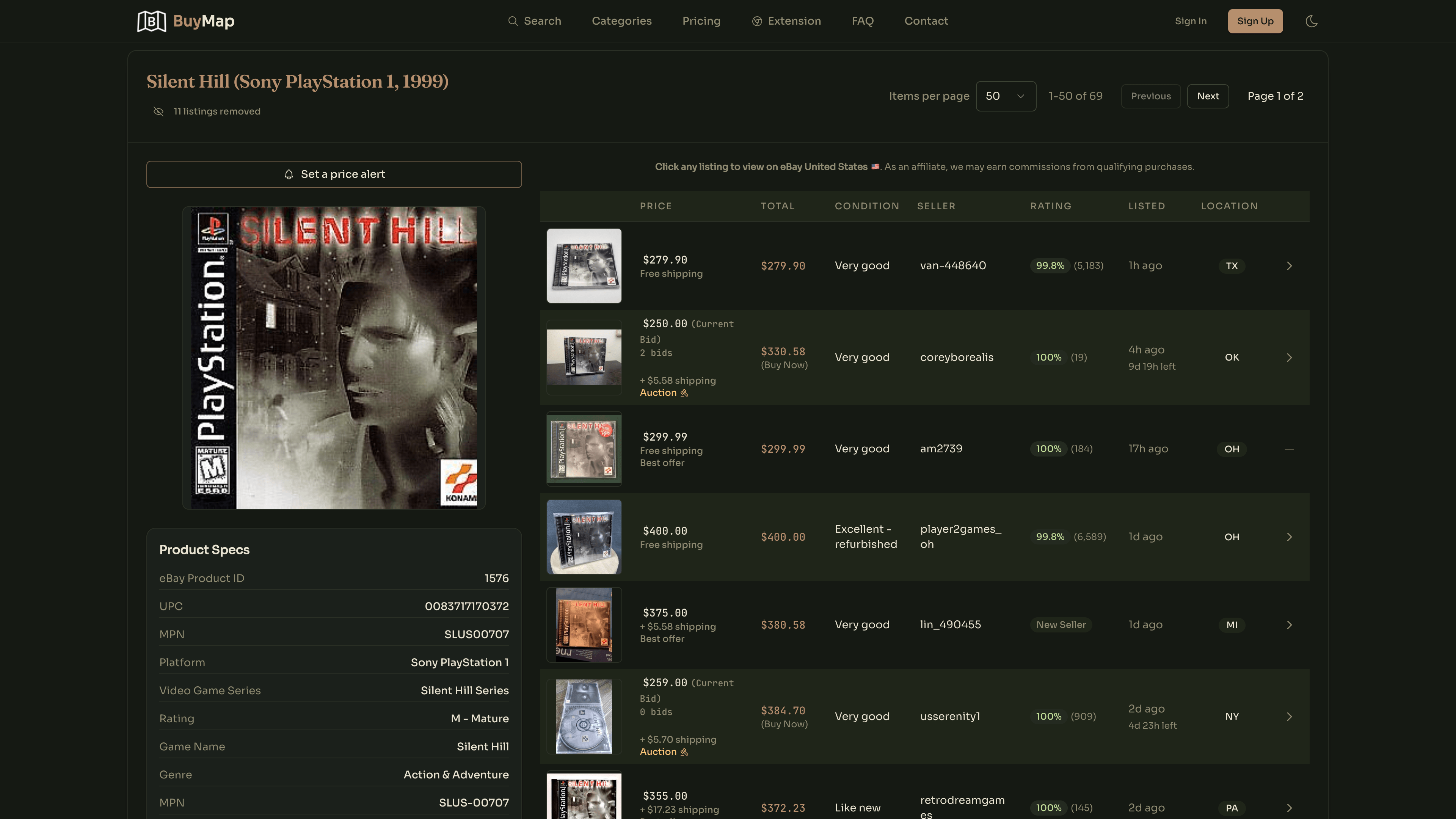

User reviews (0)