
 简体中文
简体中文 English
Website review
This review may include AI-generated content and is not individually verified. Domain, certificate and other facts come from the observed data on this page.
What is CoinSyncer?
CoinSyncer is a free crypto portfolio tracker that pulls your balances from multiple exchanges and wallets into one dashboard. According to its own description, it is aimed at investors whose assets are spread across several platforms, and it syncs those balances automatically so you do not have to update holdings by hand.
What it offers
- One consolidated view: connect multiple exchange accounts and wallets, with no stated limit on how many.
- Broad coverage: support for 90+ blockchain networks and 20+ exchange integrations.
- Frequent refreshes: balances update multiple times a day, and prices refresh several times a day.
- Multi-device access: the page presents it as accessible across devices via the web.
Who it suits
Someone holding assets on, say, two exchanges plus a hardware wallet and a couple of DeFi chains is the clearest fit. Instead of opening four apps and a block explorer to total up a position, you check one screen. A long-term holder who buys monthly and rarely trades gets less from frequent syncing than an active investor rebalancing across venues.
Trade-offs to weigh
Automatic syncing usually means granting read access to exchange accounts through API keys, so check what permissions are requested and whether keys can be restricted to read-only. Coverage claims matter more than they look: if your main exchange or chain is not on the list, the dashboard shows an incomplete picture, which is worse than no dashboard. Also confirm how the tool values assets on chains or exchanges it does not support.
Next step: before connecting anything, list every exchange, wallet and network you actually use, then check each one against CoinSyncer's supported list. If a major holding is missing, look at alternatives such as CoinTracker or Koinly, and compare which ones cover your specific venues.
How do I connect my exchange accounts and wallets to CoinSyncer?
CoinSyncer is designed so you connect accounts from inside its dashboard rather than by manually entering balances. According to the site, you can link as many exchange accounts and wallets as you like, and it then syncs those balances automatically so the totals stay current. The page also states support for 20+ exchange integrations and 90+ blockchain networks, which is the practical reason to connect rather than type holdings in by hand.
What connecting typically involves
- Exchange accounts: You authorise CoinSyncer to read your balances, usually through an API key or a read-only connection created on the exchange itself. When you generate that key, restrict it to read-only permissions and skip withdrawal rights.
- Wallets: You add the wallet address or connect the wallet, and CoinSyncer reads on-chain balances for the networks it supports. This works for public addresses; you are not handing over your seed phrase or private keys.
- Multiple accounts: There is no stated cap, so you can add each exchange and wallet separately and let the dashboard combine them.
A practical first run
Start with one exchange you use most and one wallet, confirm the synced total matches what you see on the exchange, then add the rest. That way, if a balance looks wrong, you know which connection caused it.
What to check before you connect
| Check | Why it matters |
|---|---|
| Read-only API permissions | Limits what a leaked key could do |
| Network and chain support | A wallet on an unsupported chain may not appear |
| Refresh frequency | The site says balances refresh multiple times a day, so intraday trades may lag |
| Which accounts you actually hold | Connecting everything is only useful if you want one combined view |
If you hold assets on a small exchange or an obscure chain, verify it is covered before assuming the dashboard total is complete. For broader portfolio-tracking options, CoinGecko and CoinMarketCap offer portfolio features alongside price data.
What exchanges and blockchain networks does CoinSyncer support?
CoinSyncer supports 20+ exchange integrations and 90+ blockchain networks, according to its own product description. That combination is the core of its pitch: you connect exchange accounts and wallet addresses, and the dashboard syncs balances across them so you can see holdings in one place.
What that means in practice
- Exchanges: broad coverage of major platforms, though the page doesn't name which ones. Before committing, check the integration list against the specific exchanges you use—especially smaller regional or newer venues, which are the usual gaps in any tracker.
- Networks: 90+ chains is generous enough to cover most multi-chain portfolios, including assets held in self-custody wallets rather than on exchanges.
- Refresh rate: balances update multiple times a day, and prices refresh several times a day. That's fine for portfolio monitoring and tax-season review, but it is not a live trading terminal—don't expect tick-by-tick accuracy.
Who it suits
Someone with assets scattered across two or three exchanges plus a few wallets, who wants a single consolidated view without manually entering positions. If you actively trade intraday and need real-time P&L, the refresh cadence here will feel slow.
A useful next step: list every exchange and chain you actually hold assets on, then compare that list against CoinSyncer's supported integrations at CoinSyncer. If one or two of your venues are missing, the consolidated view loses much of its value. For a second opinion on coverage and reliability, community discussion on Reddit is often more candid than product pages.
How often does CoinSyncer sync my balances and update crypto prices?
CoinSyncer refreshes balances and crypto prices several times a day, not continuously. According to the site, your connected exchange accounts and wallets are synced multiple times daily, and prices are also refreshed several times a day for up-to-date tracking.
What that means in practice
- Balances: After a trade, deposit, or withdrawal, expect a delay of a few hours before the dashboard reflects it. The sync is automatic, so you don't need to reconnect accounts manually.
- Prices: Portfolio values move between refreshes, so the displayed total can lag the live market by a few hours. Treat it as a tracking and review tool rather than a real-time trading screen.
When this cadence works well
A long-term investor holding across several exchanges and wallets will find multi-daily syncing sufficient: you get a consolidated view without juggling apps, and the delay rarely matters for weekly or monthly decisions.
When it may not be enough
If you trade frequently, monitor short-term price moves, or need to confirm a withdrawal landed immediately, check the exchange or wallet directly. For live quotes and order execution, dedicated exchange interfaces are the better fit.
A useful next step
Before connecting everything, test with one exchange account: make a small trade, then note how long it takes to appear in CoinSyncer and how closely the price refresh matches your exchange. That tells you whether the update frequency suits how actively you manage your portfolio.
Is CoinSyncer free to use, and what are the limitations of the free version?
CoinSyncer presents itself as a free crypto portfolio tracker, and the site's own title describes it that way. Based on the available page information, there is no mention of paid tiers, subscription plans, or feature gates, so the most accurate answer is that the product is positioned as free to use, with no documented limitations of a "free version" because no paid version is described.
What the site actually says
The page evidence focuses on capability rather than pricing:
- A single dashboard for holdings across multiple exchanges and wallets
- Connections to as many exchange accounts and wallets as you like
- Automatic balance syncing
- Support for 90+ blockchain networks
- 20+ exchange integrations
- Balances refreshed multiple times a day
- Crypto prices refreshed several times a day
Nothing in that list is marked as restricted, capped, or reserved for paying users.
What to check before relying on "free"
Because the site does not spell out commercial terms, treat "free" as a positioning claim to verify rather than a guarantee. Practical things worth confirming:
- Whether connecting more than a certain number of accounts triggers a limit
- Whether historical performance data, tax reports, or exports sit behind a paywall
- Whether automatic syncing continues indefinitely or only during a trial period
- What data you are granting access to when linking exchanges, and how it is stored
Who this suits
If you hold assets across several exchanges and a few wallets, the value proposition is consolidation: one view instead of logging into each platform. A reader with a single exchange account and one wallet will get less from it, since manual tracking is already simple at that scale.
For comparison, CoinTracker and Koinly are well-known trackers that combine portfolio monitoring with tax reporting, while Blockfolio-style apps focus on price tracking. CoinSyncer's stated emphasis is broader exchange and network coverage rather than tax features.
Next step
Create an account, connect one exchange, and compare the synced balance against the exchange's own figure. If it matches and updates as promised, add your remaining accounts and watch for any prompt to upgrade — that prompt, or its absence, is the clearest signal of where the free tier actually ends.
Can I track my crypto portfolio on mobile devices with CoinSyncer?
Yes. CoinSyncer is designed to be used across devices, so you can view your portfolio on a phone or tablet as well as on a desktop browser. The site describes it as a web-accessible tracker, meaning you sign in through a browser rather than installing a dedicated iOS or Android app. Your exchange connections and synced balances live on the account, so the same portfolio view is available wherever you log in.
What you can expect on a phone
- One dashboard for everything. Balances from connected exchanges and wallets appear in a single view, which is easier to scan on a small screen than opening each exchange app in turn.
- Automatic syncing. Balances refresh multiple times a day, so the mobile view is not frozen at the moment you last checked on desktop.
- Broad coverage. The site cites 20+ exchange integrations and support for 90+ blockchain networks, so you are less likely to need a second tracker for assets held elsewhere.
- Price updates. Crypto prices refresh several times a day, which keeps portfolio values reasonably current without manual entry.
Where the web-first approach matters
A browser-based tracker is convenient because nothing needs to be installed or updated, and you can check it from any device you happen to be using. The trade-off is that it depends on a network connection and a browser session, so it is less suited to quick offline glances than a native app with cached data. If you mainly want a fast home-screen widget or biometric unlock, a mobile app may feel more natural; if you want the same view on a laptop and a phone without managing installs, this approach fits well.
A practical way to decide
Try this test before committing: open CoinSyncer on your phone, confirm that your main exchange and any self-custody wallets connect, then check whether the refreshed balances match what you see in the exchange apps themselves. If the synced totals line up and the mobile layout is comfortable for the assets you hold, it will work as a daily tracker.
For a broader comparison of portfolio trackers, you can also look at CoinGecko and CoinMarketCap, both of which offer portfolio features alongside market data, though their exchange-sync depth differs from a dedicated tracker.
 Cloudflare
 IONOS Mail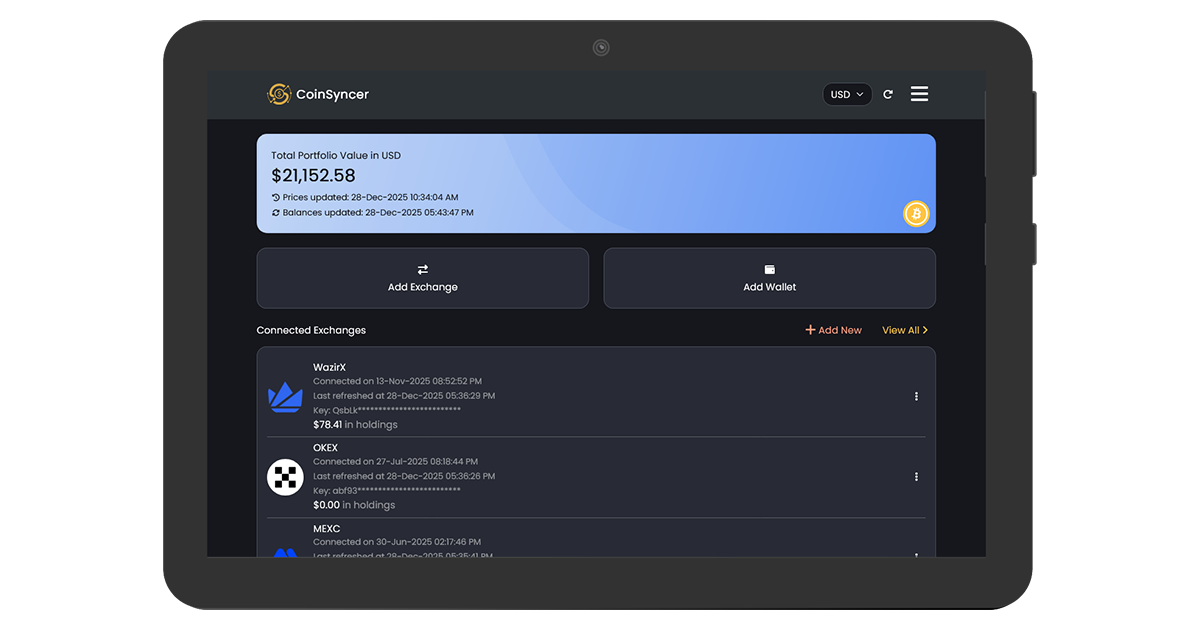
User reviews (0)