
 简体中文
简体中文 English
cssgridgarden.com
A game for learning CSS grid layout
At a glance
- Category
- Games & Board Games
- Language
- English
- Paid-content signal
- No paid content foundObserved
- Registered
- 2017
- Hosting
- CloudflareInferred
- HTTPS certificate trusted
- PassedObserved
- Last updated
Related questions
More questions →How Grid Garden Compares With Flexbox Froggy and Anchoreum
Grid Garden, Flexbox Froggy, and Anchoreum are three separate Codepip games that teach different CSS layout skills, so the right choice depends on what you want to practice. Grid Garden is for CSS grid layout, Flexbox Froggy is for flexbox, and Anchoreum is a third Codepip title linked from the Grid Garden page. They are complementary practice tools rather than substitutes: you would not pick one to replace another, but rather play the one that matches the layout system you are currently learning.
What each game is for
The Grid Garden page describes itself simply as "a game for learning CSS grid layout," created by Codepip. The same page links to Flexbox Froggy and Anchoreum under the line "Want to learn more CSS?" That framing is the clearest signal of how the three relate: they sit side by side as a set of CSS practice games from the same creator.
| Game | Layout system practiced | Best fit for |
|---|---|---|
| Grid Garden | CSS grid layout | Learning two-dimensional layout: rows and columns together |
| Flexbox Froggy | CSS flexbox | Learning one-dimensional layout: aligning items along a single axis |
| Anchoreum | Not described on the Grid Garden page beyond being a Codepip game | Readers should check the game itself for its specific topic |
The comparison above uses the same dimension for each entry — the layout skill being practiced — because that is the only basis the source material supports. Grid Garden's focus on grid and Flexbox Froggy's focus on flexbox are stated directly; Anchoreum is only identified as another Codepip game linked from the page, so its exact subject should be confirmed on its own site rather than assumed.
Why they are complementary, not competing
CSS grid and flexbox solve different layout problems, and most real pages use both. Grid handles layout in two dimensions at once — placing items into rows and columns — while flexbox distributes items along one axis. Practicing one does not build the skills of the other, which is why Codepip presents them as a sequence of games rather than a single course.
A practical example: a page header with a logo, navigation links, and a search box is a natural flexbox task (one row, items spaced along it), while the overall page structure of header, sidebar, main content, and footer is a natural grid task (rows and columns together). Someone learning layout would benefit from both games, in whichever order matches their current lesson.
How to choose
- If you are studying CSS grid right now, start with Grid Garden. It is the direct match for that topic.
- If you are studying flexbox, play Flexbox Froggy instead; Grid Garden will not exercise those properties.
- If you have finished one and want more CSS practice, follow the links on the Grid Garden page to the other Codepip games, including Anchoreum.
- If you are unsure what Anchoreum covers, open it directly — the Grid Garden page only names it as a related game, without describing its content.
What the source does and does not tell you
The Grid Garden page confirms the game's purpose, its creator (Codepip), and the existence of the two related games. It does not provide pricing, account requirements, or a level count beyond the interface showing "Level 1 of 1" with a reset control and numbered level selector. Treat those details as things to check on the site itself rather than assumptions. What you can rely on is the division of topics: grid, flexbox, and a third Codepip game, each aimed at a different piece of CSS layout.
What Is Grid Garden?
Grid Garden is a browser-based game for practicing CSS Grid layout. You play by writing real CSS grid properties to water carrots across a series of levels, and the page advances only when your code produces the right layout. It suits beginners who have read the basics of grid-column, grid-row, and grid-area and want repetition, or intermediate users who want a quick, low-stakes way to test whether they actually remember how line numbers and spans behave. It is not a full CSS course, a reference, or a layout tool.
What you actually do in the game
Each level shows a grid of soil plots with carrots (and later, weeds) placed on specific cells. Your job is to write CSS that moves the water to the carrots and away from the weeds.
The loop is the same at every level:
- Read the level's goal from the on-screen instructions.
- Write CSS in the editor panel, typically targeting an element such as
#wateror#poison. - The grid updates as soon as your code is valid, so you see the result immediately.
- Fix mistakes until the layout matches the goal, then continue to the next level.
A typical early solution looks like this:
#water {
  grid-column-start: 1;
  grid-column-end: 4;
}
The expected result is that the water spans columns 1 through 3 and reaches the carrots in that row. If nothing moves, the usual causes are a missing semicolon, a misspelled property, or line numbers that count from the wrong edge — remember that negative numbers count back from the end of the grid.
What it covers, and what it doesn't
| Dimension | Grid Garden |
|---|---|
| Format | Level-based browser game with an in-page CSS editor |
| Core skills practiced | grid-column-start/end, grid-row-start/end, grid-area, span, negative line numbers, order |
| Feedback | Instant visual update on the grid; no written explanations of wrong answers |
| Prerequisites | Basic CSS syntax and a rough idea of what a grid line is |
| Not included | Systematic lessons, property reference, Flexbox or responsive layout theory, certificates |
Because there is no explanatory layer, the game works best alongside documentation. When a level stumps you, look up the specific property rather than guessing — the game will not tell you why an answer is wrong.
Practical details
Grid Garden is created by Codepip, the same team behind Flexbox Froggy, and the page links to that game plus Anchoreum for further practice. The interface is available in a long list of languages, including English, Spanish, French, German, Portuguese (both Brazil and Portugal variants), Russian, Arabic, Hindi, Chinese (Simplified and Traditional), Japanese, and Korean, so you can switch the instructions to your native language while still writing CSS in English.
The page shows a level selector and a reset control, so you can jump back to earlier levels or restart if you want to re-drill a concept. No account or installation is needed to start playing; the game runs directly in the browser.
When it's the right choice
Choose Grid Garden if you want short, repeatable drills that build muscle memory for grid line placement, and you are comfortable learning the "why" from docs or a course. Skip it if you need a structured curriculum, an explanation of how grid interacts with responsive design, or a way to debug a real project layout — for those, a reference guide and your browser's dev tools will serve you better.
How to Start Playing Grid Garden on cssgridgarden.com
Open cssgridgarden.com in any modern browser and you can start playing immediately — the game loads directly into a level, and no account or sign-up is mentioned on the page. You type CSS grid properties into the editor to water the carrots, then use Next to advance and Reset to restart the current level.
What you see when the page loads
The page is titled Grid Garden and is described as "a game for learning CSS grid layout." The interface is a single game screen rather than a landing page with a start button:
- A level indicator showing your position (the page displays "Level 1 of 1" as the starting state).
- A code area where you write CSS grid rules.
- The garden view that responds to your CSS.
- A Reset control to restart the current level.
- A Next control to move on once a level is solved.
Because the game begins at Level 1, there is no separate "play" step to hunt for.
Step-by-step: playing your first level
- Open the site. Go to
cssgridgarden.comin your browser. The game loads in English by default. - Read the level instruction. Each level tells you what to accomplish — typically watering specific carrot plots by placing grid items.
- Write CSS in the editor. Use grid properties such as
grid-column,grid-row, and related placement rules to position the water. The garden view updates as your CSS takes effect. - Check the result. If the correct plots are watered, the level is solved and you can continue.
- Click Next to advance to the following level.
- Click Reset at any time to clear your current attempt and start that level over.
The expected outcome of each level is a correctly watered garden; the exact property needed changes from level to level, so read each instruction before editing.
Moving through levels and restarting
| Action | Control | When to use it |
|---|---|---|
| Advance to the next level | Next | After the current level's goal is met |
| Restart the current level | Reset | When your CSS isn't working and you want a clean attempt |
| Jump to a level | Level selector | To revisit or skip ahead |
The level selector at the top lets you move between levels directly, so you don't have to replay everything to return to a spot you want to practice.
Language options
Grid Garden is available in many languages, selectable from the list at the bottom of the page. Options include English, Español, Français, Deutsch, Nederlands, Italiano, Português (BR and PT), Català, Svenska, Norsk, Suomi, Polski, Slovenčina, Magyar, Română, Shqip, Български, Eesti, Latviešu, Lietuvių, Русский, Українська, Ελληνικά, Türkçe, Հայերեն, Azərbaycanca, العربية, فارسی, پښتو, اردو, हिन्दी, বাংলা, தமிழ், 简体中文, 繁體中文, 日本語, 한국어, Tiếng Việt, ภาษาไทย, Bahasa Indonesia, Tagalog, and Yorùbá. Switching language changes the interface text, not the CSS you write.
Related practice games
The page links to other Codepip games for continued CSS practice:
- Flexbox Froggy — for learning CSS flexbox layout.
- Anchoreum — another Codepip CSS game linked from the same footer.
These are useful once you've worked through Grid Garden and want to practice a different layout system.
Common snags
- Nothing happens after editing CSS: confirm your rule targets the grid container or item the level expects; a misplaced selector leaves the garden unchanged.
- You want a fresh start mid-level: use Reset rather than reloading the page.
- You can't find a "start" button: there isn't one — the game opens on Level 1 directly.
- You want to practice a specific concept: use the level selector to jump to the relevant level instead of replaying from the beginning.
Grid Garden is created by Codepip, and the page also links to its YouTube, Twitter, and GitHub profiles if you want to follow updates or report issues.
What CSS Grid Layout Skills Can You Practice in Grid Garden?
Grid Garden is a browser-based puzzle game from Codepip that teaches CSS Grid by having you water carrots with grid properties. You practice placing and spanning items with grid-column and grid-row, counting grid lines, and reasoning about columns and rows — all by writing real CSS in each level instead of reading documentation. It suits beginners who already know basic CSS selectors and want hands-on syntax practice; it is not a full CSS course and does not cover every Grid feature.
What the game actually is
The page identifies it as "a game for learning CSS grid layout," created by Codepip, with links to YouTube, Twitter, and GitHub. The interface shows a level selector ("Level 1 of 1" in the captured page state), a Reset control, a numbered grid ruler running 1–14, and a Next button. The page also links to sibling games — Flexbox Froggy and Anchoreum — and offers the interface in dozens of languages, including 简体中文, 繁體中文, 日本語, and 한국어.
The core loop: each level shows a garden grid with carrots (and later weeds), you write CSS rules in an editor, and the browser renders the result immediately. When the carrots are watered correctly, you advance.
Skills you practice, level by level
Grid lines and counting
The numbered ruler across the top is the game's main teaching device. Early levels force you to translate "the third column line" into grid-column-start: 3 rather than guessing pixel positions. This is the single most transferable skill in Grid: lines, not containers, are what you position against.
Placing items with grid-column and grid-row
You set start and end lines on the carrot elements. A typical early solution looks like:
#carrot-1 {
  grid-column-start: 2;
}
Later levels require both axes, so you write grid-row-start alongside grid-column-start and watch the item move to the intersection.
Spanning with the span keyword
Once single-cell placement is comfortable, levels ask you to cover a range. The game accepts both line-to-line and span syntax, so you practice the distinction:
#carrot-2 {
  grid-column-start: 1;
  grid-column-end: span 3;
}
This is where the span keyword stops being abstract — you see exactly how many cells it covers.
The shorthand properties
As levels progress, the verbose start/end pairs become unwieldy, which naturally pushes you toward grid-column: 2 / 4 and grid-row: 1 / span 2. The game rewards the shorthand because it is faster to type, not because it tells you to use it.
Negative line numbers
Later levels introduce counting from the end of the grid with negative values (e.g., grid-column-start: -2). This is a concept many tutorials mention once and readers forget; the game makes you use it to solve a puzzle.
The grid-area shorthand
The final stretch typically requires the four-value grid-area: row-start / column-start / row-end / column-end form, which is the densest Grid syntax and the one most likely to be mis-ordered in real code.
What it does not cover
Based on the game's scope, expect no practice with grid-template-areas named regions, repeat() and minmax() for responsive tracks, auto-fit/auto-fill, implicit grid behavior, or alignment properties like justify-items and align-content. Those are better learned from MDN or a layout tutorial after you finish the game. The page itself only claims to be "a game for learning CSS grid layout" and points to Flexbox Froggy for flexbox — it makes no broader curriculum claim.
How to get the most out of it
- Turn off autocomplete hints in your editor if you use one — the point is recalling property names and line numbers, not tab-completing them.
- Predict before you type. Read the level, say the line numbers out loud, then write the rule. If you are wrong, the visual feedback tells you immediately, which is the actual learning moment.
- Rewrite each solution in shorthand after it passes. Solving with
grid-column-start/grid-column-endand then compressing togrid-column: 2 / 4doubles the practice per level. - Reset and redo levels cold a day later. The Reset control makes this trivial, and spaced repetition is what moves syntax from "looked up" to "known."
- Switch the interface language if English is not your first language — the page lists translations including Chinese, Japanese, Korean, and Arabic — but keep writing the CSS in English, since property names are not translated.
Who should use it, and when to move on
Use Grid Garden if you can write a basic CSS rule and select elements by ID, but freeze when asked to place something on a grid. It is a syntax-drilling tool, not a design tool: it will not teach you when to choose Grid over Flexbox, how to build a page layout, or how to make a grid responsive.
Move on once you finish the levels and can write grid-area from memory. At that point, the productive next step is rebuilding a real layout — a card gallery or a page shell — with grid-template-columns: repeat(auto-fit, minmax(240px, 1fr)), which the game does not exercise. Flexbox Froggy, linked from the same page, covers the complementary flexbox syntax if you have not done it yet.
What Languages Does Grid Garden Support?
Grid Garden's page lists a language selector with dozens of interface languages, including English, Spanish, French, German, Simplified Chinese, Traditional Chinese, and Japanese. You can switch languages directly from the links shown on the game page—no account or payment is mentioned for using them.
How the language options appear
On the Grid Garden page, the language choices are displayed as a row of text links near the bottom of the game area, alongside credits for the game's creator, Codepip. Each link is labeled in its own language (for example, “Español,” “Deutsch,” “简体中文,” “日本語”), so you can find your language even if you don't read English.
Selecting a link changes the game's presentation to that language. The page evidence shows the selector as part of the same page as the game itself, so you don't need to navigate to a separate settings screen.
Full list of languages shown
The page lists the following options:
| Group | Languages |
|---|---|
| Western European | English, Español, Français, Deutsch, Nederlands, Italiano, Português (BR), Português (PT), Català, Svenska, Norsk, Suomi |
| Central and Eastern European | Polski, Slovenčina, Magyar, Română, Shqip, Български, Eesti, Latviešu, Lietuvių |
| Cyrillic and Greek | Русский, Українська, Ελληνικά |
| Turkic and Armenian | Türkçe, Հայերեն, Azərbaycanca |
| Middle Eastern and South Asian scripts | العربية, فارسی, پښتو, اردو, हिन्दी, বাংলা, தமிழ் |
| East and Southeast Asian | 简体中文, 繁體中文, 日本語, 한국어, Tiếng Việt, ภาษาไทย, Bahasa Indonesia, Tagalog |
| African | Yorùbá |
What “supported” means here
The language links change the interface language of the game. The page evidence shows the selector and the game on the same page, but it does not describe how deeply each translation covers the level instructions or hints. If your goal is to practice CSS Grid terminology in a specific language, it's worth opening your preferred language and checking the first level's instructions before committing to a full playthrough.
Practical notes
- No login required to see the options: the language links are part of the public game page.
- Pricing is not addressed: the page evidence contains no pricing information, so nothing here should be read as confirming the game is free or paid.
- Related games: the same page points to Flexbox Froggy and Anchoreum for further CSS practice, but the language list above applies to Grid Garden as shown.
If your language isn't in the list, the English version remains the default starting point, and the visual nature of the game—placing grid items by editing CSS—means much of the learning still works even with limited interface text.
Website Overview
An established domain and managed infrastructure suggest continuity of operations and may support dependable delivery, although neither guarantees service quality. Several search or sharing settings need attention. Together they may make snippets, preview images or preferred URLs less consistent across platforms.
Domain and Registration
Registered in 2017, this domain has about 9 years of history. That suggests continuity, although ownership and purpose may have changed. Transfer-protection status is present, helping reduce the risk of unauthorized domain transfers. The registrar is NameCheap, Inc., a widely used domain service provider. The domain uses the common .com extension, which is not an independent safety signal.
DNS and Email
The observed email authentication setup is incomplete: DMARC is missing. Nameservers are provided by Cloudflare, indicating managed DNS hosting. MX records point to the registrar-servers.com email service. No CNAME was found; the observed records resolve directly to addresses. TXT records include verification markers for Google. Such markers may also remain after a service stops being used.
TLS and Certificates
The public key uses EC with 256 bits. The server supplied a complete certificate chain. No organization name is present in the certificate; the available fields are consistent with domain validation. The certificate was issued within the Google Trust Services cloud or CDN ecosystem. The certificate's total validity is about 90 days, consistent with a short renewal cycle.
HTTP and Browser Security
The checked browser-security headers were not detected, leaving fewer explicit browser-side safeguards. CORS permits any origin to read this response. This is common for public resources; sensitive responses need narrower handling. No X-Powered-By header was found, reducing one common source of backend fingerprinting information. The cf-ray response header indicates a CDN or caching proxy in the delivery path. No obvious internal addresses or debug information were found in the headers.
Technology Stack Analysis
The public page identifies jQuery, Google Analytics, Cloudflare without precise versions, leaving fewer clues for version-specific scanning.
Search and Social Sharing
No homepage meta description was detected, leaving snippet selection more dependent on page text. No homepage canonical URL was detected. If duplicate URLs exist, consolidation may be less explicit. The title has 49 characters, within a common display range. The observed directives allow indexing and link following. No Generator meta tag is publicly exposed.
Hosting and Email
 Cloudflare
Registration details
| Registrar | NameCheap, Inc. |
|---|---|
| Registered | 2017-03-23 |
| Expires | 2027-03-23 |
| Domain status | client transfer prohibited |
| Nameservers | gina.ns.cloudflare.com、pablo.ns.cloudflare.com |
| DNSSEC | unsigned |
DNS records
| Type | Name | Value | TTL | Priority |
|---|---|---|---|---|
| A | cssgridgarden.com | 104.21.2.199 | 300 | — |
| A | cssgridgarden.com | 172.67.129.155 | 300 | — |
| AAAA | cssgridgarden.com | 2606:4700:3031::ac43:819b | 300 | — |
| AAAA | cssgridgarden.com | 2606:4700:3036::6815:2c7 | 300 | — |
| MX | cssgridgarden.com | eforward1.registrar-servers.com | 300 | 10 |
| MX | cssgridgarden.com | eforward2.registrar-servers.com | 300 | 10 |
| MX | cssgridgarden.com | eforward3.registrar-servers.com | 300 | 10 |
| MX | cssgridgarden.com | eforward4.registrar-servers.com | 300 | 15 |
| MX | cssgridgarden.com | eforward5.registrar-servers.com | 300 | 20 |
| NS | cssgridgarden.com | gina.ns.cloudflare.com | 86400 | — |
| NS | cssgridgarden.com | pablo.ns.cloudflare.com | 86400 | — |
| TXT | cssgridgarden.com | brave-ledger-verification=8bc814303903352656c1635f4540a3df7731a1d65af9935a0a70af3d210a20a9 | 300 | — |
| TXT | cssgridgarden.com | google-site-verification=3JYLgPQqTbs9eHBQh_b-Ceq3kgthK4sq5zstzExhQ9U | 300 | — |
| TXT | cssgridgarden.com | v=spf1 include:spf.efwd.registrar-servers.com ~all | 300 | — |
TLS and certificates
| Assessment | Normal configuration |
|---|---|
| Supported protocols | TLSv1.2、TLSv1.3 |
| Negotiated protocol | TLSv1.3 |
| Certificate subject | cssgridgarden.com |
| Issuer | Google Trust Services |
| Valid until | 2026-12-26T02:09 · Remaining when checked: 59 days |
| Verification details | Certificate trust: Passed · Hostname match: Passed |
HTTP response headers
| Header | Value |
|---|---|
| content-type | text/html; charset=utf-8 |
| cache-control | max-age=600 |
| server | cloudflare |
| access-control-allow-origin | * |
Identified technologies
Pages, Search and Sharing
| Meta description | Not detected |
|---|---|
| Canonical URL | Not detected |
| Language | English (default) |
| Twitter Card | Not detected |
Social Sharing Preview
9 fields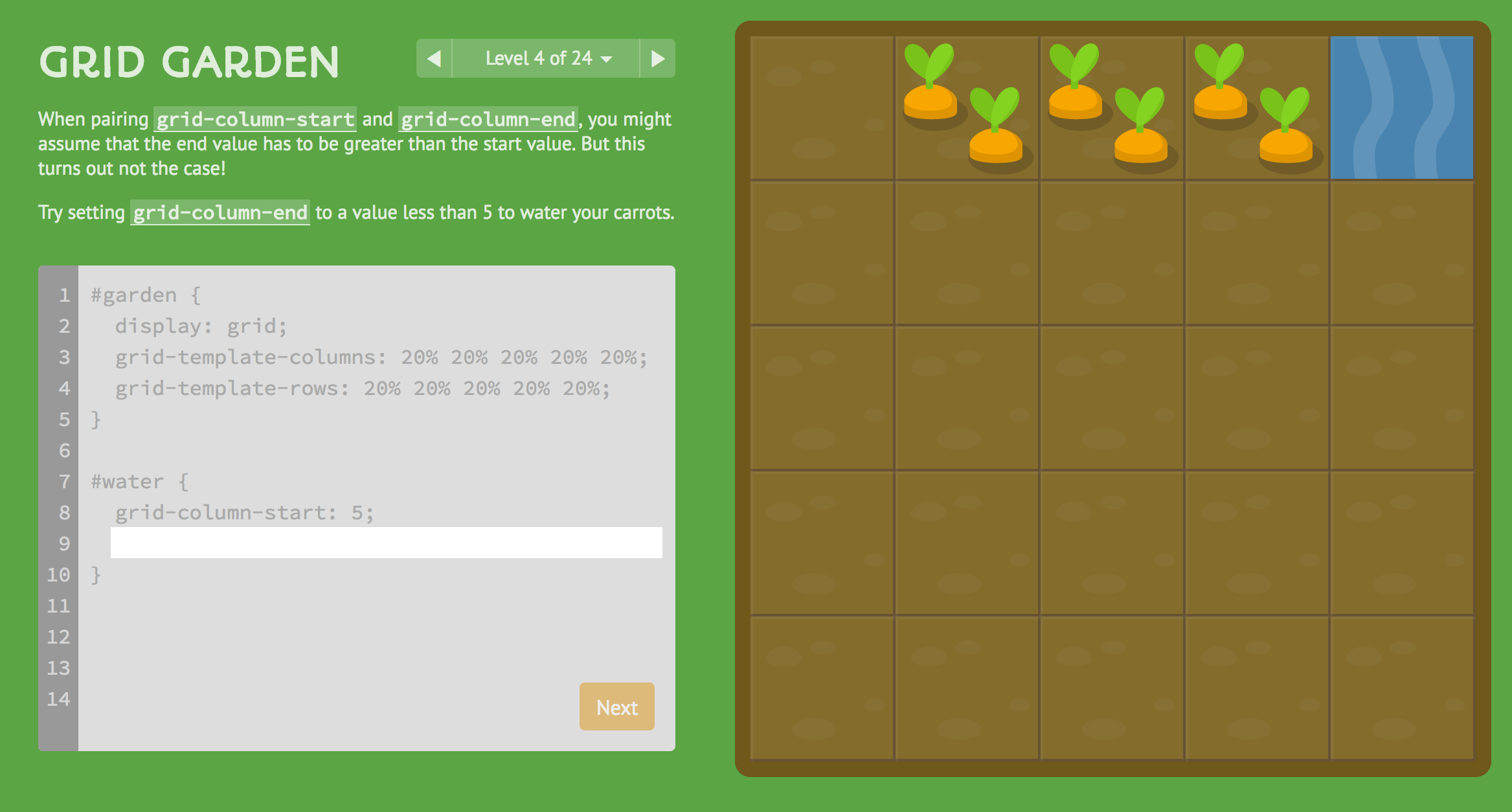

robots.txt (opens in a new tab)
0 rulesNo rules found
No matching rules.
Sitemaps
0No sitemaps found
Recent Updates
- Website images
- Screenshots
- Network details
- Website Technologies
- Pages and Search Information
- HTTP Response Information
- TLS and certificates
- DNS Information
- Domain Registration
- Website profile
- Website Description
- Website Name
- Website profile
- Website Description
- Website Name
User reviews (0)