
 简体中文
简体中文 English
Website review
This review may include AI-generated content and is not individually verified. Domain, certificate and other facts come from the observed data on this page.
What is Dozzle?
Dozzle is a lightweight, open-source log viewer for Docker, Docker Swarm, and Kubernetes. It streams container logs in real time to your browser, so you can search, filter, and follow output across multiple containers without SSHing into the host or running docker logs by hand. It also shows live stats and metrics, supports multi-host and Swarm setups, and can send alerts via webhooks.
Who it is for
- Developers debugging a container that is crashing or misbehaving, who want fast access to logs from a browser tab.
- Small teams running a handful of Docker hosts that need shared visibility without a full observability stack.
- Homelab and self-hosted users who prefer a single lightweight service over tools like the ELK stack or Grafana Loki.
What it does well
- Real-time streaming with search and filtering across containers.
- Live CPU, memory, and other container metrics alongside logs.
- Multi-host and Swarm support, so one interface can cover several machines.
- Alerts and webhooks for basic notification workflows.
Trade-offs to consider
Dozzle is a log viewer, not a long-term log store or a full APM platform. It is designed for live troubleshooting and recent output; if you need retention, historical search, or deep tracing, you would pair it with a dedicated logging backend. It is also intentionally minimal, so teams wanting dashboards, SLO tracking, or complex query languages may outgrow it.
Next step
If you already run Docker, the quickest test is to start Dozzle against your local Docker socket and open it in a browser. Compare the experience with your current workflow (docker logs, docker compose logs, or a heavier stack). If you mainly need live, per-container visibility with minimal setup, Dozzle fits well; if you need retention and analytics, treat it as a complement rather than a replacement.
How do I install and run Dozzle for my Docker containers?
Install Dozzle by running its container on the same Docker host you want to monitor, mounting the Docker socket so it can read logs. It then serves a browser UI on a port you choose.
Minimal install
The common pattern is a single docker run command:
- Pull the image
amir20/dozzle. - Publish a port, e.g.
-p 8080:8080. - Mount the socket:
-v /var/run/docker.sock:/var/run/docker.sock. - Optionally run detached (
-d) and with--name dozzle.
Then open http://localhost:8080 (or your host's address) and you'll see your running containers listed. Click one to stream its logs live; the page evidence confirms real-time streaming, plus search and filtering across containers without SSHing into the host.
Docker Compose alternative
If you already use Compose, define a dozzle service with the same image, port mapping and socket volume, then docker compose up -d. This keeps the setup alongside your other services and makes upgrades a matter of changing the image tag.
Practical notes and trade-offs
- Mounting the Docker socket gives Dozzle broad read access to container metadata and logs. On a shared or internet-facing host, put it behind a reverse proxy with authentication rather than exposing the port directly.
- Dozzle is designed as a viewer, so expect lightweight, read-oriented behavior rather than a full log-storage or alerting platform. The site does list Alerts & Webhooks and a Dozzle Cloud option, so check those pages if you need notifications or multi-host aggregation beyond a single host.
- For multiple hosts or Swarm, the "Multi-host & Swarm" capability is the relevant feature to review before deciding on architecture.
Next step
Decide your scope first: single host (one container, socket mount, done) versus several hosts (look at the multi-host and Cloud options). Then choose a port, add authentication if the UI is reachable beyond your machine, and verify by tailing a busy container's logs while you restart it.
Can Dozzle work with Kubernetes and Docker Swarm, or only standalone Docker hosts?
Dozzle works beyond standalone Docker hosts. Its own page presents it as a log viewer for Docker, Swarm, and Kubernetes, with dedicated sections for real-time logs, live stats, multi-host and Swarm support, alerts and webhooks, and a cloud offering.
What that means in practice depends on how you run containers:
- Standalone Docker host — the simplest case; stream and search logs from containers on one machine without SSHing in.
- Docker Swarm — Dozzle supports multi-host setups, so you can follow services spread across swarm nodes rather than checking each node separately.
- Kubernetes — also listed as supported, though Kubernetes log access and permissions are typically more involved than a single Docker socket.
If your environment mixes these, the decision is less about whether Dozzle "only" works with standalone Docker and more about how you connect it to each cluster or node and what access it needs. A reasonable next step is to check Dozzle's own deployment documentation for the Kubernetes and Swarm connection methods, then try it against one non-production node before rolling it out.
How does Dozzle compare to Docker Desktop's built-in log viewer or other container log tools?
Dozzle is a browser-based, real-time log viewer for Docker, Swarm, and Kubernetes. Its main difference from Docker Desktop's built-in viewer is scope: Docker Desktop is a local development GUI tied to a single machine, while Dozzle is designed to stream logs from containers across hosts from a browser, with search, filtering, and live stats. Dozzle also lists alerts and webhooks and a cloud offering, so it can fit team or multi-host workflows where a desktop app is awkward.
When Dozzle is the better fit
- You run containers on a remote server, NAS, or multiple hosts and want to check logs without SSHing in.
- You want a lightweight web UI that several people can open at once.
- You need to search and follow logs across containers rather than one container at a time.
- You want live stats and metrics alongside logs, plus alerting via webhooks.
When Docker Desktop's built-in viewer is enough
- You develop locally on one machine and already have Docker Desktop open.
- You only need quick, single-container log inspection during a build or debug session.
- You prefer no extra service to deploy or secure.
Other tools to weigh
- Portainer (Portainer) is a broader container management UI; its log view is one part of a larger stack, so it is heavier if you only want logs.
- Grafana Loki (Grafana Loki) plus Grafana is a log aggregation system for retention, querying, and dashboards. It is more setup and more powerful than Dozzle, and better for long-term, high-volume logs.
- Docker's own CLI (
docker logs -f) is the zero-install baseline, but it is per-container and not shared or searchable across hosts.
Trade-offs to decide on
| Need | Dozzle | Docker Desktop viewer | Loki/Grafana |
|---|---|---|---|
| Multi-host browser access | Yes | No | Yes |
| Zero/low setup | Low | None (already installed) | High |
| Search across containers | Yes | Limited | Yes |
| Long-term retention | Not its focus | No | Yes |
| Shared team access | Yes | No | Yes |
A practical next step: if your logs live on a remote host and you keep SSHing in, try Dozzle there first. If you need retention, compliance, or complex queries, plan for Loki or a similar aggregator instead.
Is it safe to expose Dozzle in production, and how should I secure access to the log viewer?
Treat Dozzle as an internal debugging tool, not a public website. The page itself describes browser-based streaming of container logs, search and filtering across containers, live stats, multi-host and Swarm support, and alerts or webhooks. Logs routinely contain tokens, connection strings, internal hostnames and user data, so the main risk is not Dozzle's code but what it can reveal to anyone who reaches it.
Practical ways to secure access
- Keep it off the public internet. Reach it over a private network, VPN, WireGuard/Tailscale-style mesh, or an SSH tunnel (
ssh -L 8080:localhost:8080 user@host). This is the simplest and strongest control. - Put authentication in front. If it must be reachable beyond a trusted network, terminate at a reverse proxy that enforces SSO or at least strong basic auth over HTTPS. Dozzle's own docs discuss authentication options; check them for your version rather than assuming a login screen exists.
- Restrict by network and identity. Allow only specific source ranges, and prefer per-person accounts over one shared password so you can revoke access and see who viewed what.
- Limit what it can see. Run Dozzle with read-only access to the Docker socket. Mounting the socket read-only reduces the blast radius, but a socket proxy that exposes only the endpoints Dozzle needs is better, since socket access is effectively host-level privilege.
- Protect the data path. Use TLS end to end, and remember that alerts and webhooks send log content to another system — treat that destination as sensitive too.
Decision guide
| Situation | Reasonable approach |
|---|---|
| Solo developer on one host | Localhost binding plus SSH tunnel |
| Small team, private network | Internal DNS, VPN-only, per-user accounts |
| Regulated or multi-tenant environment | SSO proxy, audit logging, socket proxy, no inbound internet exposure |
A concrete scenario: a team debugging a payment service wants fast log access during incidents. Publishing Dozzle at logs.example.com with a shared password turns one leaked credential into full log disclosure. Instead, keep it on the VPN, give each engineer an SSO identity, and let the proxy log access.
Next step: decide whether Dozzle is reachable only from your private network. If yes, an SSH tunnel or VPN is enough; if no, add an authenticating reverse proxy and a restricted socket before exposing anything. Compare with Grafana if you need long-term retention and dashboards, or Portainer if you want container management alongside logs.
What are the limitations of the free open-source version compared to Dozzle Cloud?
Dozzle's free, open-source edition is a self-hosted, browser-based log viewer for Docker, Swarm and Kubernetes. Its core job is streaming and searching container logs and showing live stats. Dozzle Cloud is the hosted counterpart aimed at teams that want the same visibility without running the viewer themselves. The page evidence names "Dozzle Cloud" as a separate offering and lists multi-host/Swarm, alerts and webhooks among the feature headings, but it does not spell out a precise free-versus-Cloud feature matrix, so treat the split below as the practical distinction rather than a published checklist.
Where the free version typically stops
- You host and operate it. You deploy the agent/viewer alongside your containers and keep it reachable, updated and secured. That is the main "limitation": operational effort, not missing log viewing.
- Reach is bounded by your own setup. Free Dozzle is built for watching your own Docker/Swarm/Kubernetes hosts; if your containers sit in networks the viewer cannot reach, you must expose or connect them yourself.
- No managed service layer. Hosted conveniences — someone else running the endpoint, handling upgrades and access for a distributed team — are what Cloud exists to provide.
- Alerts and webhooks may be positioned as the Cloud/advanced side. The heading appears on the page, but the free edition's emphasis is live streaming, search and stats rather than notification pipelines.
Choosing between them
| Situation | Better fit |
|---|---|
| Solo developer, one or two hosts, comfortable with Docker | Free open-source Dozzle |
| Logs needed only during active debugging | Free open-source Dozzle |
| Team spread across machines needing shared, always-on access | Dozzle Cloud (or self-hosted Dozzle behind your own auth) |
| You want notifications when something goes wrong | Check whether alerts/webhooks are in your edition before relying on them |
| You cannot run or maintain extra infrastructure | Dozzle Cloud |
A concrete example: a developer running a handful of containers on a home server installs free Dozzle, opens it in the browser, and tails logs during a deploy — no cost, no account. A platform team with clusters in several environments faces the opposite trade-off: self-hosting means owning access control, uptime and upgrades, which is exactly the burden Cloud removes.
Next step: before deciding, open Dozzle's own comparison of the free edition and Cloud and confirm which of multi-host, alerts and webhooks are included where — those are the features most likely to determine whether the free version is enough. If you only need live logs and stats on infrastructure you already run, the free version is usually sufficient.
 Namecheap
 Fastly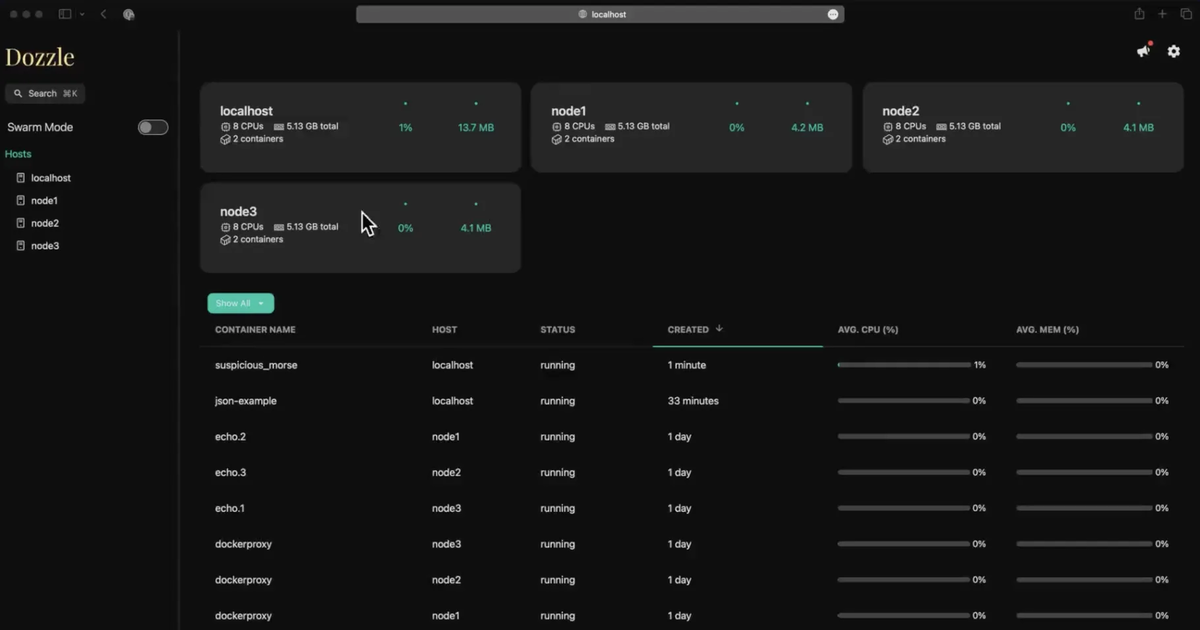

User reviews (0)