Website profiles · Technology insights · Alternatives

drawdb.app Paid content

Categories: Design & Creativity

Free online database schema design tool. Draw entity-relationship diagrams, generate SQL for PostgreSQL, MySQL, SQLite, MariaDB, SQL Server & Oracle, import/export DBML, and collaborate on data models in real time.

Visit website

Updated: 2026-09-30 02:02 Language: English (default) Access: Normal

Profile views 3 Outbound visits 3
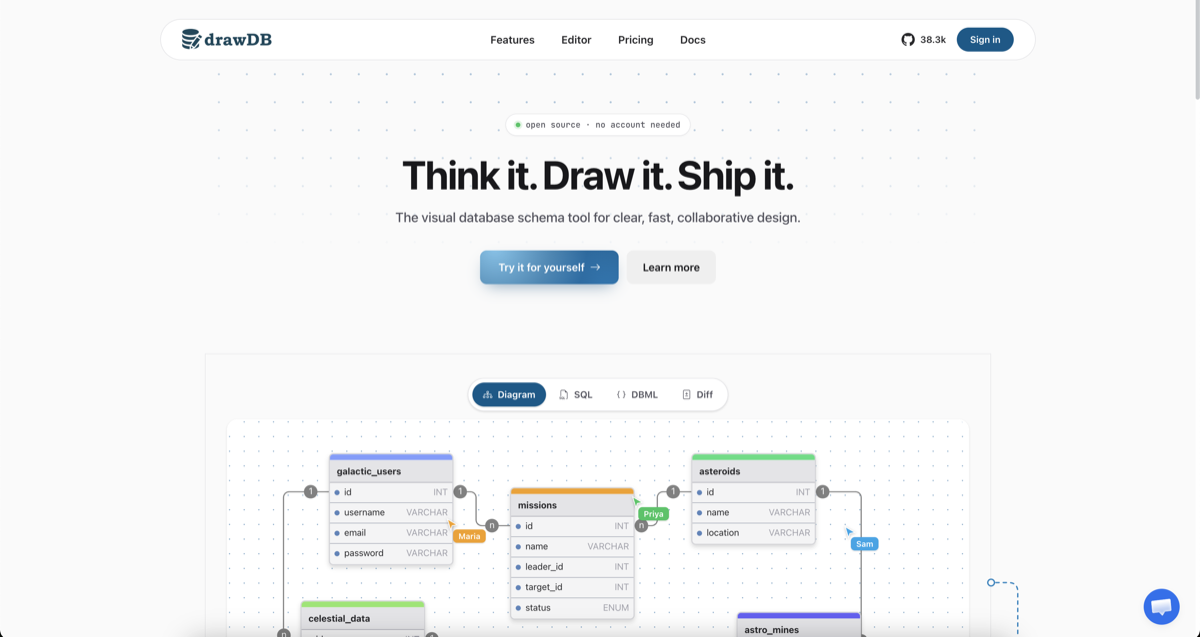
drawDB Full homepage screenshot
Editorial Review

Website Review

What is drawDB?

drawDB is a browser-based database schema designer: you draw an entity-relationship diagram on a canvas, and the tool turns that diagram into SQL you can actually run. It is open source and requires no account to try, which makes it easy to evaluate before committing a team to it.

What you can do with it

  • Build tables, columns, types and relationships visually, then generate DDL for MySQL, PostgreSQL, SQLite, MariaDB, SQL Server or Oracle.
  • Import an existing DDL script and have drawDB reconstruct the diagram, instead of redrawing a schema by hand.
  • Import and export DBML, and export diagrams as JSON or an image.
  • Work with others in real time, with shared cursors and presence, plus teams and per-diagram view/edit roles.
  • Let an AI assistant draft tables, relationships and types from a description.
  • Save diagrams to cloud storage, use built-in or custom templates, compare versions with a diff, and generate migration scripts.

Who it suits

The strongest fit is a small team or solo developer who wants one shared picture of a schema and clean DDL out of it. If your schema already lives in migration files, the reverse-engineer and diff features are the parts worth testing first. If you need heavy governance, approval workflows or deep integration with a specific enterprise data catalog, treat drawDB as the design layer and check how its exports fit your existing pipeline.

Trade-offs to weigh

Browser-based, account-optional design is fast to adopt, but it means the diagram is a separate artifact from your migrations unless you deliberately keep them in sync — the diff and migration features exist for exactly that reason. Real-time collaboration and cloud storage depend on the hosted service; the project also documents running it on your own infrastructure, which is the option to consider if schema data should not leave your network. AI-generated tables are a starting draft, not a review substitute.

A useful first step: take one real DDL file from a project you maintain, import it, and check whether the reconstructed relationships and generated SQL match what you expect. That single test tells you more than any feature list.

For comparison, established diagramming tools include dbdiagram.io and Lucidchart, while GitHub hosts the drawDB source and sponsorship page.

How do I generate SQL from an ER diagram in drawDB?

In drawDB, SQL generation is a one-click export from the diagram you've drawn: the tool reads your entities, columns, types and relationships, then emits DDL for the dialect you choose. The site lists MySQL, PostgreSQL, SQLite, MariaDB, SQL Server and Oracle among the supported targets, plus DBML import/export.

Typical workflow

  1. Draw or import the schema. Build tables on the canvas, or use Reverse engineer to import an existing DDL script and have drawDB rebuild the diagram for you.
  2. Set the dialect. Pick the database you actually ship on, since type names and syntax differ between engines.
  3. Check the diagram first. The Issue detection feature flags problems in the model so the generated script is less likely to fail.
  4. Export. Use the SQL/DDL export to get a script you can run, or export the diagram itself as JSON or an image for documentation.

Where it fits

Situation drawDB's fit
Greenfield schema, small team Strong: draw, generate DDL, share the diagram
Existing database you need to visualize Useful via DDL import rather than redrawing
Schema that changes often Migrations and versioning are offered, so treat the diagram as the source of truth
Regulated environment needing self-hosting The site advertises running it on your own infrastructure

Practical caveats

Generated DDL is a starting point, not a finished migration. Review index choices, nullability, default values, constraint names and character sets against your own conventions before running anything against production. If you use the AI schema assistant to draft tables, treat its output the same way — it accelerates the first pass, but you still own the correctness.

For a concrete scenario: a developer sketching a new service can draw five or six tables, generate PostgreSQL DDL, run it against a local database, and iterate — then export the same diagram to DBML so a teammate can review it as text in a pull request.

Next step

Open the editor and try one table plus one foreign key, then export the SQL for your target dialect. Compare the output against what you'd have written by hand; that quickly tells you how much cleanup your workflow needs. If you want a second opinion on the model itself, dbdiagram.io and DBML document the DBML format that drawDB can exchange.

Can I import an existing database schema into drawDB to create a diagram?

Yes. drawDB supports reverse engineering: you import a DDL script and it rebuilds the diagram for you, so you don't have to redraw tables and relationships by hand.

How this typically fits a workflow

  1. Export your schema as DDL from your database (for example with pg_dump --schema-only on PostgreSQL or mysqldump --no-data on MySQL).
  2. Import that script into drawDB.
  3. Review the generated entities and relationships, then fix anything the parser could not infer — check constraints, composite keys and enum types are common places where a diagram needs a human pass.
  4. Export back out as DDL, JSON or an image, or keep editing in the canvas.

What to weigh

  • Reverse engineering is a one-way starting point, not a sync. If the database changes later, you re-import or reconcile manually; drawDB's migration generation works from the diagram side, so the diagram becomes your source of truth once you adopt it.
  • Import quality depends on how standard your DDL is. Stored procedures, triggers, vendor-specific syntax and comments may not survive the round trip.
  • A useful sanity check: import your schema, immediately export the DDL, and diff it against the original. Anything missing tells you what the tool does not model.

Who benefits most

Teams inheriting an undocumented database, developers who need a diagram for a design review, and anyone preparing a migration who wants to see the current structure before changing it. If you only need a quick look at a schema you will never edit, a lighter viewer may be enough; if the diagram will live alongside the code, drawDB's editing, collaboration and export features are the reason to use it.

For alternatives or cross-checking, dbdiagram.io is built around DBML text-to-diagram workflows, and drawDB itself documents its own import and export behaviour.

Next step

Pick your smallest real schema — five to ten tables — and run the import-export-diff loop above. That tells you in a few minutes whether the round trip is clean enough for your dialect before you commit a large model to it.

Is drawDB free and open source, and what are the paid plan options?

Yes — drawDB is free and open source, and its own site says it "is, and stays, free and open source," with sponsors funding that independence rather than a paid tier gating the editor. The homepage also states you can use it with "no account needed," so the core diagramming experience doesn't require signing up or paying.

What's free

  • Building ER diagrams on the canvas, with customizable panels and keyboard shortcuts.
  • SQL/DDL generation for the major dialects listed on the page: MySQL, PostgreSQL, SQLite, MariaDB, SQL Server, and Oracle.
  • DBML import/export, diagram export to JSON or images, and reverse engineering from an existing DDL script.
  • Templates and custom templates, plus issue detection on your diagram.
  • Real-time collaboration with shared cursors and presence.

The paid side The site links to a pricing page, but the material available here doesn't itemize plans, prices, or which features sit behind them. Features like cloud storage, teams and access control, the AI schema assistant, and migration generation are described as product capabilities, not explicitly labeled free or paid. Treat those as the areas most likely to have a paid or team tier, and confirm on the pricing page before committing a team to them.

How to decide If you're an individual designing schemas and exporting DDL, the free open-source editor covers the core loop — draw, detect issues, export. If you need shared cloud storage, role-based access for a team, or AI-drafted schemas, check the pricing page first, since that's where a hosted or team offering would typically live.

A practical first step: sketch one real schema in the free editor, export the DDL for your target database, and run it against a scratch database. That tells you whether the generated scripts match your conventions before you evaluate anything paid. For a second opinion on the SQL output, compare against a dedicated tool like DBeaver or the documentation for your specific engine.

How does real-time collaboration work in drawDB for teams?

drawDB treats real-time collaboration as a shared canvas rather than a comment-and-review layer. According to the site, teammates see live cursors and presence indicators, and edits sync instantly, so a schema change made by one person appears for everyone else without a refresh or merge step. The same page also mentions teams and access control: you can invite teammates and assign roles that decide who may view or edit a given diagram.

What that means in practice

  • A backend developer adding a missions table and a data analyst adjusting field types can work on the same diagram and see each other's changes as they happen.
  • Presence and cursors make it obvious who is in the file, which reduces the "who changed this relation?" problem during design sessions.
  • Role-based permissions matter more than live sync in most teams: viewers can follow along in a design review without accidentally altering relationships.

Trade-offs to weigh

Live editing is excellent for short, synchronous sessions — a 30-minute call where the team agrees on entities and cardinality. It is weaker as an audit trail: instant sync means there is no built-in proposal-and-approve step before a change lands, so a mistaken edit is visible to everyone immediately. If your team needs formal review, pair the live session with versioning and migration generation, which the site lists as features, so changes can be captured and turned into scripts rather than only living in the canvas.

Access control is the other consideration. Roles that control view versus edit are useful for keeping stakeholders read-only, but they are not a substitute for a policy about who owns the schema. Decide that before inviting people.

A concrete scenario

A five-person team starts a design review. The lead shares the diagram, everyone joins, and two engineers sketch tables while the rest watch. After the call, the lead exports DDL for the target dialect and saves the diagram. The next day, a teammate imports an existing DDL script to reverse engineer a legacy schema into a second diagram for comparison.

Next step

Before adopting it for a team, test one real workflow: open a diagram with two people, have one add a table and a relationship, confirm the other sees it, then check whether the role settings let a third person view without editing. If that matches how your team works, the live canvas will save time; if you need approvals before changes, plan to combine it with versioning.

For related context, DBML documents the text format drawDB can import and export, and GitHub hosts the open-source project and its sponsorship.

Which databases does drawDB support for DDL export?

drawDB generates DDL for the major relational dialects, so you can design one diagram and export SQL for whichever database you actually deploy on. Based on the product's own feature list, the supported targets are:

  • MySQL
  • PostgreSQL
  • SQLite
  • MariaDB
  • SQL Server (MSSQL)
  • Oracle

It also handles DBML import/export, which is useful if your team keeps schema definitions in text form or moves between tools. The site notes the list continues beyond these ("more"), so if you rely on a less common engine, verify it in the editor before committing to a workflow.

Practical next step: build a small two-table diagram with a foreign key, then export DDL for each dialect you use and compare the generated types and constraints. That quickly shows whether the output matches your conventions — for example, how ENUM or timestamp types are rendered differs across MySQL, PostgreSQL and SQL Server, and you may want to adjust column types before exporting.

Decision criterion: if your stack is a single database, drawDB's export is mainly a convenience. If you maintain the same logical model across several engines — say PostgreSQL in production and SQLite in tests — the one-diagram, multi-dialect export is the feature that saves real time, though you should still review generated migrations rather than applying them unreviewed.

For related tooling, DBML documents the text format drawDB can round-trip, and GitHub hosts the project if you prefer to self-host.

Related questions

More questions →
How to Choose an ER Diagram Tool (and What to Check Before You Commit)

Start by naming the job the tool has to do: sketching a schema on a whiteboard-equivalent, designing a production schema you'll ship, reverse-engineering a database that already exists, or letting a team edit the same model at once. That single answer eliminates most candidates. For example, drawDB is a browser-based, open-source ER diagram tool that generates DDL for MySQL, PostgreSQL, SQLite, MariaDB, SQL Server, and Oracle, imports DDL and DBML, and supports real-time collaboration — so it fits schema design and team work, but if you only need a one-off sketch, you may not need collaboration or migration features at all.

Match the tool to your actual use case

Your situation What the tool must have What you can ignore
Quick sketch to explain an idea Fast canvas, no signup friction Migration scripts, access control
Designing a schema you'll deploy DDL generation for your dialect, issue detection Templates, AI drafting
Existing database you inherited DDL import / reverse engineering Starting-from-scratch templates
Multiple people editing one model Real-time sync, presence, roles Offline-only editing
Regulated or self-hosted environment Self-hosting, export of the model itself Cloud-only storage

Write your answer down before you open any tool. "I need to reverse-engineer a PostgreSQL schema and share it with two reviewers" is a testable requirement; "I need a good ER diagram tool" is not.

Check SQL dialect coverage against your database

The export is the deliverable. A diagram that can't produce DDL for the database you actually run on is a drawing, not a design tool.

  • List every database engine in your stack, including the one you'll migrate to.
  • Confirm the tool generates DDL for each, not just the popular two or three.
  • drawDB states support for MySQL, PostgreSQL, SQLite, MariaDB, SQL Server, and Oracle, and describes generating "clean DDL for your dialect."
  • If you use DBML in your workflow, check import/export support explicitly — drawDB lists DBML among its formats.

If your engine isn't on the list, decide now whether you'll hand-edit the generated SQL or pick a different tool. Hand-editing every export is a recurring cost, not a one-time inconvenience.

Confirm reverse engineering before you commit

Redrawing an existing schema by hand is the most common way teams waste a week. Check whether the tool can ingest what you already have:

  • DDL script import — paste or upload your CREATE TABLE statements and get a diagram back. drawDB describes this as reverse engineering: "Import a DDL script and drawDB rebuilds the diagram for you — no manual redrawing."
  • DBML import/export — useful if your team already keeps schema definitions in DBML.
  • Round-trip fidelity — after import, export again and diff against the original. If types, nullability, or foreign keys change, the tool is lossy for your schema.

Test this on your real schema, not a three-table demo. Import failures usually show up on enums, composite keys, and circular foreign keys.

Evaluate collaboration, storage, and access control

These decide whether the tool survives contact with a team.

  • Real-time collaboration — shared cursors, presence, and instant sync. drawDB lists all three. If two people can't edit without overwriting each other, you'll fall back to screenshots in chat.
  • Cloud storage and sync — diagrams saved and synced across devices. Check whether this requires an account; drawDB's page states "open source · no account needed" alongside a Sign in option, so verify what each mode gives you.
  • Teams and roles — invite teammates, assign roles, control who can view or edit each diagram. Relevant only if you're sharing beyond a couple of people.
  • Self-hosting — drawDB lists "Run it on your own infrastructure" as a capability. If your data can't leave your network, this is a hard requirement, not a nice-to-have.

Look at export formats and migration support

Ask what leaves the tool and in what shape:

  • SQL DDL — to run against your database.
  • JSON — to keep the model itself under version control. drawDB lists JSON and image export.
  • Image — for docs and reviews.
  • Migration scripts — drawDB describes versioning the diagram and generating migration scripts to update your database. If your team already has a migration tool, check whether these scripts fit it or just add a second source of truth.
  • Issue detection — drawDB lists catching errors in the diagram so generated scripts are correct. Run it deliberately: create a table with no primary key or an orphaned foreign key and see whether it flags them.

Weigh pricing and openness honestly

drawDB's page states it "is, and stays, free and open source," with sponsorship funding development, and shows 39.9k+ stars and 3.4k forks. A pricing page exists at drawdb.app/pricing, so read it rather than assuming every feature is free — the page's own framing is that sponsors keep the project sustainable, which implies tiers exist.

For open-source tools generally, check:

  • License — what you're allowed to do with the code, especially if you self-host.
  • What's free vs. paid — collaboration, cloud storage, and access control are common paid boundaries.
  • Exit cost — can you export everything (DDL, JSON, images) and leave? drawDB's export options make this answerable before you invest.

A short decision sequence

  1. Write your use case in one sentence.
  2. List your database engines and confirm DDL generation for each.
  3. Test reverse engineering on your real schema.
  4. Decide whether collaboration, cloud storage, or self-hosting is mandatory.
  5. Check export formats and whether migration scripts fit your existing pipeline.
  6. Read the pricing page and confirm what's free, what's paid, and what you can take with you.

If steps 1–3 pass and step 4 matches how your team works, the tool is worth adopting. If any of them fail, the diagram will look fine and the schema work will still be manual.

What Is drawDB and What Can You Do With It?

drawDB is a free, open-source, browser-based tool for designing database schemas as entity-relationship diagrams and generating SQL from them. You draw tables and relationships on a canvas, and drawDB produces DDL for MySQL, PostgreSQL, SQLite, MariaDB, SQL Server, or Oracle. It fits anyone who wants to sketch a schema visually, model data as a team, or get correct SQL without hand-writing every CREATE TABLE statement. The site states it is open source and needs no account to start, and that it "is, and stays, free and open source," sustained by sponsors.

The core workflow

  1. Draw the model. Add tables and columns on the canvas and connect them to define relationships. The editor supports undo and keyboard shortcuts for moving quickly.
  2. Refine types and constraints. Set column types and keys as you go; drawDB flags issues in the diagram so the generated scripts stay correct.
  3. Generate and export. Produce clean DDL for your target dialect, or save the diagram as JSON or an image. You can also export DBML.

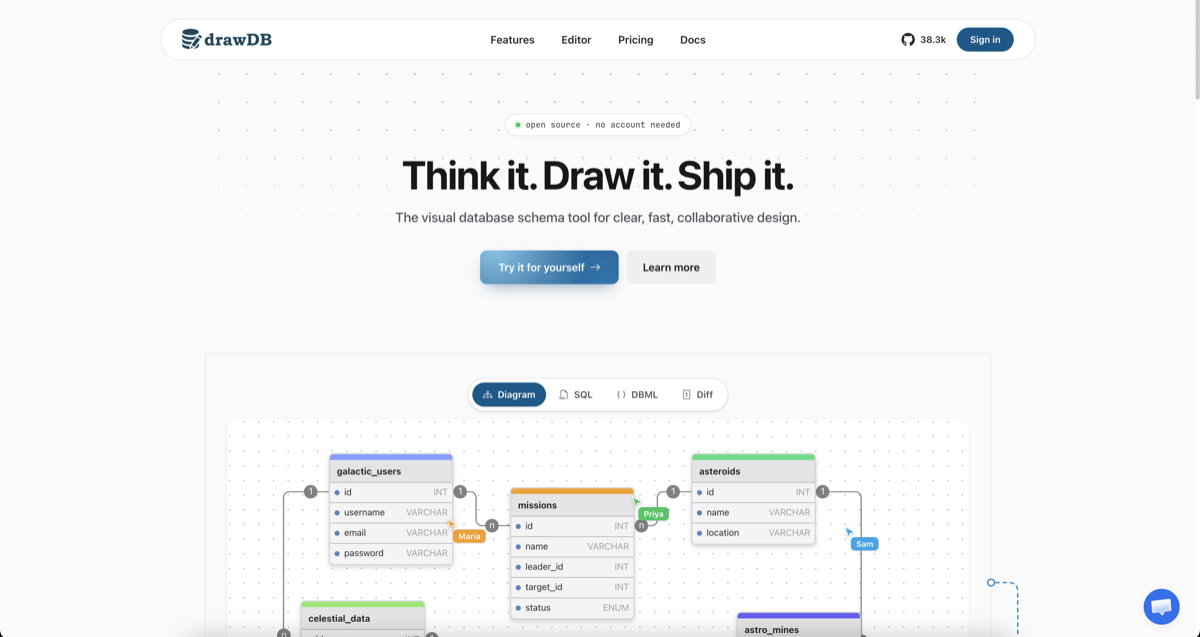
The site's own example schema (users, celestial data, asteroids, missions) shows the intended scale: a handful of related tables rather than a full enterprise data warehouse.

Capabilities beyond diagramming

Capability What it does
SQL generation Generates DDL for MySQL, PostgreSQL, SQLite, MariaDB, SQL Server, Oracle
DBML import/export Round-trips your model through DBML
Reverse engineering Import a DDL script and drawDB rebuilds the diagram instead of you redrawing it
Migration generation Versions the diagram and generates migration scripts to update a database
Issue detection Catches diagram errors before they reach generated scripts
Export formats DDL, JSON, or image
Templates Pre-built templates to start from, plus custom templates you save and reload

The reverse-engineering path is the one to reach for when you inherit an existing database: paste the DDL, get a diagram, then edit from there.

Collaboration, storage, and self-hosting

  • Real-time collaboration — shared cursors, presence, and instant sync across a team.
  • Cloud storage — diagrams saved to the cloud and synced across devices.
  • Teams and access control — invite teammates, assign roles, and control who can view or edit each diagram.
  • Self-hosting — the site lists running it on your own infrastructure as an option.
  • AI schema assistant — describe what you need and it drafts tables, relationships, and types.

The site reports 39.9k+ developers and 39.9k GitHub stars, with 3.4k forks and 51 languages.

When drawDB is a good fit

  • Quick schema sketching — you want a diagram and SQL in one session without installing anything.
  • Team data modeling — multiple people need to edit the same model live with roles and access control.
  • Generating SQL without writing DDL by hand — you know the tables and relationships but not the exact dialect syntax.
  • Working from an existing schema — reverse engineering saves redrawing a database you already have.
  • Keeping models in version control — JSON export and migration generation let you track schema changes over time.

If your need is a one-off diagram with no SQL output, a general-purpose drawing tool may be lighter. If you need dialect-specific DDL, DBML interchange, or live multi-user editing, drawDB targets exactly that.

Practical notes

  • The site lists a pricing page, so check it directly for current plan details rather than assuming every feature is free — the open-source core and sponsor model are stated, but paid tiers may exist.
  • No account is needed to try the editor, per the site; cloud storage, teams, and collaboration features are where accounts and plans typically come in.
  • Because it runs in the browser, you need JavaScript enabled.
What Is SQLite and What Do Developers Use It For?

SQLite is an embedded, serverless, file-based relational database: the entire database engine and your data live in a single file on disk, and your application talks to it through a library rather than a network connection. That design makes it the default choice when you want SQL storage inside an app, a device, or a test environment without running or administering a database server. It is a poor fit when many processes must write concurrently at high volume, or when you need per-user access control — in those cases a client-server database like PostgreSQL, MySQL, or MariaDB is the better tool.

The core idea: a database that is just a file

In a client-server database, your program connects over a network to a separate server process that owns the data. SQLite inverts this. The database engine is linked into your application, and the database itself is one ordinary file (plus temporary journal files during writes). There is no daemon to start, no port to open, no connection string pointing at a host.

What that means in practice:

  • Setup is a file operation. Creating a database means creating a file; copying a database means copying a file; backing it up means copying it while no write is in progress.
  • No separate administration. There are no server users, grants, or configuration files to manage. Access control is whatever your operating system and application already enforce.
  • Deployment is simpler. You ship one file alongside your program instead of provisioning a server.
  • It is a library, not a service. You call it from your code (or through a language binding), and it runs in your process.

How SQLite differs from MySQL, PostgreSQL, and MariaDB

The comparison that matters is not "which is faster" but "which architecture fits this workload." Upscene, which publishes database tools including Database Workbench and Advanced Data Generator, lists SQLite alongside Oracle, PostgreSQL, InterBase, Firebird, SQL Server, MySQL, MariaDB, and NexusDB as one of the databases its tooling supports — a useful reminder that SQLite is treated as a first-class database in professional toolchains, not a toy.

Dimension SQLite Client-server (MySQL, PostgreSQL, MariaDB)
Process model Embedded in your app Separate server process
Connection Direct file/library access Network connection to a host
Setup Create a file Install, configure, and run a server
Concurrency One writer at a time; readers can proceed Many concurrent writers
User management None built in Users, roles, grants
Typical scale Single app or device Many clients, shared data
Access control OS and application level Database-level

The concurrency row is the one that most often decides the question. SQLite serializes writes: while one write transaction is committing, other writers wait. For a mobile app, a desktop tool, or a single-process service, that is irrelevant. For a web backend serving many simultaneous writers, it becomes the bottleneck.

What developers actually use SQLite for

The common thread is "SQL storage that travels with the application."

  • Mobile apps. Both major mobile platforms ship SQLite as a system library, so apps get a local relational store with no extra dependency.
  • Desktop software. Applications that keep user data locally — notes, media catalogs, configuration, caches — use SQLite so the data is portable and inspectable.
  • Embedded devices and appliances. Where there is no room or reason for a database server, SQLite provides SQL in a small footprint.
  • Local development and testing. A file-based database is easy to create, reset, and discard, which makes it convenient for tests and for prototyping before committing to a server database.
  • Small websites and internal tools. A low-traffic site or a single-user tool can run on SQLite and avoid server administration entirely.
  • Application file formats. Some applications use SQLite as their on-disk format, so the "file" is a queryable database.

Upscene's own article list reflects this practical framing: it covers SQLite and foreign keys as a data-integrity topic, treating constraints as a design concern rather than a server feature.

Key limitations to plan around

Knowing where SQLite stops being the right answer is as important as knowing where it starts.

  • Write concurrency. One writer at a time. If your workload is write-heavy and multi-client, expect contention.
  • No user management. There is no built-in concept of database users or permissions; you rely on the filesystem and your application.
  • Network filesystems are risky. Sharing a SQLite file over a network share is not the same as a shared database server and can corrupt data under concurrent access.
  • Feature scope. It is a compact engine, not a full server platform; features tied to server administration do not exist because there is no server.

When to migrate to a server database

Move to PostgreSQL, MySQL, or MariaDB when any of these become true: multiple processes or machines must write to the same data, you need concurrent write throughput, you need per-user access control, or you need the operational tooling (replication, monitoring, centralized backup) that a server provides. The migration is usually about the architecture, not the SQL.

Tooling for working with SQLite files

Because a SQLite database is a file, you can manage it with general-purpose database tools rather than a dedicated server client. Upscene's Database Workbench is a multi-database development tool that includes SQLite among its supported databases, offering a consistent interface across engines along with an ER designer, metadata browsing, SQL development, data import/export, and test data generation. Its Advanced Data Generator is a separate tool for generating realistic test data into a database or data files, which is useful when you want to exercise a SQLite schema with meaningful volume.

If you only need to look inside a file, a lightweight browser is enough; if you are designing schemas, generating test data, or moving between SQLite and a server database, a multi-database tool pays off because the same interface works across engines.

Deciding for your project

Choose SQLite when the data belongs to one application or device, when you want zero server administration, and when writes are not highly concurrent. Choose a client-server database when the data is shared across many writers or machines, when you need user-level access control, or when you need server-grade operations. The two are not competitors so much as answers to different questions — and many projects legitimately use both, with SQLite locally and a server database in production.

What Is Oracle and What Do Developers Use It For?

Oracle Database is a relational database management system (RDBMS) from Oracle Corporation. Developers use it to store, query, and manage structured data for enterprise applications, high-volume transaction systems, data warehouses, and large-scale reporting. It is a good fit when you need strong transactional guarantees, mature tooling, and support for very large or highly concurrent workloads. It is usually a poor fit for small hobby projects or lightweight embedded use, where SQLite, MySQL, MariaDB, or PostgreSQL tend to be simpler and cheaper to run.

Oracle Database vs. "Oracle" the company

"Oracle" is used loosely, so it helps to separate the terms:

  • Oracle Corporation — the company that also sells cloud infrastructure, middleware, and business applications.
  • Oracle Database — the RDBMS itself, the thing developers connect to and write SQL against.
  • Oracle tools and services — SQL clients, cloud database services, and other products built around the database.

When a developer says "we use Oracle," they almost always mean Oracle Database.

What developers actually use it for

Enterprise and transactional applications

Oracle's core strength is online transaction processing (OLTP): many users or services reading and writing at the same time, with consistency guaranteed. Typical examples include finance systems, ERP and CRM backends, order management, and internal business applications.

Data warehousing and analytics

Oracle is also used for large-scale reporting and analytical workloads, where data is loaded in bulk and queried with complex joins and aggregations. This is a different usage pattern from OLTP, and it often involves separate schemas, partitioning, and tuning strategies.

Multi-application data platforms

Large organizations frequently run many applications against one Oracle instance or cluster, using schemas to keep each application's data logically separated while sharing infrastructure and administration.

Core concepts you meet first

Concept What it means in practice
Schema A named collection of database objects, usually owned by one user or application
Table Where rows of structured data live
SQL The language you use to define and query data
PL/SQL Oracle's procedural extension for stored procedures, functions, triggers, and packages
User / privilege Accounts and the permissions that control what they can read or change

PL/SQL is one of the bigger practical differences from databases like MySQL or SQLite: a lot of Oracle application logic lives in stored routines on the server, not only in application code.

Tooling categories developers use with Oracle

Working with Oracle usually means combining a few kinds of tools:

  • SQL clients — for running queries, browsing metadata, and administering users and privileges.
  • ER / modeling tools — for designing schemas and reverse-engineering existing ones.
  • Stored routine debuggers — for stepping through PL/SQL procedures and functions.
  • Test data generators — for populating development and test databases with realistic data.
  • Migration and comparison tools — for moving schemas between environments and tracking changes.

Upscene's Database Workbench is an example of a multi-database development tool that covers several of these categories, including an ER designer, metadata browsing, stored routine debugging, a test data generator, and reverse engineering. Its product line supports Oracle alongside PostgreSQL, MySQL, MariaDB, SQL Server, InterBase, Firebird, NexusDB, and SQLite, which is relevant if you work across more than one database and want a consistent interface.

Practical trade-offs to weigh

  • Licensing and cost. Oracle is commercial software, and Upscene's site includes a purchase path for its own tools. Cost is a real factor when comparing Oracle against open-source databases.
  • Resource requirements. Oracle generally expects more memory, storage, and administration effort than lightweight databases.
  • Operational complexity. Backups, tuning, patching, and user management are more involved than with embedded databases.
  • When a lighter database fits better. For local development, small apps, embedded use, or prototypes, SQLite, MySQL, MariaDB, or PostgreSQL are often the more practical choice. Oracle earns its place when scale, concurrency, or existing enterprise standards demand it.

If your project is small or you are still learning SQL, start with a lighter database and move to Oracle when you have a concrete reason — existing infrastructure, enterprise requirements, or workloads that need its transactional and analytical capabilities.

What Is MariaDB and What Do Developers Use It For?

MariaDB is an open-source relational database that started as a community-developed fork of MySQL, and it's used for the same broad jobs: powering web applications, storing application data, running reporting and analytics queries, and acting as the database behind content management systems and e-commerce platforms. If you already know MySQL, you can think of MariaDB as a drop-in-compatible alternative that keeps the same SQL dialect, wire protocol, and client tooling while being developed independently. Choose it when you want a MySQL-compatible database without being tied to Oracle's MySQL release cycle; choose MySQL instead if your team depends on features or vendor support that only exist in MySQL itself.

Where MariaDB Came From

MariaDB began as a fork of MySQL led by some of MySQL's original developers, created after Oracle acquired MySQL. The goal was to keep a community-driven, open-source relational database that stayed compatible with the MySQL ecosystem developers already used.

That origin explains most of its practical behavior:

  • It speaks the same protocol, so MySQL clients and drivers generally connect to it.
  • It uses the same SQL syntax for the vast majority of everyday work.
  • It keeps the same storage-engine model (InnoDB as the default transactional engine, plus others).

The fork means the two projects have diverged over time, but the compatibility is deep enough that many applications never notice which one they're running on.

MariaDB vs MySQL: What Actually Differs

For most day-to-day development the two are interchangeable. The differences show up in specific areas:

Dimension MariaDB MySQL
Governance Community-driven, independent Oracle-controlled
SQL compatibility Largely MySQL-compatible Reference implementation
Feature divergence Some features added or changed independently Some features unique to MySQL
Client tooling MySQL clients usually work MySQL clients native

The practical takeaway: if your application uses standard SQL and common features, migrating between them is usually straightforward. If you rely on a specific feature that only one project offers, that feature becomes the deciding factor. Always verify the exact feature you depend on against the version you plan to run, since both projects evolve.

What Developers Use MariaDB For

MariaDB fits the same roles as any general-purpose relational database:

  • Web applications — the classic LAMP-style stack, where an app server talks to MariaDB over a network connection.
  • Content management and e-commerce — many popular platforms support MariaDB as a backend.
  • Embedded and local storage — applications that need a small, self-contained relational store.
  • Reporting and analytics — running aggregate queries over operational data.
  • Development and testing databases — a local instance for building and testing before deploying.

The common thread is structured data with relationships: rows, tables, joins, transactions, and constraints. If your data fits that shape, MariaDB is a reasonable default.

Tooling Around MariaDB

Because MariaDB is MySQL-compatible, a wide range of database tools work with it. Upscene, for example, lists MariaDB among the databases its developer tools support, alongside MySQL, PostgreSQL, Oracle, SQL Server, InterBase, Firebird, SQLite, and NexusDB. Its product line covers the tasks you'd expect when working with a relational database:

  • Database Workbench — a database development tool with an ER designer, metadata browsing, SQL development, stored routine debugging, data import/export, and reverse engineering.
  • Advanced Data Generator — generates realistic test data into a database or data files.
  • Hopper — a stored routine debugger for InterBase, Firebird, and MySQL.

The value of a multi-database tool like this is a consistent interface across engines: if you work with MariaDB and MySQL side by side, you use the same workflow for both.

When to Choose MariaDB

Pick MariaDB when:

  • You want a MySQL-compatible database with independent, community-driven development.
  • Your application uses standard SQL and common features, so compatibility is not a concern.
  • You want to avoid depending on a single vendor's roadmap.

Consider MySQL instead when:

  • You depend on a feature that exists only in MySQL.
  • Your hosting or vendor environment standardizes on MySQL.
  • You need commercial support tied specifically to MySQL.

Consider a different database entirely when your workload is not a good fit for a relational model — for example, document-oriented data or very large-scale key-value access.

A Quick Way to Decide

If you're starting a project that needs a relational database and you have no strong reason to pick otherwise, MariaDB is a safe, well-supported choice that behaves like MySQL. The decision usually comes down to one question: does anything in your stack require MySQL specifically? If not, MariaDB will do the job, and the tooling ecosystem around MySQL will largely work with it too.

Website Overview

An active inbound-mail setup with incomplete authentication may leave the domain more open to impersonation. Provider hosting alone does not close that gap.

Domain and Registration

Transfer-protection status is present, helping reduce the risk of unauthorized domain transfers. The domain has about 2 years of registration history; its current configuration provides more context than age alone. The registrar is CloudFlare, Inc., a widely used domain service provider. The domain uses the common .app extension, which is not an independent safety signal.

DNS and Email

The observed email authentication setup is incomplete: DMARC is missing. The lowest TTL is 60 seconds, supporting rapid record changes at the cost of more frequent lookups. Nameservers are provided by Cloudflare, indicating managed DNS hosting. MX records point to the Google Workspace email service. No CNAME was found; the observed records resolve directly to addresses.

TLS and Certificates

The public key uses EC with 256 bits. The server supplied a complete certificate chain. No organization name is present in the certificate; the available fields are consistent with domain validation. The certificate was issued within the Google Trust Services cloud or CDN ecosystem. The certificate's total validity is about 90 days, consistent with a short renewal cycle.

HTTP and Browser Security

The checked browser-security headers were not detected, leaving fewer explicit browser-side safeguards. No X-Powered-By header was found, reducing one common source of backend fingerprinting information. The cf-ray response header indicates a CDN or caching proxy in the delivery path. No obvious internal addresses or debug information were found in the headers. The Server header identifies cloudflare without an exact version.

Technology Stack Analysis

The public page identifies Cloudflare without precise versions, leaving fewer clues for version-specific scanning.

Search and Social Sharing

The meta description has 214 characters and may be shortened in search results. Twitter Card metadata is configured. JSON-LD includes Organization data, helping describe the organization as an entity. The title has 56 characters, within a common display range. The observed directives allow indexing and link following.

Hosting and Email

DNSCloudflare
HostingCloudflare
EmailGoogle Workspace
Location Location unknown 104.21.86.210

User reviews (0)

  • No reviews yet.

Pages, Search and Sharing

Meta descriptionFree online database schema design tool. Draw entity-relationship diagrams, generate SQL for PostgreSQL, MySQL, SQLite, MariaDB, SQL Server & Oracle, import/export DBML, and collaborate on data models in real time.
Canonical URLhttps://www.drawdb.app/
LanguageEnglish (default)
Twitter Cardsummary_large_image
All bots 4 allowed · 11 disallowed
  • Allow/
  • Allow/editor
  • Allow/examples
  • Allow/pricing
  • Disallow/auth
  • Disallow/checkout
  • Disallow/onboarding
  • Disallow/trial
  • Disallow/teams
  • Disallow/invites
  • Disallow/editor/diagrams
  • Disallow/editor/templates
  • Disallow/editor/examples
  • Disallow/share
  • Disallow/blank

Registration details RDAP / WHOIS

RegistrarCloudFlare, Inc.
Registered2024-07-02
Expires2027-07-02
Domain statusclient transfer prohibited
Nameserversmalavika.ns.cloudflare.com、pete.ns.cloudflare.com
DNSSECunsigned

DNS records

TypeNameValueTTLPriority
Awww.drawdb.app104.21.86.210300—
Awww.drawdb.app172.67.136.223300—
AAAAwww.drawdb.app2606:4700:3031::6815:56d2300—
AAAAwww.drawdb.app2606:4700:3033::ac43:88df300—
MXdrawdb.appsmtp.google.com601
NSdrawdb.appmalavika.ns.cloudflare.com86400—
NSdrawdb.apppete.ns.cloudflare.com86400—
TXTdrawdb.appgoogle-site-verification=8kCNfhfzOnijw9EMVDmn4MoSWndTyfpcJEvawClC5bM300—
TXTdrawdb.appgoogle-site-verification=cz1-Qqx86ZSliCqiFqQeR-pMMpUcY7hMXAGbV7L9krs300—
TXTdrawdb.appgoogle-site-verification=rzbQdw6NmoJ73DFyLiaaPzF9Zv5HE7UC8TCA68c54Bk300—
TXTdrawdb.appgoogle-site-verification=xWfXd8LFcCehJ-gO9dHF1WrZdlP3oEI2UkVfbaSMoMw300—
TXTdrawdb.appv=spf1 include:_spf.mx.cloudflare.net ~all300—

TLS and certificates

AssessmentNormal configuration
Supported protocolsTLSv1.2、TLSv1.3
Negotiated protocolTLSv1.3
Certificate subjectdrawdb.app
IssuerGoogle Trust Services
Valid until2026-12-18T09:04 · Remaining when checked: 79 days
Verification detailsCertificate trust: Passed · Hostname match: Passed

HTTP response headers

HeaderValue
content-typetext/html
cache-controlpublic, max-age=0, must-revalidate
servercloudflare

Identified technologies

Cloudflare