Website profiles · Technology insights · Alternatives

eminer.app

eMiner automates the search and capture of leads on the internet.

Paid content
Visit website
Profile views 6 Outbound visits 1 Normal
eMiner Full homepage screenshot

At a glance

Category
Marketing
Language
English
Paid-content signal
Paid contentObserved
Registered
2021
Hosting
Amazon CloudFrontInferred
HTTPS certificate trusted
PassedObserved
Last updated

Website review

This review may include AI-generated content and is not individually verified. Domain, certificate and other facts come from the observed data on this page.

What is eMiner?

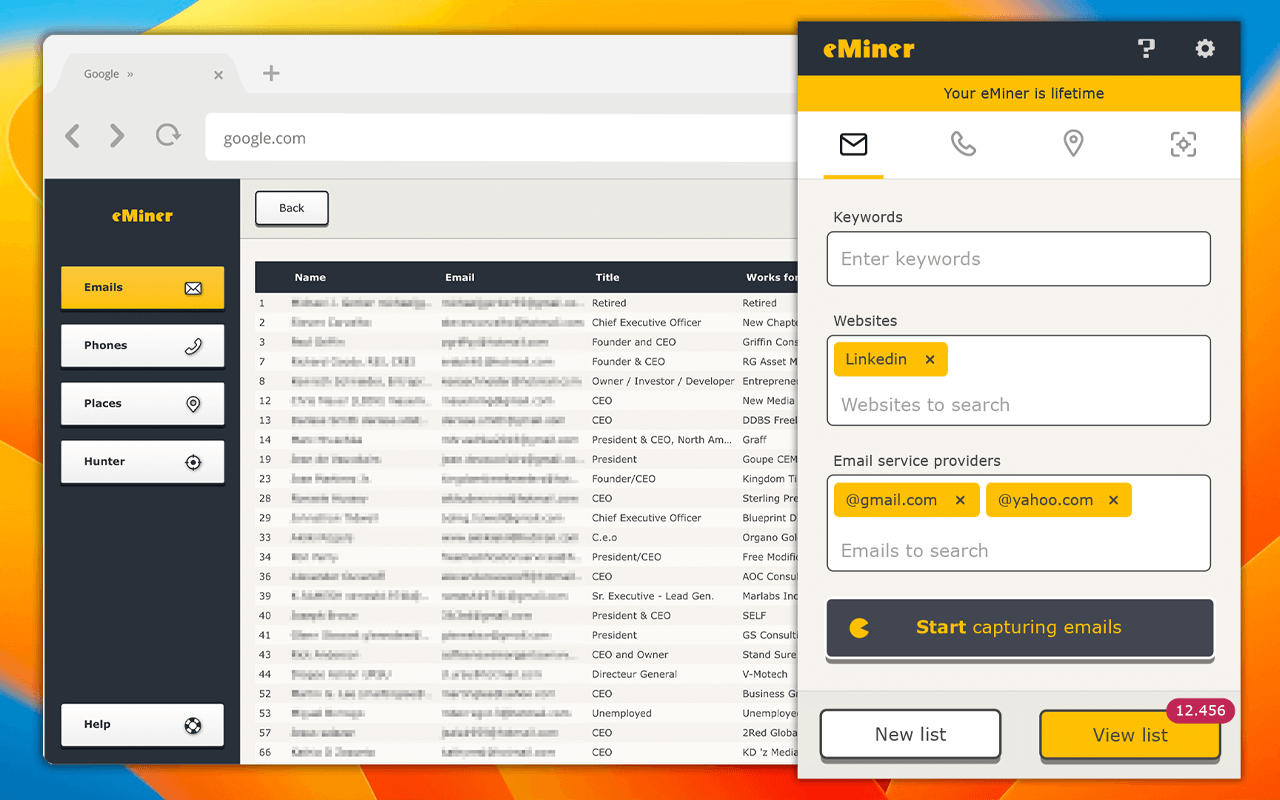
eMiner is a Chrome extension that automates lead sourcing. Instead of manually searching Google Maps, social networks and individual websites for contact details, you tell it which sites and email domains to target, and it runs the searches, captures the public contact data it finds, validates it and organises it into segmented lists. The pitch is straightforward: less time prospecting, more time selling.

What it actually does

  • Automated search across many sources. The page claims coverage of Google Maps, major social networks and 700+ other websites, all reached through search engines rather than private databases.
  • Contact capture and validation. It finds emails and similar public contact details, checks them, and puts them into a structured list.
  • Segmentation. You build "super-segmented" lists, so outreach can be split by source, niche or domain rather than dumped into one flat export.
  • Public-data sourcing. eMiner states that everything it captures is already indexed by Google, Bing and AOL, so it is not accessing protected or gated data.

Who gets the most from it

It suits freelancers, agencies and small sales or growth teams that need to build a first audience quickly and cannot justify an enterprise data contract. If your prospecting is already concentrated in one niche — local businesses, a specific industry, a defined set of domains — the domain and site targeting is where the tool earns its place.

It is a weaker fit if you need verified direct-dial numbers, intent data or CRM-grade enrichment, or if your compliance rules require a named data provider with documented consent chains. Publicly indexed contact data is still personal data under GDPR-style rules, so the lawful basis for contacting those people remains your responsibility, not the tool's.

A practical first test

Pick one narrow segment you already know well — say, marketing agencies in a single city with a published contact page — and run it as a small list. Compare the results against what you would have found manually in the same time. That tells you whether the automation is genuinely saving hours or just producing volume you still have to clean.

A free install option is advertised, so the sensible next step is a bounded trial on one segment rather than a full switch of your sourcing workflow.

How does eMiner automate lead capture from Google Maps and social networks?

eMiner is a Chrome extension that turns search engines and public directories into a lead list. Rather than browsing Google Maps or social profiles by hand, you define the websites and email domains you care about, and the tool builds and runs the searches for you, then captures, validates and organizes the contacts it finds. The page describes this as a "contact capture machine" that pulls from Google Maps, major social networks and hundreds of other sources.

What the automation actually does

  • You set the targets. You specify which sites and email domains to search, which keeps results focused on the segment you want.
  • eMiner builds the queries. It generates more elaborate search strings than a person would type manually, so it can surface contacts across many sources in one pass.
  • It captures and validates. Found contacts are collected and checked before being organized into a list.
  • You export into outreach. The output is a segmented list you can use for campaigns or one-to-one relationship building.

The Google Maps and social network angle

The page calls out a "Places" module for searching Maps, plus coverage of major social networks. In practice this matters because Maps listings often expose business names, locations and sometimes contact details, while social profiles supply names, roles and company context. Combining the two lets you filter by geography and role at the same time — useful if you sell locally, recruit by region, or want to reach decision-makers at specific companies.

Who gets the most from it

Sales teams doing outbound prospecting, recruiters sourcing candidates, and agencies building first audiences are the clearest fits. The page quotes marketing influencers and growth marketers describing it as a fast way to create initial audiences. If your bottleneck is the hours spent copying details from Maps listings and profiles, this directly targets that step. If you need deep CRM-grade enrichment or verified direct-dial numbers, treat it as a sourcing layer rather than a complete data platform.

Practical next step

Before committing, run one narrow test: pick a single city and one job title, let eMiner generate the list, and check how many records have usable, accurate email addresses. That hit rate — not raw volume — tells you whether it saves you time on your actual segment. The site offers a free install and a Pricing page if you want to compare tiers after the trial. For a broader view of the prospecting category, see HubSpot and Apollo.

Can eMiner be used to find leads in specific industries or niches?

Yes. eMiner is built for niche lead capture: you tell it which websites and email domains to search, and it runs automated searches to find, capture, validate and organize contacts from Google Maps, social networks and hundreds of other sources. Because you define the sources, industry targeting comes from your input rather than from a fixed industry menu.

How niche targeting works in practice

  • Source selection: Restrict searches to trade directories, association sites, niche marketplaces or company domains that typify the industry.
  • Domain filtering: Target specific email domains (for example, company domains common in one sector) to keep results within the niche.
  • Search refinement: Use the Chrome extension to generate segmented lists, then narrow by source, geography or role where the captured data allows.
  • Google Maps module: Useful for local, place-based niches such as clinics, studios, contractors or restaurants.

A concrete scenario

A recruiter placing dental staff could point eMiner at dental practice directories and practice websites, capture publicly listed contacts, then segment by location. A B2B seller of lab equipment might instead target university department pages and supplier directories. The tool does the repetitive searching; the niche definition is your job.

Trade-offs to weigh

  • Precision depends on your source list. Broad sources produce broad lists; niche sources produce niche lists.
  • Public data only. eMiner states it captures data that is public and indexed by search engines, so private or gated contact data is out of scope.
  • Validation still matters. Captured contacts should be checked before campaigns to protect sender reputation.

Next step

Write down five websites or domains where your ideal customers appear, then run a small capture against those sources and inspect the segmentation quality before scaling. If the results are too broad, add more specific sources rather than more search volume.

For pricing and plan limits, see eMiner.

Is the data captured by eMiner compliant with privacy regulations like GDPR?

eMiner states that the data it captures is public and indexed by search engines like Google, Bing and AOL, and that it therefore does not access protected data. That is the product's own position, not a legal guarantee. Public availability and GDPR compliance are not the same thing: GDPR applies whenever personal data such as names, business emails or phone numbers is processed, regardless of whether the data was publicly visible. So the honest answer is that eMiner's public-source design reduces one category of risk, but it does not by itself make your lead lists compliant.

What the compliance question actually turns on

  • Lawful basis. If you are emailing or calling the people you capture, you need a basis such as legitimate interest or consent, and legitimate interest usually requires a balancing assessment you can document.
  • Purpose and minimisation. Collecting "as many leads as possible" from 700+ sources conflicts with data-minimisation principles unless you can show each field is necessary for a defined purpose.
  • Transparency. People whose details you hold generally need to know you have them, which is hard when contacts arrive from automated scraping.
  • Special categories and jurisdiction. Some sources may surface data that is not ordinary business-contact information, and rules differ across the EU, UK, Brazil and US states.
  • Suppression and erasure. You need a workable way to honour objections and deletion requests.

A practical way to decide

Use eMiner where the output stays close to business-to-business contact data tied to a role or company, and where your outreach can plausibly rest on legitimate interest with a clear opt-out. Treat consumer-facing or mixed lists more cautiously, and check whether your CRM and email platform impose their own consent requirements.

Before scaling, run a small pilot: capture one list, trace a sample of records back to their original public pages, and confirm you can identify a lawful basis and a contact route for each. If you cannot answer "why am I allowed to contact this person?" for a given record, the source being public will not save you.

For the underlying rules, the authoritative references are the official texts from the European Data Protection Board and your national supervisory authority, such as the UK Information Commissioner's Office if you market to the UK.

What are the pricing options for eMiner and is there a free version?

eMiner’s site points to a pricing page at eMiner, but the page evidence provided here does not list specific plan names, prices, billing periods, or usage limits. The clearest pricing-related signal is that eMiner is offered as a Google Chrome extension with a free install option described as “Install eMiner Free,” so a free entry point appears to exist as part of the product’s acquisition model.

What is confirmed

  • eMiner is positioned as a Chrome extension that automates searching and capturing leads from search engines, Google Maps, social networks, and hundreds of other websites.
  • The site repeatedly invites users to “Install eMiner Free,” which indicates a free version or free installation path.
  • A separate “Pricing” link exists, suggesting there may be paid tiers or paid usage beyond the free option, but the actual paid details are not included in the supplied page evidence.

What is not confirmed

  • Whether the free version is permanently free, a trial, or limited by credits, seats, exports, or saved leads.
  • Whether paid plans are monthly, annual, or usage-based.
  • Any price points, feature comparisons between plans, or payment methods.

Practical next step

If you are evaluating eMiner for lead generation, treat the free install as a way to test workflow fit rather than as proof of unlimited use. Check the official pricing page directly before relying on it for budgeting, and look specifically for limits on captured contacts, search volume, exports, and access to modules such as Google Maps or social network sources.

For a concrete scenario: a freelance sales consultant might install the free version to test whether eMiner can build a small, targeted list from public sources. If the free version caps exports or daily captures, the paid option may only make sense when the time saved on manual prospecting clearly outweighs the subscription cost.

How does eMiner compare to other lead generation tools in terms of accuracy and speed?

eMiner positions itself as a Chrome extension that automates lead discovery across Google Maps, social networks and hundreds of other sites, so its pitch is speed of list-building rather than precision. Accuracy and speed are usually in tension: broad automated scraping fills a list quickly but produces more duplicates, outdated roles and generic addresses, while narrower, verified tools are slower but cleaner. eMiner's own page emphasizes volume ("insatiably devours leads") and automation, not verification rates, so treat it as a sourcing accelerator rather than a data-quality guarantee.

Where it fits against other lead tools

Tool type Typical strength Typical trade-off
Browser extensions like eMiner Fast capture from many public sources Variable accuracy; needs cleaning and de-duplication
B2B contact databases (e.g. Apollo.io, Hunter.io) Built-in verification and firmographic filters Subscription cost; coverage gaps outside their index
LinkedIn-focused tools (e.g. PhantomBuster) Workflow automation on a single network Platform limits; narrower source range

Speed depends on how you use it. A recruiter or agency owner who needs a rough first-pass list of local businesses from Maps can get results in minutes, then spend time verifying. A sales team targeting named enterprise accounts will likely find a dedicated database with verification built in more accurate per contact, even if it costs more.

Practical next step

Run a small test: pick one narrow segment, capture 50 contacts with eMiner, and measure bounce rate and wrong-person rate before scaling. If the error rate is acceptable, use it for top-of-funnel volume and pair it with a verification step; if not, keep it for research rather than outreach.

Related questions

More questions →
What Is eMiner and What Does It Do?

eMiner is a Google Chrome extension that automates finding and capturing lead contacts across the web. It searches Google Maps, major social networks, and 700+ other websites to build segmented contact lists for sales and relationship outreach. If your job involves sourcing prospects manually, eMiner is built to cut that time down.

What eMiner actually does

The tool positions itself as a "contact capture machine." Instead of you opening tabs, running searches, and copying emails by hand, eMiner runs the search process for you and organizes what it finds.

Per the site, the workflow is:

  1. You define the targets — which websites and email domains you want to search for contacts.
  2. eMiner builds the searches — it constructs advanced queries through search engines.
  3. It captures, validates, and organizes the contact data it finds into lists.

The output is a segmented lead list you can use in campaigns or direct outreach.

Where the leads come from

Source What it covers
Google Maps Local business contacts via the "Places" module
Social networks Major platforms
Other websites 700+ additional sources

The site describes the result as "ultra-targeted lists" built from these combined sources.

Is the data legal to use?

eMiner states that all data it captures is public and indexed by Google, Bing, and AOL, and therefore does not involve accessing protected data. That's the company's own framing — if compliance matters for your use case, verify it against the rules that apply to you (GDPR, CAN-SPAM, platform terms, etc.) before running outreach.

Who it's for

  • Sales teams sourcing prospect lists
  • Relationship marketers building first audiences
  • Growth marketers who want to spend less time sourcing and more time selling

The site's own pitch: "Spend less time sourcing and more time selling."

How to get started

  1. Install the eMiner extension from the Chrome Web Store (the site links to a free install).
  2. Set the websites and email domains you want searched.
  3. Let eMiner run the searches and compile the captured contacts.
  4. Export or use the lists in your campaigns.

What to check before committing

  • Pricing — the site has a dedicated pricing page at eminer.app/pricing/; the free install and paid tiers are separate things, so confirm what the free version includes.
  • Source coverage — confirm the 700+ sites and social networks include the ones your prospects actually use.
  • Data validation — the site claims eMiner validates captured data, but test a sample list against bounce rates before scaling outreach.

If your bottleneck is manually hunting for contact details across search engines and maps, eMiner is designed for exactly that job. If you need verified, consent-based contact data, treat it as a sourcing aid rather than a compliance solution.

Is eMiner's Data Collection Legal and Compliant?

eMiner states that all data it captures is public and indexed by Google, Bing, and AOL, and that this means it "does not violate access to protected data." That is the vendor's own position, not a legal ruling. Whether your specific use of eMiner is lawful depends on where you and the people in your lists are located, what data you collect, and what you do with it afterward. Treat the tool as a public-data collector and treat compliance as your responsibility.

What eMiner actually collects

According to the site, eMiner is a Google Chrome extension that automates searching and capturing leads through search engines. It works by:

  • You define which websites and email domains to search.
  • eMiner builds searches through search engines to find, capture, validate, and organize contact data.
  • It draws from Google Maps ("Places" module), major social networks, and "700+ websites."

The company's stated basis for legality is that the captured data is public and already indexed by Google, Bing, and AOL. In other words, eMiner's claim rests on the idea that it is aggregating information that is already discoverable, not breaching protected systems.

Why "public data" is not the same as "compliant use"

Public availability addresses one question — whether the data was behind a login or access control. It does not settle the questions that most privacy and marketing rules actually turn on:

Question Why it matters
What personal data is in the record? A business email and a personal email can be treated differently.
Where are the people located? Rules like GDPR (EU/UK) and various US state privacy laws attach to the person's location, not yours.
What is your legal basis for contacting them? Consent, legitimate interest, or existing relationship — this varies by regime.
What did you promise in your own privacy policy? Your policy may restrict uses that the tool enables.
Are you combining eMiner data with other sources? Enrichment and profiling can trigger additional obligations.

eMiner's own framing supports this: the site presents the tool as a way to build "super-segmented lists" for campaigns and relationship actions. That is a marketing and outreach use case, and outreach is exactly where privacy and anti-spam rules bite.

The compliance checklist that actually decides your case

Before running eMiner at scale, work through these:

  1. Identify the jurisdictions involved. Your location, your company's location, and the locations of the people you capture all matter.
  2. Classify the data. Separate business contact details from personal data, and note if any special-category data appears.
  3. Check your legal basis for outreach. In consent-based regimes, cold outreach to captured addresses may be restricted; in others, a legitimate-interest or existing-customer basis may apply.
  4. Honor opt-outs and deletion requests. If someone asks to be removed, you need a process.
  5. Keep records. Document what you collected, from where, and why.
  6. Review the tool's terms. eMiner's site does not, in the material provided, spell out data-handling or compliance guarantees — so do not assume the tool absorbs your liability.

What the vendor does and does not claim

Does claim: all captured data is public and indexed by major search engines; the tool does not access protected data.

Does not claim (in the available material): that using the output for outreach is compliant in your jurisdiction, that it satisfies GDPR or any specific regulation, or that it provides consent management.

The gap between "we only collect public data" and "your campaign is legal" is where the real risk sits. The vendor's statement is a starting point for your own review, not a substitute for it.

Practical takeaway

  • If your use is limited to building internal research lists from genuinely public sources, the exposure is lower — but not zero.
  • If you plan cold email, cold calling, or ad targeting at scale, get jurisdiction-specific advice before you send.
  • If you operate in or contact people in the EU/UK, or in US states with comprehensive privacy laws, assume additional obligations apply.
  • When in doubt, prefer opt-in sources or existing relationships over captured public contacts.

eMiner can be a legitimate research and sourcing tool. Legality is a function of your use case and local law, and that determination is yours to make — ideally with qualified legal input rather than a vendor's assurance.

How eMiner Automates Lead Capture

eMiner automates lead capture by turning a Chrome extension into a search-and-collect pipeline: you define which websites and email domains to target, and the tool builds advanced search queries across search engines, then finds, captures, validates, and organizes the public contact data it returns. It is built for sales and relationship teams that want segmented lead lists without manually scraping pages one by one. The data it collects is public and indexed by Google, Bing, and AOL, according to the product site.

The core workflow

The automation runs in three stages.

1. You set the targets

You tell eMiner which websites and email domains you want contacts from. This is the input that shapes everything downstream — the tool does not guess your market, it searches within the boundaries you give it.

2. eMiner builds and runs the searches

Instead of you typing queries by hand, eMiner elaborates "sophisticated searches" through search engines to surface matching pages and contacts. The site describes this as automating the mining of contacts across Google Maps, social networks, and 700+ other websites.

3. It captures, validates, and organizes

Results are not just dumped raw. eMiner captures the data, validates it, and organizes it into lists you can use in campaigns and relationship actions. The stated goal is "super-segmented lists" with full autonomy over acquisition.

What the Places module does

eMiner includes a "Places" module for searching sources like Google Maps. This is the part of the workflow aimed at location-based or business-listing leads, as opposed to contacts found through general web and social searches. The site shows a demonstration of a search through this module.

Why the automation matters

The pitch is time reallocation: "Spend less time sourcing and more time selling." Manual lead sourcing across hundreds of sites is slow and inconsistent; eMiner's value is running that sourcing continuously and at scale so the output is a ready list rather than a research project. The site frames the result as building audiences and generating leads "without relying on a lot of effort and high investments."

What to check before relying on it

  • Source of data: eMiner states all captured data is public and indexed by major search engines, so it does not access protected data. Confirm this matches your own compliance requirements.
  • Install method: It is a Google Chrome extension, so it runs in the browser rather than as a standalone app.
  • Pricing and plan limits: The site links to a pricing page, but the input does not specify cost, free-tier limits, or login requirements. Check the pricing page directly before assuming free or unlimited use.
  • Output quality: Because results depend on the sites and domains you define, the quality of your targeting directly affects the list you get.

If your task is to build targeted contact lists from public web and map sources without manual searching, eMiner's define-search-capture-validate-organize loop is the mechanism to evaluate. Start by testing it on one narrow domain set so you can judge the validation and organization quality before scaling.

Who should use eMiner and how do you get started?

eMiner is a Chrome extension that automates lead sourcing: it runs sophisticated searches across Google Maps, social networks, and 700+ websites to find, capture, validate, and organize public contact data. It fits sales, marketing, growth, and relationship-building roles that need segmented lead lists without heavy manual prospecting. You start by installing the free extension, defining which sites and email domains to search, and letting eMiner build the list.

Who eMiner is built for

The site positions eMiner as "the contact capture machine for sales and relationships," with the promise of spending less time sourcing and more time selling. Based on that framing, it suits:

  • Sales teams building prospect lists from Maps and social networks.
  • Marketers and growth hackers who need first audiences fast — one testimonial calls it "an amazing growth hacking tool for lead generation," and another says it helps "win the game fast by creating the first audiences."
  • Relationship-focused roles that run outreach campaigns and want segmented lists without large effort or investment.
  • Anyone doing repetitive manual prospecting who wants the search-and-capture loop automated.

If you only need a handful of contacts occasionally, the automation payoff is smaller. The value scales with how many targeted lists you need to produce.

What it actually does

eMiner is not a database you buy into — it is a search-and-capture layer on top of public sources. Per the site:

  • It generates leads from "all major networks & websites" plus "hundreds of other sources," specifically naming Google Maps and social networks alongside 700+ websites.
  • You define which websites and email domains to search; eMiner then builds and runs the searches, and captures, validates, and organizes the results.
  • The site demonstrates two flows: fully automated email capture and search through a "Places" module (the Maps-based path).
  • All captured data is public and indexed by Google, Bing, and AOL, which the site uses to argue it does not access protected data.

That last point is the vendor's own compliance claim, not an independent legal review. If compliance is a deciding factor for you, treat it as a starting position and verify against your own jurisdiction and policies.

How to get started

  1. Install the extension. The site's call to action is "Install eMiner Free!" — it is a Google Chrome extension, so you need Chrome (or a Chromium-based browser that supports Chrome extensions).
  2. Define your targets. Specify the websites and email domains you want searched. This is the main input that shapes your results, so be specific about the segment you want.
  3. Run the search. eMiner elaborates the search queries through search engines and captures matching contacts. For location-based prospecting, use the "Places" module.
  4. Review the captured list. Data comes back validated and organized; from there you build super-segmented lists for campaigns and relationship actions.

Expected result: a targeted contact list assembled from public sources, produced with far less manual searching than doing it by hand.

Pricing and limits

The site has a dedicated Pricing page at eminer.app/pricing/, so paid tiers exist alongside the free install. The available material does not state prices, plan limits, or whether any usage caps apply to the free version — check the Pricing page directly before committing. Do not assume the free install covers unlimited capture.

Common sticking points

  • Vague targeting. Since you define the sites and domains, a broad definition produces a broad, less useful list. Narrow inputs give "ultra-targeted" output.
  • Compliance assumptions. The public-data argument is the vendor's; your own obligations around outreach and data use still apply.
  • Tooling dependency. It runs inside Chrome, so it is not a standalone app or API.

Quick verdict

Choose eMiner if you are in sales, marketing, growth, or relationship work and your bottleneck is sourcing volume — the testimonials consistently emphasize speed of building initial audiences. Look elsewhere if you need only occasional contacts, want a pre-built verified database rather than a capture tool, or need pricing and limits confirmed before installing; in that case, start at the Pricing page.

Website Overview

The available information shows a mix of normal operation and configuration gaps. Depending on how the website is used, these gaps may affect secure access or the consistency of its public presentation.

Domain and Registration

Transfer-protection status is present, helping reduce the risk of unauthorized domain transfers. The domain has about 5 years of registration history; its current configuration provides more context than age alone. The registrar is GoDaddy.com, LLC, a widely used domain service provider. The domain uses the common .app extension, which is not an independent safety signal.

DNS and Email

Nameservers are provided by Cloudflare, indicating managed DNS hosting. MX records point to the Cloudflare Email Routing email service. No CNAME was found; the observed records resolve directly to addresses. SPF and DMARC are configured. DKIM status is unknown. TXT records include verification markers for Google, Meta. Such markers may also remain after a service stops being used.

TLS and Certificates

The public key uses EC with 256 bits. The server supplied a complete certificate chain. No organization name is present in the certificate; the available fields are consistent with domain validation. The certificate was issued within the Google Trust Services cloud or CDN ecosystem. The certificate's total validity is about 90 days, consistent with a short renewal cycle.

HTTP and Browser Security

The checked browser-security headers were not detected, leaving fewer explicit browser-side safeguards. No X-Powered-By header was found, reducing one common source of backend fingerprinting information. The cf-ray, x-cache, via response header indicates a CDN or caching proxy in the delivery path. No obvious internal addresses or debug information were found in the headers. The Server header identifies cloudflare without an exact version.

Technology Stack Analysis

The public page identifies Cloudflare, Amazon CloudFront without precise versions, leaving fewer clues for version-specific scanning.

Search and Social Sharing

No homepage canonical URL was detected. If duplicate URLs exist, consolidation may be less explicit. Twitter Card metadata is configured. The title has 32 characters, within a common display range. A meta description is present, with 65 characters. The observed directives allow indexing and link following.

Hosting and Email

DNSCloudflare
HostingAmazon CloudFront
EmailCloudflare Email Routing
Approximate IP geolocation (inferred; a CDN or proxy may differ from the origin server) Location unknown Inferred 104.21.92.187

Registration details

RDAP / WHOIS

RegistrarGoDaddy.com, LLC
Registered2021-04-14
Expires2027-04-14
Domain statusclient delete prohibited、client renew prohibited、client transfer prohibited、client update prohibited
Nameserversmeadow.ns.cloudflare.com、peyton.ns.cloudflare.com
DNSSECunsigned

DNS records

DNS

TypeNameValueTTLPriority
Aeminer.app104.21.92.187300—
Aeminer.app172.67.197.30300—
AAAAeminer.app2606:4700:3030::ac43:c51e300—
AAAAeminer.app2606:4700:3036::6815:5cbb300—
MXeminer.approute2.mx.cloudflare.net3006
MXeminer.approute1.mx.cloudflare.net30056
MXeminer.approute3.mx.cloudflare.net30073
NSeminer.appmeadow.ns.cloudflare.com86400—
NSeminer.apppeyton.ns.cloudflare.com86400—
TXTeminer.appfacebook-domain-verification=9xw0gtr0ygj3idejc682r8xedpewc2300—
TXTeminer.appgoogle-site-verification=MaVyvnGImCC3C65y1Bgd-p9UknKqPDaCZ2NIGWgEj_c300—
TXTeminer.appstripe-verification=93bc1c5437cf67deb22ad8eb093e9a4644a737802485c14fc797c98d70b1d400300—
TXTeminer.appv=spf1 include:_spf.mx.cloudflare.net ~all300—
DMARC_dmarc.eminer.appv=DMARC1; p=none; rua=mailto:[email protected]300—

TLS and certificates

TLS / SSL

AssessmentNormal configuration
Supported protocolsTLSv1.2、TLSv1.3
Negotiated protocolTLSv1.3
Certificate subjecteminer.app
IssuerGoogle Trust Services
Valid until2026-12-18T16:35 · Remaining when checked: 72 days
Verification detailsCertificate trust: Passed · Hostname match: Passed

HTTP response headers

HTTP

HeaderValue
content-typetext/html; charset=utf-8
servercloudflare

Identified technologies

CloudflareAmazon CloudFront

Pages, Search and Sharing

Meta descriptioneMiner automates the search and capture of leads on the internet.
Canonical URLNot detected
LanguageEnglish (default)
Twitter Cardsummary
All bots 0 allowed · 7 disallowed
  • Disallow/contact
  • Disallow/off
  • Disallow/welcome
  • Disallow/uninstall
  • Disallow/privacy
  • Disallow/terms
  • Disallow/warning

User reviews (0)

  • No reviews yet.