
 简体中文
简体中文 English
Website review
This review may include AI-generated content and is not individually verified. Domain, certificate and other facts come from the observed data on this page.
What is 3D Text Generator?
3D Text Generator on 3D Text Generator is a browser-based tool for turning typed words into styled 3D lettering and downloading the result as a PNG with a transparent background. You start from a template rather than a blank canvas: the page lists 18+ searchable styles such as gold, neon, chrome, ice, fire, bubble letters, glitter and rose gold, plus presets like Barbie pink, sports-logo text and rose gold. It previews changes in real time as you rotate and zoom, supports English and Chinese text, and requires no signup or watermark.
Its practical value is speed for people who need a headline graphic, not a full 3D modeling suite. Typical uses named on the page are YouTube thumbnails and social covers, playful brand words and logos, birthday or seasonal posters, and gaming titles or emblems. A transparent PNG is the main reason to choose it: the lettering can be dropped onto a thumbnail, product mockup or poster in another editor without cutting out a background.
The trade-off is control. A template-first workflow gets you a polished look in seconds, but if you need custom geometry, lighting rigs or animation, a general 3D application is the better fit.
Next step: decide by output. If you need a static transparent PNG for a thumbnail, invitation or promo graphic, open the closest style preset, type your text, and check the preview at the size it will actually appear. If you need motion or editable 3D scenes, look elsewhere.
How do I export a 3D text PNG with a transparent background for use in a game or ecommerce listing?
Choose a preset style, enter your text, then use the PNG export with the transparent background option enabled. On 3D Text Generator, the page describes a template-led workflow—pick a style such as chrome, neon, or gold, adjust the copy and colors, then download a transparent PNG—which is the right order for both game assets and ecommerce listings. No signup or watermark is mentioned.
For a game asset
- Export at the largest sensible size for your target resolution, then downscale in your engine rather than upscaling.
- Keep the transparent PNG as a master file; import it into your engine or editor and let the engine handle scaling and filtering.
- Test the text over both dark and light backgrounds before committing, since thin glows and chrome highlights can vanish on one of them.
For an ecommerce listing
- Match the style to the product: rose gold or soft pastel for beauty, chrome for tech and gaming, gold for premium or seasonal promotions.
- Check legibility at thumbnail size—marketplace images are often viewed small, so avoid busy glitter or fire styles for short words.
- Keep the transparent version for overlaying on product photos, and place it over a plain background if the marketplace requires a solid image.
Decision criterion
If you need many variations quickly, start from presets and adjust only copy and color. If the text is a core brand element, spend the extra time on spacing and legibility at small sizes before exporting.
As a next step, export one test PNG, drop it onto a dark and a light mock background, and confirm the edges look clean before producing the full set.
Which template style should I choose for a YouTube thumbnail versus a beauty brand logo?
For a YouTube thumbnail, start with a high-contrast, energetic style such as Neon Rush or Chrome; for a beauty brand logo, start with Rose Luxe (rose gold) and keep the lettering simpler and more refined.
Why these fit differently
YouTube thumbnail (Neon Rush or Chrome)
- Thumbnails compete at small sizes, so bold glow or hard metallic edges stay readable when scaled down.
- Neon suits streaming, gaming, club and music content; chrome suits gaming titles, emblems and tech or hard-surface branding.
- Trade-off: these styles are loud. They work for attention-grabbing covers but feel heavy in a permanent logo or packaging.
Beauty brand logo (Rose Luxe)
- Soft metallic lettering reads as polished and feminine, matching beauty, packaging and invitation use.
- Trade-off: subtle metallic effects lose impact in tiny thumbnails unless you increase contrast or size.
- For a playful, cute beauty or party brand, Dream Pop (Barbie pink) or Spark Joy (glitter) can work, but glitter can look busy at logo scale.
Quick comparison
| Need | Best starter style | Watch out for |
|---|---|---|
| YouTube thumbnail | Neon Rush, Chrome | Too much detail at small size |
| Beauty brand logo | Rose Luxe | Low contrast in small uses |
| Playful/party branding | Dream Pop, Spark Joy | Glitter feels busy in logos |
| Luxury or premium titles | Golden Hour | Gold can look dated if overused |
Next step
Open your two strongest candidates side by side, type your actual words, and preview each at thumbnail size before downloading the transparent PNG. If the style still reads clearly when shrunk, it's the right pick; if not, move to a bolder or simpler template.
Can I use the generated 3D text commercially without a watermark or signup?
Yes. Based on the site's own description, 3D text you generate on 3D Text Generator can be downloaded as a transparent PNG with no signup and no watermark. That covers the two practical barriers most people hit: no account wall before export, and no branding baked into the file.
What that means in practice
- Commercial use: The page presents the output as ready for gaming, ecommerce, social media and holiday graphics, so using a PNG in a product listing, thumbnail or campaign graphic fits the stated intent. For anything high-stakes — a paid ad, merch, a client deliverable — confirm the site's own terms, since a generator's page copy is not a licence.
- No watermark: The downloaded PNG should be clean, so you can drop it straight onto a background in Canva, Photoshop or a video editor.
- No signup: You can open a template, type your words and export without creating an account, which suits one-off jobs.
A concrete scenario
A small shop owner needs a gold "Grand Opening" banner for an Instagram post and a printed flyer. They open the gold template, type the words, export a transparent PNG, and place it over both a photo and a solid colour without redoing the work.
Decision criterion
If you need many variations of one style, the reusable editor link is the more useful feature than the free export. If you need a single title graphic today, template-first is faster than starting from a blank canvas.
As a next step, check the site's terms or FAQ for any restriction on reselling the raw PNG itself, as opposed to using it inside a design — that distinction matters for print-on-demand sellers.
Does the generator support Chinese characters as well as English text?
Yes. The generator supports both Chinese characters and English text. Its page lists "English and Chinese ready" among the core capabilities, so you can type Chinese words into the editor and apply the same 3D styles used for English.
What that means in practice
- Mixed-language text works as a starting point. You can build a Chinese headline or a Chinese-English mix, then pick from the 18+ styles such as gold, neon, chrome, or glitter. The template-led workflow (choose a style first, then edit your copy) applies either way.
- Check the letterforms before you commit. Metallic and beveled styles depend on how each style renders strokes and depth. Dense Chinese characters with many strokes can look crowded at small sizes, so preview at the size you'll actually use — a thumbnail versus a poster changes what reads clearly.
- Export suits overlay use. Transparent PNG export means the text can sit on video thumbnails, product images, or event posters without a background box.
A practical next step
If your project is a Chinese-language YouTube thumbnail or a bilingual brand wordmark, start with a bold style like Chrome or Golden Hour, type a short phrase (three to five characters usually reads better than a full sentence), and preview before downloading. For longer Chinese lines, test a simpler style with less surface detail so the strokes stay legible.
For broader font and character-coverage comparisons, general typography references such as Google Fonts can help you judge which letterform styles suit Chinese text, though this generator's own style set is the one that determines your result here.
How do I save and reopen my 3D text design later using a shareable editor link?
Use the editor's shareable link to save a design: after styling your text, copy the reusable editor link rather than relying only on the downloaded PNG. The PNG preserves the final image, while the link preserves the editable setup so you can return to the same style and wording later.
Practical workflow
- Type your text and choose a template, such as chrome, neon, or gold.
- Adjust colors and background as needed.
- Copy the shareable editor link and store it somewhere durable—a notes app, project brief, or bookmark folder.
- Download the transparent PNG for the immediate use, such as a thumbnail or product graphic.
- Reopen the link when you need a variant, then change the wording and export a fresh PNG.
Decide which artifact to keep
| What you keep | Best for | Trade-off |
|---|---|---|
| Shareable editor link | Returning to edit text, colors, or style | Depends on the service remaining available |
| Transparent PNG | Immediate use in designs, slides, or store listings | Not editable as layered text |
For a recurring campaign, keep both: the link as the working master and the PNG as the published asset. Label links by project and date so a later revision does not overwrite the wrong version.
 Cloudflare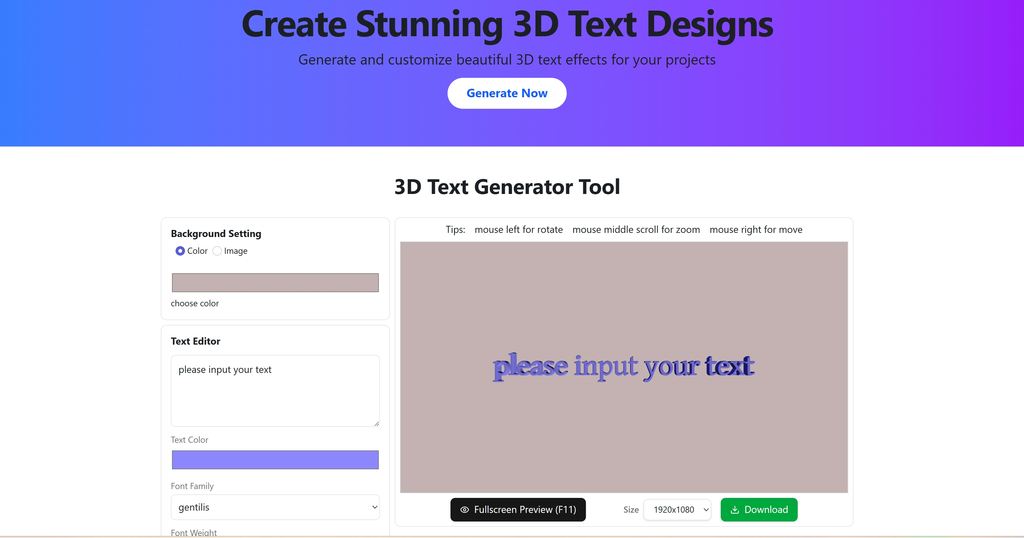

User reviews (0)