
 fishstrap.app
No paid content found
fishstrap.app
No paid content found
Categories: Development
The official Fishstrap website. Fishstrap is an alternative to the normal Roblox client.
 Visit website
 Updated: 2026-09-28 04:19
 Language: English (default)
 Access: Normal
 Profile views 0
 Outbound visits 0
Related questions
More questions →Roblox Clothing Design: How to Create, Preview, and Price Custom Outfits
Roblox clothing design is the process of turning a flat 2D template into a wearable shirt, pair of pants, or full outfit on the Roblox platform. You draw or edit the template, convert it into the format Roblox accepts, preview how it looks on a 2D and 3D avatar, then upload and price it. Dripzels bundles these steps into one place with a Clothing Preview, Robux Calculator, and Template Conversion tool, so you can check your work before spending Robux on an upload.
What Roblox clothing design actually involves
A Roblox clothing item is not a 3D model you sculpt. It is a texture image wrapped onto the avatar's body. That is why the whole workflow starts with a template — a flat layout that maps each part of the shirt or pants to a specific region of the character.
There are two main categories:
- Classic clothing — shirts and pants made from the standard template. These are the most common custom items and the easiest to make.
- Outfits — a saved combination of clothing and accessories that a player can wear together. You assemble these from items you already own or created.
Custom clothing shows up in avatar shops, group stores, and on individual players. Designers use it to sell looks, build a brand, or dress a character for a game.
Turning a 2D template into a wearable item
The core task is converting your artwork into a file Roblox will accept. The general flow looks like this:
- Start with the correct template. Shirts and pants use different layouts. Using the wrong one is the most common reason a design looks scrambled after upload.
- Draw within the template regions. Each block of the template corresponds to a body area — torso, arms, legs. Anything outside those regions will not appear where you expect.
- Export as a PNG. Roblox expects a specific image format and size, so keep the template's original dimensions.
- Convert the template if needed. If your source file is in a different layout or format, a template conversion step re-maps it into the Roblox-ready structure.
- Upload through Roblox. This is where the item becomes real and where a Robux cost may apply.
The input is your image; the action is mapping it to the template regions; the expected result is a preview that matches what you drew. If the preview looks wrong, the problem is almost always the template alignment, not the upload.
Checking your design before you upload
Previewing is the step that saves you from wasting an upload. A clothing preview tool shows two things:
- 2D view — the flat texture as it will be stored.
- 3D view — how the texture wraps onto an avatar body.
The 3D view is the one that catches real mistakes. A design can look perfect flat and still stretch, mirror, or misalign once it is on a body. Checking both views lets you fix seams and placement before committing.
Use the preview as a pass/fail gate: if the 3D result does not match your intent, go back to the template rather than uploading and hoping.
Setting a price with a Robux calculator
Pricing custom clothing means deciding what the item is worth in Robux, Roblox's in-platform currency. A Robux calculator helps you translate between Robux and real-world currency so you can judge whether a price is reasonable.
When setting a price, weigh:
- Complexity — detailed, original designs usually justify more than simple recolors.
- Demand — popular styles and limited looks can command higher prices.
- Comparable items — check what similar clothing sells for before you decide.
- Upload costs — remember that publishing may cost Robux, so factor that into your margin.
The calculator does not set the price for you. It gives you the conversion so you can make a deliberate choice instead of guessing.
Common mistakes and how to fix them
| Problem | Likely cause | Fix |
|---|---|---|
| Design looks scrambled on the avatar | Wrong template or misaligned regions | Re-check the template layout and re-map your artwork |
| Colors or edges look off in 3D | Design drawn outside valid regions | Keep artwork inside the template's body zones |
| Item will not upload | Wrong file format or size | Export as the expected PNG at the template's dimensions |
| Price feels arbitrary | No conversion reference | Run the Robux calculator before listing |
Most clothing problems trace back to the template, not the tool. Fix the source layout first, then re-preview.
Where Dripzels fits
Dripzels is positioned as an all-in-one resource for Roblox clothing design, combining Clothing Preview, a Robux Calculator, and Template Conversion. If you are making custom shirts, pants, or outfits and want to check the 2D and 3D result and set a price in one workflow, that combination covers the full loop from template to listing. If you only need one step — say, just a price conversion — you can use that single tool on its own.
Website Overview
Page metadata, canonical configuration and social previews work together to provide more consistent search and sharing presentation.
Domain and Registration
Transfer-protection status is present, helping reduce the risk of unauthorized domain transfers. The domain has about 1 years of registration history; its current configuration provides more context than age alone. The registrar is Porkbun LLC, a widely used domain service provider. The domain uses the common .app extension, which is not an independent safety signal.
DNS and Email
Nameservers are provided by Cloudflare, indicating managed DNS hosting. MX records point to the Cloudflare Email Routing email service. No CNAME was found; the observed records resolve directly to addresses. SPF and DMARC are configured. DKIM status is unknown. TXT records include verification markers for Google. Such markers may also remain after a service stops being used.
TLS and Certificates
The public key uses EC with 256 bits. The server supplied a complete certificate chain. No organization name is present in the certificate; the available fields are consistent with domain validation. The certificate was issued within the Google Trust Services cloud or CDN ecosystem. The certificate's total validity is about 90 days, consistent with a short renewal cycle.
HTTP and Browser Security
The checked browser-security headers were not detected, leaving fewer explicit browser-side safeguards. No X-Powered-By header was found, reducing one common source of backend fingerprinting information. The cf-ray response header indicates a CDN or caching proxy in the delivery path. No obvious internal addresses or debug information were found in the headers. The Server header identifies cloudflare without an exact version.
Technology Stack Analysis
The public page identifies SvelteKit, Cloudflare without precise versions, leaving fewer clues for version-specific scanning.
Search and Social Sharing
Twitter Card metadata is configured. The title has 9 characters, within a common display range. A meta description is present, with 100 characters. The observed directives allow indexing and link following. No Generator meta tag is publicly exposed.
 Hosting and Email
 Cloudflare
 Hosting
 Location
 unknown
104.21.65.231
Location
Location unknown
104.21.65.231
 Pages, Search and Sharing
| Meta description | The official Fishstrap website. Fishstrap is an alternative to the normal Roblox client. |
|---|---|
| Canonical URL | https://fishstrap.app/ |
| Language | English (default) |
| Twitter Card | summary_large_image |
Social Sharing Preview
6 fields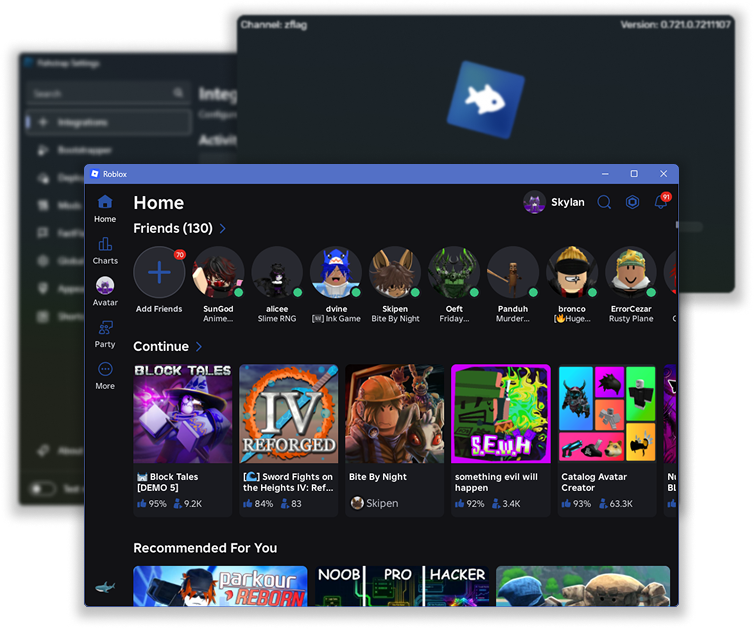
Sharing metadata
| og:type | article |
|---|---|
| og:image | https://github.com/fishstrap/fishstrap.app/blob/main/static/img/Showcase-Dark.png?raw=true |
| og:title | Fishstrap |
| og:site_name | Fishstrap |
| og:description | Fishstrap is an alternative to the default roblox bootstrapper, based on Bloxstrap. |
| twitter:card | summary_large_image |
robots.txt (opens in a new tab)
1 rules
All bots 1 allowed · 0 disallowed

 All bots

*
No matching rules.
Sitemaps
0No sitemaps found
 Registration details RDAP / WHOIS
| Registrar | Porkbun LLC |
|---|---|
| Registered | 2025-01-27 |
| Expires | 2027-01-27 |
| Domain status | client delete prohibited、client transfer prohibited |
| Nameservers | alice.ns.cloudflare.com、jeff.ns.cloudflare.com |
| DNSSEC | unsigned |
 DNS records
| Type | Name | Value | TTL | Priority |
|---|---|---|---|---|
| A | fishstrap.app | 104.21.65.231 | 300 | — |
| A | fishstrap.app | 172.67.152.24 | 300 | — |
| AAAA | fishstrap.app | 2606:4700:3037::6815:41e7 | 300 | — |
| AAAA | fishstrap.app | 2606:4700:3037::ac43:9818 | 300 | — |
| MX | fishstrap.app | route1.mx.cloudflare.net | 300 | 48 |
| MX | fishstrap.app | route3.mx.cloudflare.net | 300 | 70 |
| MX | fishstrap.app | route2.mx.cloudflare.net | 300 | 87 |
| NS | fishstrap.app | alice.ns.cloudflare.com | 86400 | — |
| NS | fishstrap.app | jeff.ns.cloudflare.com | 86400 | — |
| TXT | fishstrap.app | google-site-verification=czVberJ-k9nfkBYtzU9nbAZlvNb5tqQDWtZuDa-IwRU | 300 | — |
| TXT | fishstrap.app | v=spf1 include:_spf.google.com include:_spf.mx.cloudflare.net -all | 300 | — |
| DMARC | _dmarc.fishstrap.app | v=DMARC1; p=reject; rua=mailto:[email protected] | 300 | — |
 TLS and certificates
| Assessment | Normal configuration |
|---|---|
| Supported protocols | TLSv1.2、TLSv1.3 |
| Negotiated protocol | TLSv1.3 |
| Certificate subject | fishstrap.app |
| Issuer | Google Trust Services |
| Valid until | 2026-10-06T11:01 · Remaining when checked: 8 days |
| Verification details | Certificate trust: Passed · Hostname match: Passed |
 HTTP response headers
| Header | Value |
|---|---|
| content-type | text/html |
| cache-control | max-age=14400 |
| server | cloudflare |
 Identified technologies
User reviews (0)