Website profiles · Technology insights · Alternatives

haldane4.denisbondare.com

ASCII horror game about depths of the Southern Ocean

No paid content found
Visit website
Profile views 0 Outbound visits 0 Normal
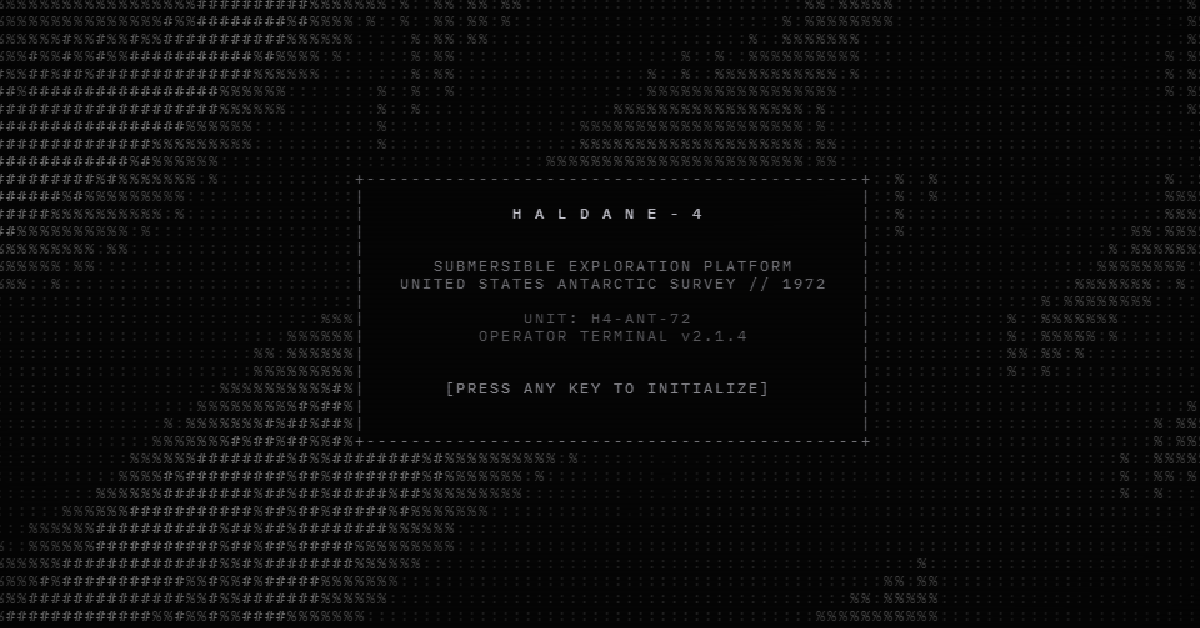
HALDANE-4 Full homepage screenshot

At a glance

Category
Games & Board Games
Language
English
Paid-content signal
No paid content foundObserved
Registered
2026
Hosting
CloudflareInferred
HTTPS certificate trusted
PassedObserved
Last updated

Website review

This review may include AI-generated content and is not individually verified. Domain, certificate and other facts come from the observed data on this page.

What is HALDANE-4?

HALDANE-4 is a browser-based ASCII horror game set in the depths of the Southern Ocean, presented as an "operator terminal." You pilot something through dark water using a small set of controls shown on screen: WASD to move, the mouse to thrust and rotate, Shift to cut the engine and Space for the light. The page recommends headphones and desktop play, which fits a tension-driven game where sound and a narrow text display carry the atmosphere.

What to expect in practice

  • A terminal interface, not a graphical one. The scene is drawn in ASCII characters, so the horror comes from limited visibility and your imagination filling in what the characters represent.
  • Direct, minimal controls. Movement, rotation, thrust and a light are the main verbs; the light is a click-to-activate element, suggesting darkness is a core mechanic rather than decoration.
  • Short-session, atmospheric play. The "drag to move / drag to look" hints and the resume option point to a compact experience you can dip into rather than a long campaign.

Is it for you?

It suits players who enjoy moody, low-fi horror and are comfortable with keyboard-and-mouse controls on a desktop. If you prefer detailed graphics or touch controls, the ASCII presentation and desktop recommendation will be a mismatch. As a first step, open it on a desktop with headphones and give the light mechanic a few minutes before deciding whether the pacing works for you.

How do I control the submarine in HALDANE-4?

HALDANE-4 uses a first-person submarine control scheme built around keyboard movement and mouse aiming. The operator terminal on the page lists the core bindings: WASD to move, mouse to thrust or steer, Shift to rotate, Space to cut the engine, and click to initialize the terminal and toggle the light.

The controls in practice

  • WASD handles your main movement through the water. Expect it to feel like piloting rather than walking, so small taps work better than holding a key down in tight spaces.
  • Mouse does double duty: dragging moves the view, and it also drives thrust and rotation depending on context. The terminal notes "drag to move" and "drag to look," which suggests the pointer is your primary steering instrument.
  • Shift rotates the vessel. Use it to line up with a passage or turn away from something before engaging thrust.
  • Space shuts the engine off. Killing power is likely your quiet option—useful when you want to drift past something rather than announce yourself.
  • Click initializes the terminal at the start and controls the light. Running dark is a deliberate choice here, so the light is probably a risk-and-reward toggle.

A sensible first run

Start by clicking to initialize, then test each binding in open water before you commit to a direction. Get a feel for how much thrust a short mouse drag produces, then practice a Shift rotation followed by Space to coast. That sequence—turn, thrust, cut power, drift—is the basic vocabulary the scheme is built around.

The page recommends headphones and says the game is best on desktop, which fits a sound-driven horror game where engine noise and directional audio carry information. Play with audio on and treat engine state as a resource, not just a movement key.

Is HALDANE-4 playable on mobile or only on desktop?

HALDANE-4 is built for desktop play. Its terminal screen explicitly says "BEST ON DESKTOP" and lists keyboard-and-mouse controls (WASD to thrust, mouse to rotate, Shift for the engine, Space for the light), which points to a desktop-first experience rather than a touch-native one.

What this means in practice

  • Desktop is the intended setup. The control scheme assumes a keyboard and mouse, so a laptop or desktop is the natural way to play.
  • Mobile is at best a fallback. The page mentions drag gestures ("drag to move," "drag to look"), so some interaction may work on a touchscreen, but the game doesn't present itself as a mobile title. Treat phone play as unconfirmed rather than supported.
  • Headphones are recommended. The site suggests using headphones, which suits an atmospheric horror game where sound carries much of the tension.

Next step

If you only have a phone, try loading the page and see whether the drag controls respond before committing time to it. If you have a desktop, start there with headphones on—that matches how the game is designed to be played.

What kind of horror experience does HALDANE-4 offer in the Southern Ocean?

HALDANE-4 presents itself as an ASCII horror game set in the depths of the Southern Ocean, played through an "operator terminal." The interface cues on the page — WASD movement, mouse thrust and rotation, engine-off and light controls, and the line "use headphones, best on desktop" — point to a first-person submarine or submersible simulation where sound and instrument readouts carry much of the tension. The horror comes from the setting and the interface rather than from detailed graphics: you are managing a vessel in cold, dark water while something is presumably out there.

What that experience likely feels like

  • Instrument-panel tension. ASCII display and terminal framing mean you read your situation from text and symbols, not from a rendered scene. That suits players who find dread in ambiguous readings and limited information.
  • Deliberate, mechanical controls. Separate thrust, rotation, engine and light controls suggest slow, methodical movement where turning the engine off or cutting the light is a meaningful decision, not a reflex.
  • Audio-led atmosphere. The headphone recommendation implies sound design does heavy lifting — creaks, sonar, or something approaching — which is common in deep-sea horror.
  • Desktop-first. The page explicitly favors desktop with a mouse and keyboard, so a laptop or phone session would likely lose the intended feel.

Who it suits, and the trade-off

This is for players who enjoy atmospheric, low-fi horror and are comfortable with a simulation-like control scheme — closer to piloting a fragile machine through the dark than to action horror. The trade-off is accessibility: ASCII presentation and multi-key controls ask more patience than a conventionally rendered horror game, and the tension depends on your willingness to invest in the terminal fiction. If you prefer jump scares or visual spectacle, this framing may feel austere.

A practical first step: open it on a desktop with headphones, spend the first few minutes learning thrust, rotation, engine and light before moving far, and treat your instrument readouts as the main source of information. For context on the genre of text-and-terminal horror, Steam lists comparable titles and player tags you can use to judge whether this style fits you.

Why does HALDANE-4 recommend using headphones?

HALDANE-4 recommends headphones because it is an atmosphere-first horror game set in the depths of the Southern Ocean, and its interface is built around an "operator terminal" rather than conventional visuals. The page evidence shows a control scheme (WASD, mouse thrust and rotate, engine off, light) presented as terminal commands, with the instruction "USE HEADPHONES" alongside "BEST ON DESKTOP." In a game like this, sound is likely doing much of the work that graphics would otherwise do: signaling what is near you, how your vessel is behaving, and when something has changed. Headphones keep those cues close and separate, which matters more when the screen is mostly text and darkness.

What headphones actually change for a player

  • Directional awareness. With the engine off or lights dimmed, audio becomes the main way to tell where movement is coming from. Speakers in a shared room blur that.
  • Low-frequency detail. Deep-water settings lean on rumble and pressure sounds that laptop speakers often fail to reproduce.
  • Immersion and tension. Horror depends on small, quiet sounds; headphones remove room noise that would otherwise dilute them.
  • Privacy. Jump scares and drone-like ambience are less disruptive to others.

A concrete example: a player running the terminal on a laptop speaker may hear the engine and little else, while a headphone user catches a faint change in tone that signals something approaching before the light reveals it. That difference is the point of the recommendation, not a claim about audio quality.

Practical next step

If you plan to play, use closed-back headphones and start at moderate volume, since sudden loud cues are common in horror. If you only have speakers, play in a quiet room and keep the volume low enough to still hear quiet detail; expect a flatter, less tense experience. Desktop with a mouse is the intended setup given the drag-to-look and thrust controls, so treat headphones as part of that same recommended configuration rather than an optional extra.

How do I start the operator terminal in HALDANE-4?

Click INITIALIZE TERMINAL on the opening screen, then click the game view once so it captures your mouse and keyboard. The page evidence shows a "CLICK TO INITIALIZE TERMINAL" prompt alongside the control legend, and the terminal is labelled OPERATOR TERMINAL v2.1.4.

What to expect once it loads

  • You pilot a submersible in the Southern Ocean, so the controls are framed as a vessel console rather than a character controller.
  • The on-screen legend lists WASD for thrust, mouse for rotate, Shift for engine off and Space for light. Treat that as the reference card and check it in-game before you descend.
  • A "DRAG TO MOVE / DRAG TO LOOK" prompt and a HIDE UP DN - + control suggest the interface has a movable or collapsible panel. If the view feels cramped, use that to clear the screen.

Practical first steps

  1. Put on headphones before initialising, since the page recommends them and the game leans on audio for atmosphere and cues.
  2. Play on desktop, as suggested; the keyboard-and-mouse scheme assumes it.
  3. If clicks stop registering, click the game area again to restore focus — a common issue with browser games that capture the pointer.

A reader scenario

Someone opening this on a laptop in a quiet room should initialise, click into the canvas, then spend a minute testing thrust and rotation with the light on before moving into darker water. Learning the engine-off and light keys early matters more than speed, because a horror game about ocean depths will likely use darkness and sound as its main pressure.

If the terminal does not respond, reload the page and initialise again; browser games of this kind usually need a fresh click after any tab switch.

Related questions

More questions →
What Setup Does HALDANE-4 Recommend for the Best Experience?

HALDANE-4 is best played on a desktop computer with a keyboard, mouse, and headphones, launched directly in a browser with no installation step. The game's own terminal screen states these preferences up front: it is "best on desktop," recommends headphones, and maps its controls to WASD, the mouse, Shift, Space, and click. If you are on a phone or tablet, the page still loads, but the control scheme and the desktop recommendation point to a computer as the intended setup.

The recommended setup at a glance

Requirement What the game indicates Why it matters
Device Desktop recommended The terminal explicitly says "BEST ON DESKTOP"
Input Keyboard and mouse Movement, thrust, rotation, engine, and light are all bound to keys and mouse buttons
Audio Headphones suggested The page advises "USE HEADPHONES" for the sound atmosphere
Installation None implied The game runs in the browser; you initialize it from the terminal screen
Display Drag to move and drag to look The page offers drag controls, which suit a mouse or trackpad

Controls you need to have available

The terminal lists the full control set before you start:

  • WASD — movement
  • Mouse — thrust
  • Mouse — rotate (paired with the thrust control)
  • Shift — engine off
  • Space — light
  • Click — initialize terminal

Because thrust and rotation are mouse-driven, a mouse or trackpad is effectively required. A touchscreen can register taps and drags, but it does not give you the same precision for thrust and rotation that the control scheme assumes.

Step by step: getting to a playable state

  1. Open the game page in a desktop browser.
  2. Put on headphones before you start, since the page recommends them for the audio atmosphere.
  3. Click to initialize the terminal. This is the entry action the page lists.
  4. Use WASD to move, the mouse to thrust and rotate, Shift to cut the engine, and Space for light.
  5. If the view feels off, use drag to move and drag to look to adjust your perspective.

Expected result: the terminal initializes and you are in control of the game rather than looking at a static start screen.

Common snags and how to read them

  • Nothing happens on load. The page expects a click to initialize the terminal. Click the game area first.
  • Controls feel unresponsive. Confirm you are using a keyboard and mouse rather than touch input, since the scheme is built around keys and pointer movement.
  • The atmosphere feels flat. The page specifically suggests headphones, so switch from speakers before judging the audio.
  • You are on mobile. The game may load, but the desktop recommendation and keyboard-and-mouse controls mean the experience is not the one the game is designed around.

Bottom line

For the intended experience, use a desktop browser, a keyboard and mouse, and headphones, then click to initialize the terminal. No download or install is implied by the page; the setup question is about input devices and audio, not software.

How do you play HALDANE-4 and what are the controls?

HALDANE-4 is a browser-based ASCII horror game set in the depths of the Southern Ocean. To start, open the game page, click the terminal to initialize it, and use WASD to move, the mouse to thrust and rotate, Shift to cut the engine, and Space to toggle your light. The game recommends headphones and is best played on desktop.

Getting started

  1. Open haldane4.denisbondare.com in a desktop browser.
  2. Put on headphones — the page explicitly recommends them, and for a horror game built on atmosphere, sound is likely doing much of the work.
  3. Click the terminal screen to initialize it. The page shows "CLICK TO INITIALIZE TERMINAL" as the entry point; nothing happens until you do this.
  4. Use the on-screen RESUME control if the interface is paused or hidden.

The terminal is labeled "OPERATOR TERMINAL v2.1.4," which frames the whole experience: you are operating equipment, not steering a character in a conventional sense.

Controls at a glance

Input Action
WASD Move
Mouse Thrust and rotate
Shift Engine off
Space Light
Click Initialize terminal (to begin)
Drag Move and look around the scene
HIDE / UP / DN / - / + / RESUME On-screen interface controls

A few things worth noting about how these fit together:

  • Movement and thrust are split. WASD handles movement while the mouse handles thrust and rotation. Expect to use both hands together rather than treating the mouse as a simple camera.
  • Shift is a deliberate choice, not a convenience. Cutting the engine is mapped to its own key, which suggests silence or drifting matters at some point. If something seems to be reacting to you, engine-off is the first thing to try.
  • Space controls light. In a dark ocean setting, light is likely a trade-off — useful for seeing, possibly risky for being seen.
  • Drag does double duty. Dragging moves and looks around the scene, which is useful when you want to inspect your surroundings without committing to thrust.

Practical tips for a first session

  • Initialize first, then experiment. Click the terminal before pressing anything else; the controls assume the terminal is active.
  • Test each control once in a quiet moment. Confirm what engine-off and light actually change before you need them under pressure.
  • Use the +/- controls to adjust the interface if text is hard to read at your window size.
  • Play on desktop. The page states it is best on desktop, and the control scheme (WASD plus mouse plus Shift plus Space) assumes a keyboard.

Common snags

  • Nothing happens on load. The terminal needs a click to initialize — this is the most likely first obstacle.
  • The interface disappears or pauses. Use RESUME, or the HIDE/UP/DN controls to bring the terminal back into view.
  • Controls feel unresponsive. Make sure the game window has focus after clicking, and check that you are not holding Shift, which turns the engine off.

The page does not list a price, a login requirement, or platform restrictions beyond the desktop recommendation, so treat those as unconfirmed rather than assuming free access.

What Is the Setting and Atmosphere of HALDANE-4?

HALDANE-4 is an ASCII horror game set in the depths of the Southern Ocean. Its atmosphere comes from three things working together: a deep-sea setting, a monochrome text-based visual style, and a framing device that casts you as an operator working a terminal rather than a character walking through a rendered world. If you want a horror game that builds dread through restraint and interface fiction instead of graphics, this is the kind of experience it offers.

The Setting: The Depths of the Southern Ocean

The game's own description places it in the deep water of the Southern Ocean. That choice matters for tone. The Southern Ocean is remote, cold, and largely unseen — a setting that naturally supports isolation and pressure. Because the game is presented in ASCII, you never get a scenic view of that environment. The depth exists mostly as implication: you are somewhere dark and far down, and the interface is your only window.

The Atmosphere: Horror Through a Terminal

The page frames the whole experience as an "OPERATOR TERMINAL." The visible interface includes lines like:

  • OPERATOR TERMINAL v2.1.4
  • CLICK TO INITIALIZE TERMINAL
  • USE HEADPHONES
  • BEST ON DESKTOP

This is interface fiction: the game presents itself as software you are operating, not a story you are watching. The horror tone is carried by that framing — a cold, utilitarian terminal, minimal text, and the sense that you are monitoring or controlling something at depth. The ASCII presentation reinforces it. There are no graphical scenes to soften the mood; everything arrives as characters on a screen, which keeps the player in a state of limited information.

What the Controls Suggest About the Feel

The control listing hints at the kind of tension the game is going for:

Input Action
WASD Thrust
Mouse Rotate
Shift Engine off
Space Light
Click Initialize terminal

Thrust, rotation, engine-off, and light are all verbs of piloting or operating something in a dark environment. Turning the engine off and toggling a light imply moments where you choose to go quiet or illuminate — small decisions that fit a horror game about being deep underwater. The controls are listed on the terminal itself, which keeps the fiction intact.

Who This Atmosphere Is For

This game suits players who enjoy atmospheric horror built on suggestion, text interfaces, and slow-burn unease — and who are comfortable with a minimal, ASCII-only presentation. It is less suited to players who want visual spectacle or fast action. The page recommends headphones and desktop play, which points to an audio-and-attention experience rather than a casual one.

If that description matches what you want, the atmosphere is the main draw: a cold terminal, a deep ocean, and very little reassurance about what is down there.

What Is HALDANE-4?

HALDANE-4 is a browser-based ASCII horror game set in the depths of the Southern Ocean. You play through an "operator terminal" interface — a retro, text-driven screen — and the site itself states it is best experienced on desktop with headphones. It is not a conventional graphical game: the horror is conveyed through a sparse ASCII presentation and a terminal aesthetic rather than rendered 3D environments.

What the experience looks like

The page presents itself as OPERATOR TERMINAL v2.1.4, with a control legend displayed on screen before you begin. The framing is deliberately diegetic: you are not opening a game menu, you are initializing a terminal. The stated setting — the deep Southern Ocean — tells you what kind of atmosphere to expect: isolation, darkness, and limited visibility rather than action or combat spectacle.

The ASCII style means the visuals are built from characters and text layout. That choice keeps the download light and the focus on mood, sound, and the interface itself as a source of tension.

Controls

The terminal lists its controls directly, so you can learn them before starting:

Input Action
WASD Thrust
Mouse Rotate
Shift Engine off
Space Light
Click Initialize terminal
Drag Move / look
Up / Down arrows, + / − Adjust (as labeled on screen)
Hide Toggle the control overlay

The mix of thrust, rotate, engine-off, and light controls suggests movement through a dark space where managing your engine and illumination matters — you are piloting or operating something rather than walking.

Before you start

  • Use a desktop browser. The site recommends desktop, and the control scheme (WASD plus mouse rotation and dragging) assumes a keyboard and mouse.
  • Use headphones. The page explicitly says headphones are best, which indicates audio is a core part of the experience.
  • Click to initialize. The terminal does not start on its own; a click begins the session.
  • Expect a minimal interface. There are no accounts, downloads, or setup steps described on the page — you load it and play.

Who it is for

HALDANE-4 suits players who enjoy atmospheric horror, experimental or art-game presentation, and text-based interfaces — people who find restraint scarier than spectacle. If you want fast action, detailed graphics, or clear objectives spelled out upfront, the terminal framing and ASCII visuals are likely to feel too abstract. If you enjoy being dropped into an unfamiliar console with only a control legend and an ominous setting, that is precisely the intended experience.

Website Overview

Several search or sharing settings need attention. Together they may make snippets, preview images or preferred URLs less consistent across platforms. An active inbound-mail setup with incomplete authentication may leave the domain more open to impersonation. Provider hosting alone does not close that gap.

Domain and Registration

The domain was registered less than a year ago and has limited historical evidence to assess. Transfer-protection status is present, helping reduce the risk of unauthorized domain transfers. The registrar is NameCheap, Inc., a widely used domain service provider. The domain uses the common .com extension, which is not an independent safety signal.

DNS and Email

The observed email authentication setup is incomplete: DMARC is missing. Nameservers are provided by Cloudflare, indicating managed DNS hosting. MX records point to the registrar-servers.com email service. No CNAME was found; the observed records resolve directly to addresses. DNSSEC signatures were not detected, so this additional DNS authenticity protection is not confirmed.

TLS and Certificates

The public key uses EC with 256 bits. The server supplied a complete certificate chain. No organization name is present in the certificate; the available fields are consistent with domain validation. The certificate was issued by Let's Encrypt, commonly associated with automated certificate services. The certificate's total validity is about 89 days, consistent with a short renewal cycle.

HTTP and Browser Security

The checked browser-security headers were not detected, leaving fewer explicit browser-side safeguards. No X-Powered-By header was found, reducing one common source of backend fingerprinting information. The cf-ray response header indicates a CDN or caching proxy in the delivery path. No obvious internal addresses or debug information were found in the headers. The Server header identifies cloudflare without an exact version.

Technology Stack Analysis

The public page identifies Cloudflare without precise versions, leaving fewer clues for version-specific scanning.

Search and Social Sharing

No homepage meta description was detected, leaving snippet selection more dependent on page text. No homepage canonical URL was detected. If duplicate URLs exist, consolidation may be less explicit. Twitter Card metadata is configured. The title has 9 characters, within a common display range. The observed directives allow indexing and link following.

Hosting and Email

DNSCloudflare
HostingCloudflare
Emailregistrar-servers.com
Approximate IP geolocation (inferred; a CDN or proxy may differ from the origin server) Location unknown Inferred 104.21.1.89

Registration details

RDAP / WHOIS

RegistrarNameCheap, Inc.
Registered2026-04-19
Expires2027-04-19
Domain statusclient transfer prohibited
Nameserverspatrick.ns.cloudflare.com、stevie.ns.cloudflare.com
DNSSECunsigned

DNS records

DNS

TypeNameValueTTLPriority
Ahaldane4.denisbondare.com104.21.1.89300—
Ahaldane4.denisbondare.com172.67.128.243300—
AAAAhaldane4.denisbondare.com2606:4700:3030::ac43:80f3300—
AAAAhaldane4.denisbondare.com2606:4700:3036::6815:159300—
MXdenisbondare.comeforward1.registrar-servers.com30010
MXdenisbondare.comeforward2.registrar-servers.com30010
MXdenisbondare.comeforward3.registrar-servers.com30010
MXdenisbondare.comeforward4.registrar-servers.com30015
MXdenisbondare.comeforward5.registrar-servers.com30020
NSdenisbondare.compatrick.ns.cloudflare.com86400—
NSdenisbondare.comstevie.ns.cloudflare.com86400—
TXTdenisbondare.comv=spf1 include:spf.efwd.registrar-servers.com ~all300—

TLS and certificates

TLS / SSL

AssessmentNormal configuration
Supported protocolsTLSv1.2、TLSv1.3
Negotiated protocolTLSv1.3
Certificate subjectdenisbondare.com
IssuerLet's Encrypt
Valid until2027-01-11T21:44 · Remaining when checked: 75 days
Verification detailsCertificate trust: Passed · Hostname match: Passed

HTTP response headers

HTTP

HeaderValue
content-typetext/html
servercloudflare

Identified technologies

Cloudflare

Pages, Search and Sharing

Meta descriptionNot detected
Canonical URLNot detected
LanguageEnglish (default)
Twitter Cardsummary_large_image

Unknown

No sitemaps found

User reviews (0)

  • No reviews yet.