Website profiles · Technology insights · Alternatives

inappstory.com

Launch in-app campaigns that keep offers, features, and journeys visible as your product grows more complex and harder to manage manually.

Paid content
Visit website
Profile views 5 Outbound visits 1 Normal
InAppStory Full homepage screenshot

At a glance

Category
Marketing
Language
English
Paid-content signal
Paid contentObserved
Registered
2020
Hosting
Amazon.com, Inc.Inferred
HTTPS certificate trusted
PassedObserved
Last updated

Website review

This review may include AI-generated content and is not individually verified. Domain, certificate and other facts come from the observed data on this page.

What is InAppStory?

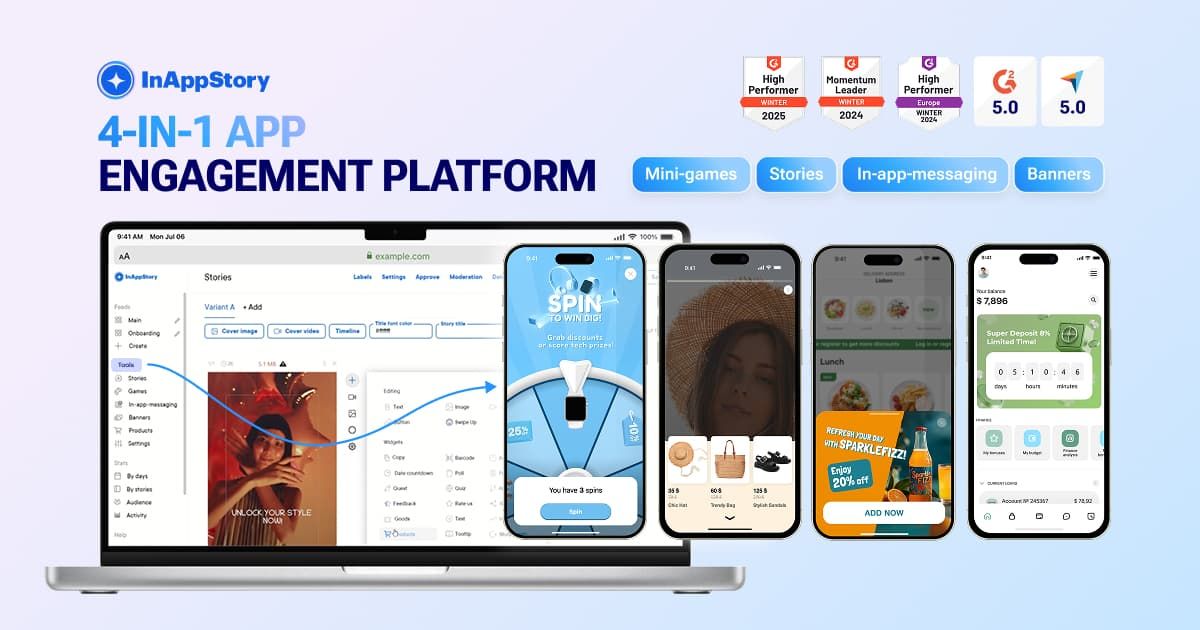
InAppStory is a platform for in-app communication and gamification. Instead of relying only on push notifications or email, product teams use it to place interactive messages, stories and promo games directly inside their own mobile app, so announcements, offers and feature launches are seen where users already are.

What it does

The platform centers on formats that live over or within your app's interface:

  • Stories – short full-screen, swipeable sequences for engagement and education.
  • Pop-up – an overlay for promotions or high-priority messages.
  • Bottom sheet – slides up to add context or an in-the-moment action.
  • Toast – a compact, non-blocking message for quick reminders.
  • Banner – persistent on-screen content such as an offer or countdown.
  • In-app landing pages (ScrollView) and full-screen messages.

It also includes interactive elements, games and checkout-related formats. The pitch is aimed at teams whose product has grown complex enough that manual, one-off in-app messaging no longer scales.

Who it suits

The typical fit is a product, growth or CRM team at a company with its own app and a sizeable user base — the kind of team that already knows where user attention should go next but lacks the tooling to ship those ideas quickly. A marketplace app running weekly promos, or a subscription app onboarding new features, is a realistic scenario: a product manager builds a story or pop-up, targets a segment, and measures whether activation or repeat usage moves.

If your app is small, or your messaging needs are limited to occasional announcements, a full engagement platform is likely more machinery than you need.

Trade-offs to weigh

  • In-app only. These formats reach users who already open the app; they complement, rather than replace, push and email for bringing people back.
  • Quote-based pricing. Pricing is custom, based on monthly active users and the formats you need, so budgeting requires a sales conversation rather than a self-serve checkout.
  • Build versus buy. Native in-app messaging is possible to build in-house, but maintaining multiple formats, targeting and analytics across releases is ongoing engineering work.

A practical next step: list the three moments where you currently lose user attention — a new feature nobody finds, a renewal nobody notices, a promo that underperforms — and ask a demo whether those formats map to them. For background on the category, OneSignal and Braze cover adjacent messaging and engagement ground.

How does InAppStory help increase customer lifetime value (LTV)?

InAppStory increases LTV by keeping offers, new features and journeys visible inside the app, so existing users return more often and progress further instead of drifting away. The platform combines interactive in-app formats with promo games; pricing is quoted based on monthly active users and the formats you choose, so cost scales with the audience you are trying to monetise.

Where the LTV effect comes from

  • Repeat attention: Stories, pop-ups, banners, bottom sheets and toasts place messages directly in the product rather than in a crowded inbox. A toast suits a quick trigger-based reminder; a banner keeps a countdown or offer permanently in view; a pop-up interrupts for high-priority promotions.
  • Deeper journeys: In-app landing pages (ScrollView) and full-screen messages let you explain a feature or offer without sending users elsewhere, which supports activation and upsell rather than one-off clicks.
  • Habit through play: Gamification and promo games give users a reason to open the app repeatedly, the behaviour that usually precedes higher retention and spend.
  • Personalisation at scale: The pitch is that communication stays personal as the audience grows, so teams do not have to choose between reach and relevance.

A concrete scenario

A subscription app wants more users to adopt an annual plan. A banner holds the upgrade offer in view, a bottom sheet explains the saving at the moment a user hits a usage limit, and a short Story sequence warms up users who have never opened the pricing screen. Each format targets a different level of readiness instead of broadcasting the same push to everyone.

How to judge whether it fits

Your situation Likely fit
Large or fast-growing in-app audience, manual messaging no longer scales Strong
Retention or repeat usage is the main constraint Strong
You mainly need email or web campaigns Weak
You need transparent self-serve list pricing before a demo Weak — quotes are custom

Reviewers quoted on the site — including Nupur R., a senior product manager — highlight easy communication, high delivery compared with push notifications, and interactivity that lifts engagement. That is their observation from using the product; the practical reading is that the formats earn their place when they are tied to a measurable step in the user journey, such as trial-to-paid conversion or feature adoption, rather than used as decoration.

Next step: define one LTV lever you want to move, pick the single format that matches the moment, and ask for a quote scoped to that use case and your MAU. For broader context on in-app messaging, see OneSignal and Braze.

Which in-app communication formats does InAppStory support, such as stories, pop-ups, or banners?

InAppStory supports a set of in-app formats that cover both passive visibility and active interaction. According to the product page, the main ones are:

  • Stories — short, full-screen swipeable sequences, used for engagement, education, or warming users up to a new feature.
  • Pop-up — an overlay that grabs immediate attention, suited to promotions and high-priority messages.
  • Banner — a persistent element that keeps an offer, reminder, tip, or countdown in view.
  • Bottom sheet — slides up from the bottom to add context to the current screen, useful for offers, clarifications, and quick actions.
  • Toast — a compact message over the interface that does not interrupt the user flow, best for quick reminders and trigger-based messages.
  • In-app landing pages (ScrollView) and full-screen messages — listed alongside the formats above for longer or more structured content.

The page also groups these under "Interactive elements" and "Games," so gamified promo mechanics sit alongside the message formats rather than as a separate product.

Choosing between them

The formats differ mainly in how much attention they demand and how much they interrupt:

Format Attention level Interruption Typical use
Toast Low None Trigger-based reminders
Banner Low, persistent None Ongoing offers, countdowns
Bottom sheet Medium Partial Contextual offers, clarifications
Pop-up High Yes Promotions, must-see messages
Stories High, voluntary Full screen, user-driven Education, feature launches
In-app landing page High, voluntary Full screen Multi-step content

A practical decision rule: use Toast or Banner when the message should coexist with what the user is doing; move to Bottom sheet or Pop-up when the message needs a decision; use Stories or an in-app landing page when you want the user to opt into a sequence rather than be interrupted.

Next step

Map each format to a single job in your current funnel — for example, a Toast for a triggered reminder, a Story for a feature launch — then check whether your existing tooling can target and measure those placements. If you want to see how the formats behave in a live app, the vendor offers a demo path from the page, and pricing is quoted based on monthly active users and the formats you select, so it is worth defining your format list before requesting a quote. The platform has been used by brands for in-app communication for over seven years, per the page.

For broader context on in-app messaging approaches, you can compare with OneSignal or Braze, though their format sets and positioning differ from InAppStory's.

How is InAppStory priced, and what factors like MAU affect the cost?

InAppStory does not publish a fixed price list. It quotes per project, and the page states that pricing is based on your monthly active users (MAU) and the formats you need. So the cost is effectively a function of audience size and how many in-app surfaces you run, not a flat subscription you can look up.

What drives the quote

  • MAU. The page explicitly names MAU as a pricing input, so a larger active audience generally means a higher tier.
  • Formats selected. The platform lists Toast, Bottom sheet, Stories, Pop-up, Banner, plus in-app landing pages (ScrollView) and full-screen messages. Each format you activate can change the scope — a team running only Banners is a different deal from one running Stories, games and landing pages together.
  • Interactive elements and games. Gamification and interactive mechanics are part of the platform, so if those are central to your plan, expect them to be part of the commercial discussion.

How to think about the trade-off

A per-MAU model aligns cost with reach, which suits apps whose engagement strategy scales with the user base. The catch is that you need a clear internal view of which formats actually move retention before you commit — otherwise you pay for reach without knowing which surface earned it.

Practical next step

Before requesting a quote, list the two or three formats tied to a specific goal (for example, Stories for feature education, Pop-up for a time-limited offer), estimate your MAU, and ask for pricing at that scope. That gives you a comparable number instead of a broad platform quote. You can start from InAppStory.

If you want to benchmark the category, Braze Braze and Airship Airship also sell engagement platforms with usage-based pricing, which can help you sense-check the shape of any quote you receive.

Can InAppStory be integrated with an existing mobile app and analytics stack?

Yes. InAppStory is built to sit inside an app you already ship, not to replace it. The platform delivers in-app formats — stories, pop-ups, banners, bottom sheets, toasts, checkout elements, games, and in-app landing pages — which implies a client-side SDK or embedded module inside your existing mobile app, with campaigns and formats configured from the platform side. The site's own framing supports this: it positions the product as a layer for guiding attention "inside the app" rather than as a standalone app or destination.

What integration typically involves

  • Mobile app: An SDK added to your iOS and/or Android build, plus a place in your navigation or screen flow where formats render. Stories and full-screen messages need their own surface; banners, toasts and bottom sheets are placed within existing screens.
  • Content and campaign workflow: Your team defines formats, triggers and audiences in the InAppStory workspace, then publishes without necessarily shipping a new app version — the practical reason teams adopt this class of tool.
  • Analytics: Events from shown, clicked, completed and converted interactions need to reach your analytics stack. Expect to pass through your existing event pipeline (for example, forwarding to your product analytics or CDP) rather than assuming a turnkey native connector for every tool.

Where the trade-offs sit

Situation Fit
You want faster campaign changes without app releases Strong — this is the core value
You already have a clean event taxonomy and a CDP Easier — map InAppStory events into it
Your analytics is a bespoke in-house system Workable, but budget engineering time for the event bridge
You need the marketing team to self-serve Good, provided triggers and audiences are set up once

A concrete scenario: a subscription app wants to promote an annual plan. The product manager defines a bottom sheet triggered after a user's third session, a story sequence explaining the plan, and a banner with a countdown. Those fire inside the existing app; the resulting impressions and conversions are pushed into the analytics stack the growth team already uses for cohort and LTV reporting. The integration work is front-loaded — SDK, event mapping, placement — after which campaign changes are mostly configuration.

Next step

Before committing, ask InAppStory for the SDK documentation for your platforms, the list of supported event callbacks, and any existing analytics or CDP integrations. Then check one thing internally: whether your app's release cycle and event schema can absorb a new source of interaction events without breaking existing reports. If the answer is yes, integration is a scoped engineering task rather than a rebuild.

For comparison, it is worth seeing how adjacent in-app engagement tools document their SDKs and event models, such as Braze or Airship, since both publish integration and event-forwarding details you can weigh against your stack.

How do InAppStory's in-app messages compare to push notifications for engagement?

InAppStory positions its in-app formats as a higher-delivery, more interactive complement to push notifications rather than a replacement. The page's own customer quote, from Nupur R., a Senior Product Manager, describes "a very high delivery rate against the usual push notifications" and notes that the interactive nature helps increase engagement. That is a customer's observation, not an independently verified benchmark.

The practical difference

Push notifications leave the app and compete in a crowded lock screen; they can be muted, batched or ignored. In-app messages appear while the user is already inside the product, so there is no delivery dependency on OS permissions or notification settings. The trade-off is reach: in-app messages only work when someone opens the app, whereas push can pull people back in. Most teams use push for re-engagement and in-app formats for activation, education and conversion once the user has arrived.

Formats and their best uses

  • Stories — short full-screen swipeable sequences for launches, education and warming users toward a next step.
  • Pop-up — an overlay for promotions or high-priority messages that should not be missed.
  • Bottom sheet — slides up to add context to the current screen; suits offers and in-the-moment actions.
  • Toast — a compact overlay that does not interrupt flow; suits quick reminders and trigger-based messages.
  • Banner — stays visible for offers, reminders, tips or countdowns.
  • Games and interactive elements — promo mechanics that give users a reason to return.

The page also mentions in-app landing pages (ScrollView) and full-screen messages, and describes the platform as covering communication and gamification in one place.

How to choose

Consideration Push notifications InAppStory in-app formats
Where the message appears Outside the app, on the device Inside the app interface
Reach Can reach users who are not in the app Only users currently in the app
Permission dependency Depends on opt-in and OS behavior No notification permission needed
Interactivity Typically a tap-through Stories, games, sheets, banners
Best role Re-engagement and win-back Onboarding, feature adoption, offers, retention

A concrete scenario: a subscription app wants existing users to notice a new feature. A push may be muted or ignored; a Story sequence shown on the next app open, followed by a bottom sheet with a trial action, keeps the message inside the product where the user is already attentive. The reverse applies to a lapsed user who has not opened the app in weeks — push is still the tool that brings them back.

Next step

Map your current push campaigns by goal. Keep push for re-engagement, and test moving feature announcements, upsell offers and onboarding steps into in-app formats, measuring completion and conversion rather than open rate alone. Because the page notes that pricing is based on monthly active users and the formats you choose, list the formats you actually need before requesting a quote.

Related questions

More questions →
How Do Enterprise Teams Adopt Specialist AI Agents Without Disrupting Existing Workflows?

Enterprise teams can adopt specialist AI agents without disruption by starting with one narrow, high-volume workflow, running it as a bounded pilot with human review, measuring against a baseline, and only then expanding. The key is to treat agents as new team members with defined scopes rather than as a replacement for existing tools or a sweeping platform migration. This article explains what specialist agents are, where they fit across common team functions, and a phased approach you can follow.

What Makes an Agent "Specialist" Rather Than General-Purpose

A general-purpose assistant responds to open-ended prompts across many topics. A specialist agent is scoped to one job: it has a defined goal, a limited set of tools and data sources, and a clear definition of "done."

That scoping matters for enterprise teams for three practical reasons:

  • Predictability. A narrow agent produces more consistent outputs, which makes it easier to review and trust.
  • Permission control. You can grant access only to the systems that specific task needs, rather than broad data access.
  • Measurable value. When an agent owns one workflow, you can compare its output against a manual baseline.

A useful rule of thumb: if you cannot describe the agent's job in one sentence with a clear input and output, it is still too broad to deploy safely.

Mapping Team Functions to Agent Use Cases

Most enterprise teams have a handful of repetitive, rules-plus-judgment tasks that are good first candidates. The table below shows typical starting points.

Team Candidate agent task Why it fits
Sales Research and enrich inbound leads before handoff High volume, structured output, easy to verify
Customer success Draft responses to common account questions Repetitive, benefits from consistency
Marketing Repurpose long-form content into channel variants Clear brief, reviewable drafts
HR Screen and summarize applications against criteria High volume, needs audit trail
Operations Triage and route incoming requests Rule-based with clear routing logic

Notice that none of these replace a person's judgment. They compress the repetitive portion so the human spends time on exceptions and decisions.

A Phased Adoption Approach: Pilot, Measure, Expand

Phase 1: Pick one workflow and define success

Choose a task that is high-volume, low-risk, and currently a bottleneck. Write down:

  • The current process, step by step
  • The baseline metric (time per task, volume per week, error rate)
  • What "good output" looks like, with two or three examples
  • Who reviews the agent's work

Phase 2: Run a bounded pilot

Keep the agent inside the existing workflow rather than beside it. For example, the agent drafts; the human sends. Set a review gate so nothing leaves the team unreviewed. Run for a fixed period, such as four to six weeks, with a small group.

Phase 3: Measure against the baseline

Compare the same metrics you recorded in Phase 1. Look for time saved, consistency gained, and — importantly — where the agent failed. Failures tell you whether the scope was right.

Phase 4: Expand deliberately

Only widen scope after the pilot shows a clear, repeatable gain. Expand in one of two directions: more volume of the same task, or an adjacent task with the same data and review pattern. Avoid expanding into a new function and a new data source at the same time.

Handling Workflow Integration Concerns

Data access

Give each agent the minimum access its task requires. Prefer read access plus a single write action over broad permissions. Document which systems it touches so security and IT can review.

Handoffs

Define exactly where the agent stops and a human begins. A simple handoff rule works well: the agent completes the task and flags anything outside its defined scope for a person. Ambiguous handoffs are the most common source of friction.

Human oversight

Decide the review level up front:

  • Full review for anything customer-facing or high-stakes
  • Spot check for internal, low-risk outputs
  • Exception-only review once the agent has a track record

Start stricter than you think you need, then relax as evidence accumulates.

How Roles and Responsibilities Shift

Adopting agents rarely removes roles; it redistributes effort. Expect these shifts:

  • Reviewers become editors. People spend less time producing first drafts and more time improving and approving them.
  • Process owners become agent owners. Someone needs to maintain the agent's instructions, examples, and scope as the business changes.
  • New quality checks appear. Teams need a lightweight way to catch drift — for example, a weekly sample review.

Be explicit about who owns the agent after launch. An unowned agent degrades quietly.

Practical Criteria for Choosing Where to Start

Score candidate workflows against these questions:

  1. Volume: Does it happen often enough to matter?
  2. Risk: What is the cost of a wrong output, and can a human catch it?
  3. Structure: Is the input and output reasonably consistent?
  4. Baseline: Can you measure the current state today?
  5. Ownership: Is there a person who will own the agent after launch?

A workflow that scores well on all five is a strong first pilot. A high-volume task with no clear owner is a poor start, no matter how repetitive it is.

A Simple Pilot Template

You can copy this structure to scope your first agent:

  • Task: [one sentence]
  • Current baseline: [time/volume/error rate]
  • Agent scope: [what it does, what it does not do]
  • Data access: [systems, read/write]
  • Handoff rule: [when it escalates to a human]
  • Review level: [full / spot / exception]
  • Owner: [name]
  • Pilot length: [weeks]
  • Success metric: [target]

Bottom Line

Disruption comes from adopting too much at once, not from agents themselves. Start with one scoped task, keep humans in the loop, measure against a real baseline, and expand only when the evidence supports it. Platforms built around specialist agents — such as Relevance AI, which offers agents for sales, customer success, marketing, and HR — are designed for exactly this kind of task-by-task rollout, so you can add capability without rebuilding your team's existing processes.

What is InAppStory?

InAppStory is a platform for in-app communication and gamification. It lets product and marketing teams place interactive, personalized messages and promo games directly inside a mobile app, so offers, new features, and user journeys stay visible as the product grows harder to manage manually. It fits teams that already have an audience and now need a faster way to direct attention inside the app, rather than relying only on push notifications.

What problem it solves

The core premise is that audience growth makes attention harder to manage. Once an app has a large user base, important content — a new feature, a promotion, a next step in a journey — competes with everything else on screen. InAppStory positions itself as the layer that guides that attention and keeps communication personal at scale.

The site frames the value this way: your team already knows where user attention should go next, and the platform provides the tools to bring those ideas to life without working around limitations.

Formats it supports

InAppStory offers several in-app formats, each suited to a different job:

Format How it appears Best for
Toast Compact message over the interface, no interruption to flow Quick reminders, trigger-based messages
Bottom sheet Slides up from the bottom, adds context to the current screen Offers, clarifications, in-the-moment actions
Stories Short full-screen sequences, easy to swipe through Engagement, education, warming users up
Pop-up Overlay that grabs attention instantly Promotions, offers, high-priority messages
Banner Stays visible on screen Offers, reminders, tips, countdowns

The platform also lists in-app landing pages (ScrollView) and full-screen messages, plus interactive elements, games, and checkout as part of its toolkit.

Who it's for

InAppStory is aimed at teams that need to surface what's new and keep communication personal as they scale. The site describes it as serving leading brands for 7+ years and highlights ease of launch, flexible workflows, and visible in-app impact.

A customer quote on the page — from Nupur R., Senior Product Manager — notes that the platform made new feature introduction and customer communication easy, with a high delivery rate compared to usual push notifications, and that the interactive format helped increase engagement.

How pricing works

Pricing is not listed as fixed tiers. The site directs visitors to request a custom quote by filling out a form, and states that pricing is based on MAU (monthly active users) and the formats you need. If you want a concrete number, the path is to book a demo or submit the quote form rather than expect a published price list.

When it's worth considering

Consider InAppStory if you:

  • Already have an audience and want to guide attention inside the app more deliberately
  • Need interactive, in-app messaging beyond standard push notifications
  • Want multiple message formats (stories, pop-ups, banners, toasts) from one platform
  • Are comfortable with custom, MAU-based pricing

It may be less relevant if you only need basic push notifications, or if you require published, self-serve pricing before evaluating a tool.

Who is InAppStory for and what problems does it solve?

InAppStory is an in-app communication and gamification platform for product, growth, and marketing teams that already have an audience and now need to direct attention inside the app. It solves a specific problem: as a product grows more complex, offers, new features, and user journeys get harder to surface manually, so engagement and retention slip. InAppStory gives teams formats — stories, pop-ups, banners, toasts, bottom sheets, games, and in-app landing pages — to keep those things visible and personalized.

Who it's for

The site frames the target user directly: teams that have "already done the hard part — grown your audience." That points to a few concrete profiles:

  • Product teams introducing new features or guiding users through journeys without relying only on push notifications.
  • Growth teams trying to lift activity, repeat opens, and retention.
  • Marketing teams running in-app promotions, offers, and campaigns that need to be seen inside the product.
  • Teams at scale where manual, one-off in-app messaging no longer keeps up with audience size.

A customer quote on the page makes the growth-stage fit explicit: "We wanted instruments that could increase the activity of our clients and make them open our app and interact with it more often."

What problems it solves

The core problem is attention. As a product adds features and offers, users miss them, and manual communication stops scaling. InAppStory addresses this by making in-app messages interactive and personalized so "new things get seen, and your most valuable users keep coming back."

In practice, that maps to:

  • Low visibility of new features or offers — surfaced through stories, pop-ups, and banners rather than buried in the UI.
  • Weak engagement — interactive elements and games give users something to do, not just read.
  • Retention and LTV pressure — the platform is positioned around driving LTV through in-app communication.
  • Manual communication overhead — campaigns are launched and managed in one platform instead of worked around product limitations.

One reviewer, Nupur R. (Senior Product Manager), describes the trade-off against push: "a very high delivery rate against the usual push notifications. Plus, these are interactive, so it helps us increase engagement."

What formats it offers

The platform groups its tools into interactive elements and games, plus several message formats. Each format suits a different job:

Format How it appears Best for
Toast Compact message over the interface, no flow interruption Quick reminders, trigger-based messages
Bottom sheet Slides up from the bottom, adds context Offers, clarifications, in-the-moment actions
Stories Short full-screen swipeable sequences Engagement, education, warming users up
Pop-up Overlay that grabs attention Promotions, offers, high-priority messages
Banner Stays visible on screen Offers, reminders, tips, countdowns
In-app landing pages (ScrollView) & full-screen messages Full-screen content Deeper content and campaigns

Games and interactive elements sit alongside these, which is why the page calls it "one platform for in-app communication and gamification."

How pricing works

Pricing is not published as a fixed plan on the page. The site directs you to request a custom quote: "Fill out the form and we'll get back to you with pricing based on your MAU and the formats you need." A pricing page exists at inappstory.com/pricing, but the page evidence does not list specific tiers or numbers.

So the practical takeaway: cost depends on your monthly active users and which formats you use, and you get it through a quote rather than self-serve checkout. If budget certainty matters early, request the quote before committing to a format mix.

When it's a good fit — and when it isn't

Likely a good fit if:

  • You already have a user base and want to increase in-app activity and retention.
  • You need multiple in-app formats (not just push) in one place.
  • You want interactive and gamified communication, not static messages.
  • You're comfortable getting pricing through a custom quote based on MAU.

Probably not the right starting point if:

  • You're pre-audience and still validating the product.
  • You only need a single simple message type.
  • You need published, self-serve pricing before evaluating.

The page notes the platform has helped leading brands communicate inside the app for 7+ years, with review scores of 5.0 across 65 and 29 reviews — useful as a signal of maturity, though the specific claims come from the vendor's own page.

What Evidence Shows InAppStory Is Trusted by Brands?

InAppStory presents three kinds of trust evidence on its site: longevity (7+ years helping leading brands communicate inside the app), third-party review scores (5.0 from 65 reviews and 5.0 from 29 reviews), and named customer quotes describing measurable outcomes like high delivery rates and increased client activity. If you are evaluating the platform for a product team, these signals are worth reading alongside the pricing model, since InAppStory quotes custom pricing based on MAU and the formats you need rather than publishing a rate card.

Longevity and stated track record

The site states that InAppStory has been "helping leading brands communicate inside the app for 7+ years." That claim is about duration and brand relationships, not a specific customer count or revenue figure. Treat it as a signal of stability rather than proof of fit for your use case.

Review scores

The site displays two review ratings, both 5.0:

Rating Review count
5.0 65 reviews
5.0 29 reviews

The page does not name the review platforms behind these numbers, so you cannot independently verify them from the site alone. If review provenance matters to your evaluation, check the named platforms directly before treating the scores as decisive.

What customers say they got out of it

The site includes direct quotes that point to specific outcomes rather than general praise:

  • Delivery and engagement. Nupur R., Senior Product Manager, describes "new feature introduction, easy communication with the customers and a very high delivery rate against the usual push notifications," adding that the interactive format "helps us increase engagement with the customer."
  • Activity and app opens. Another customer says they "wanted instruments that could increase the activity of our clients and make them open our app and interact with it more often," and that "InAppStory has proven to be a fantastic solution to these challenges."

These quotes are useful because they name the problem (push notification limits, low app opens) and the claimed result (higher delivery, more interaction). They are still vendor-published testimonials, so weigh them as directional evidence.

What the platform says it is recognized for

The site summarizes its reputation as "Recognized for easy launches, flexible workflows, and visible in-app impact." That maps to three evaluation criteria you can test in a demo:

  • Easy launches — how quickly your team can ship a first campaign.
  • Flexible workflows — whether the tool fits your existing approval and content process.
  • Visible in-app impact — whether you can measure results inside the product.

How to verify these claims yourself

Because the strongest evidence on the page is vendor-published, use the site's own next step to test it:

  1. Book a demo through the site.
  2. Ask for references or case detail in your industry, not just the quotes shown.
  3. Request pricing, which the site says is a custom quote "based on your MAU and the formats you need."
  4. Ask which review platforms produced the 5.0 scores so you can read the full reviews.

The trust signals are real and specific enough to justify a demo, but they are not a substitute for checking references and pricing against your own scale and formats.

How does InAppStory pricing work?

InAppStory does not publish fixed prices. The site has a Pricing page, but the actual cost is delivered as a custom quote: you fill out a project form, and the team responds with pricing based on your MAU (monthly active users) and the formats you need. If you want a number before committing, the practical path is to request that quote rather than look for a public price list.

What the pricing model is based on

According to the site's own quote request section, pricing is calculated from two inputs:

  • MAU (monthly active users) — the size of your in-app audience
  • Formats you need — which in-app communication and gamification formats you plan to use

This means two teams with the same user count can get different quotes if they use different format sets. It also means cost scales with audience size rather than being a flat subscription you can read off a page.

How to get a price

  1. Go to the Pricing page or the "Get a custom quote" form on the site.
  2. Fill out the project form with your details.
  3. The team gets back to you with pricing based on your MAU and required formats.
  4. You can also book a demo if you want to see the formats before deciding.

The expected result is a tailored quote, not an instant checkout. There is no indication on the site of self-serve signup, instant pricing, or a free tier — so treat this as a sales-assisted purchase until you confirm otherwise with the vendor.

What you are buying

The quote covers access to one platform for in-app communication and gamification. The formats listed on the site include:

Format What it is Typical use
Toast Compact message over the interface Quick reminders, trigger-based messages
Bottom sheet Slides up from the bottom Offers, clarifications, in-the-moment actions
Stories Short full-screen swipeable sequences Engagement, education, warming users up
Pop-up Overlay that grabs attention Promotions, offers, high-priority messages
Banner Stays visible on screen Offers, reminders, tips, countdowns
In-app landing pages (ScrollView) & full-screen messages Full-screen content surfaces Campaigns and journeys

Because formats are a pricing input, it is worth deciding which of these you actually need before requesting a quote. Asking for everything "just in case" will likely raise the number.

What to prepare before requesting a quote

  • A realistic MAU figure, not a peak or a projection you cannot defend
  • The specific formats you intend to launch first
  • Whether you need games/gamification in addition to messaging formats
  • Your timeline, since the site positions quick launches as a strength

Practical considerations

  • No public price list. The Pricing page exists, but the number comes from the form. Budget approval will need a vendor conversation first.
  • MAU-based scaling. If your audience grows fast, expect the quote to be revisited. Ask how MAU is counted and how often it is measured.
  • Format scope matters. Clarify whether the quote covers all formats or a subset, and whether adding formats later changes the price.
  • Payment platforms are not listed on the site, so billing methods and terms are another thing to confirm directly.

If you are comparing vendors, the honest comparison here is not "price vs. price" but "what MAU and format bundle each vendor quotes you for the same scope." Request the quote with a fixed scope so the numbers are comparable.

Website Overview

Several search or sharing settings need attention. Together they may make snippets, preview images or preferred URLs less consistent across platforms.

Domain and Registration

Transfer-protection status is present, helping reduce the risk of unauthorized domain transfers. The domain has about 5 years of registration history; its current configuration provides more context than age alone. The domain uses the common .com extension, which is not an independent safety signal.

DNS and Email

The lowest TTL is 30 seconds, supporting rapid record changes at the cost of more frequent lookups. Nameservers are provided by yandexcloud.net, indicating managed DNS hosting. MX records point to the Google Workspace email service. No CNAME was found; the observed records resolve directly to addresses. SPF and DMARC are configured. DKIM status is unknown.

TLS and Certificates

The certificate issuer is Sectigo Limited, a commercial certificate authority. The certificate uses an RSA 2048-bit public key, offering broad client compatibility. The server supplied a complete certificate chain. No organization name is present in the certificate; the available fields are consistent with domain validation. The certificate is valid for about 198 days in total, with 159 days remaining.

HTTP and Browser Security

X-Powered-By exposes backend information: Next.js, Payload. The checked browser-security headers were not detected, leaving fewer explicit browser-side safeguards. No obvious internal addresses or debug information were found in the headers. The Server header identifies nginx without an exact version. No explicit CDN or WAF marker was found in the response headers.

Technology Stack Analysis

The public page identifies Next.js, HubSpot CMS, Google Tag Manager, nginx without precise versions, leaving fewer clues for version-specific scanning.

Search and Social Sharing

No homepage canonical URL was detected. If duplicate URLs exist, consolidation may be less explicit. Open Graph is partially configured; og:type is missing. Twitter Card metadata is configured. JSON-LD includes Organization data, helping describe the organization as an entity. The title has 51 characters, within a common display range.

Hosting and Email

DNSyandexcloud.net
HostingAmazon.com, Inc.
EmailGoogle Workspace
Approximate IP geolocation (inferred; a CDN or proxy may differ from the origin server) Germany flagFrankfurt am Main, Hesse, Germany Inferred 18.193.135.33

Registration details

RDAP / WHOIS

RegistrarName.com, Inc.
Registered2020-11-25
Expires2026-11-25
Domain statusclient transfer prohibited
Nameserversns1.yandexcloud.net、ns2.yandexcloud.net
DNSSECunsigned

DNS records

DNS

TypeNameValueTTLPriority
Ainappstory.com18.193.135.3330—
Ainappstory.com52.58.158.4830—
MXinappstory.comaspmx.l.google.com6001
MXinappstory.comalt1.aspmx.l.google.com6005
MXinappstory.comalt2.aspmx.l.google.com6005
MXinappstory.comalt3.aspmx.l.google.com60010
MXinappstory.comalt4.aspmx.l.google.com60010
NSinappstory.comns1.yandexcloud.net3600—
NSinappstory.comns2.yandexcloud.net3600—
TXTinappstory.comfacebook-domain-verification=wv73wl7iwwv8qlp1ektce57lp3rxhi600—
TXTinappstory.comgoogle-site-verification=-Zt9rk68pt8BfD6-62aMucyQ0Ija45dpsFS1m-Y06NM600—
TXTinappstory.comgoogle-site-verification=PUBLsYXFanm68zpBW2TpnR21tj1ZESnN6UfSTEu43ns600—
TXTinappstory.comgoogle-site-verification=fIvJPQ9viu2vMp2n9e4S86-ufCzpLb6aOeiv86I08AE600—
TXTinappstory.comgoogle-site-verification=qM3lgtgRSC4Aj5sJg2TahXlZrTmiZMytnnl3ptOoTpU600—
TXTinappstory.comgoogle-site-verification=ya0VLFHs4pqODeLNnOMX-r6rBK5zrXojr1klhFKuUHo600—
TXTinappstory.comv=spf1 a mx ip4:84.201.136.178 ip4:185.96.87.26 include:_spf.google.com include:9412177.spf07.hubspotemail.net ~all600—
TXTinappstory.comyandex-verification: f41c33519bce150b600—
DMARC_dmarc.inappstory.comv=DMARC1; p=none; sp=none; rua=mailto:[email protected]600—

TLS and certificates

TLS / SSL

AssessmentNormal configuration
Supported protocolsTLSv1.2、TLSv1.3
Negotiated protocolTLSv1.3
Certificate subject*.inappstory.com
IssuerSectigo Limited
Valid until2027-03-21T23:59 · Remaining when checked: 159 days
Verification detailsCertificate trust: Passed · Hostname match: Passed

HTTP response headers

HTTP

HeaderValue
content-typetext/html; charset=utf-8
cache-controlprivate, no-cache, no-store, max-age=0, must-revalidate
servernginx

Identified technologies

Next.jsHubSpot CMSGoogle Tag Managernginx

Pages, Search and Sharing

Meta descriptionLaunch in-app campaigns that keep offers, features, and journeys visible as your product grows more complex and harder to manage manually.
Canonical URLNot detected
LanguageEnglish (default)
Twitter Cardsummary_large_image
All bots 1 allowed · 1 disallowed
  • Allow/
  • Disallow/*?*
twitterbot 0 allowed · 0 disallowed
facebookexternalhit 0 allowed · 0 disallowed

User reviews (0)

  • No reviews yet.