
 简体中文
简体中文 English
Website review
This review may include AI-generated content and is not individually verified. Domain, certificate and other facts come from the observed data on this page.
What is KeebFinder?
KeebFinder is a comparison and discovery site for mechanical keyboards and keycap sets. It is built around filtering: you describe what you want — layout, switch type, connectivity, mounting style, materials, features — and it narrows a catalog down to matching boards rather than sending you through dozens of product pages. A typical listing shows a keyboard's specs alongside scored ratings for build quality, customizability, performance, productivity and portability, plus any current discount.
Who it is for
- First-time buyers who know their preferences in plain language ("quiet," "low profile," "wireless, 75%") but not the vocabulary of the hobby.
- Enthusiasts comparing specific options, such as a hot-swap wired board against a magnetic-switch model with rapid trigger.
- Deal watchers who want to see which boards are currently discounted without visiting each brand's store.
What it does well, and where it stops
The filter-first approach is the real value: it answers "which boards fit my constraints?" instead of "what is new?" The scored ratings also give a quick read on trade-offs — a compact board may score high on portability and lower on customizability. Treat those scores as a starting point for comparison, not a verdict, since a scoring system reflects its own criteria rather than your priorities.
The limits are the usual ones for an aggregator: it tells you what exists and roughly how it compares, but not how a specific switch feels under your fingers or how a case sounds in your room. Specs and prices also change, so confirm details with the seller before buying.
A practical way to use it
Decide your three non-negotiables first — for example, 75% layout, hot-swap sockets, and a quiet switch option — then filter on those and use the ratings to rank whatever survives. If you are weighing a mainstream board against a niche one, it also helps to check the manufacturer's own page for the final spec sheet and current price; for widely sold brands you can cross-check at Keychron or Ducky Keyboards.
How do I find a quiet mechanical keyboard on KeebFinder?
Use KeebFinder's filters and sort options to narrow the catalog to quiet or silent mechanical keyboards, then compare the remaining matches on layout, switch type and price. The site presents itself as a comparison tool for keyboards and keycap sets, with defined filter criteria, so the practical approach is to filter first and read reviews second.
A practical filter sequence
- Start with the Silent Switches entry point or search for "silent" — KeebFinder surfaces a Silent Switches category, which is the fastest route to boards marketed around reduced noise.
- Add your layout (75%, TKL, full-size) and connection preference (wired, wireless) so you are not scrolling through irrelevant results.
- Sort or filter by price if budget matters; the site shows sale pricing directly on listing cards.
- Open each candidate and check the switch name, because "quiet" marketing language and an actual silent switch are not the same thing.
What actually makes a keyboard quiet
Noise comes from three places, and only one of them is the switch:
| Source | What helps | Trade-off |
|---|---|---|
| Switch | Silent linear or silent tactile switches with dampening | Slightly mushier bottom-out feel |
| Case and mounting | Gasket mount, foam, plastic or thick metal case | Heavier, sometimes pricier |
| Keycaps and stabilizers | PBT caps, lubed and tuned stabilizers | Requires DIY work on many boards |
A low-profile board is not automatically quiet, and a hot-swap board lets you fix a noisy keyboard later by swapping in silent switches — worth paying for if silence is your priority.
Reading a listing properly
KeebFinder listing cards show spec tags and scores rather than just a photo. The example card for the Varmilo Minilo75 HE lists 75%, hotswap, wired, RGB, HE, rapid trigger, metal case and tray mount alongside a discounted price. That board's selling point is rapid trigger performance, not silence — a metal tray-mount case with HE switches is unlikely to be the quietest option, so treat the spec tags as a filter, not a verdict.
Where to verify before buying
KeebFinder aggregates specs; it does not measure sound. Cross-check with a source that records typing tests, such as YouTube reviewers, and confirm availability and returns with the brand or retailer. If you want community opinions on specific silent switch models, Reddit threads on r/MechanicalKeyboards are useful, though individual experiences vary with the same switch in different cases.
Decision rule
If you want quiet with no work, filter for silent switches plus a gasket-mounted or plastic case and buy that. If you already own a hot-swap board, skip the new purchase and buy silent switches instead — it is almost always cheaper and quieter than replacing the whole keyboard.
Which low profile mechanical keyboards are available on KeebFinder?
KeebFinder is a comparison and filter site rather than a store, so the low-profile keyboards you see there are listings drawn from other retailers. You can use its filters to narrow the catalogue to low-profile models, then compare each result on layout, switch type and price before clicking through to buy.
What you can realistically filter for
Based on how the site presents itself, the useful filters for a low-profile search are:
- Profile / switch type — the key filter for low-profile boards, since these use flatter switches such as low-profile Choc or low-profile Gateron-style options rather than standard MX-height switches.
- Layout — 60%, 65%, 75%, TKL and full-size, which matters because low-profile boards are most common in compact sizes.
- Connectivity — wired, wireless or hot-swappable, if you want to change switches later.
- Other traits from the listings — the page evidence shows entries tagged with things like hotswap, RGB, metal case, tray mount and rapid trigger, so expect similar tags on low-profile results.
What the listings look like
Each result is presented as a compact spec block with an overall score plus sub-scores for value, build quality, customizability, performance, productivity and portability, alongside a price and a short tag list. For example, the Varmilo Minilo75 HE appears as a 75% hotswap wired board with RGB, HE switches, rapid trigger, a metal case and tray mount, listed with a discount. That format is useful for scanning, but the scores are the site's own ratings — treat them as a starting point, not a verdict.
A practical way to choose
Low-profile boards trade key travel and switch choice for a thinner, more portable feel. If you type all day, standard-height switches usually give a more familiar feel; if you carry a board between desk and bag, or want a laptop-like typing height, low profile is the better fit.
Decide in this order:
- Layout — pick the smallest size that still includes the keys you actually use.
- Switch availability — confirm the low-profile switch type is one you can buy replacements for, especially if you want to swap them.
- Connectivity — wired only, or wireless with a dongle or Bluetooth.
- Case and mount — metal and gasket or tray mounts change sound and stiffness more than the low-profile shape itself.
A concrete scenario: if you want a quiet, thin board for an open-plan office, filter for low profile, then look for a silent switch option and a compact 65% or 75% layout, and check whether the listing notes hotswap support so you can fit silent low-profile switches later.
Where to verify before buying
KeebFinder aggregates; it does not stock or ship. Confirm the current price, stock and return policy on the retailer's own page, and check the manufacturer's site for the exact switch and keycap specifications. For broader context on switch types and low-profile options, community resources such as Reddit keyboard communities and enthusiast references like Deskthority can help you sanity-check a choice before you commit.
How does KeebFinder's scoring system work for comparing keyboards?
KeebFinder scores keyboards on several separate criteria rather than giving one overall verdict. The page evidence shows a product card with individual figures for Overall/Value, Build Quality, Customizability, Performance, Productivity, and Portability, plus a percentage discount and price. For the Varmilo Minilo75 HE shown there, the pattern is revealing: Performance is rated 93.0 while Build Quality is 43.8. The scores describe different qualities, so a high mark in one does not lift the others.
What the categories tell you
- Overall/Value condenses the rest into a single shopping-oriented number. Use it for shortlisting, not for deciding.
- Build Quality reflects materials and construction. The Minilo75 HE's metal case and tray mount sit alongside its 43.8 here, so the score appears to weigh more than just "metal versus plastic."
- Customizability covers how much you can change, such as hotswap sockets for replacing switches.
- Performance captures responsiveness and features aimed at fast typing or gaming. The Minilo75 HE's HE switches and rapid trigger fit its 93.0.
- Productivity and Portability answer different needs: daily work output versus carrying the board around.
How to use it
Start from the two or three categories that match your actual use, then compare candidates on those alone. A writer who never moves a keyboard can ignore Portability; someone who carries a board to a co-working space should weight it heavily. Treat the Overall/Value figure as a tiebreaker between boards that already pass your personal filters.
The trade-off is that numeric scores compress subjective feel into single figures. Typing sound, keycap texture, and stabilizer rattle do not reduce neatly to a number, so read the listed specifications on each card and use the scores to narrow the field rather than to crown a winner. KeebFinder's filter criteria are the more reliable tool for matching requirements like a low-profile or quiet board; the scores help you rank what survives those filters.
What are the best pre-built mechanical keyboards for productivity according to KeebFinder?
KeebFinder is a filter-driven comparison site, so it doesn't publish a single ranked "best for productivity" list. Instead, it surfaces productivity scores and lets you sort and filter candidates yourself. The clearest example visible on the site is the Varmilo Minilo75 HE, which carries a Productivity score of 76.2 — the highest productivity figure in the sample shown, alongside 93.0 for Performance and 62.8 for Portability.
What "productivity" tends to mean here
KeebFinder's scoring appears to reward boards that suit long typing sessions and desk-bound work rather than gaming or travel. In practice, that points to:
- 75% and larger layouts — you keep a function row and arrow keys, which matters for spreadsheets, IDEs and document editing.
- Hotswap sockets — you can swap to a quieter or heavier switch later without soldering.
- Wired or reliable wireless — fewer interruptions during a workday.
- Metal or solid cases — less deck flex and a more consistent typing feel.
The Minilo75 HE checks most of these: 75%, hotswap, wired, RGB, a metal case and tray mount. Note that "HE" (Hall Effect) with rapid trigger is a gaming-oriented feature; it doesn't hurt productivity, but it isn't what earns the typing score.
A practical way to choose
Decide your two non-negotiables first, then filter. If quiet matters most, start from the site's Silent Switches section. If you want a compact desk footprint without losing arrow keys, filter to 75% and above. If you need portability, accept a lower productivity score and look at the 60–65% range.
Cross-checking beyond one site
KeebFinder's scores are its own editorial weighting, so verify against independent reviews before buying:
- Reddit — r/MechanicalKeyboards threads on office and typing use
- Keychron — widely used pre-built productivity boards
- Ducky — long-standing pre-built options
- NuPhy — low-profile and compact alternatives
For a concrete scenario: someone writing or coding eight hours a day should shortlist the Minilo75 HE, confirm the switch option is a linear or tactile rather than a loud clicky, and treat the rapid-trigger feature as a bonus rather than a reason to buy.
How can I filter keyboards by features like hotswap, RGB, or rapid trigger on KeebFinder?
KeebFinder's filter system lets you narrow mechanical keyboards by specific hardware features rather than browsing a single flat list. On the site, you start from the "What brings you here?" prompt or the main keyboard finder, then layer filters such as layout, switch type, connectivity, and feature tags. The page evidence shows feature tags attached directly to listings — for example, a Varmilo Minilo75 HE entry carries "Hotswap," "RGB," "HE," and "Rapid trigger" labels — so each filter you add should map to one of those tags.
How to filter by feature
- Open the keyboard finder and pick a starting category (for example, "Magnetic Keyboards" or "Silent Switches" if those are your priorities).
- Apply your must-have filters one at a time: hotswap, RGB, rapid trigger, wired/wireless, case material, mount style.
- Watch the result count after each addition. If it drops to zero, remove the least important filter first — usually RGB or a specific mount type.
- Sort or scan the remaining cards, which display the feature tags and the site's category scores (overall, value, build quality, customizability, performance, productivity, portability).
What each filter actually gets you
| Filter | Practical meaning | Trade-off to expect |
|---|---|---|
| Hotswap | Swap switches without soldering | Slightly higher cost and occasionally looser socket fit |
| RGB | Per-key or zone lighting | Can add cost and, on some boards, more plastic-heavy builds |
| Rapid trigger | Adjustable actuation reset, common on HE/magnetic boards | Mostly limited to Hall-effect models, which may feel different from standard mechanical switches |
A concrete scenario
Say you want a 75% board for both typing and fast-paced games, with silent switches and the option to change switches later. Filter for 75% layout + hotswap + silent switches, then check whether any remaining models also list rapid trigger. If nothing matches all four, decide which two are non-negotiable — for most people, layout and hotswap are the hardest to change after purchase, while RGB is the easiest to live without.
As a next step, compare two or three filtered results side by side using the site's own score columns, then cross-check specs on the manufacturer's page before buying. For broader background on switch types and layouts, Reddit communities and Deskthority are useful references, though neither is a store.
 Cloudflare
 Google Workspace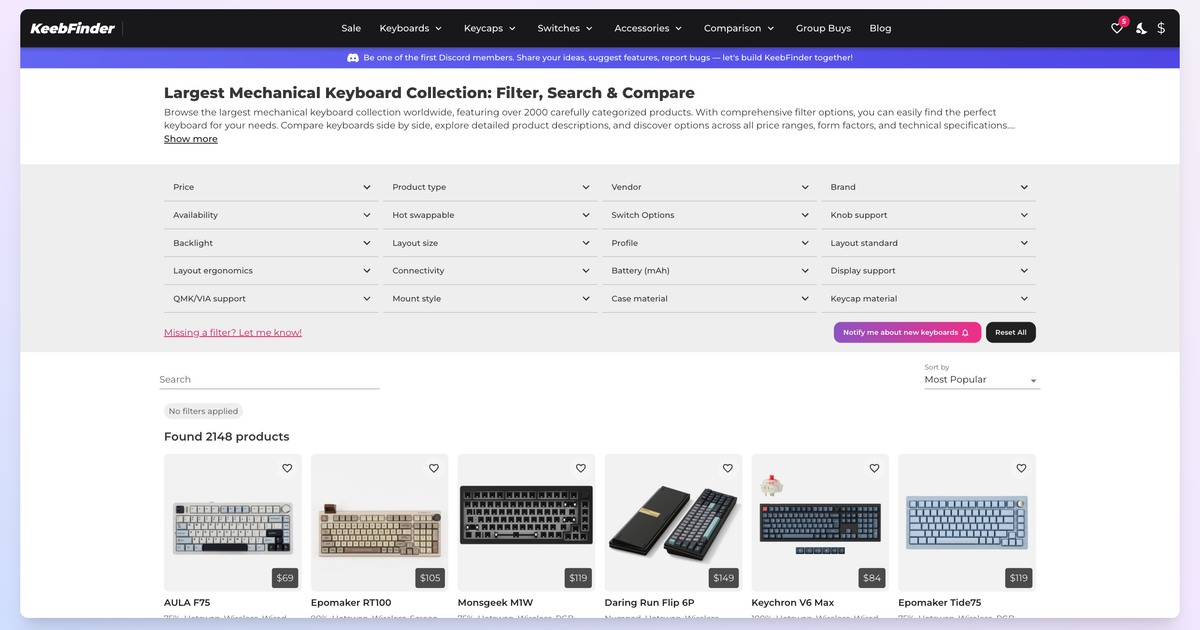

User reviews (0)