Website profiles · Technology insights · Alternatives

llamachat.app

Chat with your favourite LLaMA LLM models

No paid content found
Visit website
Profile views 0 Outbound visits 0 Normal
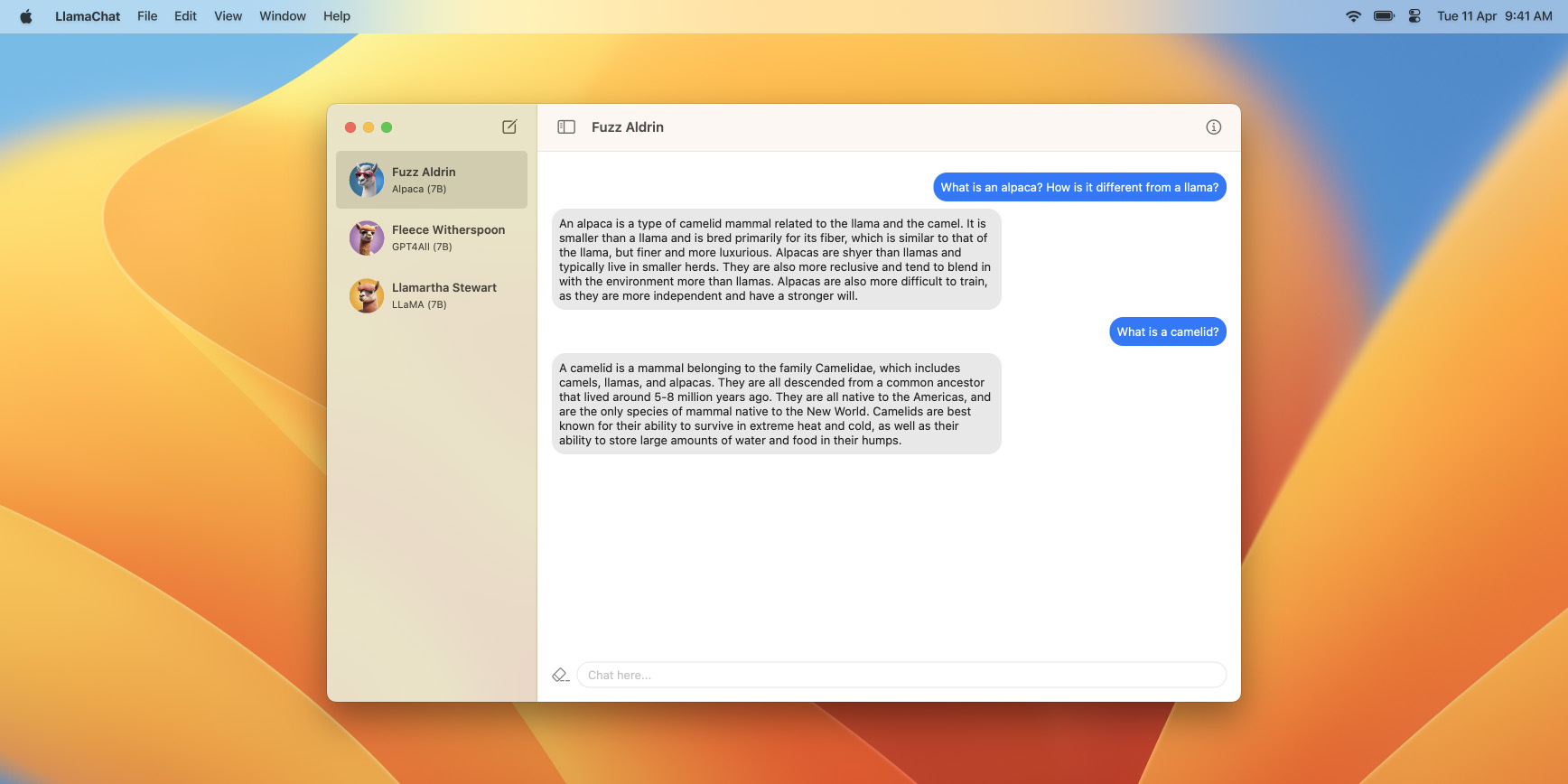
LlamaChat Full homepage screenshot

At a glance

Category
Artificial Intelligence
Language
English
Paid-content signal
No paid content foundObserved
Registered
2023
Hosting
VercelInferred
HTTPS certificate trusted
PassedObserved
Last updated

Website review

This review may include AI-generated content and is not individually verified. Domain, certificate and other facts come from the observed data on this page.

What is LlamaChat?

LlamaChat is a free, open-source Mac app for chatting with LLaMA-family language models locally, without sending prompts to a cloud service. It runs on macOS 13 and later, supports both Intel and Apple Silicon Macs, and is distributed through GitHub and Homebrew.

What it actually does

  • Local chat: You converse with LLaMA, Alpaca and GPT4All models on your own machine; Vicuna is listed as coming soon.
  • Model import: It accepts raw PyTorch checkpoints or pre-converted .ggml files, so you can bring models you already have rather than downloading them inside the app.
  • Open foundation: It is built on llama.cpp and llama.swift and is described as fully open-source and free.

Who it suits

It fits a Mac user who wants a private, offline chatbot and is comfortable finding and managing model files. LlamaChat does not bundle any models, so setup involves obtaining weights yourself and following their licence terms. That makes it less plug-and-play than a hosted chatbot, and it is Mac-only.

How it compares

Option Where it runs Setup effort Best for
LlamaChat Locally on macOS Moderate: supply your own model files Private, offline chat on a Mac
Hosted chat services Provider's servers Low Instant use, no hardware concerns
Command-line runners Locally, any OS Higher Scripting and experimentation

As a next step, check your Mac meets macOS 13 and decide which model file you can obtain legitimately before installing; for broader local-model tooling, GitHub hosts the project and related tools.

Do I need to convert my model files before using LlamaChat, or can it import raw PyTorch checkpoints?

No, you don't need to convert first. LlamaChat can import raw published PyTorch model checkpoints directly, or your pre-converted .ggml model files.

What that means in practice

  • Raw PyTorch checkpoints: If you've downloaded a model in its original PyTorch form, you can bring it into LlamaChat as-is; the app handles the conversion step for you.
  • Pre-converted .ggml files: If you already have a .ggml version, you can import that too, which is useful when you've prepared files for another local tool.

A useful decision criterion

  • Choose raw PyTorch when you want to work from the model's published source form and avoid hunting for a separate converted copy.
  • Choose .ggml when you already have one and want to skip any conversion work.

One practical caveat: LlamaChat doesn't ship with model files, so either way you're responsible for obtaining the model and following its provider's terms. If you're new to this, start with a pre-converted .ggml file from a source you trust, then try a raw checkpoint once you're comfortable with the import flow.

What are the system requirements to run LlamaChat on a Mac?

LlamaChat runs on macOS 13 (Ventura) or later and is built for both Intel processors and Apple Silicon. It is distributed as a downloadable app (v1.2.0) or via Homebrew cask. Beyond the OS and processor support, the page does not list specific RAM, storage or GPU requirements, so plan for enough memory and disk space to hold the LLaMA, Alpaca or GPT4All model files you supply yourself, since LlamaChat ships without any models.

A practical next step: check the model you intend to run (for example an Alpaca 7B or GPT4All file) for its own memory and disk guidance, then confirm your Mac meets macOS 13 before installing. If you are on an older macOS version, LlamaChat will not run until you upgrade.

How do I install LlamaChat using Homebrew?

Run this command in Terminal:

brew install --cask llamachat

LlamaChat is distributed as a Homebrew cask, so it installs like a regular Mac app rather than a command-line tool. The page lists version 1.2.0, built for both Intel processors and Apple Silicon, and requires macOS 13. You can also download it directly from the site if you prefer not to use Homebrew.

After installing, launch LlamaChat from Applications. The app ships without any model files, so you'll need to obtain LLaMA, Alpaca or GPT4All models yourself and import them. LlamaChat accepts raw PyTorch checkpoints or pre-converted .ggml files, and you're responsible for following each model provider's terms.

A practical next step: confirm your macOS version first (sw_vers in Terminal). If you're on macOS 12 or earlier, the cask won't run, and you'll need to upgrade before installing.

Where do I get the LLaMA, Alpaca, or GPT4All model files that LlamaChat doesn't include?

LlamaChat is only the chat front-end: it ships with no model files, so you obtain the weights yourself and import them. The page confirms it can import raw PyTorch checkpoints or pre-converted .ggml files, and that you are responsible for following each model provider's terms.

The practical split is by model family:

  • LLaMA: Meta's original weights are gated. Request access through Meta's official release process, then convert the checkpoint to .ggml using the tooling referenced by llama.cpp, which LlamaChat is built on.
  • Alpaca: Stanford's 7B fine-tune of LLaMA. Its model card and repository point to the delta weights and instructions for reconstructing them from a base LLaMA checkpoint — you still need the base model.
  • GPT4All: Distributed by Nomic AI as ready-to-use .ggml files through its official site and installer, which is the least friction if you just want to start chatting.
Model Access route Format work needed
LLaMA Gated request to Meta Convert checkpoint to .ggml
Alpaca Stanford repo plus base LLaMA Apply delta, then convert
GPT4All Direct download from Nomic AI Usually none — .ggml ready

For a first run on a Mac, GPT4All files are the quickest path: download a .ggml file, open LlamaChat, and import it. Reserve the LLaMA and Alpaca routes for when you specifically want those base models and are prepared for the conversion step. Check each provider's licence before redistributing anything you download.

Is LlamaChat affiliated with Meta or Stanford, and can I use it for free?

No. LlamaChat states it is an independent application and is not affiliated with, endorsed by, or sponsored by Meta Platforms, Stanford, or Nomic AI. Its use with models developed by those organizations does not constitute a partnership. The site also notes it is not distributed with any model files, proprietary or otherwise—you are responsible for obtaining and integrating model files under their providers' terms. Yes, it is free: the site says LlamaChat is 100% free and fully open-source, "and always will be."

What "free" covers

The application itself is free, with source available via GitHub. The models are separate. Alpaca, LLaMA, GPT4All, and other model files have their own licenses and conditions, so check those before downloading or using them. The free claim applies to LlamaChat, not to every model you load into it.

Practical decision

For a Mac user who wants a local chat interface and is comfortable sourcing model files and following their terms, LlamaChat is a no-cost option. If you need bundled models or vendor support, this is not that kind of product. As a next step, confirm your Mac meets the stated requirement (macOS 13) and review the license of the specific model you plan to import before installing.

Related questions

More questions →
What Are Open-Source UI Element Libraries and How Do They Differ From UI Frameworks?

An open-source UI element library is a collection of individual, ready-made interface pieces—buttons, cards, inputs, toggles, loaders—that you copy into your own project and adapt. A UI framework, by contrast, is a structured system of components, conventions, and often a theming layer that governs how your whole interface is built. The practical difference: an element library gives you a snippet; a framework gives you a way of working. If you need a polished button in ten minutes, reach for the element library. If you're building a 40-screen product with a team, you probably want the framework.

What "open-source UI element library" actually means

The term gets used loosely, so it helps to separate the parts:

  • Open-source: the code is publicly available, and the license tells you what you may do with it—copy, modify, redistribute, or use commercially.
  • UI element: a single, self-contained piece of interface, usually small enough to read in one sitting. A button with hover states, a pricing card, a search field.
  • Library: a browsable, searchable collection of those elements, typically contributed by many different people.

On a site like Uiverse, elements are shared by a community and written in plain CSS or Tailwind. You find one you like, copy the markup and styles, paste them into your project, and adjust colors, spacing, and text to fit. There's no package to install and no build step required—which is exactly the appeal, and also the source of most of the confusion.

Element library vs. UI framework: the core differences

Dimension Open-source UI element library UI framework / design system
Unit of reuse A single snippet you copy A component you import or call
Installation None; paste into your code Package install, config, sometimes a provider
Consistency Depends on you; each element may look different Enforced by shared tokens and APIs
Theming Manual edits per element Central theme/config file
Updates You own the copy; no upstream updates Version bumps bring fixes and changes
Accessibility Varies per contributor; must be checked Usually tested and documented
Best for Prototypes, landing pages, small sites, one-off needs Multi-page apps, teams, long-lived products
Learning curve Low—read the CSS Higher—learn the API and conventions

The table isn't a verdict. It's a map of trade-offs. Element libraries win on speed and freedom; frameworks win on consistency and maintenance.

Licensing and attribution: what to check before you paste

This is where people get into trouble, and it's worth slowing down for.

  1. Find the license. Every element or collection should state one. Common open-source licenses include MIT, Apache-2.0, and BSD. Some projects use copyleft licenses like GPL, which can impose obligations if you redistribute your code.
  2. Understand what the license permits. MIT and Apache-2.0 are permissive: you can typically use the code in commercial and closed-source projects. Copyleft licenses may require you to release derivative source under the same terms.
  3. Check attribution requirements. Permissive licenses usually require you to keep the copyright notice and license text somewhere in your project. That's a real obligation, not a formality.
  4. Look for per-element terms. On community sites, the site's overall terms and the individual contributor's stated wishes may differ. If a contributor asks for credit, honor it.
  5. When in doubt, ask or avoid. If a snippet has no license at all, you don't have clear permission to reuse it. Treat "no license" as "not open source," even if the code is publicly visible.

This article is general information, not legal advice. For commercial products with real exposure, have someone qualified review the licenses you're relying on.

How to use a community element in your project: a practical workflow

Here's a repeatable process that avoids most of the usual mess.

1. Start from a real need, not a browsing session

Decide what you need first—"a compact primary button with a loading state"—then search. Browsing aimlessly produces a pile of pretty snippets that don't fit together.

2. Copy the smallest version that works

Take the markup and the styles. Strip anything you don't need: demo wrappers, extra animations, decorative layers. Less code means fewer surprises.

3. Convert it to your conventions

If your project uses design tokens or CSS variables, replace hard-coded values:

/* Before: hard-coded */
.button { background: #4f46e5; border-radius: 8px; }

/* After: token-based */
.button { background: var(--color-primary); border-radius: var(--radius-md); }

This one step is what keeps a copied element from looking like a foreign object in your UI.

4. Check accessibility before you ship

Community elements vary widely here. Verify at minimum:

  • Keyboard focus is visible and the element is reachable by Tab.
  • Color contrast meets WCAG AA (4.5:1 for normal text).
  • Interactive elements use semantic HTML (<button>, not a clickable <div>).
  • Form inputs have associated labels.
  • Motion respects prefers-reduced-motion.

5. Test in context

Paste it into a real page with real content. Long labels, small screens, and dark mode break more copied elements than anything else.

6. Note where it came from

Keep a short comment or an internal credits file: source, license, date. Future you—and your legal reviewer—will be grateful.

Where element libraries genuinely shine

  • Prototypes and demos: you need something clickable today, not a design system.
  • Landing pages and marketing sites: a handful of distinctive elements, each custom.
  • Filling gaps: your framework lacks one specific component, and you don't want to build it from scratch.
  • Learning: reading well-made CSS is one of the fastest ways to improve.
  • Small projects: a personal site doesn't need a theming architecture.

Where they fall short

  • Consistency at scale: ten elements from ten contributors rarely look like one product.
  • Maintenance: you own every copy. When your design changes, you edit each one.
  • Accessibility debt: you inherit whatever the contributor did or didn't do.
  • No upstream fixes: a bug fixed in the original won't reach your copy.
  • Integration friction: different naming conventions, different units, different assumptions about resets.

When to choose which

Choose an element library when the scope is small, the timeline is short, or you need a few distinctive pieces rather than a whole system.

Choose a framework or design system when multiple people build multiple screens over months, when consistency is a product requirement, or when accessibility and theming need to be guaranteed rather than checked.

A hybrid works well for many teams: adopt a framework for the structural components—forms, navigation, layout—and borrow individual elements for the places where you want personality. Just route every borrowed element through the same token and accessibility checks, so it lands as part of your system rather than beside it.

The short version: open-source UI element libraries are a fast, flexible way to get good-looking interface pieces into a project. They are not a substitute for a design system, and the license and accessibility details are the part worth reading carefully.

Is LlamaChat Free and Open-Source, and Is It Affiliated with Meta or Stanford?

LlamaChat is 100% free and fully open-source, and its website states it always will be. It is an independent application and is not affiliated with, endorsed by, or sponsored by Meta Platforms, Stanford University, or Nomic AI. Those organizations own the model names and trademarks referenced in the app, but they have no partnership or collaboration with LlamaChat.

Cost and licensing

The project site makes the cost and licensing position explicit:

  • Price: 100% free, with no paid tier mentioned on the site.
  • Source code: Available on GitHub, and the project invites contributions through pull requests.
  • Open components: LlamaChat is built on open-source libraries, specifically llama.cpp and llama.swift.
  • No bundled models: LlamaChat does not ship with any model files, proprietary or otherwise. You obtain and integrate model files yourself, under whatever terms their providers set.

That last point matters for cost expectations. The app itself is free, but the models you load are separate artifacts with their own licenses and conditions. A free app does not mean the models are free or unrestricted; check each model provider's terms before use.

Independence from Meta, Stanford, and Nomic AI

The site includes an explicit disclaimer: LlamaChat is an independent application and is not affiliated with, endorsed by, or sponsored by Meta Platforms, Inc., Leland Stanford Junior University, or Nomic AI, Inc. Using LlamaChat with models or intellectual property developed by those entities does not constitute any form of partnership or collaboration.

The naming can create confusion, so it helps to separate the pieces:

Name What it refers to Relationship to LlamaChat
LLaMA Meta's model family Model you supply yourself; no affiliation
Alpaca Stanford's 7B-parameter LLaMA model fine-tuned on 52K instruction-following demonstrations generated from OpenAI's text-davinci-003 Model you supply yourself; no affiliation
GPT4All Nomic AI's model line Model you supply yourself; no affiliation
LlamaChat The Mac chat application Independent project by Alex Rozanski and contributors

All trademarks, service marks, and company names remain the property of their respective owners.

What "open-source" covers in practice

Open-source here refers to the application and its underlying libraries, not to the models. In practical terms:

  • You can inspect the source on GitHub and submit a pull request if something is missing.
  • The chat experience is powered by llama.cpp and llama.swift, both open-source projects.
  • Model conversion and import are handled by the app, but the model files themselves come from you and carry their own terms.

If your goal is a fully open-source stack end to end, verify the license of each model you load, since that is the part LlamaChat does not control.

Quick answers to common follow-ups

Can I use it commercially? The site does not address commercial use of the app. The app is free and open-source, but model licenses may impose their own restrictions, so review them separately.

Do I need to pay for anything? The app is free. You still need to obtain model files, and any costs or conditions attached to those come from the model providers.

Where do I get the source? The site links to GitHub from the main page ("View on GitHub"), and the download page offers both a direct Mac download and a Homebrew cask install.

LlamaChat on Mac: System Requirements and Installation Options

LlamaChat runs on macOS 13 or later and is built for both Intel processors and Apple Silicon, so most modern Macs qualify. You can install it either by downloading version 1.2.0 from llamachat.app or by running brew install --cask llamachat. The app ships without any model files, so you must obtain and add a compatible model yourself before you can chat.

What LlamaChat Is

LlamaChat is a free, open-source Mac application for chatting with LLaMA-family models locally on your machine. According to the project site, it supports LLaMA, Alpaca, and GPT4All models, with Vicuna listed as coming soon. It is powered by the open-source libraries llama.cpp and llama.swift, and the site states it is "100% free and fully open-source, and always will be."

Because everything runs locally, your conversations stay on your Mac rather than going to a hosted service.

System Requirements

Requirement Detail
Operating system macOS 13 or later
Processor Intel processors and Apple Silicon both supported
Model files Not included; you supply your own
Cost Free and open-source per the project site

The two hard gates are macOS 13 and having a model file ready. If your Mac is on macOS 12 or earlier, the app will not run. If you have no model file, the app will launch but you will have nothing to chat with.

Installation Options

Option 1: Download from the website

  1. Go to llamachat.app.
  2. Download version 1.2.0 for Mac.
  3. Open the downloaded app and confirm it launches.

Expected result: LlamaChat opens on your Mac and is ready for a model to be imported.

Option 2: Install with Homebrew

If you already use Homebrew, run:

brew install --cask llamachat

Expected result: Homebrew installs the LlamaChat cask, and the app appears in your Applications folder like a normal Mac app.

Either route gets you the same version (1.2.0). Choose the download if you don't use Homebrew; choose the cask if you prefer managing apps from the terminal and want updates handled through Homebrew.

Adding a Model

LlamaChat does not bundle model files, proprietary or otherwise. The site is explicit that you are responsible for obtaining and integrating model files in line with each provider's terms.

The app accepts two input formats:

  • Raw PyTorch model checkpoints published by model providers, imported directly.
  • Pre-converted .ggml model files, if you already have one.

Expected result: After import, the model appears in LlamaChat and you can start a conversation with it.

A practical example: if you want an instruction-following chat experience, the site describes Alpaca as Stanford's 7B-parameter LLaMA model fine-tuned on 52K instruction-following demonstrations, which is what gives it a chatbot-like feel compared with the base LLaMA model. You would still need to source that model yourself and bring it into the app.

Common Stumbling Blocks

  • Wrong macOS version. The app requires macOS 13; check your version under System Settings before installing.
  • Expecting models to be included. They are not. Plan to download a model separately and confirm its license terms before use.
  • Unclear model format. If a raw checkpoint won't import, check whether a pre-converted .ggml version is available instead, since the app accepts both.
  • Assuming affiliation. The site notes LlamaChat is an independent application, not affiliated with or endorsed by Meta, Stanford, or Nomic AI, so support and model licensing come from those providers, not from LlamaChat.

Bottom Line

If you have a Mac on macOS 13 or later and are willing to source a model file yourself, LlamaChat is a free, open-source way to chat with LLaMA-family models locally. Install it from the website or via brew install --cask llamachat, then import a raw PyTorch checkpoint or a .ggml file to begin.

What is LlamaChat and what can you do with it?

LlamaChat is a free, open-source macOS application for chatting with LLaMA-family language models entirely on your own Mac. You can use it to hold conversations with models such as LLaMA, Alpaca, GPT4All, and Vicuna without sending prompts to a cloud service. It requires macOS 13 and runs on both Intel processors and Apple Silicon. The app itself ships without any model files, so you must obtain and add a compatible model yourself before you can chat.

What you can do with LlamaChat

  • Chat locally with supported models. The app is built for LLaMA, Alpaca, and GPT4All models, with Vicuna listed as coming soon. Alpaca, for example, is Stanford's 7B-parameter LLaMA model fine-tuned on instruction-following demonstrations, which is what gives it a chatbot-style response pattern rather than raw text completion.
  • Import models in two formats. LlamaChat can import raw published PyTorch model checkpoints directly, or pre-converted .ggml model files. This means you can either bring a checkpoint you already have or use a model file that has already been converted.
  • Keep everything on-device. Because the models run locally, your conversations stay on your Mac rather than being processed by a remote server.
  • Inspect or contribute to the code. The app is fully open-source, powered by the open-source libraries llama.cpp and llama.swift, and the source is available on GitHub.

Requirements and installation

Item Detail
Operating system macOS 13 or later
Hardware Built for Intel processors and Apple Silicon
Current version 1.2.0
Cost 100% free and open-source
Model files Not included; you supply them

You can install LlamaChat in either of two ways:

  1. Download the app from the project's site (version 1.2.0).
  2. Install via Homebrew with brew install --cask llamachat.

After installing, you still need to add a model. Obtain a compatible LLaMA-family model file in accordance with its provider's terms, then import it into LlamaChat as either a raw PyTorch checkpoint or a .ggml file. Once the model is loaded, you can start a chat.

What to check before you commit

  • Do you have a model? LlamaChat does not distribute any model files, proprietary or otherwise. You are responsible for obtaining and integrating model files under the terms set by their providers. If you don't already have a compatible model, factor that step into your decision.
  • Is your Mac on macOS 13? The app requires macOS 13, so older systems are out.
  • Do you need Vicuna? It is listed as coming soon rather than currently supported, so don't count on it yet.
  • Do you want a GUI over a command-line setup? LlamaChat wraps the llama.cpp and llama.swift libraries in a Mac app, which suits people who want local chat without assembling the underlying tooling themselves.

LlamaChat is an independent application and is not affiliated with, endorsed by, or sponsored by Meta Platforms, Leland Stanford Junior University, or Nomic AI.

How to Load or Convert Models in LlamaChat

LlamaChat does not ship with any model files. To use it, you must obtain a model yourself and then bring it into the app in one of two forms: a raw published PyTorch checkpoint, which LlamaChat can import and convert, or a model you have already converted to the .ggml format. Either way, you are responsible for following the terms set by whoever provides the model.

What you need before starting

  • LlamaChat v1.2.0 installed on a Mac running macOS 13 or later. The build supports both Intel processors and Apple Silicon.
  • A model source. LlamaChat is built to chat with LLaMA, Alpaca, and GPT4All models, with Vicuna listed as coming soon. The app's own description notes that Alpaca is Stanford's 7B-parameter LLaMA model fine-tuned on instruction-following demonstrations, which is why it behaves more like a chatbot than base LLaMA.
  • The provider's license or terms. Since no model files are distributed with the app, check the conditions attached to whichever model you download before you integrate it.

Option 1: Import a raw PyTorch checkpoint

LlamaChat can import raw published PyTorch model checkpoints directly. This is the path to take if you have downloaded the original weights rather than a pre-converted file.

  1. Download the model checkpoint from its publisher and keep the files together in the folder where they were delivered.
  2. Open LlamaChat and start an import of that checkpoint.
  3. Let the app handle the conversion. Because the checkpoint is being converted rather than merely opened, expect this step to take noticeably longer than loading a ready-made file, and give it time to finish before interacting with the model.

The expected result is a model that appears in LlamaChat and is ready to chat with, without you having to run a separate conversion tool.

Option 2: Import a pre-converted .ggml file

If you already have a .ggml model file, or you converted one outside the app, LlamaChat can import it as-is. This skips the conversion work inside the app and is the faster route when a .ggml build of your chosen model is available.

  1. Confirm the file is in .ggml format.
  2. Import it into LlamaChat.
  3. Select the model and begin chatting.

Choosing between the two

Situation Better option
You only have the original published weights Raw PyTorch checkpoint import
You already have or can easily get a .ggml file Pre-converted .ggml import
You want to avoid a long conversion step Pre-converted .ggml import
No .ggml build exists for your model Raw PyTorch checkpoint import

How to verify it worked

After either route, the model should be selectable in LlamaChat and should respond to a test message. If it does not appear, recheck that the files are complete and that the format matches one of the two supported types. If a raw checkpoint import stalls, the conversion is likely still running rather than failed.

Common sticking points

  • Expecting bundled models. None are included, proprietary or otherwise, so an empty model list on first launch is normal.
  • Wrong format. Only raw PyTorch checkpoints and .ggml files are supported import types; other formats need converting first.
  • Licensing. Obtaining and integrating model files in line with each provider's terms is your responsibility, not something the app handles for you.
  • macOS version. The current release requires macOS 13, so older systems will not run it.

LlamaChat itself is free and fully open-source, powered by llama.cpp and llama.swift, and its source is available on GitHub if you want to check how conversion is handled or contribute changes.

Website Overview

The available information shows a mix of normal operation and configuration gaps. Depending on how the website is used, these gaps may affect secure access or the consistency of its public presentation.

Domain and Registration

Transfer-protection status is present, helping reduce the risk of unauthorized domain transfers. The domain has about 3 years of registration history; its current configuration provides more context than age alone. The registrar is Namecheap Inc., a widely used domain service provider. The domain uses the common .app extension, which is not an independent safety signal.

DNS and Email

Nameservers are provided by Namecheap, indicating managed DNS hosting. No CNAME was found; the observed records resolve directly to addresses. No MX record was found. A conventional explicit inbound-mail route is not configured. TXT records include verification markers for Google. Such markers may also remain after a service stops being used. DNSSEC signatures were not detected, so this additional DNS authenticity protection is not confirmed.

TLS and Certificates

The certificate uses an RSA 2048-bit public key, offering broad client compatibility. The server supplied a complete certificate chain. No organization name is present in the certificate; the available fields are consistent with domain validation. The certificate was issued by Let's Encrypt, commonly associated with automated certificate services. The certificate's total validity is about 89 days, consistent with a short renewal cycle.

HTTP and Browser Security

The response lacks these common security headers: CSP, X-Content-Type-Options, Referrer-Policy, Permissions-Policy, clickjacking protection. CORS permits any origin to read this response. This is common for public resources; sensitive responses need narrower handling. No X-Powered-By header was found, reducing one common source of backend fingerprinting information. No obvious internal addresses or debug information were found in the headers. The Server header contains the custom value Vercel.

Technology Stack Analysis

The public page identifies Next.js, Vercel without precise versions, leaving fewer clues for version-specific scanning.

Search and Social Sharing

No homepage canonical URL was detected. If duplicate URLs exist, consolidation may be less explicit. Twitter Card metadata is configured. The title has 9 characters, within a common display range. A meta description is present, with 41 characters. The observed directives allow indexing and link following.

Hosting and Email

DNSNamecheap
HostingVercel
EmailUnknown
Approximate IP geolocation (inferred; a CDN or proxy may differ from the origin server) United States flagWalnut, California, United States Inferred 76.76.21.21

Registration details

RDAP / WHOIS

RegistrarNamecheap Inc.
Registered2023-04-10
Expires2027-04-10
Domain statusclient transfer prohibited
Nameserversdns1.registrar-servers.com、dns2.registrar-servers.com
DNSSECunsigned

DNS records

DNS

TypeNameValueTTLPriority
Allamachat.app76.76.21.211799—
NSllamachat.appdns1.registrar-servers.com1800—
NSllamachat.appdns2.registrar-servers.com1800—
TXTllamachat.appgoogle-site-verification=jSLUoAbpKs1tdf8WcIWJNI1nprCXlOsxzjG5U9FTfwo1799—

TLS and certificates

TLS / SSL

AssessmentNormal configuration
Supported protocolsTLSv1.2、TLSv1.3
Negotiated protocolTLSv1.3
Certificate subjectllamachat.app
IssuerLet's Encrypt
Valid until2026-12-27T18:40 · Remaining when checked: 71 days
Verification detailsCertificate trust: Passed · Hostname match: Passed

HTTP response headers

HTTP

HeaderValue
content-typetext/html; charset=utf-8
cache-controlpublic, max-age=0, must-revalidate
serverVercel
strict-transport-securitymax-age=63072000
access-control-allow-origin*

Identified technologies

Next.jsVercel

Pages, Search and Sharing

Meta descriptionChat with your favourite LLaMA LLM models
Canonical URLNot detected
LanguageEnglish (default)
Twitter Cardsummary_large_image

No robots.txt found

No sitemaps found

User reviews (0)

  • No reviews yet.