Website profiles · Technology insights · Alternatives

madewithml.com

Learn how to responsibly design, develop, deploy and iterate on production ML applications.

No paid content found
Visit website
Profile views 4 Outbound visits 0 Normal
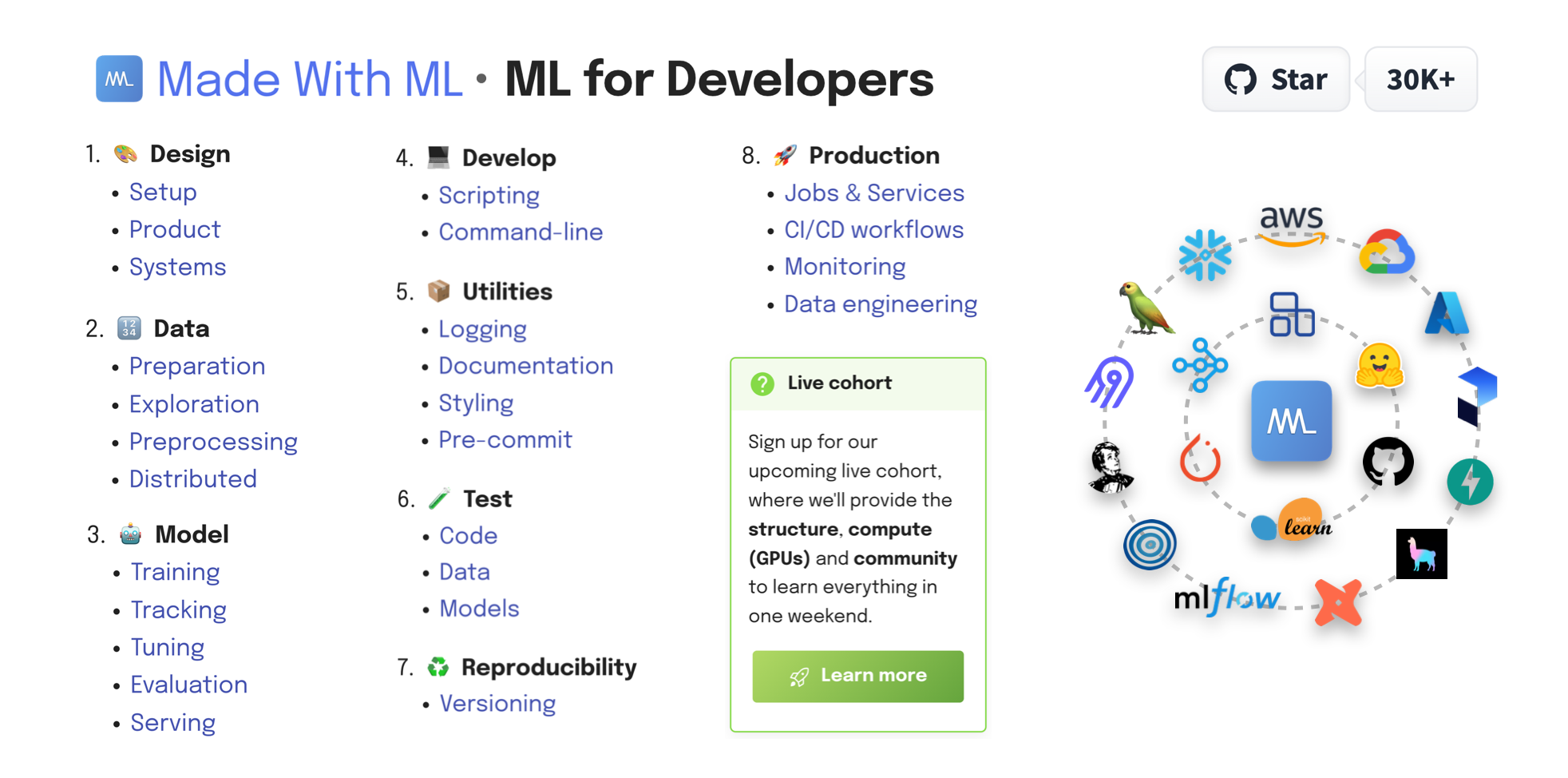
Made With ML by Anyscale Full homepage screenshot

At a glance

Category
Education & Learning
Language
English
Paid-content signal
No paid content foundObserved
Registered
2020
Hosting
FastlyInferred
HTTPS certificate trusted
PassedObserved
Last updated

Website review

This review may include AI-generated content and is not individually verified. Domain, certificate and other facts come from the observed data on this page.

What is Made With ML?

Made With ML is a free, project-based learning site for developers who want to build machine learning systems that actually ship. Rather than teaching ML as isolated notebook experiments, it walks through the full lifecycle of a production application: design, data preparation, modeling, software development, testing, reproducibility, and deployment. The course is published by Anyscale and taught by Goku Mohandas.

What it covers

The curriculum is organized as a numbered pipeline, which is a useful signal of its philosophy — ML is treated as an engineering discipline, not just modeling:

  • Design — framing the product and system before writing code
  • Data — preparation, exploration, preprocessing, and distributed processing
  • Model — training, tracking, tuning, evaluation, and serving
  • Develop — scripting, command-line tooling, and project structure
  • Utilities — logging, documentation, styling, pre-commit hooks
  • Testing — code, data, and model tests
  • Reproducibility — versioning data and experiments
  • Production — jobs and services, CI/CD workflows, monitoring, data engineering

Alongside the main course there are foundations lessons covering notebooks, Python, NumPy, Pandas, and PyTorch, plus machine learning fundamentals (linear and logistic regression, neural networks) and deep learning topics (CNNs, embeddings, RNNs, attention, transformers).

Who it's for

The site describes its audience as developers — people comfortable with code who want to add ML engineering skills, or ML practitioners who want to learn the software engineering side they were never taught. It's less suited to someone looking for a gentle, math-first introduction with no programming background.

A concrete trade-off to weigh

The course is built around a single running example: fine-tuning an LLM for a supervised task. The authors state that the techniques extend to other tasks (NLP, computer vision, time series), model types, data modalities, cloud platforms (AWS, GCP), and scales from a laptop to a distributed cluster. That's a reasonable claim for the engineering patterns, but if your interest is, say, classical tabular modeling or reinforcement learning, expect to translate the examples yourself rather than follow them directly.

A practical next step

If you're deciding whether to commit, open the lesson list and find the section closest to a problem you currently have — for example, model tracking or CI/CD for ML. Read that one section first. If the explanations assume knowledge you don't have, the Foundations lessons are the natural entry point.

For a broader set of structured ML courses, Coursera and fast.ai take different approaches worth comparing — fast.ai is more top-down and code-first, while Made With ML is more pipeline- and production-oriented.

How can I learn to deploy machine learning models to production?

Use Made With ML by Anyscale as a structured, project-based course: it walks one full application through design, data, modeling, development, testing, reproducibility and production rather than teaching deployment as an isolated step. The core lesson is that deployment is the last stage of a longer chain — if data preparation, versioning and tests are weak, the serving layer inherits the problems.

What the site covers, in its own order

The course is organized as a sequence of lessons, and each stage builds on the previous one:

  • Design: setup, product and systems thinking
  • Data: preparation, exploration, preprocessing, distributed processing
  • Model: training, tracking, tuning, evaluation, serving
  • Developing: scripting, command-line interfaces
  • Utilities: logging, documentation, styling, pre-commit
  • Testing: code, data and models
  • Reproducibility: versioning
  • Production: jobs and services, CI/CD workflows, monitoring, data engineering

It also includes a live cohort format with lessons, Q&A, GPU compute and community access, and a subscription option for ongoing material.

Why this order matters for deployment

Most people asking this question jump straight to "how do I wrap my model in an API?" The harder, more common failure is a model that cannot be reproduced or monitored. A concrete scenario: you train a model locally, push it behind an endpoint, and three weeks later predictions drift because the input pipeline changed silently. The testing and reproducibility sections exist to prevent exactly that, and the production section then adds jobs, services, CI/CD and monitoring on top.

Where it fits relative to other resources

Resource Best for Trade-off
Made With ML by Anyscale One end-to-end project with software engineering practices Course-shaped; you follow its chosen task and stack
scikit-learn Understanding the modeling algorithms themselves Documentation, not a deployment workflow
MLflow Experiment tracking and model registry mechanics Tool-specific; you supply the surrounding process
FastAPI Building the actual serving API Assumes you already have a tested, versioned model

A practical next step

Pick one small model you already have, then work backward through the course's stages: write a test for the data, version the dataset and model, and only then expose it as a service with logging and a monitoring check. The course notes that its task — fine-tuning an LLM for a supervised problem — extends to other applications, models, data types, cloud platforms and scales, so the workflow transfers even if your model is a simple regressor.

What are the best practices for MLOps and reproducible ML workflows?

The strongest MLOps practice is to treat the ML lifecycle as one connected system—design, data, model, code, reproducibility, production—rather than a series of one-off notebooks. Made With ML by Anyscale structures its course around exactly that chain, and it is a useful reference for how the pieces fit together: Made With ML by Anyscale.

Practices worth adopting

  • Version everything that affects a result: code, data, model artifacts, and configuration. If you cannot recreate last month's model from a commit, you cannot debug or audit it.
  • Track experiments as you train, not afterwards. Log parameters, metrics, and artifacts so runs are comparable and promotable.
  • Test code, data, and models separately. Data tests catch schema and distribution drift; model tests catch quality regressions; code tests catch ordinary bugs.
  • Automate the path to production with CI/CD workflows, scheduled jobs and services, and monitoring, so deployment is repeatable rather than manual.
  • Use software engineering hygiene—scripting, CLI entry points, logging, documentation, styling, and pre-commit checks—because ML code is still code.
  • Design before building. Clarifying the product goal and system constraints first prevents wasted training cycles.

How the layers compare

Layer Main risk if skipped Typical tooling focus
Design Building the wrong thing Product and systems framing
Data Silent quality failures Preparation, exploration, preprocessing, distributed processing
Model Unreproducible results Training, tracking, tuning, evaluation, serving
Develop Fragile handoffs Scripting, CLI, logging, docs, pre-commit
Test Regressions reaching users Code, data, and model tests
Reproducibility Inability to audit or roll back Versioning
Production Stale or broken services Jobs, CI/CD, monitoring, data engineering

A practical next step

Pick one model you have already trained and try to rebuild it from a clean checkout using only committed code, versioned data, and logged configuration. Every step where you have to guess or copy something from memory is a gap to close first—usually versioning or experiment tracking. If you want a guided path, the course's lesson sequence is a reasonable order to work through: Made With ML by Anyscale. For tool-level documentation, go to the official sources, such as MLflow for tracking or PyTorch for the modeling stack.

One trade-off to keep in mind: full reproducibility and monitoring add upfront effort and infrastructure. Teams shipping occasional internal models can start with versioning plus tracked runs; teams serving user-facing predictions should treat testing, CI/CD, and monitoring as non-negotiable.

Is there a live cohort or instructor-led training available for Made With ML?

Yes. Made With ML offers a live cohort option in addition to its self-paced lessons. The site describes it as an upcoming live cohort with live lessons plus QA, compute (GPUs), and community, positioned as a way to cover the material "in one day." The main course content remains available through the lesson library, so you can start self-paced and use the cohort for structured, instructor-led time.

Who it suits

  • Self-paced learners who want to work through the Design → Data → Model → Develop → Utilities → Test → Reproducibility → Production sequence on their own schedule.
  • Learners who benefit from deadlines, live Q&A, and access to GPUs without setting up their own environment.
  • Developers moving from general software engineering into production ML who want MLOps practices (tracking, testing, serving, orchestration) demonstrated end to end.

How to decide

If you... Consider
Need flexibility and prefer reading/coding alone The self-paced lessons at Made With ML
Want live instruction, QA and GPU compute The live cohort, if timing and cost fit
Are comparing structured programs Also look at Full Stack Open for web dev, or fast.ai for practical deep learning

The cohort is described as covering everything in one day, which is intensive. Treat it as a guided sprint rather than a replacement for working through the lessons; the exercises and production pipeline are where the learning sticks.

Next step: check the current cohort dates and prerequisites on the site, then skim the lesson list to confirm the LLM fine-tuning example matches your target use case before committing.

How does Made With ML help me scale ML workloads from a local laptop to a distributed cluster?

Made With ML is built around the idea that you can take the same Python skills you use on a laptop and apply them to distributed workloads without switching to a different language or framework. The course walks through the full lifecycle — design, data, model, develop, utilities, test, reproducibility, production — and treats scaling as a property of each stage rather than a separate topic.

For the scaling question specifically, the practical value is that it shows where distribution enters the picture at each step:

  • Data: preparation, exploration, preprocessing and distributed processing are covered as distinct lessons, so you see when a single-machine pipeline stops being enough.
  • Model: training, tracking, tuning, evaluation and serving are each addressed, including how these change when the workload no longer fits on one machine.
  • Production: jobs and services, CI/CD workflows, monitoring and data engineering are treated as ongoing operational concerns, which is where scale usually becomes a cost and reliability problem rather than a speed problem.

The page also states that the concepts extend across task types (NLP, CV, time-series), model families (regression through LLMs), data modalities (tabular, text) and cloud platforms (AWS, GCP), and that workloads can move from a local laptop to a distributed cluster. That framing matters: the goal is transferable patterns, not one vendor's tooling.

A concrete way to use this: pick one stage you already run locally — say preprocessing or model training — and follow that lesson end to end, noting which parts are pure Python and which parts are configuration for the distributed environment. Then repeat for serving, because serving has different scaling constraints (latency, concurrency) than training (throughput, memory).

If you want to check the lesson structure before committing time, start with the course outline at Made With ML by Anyscale and look at the Data and Production sections first — those are where local-to-cluster differences show up most clearly.

What is the subscription cost and what does it include?

The page does not list a subscription price. Its only pricing-related signal is a “Subscribe” action tied to joining a community of developers, and the visible page content does not state what a paid plan includes.

What the site does describe clearly is the course structure and audience.

What the course covers

  • Design: setup, product thinking, systems
  • Data: preparation, exploration, preprocessing, distributed data
  • Model: training, tracking, tuning, evaluation, serving
  • Develop: scripting, command-line workflows
  • Utilities: logging, documentation, styling, pre-commit
  • Test: code, data, models
  • Reproducibility: versioning
  • Production: jobs and services, CI/CD workflows, monitoring, data engineering

Who it is for

The page says it is for developers learning to responsibly deliver value with ML, and mentions a community of 40K+ developers. The instructor is listed as GokuMohandas.

Free vs. paid signals

Item What the page shows
Subscription cost Not stated
What subscription includes Not stated
Free lessons Lesson topics are listed on the page
Live cohort Separate sign-up for live lessons, QA, GPUs, and community

If you need the actual subscription cost and inclusions, use the site’s Subscribe or Learn more action and check the checkout or cohort page directly. As a practical decision criterion: if you mainly want the written lessons, the listed curriculum suggests you can start there; if you want live instruction, GPU compute, and community QA, the live cohort is the relevant offer.

Related questions

More questions →
What Can You Actually Do With a Free Hosted REST API Like ReqRes?

A free hosted REST API like ReqRes gives you a real HTTP endpoint you can call immediately—no signup, no local server, no database setup. You get predictable JSON responses for users, resources, login, and registration, which makes it useful for front-end demos, integration tests, learning HTTP clients, and prototyping. What it is not is a production backend for your app: the data is shared, resets periodically, and you don't control the schema. If you need persistent, private data with auth and logs, that's where an account-based backend or a commercial licence comes in.

What "free REST API for testing and prototyping" actually means

The phrase sounds vague, so it helps to separate two things people often conflate:

  • A mock/sample API — a public, hosted service with fixed or semi-fixed endpoints that return realistic-looking JSON. You don't own the data. It exists so you can point code at a URL and get a response.
  • A real backend you configure — a service where you define collections, schemas, authentication, and logging, and where your data persists and belongs to you.

ReqRes's landing page describes both: a free REST API for testing and prototyping with real responses and no signup, plus an option to build your own backend with collections, auth, and logs at app.reqres.in. Those are different products with different trade-offs. The free public endpoints are the "point and go" part; the account-based backend is the "own your data" part.

What you can do with the no-signup public endpoints

1. Front-end demos without a backend

If you're building a UI and need data to render, you can fetch from a public endpoint instead of hardcoding arrays. This keeps your demo code closer to real fetch logic:

async function loadUsers(page = 1) {
  const res = await fetch(`https://reqres.in/api/users?page=${page}`);
  if (!res.ok) throw new Error(`HTTP ${res.status}`);
  const { data, total, page: current } = await res.json();
  return { users: data, total, page: current };
}

You get pagination fields, a data array, and support metadata—enough to build list views, loading states, and empty states.

2. Integration and contract tests

You can assert that your HTTP layer handles status codes, headers, and JSON shapes correctly. Typical checks:

  • GET /api/users/2 returns 200 with a data object.
  • GET /api/users/23 returns 404 (a non-existent user).
  • POST /api/login with valid credentials returns a token; with missing fields returns 400.

This is useful for testing your client wrapper, retry logic, error handling, and serialization—without spinning up your own server.

3. Learning HTTP clients and tooling

If you're new to fetch, Axios, curl, Postman, or HTTPie, a hosted API is a low-friction target. You can practice:

  • Sending query parameters (?page=2, ?delay=3).
  • Setting headers and reading response headers.
  • Handling POST, PUT, PATCH, DELETE.
  • Observing status codes for success and failure.

4. Deliberate failure and latency testing

Endpoints that return 404 on purpose, or that accept a delay parameter, let you test how your app behaves when things go wrong or slow down. That's hard to do reliably against a happy-path local mock.

What the public endpoints are not good for

Use case Public sample endpoints Account-based backend
Persistent, private data No — shared and reset Yes
Custom schema/collections No Yes
Authentication you control Limited (demo login) Yes
Request logs and debugging No Yes
Production traffic Not intended Depends on plan/licence
Team collaboration No Yes

The key limitation: you don't own the data, and other people are hitting the same endpoints. Treat responses as illustrative, not authoritative.

When you'd move to an account-based backend

Consider app.reqres.in (collections, auth, logs) when any of these are true:

  • You need your own collections and fields, not the fixed demo schema.
  • You need data to persist between sessions and belong only to you.
  • You need real authentication flows you can rely on in a demo or internal tool.
  • You need request logs to debug what your client actually sent.
  • You're working with a team and need shared, stable endpoints.

The trade-off is setup and, eventually, cost. The public endpoints require none; the backend requires an account and configuration.

Where pricing and licensing become relevant

The site signals a commercial licence and an upgrade path (with Stripe as the payment platform), but specific prices, plan tiers, and limits aren't stated here—so don't assume numbers. What you can reason about:

  • Prototyping and learning → free public endpoints are usually enough.
  • Internal tools, demos for clients, or anything you don't want reset → an account-based backend is the natural next step.
  • Production or commercial use → check the licence terms and any paid plan, because "free for testing" and "free for commercial production" are not the same thing.

Before committing, read the current terms on the site rather than relying on secondhand summaries, since pricing and licence scope change.

A quick decision checklist

  1. Do you need data that persists and is private? If yes → account-based backend.
  2. Do you need a custom schema? If yes → account-based backend.
  3. Are you only testing HTTP behavior, UI rendering, or learning a client? If yes → free public endpoints.
  4. Will this touch real users or revenue? If yes → review the licence and any paid plan first.
  5. Do you need logs and team access? If yes → account-based backend.

If you answer "no" to 1, 2, 4, and 5, the free hosted API is likely all you need. If you answer "yes" to any of them, plan for the account-based path.

What is Made With ML by Anyscale?

Made With ML is a free educational platform for developers who want to learn how to design, develop, deploy, and iterate on production machine learning applications. It combines machine learning concepts with software engineering best practices, and is created by GokuMohandas and associated with Anyscale. The site states it has 40K+ developers learning on the platform. It's best suited for developers who already have some Python and ML familiarity and want to move from notebooks to production-grade systems.

What the platform covers

The curriculum is organized into eight sequential modules:

# Module Topics
1 🎨 Design Setup, Product, Systems
2 🔢 Data Preparation, Exploration, Preprocessing, Distributed
3 🤖 Model Training, Tracking, Tuning, Evaluation, Serving
4 💻 Develop Scripting, Command-line
5 📦 Utilities Logging, Documentation, Styling, Pre-commit
6 🧪 Test Code, Data, Models
7 ♻️ Reproducibility Versioning
8 🚀 Production Jobs & Services, CI/CD workflows, Monitoring, Data engineering

There are also Foundations lessons covering Toolkit (Notebooks, Python, NumPy, Pandas, PyTorch) and Machine Learning (linear regression, logistic regression, neural networks, data quality), plus Deep Learning (CNNs, Embeddings, RNNs, Attention, Transformers).

How it teaches

The course follows a stated set of principles:

  • First principles — every ML concept is developed from the ground up before jumping into code.
  • Best practices — software engineering practices are applied throughout model development and deployment.
  • Scale — ML workloads (data, train, tune, serve) scale in Python without learning entirely new languages.
  • MLOps — components like tracking, testing, serving, and orchestration are connected into an end-to-end system.

The specific task used in the course is fine-tuning an LLM for a supervised task, but the site notes the lessons extend to other applications (NLP, CV, time-series), models (regression through LLMs), data modalities (tabular, text), cloud platforms (AWS, GCP), and scale (local laptop to distributed cluster).

Who it's for

The content is aimed at developers. If you're comfortable with Python and have some ML exposure but want to understand how to responsibly deliver value with ML in production, this is the target audience. Complete beginners may want to work through the Foundations section first.

Access and cost

The site offers a Subscribe option and mentions a live cohort where participants get live lessons, QA, compute (GPUs), and community. The homepage does not list pricing for the cohort or specify what the subscription includes, so check the site directly for current terms. The lesson content itself is presented as viewable on the site.

Where to start

  1. Go to madewithml.com and review the course lesson list.
  2. If you're new to the tooling, start with Foundations (Toolkit → Machine Learning → Deep Learning).
  3. Otherwise begin at Module 1 (Design) and work through the modules in order.
  4. The code repository is referenced as GokuMohandas/Made-With-ML for following along.

The main thing to decide up front: whether you want the self-paced lesson path or the live cohort with GPUs and instructor QA. The former costs nothing to browse; the latter requires signing up and checking current availability.

How to Use Ahrefs for Your First SEO Audit: A Step-by-Step Tutorial

If you're new to Ahrefs and want to run your first SEO audit, the fastest path is: open Site Explorer, enter your target URL, review the Overview for a health snapshot, then dig into Organic Keywords, Top Pages, and Site Audit to find specific problems. From there, build a short prioritized to-do list instead of trying to fix everything at once.

This tutorial walks through that workflow using a realistic starting scenario, explains what the numbers mean, and shows how to turn findings into actions.

Before You Start: Pick a Narrow Scope

A common beginner mistake is auditing an entire large website on day one. The reports become overwhelming, and you can't tell which issues matter.

Instead, choose one of these starting points:

  • A single important page (your homepage or a key product/service page)
  • A small site (under ~50 pages, e.g., a personal blog or small business site)
  • One section of a bigger site (e.g., /blog/)

For this tutorial, assume you're auditing a small business site with about 30 pages. The same steps scale up later.

You'll need an Ahrefs account to follow along. Ahrefs offers paid plans, and pricing and feature limits change over time, so check the current Pricing page for what's included in each tier before committing.

Step 1: Enter Your Target in Site Explorer

Site Explorer is Ahrefs' core tool for analyzing any website or URL.

  1. Open Site Explorer from the top navigation.
  2. In the search box, paste your domain (e.g., example.com).
  3. Choose the Exact URL or Domain mode depending on scope. For a full-site view, use Domain or Prefix; for a single page, use Exact URL.
  4. Press Enter.

You'll land on the Overview report. Don't try to absorb everything — focus on four numbers first.

Reading the Overview Snapshot

Metric What it tells you How to use it
Ahrefs Rank (AR) Relative strength of the site's backlink profile vs. others in the database Useful for comparing against competitors, not as a standalone goal
Organic traffic Estimated monthly visits from search A rough trend indicator, not exact analytics
Organic keywords Estimated number of keywords the site ranks for Shows breadth of visibility
Backlinks / Referring domains Total links and unique sites linking to you Referring domains matter more than raw backlink count

Important caveat: Ahrefs' traffic and keyword numbers are estimates based on its own data. They won't match Google Search Console or your analytics exactly. Treat them as directional, not absolute.

Step 2: See What You Already Rank For

Go to Organic Keywords in the left sidebar. This shows queries where your site appears in search results.

Sort by Traffic (descending) to see which pages bring the most estimated visitors. Then look for:

  • Keywords ranking in positions 4–15 — these are often the easiest wins. A small content or on-page improvement can push them onto page one.
  • Keywords with high volume but low position — potential opportunities if the topic is relevant.
  • Irrelevant keywords — if you rank for something off-topic, it may signal thin or mismatched content.

Write down 5–10 of the position 4–15 keywords. These become your first optimization targets.

Step 3: Find Your Best and Weakest Pages

Open Top Pages. This ranks your URLs by estimated organic traffic.

Look for two things:

  1. Your top performers — understand what topics and formats work. Can you create more content like this?
  2. Pages with traffic but poor rankings — these may need on-page fixes (title, headings, internal links).

If a page gets zero traffic and targets a topic you care about, it's a candidate for a rewrite or consolidation.

Step 4: Run a Technical Site Audit

Now move to Site Audit. This crawls your site and flags technical and on-page issues.

  1. Click Site Audit → New project.
  2. Enter your domain and set crawl settings (default is usually fine for a small site).
  3. Start the crawl and wait for it to finish.

Once complete, you'll see a Health Score and a list of issues grouped by category.

Which Issues to Fix First

Not all issues are equal. Prioritize in this order:

Priority Issue type Why it matters
1 Broken links (404s) Bad for users and crawl efficiency
2 Pages blocked from indexing They can't rank at all
3 Missing or duplicate title tags Directly affects click-through and relevance
4 Slow-loading pages Affects experience and rankings
5 Thin content Low value to users and search engines

Ignore low-impact warnings (like minor meta description length) until the big items are handled.

Step 5: Turn Findings Into a To-Do List

You now have raw data. Convert it into a short, actionable list. Example:

  1. Fix 3 broken links found in Site Audit.
  2. Rewrite title tags on 5 pages with duplicate titles.
  3. Improve 4 pages ranking in positions 6–12 by adding missing subtopics and internal links.
  4. Remove or update 2 thin pages with no traffic.

Keep the list to 5–10 items max for your first audit. Finishing a short list beats starting a long one.

Common Beginner Mistakes

  • Chasing every red flag. Site Audit flags many minor issues. Fix what affects rankings and users first.
  • Trusting estimates as exact numbers. Ahrefs data is modeled, not measured from your analytics.
  • Auditing a huge site too early. Start small to learn the interface.
  • Ignoring search intent. A page can be technically perfect but still fail if it doesn't match what searchers want.
  • Forgetting to re-crawl. After fixes, run Site Audit again to confirm improvements.

Where to Go Next

Once your first audit is done:

  • Compare with competitors using Site Explorer's Competing Domains and Content Gap reports.
  • Track keyword rankings over time with Rank Tracker.
  • Explore backlink opportunities in the Backlinks and Link Intersect reports.
  • Set up recurring Site Audit crawls so new issues surface automatically.

Your first audit isn't about perfection — it's about building a repeatable habit: enter a target, read the key reports, pick the highest-impact fixes, and act. Do that once a month and your site's health compounds.

How to Access Made With ML Lessons and Resources

Made With ML by Anyscale is a free-to-browse course site where you can start reading lessons immediately, and you have three main access paths: View lessons on the site, Subscribe to join the 40K+ developer community, and sign up for a live cohort that adds live lessons, QA, GPUs, and community. The GitHub repository GokuMohandas/Made-With-ML is also linked directly from the homepage. The site lists a "Subscribe" action but does not publish pricing or login requirements, so treat subscription terms as something to confirm on the page itself.

The three ways to access the material

Access path What you get Best if
View lessons The full lesson sequence on the site, organized by stage You want to self-pace through the written material
Subscribe Entry into the community of 40K+ developers You want updates and community context alongside the lessons
Live cohort Live lessons + QA, compute (GPUs), and community, described as "everything in one day" You want a scheduled, instructor-led run with compute provided

The homepage presents these as parallel options rather than a funnel — you can read lessons without subscribing, and the cohort is a separate sign-up ("Learn more").

What you'll actually be working through

The course is structured as eight numbered stages, each with sub-topics:

  1. 🎨 Design — Setup, Product, Systems
  2. 🔢 Data — Preparation, Exploration, Preprocessing, Distributed
  3. 🤖 Model — Training, Tracking, Tuning, Evaluation, Serving
  4. 💻 Develop — Scripting, Command-line
  5. 📦 Utilities — Logging, Documentation, Styling, Pre-commit
  6. 🧪 Test — Code, Data, Models
  7. ♻️ Reproducibility — Versioning
  8. 🚀 Production — Jobs & Services, CI/CD workflows, Monitoring, Data engineering

There are also Foundations lessons (Toolkit: Notebooks, Python, NumPy, Pandas, PyTorch; Machine Learning: linear regression, logistic regression, neural networks, data quality; Deep Learning: CNNs, embeddings, RNNs, attention, transformers) and a Utilities section.

The stated goal is to combine machine learning with software engineering to "design, develop, deploy and iterate on production ML applications."

Before you start: what the course assumes

The site frames the content as "ML for Developers" and says the specific task involves fine-tuning an LLM for a supervised task — but explicitly notes this extends to other applications (NLP, CV, time-series), models (regression → LLMs), data modalities (tabular, text), cloud platforms (AWS, GCP), and scale (local laptop → distributed cluster).

Three design principles shape how you should approach it:

  • First principles — concepts are explained before the code, so don't skip to the implementation.
  • Best practices — software engineering practices are applied throughout model development and deployment.
  • Scale — ML workloads (data, train, tune, serve) are scaled in Python without learning new languages.

If you're choosing between the self-paced lessons and the cohort, the deciding factor is compute and scheduling: the cohort bundles GPUs and live QA into one day, while the lessons let you supply your own environment and pace.

Does Made With ML Focus on One ML Task or Teach General Skills?

Made With ML uses one concrete task as its teaching vehicle — fine-tuning an LLM for a supervised task — but the site states that everything taught extends to other applications (NLP, CV, time-series), other models (regression through LLMs), other data modalities (tabular, text), other cloud platforms (AWS, GCP), and other scales (local laptop to distributed cluster). So if you want transferable ML engineering skills rather than a single-task recipe, the course is designed for that; if you only want a narrow tutorial on one model type, the framing will feel broader than you need.

Why a single task is used at all

Teaching production ML requires a concrete example, because abstract lessons about tracking, testing, and serving don't stick without something to run. Made With ML picks fine-tuning an LLM for a supervised task as that example, then builds the full lifecycle around it.

The site is explicit that this choice is pedagogical, not a limitation. The stated goal is that the concepts "easily extend" beyond the example task.

What actually transfers

The course is organized around a lifecycle rather than a model:

Stage What it covers
🎨 Design Setup, product, systems
🔢 Data Preparation, exploration, preprocessing, distributed data
📈 Model Training, tracking, tuning, evaluation, serving
💻 Developing Scripting, CLI
📦 Utilities Logging, documentation, styling, pre-commit
✅ Testing Code, data, models
♻️ Reproducibility Versioning
🚀 Production Jobs & services, CI/CD workflows, monitoring, data engineering

None of these stages are specific to LLMs. Versioning, CI/CD, monitoring, and data testing apply whether you ship a regression model or a transformer.

The site also lists separate foundations and toolkit sections (notebooks, Python, NumPy, Pandas, PyTorch; linear regression, logistic regression, neural networks, data quality) plus deep learning topics (CNNs, embeddings, RNNs, attention, transformers). That range is itself evidence the material isn't scoped to one task.

Who this fits, and who it doesn't

Fits you if: you want to learn to design, develop, deploy, and iterate on production ML applications, and you're willing to learn through one worked example that you then generalize.

May not fit you if: you want a task-specific recipe you can copy without understanding the surrounding engineering, or you're looking only for LLM fine-tuning mechanics with no interest in testing, reproducibility, or deployment.

The site describes its audience as developers — "Join 40K+ developers in learning how to responsibly deliver value with ML" — and the instructor is listed as Goku Mohandas.

Practical way to check before committing

  1. Open the course lessons list and scan the eight lifecycle stages above.
  2. Ask whether the stage you care about (say, monitoring or data versioning) is something you'd want to learn independent of the example task.
  3. If yes for most stages, the general-skills framing matches your goal.
  4. If you only want the fine-tuning steps, note that the course deliberately wraps them in the full lifecycle.

One caveat worth flagging: the site mentions a "Subscribe" action and a live cohort with "live lessons + QA, compute (GPUs) and community," but the provided page evidence does not state prices, access terms, or whether any content is free. Check the site directly for current terms before planning around cost or login requirements.

Website Overview

An established domain and managed infrastructure suggest continuity of operations and may support dependable delivery, although neither guarantees service quality. Page metadata, canonical configuration and social previews work together to provide more consistent search and sharing presentation.

Domain and Registration

Registered in 2020, this domain has about 6 years of history. That suggests continuity, although ownership and purpose may have changed. Transfer-protection status is present, helping reduce the risk of unauthorized domain transfers. The registrar is Cloudflare, Inc., a widely used domain service provider. The domain uses the common .com extension, which is not an independent safety signal.

DNS and Email

Nameservers are provided by Cloudflare, indicating managed DNS hosting. MX records point to the Cloudflare Email Routing email service. No CNAME was found; the observed records resolve directly to addresses. SPF and DMARC are configured. DKIM status is unknown. TXT records include verification markers for Google. Such markers may also remain after a service stops being used.

TLS and Certificates

The public key uses EC with 256 bits. The server supplied a complete certificate chain. No organization name is present in the certificate; the available fields are consistent with domain validation. The certificate was issued within the Google Trust Services cloud or CDN ecosystem. The certificate's total validity is about 90 days, consistent with a short renewal cycle.

HTTP and Browser Security

The checked browser-security headers were not detected, leaving fewer explicit browser-side safeguards. CORS permits any origin to read this response. This is common for public resources; sensitive responses need narrower handling. No X-Powered-By header was found, reducing one common source of backend fingerprinting information. The cf-ray, x-cache, x-served-by, via response header indicates a CDN or caching proxy in the delivery path. No obvious internal addresses or debug information were found in the headers.

Technology Stack Analysis

The public page identifies mkdocs-1.4.3, mkdocs-material-9.1.18, jQuery, Google Tag Manager, Cloudflare, Fastly without precise versions, leaving fewer clues for version-specific scanning.

Search and Social Sharing

The Generator tag identifies mkdocs-1.4.3, mkdocs-material-9.1.18, making the publishing system easier to fingerprint. Twitter Card metadata is configured. The title has 31 characters, within a common display range. A meta description is present, with 91 characters. The observed directives allow indexing and link following.

Hosting and Email

DNSCloudflare
HostingFastly
EmailCloudflare Email Routing
Approximate IP geolocation (inferred; a CDN or proxy may differ from the origin server) Location unknown Inferred 104.21.19.57

Registration details

RDAP / WHOIS

RegistrarCloudflare, Inc.
Registered2020-02-03
Expires2027-02-03
Domain statusclient transfer prohibited
Nameserversjose.ns.cloudflare.com、maleah.ns.cloudflare.com
DNSSECunsigned

DNS records

DNS

TypeNameValueTTLPriority
Amadewithml.com104.21.19.57300—
Amadewithml.com172.67.185.69300—
AAAAmadewithml.com2606:4700:3031::6815:1339300—
AAAAmadewithml.com2606:4700:3034::ac43:b945300—
MXmadewithml.comroute1.mx.cloudflare.net30048
MXmadewithml.comroute2.mx.cloudflare.net30067
MXmadewithml.comroute3.mx.cloudflare.net30084
NSmadewithml.comjose.ns.cloudflare.com86400—
NSmadewithml.commaleah.ns.cloudflare.com86400—
TXTmadewithml.combrevo-code:79cf9dead9ebc456ba821af1c80fbceb300—
TXTmadewithml.comgoogle-site-verification=J6yF0rQr5-SaMGlRsnpKmbBl7_hTc5WyJ8fknUcABKY300—
TXTmadewithml.comgoogle-site-verification=NFx1mW6cuRiT7wxqkOs85vJUdqJFkzfB1XdoZF5kaeI300—
TXTmadewithml.comv=spf1 include:_spf.mx.cloudflare.net ~all300—
DMARC_dmarc.madewithml.comv=DMARC1; p=none; rua=mailto:[email protected]300—

TLS and certificates

TLS / SSL

AssessmentNormal configuration
Supported protocolsTLSv1.2、TLSv1.3
Negotiated protocolTLSv1.3
Certificate subjectmadewithml.com
IssuerGoogle Trust Services
Valid until2026-12-16T20:53 · Remaining when checked: 72 days
Verification detailsCertificate trust: Passed · Hostname match: Passed

HTTP response headers

HTTP

HeaderValue
content-typetext/html; charset=utf-8
cache-controlmax-age=600
servercloudflare
access-control-allow-origin*

Identified technologies

mkdocs-1.4.3, mkdocs-material-9.1.18jQueryGoogle Tag ManagerCloudflareFastly

Pages, Search and Sharing

Meta descriptionLearn how to responsibly design, develop, deploy and iterate on production ML applications.
Canonical URLhttps://madewithml.com/
LanguageEnglish (default)
Twitter Cardsummary_large_image
All bots 0 allowed · 0 disallowed

User reviews (0)

  • No reviews yet.