Website profiles · Technology insights · Alternatives

nept.cloud

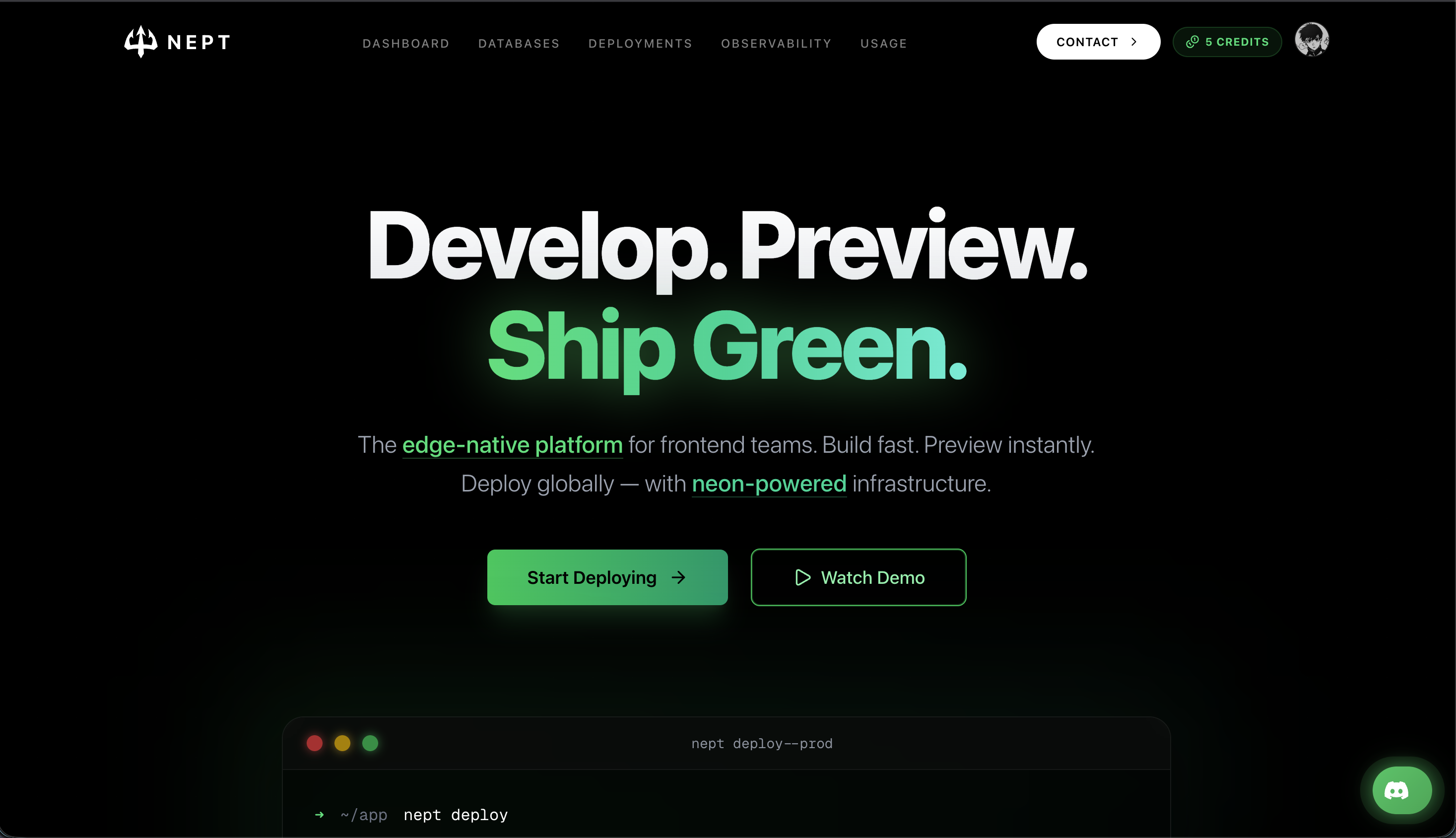
Nept is a cloud platform for developers to deploy, host, and scale frontend and full-stack applications with GitHub, Docker, domains, databases, and CLI tooling.

Paid content
Visit website
Profile views 12 Outbound visits 12 Normal
Nept Full homepage screenshot

At a glance

Category
Development
Language
English
Paid-content signal
Paid contentObserved
Registered
2025
Hosting
CloudflareInferred
HTTPS certificate trusted
PassedObserved
Last updated

Website review

This review may include AI-generated content and is not individually verified. Domain, certificate and other facts come from the observed data on this page.

What is Nept?

Nept is a cloud platform for deploying, hosting and scaling frontend and full-stack applications. You connect a Git repository, and each push triggers an automatic build and deploy; the app is then served from edge nodes in multiple regions. It also supports Docker-based projects and edge functions, so it works both for standard frameworks and custom setups.

Nept

H3 What it actually does

  • Automatic deploys from Git: GitHub, GitLab and Bitbucket are supported, with a preview URL generated for every branch so changes can be reviewed before merging.
  • Framework detection: Next.js, Svelte, Astro, Remix and Qwik are auto-detected; anything else can be brought in via a Dockerfile.
  • Edge functions: Lightweight TypeScript functions for auth, personalization, A/B tests or low-latency APIs.
  • Built-in security and scaling: TLS certificates, DDoS mitigation and a WAF are included, with serverless scaling from zero and cold starts quoted under 30ms.

H3 Who it suits It fits small product teams and solo developers who want to ship a frontend or full-stack app without managing servers or CI/CD plumbing. It is less obviously aimed at teams needing deep infrastructure control or unusual runtime requirements, where a general-purpose cloud may still be the better fit.

H3 A practical next step If you already have a repo, the fastest test is to connect it and check whether the build settings are detected correctly. If your project is not a mainstream framework, confirm Docker support works for your case before committing. Pricing details are listed on the site's pricing page rather than in the overview above.

How do I deploy my frontend app to Nept from GitHub?

Connect your GitHub repository to Nept, then let every push to your main branch trigger an automatic build and deploy. Nept is a cloud platform for deploying frontend and full-stack apps, and its documented flow is built around Git: "Connect your Git repository. Every push triggers an automatic build," with support listed for GitHub, GitLab, and Bitbucket Nept.

The practical sequence looks like this:

  1. Push your code to GitHub. Have a working repository with your app and its build configuration committed.
  2. Connect the repo in Nept. Nept detects your framework and applies build settings automatically; the platform says it supports Next.js, Svelte, Astro, Remix, and Qwik, with custom Dockerfile support for anything else.
  3. Let the first build run. Nept builds, optimizes, and deploys, using a content-addressed cache and remote build workers so repeat builds get faster.
  4. Check the preview URL. Every branch gets its own preview URL (the example shown is preview: feat-xyz.app.nept.cloud), so you can share a branch with teammates before merging.
  5. Merge to production. Your app goes live globally, with TLS certificates issued automatically on every domain.

What to decide before you start

Decision Why it matters
Branch strategy Main branch deploys to production; feature branches produce preview URLs. Agree on this with your team first.
Framework vs. Dockerfile Auto-detection covers major frameworks; a Dockerfile is the fallback for custom setups.
Where your backend lives Nept covers edge functions and serverless, so if you need auth, personalization, or a low-latency API, you can keep it on the same platform.
Domain plan Custom domains get automatic certificates, so plan your production domain before the first release.

A concrete scenario

You maintain a Next.js marketing site and want design review before each release. You push a branch called feat-pricing, Nept builds it and gives you a preview URL, your designer comments, you push fixes, and the preview updates. When it looks right, you merge to main and the production site updates. The same pipeline handles a Docker-based app if your project does not match a detected framework.

Where the trade-off sits

The Git-driven model is fast to adopt and low on configuration, but it assumes your workflow already lives in Git and that your build fits Nept's pipeline. Teams with unusual build steps, private package registries, or heavy native dependencies should verify those work early rather than after migrating.

Next step: connect one non-critical repository first, confirm the build succeeds and the preview URL behaves as expected, then move your production app over.

How much does Nept cost compared to other deployment platforms?

Nept's own site does not state concrete prices on the page evidence provided — it only links to a pricing page (Nept). So a precise "Nept costs X vs. Y" comparison isn't possible from what's available here. What the evidence does show are the pricing model signals: pay-per-request serverless pricing, per-project deployments, and edge regions in US-East (Ashburn), EU-West (Paris), and AP-South (Mumbai). Those are the levers that usually determine the bill on this class of platform.

How to compare Nept against alternatives

Rather than a price table, compare the billing dimensions that actually drive cost:

Dimension What to check on Nept Why it matters vs. competitors
Compute model Pay-per-request serverless (stated) Request-based billing is cheap for spiky/low traffic, expensive at sustained high volume; always-on container hosts invert this
Build minutes "Smart Builds" with content-addressed cache Frequent deploys on monorepos can dominate cost if build minutes are billed
Bandwidth/egress Not stated in evidence Usually the largest surprise line item on edge platforms
Preview deployments Every branch gets a preview URL Some platforms charge per preview environment; confirm whether these count toward usage
Seats/team Not stated Per-seat pricing changes the math for larger teams

A concrete way to decide

Take one real project and estimate a month: number of requests, average response size, build minutes per deploy × deploys per week, and number of preview branches. Then price that same workload on two or three platforms. If your traffic is bursty and mostly low, a request-based model like Nept's described serverless approach tends to win; if you run a steady high-volume API, a fixed always-on instance often costs less.

Next step

Open Nept's pricing page directly and check the free-tier limits, egress rates, and whether preview deployments are metered. Compare those specific numbers against one alternative you already use, using the workload estimate above — that gives you a defensible answer instead of a headline price comparison.

Can I deploy a Docker container or full-stack app on Nept?

Yes. Nept is positioned as a platform for deploying both containerized workloads and full-stack applications, not just static frontends. The page describes it as "Framework-agnostic," with auto-detected build settings for frameworks like Next.js, Svelte, Astro, Remix, and Qwik, plus "Custom Dockerfile support for the rest." It also lists "frameworks, containers, edge functions" as deployable targets.

H3 What that looks like in practice

  • Docker containers: You supply a Dockerfile and Nept builds and deploys the image through the same pipeline. This suits apps with non-standard runtimes, custom system dependencies, or a backend written in a language outside the auto-detected framework list.
  • Full-stack apps: For supported frameworks, Nept detects build settings automatically, so a Next.js or Remix app with server routes, API handlers, and a database layer can go out without hand-written CI configuration.
  • Databases: The platform name mentions databases among its core capabilities, so a full-stack app that needs persistent storage is within scope, not just an edge-rendered frontend.
  • Edge functions: Lightweight TypeScript functions deploy globally and are described as suited to auth, personalization, A/B tests, and low-latency APIs — useful for the server-side pieces of a full-stack app that don't need a long-running container.

H3 How deployment works

The described flow is Git-driven: connect a repository (GitHub, GitLab, or Bitbucket), and every push triggers an automatic build and deploy. Each branch gets its own preview URL, so you can test a full-stack feature branch — including its container or function changes — before merging to production. If you prefer not to rely on Git integration, the CLI tooling and Dockerfile path give you a more manual route.

H3 Trade-offs to weigh

Approach Best for What you give up
Auto-detected framework build Standard Next.js/Remix/Astro apps Less control over the build environment
Custom Dockerfile Unusual runtimes, system-level dependencies You own build correctness and image size
Edge functions Auth, personalization, light APIs Not a fit for long-running or heavy compute

The practical decision rule: if your framework is on the supported list and you don't need custom native packages, let auto-detection handle it. If you need a specific runtime version, a background worker, or a language the platform doesn't auto-detect, use the Dockerfile path and treat Nept as a container host with edge distribution on top.

A sensible next step is to check whether your stack needs persistent connections or long-running processes, since those are the cases where an edge-first platform's serverless model matters most. If you're unsure, deploy a throwaway branch of your app as a preview and watch build times, cold-start behavior, and how the database layer responds under a few concurrent requests.

What frameworks does Nept support for automatic builds?

Nept auto-detects build settings for the major frontend frameworks named on its site: Next.js, Svelte, Astro, Remix, and Qwik. Anything outside that list is still deployable through a custom Dockerfile, so the platform isn't limited to those five — it just won't configure the build for you automatically.

In practice, that split matters more than the framework list itself:

  • Auto-detected frameworks — you connect a Git repo and Nept infers the build command, output directory and runtime. Good fit if you want a push-to-deploy flow with no config file in your repo.
  • Custom Dockerfile — you own the build steps. Necessary for less common frameworks, monorepos with unusual layouts, or apps that need system-level dependencies. You trade convenience for control.

A useful decision test: if your project builds with a single standard command and no extra system packages, auto-detection will likely cover you. If your build needs a custom step — a codegen pass, a native library, a nonstandard output folder — plan on the Dockerfile path from the start rather than fighting the defaults.

Worth verifying before you commit: the exact list of auto-detected frameworks and any version support can change, so check the current docs on Nept if you're on a recent major release of Next.js, Astro or SvelteKit.

How do preview deployments and custom domains work on Nept?

Preview deployments on Nept are branch-scoped URLs that let you review a change before it reaches production. Custom domains are the addresses you attach to a production app, and Nept handles their TLS certificates automatically.

H3 Preview deployments

Every branch gets its own URL, so a branch like feat-xyz is served at something like preview: feat-xyz.app.nept.cloud. The practical workflow is:

  • Push a branch, and Nept builds and deploys it without touching production.
  • Share the preview URL with designers, QA or a client for feedback.
  • Iterate by pushing more commits to the same branch; the preview updates.
  • Merge to production only once the preview is approved.

This is most useful for teams doing review-driven work — a marketing site with stakeholder sign-off, or a web app where QA needs a stable URL per feature. For a solo developer shipping a small static site, previews are convenient but not essential.

H3 Custom domains

You connect a domain you own, and Nept issues and renews the TLS certificate for it, so HTTPS works without manual certificate management. The page evidence also lists DDoS mitigation and a WAF as included defaults on every domain, which matters if the domain is public-facing and you don't want to bolt on a separate CDN or security layer.

The trade-off to plan for: DNS. You will need to point the domain at Nept, usually via a CNAME or an A/ALIAS record depending on whether you use an apex or subdomain. Decide early whether the domain is managed at your registrar or delegated to Nept's nameservers, because that choice affects how you handle email and other records on the same domain.

H3 Choosing between them

Need Use
Review a change before release Preview deployment on the branch
Public, branded production URL Custom domain
Temporary demo for a client Preview URL, no DNS changes
Email on the same domain Custom domain, but keep DNS control at your registrar

If you only need feedback on a change, use the preview URL and skip DNS entirely. If the site is going live, attach the custom domain and verify the certificate is issued before you announce the launch.

As a next step, deploy a branch and open its preview URL, then attach your production domain and confirm HTTPS resolves from a network outside your own. See Nept for the deployment flow and GitHub if your repository lives there.

Related questions

More questions →
How Nept's Global Edge Network Performs Across Regions

Nept runs edge nodes in three regions — US-East (Ashburn, VA), EU-West (Paris, FR), and AP-South (Mumbai, IN) — and publishes live health, latency, and uptime figures for each. Based on the platform's own status data, latency ranges from 38 ms in Ashburn to 52 ms in Mumbai, with uptime between 99.994% and 99.998%. That spread is the practical answer to whether Nept can serve a globally distributed audience: it can, but the region closest to your users will always be the fastest, and the gap between regions is roughly 6–14 ms.

What the three regions actually report

Region Code Location Status Latency Uptime
US-East iad1 Ashburn, VA Healthy 38 ms 99.998%
EU-West cdg1 Paris, FR Healthy 44 ms 99.996%
AP-South bom1 Mumbai, IN Healthy 52 ms 99.994%

All three report "Healthy" and "All systems operational." The numbers move in a consistent direction: the US-East node is the lowest-latency, and each subsequent region adds a few milliseconds. Uptime is highest in US-East and lowest in AP-South, though the difference is 0.004 percentage points — small enough that it shouldn't drive a deployment decision on its own.

Why the latency numbers differ

The three regions are physically separated, so requests travel different distances. A user in North America hitting iad1 gets a shorter round trip than a user in India hitting bom1. Nept's model is to place edge nodes close to users so each request resolves at a nearby node rather than crossing an ocean. The published latency figures are the platform's own measurements of that proximity effect.

Two caveats worth keeping in mind:

  • These are platform-reported numbers, not a third-party benchmark. They describe Nept's nodes, not your specific application's response time. Your app's own latency depends on where your database, API, and build artifacts live.
  • Latency is measured to the edge, not end-to-end. If your app calls an origin server or database in a single region, users in other regions still pay that backhaul cost. Edge functions and static assets benefit most; stateful backends need their own regional strategy.

What this means for choosing a region

The region you pick should follow your users, not the lowest number in the table.

  • Mostly North American users → deploy to iad1. It has the best latency and uptime in the published data.
  • Mostly European users → cdg1, at a 6 ms penalty versus US-East.
  • Mostly South Asian users → bom1, at a 14 ms penalty versus US-East.
  • Globally spread users → rely on the edge network to serve each user from the nearest node, and keep latency-sensitive backend logic close to the largest user cluster.

For static assets and edge functions, the regional differences are small enough that the edge distribution does most of the work. For anything that hits a single-region database, the region choice matters more than the edge layer, because every request outside that region crosses a longer path.

How to verify performance for your own workload

The status figures tell you about Nept's infrastructure, not your app. To check your actual numbers:

  1. Deploy the app and note which region serves it.
  2. Use the per-branch preview URL (for example, feat-xyz.app.nept.cloud) to test a build before it reaches production.
  3. Measure response times from locations that match your real user base — a latency test from your own machine only tells you about your own path to the nearest node.
  4. Compare against the published baseline: if you're seeing far more than 38–52 ms, the bottleneck is likely your origin, database, or function cold start rather than the edge node.

Common pitfalls

  • Assuming "global" means identical latency everywhere. It doesn't. The edge reduces distance; it doesn't eliminate it.
  • Reading uptime as a guarantee. 99.994%–99.998% is a historical status snapshot, not a contractual SLA. Check the pricing or terms page for any formal commitment.
  • Ignoring cold starts. Nept advertises cold starts under 30 ms for serverless functions, which is in the same range as the regional latency differences — so for infrequently called functions, cold start can matter as much as region choice.
  • Treating the three regions as full redundancy. They're three points of presence, not a multi-region failover guarantee. If your app needs active-active across regions, that's an architecture decision you make on top of the platform, not something the region list provides automatically.

Bottom line

Nept's edge network covers three regions with healthy status, sub-55 ms latency, and uptime above 99.99%. Pick the region nearest your users, expect a 6–14 ms penalty for the farther regions, and verify your own end-to-end numbers rather than relying on the platform's edge measurements alone. The edge layer handles distribution well; your database and backend placement still determine whether users everywhere get the same experience.

What Can You Actually Do With a Free Hosted REST API Like ReqRes?

A free hosted REST API like ReqRes gives you a real HTTP endpoint you can call immediately—no signup, no local server, no database setup. You get predictable JSON responses for users, resources, login, and registration, which makes it useful for front-end demos, integration tests, learning HTTP clients, and prototyping. What it is not is a production backend for your app: the data is shared, resets periodically, and you don't control the schema. If you need persistent, private data with auth and logs, that's where an account-based backend or a commercial licence comes in.

What "free REST API for testing and prototyping" actually means

The phrase sounds vague, so it helps to separate two things people often conflate:

  • A mock/sample API — a public, hosted service with fixed or semi-fixed endpoints that return realistic-looking JSON. You don't own the data. It exists so you can point code at a URL and get a response.
  • A real backend you configure — a service where you define collections, schemas, authentication, and logging, and where your data persists and belongs to you.

ReqRes's landing page describes both: a free REST API for testing and prototyping with real responses and no signup, plus an option to build your own backend with collections, auth, and logs at app.reqres.in. Those are different products with different trade-offs. The free public endpoints are the "point and go" part; the account-based backend is the "own your data" part.

What you can do with the no-signup public endpoints

1. Front-end demos without a backend

If you're building a UI and need data to render, you can fetch from a public endpoint instead of hardcoding arrays. This keeps your demo code closer to real fetch logic:

async function loadUsers(page = 1) {
  const res = await fetch(`https://reqres.in/api/users?page=${page}`);
  if (!res.ok) throw new Error(`HTTP ${res.status}`);
  const { data, total, page: current } = await res.json();
  return { users: data, total, page: current };
}

You get pagination fields, a data array, and support metadata—enough to build list views, loading states, and empty states.

2. Integration and contract tests

You can assert that your HTTP layer handles status codes, headers, and JSON shapes correctly. Typical checks:

  • GET /api/users/2 returns 200 with a data object.
  • GET /api/users/23 returns 404 (a non-existent user).
  • POST /api/login with valid credentials returns a token; with missing fields returns 400.

This is useful for testing your client wrapper, retry logic, error handling, and serialization—without spinning up your own server.

3. Learning HTTP clients and tooling

If you're new to fetch, Axios, curl, Postman, or HTTPie, a hosted API is a low-friction target. You can practice:

  • Sending query parameters (?page=2, ?delay=3).
  • Setting headers and reading response headers.
  • Handling POST, PUT, PATCH, DELETE.
  • Observing status codes for success and failure.

4. Deliberate failure and latency testing

Endpoints that return 404 on purpose, or that accept a delay parameter, let you test how your app behaves when things go wrong or slow down. That's hard to do reliably against a happy-path local mock.

What the public endpoints are not good for

Use case Public sample endpoints Account-based backend
Persistent, private data No — shared and reset Yes
Custom schema/collections No Yes
Authentication you control Limited (demo login) Yes
Request logs and debugging No Yes
Production traffic Not intended Depends on plan/licence
Team collaboration No Yes

The key limitation: you don't own the data, and other people are hitting the same endpoints. Treat responses as illustrative, not authoritative.

When you'd move to an account-based backend

Consider app.reqres.in (collections, auth, logs) when any of these are true:

  • You need your own collections and fields, not the fixed demo schema.
  • You need data to persist between sessions and belong only to you.
  • You need real authentication flows you can rely on in a demo or internal tool.
  • You need request logs to debug what your client actually sent.
  • You're working with a team and need shared, stable endpoints.

The trade-off is setup and, eventually, cost. The public endpoints require none; the backend requires an account and configuration.

Where pricing and licensing become relevant

The site signals a commercial licence and an upgrade path (with Stripe as the payment platform), but specific prices, plan tiers, and limits aren't stated here—so don't assume numbers. What you can reason about:

  • Prototyping and learning → free public endpoints are usually enough.
  • Internal tools, demos for clients, or anything you don't want reset → an account-based backend is the natural next step.
  • Production or commercial use → check the licence terms and any paid plan, because "free for testing" and "free for commercial production" are not the same thing.

Before committing, read the current terms on the site rather than relying on secondhand summaries, since pricing and licence scope change.

A quick decision checklist

  1. Do you need data that persists and is private? If yes → account-based backend.
  2. Do you need a custom schema? If yes → account-based backend.
  3. Are you only testing HTTP behavior, UI rendering, or learning a client? If yes → free public endpoints.
  4. Will this touch real users or revenue? If yes → review the licence and any paid plan first.
  5. Do you need logs and team access? If yes → account-based backend.

If you answer "no" to 1, 2, 4, and 5, the free hosted API is likely all you need. If you answer "yes" to any of them, plan for the account-based path.

What is Nept (nept.cloud)?

Nept is a cloud platform for developers to deploy, host, and scale frontend and full-stack applications. You connect a Git repository, push code, and Nept builds and deploys it automatically to a global edge network. It's aimed at developers and teams who want to ship applications without managing servers or configuring DevOps pipelines.

How Nept works

The workflow is built around Git pushes rather than manual deployment steps:

  1. Push your code — Connect a repository from GitHub, GitLab, or Bitbucket. Every push triggers an automatic build.
  2. Auto-deploy — Nept builds, optimizes, and deploys the app. The site cites builds completing in seconds (for example, "done in 4.2s") using content-addressed caching and remote build workers.
  3. Go global — The app goes live on edge nodes without extra configuration, so users are served from locations close to them.
  4. Preview and iterate — Every branch gets its own preview URL (e.g., feat-xyz.app.nept.cloud) for team review before merging to production.

What you can deploy

Nept is framework-agnostic. According to the site, it auto-detects build settings for major frameworks including Next.js, Svelte, Astro, Remix, and Qwik, and supports custom Dockerfiles for everything else. The platform describes itself as supporting frameworks, containers, and edge functions through one deploy pipeline.

Core features

Feature What it does
Smart Builds Incremental builds with content-addressed cache, remote build workers, and automatic asset optimization
Edge Functions Lightweight TypeScript functions deployed globally in one command, suited to auth, personalization, A/B tests, and low-latency APIs
Framework support Auto-detected build settings for major frameworks; custom Dockerfile support otherwise
Security Automatic TLS certificates on every domain, DDoS mitigation, and a managed WAF included by default
Serverless scaling Cold starts under 30ms, elastic concurrency, and pay-per-request pricing
Global edge Real workloads across three regions: US-East (Ashburn), EU-West (Paris), and AP-South (Mumbai)

The site reports region latency of 38 ms (US-East), 44 ms (EU-West), and 52 ms (AP-South), with uptime figures of 99.998%, 99.996%, and 99.994% respectively.

Who Nept is for

Nept targets developers and teams who want to ship frontend or full-stack applications quickly without handling infrastructure. It fits well if you:

  • Already use Git-based workflows and want push-to-deploy
  • Want preview environments per branch for team review
  • Need edge functions for auth, personalization, or A/B testing
  • Prefer pay-per-request serverless scaling over provisioning servers

It's less relevant if you need deep control over underlying infrastructure or have requirements outside the supported framework and container model.

Pricing

Nept lists a pricing page at nept.cloud/pricing. The available material does not specify plan details, costs, or whether a free tier exists, so check that page directly for current terms.

What You Can Deploy on Nept (nept.cloud)

Nept is a framework-agnostic deployment platform, so you can ship almost any frontend, full-stack, or containerized app as long as it builds from a Git repository or a Dockerfile. If your project is a Next.js, Svelte, Astro, Remix, or Qwik app, or anything that fits in a Docker container, Nept can host it. The main condition is that your code lives in GitHub, GitLab, or Bitbucket, since every deployment is triggered by a git push.

Frameworks and app types Nept supports

Nept auto-detects build settings for major frameworks and falls back to your own Dockerfile for everything else. That means you don't write deployment config for common stacks, and you aren't locked out if you use something unusual.

What you're deploying How Nept handles it
Next.js, Svelte, Astro, Remix, Qwik Auto-detected build settings, one deploy pipeline
Other frontend frameworks Custom Dockerfile support
Full-stack apps Same pipeline — frontend plus server logic
Containerized apps Bring your own Dockerfile
Edge functions Lightweight TypeScript functions deployed globally in one command

The platform describes itself as "framework-agnostic — we support them all," with auto-detection for every major framework and Dockerfile support "for the rest." So the practical answer is: if it builds, it deploys.

Frontend and full-stack applications

This is the core use case. You connect a repository, and every push triggers an automatic build and deploy. The site's own walkthrough shows the flow:

  1. Push your code — connect your Git repo; every push triggers a build. Works with GitHub, GitLab, and Bitbucket.
  2. Auto-deploy — Nept builds, optimizes, and deploys. The example shows a build finishing in about 4.2 seconds, with smart caching to keep later builds fast.
  3. Go global — your app goes live on edge nodes with zero config, so users get responses from a node near them.
  4. Preview and iterate — every branch gets its own preview URL (for example, preview: feat-xyz.app.nept.cloud) so you can share with your team before merging.

Edge functions

Nept supports lightweight TypeScript functions deployed globally with a single command. The platform positions these for auth, personalization, A/B tests, and low-latency APIs. If your app needs small pieces of logic running close to users rather than a full server, this is the deployment type to use.

Containerized apps via Dockerfile

If your stack isn't one of the auto-detected frameworks, you can supply a custom Dockerfile. This is the escape hatch that makes "framework-agnostic" meaningful — you're not limited to the supported list.

How deployment is triggered

Nept is Git-driven. There's no separate upload step described in the platform's flow; the trigger is a push:

git push origin main

That push starts the build. The platform reports the deploy status inline (the example shows nept deploying... done in 4.2s), and on success your app is live globally. Branch pushes produce preview URLs instead of production deploys, which is how you review changes before merging.

What comes with every deployment

These are defaults rather than add-ons, which matters when you're deciding whether Nept fits your project:

  • Automatic TLS certificates on every domain
  • DDoS mitigation and a WAF with managed rules, always on
  • Serverless scaling — cold starts under 30ms, elastic concurrency, pay-per-request pricing
  • Smart builds — content-addressed cache, remote build workers, automatic asset optimization, so builds get faster as you ship more

The platform also lists three regions with published health and latency figures: US-East (Ashburn, VA), EU-West (Paris, FR), and AP-South (Mumbai, IN).

How to decide if your project fits

Use these conditions to check your own case:

  • Your code is in GitHub, GitLab, or Bitbucket → you can deploy directly.
  • You use a major framework (Next.js, Svelte, Astro, Remix, Qwik) → build settings are auto-detected, no config needed.
  • You use something else → you need a working Dockerfile.
  • You need small server-side logic near users → use edge functions.
  • You need a database → the platform's description mentions databases as part of the toolchain; check the current docs for supported options and setup before assuming a specific engine.
  • You need to know the cost → Nept has a pricing page at nept.cloud/pricing; the site mentions pay-per-request pricing for serverless, but confirm current rates there rather than assuming a free tier.

If your project builds from a repo or a Dockerfile and you want push-to-deploy with previews and global edge delivery, Nept is designed for exactly that. If your app can't be built in a container or from a supported framework, or you need deployment methods outside Git-based flows, it won't fit.

How Nept Deploys an App from Code to Production

Nept turns a Git push into a live, globally distributed deployment. Connect a repository (GitHub, GitLab, or Bitbucket), and every push triggers an automatic build that Nept optimizes and ships to edge nodes — no server configuration required. Each branch also gets its own preview URL so you can review changes before merging to production. This guide covers the four-step flow, what happens at each stage, and where things commonly go wrong.

The four-step deployment flow

Nept's own documentation describes the process as "from code to production in seconds," broken into four stages.

Step 1 — Push your code

Connect your Git repository to Nept. From that point on, every push to a tracked branch triggers an automatic build. The docs list GitHub, GitLab, and Bitbucket as supported sources.

git push origin main

Input: a commit pushed to a connected branch. Expected result: Nept detects the push and queues a build.

Step 2 — Auto-deploy (build and optimize)

Nept builds, optimizes, and deploys the app. The platform advertises "smart caching" — specifically a content-addressed cache and remote build workers — so repeat builds get faster as you ship more. The docs show a sample build completing in about 4.2 seconds, though real times depend on your project size and dependency graph.

Input: the pushed commit plus cached build artifacts from prior builds. Action: Nept runs the build, optimizes assets, and produces a deployable output. Expected result: a successful build ready to publish.

Step 3 — Go global instantly

Once built, the app goes live on Nept's edge network with zero extra configuration. Users are served from edge nodes close to them. Nept lists three regions with published health and latency figures:

Region Location Latency Uptime
iad1 Ashburn, VA (US-East) 38 ms 99.998%
cdg1 Paris, FR (EU-West) 44 ms 99.996%
bom1 Mumbai, IN (AP-South) 52 ms 99.994%

Expected result: your app is reachable at a live URL (the docs show the pattern https://app.nept.cloud).

Step 4 — Preview and iterate

Every branch gets a unique preview URL. Share it with your team, collect feedback, and iterate before merging to production. The docs give the pattern:

preview: feat-xyz.app.nept.cloud

Expected result: a shareable staging URL per branch, isolated from production until you merge.

What Nept handles for you

The platform bundles several concerns that would otherwise need separate setup:

  • Framework detection — auto-detected build settings for Next.js, Svelte, Astro, Remix, and Qwik. Custom Dockerfiles are supported for anything else.
  • Edge functions — lightweight TypeScript functions deployed globally in one command, aimed at auth, personalization, A/B tests, and low-latency APIs.
  • Security defaults — automatic TLS certificates on every domain, DDoS mitigation, and a WAF with managed rules, included rather than added on.
  • Serverless scaling — cold starts under 30ms, elastic concurrency, and pay-per-request pricing, so traffic spikes don't require manual capacity changes.

Common sticking points

  • Build failures block deployment. If Step 2 fails, nothing ships. Check the build log first — framework auto-detection usually works, but monorepos or unusual output directories may need a custom Dockerfile or adjusted settings.
  • Preview URLs are per branch, not per commit. Pushing again to the same branch updates that branch's preview rather than creating a new one.
  • Production is a merge decision. Previews are isolated; the live app updates when you merge to your production branch.
  • Caching speeds up repeats, not first builds. The content-addressed cache helps most on subsequent deploys with similar dependencies.

When this workflow fits

Nept's push-to-deploy model suits teams that want Git as the single source of truth for releases, need per-branch previews for review, and prefer not to manage servers or edge configuration. If your project already builds cleanly in CI and you want global distribution without a DevOps layer, the four-step flow above is the entire workflow.

Website Overview

The available information shows a mix of normal operation and configuration gaps. Depending on how the website is used, these gaps may affect secure access or the consistency of its public presentation.

Domain and Registration

The domain was registered less than a year ago and has limited historical evidence to assess. Transfer-protection status is present, helping reduce the risk of unauthorized domain transfers. The domain uses the common .cloud extension, which is not an independent safety signal.

DNS and Email

Nameservers are provided by Cloudflare, indicating managed DNS hosting. MX records point to the Cloudflare Email Routing email service. No CNAME was found; the observed records resolve directly to addresses. SPF and DMARC are configured. DKIM status is unknown. TXT records include verification markers for Google. Such markers may also remain after a service stops being used.

TLS and Certificates

The public key uses EC with 256 bits. The server supplied a complete certificate chain. No organization name is present in the certificate; the available fields are consistent with domain validation. The certificate was issued within the Google Trust Services cloud or CDN ecosystem. The certificate's total validity is about 90 days, consistent with a short renewal cycle.

HTTP and Browser Security

X-Powered-By exposes backend information: Next.js. The checked browser-security headers were not detected, leaving fewer explicit browser-side safeguards. The cf-ray response header indicates a CDN or caching proxy in the delivery path. No obvious internal addresses or debug information were found in the headers. The Server header identifies cloudflare without an exact version.

Technology Stack Analysis

The public page identifies Next.js, Cloudflare without precise versions, leaving fewer clues for version-specific scanning.

Search and Social Sharing

The meta description has 161 characters and may be shortened in search results. Twitter Card metadata is configured. JSON-LD includes Organization data, helping describe the organization as an entity. The title has 43 characters, within a common display range. The observed directives allow indexing and link following.

Hosting and Email

DNSCloudflare
HostingCloudflare
EmailCloudflare Email Routing
Approximate IP geolocation (inferred; a CDN or proxy may differ from the origin server) Location unknown Inferred 104.21.60.37

Registration details

RDAP / WHOIS

RegistrarHOSTINGER operations, UAB
Registered2025-11-20
Expires2026-11-20
Domain statusclient transfer prohibited
Nameserversgannon.ns.cloudflare.com、jade.ns.cloudflare.com
DNSSECunsigned

DNS records

DNS

TypeNameValueTTLPriority
Anept.cloud104.21.60.37300—
Anept.cloud172.67.191.111300—
AAAAnept.cloud2606:4700:3032::6815:3c25300—
AAAAnept.cloud2606:4700:3033::ac43:bf6f300—
MXnept.cloudroute1.mx.cloudflare.net30020
MXnept.cloudroute3.mx.cloudflare.net30086
MXnept.cloudroute2.mx.cloudflare.net30087
NSnept.cloudgannon.ns.cloudflare.com86400—
NSnept.cloudjade.ns.cloudflare.com86400—
TXTnept.cloudgoogle-site-verification=5WGuJn_mOEW5uXijs3uaZZRfWxpA02AoJhRNmGvipP8300—
TXTnept.cloudgoogle-site-verification=zqJ7kVLhRB4MP3aOlpP0W8mlCuCWb_ZRG2NZEcd6iDo300—
TXTnept.cloudprotonmail-verification=4f5c20cdaba4e1fb707344bfbd0f3c9124442392300—
TXTnept.cloudv=spf1 include:_spf.mx.cloudflare.net ~all300—
TXTnept.cloudzoho-verification=zb14958422.zmverify.zoho.com300—
DMARC_dmarc.nept.cloudv=DMARC1; p=none; pct=100; fo=1; ri=3600; rua=mailto:[email protected],mailto:[email protected],mailto:[email protected]; ruf=mailto:[email protected],mailto:[email protected];300—
DMARC_dmarc.nept.cloudv=DMARC1; p=none; rua=mailto:[email protected]; ruf=mailto:[email protected]; rf=afrf; pct=100300—

TLS and certificates

TLS / SSL

AssessmentNormal configuration
Supported protocolsTLSv1.2、TLSv1.3
Negotiated protocolTLSv1.3
Certificate subjectnept.cloud
IssuerGoogle Trust Services
Valid until2026-12-11T05:13 · Remaining when checked: 72 days
Verification detailsCertificate trust: Passed · Hostname match: Passed

HTTP response headers

HTTP

HeaderValue
content-typetext/html; charset=utf-8
cache-controlprivate, no-cache, no-store, max-age=0, must-revalidate
servercloudflare

Identified technologies

Next.jsCloudflare

Pages, Search and Sharing

Meta descriptionNept is a cloud platform for developers to deploy, host, and scale frontend and full-stack applications with GitHub, Docker, domains, databases, and CLI tooling.
Canonical URLhttps://nept.cloud
LanguageEnglish (default)
Twitter Cardsummary_large_image
All bots 3 allowed · 14 disallowed
  • Allow/
  • Allow/llms.txt
  • Allow/llms-full.txt
  • Disallow/api/
  • Disallow/dashboard
  • Disallow/dashboard/
  • Disallow/login
  • Disallow/register
  • Disallow/new-project
  • Disallow/connect-github
  • Disallow/deployments
  • Disallow/deployments/
  • Disallow/preview
  • Disallow/debug
  • Disallow/cancel
  • Disallow/success
  • Disallow/generate-site
gptbot 3 allowed · 14 disallowed
  • Allow/
  • Allow/llms.txt
  • Allow/llms-full.txt
  • Disallow/api/
  • Disallow/dashboard
  • Disallow/dashboard/
  • Disallow/login
  • Disallow/register
  • Disallow/new-project
  • Disallow/connect-github
  • Disallow/deployments
  • Disallow/deployments/
  • Disallow/preview
  • Disallow/debug
  • Disallow/cancel
  • Disallow/success
  • Disallow/generate-site
oai-searchbot 3 allowed · 14 disallowed
  • Allow/
  • Allow/llms.txt
  • Allow/llms-full.txt
  • Disallow/api/
  • Disallow/dashboard
  • Disallow/dashboard/
  • Disallow/login
  • Disallow/register
  • Disallow/new-project
  • Disallow/connect-github
  • Disallow/deployments
  • Disallow/deployments/
  • Disallow/preview
  • Disallow/debug
  • Disallow/cancel
  • Disallow/success
  • Disallow/generate-site
chatgpt-user 3 allowed · 14 disallowed
  • Allow/
  • Allow/llms.txt
  • Allow/llms-full.txt
  • Disallow/api/
  • Disallow/dashboard
  • Disallow/dashboard/
  • Disallow/login
  • Disallow/register
  • Disallow/new-project
  • Disallow/connect-github
  • Disallow/deployments
  • Disallow/deployments/
  • Disallow/preview
  • Disallow/debug
  • Disallow/cancel
  • Disallow/success
  • Disallow/generate-site
claudebot 3 allowed · 14 disallowed
  • Allow/
  • Allow/llms.txt
  • Allow/llms-full.txt
  • Disallow/api/
  • Disallow/dashboard
  • Disallow/dashboard/
  • Disallow/login
  • Disallow/register
  • Disallow/new-project
  • Disallow/connect-github
  • Disallow/deployments
  • Disallow/deployments/
  • Disallow/preview
  • Disallow/debug
  • Disallow/cancel
  • Disallow/success
  • Disallow/generate-site
claude-web 3 allowed · 14 disallowed
  • Allow/
  • Allow/llms.txt
  • Allow/llms-full.txt
  • Disallow/api/
  • Disallow/dashboard
  • Disallow/dashboard/
  • Disallow/login
  • Disallow/register
  • Disallow/new-project
  • Disallow/connect-github
  • Disallow/deployments
  • Disallow/deployments/
  • Disallow/preview
  • Disallow/debug
  • Disallow/cancel
  • Disallow/success
  • Disallow/generate-site
anthropic-ai 3 allowed · 14 disallowed
  • Allow/
  • Allow/llms.txt
  • Allow/llms-full.txt
  • Disallow/api/
  • Disallow/dashboard
  • Disallow/dashboard/
  • Disallow/login
  • Disallow/register
  • Disallow/new-project
  • Disallow/connect-github
  • Disallow/deployments
  • Disallow/deployments/
  • Disallow/preview
  • Disallow/debug
  • Disallow/cancel
  • Disallow/success
  • Disallow/generate-site
perplexitybot 3 allowed · 14 disallowed
  • Allow/
  • Allow/llms.txt
  • Allow/llms-full.txt
  • Disallow/api/
  • Disallow/dashboard
  • Disallow/dashboard/
  • Disallow/login
  • Disallow/register
  • Disallow/new-project
  • Disallow/connect-github
  • Disallow/deployments
  • Disallow/deployments/
  • Disallow/preview
  • Disallow/debug
  • Disallow/cancel
  • Disallow/success
  • Disallow/generate-site
perplexity-user 3 allowed · 14 disallowed
  • Allow/
  • Allow/llms.txt
  • Allow/llms-full.txt
  • Disallow/api/
  • Disallow/dashboard
  • Disallow/dashboard/
  • Disallow/login
  • Disallow/register
  • Disallow/new-project
  • Disallow/connect-github
  • Disallow/deployments
  • Disallow/deployments/
  • Disallow/preview
  • Disallow/debug
  • Disallow/cancel
  • Disallow/success
  • Disallow/generate-site
google-extended 3 allowed · 14 disallowed
  • Allow/
  • Allow/llms.txt
  • Allow/llms-full.txt
  • Disallow/api/
  • Disallow/dashboard
  • Disallow/dashboard/
  • Disallow/login
  • Disallow/register
  • Disallow/new-project
  • Disallow/connect-github
  • Disallow/deployments
  • Disallow/deployments/
  • Disallow/preview
  • Disallow/debug
  • Disallow/cancel
  • Disallow/success
  • Disallow/generate-site
applebot 3 allowed · 14 disallowed
  • Allow/
  • Allow/llms.txt
  • Allow/llms-full.txt
  • Disallow/api/
  • Disallow/dashboard
  • Disallow/dashboard/
  • Disallow/login
  • Disallow/register
  • Disallow/new-project
  • Disallow/connect-github
  • Disallow/deployments
  • Disallow/deployments/
  • Disallow/preview
  • Disallow/debug
  • Disallow/cancel
  • Disallow/success
  • Disallow/generate-site
applebot-extended 3 allowed · 14 disallowed
  • Allow/
  • Allow/llms.txt
  • Allow/llms-full.txt
  • Disallow/api/
  • Disallow/dashboard
  • Disallow/dashboard/
  • Disallow/login
  • Disallow/register
  • Disallow/new-project
  • Disallow/connect-github
  • Disallow/deployments
  • Disallow/deployments/
  • Disallow/preview
  • Disallow/debug
  • Disallow/cancel
  • Disallow/success
  • Disallow/generate-site
ccbot 3 allowed · 14 disallowed
  • Allow/
  • Allow/llms.txt
  • Allow/llms-full.txt
  • Disallow/api/
  • Disallow/dashboard
  • Disallow/dashboard/
  • Disallow/login
  • Disallow/register
  • Disallow/new-project
  • Disallow/connect-github
  • Disallow/deployments
  • Disallow/deployments/
  • Disallow/preview
  • Disallow/debug
  • Disallow/cancel
  • Disallow/success
  • Disallow/generate-site
bytespider 3 allowed · 14 disallowed
  • Allow/
  • Allow/llms.txt
  • Allow/llms-full.txt
  • Disallow/api/
  • Disallow/dashboard
  • Disallow/dashboard/
  • Disallow/login
  • Disallow/register
  • Disallow/new-project
  • Disallow/connect-github
  • Disallow/deployments
  • Disallow/deployments/
  • Disallow/preview
  • Disallow/debug
  • Disallow/cancel
  • Disallow/success
  • Disallow/generate-site
meta-externalagent 3 allowed · 14 disallowed
  • Allow/
  • Allow/llms.txt
  • Allow/llms-full.txt
  • Disallow/api/
  • Disallow/dashboard
  • Disallow/dashboard/
  • Disallow/login
  • Disallow/register
  • Disallow/new-project
  • Disallow/connect-github
  • Disallow/deployments
  • Disallow/deployments/
  • Disallow/preview
  • Disallow/debug
  • Disallow/cancel
  • Disallow/success
  • Disallow/generate-site
meta-externalfetcher 3 allowed · 14 disallowed
  • Allow/
  • Allow/llms.txt
  • Allow/llms-full.txt
  • Disallow/api/
  • Disallow/dashboard
  • Disallow/dashboard/
  • Disallow/login
  • Disallow/register
  • Disallow/new-project
  • Disallow/connect-github
  • Disallow/deployments
  • Disallow/deployments/
  • Disallow/preview
  • Disallow/debug
  • Disallow/cancel
  • Disallow/success
  • Disallow/generate-site
cohere-ai 3 allowed · 14 disallowed
  • Allow/
  • Allow/llms.txt
  • Allow/llms-full.txt
  • Disallow/api/
  • Disallow/dashboard
  • Disallow/dashboard/
  • Disallow/login
  • Disallow/register
  • Disallow/new-project
  • Disallow/connect-github
  • Disallow/deployments
  • Disallow/deployments/
  • Disallow/preview
  • Disallow/debug
  • Disallow/cancel
  • Disallow/success
  • Disallow/generate-site
duckassistbot 3 allowed · 14 disallowed
  • Allow/
  • Allow/llms.txt
  • Allow/llms-full.txt
  • Disallow/api/
  • Disallow/dashboard
  • Disallow/dashboard/
  • Disallow/login
  • Disallow/register
  • Disallow/new-project
  • Disallow/connect-github
  • Disallow/deployments
  • Disallow/deployments/
  • Disallow/preview
  • Disallow/debug
  • Disallow/cancel
  • Disallow/success
  • Disallow/generate-site
youbot 3 allowed · 14 disallowed
  • Allow/
  • Allow/llms.txt
  • Allow/llms-full.txt
  • Disallow/api/
  • Disallow/dashboard
  • Disallow/dashboard/
  • Disallow/login
  • Disallow/register
  • Disallow/new-project
  • Disallow/connect-github
  • Disallow/deployments
  • Disallow/deployments/
  • Disallow/preview
  • Disallow/debug
  • Disallow/cancel
  • Disallow/success
  • Disallow/generate-site
amazonbot 3 allowed · 14 disallowed
  • Allow/
  • Allow/llms.txt
  • Allow/llms-full.txt
  • Disallow/api/
  • Disallow/dashboard
  • Disallow/dashboard/
  • Disallow/login
  • Disallow/register
  • Disallow/new-project
  • Disallow/connect-github
  • Disallow/deployments
  • Disallow/deployments/
  • Disallow/preview
  • Disallow/debug
  • Disallow/cancel
  • Disallow/success
  • Disallow/generate-site

Recent Updates

  • Website images
  • Screenshots
  • Pages and Search Information

User reviews (0)

  • No reviews yet.