
 简体中文
简体中文 English
Website review
This review may include AI-generated content and is not individually verified. Domain, certificate and other facts come from the observed data on this page.
What is Personas by Draftbit?
Personas by Draftbit is a free, open-source avatar generator. You pick from a set of traits — skin, hair, facial hair, body, eyes, mouth, nose and accessories — adjust their colors, and get a cartoon-style avatar you can download as a PNG or share as a URL.
Its distinguishing feature is that every avatar is also a link. The same traits can be expressed as query parameters (for example ?hair=Mohawk&hairColor=F2C94C&eyes=Hearts), which makes avatars easy to generate programmatically rather than only through the on-screen editor.
Who it suits
- App and site builders who need placeholder or user avatars without running their own image pipeline. The
/api/avatar.svgendpoint returns an avatar image directly, and/api/optionslists valid trait values, so you can build a picker or randomizer on top. - Developers working with AI assistants or automated tooling, via the MCP server at
/mcp— useful if you want avatars generated as part of a larger automated workflow. - Anyone wanting a quick, consistent cartoon avatar for a profile, demo or mockup, where a real photo isn't appropriate.
Trade-offs to weigh
- The style is playful and cartoon-like, so it won't fit a formal or photorealistic brand.
- Because avatars are defined by URL parameters, anything you publish as a link is reproducible by anyone who sees it — fine for avatars, worth knowing if you treat the link as private.
- Being open source, you can self-host or modify it, but that also means you're relying on the project's own maintenance rather than a commercial support contract.
Next step
If you're evaluating it for a project, open the generator, build one avatar you'd actually use, then copy its URL and try changing a single parameter (say, eyes) to confirm the URL scheme behaves as you expect. That one test tells you whether it fits an automated workflow or is better used as a manual design tool. The project's code is available on GitHub if you want to check how actively it's maintained before committing.
How do I create a custom avatar with Personas?
Create a custom avatar on Personas by Draftbit by mixing and matching a set of predefined traits, then exporting the result. The page lists skin, hair, facial hair, body, eyes, mouth, nose, and accessories as the adjustable categories, with customizable colors for each.
The simplest workflow:
- Open the generator and start with the default avatar.
- Pick values in each category — for example hair, hair color, eyes, mouth, nose, body, plus any accessories.
- Adjust colors until the combination looks right.
- Download the avatar as a PNG, or copy the shareable URL.
The URL is the useful part. Every avatar is encoded as a link, so a composition can be reproduced with query parameters such as ?hair=Mohawk&hairColor=F2C94C&eyes=Hearts. That means you can save a specific look as a bookmark, paste it into a design doc, or generate variations by editing the parameters by hand.
If you are building something rather than just making one avatar, the page also describes an API: fetch an avatar as an image from /api/avatar.svg, discover the valid option values at /api/options, and connect through an MCP server at /mcp. The project is free and open source under MIT, built by Draftbit.
A practical decision criterion: use the visual editor when you want one avatar and care about how it looks; use the URL parameters or the API when you need many avatars, consistent styling across a set, or avatars generated on the fly inside an app.
For example, a community forum could store each member's query string and render avatars from /api/avatar.svg, so a user who later changes their hair color updates everywhere without re-uploading an image.
Can I download my avatar as a PNG or share it as a URL?
Yes. Personas by Draftbit supports both: you can download your finished avatar as a PNG, and you can share it as a URL. Every avatar is a link, so the shareable URL and the downloadable image come from the same composed design.
H3 How each option works
- PNG download: Use the generator to mix and match skin, hair, facial hair, body, eyes, mouth, nose, and accessories with customizable colors, then download the result as a PNG. This is the better choice when you need a file to upload to a profile, slide deck, or app store listing.
- URL sharing: The avatar can be shared as a URL. Because every avatar is a link, the recipient sees the avatar itself rather than a screenshot, and the URL can be reused wherever you need it.
H3 Practical differences
| Need | PNG | URL |
|---|---|---|
| Upload to a platform that requires a file | Best fit | Not suitable on its own |
| Send to someone in chat or email | Works, but attaches a file | Simpler—just paste the link |
| Reuse the same design in a site or app | Manual re-upload | Can be referenced directly |
| Change one detail later | Re-download a new file | Generate a new link |
H3 A concrete scenario Suppose you are setting up a community profile and want an avatar that matches your site's color scheme. You could build it once, download the PNG for the profile upload, and keep the URL for your email signature or documentation page. If you later change the hair color, you regenerate and replace both.
H3 Next step Decide based on where the avatar will live: if a platform only accepts image files, start with the PNG; if you mainly want to pass the avatar around or embed it, start with the URL. For a fuller picture of what the tool offers, see Personas by Draftbit.
How do I use query parameters to compose a specific avatar?
You compose a specific avatar by putting the feature values directly in the URL as query parameters, so the link itself defines the avatar. On Personas by Draftbit, every avatar is a shareable link, and the page's own example shows the pattern: ?hair=Mohawk&hairColor=F2C94C&eyes=Hearts.
Each parameter is a name=value pair, and pairs are joined with &. The parameter name is the avatar feature, and the value is the option you want. In the example, hair selects the hairstyle, hairColor sets its color as a hex code, and eyes chooses the eye style. The page also lists mix-and-match categories including skin, hair, facial hair, body, eyes, mouth, nose, and accessories, with customizable colors.
Practical starting point
- Open the generator and build one avatar interactively to see which combinations you like.
- Look at the URL it produces — that is your template.
- Swap individual values to create variants, keeping the same parameter names.
- Share the finished URL or download the result as a PNG.
Finding valid values
You do not have to guess. The page notes that valid options are discoverable at /api/options, so you can check the exact spelling and capitalization of feature values before composing a link. This matters because values like Mohawk and Hearts are case-sensitive in the example, and a typo will not produce the avatar you intended.
For programmatic use, the same avatar can be fetched as an image from /api/avatar.svg, and there is an MCP server at /mcp for connecting tools. If you need to generate many avatars from a script or spreadsheet, the query-parameter approach is the natural fit: build the URL string from your data and request the SVG.
Who this suits
- Developers and designers who need placeholder avatars that match a user's stored preferences.
- Community or product teams who want consistent, link-based avatars without uploading files.
- Anyone sharing a profile picture who prefers a URL over a downloaded image.
The trade-off is that a query-parameter avatar is only as stable as the option names it references. If you hard-code values into a production system, verify them against /api/options rather than relying on memory. The project is free and open source under MIT, built by Draftbit, so you can also inspect the source at GitHub if you want to understand how parameters are parsed.
Is Personas by Draftbit free and open source?
Yes. Personas by Draftbit is both free to use and open source under the MIT license, according to the site. You can generate avatars, download them as PNG, or share them as a URL without a paywall.
What "free and open source" means here
- Free to use: The avatar generator is available at no cost; the page lists no pricing or payment requirements.
- Open source (MIT): The MIT license is permissive, so you can use, modify, and redistribute the code, including in commercial projects, as long as you keep the license notice.
- Built by Draftbit: It is a Draftbit project, not an anonymous tool, which matters if you care about maintenance or want to inspect the code.
Practical uses
- App and site profiles: Generate a consistent avatar for a user who has not uploaded a photo.
- Prototyping: Drop placeholder avatars into mockups without licensing worries.
- Developer workflows: Compose avatars via query parameters (for example, hair, hair color, and eyes), fetch them as images, or connect through the MCP server. That makes it usable in automated pipelines, not just by hand.
A quick decision check If you need a no-cost avatar for a personal project, this fits. If you need guaranteed long-term support or a hosted SLA, treat the MIT license as your safety net: you can self-host or fork it, but you would own that maintenance.
Next step: open the generator, build one avatar you like, then copy its share URL and note which parameters changed. That URL is the fastest way to see whether the API or MCP route suits your project.
How do I integrate Personas into my own app using the API or MCP server?
Personas by Draftbit exposes each avatar as a plain URL, so integration means composing query parameters and either linking to that URL or fetching it as an image. You don't need an account or SDK to start.
Direct image embedding
Build a URL with the traits you want, then use it anywhere an image URL works:
<img src="https://personas.draftbit.com/api/avatar.svg?hair=Mohawk&hairColor=F2C94C&eyes=Hearts" />
The page states that /api/avatar.svg returns the avatar as an image and that every avatar is a link, so you can store just the parameter string as a user's avatar record and reconstruct the image on any client.
Discovering valid values
Rather than hardcoding trait names, query /api/options to get the supported values for hair, eyes, skin, mouth, nose, body, accessories and their colors. Fetch it once at build time or cache it, then render your own picker UI from that list. This keeps your app working if options change.
MCP server
The site lists an MCP server at /mcp, which lets an MCP-capable assistant or agent generate avatars through tool calls instead of hand-built URLs. Practical use: a chat app or internal tool where a user asks for an avatar in natural language and the model composes the parameters. Check llms.txt for the machine-readable details before wiring it up.
Choosing between the two
| Approach | Best for | Trade-off |
|---|---|---|
| Query-parameter URLs | Web/mobile apps rendering avatars as images | You manage parameter state and caching yourself |
| MCP server | Agents and LLM-driven tools | Requires an MCP-capable client |
A concrete scenario: a SaaS dashboard needs a default avatar per new user. Generate a random parameter set on signup, store the string, and render <img src=".../api/avatar.svg?...">. No upload, no storage bucket, no moderation step.
Next step: open /api/options in a browser to see the exact trait names and colors, then build one test URL from them. The project is free and open source under MIT, so you can also self-host if you'd rather not depend on the hosted endpoint.
 Cloudflare
 Google Workspace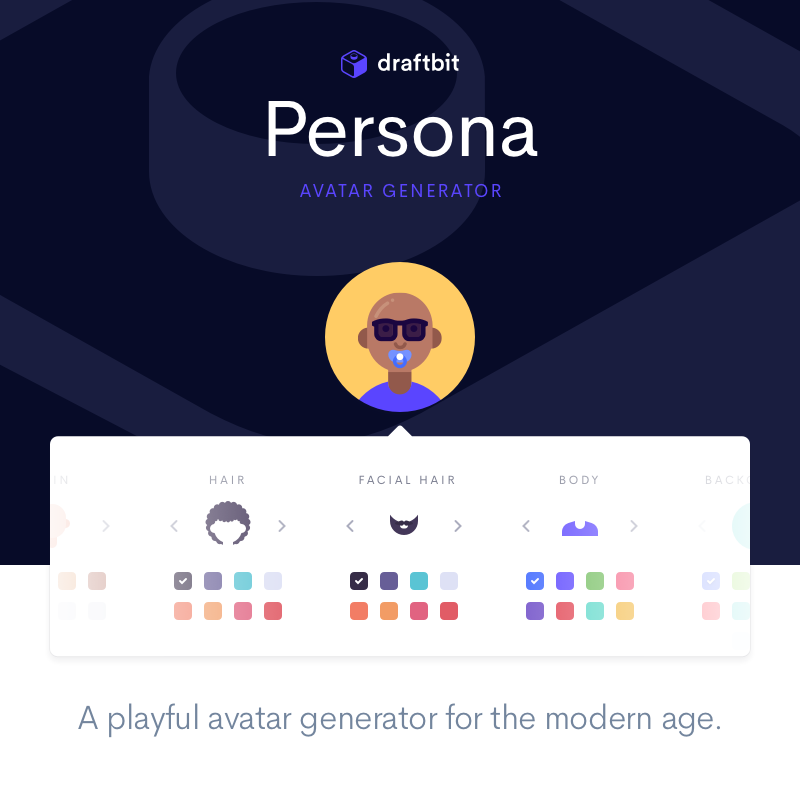

User reviews (0)