
 简体中文
简体中文 English
Website review
This review may include AI-generated content and is not individually verified. Domain, certificate and other facts come from the observed data on this page.
What is Popify?
Popify is a social proof app for e-commerce stores. It displays small popups on your storefront that show real activity from your own store — recent orders, add-to-cart actions, live visitor counts, reviews and offers — to nudge browsing shoppers toward buying. It works with Shopify, Wix and WooCommerce, and the popups are built from your store's actual orders, visitors and reviews rather than generic or invented messages.
What you can show
- Recent sales popup: who bought what, and how long ago.
- Add-to-cart activity: items other shoppers are adding right now.
- Live visitor counter: how many people are viewing a product at this moment.
- Sales counter: how many times a product sold in the last 24 hours.
- Review popup: surfaces your Editorify and Ryviu reviews while people browse.
- Video sales popup: a short product video in a popup.
- Announcement, offer and discount popups: free-shipping notices, news, or a copyable coupon code.
Who it's for
Store owners who already have traffic but want more of those visitors to convert, and who don't want to write every message by hand. Because popups pull from live store data, a store with steady orders and reviews gets more out of it than a brand-new store with little activity to display.
Trade-off to weigh
Social proof popups can feel intrusive if overdone. Showing too many at once, or repeating the same message, risks annoying shoppers instead of reassuring them. Start with one or two types — recent sales and a live visitor counter are common starting points — and watch whether they help or distract.
Next step
If you run a Shopify, Wix or WooCommerce store, install the app, pick one popup type, and run it for a week before adding more. A 3-day free trial is offered on every plan, and pricing details are on Popify.
How do I install Popify on my Shopify, Wix, or WooCommerce store?
Popify is designed to install as a social proof app across Shopify, Wix, and WooCommerce, so the setup depends on which platform you use.
Shopify: Install from the Shopify App Store, then connect it to your store. Popify builds its sale and visitor popups from your real order data. Wix: Install from the Wix App Market; the app is rated there and is built to fit different screen sizes. WooCommerce: Add the WooCommerce integration, which draws on your store's own orders, visitors, and reviews.
Once connected, choose a popup type (recent sales, add-to-cart activity, live visitors, sales counter, review, video sales, announcement/offer, or discount), start from a template, and go live. A 3-day free trial is available on every plan, and pricing is listed separately.
A practical next step: Install on one platform first, confirm your order and review sources are pulling in correctly, then add more popup types. If you also run Shopify or Wix elsewhere, keep each store's popups scoped to its own data to avoid showing mismatched activity.
Which social proof popup type should I use for a product page versus a cart page?
Use recent sales, add-to-cart, live visitor and review popups on product pages, and sales counters, free-shipping or discount messages and cart-activity nudges on cart pages. The product page is where someone is deciding; the cart page is where they are justifying and finishing. Popify's own popup types map neatly onto that split, since it lists recent sales, add-to-cart activity, live visitor counter, sales counter, review popup, video sales popup, announcement/offer and discount popup, all built from your store's real orders, visitors and reviews.
Product page: reduce doubt while they compare
- Live visitor counter — "24 people are viewing this product" works here because the shopper is actively weighing this item. It creates gentle urgency without a deadline.
- Review popup — surface reviews from Editorify or Ryviu while they browse. Best placed after they have scrolled past the main description, not on arrival.
- Recent sales popup — "Sarah from Leeds just purchased Wireless Headphones, 2 min ago" suits products with steady order volume. On a slow-moving SKU it can look stale or repetitive.
- Add-to-cart activity — useful for variants and sizes, where the shopper is choosing between options.
- Video sales popup — a 20-second product video fits products that need demonstration, such as apparel or footwear.
Cart page: remove friction and reward completion
- Sales counter — "32 sold in the last 24 hours" reassures someone who has already committed to the cart.
- Announcement or offer — free shipping over $50, or a new collection, with a call-to-action link. This is the natural place for a threshold message.
- Discount popup — a copyable code such as WELCOME10. Use it to rescue hesitation, not as a permanent fixture.
- Recent sales popup — still works, but keep frequency low; cart abandonment is sensitive to clutter.
A quick comparison:
| Popup type | Product page | Cart page |
|---|---|---|
| Live visitor counter | Strong | Weak |
| Review popup | Strong | Weak |
| Recent sales popup | Strong | Moderate |
| Add-to-cart activity | Strong | Weak |
| Sales counter | Moderate | Strong |
| Announcement / offer | Moderate | Strong |
| Discount popup | Moderate | Strong |
| Video sales popup | Strong for demo-led products | Weak |
A practical next step
If you sell one hero product with steady traffic, start with a live visitor counter plus a review popup on the product page, and a free-shipping or discount popup on the cart page. If you sell many SKUs with uneven order volume, lean on the sales counter and reviews instead of recent sales, which depend on fresh orders to stay believable.
Two decision criteria: pick popups that reflect data you actually have, and cap how often each visitor sees them. Popify offers a free trial across its plans, so you can test one product page and one cart page before rolling out site-wide.
How does Popify pull real orders, visitors, and reviews into its popups?
Popify builds its popups from data that already exists in your store, rather than from invented names or generic messages. According to its page, it connects to your live orders, cart activity, visitor counts and review sources, then turns those signals into small popups that slide in while people shop.
What gets pulled in
- Recent sales popup – real orders as they happen: who bought, what they bought, and how long ago. The page describes these as built from your store's real orders.
- Add-to-cart activity – shows what other shoppers are adding to their carts right now.
- Live visitor counter – how many people are viewing a product at that moment.
- Sales counter – how many times a product sold in the last 24 hours.
- Review popup – surfaces reviews from Editorify and Ryviu while people browse.
- Offer and discount popups – free shipping, announcements, or a copyable coupon code such as WELCOME10.
Where it works
Popify is described as one social proof app for Shopify, Wix and WooCommerce, so the same popup types are meant to run across those platforms. The page also mentions web push as a way to bring shoppers back.
A practical scenario
Imagine you run a Wix store selling home goods. A shopper lands on a candle product page. Popify can show "Emma from Berlin added to cart" from a real recent cart event, a live viewer count, and a review pulled from Ryviu — all on the same visit. The shopper sees activity that actually happened, not a scripted message.
Trade-off to weigh
Real data means the popups are only as active as your store. A new or low-traffic shop may have little order or cart activity to display, so sales and add-to-cart popups could appear rarely or feel thin. Review popups depend on having Editorify or Ryviu reviews already collected. If your traffic is low, lean on announcement, discount and review popups first, and let sales popups grow as orders accumulate.
Next step
Check which review app you already use — Editorify or Ryviu — since the review popup draws from those. If you use neither, start with the sales, visitor and discount popups, then add reviews once you have a source connected.
Can I try Popify for free, and what do the plans cost?
Popify offers a free trial rather than a permanent free tier. The site advertises a 3-day free trial on every plan, so you can test the popups on your store before paying. You need to check the pricing page for current plan prices — the trial length is stated, but the plan costs are not given in the information available.
Popify
What the trial lets you evaluate
- Recent sales popups built from your store's real orders, so you can judge whether real purchase activity looks credible rather than fake.
- Add-to-cart and live visitor counters to see if "24 people are viewing this" style messages fit your store's traffic.
- Review popups that surface your existing Editorify or Ryviu reviews.
- Announcement, discount and video popups for offers and product demos.
A practical way to decide
If you run a low-traffic store, sales and visitor popups may show little activity, making them less useful than review or discount popups. If you get steady orders, the real-order sales popup is the strongest candidate to test first. Three days is short, so pick one or two popup types, install them, and watch whether visitors engage before the trial ends.
Next step: open Popify and check its pricing page for the current plan tiers and what each one includes, since the trial applies to every plan but the costs are not listed here.
How do I customize Popify popups to match my store's branding and screen sizes?
Popify is built so that customization starts from its templates rather than from a blank canvas: you pick a popup type, then adjust it to your store. The visible types are recent-sales, add-to-cart, live-visitor counter, sales counter, review, video sales, announcement/offer, and discount popups, plus web push for bringing shoppers back. Branding work means matching each of those to your store's look without making them feel like ads.
What you can reasonably expect to control
- Content source: sales and add-to-cart popups draw on your real orders and carts, review popups surface Editorify and Ryviu reviews, and the live-visitor and sales counters reflect current activity. That means the wording is partly dictated by real data — you style the frame, not the facts.
- Visual styling: colors, typography, corner radius, shadows and imagery should follow your store's design tokens. If your store uses a specific brand hex and font, apply them here so the popup reads as part of the site.
- Placement: corner or edge positioning for slide-ins, so popups don't cover the add-to-cart button or price on mobile.
- Timing and frequency: delay before the first popup, interval between popups, and per-page or per-session caps. This matters more than color for perceived quality.
Matching screen sizes
Popify advertises "Wix popups that fit every screen," and the practical approach is to design mobile-first. On phones, a popup that occupies a third of the width looks cramped; a full-width bottom bar with one line of text and a thumbnail usually works better. Test at 360px, 390px, 768px and 1440px widths, and check that the discount popup's copy-code button stays tappable.
A quick decision rule: if the popup repeats information already visible on the page (price, product name), shrink it; if it adds new information (a recent order, a code), give it slightly more room.
A concrete scenario
A running-shoe store using the Trail Runner Shoes example might show a recent-sales popup in the bottom-left on desktop, but switch to a slim bottom bar on mobile, cap it at one popup per session, and suppress it on the checkout page. Review popups can run on product pages only; announcement popups on the homepage.
For platform-specific setup and current styling options, check Popify's own documentation and pricing page, and compare against the app marketplaces where it is listed: Popify, Shopify, Wix.
 Cloudflare
 Namecheap Private Email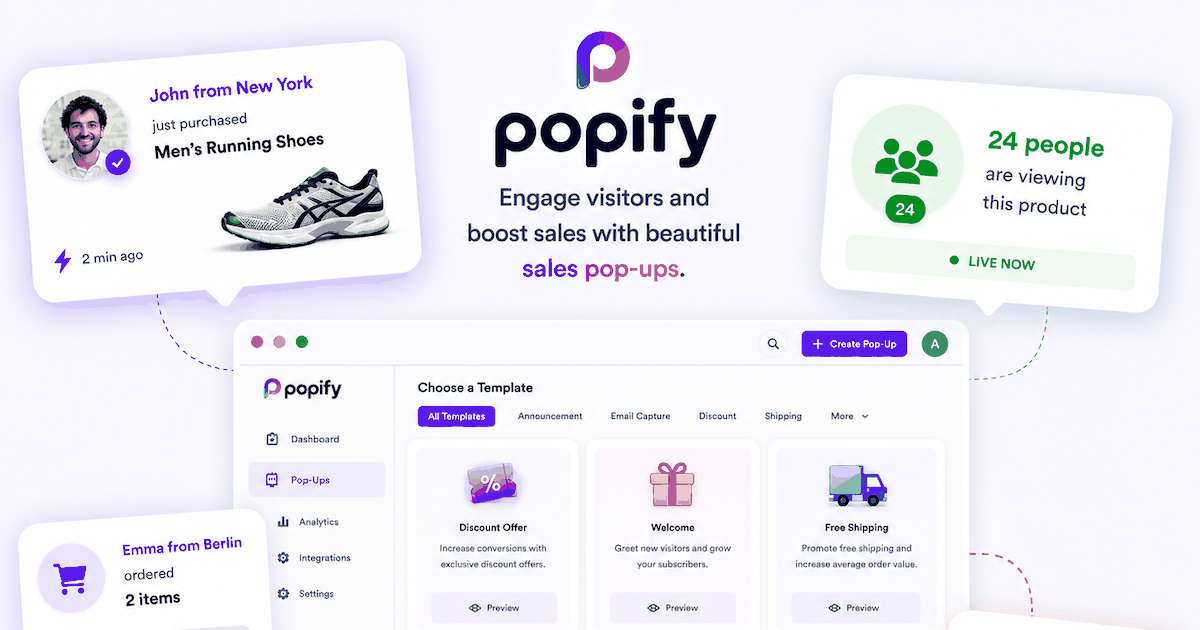

User reviews (0)