
 简体中文
简体中文 English
Website review
This review may include AI-generated content and is not individually verified. Domain, certificate and other facts come from the observed data on this page.
What is Stowaway?
Stowaway is a browser-based live 3D view of the sky above you, built around flight tracking. Rather than showing planes as icons on a flat map, it renders the actual sky at your location — your horizon, your time of day, the stars genuinely overhead — and places live aircraft and satellites where they really are. You can then take a "window seat" aboard a plane and watch its flight from that perspective. It's a rendering, but everything in it is drawn from real data: aircraft positions from public ADS-B signals, satellites on their real orbits, and stars calculated for wherever you are.
Who it suits
- Aviation and space enthusiasts who want atmosphere rather than a data grid — the kind of person who hears a plane overhead and wants to know where it's going.
- Curious casual visitors: the free tier needs no account, and the site is designed to be explored in a few minutes.
- Teachers, parents or anyone explaining orbits and air traffic to someone visually, since the 3D scene does the explaining.
Trade-offs to know
- Visual immersion over analysis. If you need altitude charts, arrival estimates or airport departure boards, a conventional tracker is more efficient; Stowaway's strength is context and feel.
- Ground detail is a paid extra. The free version covers the sky, planes and satellites; supporters get sharper, more detailed ground imagery. The site states there are no ads and no selling of user data.
- It's a browser experience, so quality depends on your device's graphics performance.
A good first step: open Stowaway near a window at dusk, find a plane you can actually hear, and follow it in the 3D view — that comparison between the real sky and the rendering is the quickest way to judge whether it's for you.
How is Stowaway different from a standard flight tracker like Flightradar24?
Stowaway reframes flight tracking as a view from a window seat rather than a map with icons. Standard trackers such as Flightradar24 answer "where is this plane?"; Stowaway answers "what does the sky above me look like right now, and what's flying through it?" It renders the actual sky over your location — your horizon, your time of day, the real positions of planes and satellites, and stars computed for where you're standing — then lets you ride along in a seat aboard a flight.
What actually differs
| Aspect | Standard trackers (e.g. Flightradar24) | Stowaway |
|---|---|---|
| Primary view | 2D map with plane icons and flight details | 3D sky rendered from your viewpoint |
| Perspective | Observer looking down at a map | Passenger looking out a window |
| Data source | Public ADS-B signals | Same public ADS-B signals, per the site |
| Extras | Airport boards, aircraft metadata, filters | Satellites on real orbits, stars for your location, fly-along seats |
| Ground detail | Satellite imagery | Sharper real buildings and streets for supporters |
| Cost model | Free tier plus paid subscriptions | Free without an account; supporters get sharper ground and extras, no ads |
Who each suits
If you're tracking a specific arrival, checking delays, or identifying a tail number, a conventional tracker remains the practical tool — its map and data panels are built for lookup. Stowaway suits a different moment: you hear an aircraft overhead, want to see it in context, or want to show a child what "up there" actually looks like. The site's own framing stresses this experiential angle, and the quoted reactions it collects — from Reddit and YouTube commenters praising its "old Internet vibes" and calling it "every airplane enthusiast's dream" — are those users' impressions, not a measured comparison. My read: the two are complementary rather than competing; Stowaway's value is atmosphere and orientation, not operational lookup.
A practical next step
Next time you notice a plane passing overhead, open Stowaway first to place it in your real sky and get a sense of direction and altitude, then switch to a standard tracker if you want its route, registration, or schedule. If you mainly need arrival times or fleet data, start with the conventional tracker and treat Stowaway as the view you reach for when curiosity, not logistics, is the reason.
Do I need an account or a paid subscription to use Stowaway?
No. Stowaway's sky, planes and satellites are free to view, and no account is needed. Paid support exists, but it is optional: supporters get sharper ground imagery and "a few extras," while the core experience stays free.
What this means in practice
- Casual checking: If you just want to see which aircraft are above you, open the site and look. Nothing to sign up for.
- Following a specific flight: You can watch live positions drawn from the same public ADS-B signals other trackers use, without registering.
- Wanting detailed ground scenery: This is the main reason to consider supporting. The free view keeps the sky and aircraft; the paid tier sharpens buildings and streets below.
How to decide
Start free and use it for a few real situations—a plane passing overhead, a satellite pass, a flight you're curious about. If you find yourself wanting to see the streets and buildings beneath the flight path in detail, that's the point where supporting becomes worth considering. If the sky view alone satisfies you, there's no reason to pay or create an account.
One related note: the site says it shows no ads and does not sell user data, which is part of how the supporter model is framed.
Can I see satellites and stars in the sky above me, not just planes?
Yes. Stowaway is built to show the whole sky above you, not just aircraft: live planes, satellites on their real orbits, and stars calculated for your location and time of day. The pitch is that everything in the view is drawn from something real rather than invented, and most of it moves while you watch.
What that means in practice
- Satellites appear where they actually are on their orbits, so the view can help you spot a pass overhead rather than just reading a list of times.
- Stars are worked out for wherever you're standing, which makes the scene a plausible match for the sky outside your window tonight.
- Planes use the same public ADS-B signals as other trackers, but shown as a 3D view from a window seat instead of a dot on a map.
A useful next step
Open it at night, from your actual location, and glance between the screen and the real sky. If a bright point on screen lines up with one overhead, the rendering is doing its job. For a satellite pass, check shortly before the predicted time and watch the path cross the view.
Trade-offs to expect
The ground is deliberately less detailed on the free version; sharper buildings and streets are reserved for supporters. If your interest is mainly identifying a specific flight number or arrival time, a conventional map-based tracker will be quicker. Stowaway's value is orientation and atmosphere: knowing what is above you and roughly where to look. It also suits people who want the experience without travelling — one quoted commenter on Stowaway notes they have never been on a plane and found it fascinating, which fits the from-anywhere framing.
What do supporters get that free users don't?
Supporters get a sharper view of the ground: real buildings and streets rendered in much finer detail than standard satellite imagery, while the free version keeps the sky, planes and satellites. The page also frames support as what keeps the free tier free—no ads, and no selling of user data.
What stays free
- Live aircraft positions, satellites and stars, with no account required.
- The core 3D "window seat" experience.
What support adds
- Higher-detail ground imagery under your flight view.
- "A few extras" beyond that, though the page doesn't spell them out—check the support page for the current list.
Next step: If close-up ground detail matters to you (say, following a descent over a city you know), support is the upgrade to consider; if you mainly want to spot planes and satellites overhead, the free version covers it.
Where does Stowaway's live flight data come from?
Stowaway says its live flight positions come from the same public signals other trackers use — specifically ADS-B, the radio signal aircraft broadcast about their own position. In practice, that means the planes you see in its 3D view are placed from broadcast position data, not invented for the scene; the sky, horizon, time of day and stars are rendered around them.
What that means for you
- Accuracy is typical of ADS-B-based tracking: good enough to spot the plane overhead and follow its route, but it is a broadcast-derived position, not a guarantee to the metre.
- Coverage depends on receivers: ADS-B is picked up by ground receivers and satellites, so some aircraft or regions may be missing or delayed. That is a property of the signal, not a flaw unique to Stowaway.
- The 3D layer is the difference: other trackers show a moving icon on a map; Stowaway puts that same position data into a view of the sky as it looks from where you are.
A useful next step: when a plane passes overhead, open Stowaway and compare the aircraft it shows with what you can actually see or hear — that tells you quickly how well the data lines up with your own window.
 Cloudflare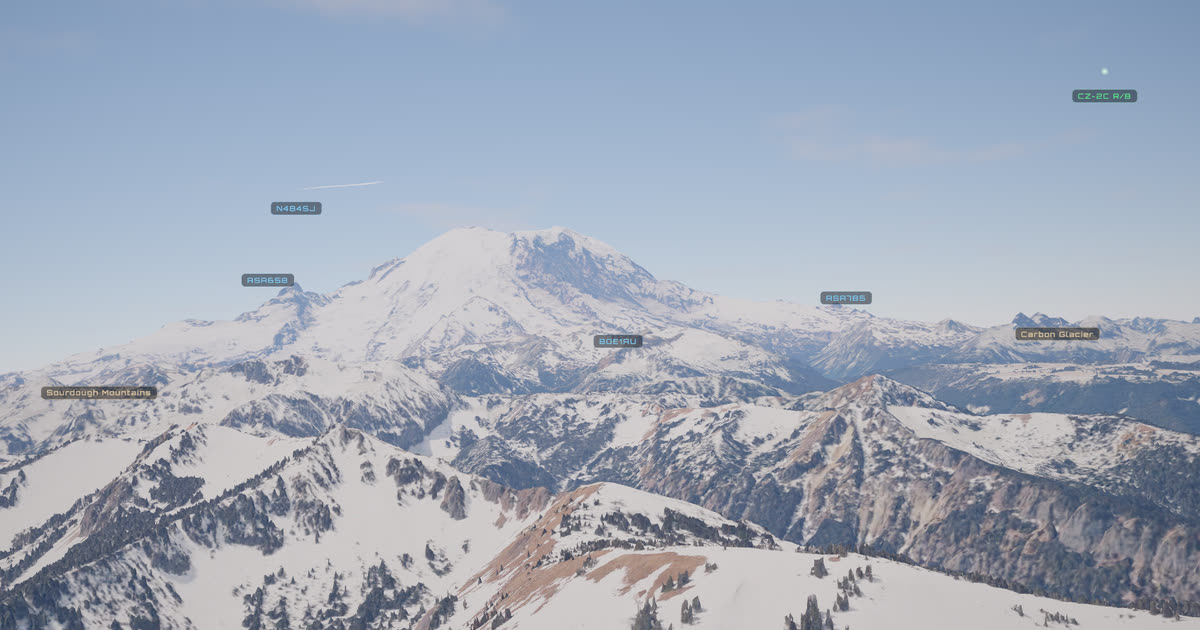

User reviews (0)