
 简体中文
简体中文 English
Website review
This review may include AI-generated content and is not individually verified. Domain, certificate and other facts come from the observed data on this page.
What is SVAR UI Components for React, Svelte and Vue?
SVAR UI Components is a library of open-source, framework-native UI components for React, Svelte, and Vue. Rather than wrapping a generic widget in framework glue, the components are built specifically for each framework, so they drop into apps and meta-frameworks like Next.js, Nuxt, and SvelteKit with minimal boilerplate. The library focuses on data-heavy and planning-oriented interfaces, and offers PRO editions of some components for enterprise features.
What it includes
| Component | What it's for | Editions |
|---|---|---|
| Gantt Chart | Project planning and resource scheduling with task dependencies, drag-and-drop editing, customizable timelines | Open source + PRO |
| DataGrid | High-performance data management: sorting, filtering, editing, virtualization | Open source + PRO |
| Calendar | Event management and scheduling with flexible views, calendar groups, recurring events | Open source + PRO |
| Kanban | Customizable task boards for project management and team workflows | Open source + PRO |
| File Manager | File browsing and management with multiple views, preview, and standard file operations | Open source + PRO |
The page also mentions building blocks such as advanced filtering logic, plus TypeScript support with strong type definitions for autocomplete, early error detection, and safer refactoring. It advertises AI-readiness through an MCP server, agent skills, and context packs for coding assistants.
Who it's for
Teams building scheduling, planning, or data-management screens who don't want to assemble low-level primitives themselves. If your app is already in React, Vue, or Svelte and you need a Gantt, calendar, kanban board, or data grid quickly, this is the target use case. The framework-native approach matters most if you care about idiomatic code and avoiding adapter layers.
Trade-offs to weigh
- Breadth vs. depth: The set is focused on planning and data components rather than a full general-purpose design system, so you may still need other libraries for basic UI elements.
- Open source vs. PRO: Core components are open source, but advanced or enterprise features sit behind PRO editions. Check which specific features you need before committing.
- AI tooling is a bonus, not a substitute: MCP servers and context packs can help coding agents produce accurate SVAR code, but they don't remove the need to understand the component APIs.
Next step
Pick the one component closest to your current need — for example, a Gantt for a project-planning screen — and try the open-source version in a small branch first. If the core works but you hit a PRO-only feature, that tells you whether the paid tier is worth it for your team.
How does SVAR UI integrate with frameworks like Next.js, Nuxt, and SvelteKit?
SVAR UI is designed to be framework-native: you install the version built for your framework (React, Vue, or Svelte) and import its components directly into your app. The page states that the components drop straight into Next.js, Nuxt, and SvelteKit, so there is no wrapper layer or adapter to configure. You configure a complete component—Gantt chart, calendar, Kanban board, data grid, or file manager—rather than assembling it from low-level primitives, which the site frames as “minimal boilerplate.” TypeScript definitions are included, so props and event payloads get autocomplete and type checking.
What this means in practice
- Next.js: Because the React build is native, you can render SVAR components inside client components and route pages the same way you would any other React library. Expect the usual Next.js consideration: interactive components need client-side rendering, not server components.
- Nuxt: The Vue build fits Nuxt's component model, so you register or import components per page or globally. Nuxt's SSR and hydration rules still apply, so test any component that touches the DOM after mount.
- SvelteKit: The Svelte build slots into SvelteKit's component structure. As with any client-heavy widget, verify behavior under SSR and prerendering.
Decision criteria
Choose the build matching your framework and check whether the component you need is open-source or has a PRO edition with the advanced features you require—Gantt, Calendar, and Kanban are listed with PRO editions, while DataGrid and File Manager are listed as available. If your team uses AI coding assistants, SVAR also offers an MCP server, agent skills, and context packs to give agents current component context.
A useful next step: pick your framework's demo from the site's demos section, run it locally, and confirm the component behaves correctly under your rendering mode (SSR, SSG, or client-only) before committing. For related component libraries, you can compare with MUI for React or PrimeVue for Vue.
Which SVAR UI components offer PRO editions and what additional features do they include?
SVAR UI's open-source components are free to use, while a subset has a PRO edition aimed at enterprise applications. Based on the component descriptions on SVAR UI Components for React, Svelte and Vue, these are the four with a PRO option:
| Component | Core (open-source) purpose | PRO positioning |
|---|---|---|
| Gantt Chart | Project planning and resource scheduling with task dependencies, drag-and-drop editing, customizable timelines | Adds advanced features for enterprise use |
| Calendar | Event management and scheduling with flexible views, calendar groups, recurring events | Adds advanced features for enterprise use |
| Kanban | Ready-to-use, customizable task boards for project management and team workflows | Adds advanced features for enterprise use |
| DataGrid | High-performance data management with sorting, filtering, editing, virtualization | Adds advanced features for enterprise use |
The File Manager is listed without a PRO edition, so it appears to be open-source only.
A practical caveat: the site groups all four PRO editions under the same "advanced features for enterprise applications" wording and does not itemize what each PRO tier adds beyond the core feature lists shown. So the table tells you which components have a paid tier, not the exact feature delta. If you need that level of detail—for example, whether PRO Gantt includes specific resource-leveling or export capabilities—check the individual product pages or the licenses page on the site rather than relying on the overview.
For a decision: if your project needs basic scheduling, boards, or grid functionality, the open-source versions cover the described core features. Choose PRO when you hit enterprise requirements the free tier doesn't meet. If you're evaluating for a team, a sensible next step is to prototype with the open-source component first, then confirm the specific PRO additions before committing.
How can I get AI coding assistants like Cursor or GitHub Copilot to write accurate SVAR code?
SVAR publishes an AI toolkit meant for exactly this: an MCP server, agent skills, and context packs that feed your coding agent up-to-date SVAR context so it writes accurate SVAR code. The practical goal is to stop the assistant from guessing at APIs and instead ground it in SVAR's real component interfaces.
What the toolkit is for
The page lists three pieces under "AI-Ready UI Components for Your Apps":
- MCP server — connects your agent to SVAR context directly, so it can look up current component details instead of relying on training data.
- Agent skills — packaged guidance that tells the agent how SVAR components are structured and used.
- Context packs — reference material you can supply to the agent for accurate code generation.
SVAR also names the assistants it targets: Claude Code, Cursor, Codex CLI, Antigravity, ChatGPT, and GitHub Copilot. So the intended workflow is to wire one of these into SVAR's toolkit rather than prompting blind.
A concrete setup path
- Pick your stack first — the components are framework-native for React, Svelte, and Vue, and drop into Next.js, Nuxt, and SvelteKit. Your agent needs to know which one you're on.
- Load the SVAR context into your assistant using the MCP server, agent skills, or a context pack.
- Ask for a specific component by name — Gantt, Calendar, Kanban, DataGrid, or File Manager — since these are the units SVAR documents.
- Check the generated code against SVAR's typed API. TypeScript definitions are a strength here: strong types improve autocomplete and catch errors early, which is also what makes agent output easier to verify.
The page shows a typed event handler as an example of the style to expect:
api.on("open-file", ({ id }: OpenFileEvent) => openFile(id));
If your assistant produces something that doesn't match that typed, configuration-driven pattern, the context probably isn't loaded.
Why this matters more than generic prompting
SVAR's stated design is "configure complete components instead of composing low-level primitives" — less boilerplate, faster development. That's good news for AI assistance, because there's less surface area to hallucinate. An agent that knows the component config shape can produce working code; one that doesn't may invent props or lifecycle methods.
One trade-off: open-source components are the base, while Gantt, Calendar, and Kanban also have PRO editions with advanced features for enterprise applications. If your project needs those, make sure your agent's context covers the PRO API, or it may generate code against the open-source surface only.
Next step
Start with one component you actually need — say DataGrid for sorting, filtering, editing, and virtualization — and run a single task end to end with the SVAR context loaded. Compare the result with the same prompt run without it. That tells you quickly whether the setup is working before you roll it out across a larger codebase.
For the toolkit itself, see SVAR UI Components.
What performance optimizations does SVAR's DataGrid offer for large datasets?
SVAR's DataGrid is described on its page as high-performance data management with sorting, filtering, editing, and virtualization. Virtualization is the key optimization for large datasets: instead of rendering every row, it renders only what fits the viewport, which keeps scrolling and DOM work bounded as row counts grow.
H3 What the page confirms
- Virtualization is listed as a DataGrid capability, alongside sorting, filtering, and editing.
- The component is framework-native for React, Vue, and Svelte, so the grid integrates with the host framework's rendering rather than wrapping it.
- It is positioned as open-source, with PRO editions adding advanced features for enterprise use — the page does not itemize which optimizations are open-source versus PRO.
- TypeScript definitions are emphasized, which helps when configuring large-column schemas but is not itself a rendering optimization.
H3 What to verify yourself The page does not publish benchmark numbers, row-count limits, or details such as row recycling, column virtualization, or server-side paging. Treat those as unknowns and test them against your own data.
A practical check: load a representative dataset — say 100,000 rows with 20 columns — and measure time-to-first-render, scroll frame rate, and memory after a few minutes of scrolling. Then repeat with editing and filtering enabled, since those paths often behave differently from read-only scrolling. If your data lives server-side, confirm whether paging or lazy loading is supported before assuming client-side virtualization is enough.
For framework-specific setup, the official docs are the right starting point: SVAR UI Components. If you are comparing options, AG Grid and TanStack Table document their own virtualization and paging models, which makes a feature-by-feature comparison easier.
Can I use SVAR UI components for free in a commercial project, or do I need a license?
SVAR UI components can be used in commercial projects without paying for the open-source editions; the PRO editions are the ones that require a license. The site describes its components as open-source and separately notes that "some components come with PRO editions that add advanced features for enterprise applications." So the free/commercial question depends on which edition you use, not on whether your project makes money.
What the free editions cover
The open-source versions are positioned for core functionality: Gantt chart, data grid, calendar, Kanban, and file manager, all framework-native for React, Svelte, and Vue, with TypeScript support and integration into Next.js, Nuxt, and SvelteKit. For a commercial app that needs a solid grid, board, or scheduler without enterprise-specific extras, the open-source edition is the intended starting point.
When you would need a license
You need a paid license when your requirements match the PRO feature set rather than the base component. The page pairs PRO editions with Gantt, Calendar, and Kanban, while DataGrid and File Manager are listed without a PRO tag in the excerpt. Typical triggers for moving to PRO in products like these are advanced scheduling logic, resource management, larger-scale or enterprise deployment needs, and support expectations.
| Situation | Likely edition |
|---|---|
| Commercial product using base grid, calendar, board, or file browsing | Open-source edition |
| Need advanced Gantt/Calendar/Kanban features or enterprise-grade support | PRO license |
Next step
Check the Licenses page on SVAR UI and match each component you plan to ship against its edition. If your only PRO-dependent feature is, say, advanced Gantt scheduling, you can often keep the rest of the app on open-source components and license just that one.
 DigitalOcean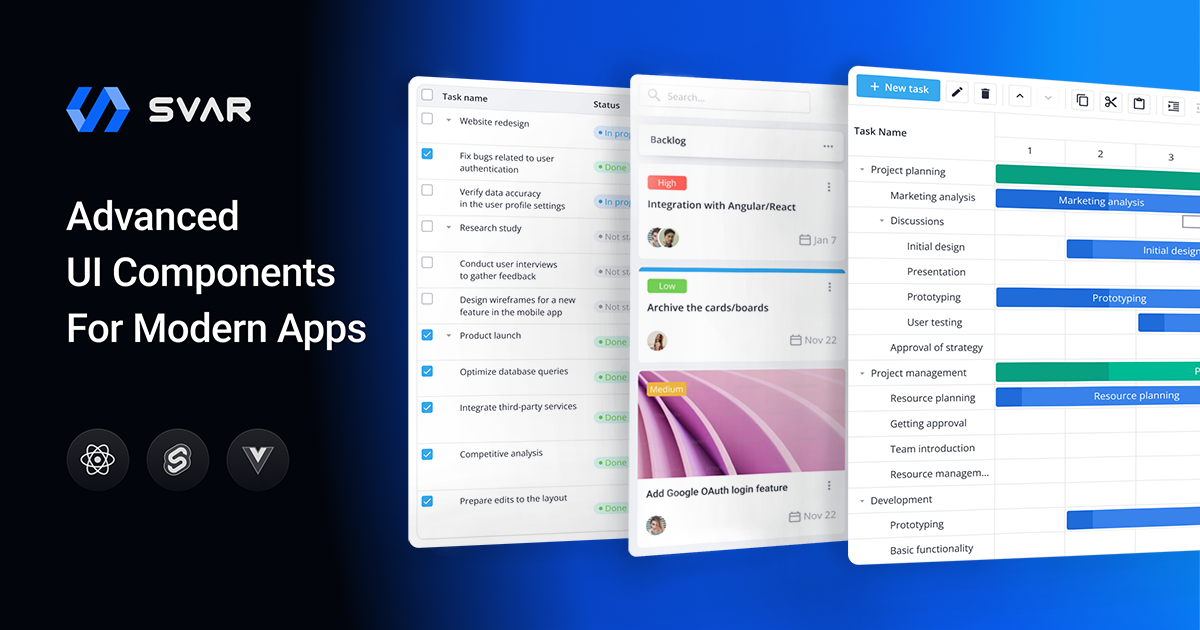
User reviews (0)