
 简体中文
简体中文 English
Website review
This review may include AI-generated content and is not individually verified. Domain, certificate and other facts come from the observed data on this page.
What is Tellie?
Tellie is a teleprompter app for Mac that listens to your voice instead of scrolling at a fixed speed. It runs as a small floating window near the MacBook notch, close to the camera, and follows the words you actually say. It is intended for people who record videos, appear on video calls, or deliver scripted remarks and would rather not read from a second screen.
What it does
- Voice-following script: Instead of setting a scroll speed and keeping up with it, you click the mic and Tellie advances as you speak, waits when you pause, and finds your place if you skip a line or go off script.
- Invisible on screen: According to the site, Tellie does not appear in screen recording, Zoom, Meet, or FaceTime, so viewers see you, not your script.
- Positioned near the camera: It hangs from the notch area, which is meant to keep your eyeline closer to your audience than a script on a separate monitor would.
- On-device processing: The page states nothing leaves your Mac.
- Stagehand (Pro): You can flag must-cover sections that turn green as you cover them, in your own words, with a nudge if time is running short.
Who it suits
- Solo video creators recording talking-head segments or cold opens who want a natural delivery without memorizing a script.
- People on Zoom, Meet, or FaceTime calls who need notes that stay off the shared screen.
- Anyone who finds fixed-speed scrolling teleprompters stressful because pauses and ad-libs throw off the timing.
Trade-offs to weigh
- It requires an Apple silicon Mac (M1 or later) running macOS 14 or later, so Intel Macs and Windows PCs are out.
- Voice-following depends on reliable microphone pickup; a noisy room or an unusual speaking cadence may behave differently from the demos.
- A free download unlocks the full app for 10 days with no account or card, and Pro is a one-time purchase listed at $29, so you can test your own script and accent before deciding.
Next step
Pick one short script you already know well, record a take with Tellie and one with a plain scrolling teleprompter, and compare how many retakes each needed. That single test will tell you whether voice-following saves you real time.
How does Tellie's voice-following teleprompter work compared to a traditional scrolling teleprompter?
Tellie replaces the fixed scroll speed of a traditional teleprompter with speech tracking. Instead of you chasing a script that moves at a constant rate, the script advances only as you actually speak the words.
Traditional scrolling teleprompter
- You set a speed (words per minute) before or during the take.
- The text moves regardless of whether you keep up.
- Pausing, ad-libbing, or skipping a line means you must manually re-sync or restart.
- Your job is to match the machine.
Tellie's voice-following approach
- You open a document and hit play; the text appears near the MacBook notch by the camera.
- Click the mic and Tellie follows the words you say, one at a time.
- It waits when you pause, keeps your place if you go off script, and finds you if you skip a line.
- The interface sits under the camera, so your gaze stays near the lens rather than drifting to a separate screen or window.
The practical difference is who controls pacing. A scrolling prompter is a metronome; a voice-following one is a listener. That matters most for unscripted or semi-scripted delivery—interviews, demos, cold opens, sponsor reads—where natural pauses and small rewrites are normal. For a tightly timed broadcast read at a fixed length, a constant scroll can still be easier to predict.
Two other design choices shape how it fits a workflow. Tellie is described as invisible to screen recording, Zoom, Meet, and FaceTime, so only you see the words while your audience or recording sees a clean frame. And processing is on-device, per the page's "Nothing leaves your Mac" framing. The page also mentions a Pro feature called Stagehand that flags must-cover sections, checks them off as you say them even in your own words, and nudges you if time gets tight.
If you want to test whether voice-following suits you, try a 60-second take with one deliberate pause and one skipped sentence. A traditional prompter will force a manual correction; Tellie should simply wait and then resume. That single test tells you more than any feature list.
How do I keep Tellie hidden from Zoom, Meet, FaceTime, and screen recordings?
Tellie handles this by design rather than by a setting you have to hunt for: it lives in the MacBook notch area and is rendered so that screen recording and video-call apps don't capture it. Your audience sees you; you see the script. That applies to Zoom, Meet, FaceTime and full-screen recordings according to the product's own description.
A few practical points:
- Nothing to toggle per app. Because the invisibility is built into how Tellie draws itself, you don't need to add it as a window share, exclude it in Zoom's screen-share options, or fiddle with Meet permissions.
- Position matters for eye contact. Tellie sits directly under the camera, so reading it looks close to looking at your webcam. That's the real payoff in a call — not just hiding the script, but keeping your gaze roughly on the other person.
- Confirm once before a real meeting. Do a 20-second test recording in QuickTime with Tellie running and check the file. It's the fastest way to be sure your macOS version, display setup and recording tool all behave as expected.
- Multi-display setups are the usual edge case. If you use an external monitor, test with Tellie on the screen you'd actually use during a call, since window placement and capture behavior can differ.
If you want the feature that tracks must-cover points and nudges you on timing, that's the Pro tier — the site lists Pro at $29 once, with a free download that unlocks everything for 10 days, no account or card. See Tellie for the current feature comparison.
Next step: install it, run one test recording, and only then take it into a live call.
What is the difference between Tellie Free and Tellie Pro, and what does the $29 Pro upgrade include?
Tellie's free tier is a full-featured teleprompter for a limited trial period, while Pro is a one-time $29 purchase that keeps the app and adds Stagehand, a coverage-tracking feature. The most important distinction is that Free is time-limited rather than feature-limited: the page states each download unlocks all of Tellie for 10 days, with no account or card required.
Free vs. Pro at a glance
| Free | Pro | |
|---|---|---|
| Cost | No charge | $29 once |
| Duration | 10 days from download | Permanent |
| Voice-following teleprompter | Yes | Yes |
| Invisible to Zoom, Meet, FaceTime, screen recording | Yes | Yes |
| On-device processing | Yes | Yes |
| Stagehand coverage tracking | No | Yes |
What the $29 Pro upgrade adds
Pro's headline addition is Stagehand. You flag sections of your script as must-cover, and they check off as you say them, even when you paraphrase rather than read verbatim. If you are running short on time, Tellie nudges you while there is still room to fit everything in. The page frames this as "Tellie keeps track so you don't have to."
Everything else — the notch-mounted display, voice-following that waits when you pause and finds your place when you skip, and invisibility to screen sharing and recording — is part of the core app rather than a Pro-only feature. The page also notes the app runs on-device and requires an Apple silicon Mac (M1 or later) with macOS 14 or later.
How to decide
The trial structure makes the decision unusually easy: download it, run a real recording or a live call within the 10 days, and see whether the voice-following actually suits how you speak. If you mostly read scripts straight through, the free trial may tell you everything you need. If your problem is forgetting a must-mention point under pressure — a launch demo, a sales call, a video with a sponsor read and a call to action — Stagehand is the feature that justifies paying, and $29 once is a low-stakes bet compared with a subscription.
One caveat worth naming: the "invisible to screen recording" behavior is the kind of claim you should verify in your own setup, since it depends on how your meeting or recording tool captures the screen. Test it during the trial with the exact apps you use.
A sensible next step is to install the free version and run one recorded take and one live call before the 10 days are up. If you find yourself wanting the must-cover checklist mid-session, buy Pro; if the plain teleprompter already covers your needs, you have lost nothing.
How does the Stagehand feature help me cover must-cover points and stay on time during a talk?
Stagehand is Tellie's Pro-tier feature for keeping a talk on track without forcing you to read a script. You mark specific points in your document as must-cover, and Tellie tracks whether you've actually said them — in your own words, not verbatim. A marked section turns green as you cover it, so you get live confirmation rather than having to remember what you've already hit.
The second piece is timekeeping. If your talk is running long, Tellie nudges you while there's still time to cover the remaining points, rather than warning you after the moment has passed. That combination — coverage tracking plus a timely nudge — is what makes it different from a plain scrolling teleprompter, which only controls pace and has no idea what you've said.
A concrete scenario. You're recording a 10-minute product video with four required beats: the hook, the announcement, the sponsor read, and the call to action. You flag all four as must-cover. You improvise the hook, so it comes out differently than written — Stagehand still marks it covered. You spend too long on the announcement, and the nudge tells you to move before you've lost the sponsor read entirely.
How to decide if you need it
| Situation | Stagehand's value |
|---|---|
| Live or recorded talk with fixed required points | High — coverage tracking removes the mental checklist |
| Hard time limit and more material than fits | High — early nudges let you cut while you still can |
| Casual screen share or short ad-lib demo | Low — a basic teleprompter is enough |
| Fully scripted read where wording is fixed | Low — you're following the script anyway |
Next step: before your next talk, write the must-cover points as short flags rather than full sentences. Stagehand checks off meaning, not exact wording, so a flag like "name the scoop before the sponsor" works better than a paragraph you'd feel obliged to recite. The free download unlocks the full app for 10 days, which is enough to test Stagehand on one real recording before deciding on Pro.
Can I run Tellie on my Mac, and what macOS version and hardware does it require?
Yes—Tellie is built specifically for Mac, but it needs a recent Apple silicon machine. According to the product page, you need an Apple silicon Mac (M1 or later) running macOS 14 or later. Intel-based Macs are not listed as supported.
The app is designed to sit in the MacBook notch area near your camera and stay invisible to screen recording and video-call apps like Zoom, Meet, and FaceTime. That design is part of why the hardware requirement is Apple silicon and a recent macOS version—older Macs may not have the notch or the on-device processing capabilities the app relies on.
If you're unsure whether your Mac qualifies, check Apple menu → About This Mac: look for a chip name starting with "M" (M1, M2, M3, etc.) and confirm your macOS version is at least 14. If you see "Intel" under Processor, Tellie won't run on your machine as described.
A free download unlocks the full app for 10 days with no account or card required, so you can test compatibility firsthand before deciding whether the Pro upgrade is worth it for your workflow.
 GoDaddy
 Vercel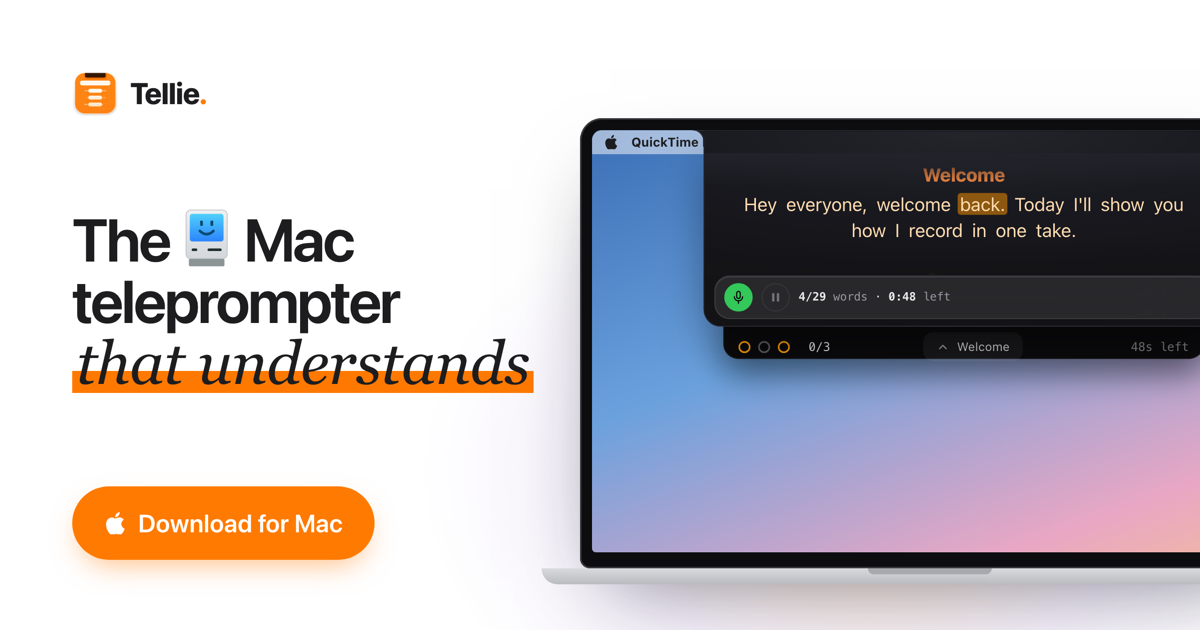

User reviews (0)