Website profiles · Technology insights · Alternatives

topnotch.app

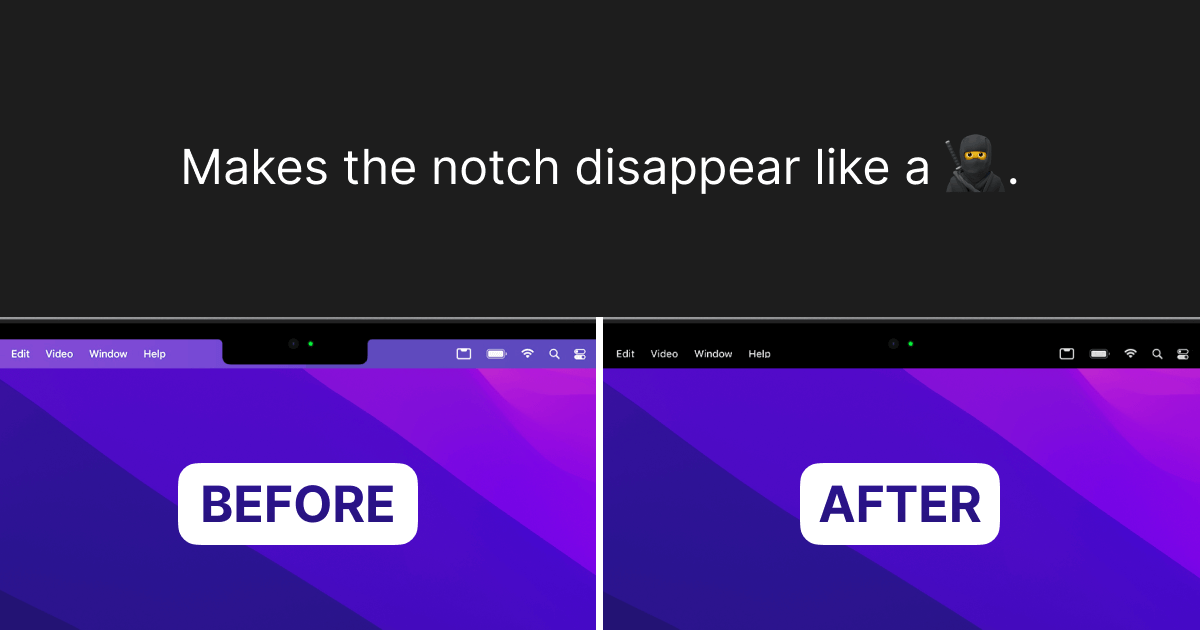
TopNotch is a little macOS app that makes your menu bar black and hides the notch.

No paid content found
Visit website
Profile views 3 Outbound visits 11 Normal
TopNotch for macOS Full homepage screenshot

At a glance

Category
Software & Apps
Language
English
Paid-content signal
No paid content foundObserved
Registered
2021
Hosting
VercelInferred
HTTPS certificate trusted
PassedObserved
Last updated

Website review

This review may include AI-generated content and is not individually verified. Domain, certificate and other facts come from the observed data on this page.

What is TopNotch for macOS?

TopNotch is a small macOS utility that makes the menu bar black so the camera notch blends into it, effectively hiding the notch visually. It also offers optional rounded corners for your wallpaper.

What it does

  • Blacks out the menu bar so the notch area looks continuous rather than cut out.
  • Supports Dynamic Desktop wallpapers and keeps watching for wallpaper changes while running in the background.
  • Works across multiple displays and spaces, so the effect stays consistent if you use more than one screen.
  • Round corners is an optional setting that adds rounded corners to the wallpaper.

Who it suits

It is aimed at people on notched MacBooks who find the notch distracting and want a cleaner-looking menu bar without changing how they work. Because it runs in the background and follows wallpaper changes, it is a set-and-forget tweak rather than something you manage daily. If you like the notch as-is or rarely look at the menu bar area, it adds little.

Practical notes

The app requires macOS 11.0 or newer and is offered as a free download. It comes from the team behind CleanShot, a well-known macOS screen capture tool, which is a reasonable signal of maintained development. As a next step, check that your macOS version meets the requirement and that you are comfortable with a background app modifying the menu bar appearance before installing.

How does TopNotch hide the MacBook notch on external monitors?

TopNotch doesn't hide the notch on external monitors, because external monitors don't have a notch to hide. Its approach is to make the menu bar area black on the built-in display so the notch blends into it. The "multiple displays" support listed on the site means the app keeps working correctly when several screens and spaces are in use—not that it conceals a notch on monitors that lack one.

What it actually does on a multi-monitor setup

  • Built-in display: turns the menu bar black so the notch visually disappears against it.
  • External monitors: no notch exists, so the useful part is consistency—the app runs in the background and adapts when you switch displays or spaces.
  • Wallpaper handling: it watches for wallpaper changes and supports macOS Dynamic Desktop wallpapers, and an optional setting adds rounded corners to the wallpaper.

A practical example: you dock a MacBook to a desk monitor and move windows between the two screens. The built-in screen keeps its black menu bar treatment, while the external screen behaves like a normal monitor; the app just needs to keep up as you change spaces or wallpapers.

To decide whether it fits, check that your Mac runs macOS 11.0 or newer and that what bothers you is the notch on the laptop screen itself. If your concern is only about external displays, there's nothing for the app to fix there. The developer also makes CleanShot, if you want to see the team's other macOS work.

Does TopNotch work with Dynamic Desktop wallpapers and multiple displays?

Yes. TopNotch explicitly supports macOS Dynamic Desktop wallpapers and is built to work across multiple displays and spaces. It also runs in the background and watches for wallpaper changes, so the black menu-bar treatment should follow when your desktop wallpaper rotates.

What that means in practice

  • Dynamic Desktop: If you use a time-shifting wallpaper, TopNotch is designed to keep working as the image changes rather than needing a manual reset.
  • Multiple displays: The app is described as working well with several screens and spaces, which matters if you move between an external monitor and your laptop.
  • Background operation: Because it stays running and monitors wallpaper changes, it suits people who rarely touch settings after setup.

A concrete scenario

You use a MacBook with an external display and a Dynamic Desktop that shifts from day to night. With TopNotch, the menu bar stays black and the notch is visually concealed on both screens, and the effect should persist as the wallpaper changes through the day.

Decision criterion

If your main goal is hiding the notch and darkening the menu bar while keeping Dynamic Desktop and multi-monitor setups, TopNotch is aimed squarely at that. If you need broader menu-bar customization, check its feature list before committing.

Next step: confirm your macOS version meets the stated requirement (macOS 11.0 or newer), then test it on your external display with a Dynamic Desktop active. For comparison, the same team makes CleanShot.

Is TopNotch free to download and what macOS version does it require?

Yes. TopNotch is offered as a free download, and it requires macOS 11.0 or newer.

Practical check before installing

Confirm your Mac is running at least macOS 11.0, then download it from TopNotch for macOS. The app is aimed at people who want the menu bar to read as black and the notch visually hidden, including on setups with multiple displays and spaces; it also supports Dynamic Desktop wallpapers and an optional rounded-corners effect, and it runs in the background watching for wallpaper changes.

If your Mac is on an older macOS release, this app won't be an option, so check Apple menu → About This Mac first.

Who made TopNotch and is it related to CleanShot?

TopNotch is made by the team behind CleanShot, the macOS screen capture tool. The TopNotch page credits it to "MTW" and lists CleanShot as a product from the same makers, so the two apps share an origin rather than being unrelated projects.

The practical link is mainly reputational: CleanShot is a well-known Mac utility, and that association suggests the TopNotch developers have experience shipping polished menu-bar software. It does not mean the apps overlap in function. TopNotch focuses on making the menu bar black, hiding the notch, and adding options such as dynamic wallpapers, multiple-display support, background operation and rounded corners.

If you are deciding whether to try it, treat the CleanShot connection as a signal of the team's track record, then judge TopNotch on its own features and on whether your Mac meets its stated macOS 11.0 or newer requirement. For background on the other product, see CleanShot.

Can TopNotch add rounded corners to my wallpaper while running in the background?

Yes. TopNotch includes a round-corners option that applies rounded corners to your wallpaper, and it is designed to stay running in the background while it watches for wallpaper changes. According to the page, it also supports macOS Dynamic Desktop Wallpapers and works across multiple displays and spaces.

A practical way to use it: enable round corners, then switch between dynamic wallpapers or displays and confirm the effect persists. For a Mac user whose main annoyance is the notch, this is a lightweight visual tweak rather than a workflow tool; the trade-off is that it changes appearance only, so judge it on how it looks across your displays. If you want the wider macOS utility context, the same team also makes CleanShot.

Related questions

More questions →
How does TopNotch hide the notch and handle wallpapers?

TopNotch is a small macOS app that makes the menu bar black so the notch blends into it, and it keeps that effect in sync with your wallpaper. It requires macOS 11.0 or newer, works across multiple displays and spaces, and runs in the background watching for wallpaper changes. It also offers an optional rounded-corners effect for your wallpaper.

How the notch is hidden

The mechanism is straightforward: rather than masking or cropping the screen, TopNotch turns the menu bar black. Because the notch area sits within the menu bar strip on notched Macs, a black menu bar makes the notch visually disappear against it. The app's own description frames this as making the notch "disappear like a 🥷."

Two consequences follow from this approach:

  • It is a menu bar treatment, not a hardware or display change. The effect depends on the menu bar being visible and black.
  • It is designed to coexist with your desktop. The app stays in the background rather than requiring a window to stay open.

How it handles wallpapers

Wallpaper handling is where TopNotch does most of its ongoing work. According to the app's page, it supports macOS Dynamic Desktop Wallpapers and stays in the background watching for wallpaper changes. In practice, that means when your desktop picture changes — including a Dynamic Desktop shifting through its time-based sequence — TopNotch is watching so the black menu bar treatment stays consistent with what's on screen.

The page also lists an optional Round corners setting: enable it and TopNotch adds rounded corners to your wallpaper. This is a separate cosmetic option from the notch hiding, so you can use the black menu bar without it, or combine both.

Feature summary

Feature What it does When it matters
Black menu bar Makes the notch blend into the menu bar You want the notch to visually disappear
Dynamic Wallpaper support Works with macOS Dynamic Desktop Wallpapers You use a time-shifting desktop picture
Background operation Stays running and watches for wallpaper changes You change wallpapers or use dynamic ones
Multiple displays and spaces Works across displays and spaces You use more than one screen or several desktops
Round corners Adds rounded corners to the wallpaper You want a softer desktop edge treatment

Setup requirements and practical fit

The only stated system requirement is macOS 11.0 or newer. The page offers a free download, and the app is made by the team behind CleanShot, a macOS screen capture tool — a useful signal if you already know that product.

Before installing, consider these conditions:

  • Check your macOS version first. If you're below 11.0, the app isn't an option.
  • Decide whether you want the rounded-corners effect. It changes your wallpaper's appearance, so it's a preference rather than a requirement for hiding the notch.
  • Multi-display users should verify behavior on each screen. The page states the app works well with multiple displays and spaces, but your setup — external monitors without a notch, for example — is worth checking after install.

A reasonable way to evaluate it: install it, confirm the menu bar turns black on your notched display, then switch wallpapers (including a Dynamic Desktop) and confirm the treatment holds. If you use several spaces or displays, cycle through them to see that the effect persists. If anything looks off, the rounded-corners option is the first setting to toggle, since it's the one that alters the wallpaper itself rather than just the menu bar.

Where can I download TopNotch for macOS?

TopNotch is available from its official site, topnotch.app, where the page offers a free download. The app requires macOS 11.0 or newer. It is made by the team behind CleanShot, the macOS screen capture tool, and the site provides a contact link.

What you get from the official download

The site describes TopNotch as a small macOS app that makes your menu bar black and hides the notch. Its listed features are:

  • Dynamic Wallpapers — supports macOS Dynamic Desktop Wallpapers
  • Multiple displays — works with multiple displays and spaces
  • Works in background — stays in the background and watches for wallpaper changes
  • Round corners — an option that adds rounded corners to your wallpaper

Before you download

Check that your Mac meets the stated requirement of macOS 11.0 or newer. The page does not list pricing beyond the free download offer, so any further terms should be confirmed on the site itself.

Who makes it

TopNotch comes from the team behind CleanShot, and the site includes a link to that product as well as a contact option. If you want to verify the source or ask a question before installing, use the contact link on topnotch.app.

What Is TopNotch for macOS?

TopNotch is a small macOS app that makes your menu bar black and hides the display notch, so the notch blends into the menu bar instead of standing out. It requires macOS 11.0 or newer and is offered as a free download. It suits MacBook users with a notched display who want a cleaner menu bar, and it also works on setups with multiple displays and spaces.

What TopNotch actually does

The core effect is simple: the menu bar is turned black, which visually absorbs the notch area on notched MacBook screens. Rather than modifying hardware or display settings, the app changes how the menu bar looks so the notch reads as part of the bar.

Beyond that, TopNotch adds a few behaviors that matter in daily use:

  • Dynamic Wallpapers — it supports macOS Dynamic Desktop Wallpapers, so the effect keeps working when the wallpaper shifts through the day.
  • Multiple displays — the app works well with multiple displays and spaces, so the treatment isn't limited to a single screen.
  • Background operation — TopNotch stays in the background and watches for wallpaper changes, reapplying its effect when needed rather than requiring manual resets.
  • Round corners — an optional setting that adds rounded corners to your wallpaper.

How it fits into a normal workflow

Because the app runs in the background and monitors wallpaper changes, you generally set it up once and forget it. A practical example: you use a Dynamic Desktop wallpaper that changes between light and dark through the day, and you also connect an external monitor. TopNotch keeps the black menu bar treatment consistent across the built-in display and the external one, and it reasserts the effect after the wallpaper changes instead of leaving the notch exposed.

The rounded-corners option is separate from the notch hiding. Enable it only if you want the wallpaper itself to have rounded edges; it is a cosmetic choice, not a requirement for the main effect.

Requirements and things to check

Item Detail
Platform macOS
Minimum version macOS 11.0 or newer
Price Offered as a free download (per the site)
Multiple displays Supported
Dynamic wallpapers Supported
Background behavior Runs in background, watches wallpaper changes

Before installing, confirm your Mac meets the macOS 11.0 requirement. If you use several displays or spaces, the multiple-display support is the feature to verify against your setup. The site does not list pricing beyond the free download, so treat any cost questions as unconfirmed by the available information.

Who it's for

TopNotch is aimed at people bothered by the notch on newer MacBook displays who want it to disappear into a black menu bar without changing their wallpaper habits. If you rely on Dynamic Desktop wallpapers or switch between displays and spaces often, the background monitoring and multi-display support are the parts that make it low-maintenance. If you don't have a notched display, the main benefit doesn't apply, though the rounded-corners wallpaper option still exists as a cosmetic tweak.

What macOS Version and Setup Does TopNotch Require?

TopNotch requires macOS 11.0 (Big Sur) or newer. That is the only system requirement stated on the app's page. Beyond the OS version, the app is built for Macs that have a notch in the display, and it also works with multiple displays and spaces. No other hardware requirements are listed.

Requirements at a glance

Requirement Detail
macOS version macOS 11.0 or newer
Intended hardware Macs with a notch in the display
Multiple displays Supported
Spaces Supported
Other hardware requirements None stated on the page

What each requirement means for you

macOS 11.0 or newer

Check your version under → About This Mac. If you are on macOS 11 or later, you meet the stated requirement. If you are on an older release, the app is not described as compatible, so you would need to update first.

A Mac with a notch

TopNotch's purpose is to make the menu bar black and hide the notch, so the feature only makes sense on a display that actually has one. On a Mac without a notch, there is nothing for the app to hide.

Multiple displays and spaces

The app is documented to work well across multiple displays and spaces, so connecting an external monitor or switching desktops does not break the effect. It also stays in the background and watches for wallpaper changes, so you do not need to keep a window open.

Setup notes worth knowing before you download

  • Dynamic wallpapers are supported. If you use macOS Dynamic Desktop wallpapers, TopNotch is stated to work with them.
  • Round corners is optional. Enabling it adds rounded corners to your wallpaper; it is a setting, not a requirement.
  • The download is listed as free. The page shows a "Download for free" option. No pricing details beyond that are provided, and no account or login requirement is mentioned.

Quick check before installing

  1. Open → About This Mac and confirm macOS 11.0 or later.
  2. Confirm your Mac's display has a notch (the app's core function depends on it).
  3. Download from the official site and launch the app; it runs in the background, so look for it in the menu bar rather than expecting a main window.

If all three checks pass, your setup meets everything the page states. If your Mac runs an older macOS version, updating the OS is the prerequisite step before TopNotch can be used.

Website Overview

The available information shows a mix of normal operation and configuration gaps. Depending on how the website is used, these gaps may affect secure access or the consistency of its public presentation.

Domain and Registration

Transfer-protection status is present, helping reduce the risk of unauthorized domain transfers. The domain has about 5 years of registration history; its current configuration provides more context than age alone. The domain uses the common .app extension, which is not an independent safety signal.

DNS and Email

Nameservers are provided by Cloudflare, indicating managed DNS hosting. No CNAME was found; the observed records resolve directly to addresses. No MX record was found. A conventional explicit inbound-mail route is not configured. TXT records include verification markers for Google. Such markers may also remain after a service stops being used. DNSSEC signatures were not detected, so this additional DNS authenticity protection is not confirmed.

TLS and Certificates

The certificate uses an RSA 2048-bit public key, offering broad client compatibility. The server supplied a complete certificate chain. No organization name is present in the certificate; the available fields are consistent with domain validation. The certificate was issued by Let's Encrypt, commonly associated with automated certificate services. The certificate's total validity is about 89 days, consistent with a short renewal cycle.

HTTP and Browser Security

The response lacks these common security headers: CSP, X-Content-Type-Options, Referrer-Policy, Permissions-Policy. CORS permits any origin to read this response. This is common for public resources; sensitive responses need narrower handling. No X-Powered-By header was found, reducing one common source of backend fingerprinting information. No obvious internal addresses or debug information were found in the headers. The Server header contains the custom value Vercel.

Technology Stack Analysis

The public page identifies Vercel without precise versions, leaving fewer clues for version-specific scanning.

Search and Social Sharing

No homepage canonical URL was detected. If duplicate URLs exist, consolidation may be less explicit. Twitter Card metadata is configured. The title has 18 characters, within a common display range. A meta description is present, with 82 characters. The observed directives allow indexing and link following.

Hosting and Email

DNSCloudflare
HostingVercel
EmailUnknown
Approximate IP geolocation (inferred; a CDN or proxy may differ from the origin server) United States flagWalnut, California, United States Inferred 76.76.21.21

Registration details

RDAP / WHOIS

RegistrarOVH sas
Registered2021-10-18
Expires2034-10-18
Domain statusclient delete prohibited、client transfer prohibited
Nameserversderek.ns.cloudflare.com、linda.ns.cloudflare.com
DNSSECunsigned

DNS records

DNS

TypeNameValueTTLPriority
Atopnotch.app76.76.21.21300—
NStopnotch.appderek.ns.cloudflare.com86400—
NStopnotch.applinda.ns.cloudflare.com86400—
TXTtopnotch.appgoogle-site-verification=ie_PFAsJ2t9UtRvJiTea9OZQ6l3EPS7KH8m6bsWVfuU300—
TXTtopnotch.appv=spf1 -all300—
DMARC_dmarc.topnotch.appv=DMARC1; p=reject; sp=reject; adkim=s; aspf=s;300—

TLS and certificates

TLS / SSL

AssessmentNormal configuration
Supported protocolsTLSv1.2、TLSv1.3
Negotiated protocolTLSv1.3
Certificate subjecttopnotch.app
IssuerLet's Encrypt
Valid until2026-11-27T00:57 · Remaining when checked: 31 days
Verification detailsCertificate trust: Passed · Hostname match: Passed

HTTP response headers

HTTP

HeaderValue
content-typetext/html; charset=utf-8
cache-controlpublic, max-age=0, must-revalidate
serverVercel
strict-transport-securitymax-age=63072000
x-frame-optionsDENY
access-control-allow-origin*

Identified technologies

Vercel

Pages, Search and Sharing

Meta descriptionTopNotch is a little macOS app that makes your menu bar black and hides the notch.
Canonical URLNot detected
LanguageEnglish (default)
Twitter Cardsummary_large_image
All bots 1 allowed · 0 disallowed
  • Allow/

No sitemaps found

Recent Updates

  • Website images
  • Screenshots
  • Network details
  • Website Technologies
  • Pages and Search Information
  • TLS and certificates
  • DNS Information

User reviews (0)

  • No reviews yet.