
 简体中文
简体中文 English
Website review
This review may include AI-generated content and is not individually verified. Domain, certificate and other facts come from the observed data on this page.
What is Triviart?
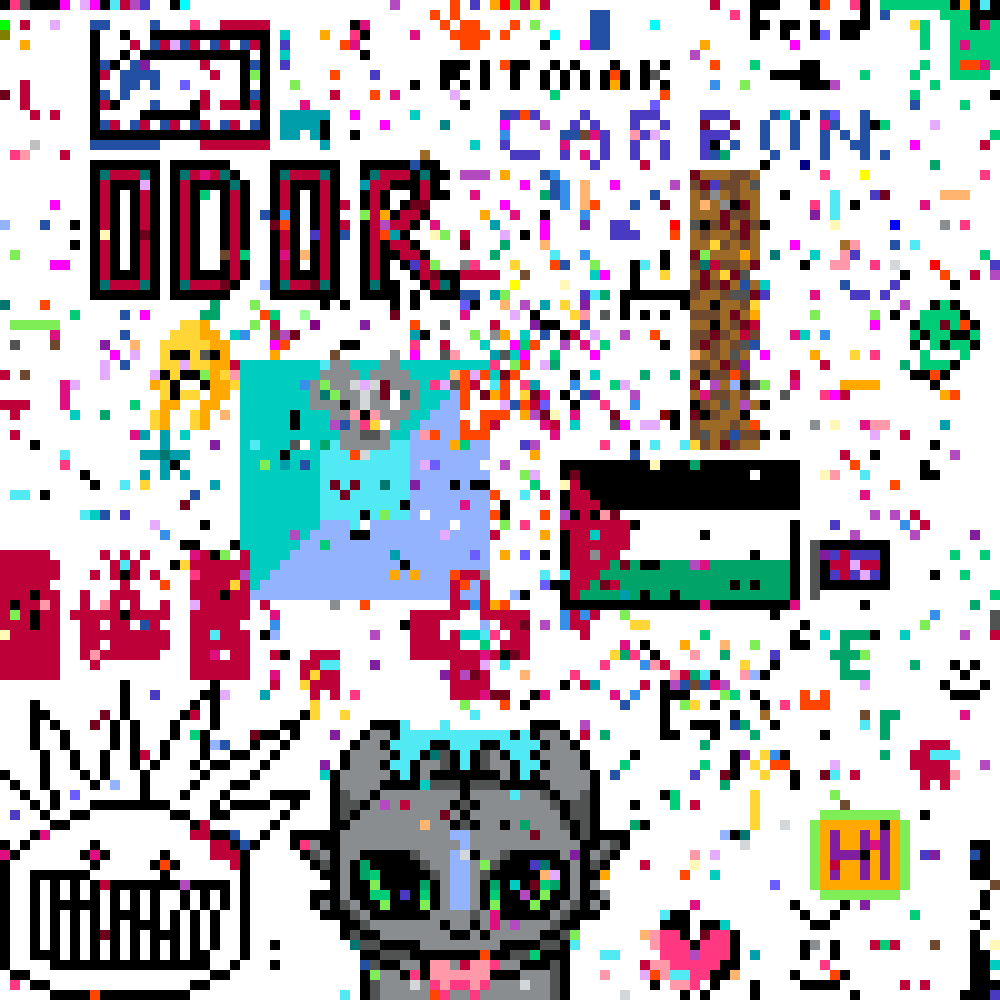
Triviart is a browser-based collaborative pixel canvas where trivia knowledge is the tool for changing the artwork. According to its own description, you answer trivia questions to color pixels and contribute to a collective masterpiece, with the option to collaborate or compete.
How it works
The page's "How to play" instructions are short and specific:
- Click any pixel to answer a trivia question tied to it.
- Hold to enter precision mode, which helps when you want to place a pixel carefully.
- Answer correctly and you can change that pixel's color for everyone to see.
That last point is the defining feature: your correct answer edits a shared canvas, not a private scoreboard. A wrong answer presumably leaves the pixel untouched, so progress depends on getting questions right rather than simply clicking around.
Who it suits
- Casual trivia players who want a low-pressure game with a visible outcome.
- People who enjoy collaborative art projects like shared pixel canvases, where the result is built by many hands.
- Groups or classrooms looking for a light activity that mixes quiz knowledge with a creative task.
The trade-off is that the trivia is a means to an end. If you want deep, well-categorized quiz content or competitive rankings, the pixel-painting layer may feel like a detour. If you mainly want to draw, the trivia gate will slow you down.
A concrete scenario
Suppose you and a few friends open Triviart at the same time. Each of you picks pixels near a blank region and starts answering. Correct answers let you lay down colors; over a session, your small cluster becomes part of a larger image that other players are also shaping. Precision mode matters here, because holding lets you target an exact pixel instead of repainting a neighbor's work.
Next step
Open Triviart and try one pixel before committing time: answer a single question and see whether the question difficulty and the pace of coloring feel right to you. If you enjoy the loop, invite others, since a shared canvas rewards more participants.
How do I play Triviart?
Triviart turns a shared pixel canvas into a quiz game. You pick a pixel, answer a trivia question, and if you're right, you get to recolor that pixel for everyone else to see.
The basic loop
- Click any pixel on the canvas.
- A trivia question appears.
- Answer it correctly and you can change that pixel's color — the change is visible to all players.
- Hold instead of clicking to enter precision mode, which helps when you want to target an exact pixel rather than a general area.
That's the whole mechanic: knowledge earns you a brushstroke. The canvas is collective, so every correct answer nudges the artwork in a direction chosen by whoever answered.
What this means in practice
Because pixels are shared, you're not coloring in isolation. A reader who wants to draw a small shape needs several correct answers in a row, and other players may overwrite those pixels later. Precision mode is the tool for that kind of deliberate work; casual players can just click around and let the canvas drift.
If you're new, start by clicking a few pixels in an empty region to see how questions feel before committing to a specific design. If you're playing with others, agree on a region and a color scheme first — coordination matters more here than raw trivia skill.
What happens if I answer a trivia question correctly?
A correct answer lets you recolor the pixel you selected, and that change is visible to everyone on the shared canvas. According to Triviart's own instructions, you click a pixel to trigger a trivia question, hold for precision mode if you need finer control, and a right answer gives you the color change on that pixel.
What this means in practice
- Your reward is visual, not a score. The payoff is altering a small part of a collective artwork rather than earning points or advancing a level.
- The effect is public. The site states the new color is "for everyone to see," so your edit joins a canvas other players are also working on.
- Accuracy matters twice. You need the right answer, and you need to have picked the pixel you actually want to change.
A quick scenario
Say you are browsing the canvas and spot a cluster of mismatched pixels in one corner. You click one, answer the question correctly, and recolor it to blend with its neighbors. Someone else may later answer a question on the same spot and repaint it, so treat any pixel as a shared, changeable surface rather than a permanent signature.
Next step
Before answering, use precision mode by holding on the pixel if the exact spot matters to you. If you are weighing whether the site suits you, note that progress depends on trivia knowledge rather than drawing skill, which makes it a reasonable fit for quiz fans who want a low-stakes creative outlet.
Can I compete with other players on Triviart?
Yes — competition is built into how Triviart works. The canvas is shared, so every pixel you recolor is visible to everyone else, and other players are changing the same pixels. That turns each correct answer into a small contest over what the collective picture looks like.
How the competitive side actually plays out:
- Pixel-by-pixel rivalry. Per the site's own "How to play" guidance, you click a pixel to answer a trivia question, and a correct answer lets you change that pixel's color for everyone. A pixel someone else just claimed can be claimed again by a later correct answer.
- Speed and accuracy both matter. You need the right answer to earn the change, so pure guessing is a weak strategy against players who actually know the material.
- Precision mode. Holding instead of clicking gives you precision mode, which matters when the fight is over a specific pixel rather than a broad area.
- Collaboration is the flip side. Because the canvas is collective, you can also work with others toward a shared image rather than against them. Triviart describes the experience as collaborate or compete, so both modes are available depending on who else is active.
Who this suits
If you enjoy quiz games but find solo trivia pointless, the shared canvas gives your correct answers a visible consequence. If you dislike contested spaces or want a calm creative outlet, the same mechanic can feel frustrating, since your work is never permanently yours.
A practical way to decide
Pick a small region of the canvas and try to hold it for a session. If reclaiming pixels from other players feels fun rather than annoying, the competitive layer is working for you. If you'd rather just build something, look for quieter areas or times when fewer people are active.
For a different flavor of competitive trivia, Sporcle runs timed quizzes with public leaderboards, and JetPunk tracks scores across its quiz catalog.
How does Triviart turn trivia answers into a collective artwork?
Triviart turns each trivia answer into one pixel of a shared canvas. The page explains the loop directly: click any pixel to answer a trivia question, hold for precision mode, and if you get it right, you can change that pixel's color for everyone to see. So the artwork is not drawn by a separate group of artists; it is assembled one correct answer at a time, with every player working on the same public picture.
How one answer becomes one pixel
The unit of progress is a single pixel, not a full drawing or a level. That matters because it keeps the creative act small enough to fit inside a trivia round. A correct answer earns the right to recolor one spot; a wrong answer presumably leaves the canvas unchanged. Because the change is visible to everyone, the canvas doubles as a record of collective accuracy and taste.
The precision mode is the practical detail that makes this more than random clicking. Holding instead of clicking suggests you can target a pixel more carefully, which is useful when the interesting work is fine detail, edges, or repairing a small area someone else got wrong. Without precision mode, a shared canvas would quickly become a smear of accidental clicks.
Why the combination works
Trivia supplies the challenge and the pacing. Coloring supplies a persistent, visual reward. Neither half needs to be deep on its own: a short question is enough to earn a pixel, and one pixel is enough to feel like you contributed.
The collective element comes from shared state. When your correct answer changes a pixel "for everyone to see," you are not decorating a private profile. You are editing a commons. That creates the familiar tensions of any shared canvas: coordination, territory, overpainting, and the temptation to undo someone else's work. Competing and collaborating are both viable, which is why the site frames it as a choice rather than a rule.
Who it suits
- Casual trivia players who want a visible result instead of a scoreboard.
- Pixel-art and collaborative-canvas fans who enjoy slow, incremental group projects.
- Groups or classrooms looking for a low-stakes activity where knowledge produces something shared.
- Completionists who like the idea of fixing small imperfections in a large image.
It is less suited to anyone wanting fast, high-stakes quiz competition or a private creative tool. The canvas is public, so patience and a tolerance for other people's choices are part of the experience.
A concrete way to try it
Start with a small, obvious region rather than the busiest part of the canvas. Answer a few questions to learn the rhythm, then use precision mode on an edge or a single mismatched pixel. Watch whether your change survives; if someone repaints it, you have learned something about how contested that area is, which is useful before committing to a bigger section.
If you enjoy the shared-canvas format more broadly, Reddit communities such as r/place have run large-scale collaborative pixel events, though they are periodic rather than trivia-driven. For trivia itself, Sporcle offers a wide range of quiz formats, and JetPunk is another long-running quiz site. These are different experiences: they test knowledge without giving you a canvas, while Triviart's distinguishing feature is that the answer and the artwork are the same action.
Is Triviart free to play?
Yes — Triviart is free to play. The core loop is open to anyone: click a pixel, answer a trivia question, and if you get it right, you can recolor that pixel for everyone to see. The site's own how-to-play instructions describe exactly this, with no mention of a paywall, subscription or paid tier. The only payment signal on the page is PayPal, which points to optional support or purchases rather than a gate on gameplay.
What “free” means in practice
- No cost to participate. Answering questions and contributing pixels is the activity itself, and it is not presented as a paid feature.
- Hold for precision mode. The page notes that holding on a pixel gives you a precision mode — a free control option, not a premium unlock.
- Shared canvas. Your correct answer changes the pixel for everyone, so the value comes from collective participation rather than from buying advantages.
Who it suits
Casual trivia players who like a visible result from each correct answer will get the most out of it. If you enjoy collaborative projects — the kind where many people nudge the same canvas toward a picture — the shared-pixel mechanic is the draw. Competitive players can treat accuracy as a scoreboard of sorts, since a wrong answer means no color change.
A practical first step
Open the canvas, pick a single pixel near an area that already looks half-finished, and answer one question. That one attempt tells you whether the trivia difficulty and the pace of the shared canvas match what you want before you invest more time.
If you want to compare the experience with other collaborative pixel projects, Reddit communities often discuss how these canvases evolve, though the pace and rules differ from site to site.
 Kamloops, British Columbia, Canada
User reviews (0)