

 Visit website
 Updated: 2026-10-01 16:42
 Language: English (default)
 Access: Normal
 Profile views 5
  Outbound visits 0
 Website Review
What is Watabou's Procgen Arcana?
Watabou's Procgen Arcana is a collection of free browser-based procedural map generators aimed at tabletop role-playing games and worldbuilding. You pick a map type from its card-style menu — Realm, City, Village, Cave/Glade, Dungeon, and Dwelling — and the site generates a map you can use as-is or reroll until something fits.
What it actually does
- Generates maps procedurally rather than asking you to draw them, so a usable result appears in seconds.
- Covers several scales of play: a realm for campaign-scale geography, a city or village for settlement adventures, and a cave, glade, dungeon or dwelling for site-based encounters.
- Runs in the browser, so there is nothing to install and no account to manage.
Who it suits
- Game masters who need a location mid-session and cannot spend an hour drawing one.
- Worldbuilders sketching a region before committing to details.
- Anyone who wants a visual prompt to build a story around, rather than a finished, canonically labelled setting.
Trade-offs to expect
Procedural output is fast and varied but not tailored: names, layouts and logic come from the generator, so you will usually want to rename places and adjust whatever conflicts with your existing campaign. Treat the maps as a starting point you edit, not a finished product.
A practical next step
Decide the scale you need before clicking. If the party is travelling between towns, start with Realm and drill into a City or Village that sits on the route; if they are about to enter a specific building or cavern, go straight to Dungeon, Cave/Glade or Dwelling. Generate a few options, keep the one that suggests an interesting situation, and write two or three sentences of local detail around it.
How do I use the map generators for my tabletop RPG campaign?
Watabou's Procgen Arcana is a set of browser-based procedural map generators aimed at tabletop RPGs and worldbuilding. You pick a generator from the landing page, generate a map, and then reroll, tweak, or export it for use in your campaign.
What you can generate
The site presents its generators as cards under headings:
- Realm — regional or kingdom-scale maps for setting the geography of a campaign.
- City — urban maps, useful when the party arrives somewhere large and you need streets, districts, and landmarks.
- Village — smaller settlements for stops along a road or a home base.
- Cave/Glade — natural sites for a single encounter or a short expedition.
- Dungeon — interior maps for a delve.
- Dwelling — a building-scale map, handy for a single house, tavern, or manor.
A practical workflow
- Start at the scale that matches your prep. If you only need tonight's session, open Dungeon or Cave/Glade rather than building a whole realm.
- Generate repeatedly until the layout suggests something. Procedural maps are best treated as prompts, not final answers.
- Save or export the result, then write a short key: who lives here, what they want, and one secret. The map gives you shape; your notes give it meaning.
- If a player goes off-script, generate a new map live at the table. This is the main advantage over pre-drawn maps — you are never stuck without a location.
Choosing a generator
| Situation | Generator | Why |
|---|---|---|
| Party is travelling between towns | Realm | Gives terrain and settlement placement |
| Party arrives in a capital | City | Enough detail for districts and navigation |
| Overnight stop on the road | Village | Quick, low-prep settlement |
| One-session side quest | Cave/Glade or Dungeon | Self-contained encounter space |
| Party breaks into a specific building | Dwelling | Focused interior layout |
A concrete example
Suppose your players decide mid-session to rob a merchant's house. Open Dwelling, generate a floor plan, and place the merchant's strongbox, a guard, and an escape route. You have a usable map in under a minute, and the players never know it did not exist beforehand.
Keep in mind
Procedural output is a starting point. Names, factions, and history still come from you, and randomly generated layouts will not always match what you already established. Treat the generators as a fast way to get a plausible map, then edit it to fit your world.
As a next step, pick the generator matching your next session's scale and generate three versions before choosing one — comparing options takes less time than fixing a map you do not like.
Can I save or export the generated maps for my worldbuilding project?
Yes. Watabou's Procgen Arcana is built for exactly this workflow: you generate a map in the browser, then take it out into your own project. The generators listed on the site are Realm, City, Village, Cave/Glade, and Dungeon, plus Dwelling, and each one is designed to be poked at, re-rolled, and then saved.
H3 What saving usually looks like Across the generators you can generally expect two kinds of output:
- An image file — a rendered picture of the map you can drop into a notes app, a wiki, a PDF or a VTT handout.
- A data or project file — some generators let you keep the underlying parameters so you can reopen the map later and keep editing it rather than starting over.
The image is what you show players; the project file is what you keep for yourself.
H3 Which output fits which job
| Your situation | What to reach for |
|---|---|
| A one-off handout for tonight's session | Image export, then paste into your notes |
| A city you'll keep adding districts to | Keep the editable/save file, export images as snapshots |
| A whole realm for a wiki | Export the map, then write your own gazetteer alongside it |
| Printing at a table | Export at the highest resolution the generator offers |
H3 A practical workflow Generate a city, export the image, and immediately re-roll the same seed space a few times until the street layout matches the story you already have in mind. Save the version you like, then name the file after the settlement rather than leaving it as a timestamp — you will thank yourself when your worldbuilding folder has forty maps in it.
If you are building a connected world, generate the realm first, then use it as the mental frame when you generate the individual cities and villages inside it. Export each level separately so you can show players the zoomed-out view and the street-level view without redrawing anything.
For broader map-making options beyond this site, Inkarnate and Azgaar's Fantasy Map Generator are two commonly used alternatives, and Dyson's Dodecahedron is a well-known source of hand-drawn dungeon maps if you would rather not generate them at all.
One trade-off to accept up front: procedurally generated maps are fast and surprising, but they rarely match a specific plot point. Treat the export as a starting draft — generate, save, then annotate the saved image with your own labels and locations. The generator gives you the geography; the story is still yours to write on top of it.
What are the differences between the Realm, City, Village, Cave/Glade, and Dungeon generators?
Watabou's Procgen Arcana offers five separate generators, each aimed at a different scale of map, from an entire world down to a single building. The distinction that matters most is scale and purpose: what you need to place, and how much detail you actually want to draw on.
What each generator is for
- Realm — A regional or world-scale map. Use it when you need landmasses, coastlines, borders, and the broad shape of a setting before you commit to any specific location.
- City — A settlement plan with streets and buildings. Use it when the party arrives somewhere and you want a layout that answers "where is the market, the gate, the temple?"
- Village — A smaller settlement. Use it when you want a handful of structures and a rural feel rather than a dense urban grid.
- Cave/Glade — A small outdoor or subterranean site. Use it for a single encounter location: a cave mouth, a clearing, a hidden grove.
- Dungeon — An interior complex of rooms and corridors. Use it when the session is about exploring a built space room by room.
Choosing between them
| Generator | Scale | Typical use |
|---|---|---|
| Realm | Continental / regional | Campaign backdrop, travel, politics |
| City | Town or city | Urban sessions, districts, street chases |
| Village | Small settlement | Starting villages, rural stops |
| Cave/Glade | Single site | One encounter, a lair or landmark |
| Dungeon | Interior complex | Room-by-room exploration |
The practical rule: pick the generator that matches the area the players will actually move through in the next session. A Realm map is wasted on a tavern argument, and a Dungeon map can't answer where the next kingdom is.
A concrete workflow
Start at Realm to fix geography, then zoom in: drop a City or Village onto a coast or trade road, and place a Cave/Glade or Dungeon at the point of interest the party is heading toward. Each generator handles one layer, so you build a campaign map by nesting outputs rather than expecting one tool to do everything.
If you only need one map tonight, skip the hierarchy and go straight to the generator matching your scene. The set is free to use at Watabou's Procgen Arcana.
Do I need to install any software or create an account to use the generators?
No. Watabou's Procgen Arcana is a browser-based set of generators, so you can open the page and start generating immediately. There is no account creation, no login, and no downloadable installer implied by the site's presentation. You pick a generator from the card-style menu — Realm, City, Village, Cave/Glade, or Dungeon — and the map appears in your browser.
What this means in practice
- No signup friction: useful if you want to test the tool mid-session, or share a link with players who won't make accounts.
- No local install: works on machines where you can't install software, such as a work laptop or a borrowed device.
- Browser-dependent: you need a reasonably modern browser and a working internet connection to load the page. Anything you generate lives in the browser session unless the tool itself offers an export option.
A concrete scenario
You're running a tabletop session and the party unexpectedly heads into a cave you haven't prepared. You open the site, choose Cave/Glade, generate until something fits, and describe it from the screen. No account, no download, no delay.
Next step
Open Watabou's Procgen Arcana and try the generator closest to your immediate need. If you plan to reuse maps across sessions, check what save or export options each generator offers before you rely on it — that's the practical trade-off of a no-install, no-account tool.
How can I customize the random maps to fit my specific setting or story?
You customize maps on Watabou's Procgen Arcana mainly through the generator you choose and the options inside it, not through a single global settings panel. The site offers separate generators for Realm, City, Village, Cave/Glade, and Dungeon, so the first and most important customization step is picking the generator that matches the scale and type of location your story needs.
Match the generator to the narrative unit
- Realm: continents, kingdoms, and political geography for campaign backdrops.
- City: towns and urban districts where intrigue, factions, and commerce happen.
- Village: small settlements for local adventures and home bases.
- Cave/Glade: wilderness and subterranean points of interest.
- Dungeon: interior adventuring sites with rooms and connections.
Practical ways to bend a result toward your setting
- Reroll until the broad shape fits, then treat the output as a sketch rather than a final artifact. Most generators are fast enough that iterating several times costs little.
- Rename features in your notes. A generated city's districts, a realm's regions, and a dungeon's rooms become yours once you assign names tied to your lore.
- Rearrange relationships. If the map shows two settlements close together, decide they are rival trade towns; if a dungeon sits near a village, make it the reason the village exists.
- Export and edit. Generated maps are typically saved as images you can annotate in any drawing tool, adding labels, borders, or story-specific markers.
A quick decision rule Choose the generator by the question your players will ask. "Where does this road lead?" calls for Realm. "Who runs this district?" calls for City. "What's in this cave?" calls for Cave/Glade.
Example scenario You need a base of operations for a mystery campaign. Generate a Village for the home base, a City for the nearest place with a thieves' guild, and a Dungeon for the ruin the guild is secretly excavating. Reroll each until the spatial relationships suggest a story, then rename everything to fit your world.
Next step Open one generator and produce three versions of the same location. Keep the one whose layout raises the most questions, then annotate it with your own names and plot hooks. If you want a different visual style or more granular controls, compare with dedicated map tools such as Azgaar's Fantasy Map Generator for overworld maps.
 Hosting and Email
 Amazon Route 53
 Hosting
 Fastly
 Location
 United States
 Pages, Search and Sharing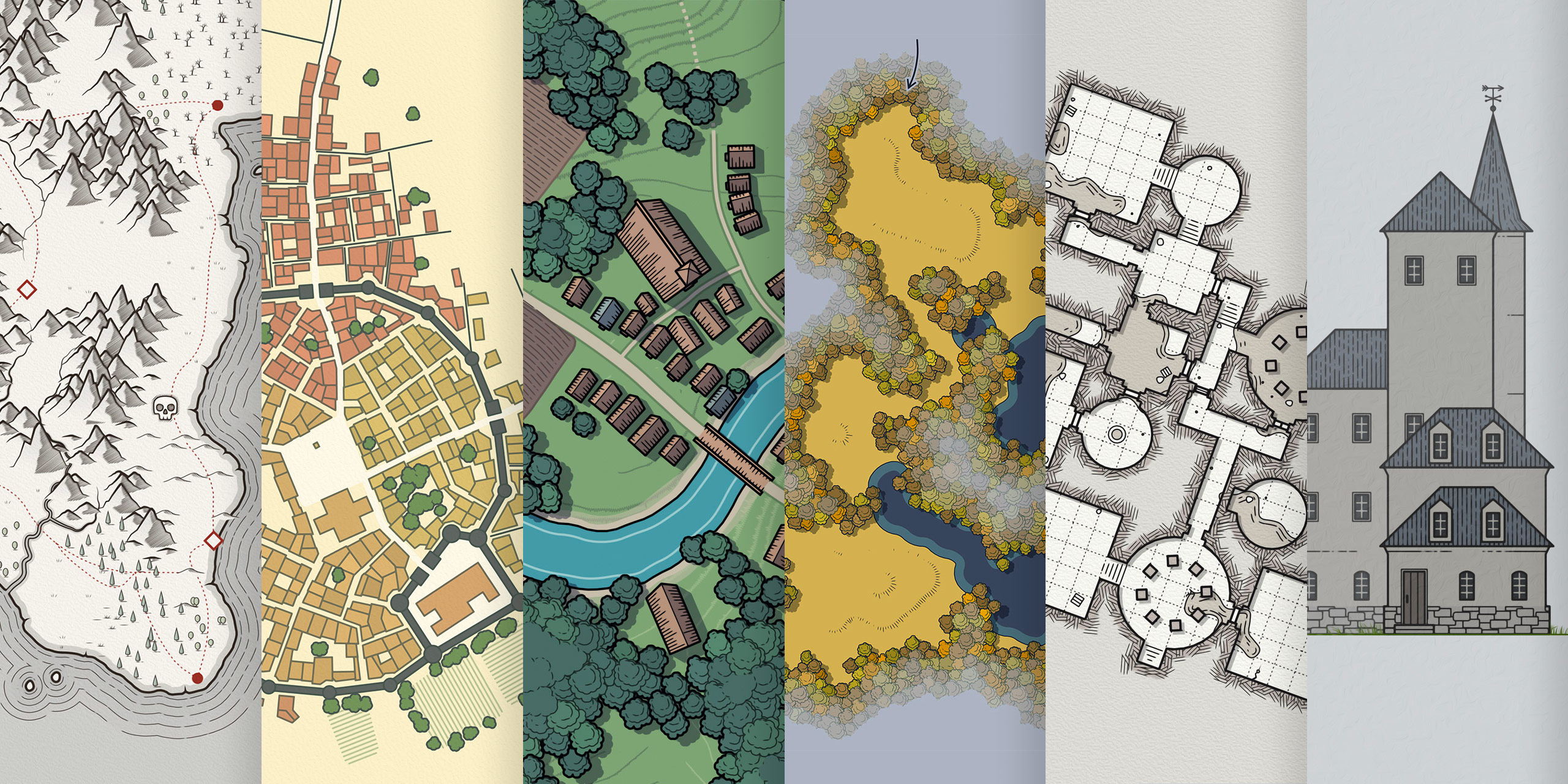


 Registration details

 Identified technologies
User reviews (0)