
 简体中文
简体中文wheniwork.com
Schedule shifts, track time, and message your team in one app. Trusted by 200,000+ workplaces. Start your free 14-day trial today.
At a glance
- Category
- Business Services
- Language
- English
- Paid-content signal
- Paid contentObserved
- Registered
- 2000
- Hosting
- Amazon CloudFrontInferred
- HTTPS certificate trusted
- PassedObserved
- Last updated
Related questions
More questions →What Features Does When I Work Offer for Scheduling and Time Tracking?
When I Work is an all-in-one workforce management platform built for hourly teams, combining employee scheduling, time and attendance tracking, and team messaging in one mobile-first app. If your main tasks are building shift schedules, filling gaps, tracking clock-ins and breaks, and approving time off, the platform covers all of these in a single place — with a free 14-day trial available to evaluate it. It is aimed at shift-based workplaces such as restaurants, retail, call centers, healthcare, seasonal and hospitality businesses, and franchises.
Scheduling: build, share, and fill shifts
The scheduling module is designed to cut the time managers spend on manual shift assignment.
- Build schedules in minutes and share them instantly with the team.
- OpenShifts let you post unfilled shifts so eligible employees can pick them up, closing schedule gaps without phone calls.
- Instant notifications alert the team when schedules are published or changed, replacing manual follow-ups and phone tag.
- Automated scheduling and overtime tracking are listed among the platform's benefits, helping surface issues before they become payroll problems.
For a manager running a single restaurant or coordinating multiple locations, the practical result is that the schedule, shift offers, and updates all live in one app rather than across texts and spreadsheets.
Time and attendance: clock-ins, breaks, and time off
Time tracking is integrated with the schedule, which the platform positions as a way to reduce human error and control labor costs.
- Time clock on any device: turn a shared tablet, computer, or phone into a time clock that tracks attendance, breaks, and time off.
- GPS clock-ins and geofencing: verify that staff are clocking in from the expected location, which supports payroll accuracy for field and multi-site teams.
- Live attendance: see who is currently clocked in and track attendance in real time during a shift.
- Time-off requests: employees submit requests and managers approve them within the same platform, so approved time off stays consistent with the schedule.
Team messaging: one channel for shift communication
Built-in team messaging is included so announcements, shift reminders, and direct updates reach the whole team without sharing personal phone numbers or relying on fragmented group texts. This keeps schedule changes and shift coverage requests visible to the people who need them.
Integrations and fit
When I Work connects with other tools for scheduling, payroll, and more, which matters if you already run payroll or POS systems you don't want to replace. The platform also highlights compliance support and solutions organized by industry, so you can check whether your sector's specific rules and workflows are addressed before committing.
How to decide if it fits
| Your need | What When I Work provides |
|---|---|
| Fast schedule creation and distribution | Minute-level schedule building, instant sharing, notifications |
| Filling last-minute gaps | OpenShifts available to eligible staff |
| Accurate hourly payroll input | Device-based time clock, break and time-off tracking, GPS/geofencing |
| Real-time shift visibility | Live attendance and time-off approvals |
| Team communication without personal numbers | Built-in messaging and shift reminders |
| Existing payroll/POS stack | Integrations with scheduling and payroll tools |
If your team is hourly and shift-based and you are currently stitching together spreadsheets, group texts, and a separate time clock, the combination above is the core value. Before adopting it, confirm two things against your own operation: that the integrations list covers your payroll provider, and that geofencing/GPS clock-in behavior suits how and where your staff actually start shifts. The 14-day free trial is the practical way to test schedule building and clock-ins with a real week of shifts.
Is When I Work Suitable for Hourly and Shift-Based Workplaces?
Yes. When I Work is explicitly designed for hourly workers and shift-based teams, whether they work "on the floor or in the field." The platform combines employee scheduling, time and attendance tracking, and team messaging into one mobile-first app, and the company reports it is trusted by 200,000+ workplaces. It fits best if your core problem is coordinating shift coverage, tracking attendance, and communicating schedule changes across a team that is often not at a desk.
Who It Is Built For
When I Work positions itself around hourly, shift-based work rather than salaried office roles. The site lists these industries as relevant:
- Restaurant
- Retail
- Call center
- Healthcare
- Seasonal
- Hospitality
- Franchise
- Volunteer
If your team's work is organized around shifts and you need managers and employees to act on the same schedule from their phones, this is the target use case. If you mainly need project management or salaried leave administration, the fit is weaker.
Core Capabilities and What Each Solves
Employee Scheduling
Managers build schedules and share them instantly. The platform supports OpenShifts to fill coverage gaps and sends notifications to the team, which reduces manual phone follow-ups. This matters most when last-minute call-outs are common.
Time and Attendance
Any device can be turned into a time clock that tracks attendance, breaks, and time off. The site specifically mentions GPS clock-ins and geofencing to verify staff locations, which is useful for field or multi-site teams and for reducing payroll errors.
Team Messaging
Shift reminders, announcements, and direct communication happen in one place without employees sharing personal phone numbers. This replaces fragmented text chains and keeps schedule changes visible to everyone affected.
Integrations and Compliance
The platform connects with payroll and other tools, and the solutions pages reference payroll integrations, compliance, automated scheduling, and overtime tracking. These are the areas to verify against your own payroll provider and local rules before committing.
How to Decide
| Your situation | Reasonable fit? | What to check first |
|---|---|---|
| Hourly team with frequent shift changes | Strong | Whether OpenShifts and notifications match your coverage workflow |
| Multiple locations or field staff | Strong | GPS/geofencing setup and manager permissions |
| Payroll accuracy is a pain point | Likely | Integration with your specific payroll provider |
| Overtime and compliance are a concern | Likely | Overtime tracking and compliance features for your region |
| Salaried, project-based team | Weak | Whether scheduling-centric tools add value at all |
Getting Started
The site offers a free 14-day trial, and you can start it with an email address or with Google. A demo can also be scheduled. A practical first step is to run one real scheduling cycle during the trial: build a week's schedule, publish it, have a few employees clock in and out, and send an announcement. That exercise will show whether the scheduling, attendance, and messaging pieces actually replace the tools you use now.
Pricing details are not specified in the available material, so check the pricing page for current plan terms before deciding.
How to Start Using When I Work With a Free Trial
When I Work offers a free 14-day trial that you can start from its website by selecting Start Free Trial, entering your full name and email address, or signing up with Google. This self-serve route suits managers who want to evaluate scheduling, time tracking, and team messaging directly. If you would rather see the product with guidance first, Schedule Demo is listed as an alternative.
Before You Start
The trial is intended for workplaces that manage hourly, shift-based teams. The site describes the product as designed exclusively for hourly workers and as a mobile-first platform for teams on the floor or in the field. Typical settings named on the page include restaurants, retail, call centers, healthcare, seasonal work, hospitality, franchises, and volunteer teams.
You will need:
- A full name and email address, or a Google account if you choose that sign-up path.
- A basic idea of your team structure, since the first useful step after sign-up is adding employees and building a schedule.
Steps to Begin the Trial
- Open wheniwork.com and select Start Free Trial.
- Enter your Full Name and Email Address, then confirm the trial start. Alternatively, choose Start my free trial with Google.
- Once in the account, add your team members so shifts can be assigned to real people.
- Build your first schedule. The site states schedules can be built in minutes and shared instantly, with OpenShifts available to fill gaps.
- Share the schedule with your team so they receive notifications in the app rather than through manual follow-ups.
- Turn on time tracking if you want attendance data alongside the schedule. The time clock works on any device and tracks attendance, breaks, and time off.
What to Test During the 14 Days
Use the trial to check the three core areas the product combines into one platform:
| Area | What the site says it does | What to try |
|---|---|---|
| Employee scheduling | Build schedules in minutes, offer OpenShifts, notify the team instantly | Create a week of shifts and publish it |
| Time and attendance | Turn any device into a time clock; track attendance, breaks, and time off; GPS clock-ins and geofencing verify staff locations | Have a team member clock in and review the record |
| Team messaging | Send shift reminders, announcements, and direct messages without sharing phone numbers | Post an announcement and a shift reminder |
Also test approving time-off requests and viewing live attendance, both of which the page lists as part of the platform.
Choosing Between Trial and Demo
- Start the free trial if you are comfortable setting up a schedule yourself and want to judge the app on your own team's data.
- Schedule a demo if you want a guided walkthrough before committing time to setup, or if you need to involve other decision-makers.
Checking Plans and Pricing
Plan details are available on the Pricing page linked from the site navigation. Review that page before your trial ends so you know which plan fits your team size and feature needs. The site does not state trial terms beyond the 14-day length, so confirm any limits on users or features on the pricing page or during sign-up.
Common Sticking Points
- Skipping team setup: A schedule is only useful once employees are added, so do that before building shifts.
- Not publishing the schedule: The value of instant notifications comes from sharing the schedule, not just creating it.
- Ignoring time tracking until later: Turning on the time clock early lets you compare scheduled versus actual hours during the trial, which is the clearest way to judge whether the platform replaces your separate tools.
What Is When I Work and What Does It Do?
When I Work is an all-in-one workforce management software built for hourly and shift-based teams. It combines employee scheduling, time and attendance tracking, and built-in team messaging in a single mobile-first platform, so managers and employees don't have to juggle separate tools for schedules, attendance, and chat. It fits workplaces where staff work on the floor or in the field—restaurants, retail, call centers, healthcare, seasonal and hospitality operations, franchises, and volunteer teams.
Core Functions
Employee Scheduling
Managers build schedules in minutes, share them instantly, and notify the team automatically. OpenShifts let you post unfilled gaps for employees to pick up, which reduces phone tag and manual follow-ups. Time-off requests can be approved within the same platform.
Time and Attendance
Any device can be turned into a time clock that tracks attendance, breaks, and time off. GPS clock-ins and geofencing verify staff locations, which helps reduce human error and makes payroll easier to process.
Built-In Team Messaging
Shift reminders, announcements, and direct communication happen in one place—without managers or coworkers needing to share personal phone numbers. This replaces fragmented text chains with a single channel tied to the schedule.
Integrations
When I Work connects with tools for scheduling, payroll, and more, so the platform can feed data into systems you already rely on.
Who It's For
| Workplace type | Typical use |
|---|---|
| Restaurant | Shift scheduling, live attendance, shift reminders |
| Retail | OpenShift coverage, time clock, team announcements |
| Call center | Coordinating distributed staff with real-time visibility |
| Healthcare | Shift-based staffing and time-off approval |
| Seasonal / hospitality / franchise / volunteer | Rapid scheduling across changing or multi-site teams |
The common thread is hourly work: teams whose hours vary by shift and whose managers need real-time visibility into who is working and when.
What It Replaces
Instead of running a spreadsheet for schedules, a separate punch clock for attendance, and group texts for communication, When I Work puts all three in one app. The stated benefit is that managers spend less time building the schedule and more time running the business, while employees get one place to check shifts, clock in, and receive updates.
Getting Started
The site offers a free 14-day trial, with sign-up by name and email or through Google, plus options to schedule a demo or create an account. Pricing details are available on the pricing page; check current plan terms there before committing, since features and limits vary by plan.
How When I Work's Team Messaging Works
When I Work's team messaging is a built-in chat feature inside its workforce management app. It lets managers and employees send shift reminders, announcements, and direct messages in one place without sharing personal phone numbers. It suits shift-based workplaces—restaurants, retail, call centers, healthcare, hospitality—where schedules change often and coordination happens on the floor or in the field. The messaging is part of the same mobile-first platform that handles scheduling and time tracking, so communication stays tied to the shift rather than scattered across personal text chains.
What the messaging feature does
Based on the product's own description, team messaging is one of three core pillars alongside employee scheduling and time and attendance. The stated capabilities are:
- Shift reminders — notifications tied to scheduled shifts, so employees know when they work.
- Announcements — one-to-many messages to the whole team or a group.
- Direct messages — one-to-one communication between managers and employees.
- No phone number sharing — communication happens inside the app, so personal numbers stay private.
The platform is described as "mobile-first," meaning employees are expected to use it from their phones. That matters for hourly teams who may not sit at a desk.
How it fits with scheduling and time tracking
Messaging is not a standalone product; it is designed to work with the rest of the app. The intended flow is:
- A manager builds the schedule and shares it instantly.
- The team receives shift reminders through the app.
- Managers post announcements or send direct messages about changes or updates.
- Employees clock in and out through the built-in time clock, with GPS clock-ins and geofencing used to verify staff locations.
The practical benefit is that a schedule change, a reminder, and an attendance record all live in one system rather than in separate tools. When I Work positions this as replacing "fragmented text chains" and "juggling separate tools for schedules, attendance, and team chat."
What it replaces, and the trade-off
The clear use case is a workplace where managers currently coordinate by texting employees individually or through group chats on personal phones. That approach creates problems the product addresses directly: managers collect personal numbers, messages get lost in private threads, and there is no shared record tied to the schedule.
The trade-off is adoption. Because messaging lives in the app, employees need to install and use it. The product's own framing—"a mobile-first platform that your managers and employees will actually use"—signals that usability is the pitch. If your team is unwilling to use an app for communication, the built-in messaging loses much of its value.
Who it fits
Team messaging in When I Work is a reasonable fit if:
- Your team is hourly and shift-based.
- You want schedule reminders and announcements in the same place as the schedule itself.
- You want to stop sharing personal phone numbers with staff.
- You already plan to use the app for scheduling and time tracking.
It is a weaker fit if you need messaging as a standalone tool, if your team communicates primarily by email, or if you already have a chat platform the team uses consistently and you only need scheduling.
Checking it for your team
When I Work offers a free 14-day trial, which is the most direct way to test whether the messaging fits how your team actually communicates. During the trial, the useful checks are: whether employees receive and act on shift reminders, whether announcements reach the right groups, and whether managers can replace their existing text threads without losing reach. Pricing details are listed on the company's pricing page; the trial terms and any plan limits should be confirmed there rather than assumed.
Website Overview
An advisory match combined with missing browser safeguards may increase exposure if the affected component is active. Deployment-specific verification and remediation deserve priority. Identifiable technologies and additional version or configuration signals make the service easier to fingerprint, which may help targeted scanners narrow their checks.
Domain and Registration
Registered in 2000, this domain has about 26 years of history. That suggests continuity, although ownership and purpose may have changed. Transfer-protection status is present, helping reduce the risk of unauthorized domain transfers. The registrar is Gandi SAS, a widely used domain service provider. The domain uses the common .com extension, which is not an independent safety signal.
DNS and Email
The lowest TTL is 60 seconds, supporting rapid record changes at the cost of more frequent lookups. Nameservers are provided by Amazon Route 53, indicating managed DNS hosting. MX records point to the Google Workspace email service. CAA records restrict which certificate authorities are authorized to issue certificates. No CNAME was found; the observed records resolve directly to addresses.
TLS and Certificates
The certificate uses an RSA 2048-bit public key, offering broad client compatibility. The server supplied a complete certificate chain. No organization name is present in the certificate; the available fields are consistent with domain validation. The certificate was issued within the Amazon cloud or CDN ecosystem. The certificate is valid for about 197 days in total, with 160 days remaining.
HTTP and Browser Security
The checked browser-security headers were not detected, leaving fewer explicit browser-side safeguards. No X-Powered-By header was found, reducing one common source of backend fingerprinting information. The x-cache, via response header indicates a CDN or caching proxy in the delivery path. No obvious internal addresses or debug information were found in the headers. The Server header contains the custom value AmazonS3.
Technology Stack Analysis
The public page identifies Gatsby 4.24.1, Google Tag Manager, Amazon CloudFront, with exact versions exposed for 1 technologies. These details can narrow vulnerability checks, although exposure alone is not a vulnerability. The advisory source OSV places Gatsby 4.24.1 in the affected range of GHSA-c6f8-8r25-c4gc. Verify the deployed version and relevant configuration before drawing conclusions about exploitability. Updating affected components should be a priority.
Search and Social Sharing
The Generator tag identifies Gatsby 4.24.1, making the publishing system easier to fingerprint. Twitter Card metadata is configured. JSON-LD includes Organization data, helping describe the organization as an entity. The title has 55 characters, within a common display range. A meta description is present, with 130 characters.
Hosting and Email
 Amazon Route 53
 Google Workspace
 United States
Inferred
54.230.253.2
United States
Inferred
54.230.253.2
Registration details
| Registrar | Gandi SAS |
|---|---|
| Registered | 2000-01-13 |
| Expires | 2027-01-13 |
| Domain status | client transfer prohibited |
| Nameservers | ns-1378.awsdns-44.org、ns-1996.awsdns-57.co.uk、ns-365.awsdns-45.com、ns-838.awsdns-40.net |
| DNSSEC | unsigned |
DNS records
| Type | Name | Value | TTL | Priority |
|---|---|---|---|---|
| A | wheniwork.com | 54.230.253.2 | 60 | — |
| A | wheniwork.com | 54.230.253.30 | 60 | — |
| A | wheniwork.com | 54.230.253.73 | 60 | — |
| A | wheniwork.com | 54.230.253.94 | 60 | — |
| MX | wheniwork.com | aspmx.l.google.com | 3600 | 10 |
| MX | wheniwork.com | alt1.aspmx.l.google.com | 3600 | 20 |
| MX | wheniwork.com | alt2.aspmx.l.google.com | 3600 | 20 |
| MX | wheniwork.com | aspmx2.googlemail.com | 3600 | 30 |
| MX | wheniwork.com | aspmx3.googlemail.com | 3600 | 30 |
| MX | wheniwork.com | aspmx4.googlemail.com | 3600 | 30 |
| MX | wheniwork.com | aspmx5.googlemail.com | 3600 | 30 |
| NS | wheniwork.com | ns-1378.awsdns-44.org | 172800 | — |
| NS | wheniwork.com | ns-1996.awsdns-57.co.uk | 172800 | — |
| NS | wheniwork.com | ns-365.awsdns-45.com | 172800 | — |
| NS | wheniwork.com | ns-838.awsdns-40.net | 172800 | — |
| TXT | wheniwork.com | 1password-site-verification=L5PROYP6URDVZIGUAA2QYXJ7NY | 300 | — |
| TXT | wheniwork.com | MS=ms88216818 | 300 | — |
| TXT | wheniwork.com | ZOOM_verify_5rkQrDKNl7qSoV7XhJ1NAn | 300 | — |
| TXT | wheniwork.com | apple-domain-verification=DVdMkBlCnMBUMX3A | 300 | — |
| TXT | wheniwork.com | atlassian-domain-verification=BfnT0aLBiLcyeXUavaXvwW7m0A8xPHFgCWGJ7qYPEPb8ylzpMMina0bLW1A6dvxn | 300 | — |
| TXT | wheniwork.com | docusign=f0296b15-329b-4300-9587-bae3393e165b | 300 | — |
| TXT | wheniwork.com | figma-domain-verification=1623c1790224945d20804d8ac074b66a7b10df3b23f6115de9fe6bfaa0e9c04b-1735913409 | 300 | — |
| TXT | wheniwork.com | google-site-verification=LHAOal4nzO_Gs-t9i9AgsQr0b0w1ufHocbzFdwzk5Gs | 300 | — |
| TXT | wheniwork.com | google-site-verification=OSz2B4CaBkhtHte4qfxZ91kBq5d2-1Sq6FtAf4u5n5c | 300 | — |
| TXT | wheniwork.com | google-site-verification=VR5ntJFIUi3XDJZdofJbrJHOdgq_N-Zfl9T-huPvppU | 300 | — |
| TXT | wheniwork.com | google-site-verification=oJ3FtuGVeD319B9gVAlFb1JFgiuwOonBY8M-MbAJZxQ | 300 | — |
| TXT | wheniwork.com | google-site-verification=ssxYU-9jSxUBLc96Tj17ig80uDMCeYe5bRuwUqvaFlQ | 300 | — |
| TXT | wheniwork.com | google-site-verification=xkH_0-ATMtl-kAoxHnjB9_V5dkQVZVhaM9KLdIVhna8 | 300 | — |
| TXT | wheniwork.com | hubspot-domain-verification=NzlhOTlmZGQtMWM3ZS00ODI1LTg1YWEtMDU0NmNhYWExNTkz | 300 | — |
| TXT | wheniwork.com | logmein-verification-code=e3ed0135-9d78-410b-9100-b1ced5ba527f | 300 | — |
| TXT | wheniwork.com | mixpanel-domain-verify=428c99d3-59c3-4892-a946-7f5761639185 | 300 | — |
| TXT | wheniwork.com | pendo-domain-verification=86a9b685-0921-4c26-af52-819c36ae37cb | 300 | — |
| TXT | wheniwork.com | rippling-domain-verification=5dcaeaa8ad940509 | 300 | — |
| TXT | wheniwork.com | status-page-domain-verification=s7d6k7tsnj4z | 300 | — |
| TXT | wheniwork.com | v=spf1 mx include:_spf.google.com include:mail.zendesk.com include:stspg-customer.com include:7988116.spf01.hubspotemail.net include:bf52x.hubspotemail.net ~all | 300 | — |
| TXT | wheniwork.com | vitally-domain-verification=7b523b23-31c3-42fd-893b-a337e6828dd9 | 300 | — |
| CAA | wheniwork.com | 0 issuewild "amazon.com" | 600 | — |
| DMARC | _dmarc.wheniwork.com | v=DMARC1;p=quarantine;sp=quarantine;pct=100;adkim=r;aspf=r;rua=mailto:[email protected],mailto:[email protected] | 600 | — |
TLS and certificates
HTTP response headers
| Header | Value |
|---|---|
| content-type | text/html |
| cache-control | public, max-age=0, must-revalidate |
| server | AmazonS3 |
Identified technologies
Pages, Search and Sharing
| Meta description | Schedule shifts, track time, and message your team in one app. Trusted by 200,000+ workplaces. Start your free 14-day trial today. |
|---|---|
| Canonical URL | https://wheniwork.com |
| Language | English (default) |
| Twitter Card | summary_large_image |
Social Sharing Preview
10 fields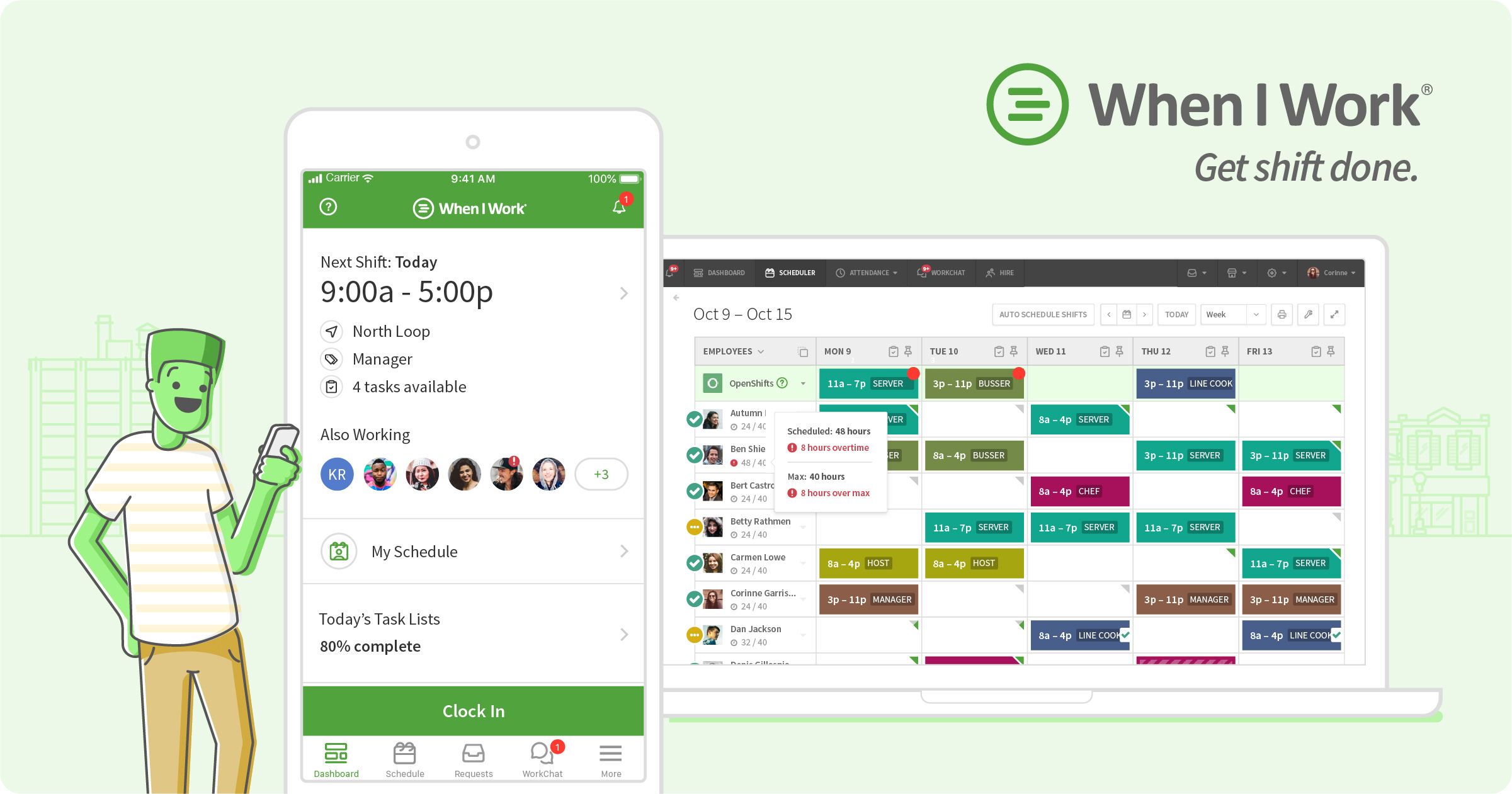

robots.txt (opens in a new tab)
1 rulesAll bots 1 allowed · 0 disallowed
- Allow
/
No matching rules.
Sitemaps
1Recent Updates
- Website images
- Screenshots
- Network details
- Website Technologies
- Pages and Search Information
- HTTP Response Information
- TLS and certificates
- DNS Information
- Domain Registration
- Website profile
- Website Description
- Website Name
- Website profile
- Website Description
- Website Name
User reviews (0)