Website profiles · Technology insights · Alternatives

wolslan.net

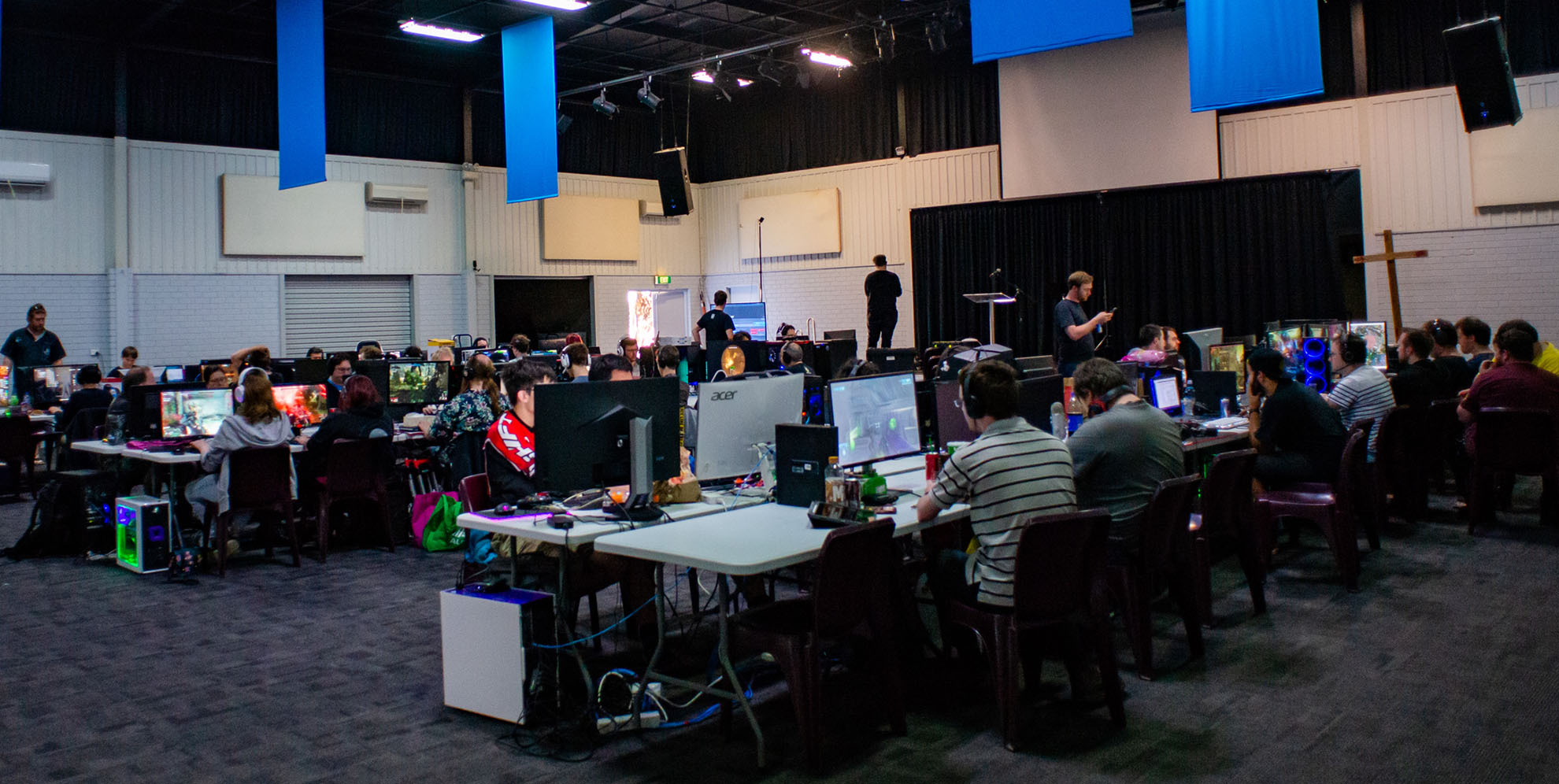
A LAN party ran in Perth, WA. Bring along your computer and play games with your friends! Snacks, aircon and chill music for all to enjoy.

No paid content found
Visit website
Profile views 8 Outbound visits 3 Normal
WOLSLAN Full homepage screenshot

At a glance

Category
Games & Board Games
Language
English
Paid-content signal
No paid content foundObserved
Registered
2002
Hosting
Hostopia Australia Web Pty LtdInferred
HTTPS certificate trusted
PassedObserved
Last updated

Website review

This review may include AI-generated content and is not individually verified. Domain, certificate and other facts come from the observed data on this page.

What is WOLSLAN?

WOLSLAN is a long-running LAN party in Perth, Western Australia, where attendees bring their own computer and play games alongside other people in the same room. The page presents it as a social, in-person event rather than an online tournament: snacks, air conditioning and background music are part of the setup, and the venue provides the desk, chair and network cabling.

What to expect if you go

  • Bring your own setup: a desktop PC and monitor, mouse and mouse mat, keyboard, power cables for both PC and monitor, a power board, and the display cable for your monitor. Network cables are supplied.
  • Plan around a full-day session: the listed event runs from 10am to 10pm, so bring enough snacks and drinks for that stretch, though there is also a canteen.
  • Check the rules before packing: loudspeakers or other noisy devices, whitegoods such as fridges and kettles, servers with loud fans, and alcohol or drugs are all prohibited. The page states a zero-tolerance policy on alcohol and drugs.
  • Practical comforts are covered: there is plenty of parking with easy access, multiple reverse-cycle air conditioners, and accessible toilets nearby. Nearby food options include Subway, Chicken Treat, ALDI and Woolworths.

Who it suits

This fits someone in or near Perth who wants a casual, friendly LAN environment and is willing to transport their own PC. It is less suited to anyone hoping to borrow equipment, since the event supplies furniture and networking but not computers. The page notes that event 103 is free in celebration, while the standard door price is listed as $15 paid at the door; treat those as the page's own figures and confirm current details before travelling.

Next step

If you are considering attending, use the checklist on the page as your packing list, then confirm the date, address and payment arrangement directly with the organisers before the event. The listed address is 30 Gnangara Drive, Waikiki, WA 6169.

What should I bring to a WOLSLAN LAN party?

Bring your own gaming setup, but not the whole desk: WOLSLAN supplies the chair, desk and network cable, so your job is to pack the PC, screen and the cables that connect them.

Checklist based on the event page

  • Desktop PC and monitor
  • Mouse, mouse mat and keyboard
  • Power cables for both PC and monitor
  • A power board
  • Display cable for the monitor
  • Snacks and drinks (a canteen is also on site)
  • Network cable: not needed — provided
  • Chair and desk: not needed — provided

What not to bring

  • Loudspeakers or other noisy devices
  • Whitegoods such as fridges, toasters or kettles
  • Servers (loud fans)
  • Alcohol or drugs — zero tolerance

Practical next step

Before the day, update your Steam games and confirm your travel and parking plans. The venue is at 30 Gnangara Drive, Waikiki, WA, with parking available and easy access. If you forget food, Subway, Chicken Treat, ALDI and Woolworths are nearby.

One trade-off worth noting: the event runs 10am to 10pm, so a full day of gaming means you should think about comfort — food, water and a break — rather than just packing hardware. The page lists air conditioning and accessible toilets close by, which matters for a long session.

For a first-timer, the simplest rule is: bring the PC, the peripherals and the cables in the checklist, and leave anything noisy or bulky at home.

How much does it cost to attend WOLSLAN and how do I pay?

Entry is generally $15, paid at the door. The page also shows a free-entry event in celebration of event 103, so check the current event listing before you travel in case a promotion is running.

What to expect

  • Standard price: $15, cash-style payment at the venue door (the page says "pay at the door").
  • Promotional events: Occasionally free, as with the event-103 celebration.
  • What's included: Desk, chair and LAN network; you bring your own PC, monitor, peripherals and power gear.

Your next step Confirm the date and price on the event page before heading to 30 Gnangara Drive, Waikiki, WA. If you're planning with friends, check the "Items to bring" list and note the banned items (loudspeakers, servers, alcohol/drugs, whitegoods) so nobody gets turned away.

For context, WOLSLAN is listed as Perth's longest-running LAN party at WOLSLAN.

Where is WOLSLAN held and is there parking?

WOLSLAN is held at 30 Gnangara Drive, Waikiki, WA 6169 — in Perth's southern suburbs. Yes, there is parking: the event page states there is plenty of parking available with easy access to the event.

Practical notes for attendees

  • The venue is a LAN party, so plan to carry in a desktop PC and monitor plus peripherals. Bringing a power board and your own power and display cables is expected; network cables are provided.
  • If you are driving, arriving by car is straightforward, and the parking situation removes the usual inner-city event stress.
  • Food options nearby include Subway, Chicken Treat, ALDI and Woolworths, with a canteen also running at the event. You can bring your own snacks and drinks.
  • The page lists accessible toilets within close reach and reverse-cycle air conditioning, which matters for a full-day event in Perth.
  • Leave loudspeakers, whitegoods, servers, alcohol and drugs at home — the event states a zero-tolerance policy on alcohol and drugs.

Next step

Before you go, check the current event page at WOLSLAN for the confirmed date, time and door price, then build a packing list from the items above. If you are unsure whether your gear is suitable, the banned-items list is the quickest way to check.

What items are banned at WOLSLAN events?

WOLSLAN bans items that create noise, safety hazards or a disruptive atmosphere. According to the event page, the prohibited list is:

  • Loudspeakers or other loud devices that could annoy people nearby
  • Whitegoods such as fridges, toasters or kettles
  • Servers, because of loud fans
  • Alcohol and drugs, under a zero-tolerance policy

If you are packing for an event, leave those at home and bring your PC, monitor, peripherals, power cables, a power board, a display cable and snacks or drinks. WOLSLAN provides the network cable, chair and desk, and there is a canteen on site.

What food and drink options are available at or near WOLSLAN?

WOLSLAN has a canteen at the event itself, so you can buy food and drinks on site rather than carrying everything in. The event page also lists nearby options for a proper meal or supplies: Subway, Chicken Treat, ALDI and Woolworths are all close by. The venue is at 30 Gnangara Drive, Waikiki, WA.

You are also allowed to bring your own snacks and drinks. That is often the cheaper and simpler route for a full-day event, especially if you want to avoid leaving your desk and your gear unattended.

A few practical points from the event's rules:

  • Bring snacks and drinks if you like — the page lists them under items to bring, alongside your PC and peripherals.
  • The canteen is on site — useful if you would rather travel light or buy something hot.
  • Nearby shops cover meals and groceries — Subway and Chicken Treat for takeaway, ALDI and Woolworths for drinks, snacks and supplies.
  • No alcohol or drugs — WOLSLAN has a zero tolerance policy, so do not plan on bringing any.
  • No loudspeakers or loud devices — keep audio to yourself so you do not annoy nearby players.
  • No whitegoods or servers — leave fridges, kettles, toasters and server hardware at home.

If you are deciding what to pack, a good rule of thumb is: bring a refillable water bottle and a few easy snacks, then use the canteen or the nearby shops for anything more substantial. That keeps your bag light and gives you a backup if the canteen queue is long or you do not want to step away from your setup.

Related questions

More questions →
What Facilities Are Available at WOLSLAN?

WOLSLAN provides the core infrastructure for a full day of gaming: a chair, desk, and wired LAN connection for each attendee, plus multiple reverse-cycle air conditioners, accessible toilets within close reach, and on-site food and drink options. You bring your own PC and peripherals. The next event runs 03/10/2026, 10am to 10pm, at 30 Gnangara Drive, Waikiki, WA, 6169.

What WOLSLAN Provides On Site

The event supplies the furniture and networking so you don't have to haul a desk across Perth:

  • Chair and desk — provided for every attendee
  • LAN network — wired connection provided; you do not need to bring a network cable
  • Air conditioning — multiple reverse-cycle units keep the room comfortable
  • Toilets — accessible toilets are within close reach
  • Parking — plenty of parking with easy access to the event
  • Canteen — food and drinks available on site

What You Need to Bring

Since WOLSLAN provides the desk, chair, and network, your packing list is your own hardware:

  • Desktop PC + monitor
  • Mouse + mouse mat
  • Keyboard
  • Power cables (PC + monitor)
  • Power board
  • Display cable (for monitor)
  • Snacks / drinks (optional — there's also a canteen)

A network cable is explicitly not needed.

Food and Drink Options

There's a canteen at the event itself, so you don't have to leave the venue to eat. If you'd rather step out, nearby options include:

  • Subway
  • Chicken Treat
  • ALDI
  • Woolworths

You're also welcome to bring your own snacks and drinks.

Items That Are Banned

WOLSLAN enforces a zero-tolerance policy on some items, and others are banned for practical reasons:

Banned item Why
Loudspeakers / loud devices Can annoy others nearby
Whitegoods (fridges, toasters, kettles) Not suitable for the venue
Servers Loud fans
Alcohol / drugs Zero tolerance policy

Comfort and Accessibility Summary

If your main concern is staying comfortable across a 12-hour session (10am–10pm), the air conditioning and accessible toilets cover the essentials, and the on-site canteen plus nearby shops mean you don't need to plan far ahead for food. Parking is straightforward, which matters if you're carrying a full desktop setup.

One practical note: the event page lists the price as $15, pay at the door, while also stating that event 103 is free in celebration. Check the current event listing before you go so you know which applies to the date you're attending.

How Much Does It Cost to Attend WOLSLAN?

Standard entry to WOLSLAN is $15, paid at the door. The exception is a milestone event: the listing for event 103 states that it is free in celebration of that edition. So the price you pay depends on which event you attend — check the current event page before you go.

Pricing at a glance

Item Detail
Standard price $15
Payment method Pay at the door
Milestone event (event 103) Free
What's included Chair, desk, and LAN network
What's not included Your own PC and peripherals

What the fee covers

Your entry covers the seat and the setup around it: WOLSLAN provides the chair, desk, and LAN network. You don't need to bring a network cable — that's supplied.

What you bring yourself is the machine and everything plugged into it: desktop PC, monitor, mouse and mouse mat, keyboard, power cables for the PC and monitor, a power board, and a display cable. Snacks and drinks are also on you, though there's a canteen at the event and nearby food options including Subway, Chicken Treat, ALDI, and Woolworths.

Event details to plan around

  • Date (as listed): 03/10/2026
  • Time: 10am to 10pm
  • Address: 30 Gnangara Drive, Waikiki, WA, 6169
  • Parking: Plenty available, with easy access to the event
  • Comfort: Multiple reverse-cycle air conditioners
  • Toilets: Accessible toilets within close reach

Before you pay at the door

A few things worth doing in advance, based on the event's own checklist:

  • Pack everything on the bring list — a missing power or display cable is the usual reason a setup won't boot.
  • Update your Steam games beforehand so you're not downloading over the event network.
  • Double-check your travel arrangements, since the venue is in Waikiki, south of Perth.
  • Invite friends — it's a social event, and the door price is per person.

What not to bring

Some items are banned outright, and turning up with them can affect your entry:

  • Loudspeakers or other loud devices that disturb people nearby
  • Whitegoods such as fridges, toasters, or kettles
  • Servers (loud fans)
  • Alcohol or drugs — zero tolerance policy

The short answer

Budget $15 in cash or card at the door for a normal WOLSLAN event, and confirm on the event page first — milestone events like event 103 have been free. The fee buys you a desk, a chair, and a wired LAN connection; everything else in your setup comes with you.

When and Where Is the Next WOLSLAN Event?

The next WOLSLAN LAN party is on 3 October 2026, running from 10am to 10pm, at 30 Gnangara Drive, Waikiki, WA, 6169. Entry is $15, paid at the door — except for this event, which the site lists as free in celebration of event 103. If you're planning to go, the practical details below cover timing, getting there, parking, and where to eat nearby.

Date and time

Detail Info
Date 03/10/2026
Time 10am to 10pm
Event number 103
Entry Free for this event (normally $15, pay at the door)

It's a single-day event, so you're looking at a 12-hour session. Arriving at 10am gives you the full day; the venue closes at 10pm.

Location and parking

The address is 30 Gnangara Drive, Waikiki, WA, 6169.

Parking is straightforward: the site states there is plenty of parking available with easy access to the event. That matters for a LAN party, since you'll be carrying a desktop PC, monitor, and peripherals from your car — a short, simple walk from parking to your desk is the difference between one trip and three.

Getting there and what's nearby

Waikiki is in Perth's southern suburbs. If you're coming from further out, double-check your travel arrangements before the day — the site's own pre-event checklist includes confirming your travel plans.

If you need food during the day:

  • Subway, Chicken Treat, ALDI, and Woolworths are all nearby.
  • There is also a canteen at the event itself.
  • You're welcome to bring your own snacks and drinks.

Comfort and facilities

  • Aircon: multiple reverse-cycle air conditioners keep the room comfortable — worth knowing for a 12-hour event in October.
  • Toilets: accessible toilets are within close reach.
  • Chairs, desks, and LAN network cables are provided, so you don't need to bring your own seating or networking gear.

Before you go

The site's checklist for attendees:

  • Pack all the items you need (see the full bring list — desktop PC, monitor, mouse and mat, keyboard, power cables, power board, and display cable).
  • Update your Steam games beforehand so you're not downloading over the event network.
  • Double-check your travel arrangements.
  • Invite your friends.

Leave at home: loudspeakers or other loud devices, whitegoods like fridges/toasters/kettles, servers (loud fans), and alcohol or drugs — the event has a zero-tolerance policy on the last one.

Quick answers

Is it free? For event 103, yes — the site lists it as free. The standard price is $15 paid at the door.

Do I need to bring a network cable? No, WOLSLAN provides it.

Do I need to bring a chair or desk? No, those are provided too.

Can I buy food there? Yes, there's a canteen, plus Subway, Chicken Treat, ALDI, and Woolworths nearby.

What to Bring to a WOLSLAN LAN Party (and What to Leave at Home)

WOLSLAN runs at 30 Gnangara Drive, Waikiki, WA 6169, and the venue supplies the chair, desk, and LAN network — so you only need to bring your own computer gear. Pack a desktop PC and monitor, mouse and mouse mat, keyboard, power cables for both the PC and monitor, a power board, and a display cable. You do not need a network cable. Snacks and drinks are welcome, and there is also a canteen on site. Leave loudspeakers, whitegoods, servers, and alcohol or drugs at home.

The full packing checklist

Based on the event's own checklist, here is everything to bring:

  • Desktop PC + monitor
  • Mouse + mouse mat
  • Keyboard
  • Power cables (PC + monitor)
  • Power board
  • Display cable (for the monitor)
  • Snacks / drinks (optional — a canteen is also available)

Not needed: a network cable. The event provides this.

What you cannot bring

WOLSLAN lists these as banned items:

Banned item Reason given
Loudspeakers or loud devices Can annoy others nearby
Whitegoods (fridges, toasters, kettles) Not permitted
Servers Loud fans
Alcohol / drugs Zero tolerance policy

Before you go

The event suggests a short prep routine:

  • Pack all the items you need.
  • Update your Steam games.
  • Double-check your travel arrangements.
  • Invite your friends.

Practical details worth knowing

  • Parking: Plenty of parking is available with easy access to the event.
  • Food and drinks: Nearby options include Subway, Chicken Treat, ALDI, and Woolworths, plus a canteen at the event itself.
  • Comfort: Multiple reverse-cycle air conditioners keep the room comfortable.
  • Toilets: Accessible toilets are within close reach.

Cost and timing

The listed price is $15, paid at the door. The next event runs 03/10/2026 from 10am to 10pm. Note that the site also advertises a free event in celebration of event 103 — check the current event page before you go, since pricing can vary by event.

What Is WOLSLAN? Perth's Longest-Running LAN Party Explained

WOLSLAN is a bring-your-own-computer LAN party in Perth, Western Australia, and it describes itself as Perth's longest-running LAN party. You bring a desktop PC and peripherals, and the organisers supply the chair, desk, and network connection. It suits people who want a social, in-person gaming session with friends rather than an online-only event. The next listed event is 03/10/2026, running 10am to 10pm at 30 Gnangara Drive, Waikiki, WA, 6169.

What you actually get at the event

The core offer is simple: you supply the gaming hardware, WOLSLAN supplies the physical setup and the LAN.

Provided by organisers You bring yourself
Chair and desk Desktop PC + monitor
LAN network connection Mouse + mouse mat
Air conditioning Keyboard
Chill music Power cables (PC + monitor)
Canteen on site Power board
Accessible toilets nearby Display cable (for monitor)
Parking with easy event access Snacks / drinks (optional)

Note that a network cable is not needed — the organisers provide this. That's a common thing people over-pack for at LAN events, so it's worth leaving yours at home.

What to pack (and what to leave behind)

The site publishes a checklist, which is the most reliable way to avoid turning up without something essential.

Bring:

  • Desktop PC + monitor
  • Mouse + mouse mat
  • Keyboard
  • Power cables for both PC and monitor
  • Power board
  • Display cable for the monitor
  • Snacks / drinks (a canteen is also available on site)

Do not bring:

  • Loudspeakers or other loud devices that could annoy people nearby
  • Whitegoods such as fridges, toasters, or kettles
  • Servers (the organisers cite loud fans as the reason)
  • Alcohol or drugs — the event states a zero-tolerance policy

The organisers also suggest preparing beforehand by packing everything you need, updating your Steam games, double-checking travel arrangements, and inviting friends.

Practical details: location, food, comfort

  • Address: 30 Gnangara Drive, Waikiki, WA, 6169
  • Parking: The site says there is plenty of parking with easy access to the event.
  • Food and drinks: A canteen runs at the event, and nearby options include Subway, Chicken Treat, ALDI, and Woolworths.
  • Aircon: Multiple reverse-cycle air conditioners are used to keep the room comfortable.
  • Toilets: Accessible toilets are within close reach.

Cost and how to decide

The site lists a door price of $15, paid at the door, for the standard event. It also shows a separate free event in celebration of event 103 — so pricing can vary by event, and the free entry applies to that specific occasion rather than to WOLSLAN generally.

If you're weighing it up:

  • WOLSLAN fits you if you have a desktop PC you can transport, you want a full-day (10am–10pm) in-person session, and you prefer an organised venue with power, network, aircon, and food nearby handled for you.
  • WOLSLAN may not fit you if you only game on a laptop you'd rather not haul around, you want to bring your own speakers or a server, or you're looking for an event with alcohol — the policy is zero tolerance.

Because the event runs a full 12 hours, plan for power, food, and breaks rather than assuming you'll step out mid-session. Checking the WOLSLAN site before attending is the safest way to confirm the current date, price, and any event-specific changes, since the free-entry offer shown applies to one particular event.

Website Overview

Identifiable technologies and additional version or configuration signals make the service easier to fingerprint, which may help targeted scanners narrow their checks. An established domain and managed infrastructure suggest continuity of operations and may support dependable delivery, although neither guarantees service quality.

Domain and Registration

Registered in 2002, this domain has about 24 years of history. That suggests continuity, although ownership and purpose may have changed. Transfer-protection status is present, helping reduce the risk of unauthorized domain transfers. The domain uses the common .net extension, which is not an independent safety signal.

DNS and Email

The observed email authentication setup is incomplete: DMARC is missing. Nameservers are provided by mediaengine.com.au, indicating managed DNS hosting. MX records point to the wolslan.net email service. No CNAME was found; the observed records resolve directly to addresses. TXT records include verification markers for Google. Such markers may also remain after a service stops being used.

TLS and Certificates

The certificate uses an RSA 2048-bit public key, offering broad client compatibility. The server supplied a complete certificate chain. No organization name is present in the certificate; the available fields are consistent with domain validation. The certificate was issued by Let's Encrypt, commonly associated with automated certificate services. The certificate's total validity is about 89 days, consistent with a short renewal cycle.

HTTP and Browser Security

The checked browser-security headers were not detected, leaving fewer explicit browser-side safeguards. No X-Powered-By header was found, reducing one common source of backend fingerprinting information. No obvious internal addresses or debug information were found in the headers. The Server header identifies Apache without an exact version. No explicit CDN or WAF marker was found in the response headers.

Technology Stack Analysis

The public page identifies WordPress 7.1.2, jQuery, Apache, with exact versions exposed for 1 technologies. These details can narrow vulnerability checks, although exposure alone is not a vulnerability.

Search and Social Sharing

The Generator tag identifies WordPress 7.1.2, making the publishing system easier to fingerprint. Twitter Card metadata is configured. JSON-LD includes Organization data, helping describe the organization as an entity. The title has 20 characters, within a common display range. A meta description is present, with 138 characters.

Hosting and Email

DNSmediaengine.com.au
HostingHostopia Australia Web Pty Ltd
Emailwolslan.net
Approximate IP geolocation (inferred; a CDN or proxy may differ from the origin server) Australia flagMelbourne, Victoria, Australia Inferred 101.0.105.2

Registration details

RDAP / WHOIS

RegistrarHostopia Canada Corp
Registered2002-08-01
Expires2028-08-01
Domain statusclient transfer prohibited
Nameserversns01.mediaengine.com.au、ns02.mediaengine.com.au
DNSSECunsigned

DNS records

DNS

TypeNameValueTTLPriority
Awolslan.net101.0.105.214400—
MXwolslan.netwolslan.net144000
NSwolslan.netns01.mediaengine.com.au86400—
NSwolslan.netns02.mediaengine.com.au86400—
TXTwolslan.netgoogle-site-verification=OrkGSc_tyKE_7L-KPzkf7KO_K_Lkymoekye7U2qRUN814400—
TXTwolslan.netv=spf1 ip4:101.0.105.2 +a +mx -all14400—

TLS and certificates

TLS / SSL

AssessmentNormal configuration
Supported protocolsTLSv1.2、TLSv1.3
Negotiated protocolTLSv1.3
Certificate subject*.wolslan.net
IssuerLet's Encrypt
Valid until2026-11-20T07:26 · Remaining when checked: 47 days
Verification detailsCertificate trust: Passed · Hostname match: Passed

HTTP response headers

HTTP

HeaderValue
content-typetext/html; charset=UTF-8
cache-controlno-cache
serverApache

Identified technologies

WordPress 7.1.2jQueryApache

Pages, Search and Sharing

Meta descriptionA LAN party ran in Perth, WA. Bring along your computer and play games with your friends! Snacks, aircon and chill music for all to enjoy.
Canonical URLhttps://wolslan.net/
LanguageEnglish (default)
Twitter Cardsummary_large_image

No rules found

User reviews (0)

  • No reviews yet.