Website profiles · Technology insights · Alternatives

aivirtualstaging.net

AI virtual staging for real estate listings. Instantly stage empty rooms with realistic, MLS-compliant furniture in seconds — 20x cheaper than manual staging. No subscriptions.

Paid content
Visit website
Profile views 11 Outbound visits 2 Normal
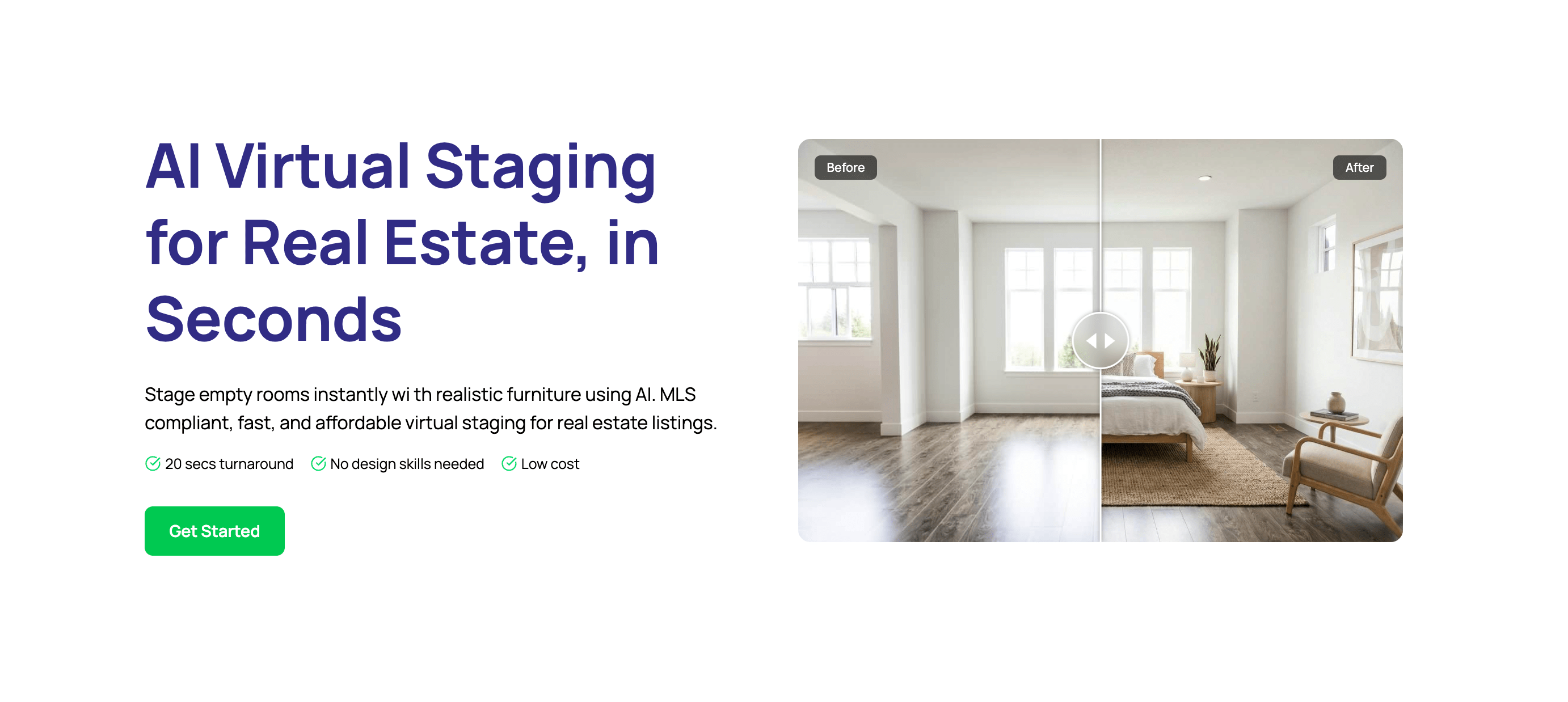
AI Virtual Staging for Real Estate Full homepage screenshot

At a glance

Category
Real Estate & Rentals
Language
English
Paid-content signal
Paid contentObserved
Registered
2025
Hosting
VercelInferred
HTTPS certificate trusted
PassedObserved
Last updated

Website review

This review may include AI-generated content and is not individually verified. Domain, certificate and other facts come from the observed data on this page.

What is AI Virtual Staging for Real Estate?

AI Virtual Staging for Real Estate is a service that uses AI to add photorealistic furniture to photos of empty rooms, producing listing-ready images that look professionally staged. On AI Virtual Staging for Real Estate, the workflow is: upload a room photo, choose an interior style, let the AI render furniture with realistic shadows and lighting, then download a high-resolution image. The site describes results in under 30 seconds, up to 4K output, MLS-compliant rendering, and no subscription.

Who it's for Real estate agents, brokers, landlords, developers, and photographers who need to market empty or unfurnished properties quickly. It's most useful when a listing is going live soon and there's no time or budget for physical staging.

What it does in practice

  • Turns empty rooms into furnished-looking photos for listing sites and marketing.
  • Generates images in minutes rather than days, so listings can publish without waiting on a photographer or stager.
  • Preserves room layout, perspective, and lighting, which matters for MLS compliance.
  • Supports furniture removal as well as addition, useful when a room is cluttered or already furnished.
  • Lets you regenerate until the result looks right, rather than paying per revision.

Trade-offs to weigh

  • AI staging is a marketing image, not a representation of the actual property. Some MLSs and brokerages require a disclosure label on virtually staged photos, and rules vary by market — check your local MLS policy before publishing.
  • It won't fix a bad photo. Blurry, dark, or oddly angled source images usually produce weaker results.
  • It replaces the visual impression of staging, not the in-person experience. Buyers touring the home will see it empty.
  • Style consistency across a listing matters; pick one interior style per property rather than mixing.

How it compares

AI virtual staging Traditional staging
Turnaround Seconds to minutes Days to weeks
Cost per photo Low, no subscription per the site Often $20+ per photo per the site
Revisions Unlimited regenerations Each change takes days
Consistency Uniform AI output Varies by stager
Physical result Photo only Real furniture in the home

The practical decision: use AI staging when speed and cost matter and the property will be marketed primarily online. Use physical staging when buyers will walk the home and the in-person impression is the priority — or combine both, staging key rooms physically and using AI for the rest.

A useful next step is to test one room before committing to a full listing. Upload a single empty living room, generate two or three styles, and compare them against your MLS disclosure requirements. If the output holds up at listing size and you can label it correctly, roll it out across the property.

How does AI virtual staging compare to traditional physical staging in terms of cost and speed?

AI virtual staging wins clearly on both cost and turnaround time: it produces a staged image in roughly 20–30 seconds, while physical staging typically takes days of coordination and delivery, and costs many times more per photo. The trade-off is that virtual staging edits a photograph rather than furnishing a real room, so it changes what buyers see online, not what they walk into.

Cost and speed at a glance

Dimension AI virtual staging (AI Virtual Staging for Real Estate) Traditional physical staging
Typical turnaround Seconds per image (~20–30 seconds per the site) Multiple days, with rush delivery costing extra
Cost model Pay-per-image, no subscription; positioned as ~20x cheaper than manual staging Often $20+ per photo, plus furniture rental, delivery and labor
Revisions Unlimited regenerations until satisfied Limited; each change takes days and may add cost
Consistency Same style applied across every listing Varies by stager and available inventory
What the buyer sees A photorealistic image of the empty room, furnished The actual physical room, furnished

What this means in practice

A listing agent with an empty condo and a weekend open house can upload photos, pick an interior style, and have MLS-ready images the same afternoon — no scheduling, no truck, no rental window. A homeowner selling a furnished house can also use the same tool to remove clutter or swap styles without moving a single item.

Physical staging still makes sense when the property will be shown in person and the buyer's reaction to real furniture matters — for example, a high-end listing where the seller wants the room to feel genuinely warm at the viewing, or a vacant home where a stager's physical presence signals investment.

How to decide

  • Choose AI staging when speed, per-image cost and consistent visuals across many listings matter most, and when the photos will do the selling online.
  • Choose physical staging when the in-person experience is the deciding factor, or when the seller's budget supports rental and installation.
  • Consider both for a luxury listing: stage key rooms physically, and use AI images for secondary rooms or alternate style options.

A practical next step: take one empty-room photo, run it through the tool, and compare the result against your current listing photos. If the AI version holds up at full resolution and passes your MLS review, the cost and time savings are straightforward.

Can AI virtual staging produce MLS-compliant images for real estate listings?

Yes, AI virtual staging can produce MLS-compliant images when the tool preserves the room's actual structure and clearly labels the image as virtually staged. Compliance ultimately depends on your MLS rules and your own disclosure practices, not on the software alone.

AI Virtual Staging for Real Estate states that its engine preserves perspective and lighting and leaves the room layout untouched, which are the technical conditions MLS guidelines usually care about. It also advertises high-resolution output up to 4K and one-click furniture removal or addition, useful if a board requires the original photo alongside the staged version.

What "MLS-compliant" usually means

  • The staged image must not misrepresent the property's structure: walls, windows, doors, ceiling height and room dimensions stay as they are.
  • Furniture and decor are illustrative, so listings typically must carry a "virtually staged" label.
  • Some boards require you to keep and be able to supply the original unedited photo.
  • Removing existing furniture is generally treated the same way as adding it: disclose it.

A practical test before you rely on any tool

Take one empty room photo and check three things: does the wall and window placement match the original exactly, do the shadows fall consistently with the light source in the photo, and does the furniture sit at a believable scale? If any of those fail, the image is risky to publish regardless of what the vendor claims.

For a listing agent with a vacant property, the workflow is straightforward: stage the photo, add the disclosure line your MLS requires, and keep the unedited file on hand. If your board has stricter rules, such as banning furniture removal or requiring a watermark, confirm that before uploading rather than after a listing gets flagged.

What interior design styles are available for AI virtual staging?

The page does not list named interior styles. It shows an "Interior Style" selector as step 2 of the workflow ("Choose Options"), and describes the results as "modern, professionally curated interior styles," but no specific style names (for example, modern, farmhouse, Scandinavian, industrial) appear in the page evidence.

H3 What this means in practice

  • You pick a style before generating, so the available set is the main variable in your output.
  • The page promises consistent design quality across listings, which matters if you want a recognizable look across a portfolio.
  • Furniture can be added or removed with one click, so you can also use the tool to clear clutter rather than only furnish empty rooms.

H3 How to check the actual style list Open the site's gallery and pricing pages to see the styles used in real examples: AI Virtual Staging for Real Estate. If you need a specific look, test one room in two candidate styles and compare the before/after images side by side before committing to a full listing.

For broader context on what styles buyers respond to, style guides from National Association of Realtors and listing examples on Zillow can help you judge whether a generated style fits your local market.

How do I use AI virtual staging to stage an empty room?

Upload a photo of the empty room, pick an interior style, let the AI render furniture, then download the result and add it to your listing. On AI Virtual Staging for Real Estate, that flow is described as four steps — upload, choose options, AI generation, download — with the render taking roughly 30 seconds and output up to 4K.

A practical workflow

  1. Shoot or source a clean photo. Use a straight-on angle, good natural light, and as little clutter as possible. The page notes JPG, PNG, and WEBP support and keeps the existing room layout and perspective intact, so a level, well-lit shot gives the AI the best base.
  2. Decide what you want staged. For an empty room, add furniture. If the room already has some pieces, you can toggle furniture removal or addition — useful when a seller's old sofa is dragging down the photo.
  3. Choose one style and apply it consistently. Pick a single interior style per property (for example, a modern neutral look) and reuse it across rooms so the listing feels like one home rather than a catalog of unrelated sets.
  4. Check the render against the real room. Confirm windows, doors, flooring, and fixed features still match. MLS rules generally require staged images to be labeled as virtually staged and not misrepresent the property — the site claims MLS-compliant results, but labeling is still your responsibility as the listing agent.
  5. Download and publish. Save the high-resolution file, then use it in the MLS, portal listings, flyers, and social posts.

Where it fits and where it doesn't

Situation Virtual staging works well Consider alternatives
Empty or dated listing photos Fast, low-cost furniture visualization —
Luxury or architecturally distinctive homes Good for standard rooms; verify details carefully Professional physical staging for high-end showings
Renovation or new-development marketing Consistent look across many units —
Rooms with unusual layouts AI may misplace scale Manual retouching or a human stager

Who tends to benefit

Real estate agents listing vacant properties, landlords marketing rentals, and developers previewing unit finishes. The trade-off is realism: virtual furniture can look slightly generic, and buyers who tour in person will see an empty room. Labeling the image honestly protects you and sets the right expectation.

Next step: stage one room first, compare it side by side with the original, and only then batch the rest of the property in the same style.

Is there a free trial or sample available for AI virtual staging?

The site does not advertise a free trial. What it does offer instead is a no-subscription, pay-as-you-go model, so you can test the output on a single room before committing to a whole listing. The workflow is upload, choose a style, generate, download — with results typically in under 30 seconds and unlimited regenerations until you're satisfied, which functions as a practical try-before-you-buy loop on one image.

A sensible test: pick your worst empty room, run one generation, and check three things — whether the wall lines, windows and floor perspective stay untouched; whether shadows and lighting look plausible rather than pasted; and whether the furniture placement would pass your local MLS rules on misrepresentation. If it fails any of those, one image was a cheap lesson.

Alternatives worth comparing if you want a genuinely free sample:

  • AI Virtual Staging for Real Estate — no subscription; pay per image after you see the result.
  • Virtual Staging AI — commonly offers limited free stagings on signup, useful for side-by-side quality checks.
  • Apply Design — free trial credits for real estate photo editing, helpful if you also need decluttering and day-to-dusk.

Decision criterion: if you list occasionally, per-image pricing beats any subscription. If you stage dozens of rooms weekly, compare the per-image rate against a monthly plan elsewhere — the break-even point is usually where a subscription costs less than roughly the number of images you'd buy in a month.

Related questions

More questions →
Are AI Virtual Staging Images from aivirtualstaging.net MLS-Compliant?

aivirtualstaging.net states that its output is MLS-compliant, and the specific claims behind that statement are what matter: perspective and lighting are preserved, room layout stays untouched, and the tool is positioned as adding or removing furniture rather than altering the property. That addresses the core MLS concern — misrepresentation — but compliance is ultimately determined by your local MLS rules, not by the tool. Treat the site's claim as a starting condition, then verify against your MLS's current virtual staging policy and label the images as virtually staged where required.

What the site actually claims

The page's "Why choose us?" comparison and the "Why Professionals Choose Virtual Staging" section make four compliance-relevant promises:

  • MLS-compliant results — perspective and lighting are "perfectly preserved to ensure compliance with all MLS guidelines."
  • Fully MLS compliant: no misrepresentation — listed as a differentiator against traditional or other tools.
  • Highly accurate AI: room layout stays untouched — the structure of the room is not redrawn or resized.
  • No over-staging risk — the comparison table flags over-staging as a risk with other approaches, implying the tool avoids it.

These map onto the two things MLS rules generally care about: that the image doesn't misrepresent the property's condition or features, and that the staging is disclosed.

Why layout preservation is the key mechanism

The compliance argument rests on what the AI does not change. According to the workflow description, the process is:

  1. Upload an empty or furnished room photo (high-res JPG, PNG, or WEBP).
  2. Choose an interior style and toggle furniture removal or addition.
  3. The AI renders furniture with realistic shadows and lighting in under 30 seconds.
  4. Download a high-resolution image (up to 4K).

Because the room's walls, windows, flooring, and proportions are preserved, the staged image still shows the actual property — furniture is the only addition. That's the distinction between virtual staging and image manipulation that changes what a buyer would physically see.

For example, if a listing photo shows a small bedroom, compliant virtual staging adds a bed and nightstands at a scale that fits the real dimensions. A non-compliant edit might widen the room or remove a structural column. The site's claim is that it does the former, not the latter.

What the site does not settle for you

The page asserts compliance with "all MLS guidelines," but MLS rules are set locally and change over time. The site does not reproduce any specific MLS's rulebook, and nothing in the available material confirms which MLSs it has been checked against. So the practical checklist is yours to run:

  • Check your MLS's current virtual staging policy. Some require a disclosure in the listing remarks; some require a label on the image itself; some restrict virtual staging in certain property types.
  • Label the images. Even where the tool produces compliant output, disclosure that the room is virtually staged is the norm and is what prevents a buyer from assuming the furniture exists.
  • Keep the original photo. Retain the unstaged image so you can show the actual condition if asked.
  • Avoid stacking edits. The tool adds or removes furniture; don't use it to imply renovations, added square footage, or features the property lacks.

The bottom line

The site's design — preserving perspective, lighting, and layout while only adding or removing furniture — is the right foundation for MLS compliance, and it explicitly claims MLS-compliant, non-misrepresenting results. But "MLS-compliant" is a claim about a process, not a guarantee that satisfies every local rule. Use the tool, then confirm your MLS's disclosure requirements and label the images accordingly.

What is AI Virtual Staging for Real Estate (aivirtualstaging.net)?

aivirtualstaging.net is an AI virtual staging tool for real estate listings. You upload a photo of an empty (or furnished) room, choose an interior style, and the site generates a photorealistic staged image — typically in under 30 seconds — that is described as MLS-compliant. It is aimed at real estate agents, landlords, developers, and rental or new-development marketers who want listing photos to look furnished without paying for physical staging. The site states there are no subscriptions and that it is about 20x cheaper than manual staging.

What it does

The core job is turning an empty room into a warm, furnished-looking space for listing photos. According to the site, the AI preserves the room's perspective and lighting so the result stays compliant with MLS guidelines, and the room layout is left untouched.

Key claims from the site:

  • Speed: results in seconds; the generation step is described as under 30 seconds, with the homepage headline "AI Virtual Staging in Seconds."
  • Output quality: high-resolution images up to 4K, described as MLS-ready.
  • Cost: positioned as roughly 20x cheaper than manual staging, with no subscription required.
  • Regeneration: unlimited regenerations until you're satisfied.
  • Furniture control: toggle furniture removal or addition with one click.
  • Supported inputs: high-res JPG, PNG, and WEBP.

How it works

The site lays out a four-step flow:

  1. Upload photo — an empty or furnished room photo in JPG, PNG, or WEBP.
  2. Choose options — pick an interior style and toggle furniture addition or removal.
  3. AI generation — the engine renders furniture with realistic shadows and lighting, stated as under 30 seconds.
  4. Download — get a high-resolution (up to 4K) image and list the property.

The intended result at each step: you provide a room photo and a style preference, the AI adds furniture while keeping the room's structure and lighting, and you receive a downloadable image ready to publish.

Who it's for

The site lists these use cases:

  • Real estate agents who need listing photos fast
  • Landlords and rental marketers
  • New developments and luxury homes
  • Complex renovation projects
  • Anyone reusing images across multiple marketing channels

If your goal is faster listing turnaround and lower visual-marketing cost without coordinating a physical staging crew, this fits the described use case. If you need physical furniture in the actual home — for in-person showings rather than photos — virtual staging does not replace that.

How it compares to traditional staging

The site presents a direct comparison:

Dimension AI Virtual Staging (site claims) Traditional / other tools (site claims)
Turnaround ~20 seconds Multiple days; faster delivery costs extra
Effort Simple, intuitive Tedious instructions, takes time
Cost Much cheaper than traditional staging Often $20+ per photo
Revisions Unlimited regenerations Limited; each change takes days
Consistency High-end look across listings Human inconsistency; quality varies
Compliance Fully MLS compliant, no misrepresentation Risk of over-staging

These are the site's own claims, not independently verified figures. Treat the cost and speed numbers as vendor-stated.

What to check before using it

  • MLS rules in your market. The site says results are MLS-compliant and preserve perspective and lighting, but compliance requirements vary by MLS. Confirm your local rules on virtually staged images, especially labeling requirements.
  • Pricing and account terms. The site has a Pricing page and a Login/Signup entry, and states "No Subscriptions." Because the input does not include actual price figures or login requirements, check the Pricing page directly for current terms rather than assuming free access.
  • Image rights and reuse. The site mentions reusing images across marketing channels; verify the terms cover your intended use.

Bottom line

aivirtualstaging.net is a fast, low-cost way to turn empty-room photos into furnished listing images, positioned for agents, landlords, and developers who want MLS-ready visuals without manual staging. It suits photo-based marketing where speed and cost matter most. Before committing, confirm your local MLS rules on virtual staging and check the Pricing page for current terms, since the site's cost and speed figures are its own claims.

Does aivirtualstaging.net Require a Subscription? Pricing Explained

No. aivirtualstaging.net advertises "No Subscriptions" on its homepage, so you are not required to sign up for a recurring plan to use the service. The site positions itself as a pay-as-you-go alternative to traditional staging, and it states that its AI staging is "20x cheaper than manual staging." For exact current rates, check the Pricing page at aivirtualstaging.net/pricing, since the homepage does not list specific per-image prices.

What "No Subscriptions" Means Here

The homepage headline and feature list both emphasize "No Subscriptions," which tells you the intended model is one-off use rather than a monthly commitment. That matters if you:

  • Stage listings occasionally rather than every week
  • Want to test the output quality before committing to any ongoing spend
  • Prefer to pay per image or per batch instead of a recurring fee

Because the site does not publish a price table on the homepage, treat "no subscription" as a statement about the billing model, not a claim that the service is free. You will need to open the Pricing page to see what a single staging job costs.

How the Cost Comparison Works

The site's core cost argument is a comparison against manual (physical) staging:

Factor aivirtualstaging.net Traditional staging
Turnaround ~20 seconds per image Multiple days
Cost claim 20x cheaper than manual staging Often $20+ per photo for virtual, more for physical
Revisions Unlimited regenerations until satisfied Limited revisions, each taking days
Consistency AI-rendered, uniform style Varies by stager

The "20x cheaper" figure is the site's own marketing claim, not an independently verified number. Use it as a directional signal: if a traditional stager quotes you several hundred dollars per room, the AI route is designed to land far below that. Your actual savings depend on how many images you stage and what the Pricing page currently charges.

What You Get Per Generation

Understanding the deliverable helps you judge whether the price is worth it:

  1. Upload — an empty or furnished room photo in high-res JPG, PNG, or WEBP.
  2. Choose options — pick an interior style and toggle furniture removal or addition.
  3. AI generation — the engine renders furniture with realistic shadows and lighting in under 30 seconds.
  4. Download — high-resolution images up to 4K, described as MLS-ready.

The site also states that room layout is preserved and results are MLS-compliant, meaning perspective and lighting are kept intact so the image does not misrepresent the property. Unlimited regenerations are included, so if a style does not fit, you can re-run it rather than paying again for a revision.

Who This Pricing Model Suits

The no-subscription, per-use structure fits:

  • Agents with sporadic listings who do not want a monthly bill
  • Photographers and marketers reusing staged images across channels
  • New developments and rentals where you stage many rooms at once but not continuously

It fits less well if you stage dozens of properties every week and would benefit from a bulk or volume arrangement — in that case, compare the per-image rate on the Pricing page against what a subscription-style competitor would charge at your volume.

Before You Commit

  • Open aivirtualstaging.net/pricing to confirm the current per-image or per-batch rate, since the homepage does not state it.
  • Confirm the billing model in checkout — "no subscriptions" describes the advertised model, but verify no recurring charge is added at payment.
  • Check whether there is a login/signup requirement, since the site shows a "Login / Signup" link; creating an account may be needed to access pricing or downloads.
  • Test with one image first to judge output quality against your MLS board's rules before staging a full listing.
How AI Virtual Staging Works on aivirtualstaging.net

aivirtualstaging.net turns a photo of an empty (or already furnished) room into a staged, MLS-ready listing image in about 30 seconds. You upload a high-res JPG, PNG, or WEBP file, pick an interior style, toggle furniture on or off, and download the result at up to 4K. It suits real estate agents, rentals, new developments, and renovation listings that need fast visuals without physical staging — the site claims results are 20x cheaper than manual staging and require no subscription.

The four-step workflow

The site describes the process as going "from empty rooms to MLS-ready masterpieces in under a minute."

1. Upload your photo

Upload an empty or furnished room photo. Supported formats are high-resolution JPG, PNG, and WEBP.

2. Choose your options

Select your preferred Interior Style. You can toggle furniture removal or addition with one click — so the same tool handles both staging an empty room and clearing furniture from a furnished one.

3. Let the AI generate

The AI engine renders furniture with realistic shadows and lighting in under 30 seconds. The site states the room layout stays untouched, which matters for MLS compliance.

4. Download and list

You get a high-resolution image (up to 4K) that the site describes as MLS-ready, available to download instantly and use in your listing.

What you get at each step

Step Input / action Expected result
Upload Empty or furnished room photo (JPG, PNG, WEBP, high-res) Photo accepted for processing
Options Pick an interior style; toggle furniture add/remove Staging direction set
Generation AI renders furniture with realistic shadows & lighting Staged image in under 30 seconds
Download Download the finished file Up to 4K, MLS-ready image

Why the output is meant to be listing-safe

The site emphasizes two things that affect whether you can actually publish the image:

  • Layout preservation — the AI keeps the room's perspective and layout intact rather than redrawing the space.
  • MLS compliance — perspective and lighting are preserved to meet MLS guidelines, and the site frames this as "no misrepresentation."

If your MLS has its own disclosure rules for virtually staged photos, check those separately — the site's compliance claim covers the image rendering, not your board's labeling requirements.

Where it fits compared with traditional staging

The site positions AI staging against manual staging and other tools on these points:

  • Speed — ~20 seconds versus multiple days (faster delivery often costs extra elsewhere).
  • Cost — described as much cheaper than traditional staging, which the site says often runs $20+ per photo.
  • Revisions — unlimited regenerations until you're satisfied, versus limited revisions where each change takes days.
  • Consistency — a consistent high-end look across listings, versus human inconsistency.
  • Over-staging risk — the site lists this as a downside of other approaches.

Practical things to check before you rely on it

  • Source photo quality drives the result. Since the tool preserves layout and lighting, start with a sharp, well-lit, straight-on shot. A tilted or dim photo limits what any renderer can do.
  • Confirm your file is high-res. The site supports high-res uploads and outputs up to 4K; a low-res phone snap undercuts the 4K output.
  • Plan for the furniture toggle. If you're staging an occupied listing, the removal option lets you clear clutter first, then re-stage.
  • Verify pricing and account terms on the site. The homepage mentions "No Subscriptions" and links to a Pricing page, but specific prices and any login requirements aren't stated in the available page content — check https://www.aivirtualstaging.net/pricing before committing.

The site also cites NAR Research that "virtual staging helps homes sell 73% faster than non-staged listings" — treat that as a marketing citation and confirm the underlying study if the number matters to your pitch.

AI Virtual Staging vs Traditional Staging: What Are the Differences?

AI virtual staging generates staged listing photos in about 20 seconds and is described as roughly 20x cheaper than manual staging, with unlimited regenerations and MLS-compliant output. Traditional staging typically takes multiple days, often costs $20+ per photo, and allows only limited revisions. The trade-off: AI is faster and cheaper but relies on generated furniture, while traditional staging places real furniture that can be photographed, walked through, and shown in person.

Speed: seconds vs. days

Dimension AI virtual staging (aivirtualstaging.net) Traditional staging
Turnaround ~20 seconds per image Multiple days; faster delivery costs extra
Workflow Upload photo → choose interior style → AI renders → download Coordinate stager, furniture rental, delivery, setup, photography
Listing readiness High-res (up to 4K), MLS-ready images downloadable immediately Depends on photo shoot scheduling after setup

For a listing that needs to go live this week, the AI route removes the scheduling bottleneck entirely. Traditional staging adds a dependency chain — stager availability, furniture lead time, and a photographer — each of which can push the publish date.

Cost: per-photo pricing vs. full staging spend

The site states AI virtual staging is 20x cheaper than manual staging, and its comparison table lists traditional/other services at often $20+ per photo. Traditional staging costs extend beyond the per-photo figure: furniture rental, delivery, setup labor, and teardown are typically bundled into the total.

Two conditions matter when comparing:

  • If you only need listing photos, AI virtual staging is the lower-cost option by the site's own comparison.
  • If buyers will physically tour the home, virtual staging does not furnish the actual space — the rooms remain empty in person, which some buyers notice.

The site also states there are no subscriptions, so cost is per-use rather than recurring. Check the pricing page for current rates, since the input does not list specific prices.

Revisions: unlimited regeneration vs. limited edits

This is where the two approaches diverge most sharply in day-to-day use.

AI virtual staging:

  • Unlimited regenerations until you're satisfied
  • Toggle furniture removal or addition with one click
  • Swap interior styles without reshooting

Traditional staging:

  • Limited revisions — each change takes days
  • Any furniture swap means re-coordinating logistics and re-photographing

If you expect to iterate — trying a modern style, then a warmer one, then removing a piece that crowds the frame — the AI workflow absorbs that iteration at no extra scheduling cost. With traditional staging, each round is a new project.

Quality and MLS compliance

The site claims its AI preserves perspective and lighting and keeps room layout untouched, which it frames as the basis for MLS compliance. Its comparison table flags traditional/other services with human inconsistency (quality varies) and over-staging risk.

What this means in practice:

  • Layout fidelity: AI staging here is positioned as adding furniture without altering the room's structure — important because MLS rules generally prohibit misrepresenting a property.
  • Consistency across listings: AI applies the same curated interior styles, so a portfolio of listings looks uniform. Human staging quality can vary by stager and by job.
  • Over-staging: The site lists this as a risk for traditional/other approaches; AI output is generated from a style template rather than a stager's judgment.

One caveat worth verifying on your own MLS: rules on virtual staging disclosure vary by board. The site's MLS-compliance claim covers perspective and lighting preservation, but you should confirm your local disclosure requirements separately.

Who each option fits

Choose AI virtual staging when:

  • You need listing photos fast (same-day publishing)
  • You're staging many properties and want consistent style at low cost
  • You expect to iterate on styles or furniture
  • The property is vacant and photos are the primary marketing asset

Choose traditional staging when:

  • Buyers will tour the home and you want it physically furnished
  • The property is luxury or high-touch, where in-person presentation is part of the sale
  • You need real furniture for video walkthroughs or open houses

The site lists its target users as covering luxury homes, rentals, new developments, and renovation projects — but the physical-furnishing gap remains the deciding factor for in-person showings.

How the AI workflow actually runs

Per the site's process:

  1. Upload photo — an empty or furnished room photo; high-res JPG, PNG, and WEBP are supported.
  2. Choose options — select an interior style; toggle furniture removal or addition.
  3. AI generation — the engine renders furniture with realistic shadows and lighting in under 30 seconds.
  4. Download — high-resolution (up to 4K), MLS-ready images, downloadable instantly.

Expected result: a staged version of your original photo with the room's perspective and lighting preserved. Common friction points to watch: very low-resolution source photos, unusual room geometry, and any local MLS disclosure rule that requires labeling virtually staged images.

Bottom line

AI virtual staging wins on speed, cost, and revision flexibility — roughly 20 seconds, about 20x cheaper, unlimited regenerations. Traditional staging wins when the home must be physically furnished for tours. For photo-driven listings, the AI route removes the multi-day dependency chain; for in-person presentation, it doesn't replace real furniture.

Website Overview

An active inbound-mail setup with incomplete authentication may leave the domain more open to impersonation. Provider hosting alone does not close that gap.

Domain and Registration

The domain was registered less than a year ago and has limited historical evidence to assess. Transfer-protection status is present, helping reduce the risk of unauthorized domain transfers. The registrar is NameCheap, Inc., a widely used domain service provider. The domain uses the common .net extension, which is not an independent safety signal.

DNS and Email

MX records exist, but SPF, DKIM and DMARC were not detected. Protection against domain impersonation may be incomplete. Nameservers are provided by Namecheap, indicating managed DNS hosting. MX records point to the Google Workspace email service. TXT records include verification markers for Google. Such markers may also remain after a service stops being used. DNSSEC signatures were not detected, so this additional DNS authenticity protection is not confirmed.

TLS and Certificates

The certificate uses an RSA 2048-bit public key, offering broad client compatibility. The server supplied a complete certificate chain. No organization name is present in the certificate; the available fields are consistent with domain validation. The certificate was issued by Let's Encrypt, commonly associated with automated certificate services. The certificate's total validity is about 89 days, consistent with a short renewal cycle.

HTTP and Browser Security

The response lacks these common security headers: CSP, X-Content-Type-Options, Referrer-Policy, Permissions-Policy, clickjacking protection. CORS permits any origin to read this response. This is common for public resources; sensitive responses need narrower handling. No X-Powered-By header was found, reducing one common source of backend fingerprinting information. No obvious internal addresses or debug information were found in the headers. The Server header contains the custom value Vercel.

Technology Stack Analysis

The public page identifies Next.js, Google Analytics, Vercel without precise versions, leaving fewer clues for version-specific scanning.

Search and Social Sharing

The meta description has 176 characters and may be shortened in search results. Twitter Card metadata is configured. JSON-LD includes Product or Offer data, potentially supporting eligible product search features. The title has 60 characters, within a common display range. The observed directives allow indexing and link following.

Hosting and Email

DNSNamecheap
HostingVercel
EmailGoogle Workspace
Approximate IP geolocation (inferred; a CDN or proxy may differ from the origin server) United States flagUnited States Inferred 216.198.79.1

Registration details

RDAP / WHOIS

RegistrarNameCheap, Inc.
Registered2025-12-23
Expires2026-12-23
Domain statusclient transfer prohibited
Nameserversdns1.registrar-servers.com、dns2.registrar-servers.com
DNSSECunsigned

DNS records

DNS

TypeNameValueTTLPriority
A108f6a49e00505b0.vercel-dns-017.com216.198.79.1300—
A108f6a49e00505b0.vercel-dns-017.com64.29.17.1300—
MXaivirtualstaging.netsmtp.google.com17991
NSaivirtualstaging.netdns1.registrar-servers.com1800—
NSaivirtualstaging.netdns2.registrar-servers.com1800—
TXTaivirtualstaging.netgoogle-site-verification=EbsdI9pmGAhC30jfcM3ICoMltvv9btNlROHdMsO4Uyk1799—
CNAMEwww.aivirtualstaging.net108f6a49e00505b0.vercel-dns-017.com1799—

TLS and certificates

TLS / SSL

AssessmentNormal configuration
Supported protocolsTLSv1.2、TLSv1.3
Negotiated protocolTLSv1.3
Certificate subjectwww.aivirtualstaging.net
IssuerLet's Encrypt
Valid until2026-11-28T00:46 · Remaining when checked: 57 days
Verification detailsCertificate trust: Passed · Hostname match: Passed

HTTP response headers

HTTP

HeaderValue
content-typetext/html; charset=utf-8
cache-controlpublic, max-age=0, must-revalidate
serverVercel
strict-transport-securitymax-age=63072000
access-control-allow-origin*

Identified technologies

Next.jsGoogle AnalyticsVercel

Pages, Search and Sharing

Meta descriptionAI virtual staging for real estate listings. Instantly stage empty rooms with realistic, MLS-compliant furniture in seconds — 20x cheaper than manual staging. No subscriptions.
Canonical URLhttps://www.aivirtualstaging.net
LanguageEnglish (default)
Twitter Cardsummary_large_image
All bots 1 allowed · 0 disallowed
  • Allow/

User reviews (0)

  • No reviews yet.