Website profiles · Technology insights · Alternatives

alsoat.app

AlsoAt is a powerful platform that lets you create a personalized profile page with links to all your social media, websites, and other online presences. Simplify your digital footprint and make it easy for people to find you "also at" various online locations.

No paid content found
Visit website
Profile views 8 Outbound visits 0 Normal
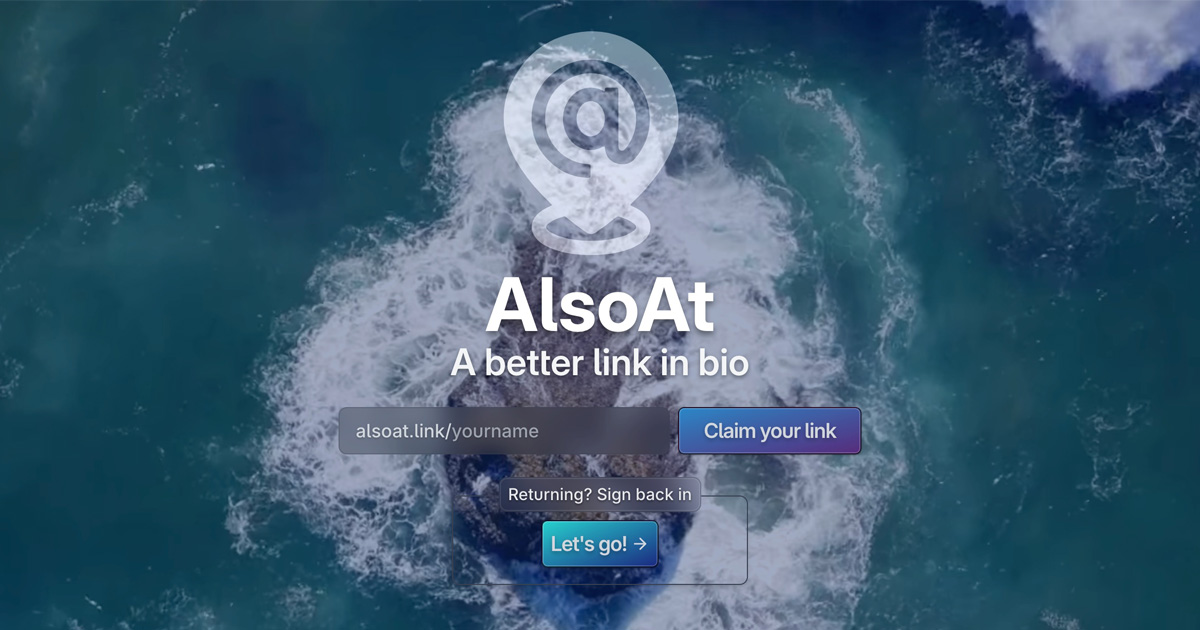
Best Link in Bio Full homepage screenshot

At a glance

Category
Social & Community
Language
English
Paid-content signal
No paid content foundObserved
Registered
2023
Hosting
VercelInferred
HTTPS certificate trusted
PassedObserved
Last updated

Website review

This review may include AI-generated content and is not individually verified. Domain, certificate and other facts come from the observed data on this page.

What is AlsoAt?

AlsoAt is a link-in-bio service: it gives you one personal profile page that gathers the links to everywhere else you exist online — social profiles, a personal site, a shop, a newsletter — so you can share a single URL instead of a list.

What it does

  • You claim a short address (the page shows the format alsoat.link/yourname) and build a profile around it.
  • The profile holds your links in one place, so a bio field on a platform that allows only one URL can still route people to everything.
  • Premade themes are offered, so you pick a look rather than design a page from scratch.
  • The pitch is framed as "a better link in bio," with the phrase "you can find me also at" as the underlying idea: the page answers where else you are.

Who it suits

It fits individuals and small creators whose problem is dispersion, not depth: a photographer with Instagram, a portfolio and a print shop; a freelancer whose clients ask for "all your links"; a musician pointing to streaming, tickets and merch. If you need a full website with pages, a blog and search visibility, a link hub is the wrong tool — it concentrates traffic rather than attracting it.

How it compares to alternatives

Option Best when Trade-off
AlsoAt-style link hub You want one shareable URL and quick setup You depend on the platform's domain and uptime
A page on your own site You want full control and long-term ownership More setup and maintenance
Just listing links in a bio You have two or three links only Limited space, no consistent look

Other established options in the same category include Linktree and Beacons, which are worth comparing on theme flexibility and analytics before committing. Since link hubs are easy to switch, the practical criterion is not features you might use someday but how fast you can publish and how the page looks on a phone.

A concrete next step

Write down the five links you actually send people to most often, then claim your address and add only those. If the free theme options cover your needs, you can decide on any paid tier later — the page's value comes from the single URL, not from extras.

How do I create a personalized profile page with AlsoAt?

Create a profile page on AlsoAt by claiming a short link, adding your social and web destinations, and choosing a premade theme. The page evidence shows the core flow: enter alsoat.link/, claim your link, then sign back in later to manage it.

H3 Practical steps

  1. Go to the AlsoAt site and use the “Claim your link” option.
  2. Pick the handle you want in your alsoat.link/ address — this becomes your public profile URL.
  3. Add the places people can find you: social profiles, a personal site, a portfolio, a shop, or a contact page.
  4. Choose one of the premade themes to control the page’s look.
  5. Publish and test the link on a phone, since most visitors will open it from a social bio.

H3 Who this suits

  • Creators and freelancers who want one URL for TikTok, Instagram, a portfolio and a booking page.
  • Small businesses that need a simple hub for a website, menu, reviews and directions.
  • Anyone with scattered profiles who is tired of listing five separate handles.

H3 Trade-offs to weigh A link-in-bio page adds one extra tap between a visitor and your destination, so keep the list short and put the most important link first. If you already run a full website with a contact page and social icons, a separate profile page may be redundant. AlsoAt’s visible design leans on premade themes, which is fast to set up but gives you less layout control than a custom-built page. If you need deeper customization or analytics, compare with a general site builder such as Squarespace or a dedicated link tool like Linktree.

H3 A quick decision rule Use AlsoAt if your main goal is a clean, single link for social bios with minimal setup. Build or keep a full website instead if you need multiple pages, embedded content, or detailed visitor tracking.

Next step: write down your five most important destinations, put the one that makes you money or gets you hired at the top, then claim your alsoat.link/ handle and build around that order.

What are the premade themes available on AlsoAt and how do I choose one?

The page evidence for AlsoAt mentions "Premade Themes" as a feature, but it does not list the specific themes or describe how selection works. So the honest answer is: the site confirms premade themes exist, but the available designs and the exact choosing flow aren't documented in the supplied information.

What you can reasonably expect from a link-in-bio tool with premade themes is a gallery of ready-made layouts and color styles you pick during profile setup, rather than a blank canvas you style from scratch. That matters most if you want to publish quickly and don't have design skills.

How to choose in practice

  1. Open the theme gallery during signup and preview each option with your actual links, not placeholder text — long usernames and many links break layouts that look fine when empty.
  2. Match the theme to your main destination. A musician linking to streaming platforms benefits from a bold, image-forward layout; a freelancer linking to a portfolio and contact form is better served by something clean and text-led.
  3. Check mobile rendering first, since most visitors arrive from a phone.
  4. Confirm whether the theme allows custom colors, fonts or a background image, and whether your profile photo shape is fixed.

If the gallery doesn't show enough detail, a quick way to compare is to look at how other people in your field present their links — for example, a creator page on Linktree or a writer's page on Beacons — and note which layout choices you find easiest to scan.

Decision criterion

Pick a premade theme when speed and consistency matter more than a unique look; consider a more customizable option if your brand depends on specific colors or typography. If you can't see the theme list before creating an account, treat that as a signal to test with a temporary profile before committing your main handle.

How does AlsoAt simplify my digital footprint compared to listing links separately?

AlsoAt replaces a scattered list of individual profile URLs with a single hosted profile page that holds all of them. Instead of telling someone "find me on TikTok, then search my name on Instagram, then check my site," you share one address and they see every destination in one place. The page evidence shows exactly this positioning: a claimable short link, a sign-in path for returning users, and premade themes for the page itself.

H3 What actually gets simpler

  • One thing to share. You give out a single link rather than pasting four or five platform URLs into a bio, email signature or message.
  • One thing to update. Adding or removing a destination happens on your page, not in every place you previously posted your links.
  • A consistent look. Premade themes mean the page has a coherent appearance without you designing anything.
  • A clearer first impression. Visitors land on a page you control rather than being dropped straight into one platform's feed.

H3 Where listing links separately still wins

  • Directness. A single link to your shop or portfolio sends people straight to the thing you care about, with no intermediate click.
  • Platform-native discovery. Some platforms reward in-app activity, and an external hub page can interrupt that.
  • Search visibility. Individual pages on your own domain can rank for your name; a hub page mostly consolidates rather than creates reach.

H3 A concrete scenario

Suppose you are a freelance illustrator who posts on TikTok, sells prints on a shop, and keeps a portfolio site. Listing those three separately means three different links competing for one bio slot, and any update means editing every place you posted them. With a hub page, you hand out one address and can reorder or swap destinations as your priorities change — for example, pushing the shop to the top during a holiday sale.

H3 How to decide

If your goal is… Better fit
Many destinations, changing often A single hub page
One destination, stable A direct link
A branded page on your own domain Your own site, with a hub as a secondary entry point

Next step: write down every place you currently want to be found, then check whether any single one of them deserves to be the only link you share. If the answer is no, a hub page is the tidier option — and if you want to compare approaches, Linktree and Beacons occupy similar territory, while keeping a page on your own domain remains the most durable long-term choice.

Is AlsoAt free to use, and what are the pricing options?

The page itself does not state a price, a free tier, or any paid plan, so there is no confirmed answer on cost. What it does show is the basic flow: you claim a short link at alsoat.link/, and returning users sign back in rather than building a new page each time. Premade themes are mentioned, which suggests appearance is handled by templates rather than custom design work.

What you can reasonably expect from a link-in-bio tool

Most products in this category follow one of three models, and knowing them helps you evaluate AlsoAt once you check its signup screen:

Model Typical shape Best for
Free with limits Free page, paid upgrades for custom domains, analytics, or extra links Individuals testing whether a hub page is useful
Free trial, then paid Full features for a short period, then a subscription People who need analytics or a branded domain
Paid only No usable free version Businesses treating the page as a landing page

Practical next step

Open the claim-link page and look for three things before you commit:

  1. Whether a custom domain or only an alsoat.link/ address is included.
  2. Whether click analytics are part of the base offering.
  3. Whether the theme set is fixed or editable.

If you mainly need one tidy URL for a handful of profiles, a free tier is usually enough. If you plan to use the page for campaigns, tracking, or a business identity, analytics and domain support matter more than theme count.

How it fits alongside alternatives

For a quick comparison of established options, Linktree and Beacons both offer free entry points with paid upgrades, while Carrd takes a different route with simple one-page sites you build yourself. AlsoAt's own pitch is narrower: one link that says you are "also at" TikTok and elsewhere, which suits creators who want a minimal, fast-to-set-up hub rather than a full personal site.

How can I sign back into my AlsoAt account if I already have one?

Sign back in by going to the AlsoAt site and using the "Returning? Sign back in" option on the main page. That link sits next to the "Claim your link" call to action, so you don't need to hunt through menus: open Best Link in Bio, look for the sign-in prompt, and enter the credentials you used when you first claimed your link.

A few practical notes for returning users:

  • Use the same login method you originally chose. If you created your account through an email address, use that; if you signed in through a social provider, pick that same option rather than creating a new account.
  • Your profile lives at your personal alsoat.link address, so if you only need to view your page, you can visit that URL directly without logging in. Signing in is for editing your links and theme.
  • If the sign-in doesn't recognize you, check whether you're using the email tied to the account rather than a secondary one, and try a password reset from the sign-in screen.

If you're unsure which email you used, search your inbox for the confirmation or welcome message you received when you claimed your link — that message will show the address attached to your profile.

Related questions

More questions →
What Is a Profile Page and How Do You Use One to Share All Your Links?

A profile page is a single public web page that gathers your social media accounts, websites, and other online locations behind one shareable URL. You use it when you post content in places that only allow one clickable link — a TikTok bio, an Instagram bio, a YouTube description, or a business card — and you want visitors to reach everything else you do online. AlsoAt is one platform built for exactly this: it describes itself as letting you "create a personalized profile page with links to all your social media, websites, and other online presences."

How a profile page works

The mechanics are simple and worth understanding before you build one:

  1. You claim a URL. On AlsoAt, that looks like alsoat.link/yourname — the site's own example is alsoat.link/, followed by your chosen link.
  2. You add your links. Each destination (a social profile, a website, a shop, a newsletter) becomes an entry on the page.
  3. You share the one URL everywhere a single link is allowed.
  4. Visitors land on your page, see your links, and choose where to go. They never have to hunt through a platform's search to find your other accounts.

The payoff is captured in AlsoAt's own phrasing: "You can find me also at TikTok with one link." Instead of repeating a different URL in every bio, you maintain one page and update it whenever your online locations change.

What to put on your profile page

A page that works has three layers, in this order:

  • Profile photo — so visitors confirm they've reached the right person or brand.
  • Short bio — one or two lines stating who you are and what the page is for.
  • Ordered links — most important destination first. Put the thing you most want people to do (subscribe, buy, follow) at the top, and group the rest below.

Order matters more than quantity. A page with five clearly ranked links outperforms one with twenty unordered ones, because visitors scan rather than read.

Customization options

AlsoAt's page evidence points to two customization levers:

Option What it does
Premade themes Changes the visual style of your page without design work
Custom link slug Sets the alsoat.link/... address people will type and share

Themes let you match the page to your existing brand look; the slug is what you actually say out loud or print, so pick something short and spellable.

How a profile page differs from a personal website or a social profile

These three get confused, and the difference decides which one you need:

  • A social media profile lives inside one platform. It can only point outward through a single bio link, and it can't represent your presence on competing platforms neutrally.
  • A personal website is fully yours — unlimited pages, full design control — but it takes more time and money to build and maintain, and it's overkill if all you need is a list of links.
  • A profile page sits between them: one page, one URL, built specifically to route visitors to your other locations. It's the right choice when your goal is distribution — getting people from wherever they found you to everywhere else you are.

If you mainly need a hub that answers "where else can I find this person?", a profile page is the fit. If you need long-form content, SEO, or a storefront, you're describing a website.

Getting started

To set one up on AlsoAt: claim your link at the address shown on the site, add your profile photo, bio, and links in priority order, choose a premade theme, then paste the single URL into every bio field you control. Returning users sign back in to edit the same page rather than creating a new one — which is the point: one page, updated in one place, shared everywhere.

What Is AlsoAt and How Does a Link-in-Bio Page Work?

AlsoAt is a platform for building a single personalized profile page that gathers your social media, websites, and other online presences behind one shareable URL. You use it when a platform gives you room for only one link — a social bio, an email signature, a podcast description — but you want visitors to reach everywhere you exist online. The site describes the concept simply: "You can find me also at TikTok with one link."

The "also at" idea

The name captures the core mechanic. Instead of sending people to one destination, you send them to a page that says, in effect, "find me here, and also at these other places." One link becomes the entry point to your whole digital footprint.

That matters because most platforms limit you to a single clickable URL in your bio or profile. A link-in-bio page turns that constraint into an advantage: the one link you're allowed becomes a hub for all the others.

What the site shows

Based on the AlsoAt homepage, the visible pieces are:

  • A claimable alsoat.link/ URL — the page prompts you to "Claim your link," suggesting you pick your own handle on that domain.
  • Premade themes — listed as a feature, so you can style the page without designing it from scratch.
  • Sign-in for returning users — a "Returning? Sign back in" option, which implies you create an account to manage your page.
  • Standard site pages — Privacy, Terms, Report, and Contact links in the footer.

The homepage does not list pricing, plan tiers, or payment options, so treat cost as something to confirm on the site itself rather than assuming it's free.

How a link-in-bio page works

The flow is the same across most tools in this category, and AlsoAt follows it:

  1. Create an account — the sign-in prompt indicates you need one to claim and manage a link.
  2. Claim your URL — choose the handle that becomes your public address (alsoat.link/yourname).
  3. Add your links — enter the destinations you want to share: social profiles, a website, a store, a newsletter, and so on.
  4. Pick a theme — apply one of the premade designs so the page looks intentional rather than default.
  5. Share the single URL — put it in bios, signatures, and anywhere else you can only post one link.

Expected result: a visitor taps your one link, lands on your page, and chooses where to go next — instead of you having to pick a single destination and lose the rest.

When this is worth using

A link-in-bio page earns its place when:

  • You're active in more than one place and want people to find all of them.
  • A platform's bio field only accepts one URL.
  • You want a consistent "home base" link you can reuse everywhere.
  • You'd rather update one page than chase down every old bio when something changes.

It's less useful if you only have one destination to share — a single website link does the same job without an extra step.

What to check before committing

  • Pricing and limits — the homepage doesn't state cost or how many links a page allows. Confirm both before you build.
  • Custom domain support — the site promotes an alsoat.link/ handle; whether you can use your own domain isn't shown.
  • Analytics — click tracking isn't mentioned on the homepage. If you need to know which links perform, verify it's offered.
  • Account requirement — you'll need to sign in to manage your page, so plan for that step.

The practical test is simple: claim a link, add two or three destinations, and open it on a phone. If the page loads cleanly and the links go where you expect, it's doing its job.

What Are Social Media Links and How Do You Share Them All in One Place?

Social media links are the URLs that point to your profiles on platforms like TikTok, Instagram, and X. Sharing them all in one place means collecting each profile URL and grouping them under a single page — often called a link-in-bio or profile page — so anyone who finds you once can reach every other place you exist online. This works best when you have more than one active profile and want one short link to hand out instead of a list. AlsoAt is one platform built for exactly this: a personalized profile page that holds your social media, website, and other online presences under one address.

Why scattered links make you hard to find

If your TikTok link lives in one bio, your Instagram in another, and your website only in a message you sent once, people have to work to assemble the full picture of you. Each platform also tends to keep users inside its own walls, so a follower on one app may never learn you are active somewhere else.

A single shareable page solves the discovery problem: you give out one URL, and the visitor chooses where to go next. The page becomes the hub; the individual platforms become spokes.

What a link-in-bio or profile page actually does

A link-in-bio page is a simple web page whose main job is to list links. Instead of a bio field that allows only one clickable URL, the page can hold as many links as you need, each labeled so visitors know what they are clicking.

On AlsoAt, the page is described as a personalized profile page with links to all your social media, websites, and other online presences — a way to simplify your digital footprint. The site also offers premade themes, so the page can match your style without custom design work.

The core mechanic is straightforward:

  • One URL you can put in every platform's bio field.
  • Many destinations listed on that page.
  • A label per link so visitors can tell TikTok from Instagram from your site.

How to gather and share all your social media links

  1. List every profile you actually maintain. Open each app, go to your own profile, and copy the URL. Include only accounts you post to or want found — dormant or abandoned profiles add noise.
  2. Decide on a destination page. This can be a link-in-bio service such as AlsoAt or any page you control. The requirement is a stable public URL you can edit later.
  3. Add each link with a clear label. Use the platform name or your handle, not a vague word like "here." Visitors scanning a list decide in seconds.
  4. Claim your page URL and put it in every bio. Once the page exists, replace the scattered links in each platform's bio field with the single page URL.
  5. Test every link from a device that is not logged in. This catches links that only work for you, redirects that break, and profiles that have gone private.
  6. Re-check on a schedule. Platforms change URL formats and accounts get renamed; a quarterly pass keeps the page accurate.

Expected result: one address that, when opened, shows a labeled list of every place you can be found, and each item lands on the correct profile.

Common pitfalls to check before you share

  • Broken or outdated links. A renamed handle or deleted account leaves a dead entry. Click every link yourself, logged out.
  • Duplicate or near-duplicate entries. Two links to the same platform confuse visitors about which account is current.
  • Unlabeled links. A row of bare URLs forces visitors to guess. Label each one.
  • A page URL that is hard to say out loud. If you share it verbally or in video, a short, readable address matters.
  • Forgetting to update the bios. Creating the page is only half the job; the single URL has to replace the old links everywhere.

Where this fits

If you have one profile and nothing else online, a single platform bio may be enough. Once you have two or more places people should find you — a second social account, a website, a shop, a newsletter — grouping them under one link-in-bio page is the simpler path. AlsoAt's stated purpose is exactly that: one link that says you can be found "also at" your other locations.

What Is a Link Aggregator and How Do You Use One to Share All Your Links?

A link aggregator is a single page that collects multiple links in one place, so you can share one URL instead of many. You use one when you have several destinations — social profiles, a website, a shop, a contact method — and want people to reach all of them from a single address. AlsoAt is an example of a platform built for this: it lets you create a personalized profile page with links to your social media, websites, and other online presences, and gives you a shareable link in the form alsoat.link/.

Link aggregator vs. link-in-bio page

The two terms overlap, but they describe slightly different things:

Term What it means Typical use
Link aggregator Any single page that gathers multiple links A hub page, a resource list, a personal directory
Link-in-bio page A link aggregator designed to sit in the "bio" field of a social profile Instagram, TikTok, or similar profiles with one clickable URL

A link-in-bio page is a link aggregator with a specific job: it replaces the single link a social platform allows in your bio. AlsoAt fits this pattern — its own copy frames the product as "a better link in bio," and the page shows a shareable address plus a "Claim your link" action.

What you can put on one page

Because the page is just a container for links, the contents depend on what you want people to find. Common entries include:

  • Social media profiles — the platforms you post on, each as its own link
  • Websites — a personal site, blog, portfolio, or store
  • Contact links — email, a messaging link, or a contact form
  • Anything else with a URL — a newsletter signup, a booking page, a document

The point is that a visitor lands on one page and chooses where to go next, rather than you pasting five separate links into a message or caption.

How to set up a basic link aggregator page

The exact screens differ by platform, but the flow is the same everywhere. Using AlsoAt as the example:

  1. Claim your link. The page shows a alsoat.link/ address and a "Claim your link" action. You pick the handle that becomes your public URL — this is the address you'll share.
  2. Add your links. Enter each destination (social profile, website, contact link) and save it. Each one becomes a clickable item on your page.
  3. Choose a theme. AlsoAt lists "Premade Themes," so you can pick a look without designing anything.
  4. Share the one URL. Put your alsoat.link/ address in your social bio, in messages, or anywhere you'd otherwise paste a list of links.

Expected result: anyone who opens your address sees your profile page with all your links in one place, and can tap through to whichever destination they want.

If you already have an account, the page offers a "Returning? Sign back in" path instead of starting over.

Checking your page before you share it

Before you put the link anywhere public, run through these checks:

  • Open the page in a private/incognito window. This shows what a logged-out visitor sees, which is what most of your audience will get.
  • Click every link. A typo in a URL is the most common reason a link "doesn't work" — the page loads fine, but the destination 404s.
  • Test on a phone. Most people will open your link from a social app on mobile, so check that the page and its links are tappable there.
  • Confirm the handle. If your page won't load at all, the usual cause is a mistyped or wrong handle in the address you shared.

When to use one

A link aggregator is worth setting up if you have more than one place you want people to find you and you share links often — in a bio, a caption, an email signature, or a message. If you only ever point people to a single destination, a plain link works just as well. AlsoAt's own framing — "You can find me also at TikTok with one link" — captures the case it's built for: several online locations, one address that covers them all.

What Is an Online Presence and How Do You Manage It in One Link?

Your online presence is the sum of every place you appear on the internet — social media profiles, websites, portfolios, store pages, and any other public profile. Managing it in one link means creating a single link-in-bio page that gathers those destinations so people can find all of you from one URL. This works best if you have more than one active profile, share links often (in bios, messages, or print), or want a consistent "find me here" destination instead of repeating a list of handles.

What counts as your online presence

Anything tied to your name or brand that someone can visit:

  • Social profiles — TikTok, Instagram, YouTube, X, LinkedIn, and similar accounts
  • Websites — personal site, blog, portfolio, or business homepage
  • Store or booking pages — shops, scheduling links, or payment pages
  • Contact points — email, contact form, or messaging link

Each of these is a separate destination. Without a hub, sharing them means either listing several handles or sending people to one platform that doesn't cover the rest.

Why one link-in-bio page simplifies sharing

A link-in-bio page replaces a scattered list with a single URL. Instead of telling someone "find me on TikTok, then my site, then my shop," you share one address that leads to all of them.

AlsoAt is built around exactly this idea: a personalized profile page with links to your social media, websites, and other online presences, so people can find you "also at" your various locations. The page is claimed at a short link (the site shows a alsoat.link/ address pattern), which is what you'd share in a bio field, a message, or anywhere a single link fits better than a list.

Practical benefits:

  • One thing to remember and share — no more repeating multiple handles
  • Consistent across platforms — the same link works in every bio field
  • Easy to update — change the destinations on the page rather than editing every profile

What to put on the page

A useful link hub usually includes:

Element Why it belongs
Social profiles Lets visitors pick the platform they prefer
Website or portfolio Sends people to your main owned space
Contact or booking link Turns a visit into a message or appointment
Store or payment page Supports direct transactions if you sell

Keep the list focused. A page with a handful of clearly labeled links is easier to act on than a long, undifferentiated list.

How to set up a personalized profile page

The general flow for a link-in-bio tool like AlsoAt:

  1. Claim your link — the site presents a "Claim your link" action at a short address. This is the URL you'll share.
  2. Add your destinations — enter the social profiles, websites, and other links you want to include.
  3. Choose a theme — AlsoAt offers premade themes, so you can pick a look without designing from scratch.
  4. Publish and share — put the single link in your social bios and anywhere else you point people to your presence.
  5. Return and update — if you already have a page, the site provides a "Sign back in" path to manage it.

Expected result: one public URL that lists all your destinations, which you can drop into any bio field or message.

Privacy and visibility considerations

A link hub is typically public — anyone with the URL can see it. Before publishing:

  • Only include links you're comfortable making public. A personal email or private booking page may not belong on a public hub.
  • Check what each destination reveals. A profile that shows your location, workplace, or personal details becomes easier to find once it's one click from your main link.
  • Review the tool's own terms. AlsoAt's page links to Privacy and Terms pages; read them to understand how your data and page are handled.
  • Keep it current. A stale link to an abandoned profile is worse than no link — remove destinations you no longer use.

When a single link makes sense — and when it doesn't

A link-in-bio page is a good fit when you have several destinations and share a link in places with limited space (bio fields, captions, print). It's less useful if you have only one destination — in that case, link directly to it. If your goal is a full website with pages and navigation, a link hub complements it rather than replaces it: the hub is the front door, the site is the house.

Website Overview

Several search or sharing settings need attention. Together they may make snippets, preview images or preferred URLs less consistent across platforms.

Domain and Registration

Transfer-protection status is present, helping reduce the risk of unauthorized domain transfers. The domain has about 2 years of registration history; its current configuration provides more context than age alone. The registrar is CloudFlare, Inc., a widely used domain service provider. The domain uses the common .app extension, which is not an independent safety signal.

DNS and Email

Nameservers are provided by Cloudflare, indicating managed DNS hosting. MX records point to the Cloudflare Email Routing email service. DNSSEC is enabled, allowing validating resolvers to authenticate signed DNS data. No CNAME was found; the observed records resolve directly to addresses. SPF and DMARC are configured. DKIM status is unknown.

TLS and Certificates

The certificate uses an RSA 2048-bit public key, offering broad client compatibility. The server supplied a complete certificate chain. No organization name is present in the certificate; the available fields are consistent with domain validation. The certificate was issued by Let's Encrypt, commonly associated with automated certificate services. The certificate's total validity is about 89 days, consistent with a short renewal cycle.

HTTP and Browser Security

The response lacks these common security headers: CSP, X-Content-Type-Options, Referrer-Policy, Permissions-Policy, clickjacking protection. CORS permits any origin to read this response. This is common for public resources; sensitive responses need narrower handling. No X-Powered-By header was found, reducing one common source of backend fingerprinting information. No obvious internal addresses or debug information were found in the headers. The Server header contains the custom value Vercel.

Technology Stack Analysis

The public page identifies Next.js, Vercel without precise versions, leaving fewer clues for version-specific scanning.

Search and Social Sharing

The meta description has 261 characters and may be shortened in search results. No homepage canonical URL was detected. If duplicate URLs exist, consolidation may be less explicit. Open Graph is partially configured; og:type is missing. Twitter Card metadata is configured. The title has 16 characters, within a common display range.

Hosting and Email

DNSCloudflare
HostingVercel
EmailCloudflare Email Routing
Approximate IP geolocation (inferred; a CDN or proxy may differ from the origin server) United States flagWalnut, California, United States Inferred 76.76.21.21

Registration details

RDAP / WHOIS

RegistrarCloudFlare, Inc.
Registered2023-12-11
Expires2026-12-11
Domain statusclient transfer prohibited
Nameserversdante.ns.cloudflare.com、treasure.ns.cloudflare.com
DNSSECsigned

DNS records

DNS

TypeNameValueTTLPriority
Aalsoat.app76.76.21.21300—
MXalsoat.approute1.mx.cloudflare.net30025
MXalsoat.approute3.mx.cloudflare.net30072
MXalsoat.approute2.mx.cloudflare.net30093
NSalsoat.appdante.ns.cloudflare.com86400—
NSalsoat.apptreasure.ns.cloudflare.com86400—
TXTalsoat.appgoogle-site-verification=rdTrAV4rJdlPuSKXZf4PPvSnSHZtN1eqZF-3ntTAufI300—
TXTalsoat.appv=spf1 include:_spf.mx.cloudflare.net ~all300—
DSalsoat.app2371 13 2 8032a8ada3cb99d6014410ca1444356128d16aaeb8b8d768eb8976df465fdad81800—
DMARC_dmarc.alsoat.appv=DMARC1; p=none;300—

TLS and certificates

TLS / SSL

AssessmentNormal configuration
Supported protocolsTLSv1.2、TLSv1.3
Negotiated protocolTLSv1.3
Certificate subjectalsoat.app
IssuerLet's Encrypt
Valid until2026-11-27T06:04 · Remaining when checked: 57 days
Verification detailsCertificate trust: Passed · Hostname match: Passed

HTTP response headers

HTTP

HeaderValue
content-typetext/html; charset=utf-8
cache-controlpublic, max-age=0, must-revalidate
serverVercel
strict-transport-securitymax-age=63072000
access-control-allow-origin*

Identified technologies

Next.jsVercel

Pages, Search and Sharing

Meta descriptionAlsoAt is a powerful platform that lets you create a personalized profile page with links to all your social media, websites, and other online presences. Simplify your digital footprint and make it easy for people to find you "also at" various online locations.
Canonical URLNot detected
LanguageEnglish (default)
Twitter Cardsummary_large_image
All bots 0 allowed · 0 disallowed

User reviews (0)

  • No reviews yet.