Website profiles · Technology insights · Alternatives

amiga.lychesis.net

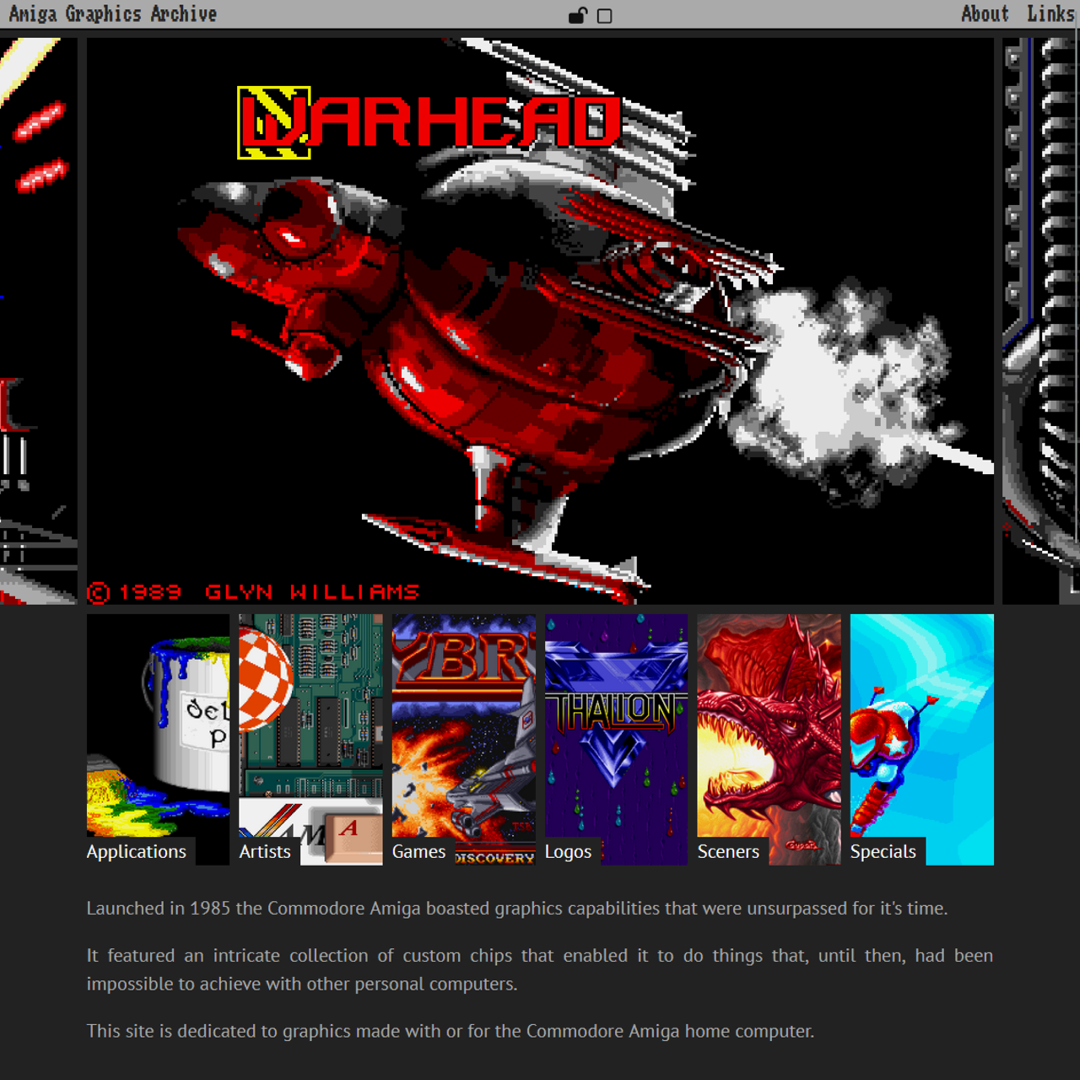
Launched in 1985 the Commodore Amiga boasted graphics capabilities that were unsurpassed for it's time. It featured an intricate collection of custom chips that enabled it to do things that, until then, had been impossible to achieve with other personal computers. This site is dedicated to graphics made with or for the Commodore Amiga home computer.

No paid content found
Visit website
Profile views 6 Outbound visits 0 Normal
Amiga Graphics Archive Full homepage screenshot

At a glance

Category
Arts & Culture
Language
English
Paid-content signal
No paid content foundObserved
Registered
2001
Hosting
Hetzner Online GmbHInferred
HTTPS certificate trusted
PassedObserved
Last updated

Website review

This review may include AI-generated content and is not individually verified. Domain, certificate and other facts come from the observed data on this page.

What is the Amiga Graphics Archive?

The Amiga Graphics Archive is a long-running curated gallery of pixel art and graphics created with or for the Commodore Amiga home computer. Its focus is preservation and presentation: high-quality and rare images, organized into collections rather than dumped into a single feed. The site's own description frames the Amiga's custom chips as the reason its graphics stood apart from other personal computers of the mid-1980s, and the archive exists to document what artists produced on that hardware.

Its collections are grouped by subject and context, which makes browsing purposeful:

  • Applications and Games — graphics tied to specific software titles.
  • Artists and Sceners — work organized by creator, useful if you already know whose style you want to follow.
  • Logos — company and publisher marks, including animated examples.
  • Publications — magazine and book scans, such as material from the Das Grosse Amiga Jahrbuch 1987.
  • Specials — themed groupings, plus articles on topics like display technology, extra half-bright mode, and screen modes.

The archive has run for years and posts dated updates, so it behaves more like a slowly growing catalog than a news site. A typical visitor is a retro-computing enthusiast, a pixel artist studying period techniques, or someone researching a specific game, publisher or artist. If you are looking for technical explanation rather than images, the articles section is the better entry point; if you want to identify where a familiar image came from, start with Logos, Games or Publications.

For a practical next step, pick one anchor — an artist you remember, or a company whose logos you want to see — and browse that collection first, then follow the cross-links into Applications or Games. The archive's own update notes show the curatorial method: images are restored and re-added when better sources surface, so a collection can deepen over time rather than being fixed at launch.

How can I find graphics by a specific Amiga artist or game company?

Use the site's own category menus rather than a general search box. The Amiga Graphics Archive organizes its material under Artists, Game Companies, and Logos, alongside broader groupings like Applications, Games, Publications, Sceners, and Specials. That structure is the fastest route: pick the person or company first, then browse the images attached to that entry.

A practical sequence:

  1. Open the Artists section if you know the individual's name.
  2. Open Game Companies if you know the publisher or developer rather than the artist.
  3. Try Logos when you are after a company's branding or title screens, since the archive keeps logo collections there — its update notes mention batches from Rainbow Arts, reLINE and Titus, including animated ones.
  4. Fall back to Publications for images tied to printed sources, such as scans from Das Grosse Amiga Jahrbuch 1987.

The trade-off is that a curated archive reflects what its maintainer has collected and identified, so some artists and companies will be thin or absent, and images credited to a company may not name the individual pixel artist. If a direct match fails, check the Updates page: new additions are logged with dates and descriptions, which often reveals where a particular artist or company has just been expanded.

As a concrete example, if you want Jim Sachs material, look him up under Artists; the archive's own update notes describe restoring his image Multimedia from a badly scaled version, which shows the kind of restoration work that sits behind individual entries. For deeper context on how Amiga images were made and displayed, the Articles section is worth a look — its listed topics include comparison, display technology, Extra Half Bright, and screen modes.

What are the different screen modes and display technologies used in Amiga graphics?

The Amiga Graphics Archive is a curated gallery of pixel art and graphics made with or for the Commodore Amiga, and its article categories point directly at the two topics you asked about: Display Technology and Screen Modes, alongside a comparison article. Those are the archive's own groupings, so they are the best places to see period examples rather than abstract explanations. You can browse them at Amiga Graphics Archive.

Screen modes, in plain terms

Amiga screen modes were largely defined by resolution and colour handling:

  • Low resolution, many colours — the everyday workhorse for games, demos and most pixel art, trading detail for a richer palette.
  • High resolution, fewer colours — sharper text and line work, but a more limited palette.
  • Interlaced modes — double the vertical resolution at the cost of visible flicker on CRTs; useful for still images and desktop work, awkward for fast motion.
  • Overscan and border modes — using screen area normally hidden behind the display border, a common trick for full-screen images and demos.
  • HAM (Hold-And-Modify) — a mode that produces far more on-screen colours than the base palette by modifying one channel per pixel, excellent for photographic and painted images but prone to colour fringing along horizontal edges.
  • Extra Half-Brite — a mode that doubles the apparent palette by adding a half-brightness variant of each colour, handy for shading and anti-aliasing effects.

The archive lists Extra Half Bright as its own article, which suggests it is worth treating as a distinct technique rather than a footnote.

Display technology

"Display technology" here is less about monitors and more about the custom chips that generated the picture. The site's own description credits "an intricate collection of custom chips" for capabilities that were otherwise impossible on personal computers of the era. In practice that meant hardware sprites, bitplane-based playfields, smooth scrolling and a copper/blitter arrangement that let artists and coders manipulate the display while it was being drawn — the reason Amiga graphics often look more animated and layered than contemporary machines.

How to use this

If you are a pixel artist or retro developer, start with the Comparison article to see modes side by side, then open Screen Modes for the technical framing and Display Technology for the hardware context. Use the archive's artists, games and logos sections to see how those trade-offs looked in finished work. A useful decision rule: choose HAM or Extra Half-Brite when colour depth matters more than crisp edges, and low-resolution indexed modes when you need clean sprites and fast motion.

For broader context on the machine itself, Amiga is the current official brand site, though it covers the platform generally rather than this archive's specific articles.

Can I download high-resolution versions of the images for personal use?

Yes, the Amiga Graphics Archive offers multiple download resolutions for its images, and personal use is the context the site appears to assume. The page lists resolution options at 360px, 540px, 720px, 1080px, 1440px, 1800px, and 2160px, so you can pick a size that suits a desktop wallpaper, a reference folder, or a closer look at pixel detail.

Keep in mind that "high resolution" here means a larger rendering of pixel art, not a higher-fidelity source. The archive is built from graphics made with or for the Commodore Amiga, whose native screens were low-resolution by modern standards. Scaling up gives you a bigger file, but it cannot add detail that was never in the original; a 2160px version of a 320×256 image is essentially an enlarged copy. The site also notes that images are copyrighted to their respective owners and credited where possible, so personal use is reasonable while republishing or commercial reuse is not automatically covered.

Amiga Graphics Archive

A practical next step: open the image you want, compare the 1080px and 2160px options side by side, and download the smaller one if the extra size does not reveal anything new. If you plan to use an image publicly, look for the credited artist or rights holder first.

What does the Extra Half Bright mode do and how does it affect Amiga graphics?

Extra Half Bright (EHB) is an Amiga display mode that doubles the number of colours a screen can show without increasing the amount of graphics memory used for the image itself. It takes a standard 32-colour palette and adds a second set of 32 shades at half intensity, giving 64 on-screen colours. The archive lists it as a display-technology article alongside screen modes, which is the right place to look for period examples.

The trade-off is that you do not choose those extra 32 colours freely. Each half-bright entry is derived from one of the original 32, so the palette is effectively fixed as a base set plus its dimmed twins. Artists used this to fake shading, metallic highlights and depth in scenes that would otherwise look flat at 32 colours, and it became a recognisable look in Amiga artwork of the late 1980s and early 1990s. Because the extra colours come from halving, the mode tends to produce muted, darker companion tones rather than a fully independent second palette.

If you want to see the effect rather than read about it, start with the archive's Applications, Artists and Games sections and compare images that use EHB against plain 32-colour work; the difference usually shows up in gradients and shadowed areas. For background on the hardware, the site's Display Technology and Screen modes articles sit next to the Comparison and Cyber Assault 556 entries. The archive is at Amiga Graphics Archive, and its updates page notes ongoing additions of rare and restored images, so it is worth revisiting if you are tracing a specific artist or publisher.

How can I contribute my own Amiga graphics or report an issue with the archive?

Contact the archive operator directly: the site gives amiga at lychesis dot net as the address for issues and suggestions, and updates show the curator regularly adds newly found or restored images from outside contributors. There is no public upload form or submission portal described, so email is the route.

What to include when you write

  • For a submission: the image itself (or a link), the artist's name, the program or format it was made in, and where you got it. The archive cares about provenance — update notes mention restoring an image to something close to its original state after finding only a badly scaled copy, so a clean original beats a re-saved screenshot.
  • For a correction: the page or collection name, what is wrong (misattribution, wrong artist, wrong title, duplicate), and your evidence. The archive states copyright belongs to the respective owners and is credited where possible, so attribution fixes are squarely in scope.
  • For a technical issue: the resolution setting you were using (the site offers 360px through 2160px) and the browser, since display problems often depend on which resolution variant loaded.

Practical expectations

This is a one-person curated gallery, not a community platform. The updates log shows batches arriving in bursts — logos from several publishers in one month, book scans in another — which suggests submissions are reviewed and published when the curator has time to identify and process them. Don't expect instant posting, and expect that not everything sent will fit the archive's quality bar.

If your interest is broader Amiga graphics history rather than this specific collection, Amiga Graphics Archive is worth browsing first to see whether your material duplicates something already catalogued under Applications, Artists, Games, Logos, Publications, Sceners or Specials.

Related questions

More questions →
How to Contact the Amiga Graphics Archive and Find Related Links

The Amiga Graphics Archive can be reached by email at amiga at lychesis dot net, which the site lists for both problems and suggestions. Beyond that direct contact, the site exposes a small set of navigation and social entry points: an About page, a Links page, and social channels including Mastodon, Facebook, Twitter, and an RSS feed. There is no contact form, phone number, or support portal mentioned in the available site material, so email is the only stated direct channel.

Direct contact

The site's own note is explicit about how to get in touch:

"If you have any issues with or suggestions for this site then feel free to contact me at amiga at lychesis dot net."

That single address covers two distinct cases:

  • Problems — for example, a broken image, a misattributed piece, or a page that does not load as expected.
  • Suggestions — for example, proposing an artist, a title, or a collection that is missing from the archive.

The address is written in an obfuscated form ("amiga at lychesis dot net") to reduce automated scraping, so you need to convert it to a normal email address before sending: [email protected].

What to include in a message

Because the archive is curated and image-focused, a useful message tends to contain:

  • The specific page or image you are writing about (a URL is the fastest way to identify it).
  • For a correction: what is wrong and, if possible, what the correct information is.
  • For a suggestion: the artist, title, and source of the image, plus where you found it.
  • For a rights or attribution issue: which image, and what action you are requesting.

Related links and site sections

The site's navigation includes several sections that act as entry points to related material rather than to external contact channels:

Section What it is for
About Background on the archive itself
Links Related resources
Applications Graphics tied to Amiga applications
Artists Images grouped by artist
Games Game-related graphics
Logos Logo collections, including company logos
Publications Material connected to printed publications
Sceners Scene-related graphics
Specials Special collections
Articles Written pieces, including topics such as Comparison, Cyber Assault 556, Display Technology, Extra Half Bright, Game Companies, and Screen modes

The Articles section is worth noting if your interest is contextual rather than just contact: it covers technical and historical subjects such as display technology and screen modes, which sit alongside the image collections.

Social channels and updates

The archive lists four ways to follow it:

  • Mastodon
  • Facebook
  • Twitter
  • RSS Feed

The RSS feed is the most direct way to track additions without relying on a social account. The site also maintains an Updates section, which is where new material is announced — for example, recent entries describe added logo collections, page scans from Das Grosse Amiga Jahrbuch 1987, and restored images.

Copyright and usage

The site states that images shown on its pages are copyrighted to their respective owners and are attributed where possible. That means the archive itself is a curated gallery, not a source of freely reusable assets. If you have an issue with an image — attribution, usage, or removal — the stated route is the same contact address above.

Practical summary

  • To contact the maintainer: email [email protected] (written on the site as "amiga at lychesis dot net").
  • To explore related material: use the About and Links pages, plus the collection sections (Artists, Games, Logos, Publications, Sceners, Specials, Applications).
  • To follow updates: use the RSS feed or the Mastodon, Facebook, or Twitter links.
  • For copyright matters: the site directs you to the same email address, since images belong to their respective owners.
How Often Is the Amiga Graphics Archive Updated?

The Amiga Graphics Archive does not follow a fixed schedule. Updates are posted to an "Updates" section on the homepage with a date for each entry, and the cadence varies: some months bring a single themed image, others bring large batches of logos or book scans. The most reliable way to follow new content is the site's RSS feed or its social accounts (Mastodon, Facebook, Twitter), since the homepage only shows the most recent entries.

What the update log actually looks like

The archive publishes dated notes describing what was added, rather than a changelog with version numbers or a fixed "every X weeks" promise. From the entries shown on the site:

Date What was added
01.07.2026 A single-image month, plus additional images from artists already in the archive
25.06.2026 An anniversary entry: an image by Jim Sachs called Multimedia, restored from a badly scaled version
14.06.2026 A large collection of logos from Rainbow Arts, reLINE, and Titus, including animated ones
12.05.2026 More images from Das Grosse Amiga Jahrbuch 1987, including many page scans

Two patterns stand out. First, the rhythm is irregular — a month can be one image or a bulk import. Second, the content type shifts: sometimes it is a single restored artwork, sometimes a category-wide dump (logos, scans, a specific publisher's output).

Why the pace varies

The archive describes itself as a curated gallery of high-quality and rare pixel art made with or for the Commodore Amiga. That framing explains the uneven cadence: additions depend on what the maintainer finds, restores, or receives, not on a production schedule. The 25.06.2026 entry is a good example — the Multimedia image had to be restored "pretty close to its original state" from a poorly scaled source before it could be published. Restoration work like that takes time and can't be batched on demand.

The 12.05.2026 entry shows the other side: a book like Das Grosse Amiga Jahrbuch 1987 yields many page scans at once, but the maintainer notes that some images in it were already present in other collections, and the "artsy or kids drawings" still couldn't be found. So even a bulk source doesn't translate into a complete, predictable upload.

How to follow new additions

  • RSS feed — listed under the site's Social section; best if you want updates without checking the homepage.
  • Mastodon, Facebook, Twitter — also listed under Social, useful if you already use one of those platforms.
  • The Updates section itself — shows the latest entries with dates, plus a "See more updates..." link for older ones.

If you only check the homepage occasionally, you'll see the newest few entries but may miss the reasoning behind them (restorations, source books, publisher batches). The RSS feed or a social follow avoids that.

What this means if you're using the archive

If you're browsing for a specific artist, publisher, or era, don't wait for the update feed — use the site's category navigation (Applications, Artists, Games, Logos, Publications, Sceners, Specials) and treat updates as a supplement. If you're tracking the archive as a long-running project, the update log is the record: it shows what was added and, in several cases, why an item was hard to source or restore. The site has been running since 2008, and the 25.06.2026 entry marks 18 years of that effort, so the update history is itself part of the archive's value.

What kinds of Amiga graphics can I find in the Amiga Graphics Archive?

The Amiga Graphics Archive is a curated gallery of pixel art and graphics made with or for the Commodore Amiga, and its collection spans several distinct categories: artist works, game-related graphics, company logos (including animated ones), and page scans from Amiga publications. The site's stated goal is to collect high-quality and rare images rather than to be an exhaustive dump, so what you find is selective by design. If you are looking for a specific commercial logo set or a scan from a particular Amiga book, the archive is a reasonable first stop; if you need a complete, verifiable catalog of everything ever drawn on the platform, it is not that.

Main categories in the archive

The site's own navigation lists these sections, which map directly to what you can browse:

  • Applications — graphics tied to Amiga software.
  • Artists — works grouped by the person who made them.
  • Games — game-related graphics.
  • Logos — company and brand logos, including animated ones.
  • Publications — scans and images sourced from Amiga books and magazines.
  • Sceners — graphics from the demo scene.
  • Specials — themed or one-off collections.

There is also an Articles section covering topics such as a "Comparison," "Cyber Assault 556," "Display Technology," "Extra Half Bright," and "Game Companies," plus a "Screen modes" article. These are explanatory pieces about Amiga graphics rather than image galleries, useful if you want context on how the hardware produced the images you are viewing.

What the collection actually contains

Concrete examples from the site's update log show the range:

  • Company logo sets — a large collection of logos from Rainbow Arts, reLINE, and a big batch from Titus, among others, including some animated logos.
  • Publication scans — images from Das Grosse Amiga Jahrbuch 1987, including many page scans. The site notes that while the book contained many famous images already present in other collections, the artsy or children's drawings from it had been hard to find elsewhere.
  • Restored pieces — an image by Jim Sachs called "Multimedia," found in a badly scaled version and restored close to its original state.

That last example is the clearest signal of the archive's quality stance: it does not simply host whatever version it finds, it works to bring images back toward their original appearance.

How images are presented and credited

Images are displayed at multiple resolutions, selectable from 360px up to 2160px, so you can view a thumbnail or a large version of the same piece. The site states that images are copyrighted to their respective owners and are credited where possible. If you intend to reuse anything, treat the archive as a pointer to the rights holder rather than a source of licensed material.

Where to start

  • Browsing by Artists or Sceners if you want to see individual styles.
  • Browsing Logos if you need company marks, including animated ones.
  • Checking Publications for book and magazine scans.
  • Reading Articles first if you want to understand the display technology and screen modes behind the graphics.

The archive launched in 1985-era Amiga context and has been running for 18 years as of its June 2026 update, with new images added in batches — recent months added single images, logo collections, and publication scans. Checking the Updates section is the fastest way to see what was most recently added.

How Is the Amiga Graphics Archive Organized?

The Amiga Graphics Archive is organized as a curated gallery rather than a searchable database. Its main navigation splits the collection into seven categories — Applications, Artists, Games, Logos, Publications, Sceners, and Specials — and a separate Articles section covers technical topics like Comparison, Display Technology, Extra Half Bright, and Screen modes. A dated Updates feed records what was added and when, so you can follow the archive chronologically instead of browsing by category.

Main categories

The site's primary navigation lists these sections:

  • Applications — graphics tied to specific Amiga software.
  • Artists — work grouped by the people who made it.
  • Games — game-related graphics.
  • Logos — company and product logos, including animated ones.
  • Publications — images drawn from printed material, such as book scans.
  • Sceners — graphics from the demoscene.
  • Specials — themed or one-off collections.

This structure means you pick a lens first (who made it, what it was for, where it appeared) and then browse within it. There is no keyword search box described on the page, so finding a specific image depends on knowing which category it would fall under.

Articles and technical topics

Alongside the image categories, the archive publishes short articles on Amiga display topics:

  • Comparison
  • Cyber Assault 556
  • Display Technology
  • Extra Half Bright
  • Game Companies
  • Screen modes

These sit apart from the galleries and explain hardware or software behavior rather than presenting artwork. If you want context for why a particular image looks the way it does, this is the section to read first.

The Updates feed

The Updates section is a reverse-chronological log of additions. Each entry pairs a date with a description of what was added. Examples from the page:

  • 01.07.2026 — a single-image month with additional images from artists already in the archive.
  • 25.06.2026 — the archive's 18th anniversary, marked by adding Jim Sachs' Multimedia, restored from a badly scaled version.
  • 14.06.2026 — a large batch of logos from Rainbow Arts, reLINE, and Titus, including animated ones.
  • 12.05.2026 — more images from Das Grosse Amiga Jahrbuch 1987, including page scans.

Because the archive grows in batches, the Updates feed is the fastest way to see what is new without re-checking every category.

How to browse it

  1. Decide what you are looking for: a specific artist, a game, a company logo, or a publication.
  2. Open the matching category from the main navigation.
  3. If you do not know the category, scan the Updates feed for recent additions, which often name the source or collection.
  4. For background on display techniques, read the Articles section.

The site also links to social channels — Mastodon, Facebook, Twitter, and an RSS feed — so updates can be followed outside the site itself. Contact is by email, listed on the page as amiga at lychesis dot net.

What is the Amiga Graphics Archive?

The Amiga Graphics Archive (amiga.lychesis.net) is a curated online gallery dedicated to graphics made with or for the Commodore Amiga home computer. It is worth browsing if you are interested in Amiga pixel art, game graphics, logos, or the demo and scene culture around the platform, and if you want a hand-picked collection rather than a general file repository. The site describes itself as aiming for high-quality and rare pixel art images, and it has been running for nearly two decades, with updates still being posted.

What the site covers

The archive organizes Amiga graphics into several browsable categories, based on the site's own navigation:

  • Applications – graphics produced with Amiga software
  • Artists – work grouped by creator
  • Games – game-related imagery
  • Logos – company and brand logos, including animated ones
  • Publications – scans and images from Amiga books and magazines
  • Sceners – graphics tied to the demo/scene community
  • Specials – themed or one-off collections

There are also editorial Articles, including topics such as a comparison piece, "Cyber Assault 556," display technology, Extra Half Bright, and screen modes.

Why the Amiga matters here

The site's own introduction explains the premise: the Commodore Amiga launched in 1985 with graphics capabilities described as unsurpassed for its time, built on a set of custom chips that let it do things other personal computers of the era could not. The archive exists to preserve the visual output of that hardware and its community.

How it is curated

Two things distinguish this from a raw image dump:

  1. Selection – the stated goal is a curated gallery of high-quality and rare pixel art, not an exhaustive archive.
  2. Restoration – the site has restored images found in poor condition. In a June 2026 update marking 18 years online, it added a Jim Sachs image called Multimedia that had been found badly scaled and was brought "pretty close to its original state."

Updates are posted regularly, and recent entries show the range of activity: a single-image month drawing on artists already in the archive, a large batch of logos from Rainbow Arts, reLINE, and Titus, and page scans from Das Grosse Amiga Jahrbuch 1987.

Practical notes

  • Language: English.
  • Cost: The site does not state any pricing or login requirement. Nothing in the available material indicates paid access, but treat that as unconfirmed rather than a guarantee of free, unrestricted use.
  • Rights: Images are noted as copyrighted to their respective owners and credited where possible. If you plan to reuse anything, check the individual attribution rather than assuming the archive grants rights.
  • Contact: The site lists a contact address in the form amiga at lychesis dot net for issues or suggestions.
  • Following updates: Social links are provided for Mastodon, Facebook, Twitter, and an RSS feed.

Who it is for

This is a reference and appreciation resource, not a software download site. It suits retro-computing enthusiasts, pixel artists studying Amiga-era technique, researchers looking for period graphics or publication scans, and anyone tracing the work of specific Amiga artists or game companies. If you need original files to run on emulated hardware, this is not that kind of archive; if you want to see and study the images themselves, it is a focused starting point.

Website Overview

Identifiable technologies and additional version or configuration signals make the service easier to fingerprint, which may help targeted scanners narrow their checks. An established domain and managed infrastructure suggest continuity of operations and may support dependable delivery, although neither guarantees service quality.

Domain and Registration

Registered in 2001, this domain has about 24 years of history. That suggests continuity, although ownership and purpose may have changed. The domain uses the common .net extension, which is not an independent safety signal.

DNS and Email

The observed email authentication setup is incomplete: DMARC is missing. Nameservers are provided by second-ns.com, indicating managed DNS hosting. MX records point to the your-server.de email service. No CNAME was found; the observed records resolve directly to addresses. DNSSEC signatures were not detected, so this additional DNS authenticity protection is not confirmed.

TLS and Certificates

The certificate uses an RSA 2048-bit public key, offering broad client compatibility. The server supplied a complete certificate chain. No organization name is present in the certificate; the available fields are consistent with domain validation. The certificate was issued by Let's Encrypt, commonly associated with automated certificate services. The certificate's total validity is about 89 days, consistent with a short renewal cycle.

HTTP and Browser Security

The checked browser-security headers were not detected, leaving fewer explicit browser-side safeguards. No X-Powered-By header was found, reducing one common source of backend fingerprinting information. No obvious internal addresses or debug information were found in the headers. The Server header contains the custom value HTTP Server. No explicit CDN or WAF marker was found in the response headers.

Technology Stack Analysis

The public page identifies Eleventy 3.1.6, with exact versions exposed for 1 technologies. These details can narrow vulnerability checks, although exposure alone is not a vulnerability.

Search and Social Sharing

No homepage meta description was detected, leaving snippet selection more dependent on page text. The Generator tag identifies Eleventy v3.1.6, making the publishing system easier to fingerprint. No homepage canonical URL was detected. If duplicate URLs exist, consolidation may be less explicit. Twitter Card metadata is configured. The title has 22 characters, within a common display range.

Hosting and Email

DNSsecond-ns.com
HostingHetzner Online GmbH
Emailyour-server.de
Approximate IP geolocation (inferred; a CDN or proxy may differ from the origin server) Germany flagNuremberg, Bavaria, Germany Inferred 85.10.213.182

Registration details

RDAP / WHOIS

RegistrarHetzner Online GmbH
Registered2001-12-02
Expires2026-12-02
Domain statusactive
Nameserversns.second-ns.com、ns1.your-server.de、ns3.second-ns.de
DNSSECunsigned

DNS records

DNS

TypeNameValueTTLPriority
Aamiga.lychesis.net85.10.213.1827200—
AAAAamiga.lychesis.net2a01:4f8:d0a:219c::27200—
MXlychesis.netwww675.your-server.de720010
NSlychesis.netns.second-ns.com7200—
NSlychesis.netns1.your-server.de7200—
NSlychesis.netns3.second-ns.de7200—
TXTlychesis.netv=spf1 +a +mx ?all7200—

TLS and certificates

TLS / SSL

AssessmentNormal configuration
Supported protocolsTLSv1.2、TLSv1.3
Negotiated protocolTLSv1.3
Certificate subject*.lychesis.net
IssuerLet's Encrypt
Valid until2026-12-26T23:21 · Remaining when checked: 87 days
Verification detailsCertificate trust: Passed · Hostname match: Passed

HTTP response headers

HTTP

HeaderValue
content-typetext/html
serverHTTP Server

Identified technologies

Eleventy 3.1.6

Pages, Search and Sharing

Meta descriptionNot detected
Canonical URLNot detected
LanguageEnglish (default)
Twitter Cardsummary

No robots.txt found

No sitemaps found

User reviews (0)

  • No reviews yet.